

Taking a Model to Production: PredictionEnginePool in ASP.NET Core, Model Versioning and Drift
The way to serve an ML.NET model safely in ASP.NET Core is PredictionEnginePool, a card stored with the model and drift tracked against real outcomes. We put Bookstore's delivery-time model into a minimal API and show with real output how a shared PredictionEngine returns 12% wrong answers under load, how to update the model without a restart, latency metrics, and a model that degrades while its inputs stay the same.
Version note: The code in this post was built and run with .NET 10, ML.NET 6.0 with the Microsoft.ML 6.0.0 package and Microsoft.Extensions.ML 6.0.0; the metrics were read with dotnet-counters 10.0. The data is synthetic Bookstore data produced by the series' seeded generator; the numbers here are not the results of a real business.
Guess First
In the fourth post we saw that calling a single PredictionEngine from many threads gave wrong results and exceptions. In this post we put the delivery-time model of Bookstore, the online bookstore used as the shared example across this site's series, into an ASP.NET Core minimal API. First question: if you make the same mistake in an API, so that every request shares one engine, how many of 2,000 requests from 16 parallel clients come back wrong or failed?
The second question is about drift. The model was trained on data up to February 2026. In June 2026 one of the carriers slows down, but nothing changes in the orders themselves (distance, warehouse, basket). Will a metric that watches the input distribution catch this change?
Producing the Model and Its Card Together
What goes to production should not be just a .zip file. To answer "which data was this model trained on, how good was it, which inputs has it never seen?" six months later, we write a small card (a model card) next to every model. First we moved the shared types into a separate class library: DeliveryInput, DeliveryPrediction and OrderTimeMappingFactory from the fifth post now live in the Bookstore.ML.Model project. As we saw in the fifth post, loading a model that contains a CustomMapping needs that class's assembly to be present in the application; the API and the training code must reference the same assembly. The card lives in this project too:
using System.Text.Json;
namespace Bookstore.ML.Model;
/// <summary>
/// Saved next to every model zip: which data it was trained on, how good it was, and the input range it has seen.
/// </summary>
public sealed record ModelCard(
    string Version,
    string Trainer,
    DateOnly TrainedFrom,
    DateOnly TrainedUntil,
    int TrainingRows,
    string DataSha256,
    double HoldoutMae,
    double HoldoutRmse,
    float MaxDistanceKm,
    float MaxItemCount,
    string[] Warehouses,
    string[] Carriers)
{
    private static readonly JsonSerializerOptions Json = new() { WriteIndented = true };
    public static ModelCard Load(string path) =>
        JsonSerializer.Deserialize<ModelCard>(File.ReadAllText(path)) ?? throw new InvalidDataException(path);
    public void Save(string path) => File.WriteAllText(path, JsonSerializer.Serialize(this, Json));
    /// <summary>Null when the input looks like the training data, otherwise the first reason it does not.</summary>
    public string? OutOfRange(DeliveryInput input) =>
        !Warehouses.Contains(input.Warehouse) ? $"unknown warehouse {input.Warehouse}"
        : !Carriers.Contains(input.Carrier) ? $"unknown carrier {input.Carrier}"
        : input.DistanceKm > MaxDistanceKm ? $"distance {input.DistanceKm} km > {MaxDistanceKm}"
        : input.ItemCount > MaxItemCount ? $"{input.ItemCount} items > {MaxItemCount}"
        : null;
}
The training command trains the SDCA model with the full pipeline from the fifth post on the orders up to the given date, measures it on the next 28 days and saves the model together with its card:
/// <summary>Train on [DataStart, until), check on the next 28 days, save model + card under models/.</summary>
public static void Train(DateOnly until, string version)
{
    MLContext ml = new(seed: 1);
    List<DeliveryInput> all = Delivered();
    List<DeliveryInput> train = [.. all.Where(o => o.OrderedAtUtc < Utc(until))];
    List<DeliveryInput> holdout = [.. all.Where(o => o.OrderedAtUtc >= Utc(until) && o.OrderedAtUtc < Utc(until.AddDays(28)))];
    IDataView trainData = ml.Data.LoadFromEnumerable(train);
    ITransformer model = FeatureLab.Full(ml.Regression.Trainers.Sdca(new SdcaRegressionTrainer.Options
    {
        LabelColumnName = "DeliveryDays", FeatureColumnName = "Features", NumberOfThreads = 1,
    })).Fit(trainData);
    RegressionMetrics m = ml.Regression.Evaluate(model.Transform(ml.Data.LoadFromEnumerable(holdout)), labelColumnName: "DeliveryDays");
    ModelCard card = new(version, "SDCA", DataStart, until, train.Count,
        Convert.ToHexStringLower(SHA256.HashData(File.ReadAllBytes("data/orders_clean.csv")))[..16],
        Math.Round(m.MeanAbsoluteError, 3), Math.Round(m.RootMeanSquaredError, 3),
        train.Max(o => o.DistanceKm), train.Max(o => o.ItemCount),
        [.. train.Select(o => o.Warehouse).Distinct().Order()], [.. train.Select(o => o.Carrier).Distinct().Order()]);
    Directory.CreateDirectory("models");
    ml.Model.Save(model, trainData.Schema, $"models/{version}.zip");
    card.Save($"models/{version}.json");
    Console.WriteLine($"{version}: {train.Count:N0} orders before {until:yyyy-MM-dd}, holdout {holdout.Count:N0} orders, " +
                      $"MAE {card.HoldoutMae:F3}, RMSE {card.HoldoutRmse:F3}, {new FileInfo($"models/{version}.zip").Length / 1024} KB");
}
dotnet run --project src/Bookstore.ML.Lab -- train-delivery 2026-02-01 delivery-v1
dotnet run --project src/Bookstore.ML.Lab -- train-delivery 2026-09-01 delivery-v2
cat models/delivery-v1.jsondelivery-v1: 13,554 orders before 2026-02-01, holdout 949 orders, MAE 0.486, RMSE 1.812, 33 KB
delivery-v2: 20,482 orders before 2026-09-01, holdout 1,490 orders, MAE 0.539, RMSE 1.398, 33 KB{
"Version": "delivery-v1",
"Trainer": "SDCA",
"TrainedFrom": "2024-11-01",
"TrainedUntil": "2026-02-01",
"TrainingRows": 13554,
"DataSha256": "a6cde25b7f4b0278",
"HoldoutMae": 0.486,
"HoldoutRmse": 1.812,
"MaxDistanceKm": 1600,
"MaxItemCount": 120,
"Warehouses": [
"ANK-1",
"IST-1"
],
"Carriers": [
"CarrierA",
"CarrierB",
"CarrierC"
]
}The card is the simplest form of model versioning: the model's name, the date range and row count of the training data, the first 16 characters of the data file's hash, the holdout metrics and the input range seen in training. The first model's training data has only two warehouses (ANK-1 and IST-1), because the Izmir warehouse opens in March 2026. This will matter shortly. MLOps platforms such as Azure Machine Learning or MLflow do the same thing with a model registry: the model file, the metrics, a reference to the training data and the version history live in one place. For a small team a file system and a JSON file do the same job; what matters is never deploying a model without its card.
A Minimal API and PredictionEnginePool
The API project references only the Microsoft.Extensions.ML package and the model library. AddPredictionEnginePool keeps PredictionEngine objects in an object pool: each request takes an engine from the pool, makes the prediction and returns the engine. No engine is used by two threads at the same time:
using System.Diagnostics;
using Bookstore.ML.Api;
using Bookstore.ML.Model;
using Microsoft.Extensions.ML;
using Microsoft.ML;
WebApplicationBuilder builder = WebApplication.CreateBuilder(args);
string modelPath = builder.Configuration["Model:Path"] ?? throw new InvalidOperationException("Model:Path is not set");
// One pool per model; the file watcher reloads the model when the zip changes
builder.Services.AddPredictionEnginePool<DeliveryInput, DeliveryPrediction>()
    .FromFile(modelName: "delivery", filePath: modelPath, watchForChanges: true);
builder.Services.AddSingleton(new ModelCardCache(Path.ChangeExtension(modelPath, ".json")));
builder.Services.AddSingleton<PredictionMetrics>();
WebApplication app = builder.Build();
app.MapPost("/predict/delivery-time", (DeliveryRequest request, PredictionEnginePool<DeliveryInput, DeliveryPrediction> pool,
    ModelCardCache cards, PredictionMetrics metrics) =>
{
    long start = Stopwatch.GetTimestamp();
    DeliveryInput input = request.ToInput();
    float days = pool.Predict(modelName: "delivery", example: input).PredictedDays;
    ModelCard card = cards.Current;
    string? warning = card.OutOfRange(input);
    metrics.Record(Stopwatch.GetElapsedTime(start), card.Version, warning is not null);
    return new DeliveryResponse(MathF.Round(days, 2), card.Version, warning);
});
app.MapGet("/model", (ModelCardCache cards) => cards.Current);
if (app.Environment.IsDevelopment())
{
    // Do not do this: one PredictionEngine shared by every request (post 04). Kept only to measure the damage.
    MLContext ml = new();
    PredictionEngine<DeliveryInput, DeliveryPrediction> shared =
        ml.Model.CreatePredictionEngine<DeliveryInput, DeliveryPrediction>(ml.Model.Load(modelPath, out _));
    app.MapPost("/demo/shared-engine", (DeliveryRequest request, ModelCardCache cards) =>
        new DeliveryResponse(MathF.Round(shared.Predict(request.ToInput()).PredictedDays, 2), cards.Current.Version, null));
}
app.Run();
The request type deliberately contains only raw order fields. Computing the "time until processing starts" from the order time, turning the note into text features, filling the missing weight with the mean: all of this is inside the saved pipeline. On the API side we only mark a missing weight as NaN:
/// <summary>The HTTP request: raw order fields only. Every feature is computed inside the saved model pipeline.</summary>
public sealed record DeliveryRequest(
    DateTime OrderedAtUtc, string City, string District, string Warehouse, float DistanceKm, string Carrier,
    string ShippingMethod, int ItemCount, float? TotalWeightKg, float OrderTotal, bool IsCampaign,
    string PaymentMethod, bool HasBackorderItem, string CustomerNote)
{
    public DeliveryInput ToInput() => new()
    {
        OrderedAtUtc = OrderedAtUtc, City = City, District = District, Warehouse = Warehouse, DistanceKm = DistanceKm,
        Carrier = Carrier, ShippingMethod = ShippingMethod, ItemCount = ItemCount,
        TotalWeightKg = TotalWeightKg ?? float.NaN, OrderTotal = OrderTotal, IsCampaign = IsCampaign,
        PaymentMethod = PaymentMethod, HasBackorderItem = HasBackorderItem, CustomerNote = CustomerNote,
    };
This is the fix for the training-serving skew pitfall from the fifth post: if you rewrite the preprocessing by hand in the API, you cannot guarantee it matches the transform used in training exactly. If you save the pipeline with the model, the API only passes raw data through. We deploy the first model, start the API and ask about an order from the Izmir warehouse:
dotnet run --project src/Bookstore.ML.Lab -- deploy delivery-v1 --atomic
ASPNETCORE_ENVIRONMENT=Development dotnet run --project src/Bookstore.ML.Api --urls http://127.0.0.1:52710 > api.log 2>&1 &
curl -s -i -X POST http://127.0.0.1:52710/predict/delivery-time -H "Content-Type: application/json" -d @req.json
{
"orderedAtUtc": "2026-10-15T11:10:00Z",
"city": "Izmir",
"district": "IZM-07",
"warehouse": "IZM-1",
"distanceKm": 20,
"carrier": "CarrierB",
"shippingMethod": "Standard",
"itemCount": 2,
"totalWeightKg": 0.9,
"orderTotal": 389.80,
"isCampaign": false,
"paymentMethod": "CreditCard",
"hasBackorderItem": false,
"customerNote": ""
}HTTP/1.1 200 OK
Content-Type: application/json; charset=utf-8
Server: Kestrel
Transfer-Encoding: chunked
{"predictedDays":1.11,"modelVersion":"delivery-v1","warning":"unknown warehouse IZM-1"}The model returns a prediction (1.11 days), but the response also carries a warning, because the model has never seen the IZM-1 warehouse in training. For this warehouse the model sees all one-hot columns as zero and makes the prediction from other features such as distance. It does not have to be wrong, but its reliability is unknown. Returning this warning to the client and counting it as a metric is the production counterpart of the extrapolation problem from the sixth post.
Thread Safety: Pool vs Shared Engine
The load test sends September and October 2026 orders to the API in parallel and compares every answer with a local prediction made single-threaded with the same model:
await Parallel.ForEachAsync(Enumerable.Range(0, requests), new ParallelOptions { MaxDegreeOfParallelism = parallel },
    async (n, ct) =>
    {
        int i = n % orders.Length;
        long start = Stopwatch.GetTimestamp();
        using HttpResponseMessage response = await http.PostAsJsonAsync(path, DeliveryRequest.From(orders[i]), ct);
        latencies.Add(Stopwatch.GetElapsedTime(start).TotalMilliseconds);
        if (!response.IsSuccessStatusCode)
        {
            Interlocked.Increment(ref failed);
            return;
        }
        DeliveryResponse body = (await response.Content.ReadFromJsonAsync<DeliveryResponse>(ct))!;
        versions.AddOrUpdate(body.ModelVersion, 1, (_, c) => c + 1);
        if (body.PredictedDays != expectedByVersion[body.ModelVersion][i]) Interlocked.Increment(ref wrong);
    });
dotnet run --project src/Bookstore.ML.Lab -- load-test http://127.0.0.1:52710 /predict/delivery-time delivery-v1 2000 16
dotnet run --project src/Bookstore.ML.Lab -- load-test http://127.0.0.1:52710 /predict/delivery-time delivery-v1 2000 16
dotnet run --project src/Bookstore.ML.Lab -- load-test http://127.0.0.1:52710 /demo/shared-engine delivery-v1 2000 16/predict/delivery-time: 2,000 requests, 16 in parallel -> 0 wrong, 0 failed; latency p50 0.8 ms, p95 1.9 ms, p99 65.8 ms; versions: delivery-v1 x2000
/predict/delivery-time: 2,000 requests, 16 in parallel -> 0 wrong, 0 failed; latency p50 0.5 ms, p95 1.6 ms, p99 169.0 ms; versions: delivery-v1 x2000
/demo/shared-engine: 2,000 requests, 16 in parallel -> 241 wrong, 40 failed; latency p50 0.4 ms, p95 3.4 ms, p99 651.5 ms; versions: delivery-v1 x1960grep -A2 "fail:" api.log | grep -o "System\.[A-Za-z.]*Exception" | sort | uniq -c 4 System.ArgumentException
1 System.ArgumentOutOfRangeException
35 System.IndexOutOfRangeExceptionThe answer to the first opening question: the endpoint that shares one engine returns a wrong number for 241 of 2,000 requests and an HTTP 500 for 40. Most of the errors are IndexOutOfRangeException: two threads write into the same engine's internal buffers at once. The wrong answers are more dangerous, because they show up in no log; the client gets a number that looks valid but is mixed with another order's features. The endpoint that uses the pool gives 0 wrong and 0 failed in both measurements. The "Deploy a model in an ASP.NET Core Web API" page on Microsoft Learn also says that PredictionEngine is not thread-safe and recommends the pool for that reason. The latency values are specific to this post's test environment; the 65–169 ms values at p99 come from a few slow requests and vary between measurements. Measure on your own hardware.
Updating the Model Without a Restart
watchForChanges: true makes the pool watch the model file with a FileSystemWatcher; when the file changes, the model is reloaded. Replacing the file is enough to release a new version:
/// <summary>Put a version where the API reads it: models/current/delivery.zip and .json.</summary>
public static void Deploy(string version, bool atomic)
{
    Directory.CreateDirectory("models/current");
    foreach (string ext in new[] { "zip", "json" })
    {
        string target = $"models/current/delivery.{ext}";
        if (atomic)
        {
            // Write next to the target, then rename: readers never see a half-written file
            File.Copy($"models/{version}.{ext}", target + ".tmp", overwrite: true);
            File.Move(target + ".tmp", target, overwrite: true);
        }
        else
        {
            File.Copy($"models/{version}.{ext}", target, overwrite: true);
        }
    }
    Console.WriteLine($"deployed {version} ({(atomic ? "copy + rename" : "copy over")})");
}
We tried this under load: while a 1.5-million-request test was running, we copied the second model (delivery-v2) over the file:
dotnet run --project src/Bookstore.ML.Lab -- load-test http://127.0.0.1:52710 /predict/delivery-time delivery-v1,delivery-v2 1500000 8 &
sleep 3
dotnet run --project src/Bookstore.ML.Lab -- deploy delivery-v2
wait
dotnet run --project src/Bookstore.ML.Lab -- load-test http://127.0.0.1:52710 /predict/delivery-time delivery-v1,delivery-v2 2000 8
deployed delivery-v2 (copy over)
/predict/delivery-time: 1,500,000 requests, 8 in parallel -> 949 wrong, 0 failed; latency p50 0.1 ms, p95 0.3 ms, p99 0.7 ms; versions: delivery-v1 x31812, delivery-v2 x1468188
info: Microsoft.Extensions.ML.FileModelLoader[101]
Reloading file '../../models/current/delivery.zip' completed after 38.0647ms
info: Microsoft.Extensions.ML.FileModelLoader[101]
Reloading file '../../models/current/delivery.zip' completed after 15.1507ms
info: Microsoft.Extensions.ML.FileModelLoader[101]
Reloading file '../../models/current/delivery.zip' completed after 8.051ms
info: Microsoft.Extensions.ML.FileModelLoader[101]
Reloading file '../../models/current/delivery.zip' completed after 3.8015ms
info: Microsoft.Extensions.ML.FileModelLoader[101]
Reloading file '../../models/current/delivery.zip' completed after 13.6252ms
/predict/delivery-time: 2,000 requests, 8 in parallel -> 0 wrong, 0 failed; latency p50 0.3 ms, p95 0.6 ms, p99 6.6 ms; versions: delivery-v2 x2000There are three results. The first is good news: no request failed, and in the test after the copy every answer came from the new model. Second, a single copy triggered five separate reloads. In the package's source code the watcher is attached only to the Changed event, and more than one Changed event can arrive while a file is being written; the code even has an open TODO note about it. Our model is 33 KB so this took a few milliseconds; with a model of hundreds of megabytes the risk of reading a half-written file grows. Third, in 949 answers the version name in the response and the model that produced the answer did not match. The card and the model are two separate files reloaded by two separate mechanisms; during the switch, the version name in the response and the model that made the prediction can differ for a short time. If you are going to use the version in logs and in A/B analysis, read it from a single object that is loaded together with the model; for example, by registering each version under its own modelName and keeping which name is active in one place.
To reduce the risk of a half-written file, the --atomic option first copies the file next to the target and then renames it. I ran this test in a Linux x64 container, and the rename triggered a reload as well:
dotnet run --project src/Bookstore.ML.Lab -- deploy delivery-v1 --atomic
dotnet run --project src/Bookstore.ML.Lab -- load-test http://127.0.0.1:52710 /predict/delivery-time delivery-v1,delivery-v2 2000 8
deployed delivery-v1 (copy + rename)
info: Microsoft.Extensions.ML.FileModelLoader[101]
Reloading file '../../models/current/delivery.zip' completed after 43.7068ms
info: Microsoft.Extensions.ML.FileModelLoader[101]
Reloading file '../../models/current/delivery.zip' completed after 5.2715ms
/predict/delivery-time: 2,000 requests, 8 in parallel -> 0 wrong, 0 failed; latency p50 0.4 ms, p95 1.1 ms, p99 5.8 ms; versions: delivery-v1 x2000Which event FileSystemWatcher raises for which file operation depends on the operating system; I did not test this behaviour on Windows. Test your deployment method once in the target environment, under load, and look for the "Reloading file" line in the log.
Rollback is the same mechanism: putting the previous version's file back. As long as you keep the cards and the old zip files, going back is one command. A/B testing and shadow deployment build on this: in an A/B test part of the traffic goes to the new model and the results of the two models are compared; in a shadow deployment the new model sees every request but its answer is only logged, not returned to the client. We did not run either in this post; for both, registering two models with different modelName values in the pool is enough.
Publishing Latency as a Metric
We measure the prediction time and the requests outside the training range with System.Diagnostics.Metrics. This API is the standard way OpenTelemetry collects metrics in .NET; once you add an OpenTelemetry exporter, the same instruments go to Prometheus or another backend:
/// <summary>Prediction latency and out-of-range inputs as System.Diagnostics.Metrics instruments (OpenTelemetry can export them).</summary>
public sealed class PredictionMetrics
{
    public const string MeterName = "Bookstore.ML";
    private readonly Histogram<double> _duration;
    private readonly Counter<long> _outOfRange;
    public PredictionMetrics(IMeterFactory meterFactory)
    {
        Meter meter = meterFactory.Create(MeterName);
        _duration = meter.CreateHistogram<double>("bookstore.ml.prediction.duration", unit: "ms",
            description: "Time spent in PredictionEnginePool.Predict and the input checks");
        _outOfRange = meter.CreateCounter<long>("bookstore.ml.prediction.out_of_range",
            description: "Requests whose input is outside the range the model was trained on");
    }
    public void Record(TimeSpan elapsed, string modelVersion, bool outOfRange)
    {
        KeyValuePair<string, object?> version = new("model.version", modelVersion);
        _duration.Record(elapsed.TotalMilliseconds, version);
        if (outOfRange) _outOfRange.Add(1, version);
    }
}
To check them without setting up an exporter, we installed the dotnet-counters tool into a folder, without a global installation, attached it to the running API and recorded for six seconds while a load test ran:
dotnet tool install dotnet-counters --tool-path tools
tools/dotnet-counters collect --process-id <api-process-id> --counters Bookstore.ML --format csv -o counters.csv --duration 00:00:00:06 &
dotnet run --project src/Bookstore.ML.Lab -- load-test http://127.0.0.1:52710 /predict/delivery-time delivery-v1 20000 8
head -5 counters.csv
Timestamp,Provider,Counter Name,Counter Type,Mean/Increment
11/15/2026 02:36:58,Bookstore.ML,bookstore.ml.prediction.out_of_range (Count / 1 sec)[model.version=delivery-v1],Rate,1226
11/15/2026 02:36:58,Bookstore.ML,bookstore.ml.prediction.duration (ms)[model.version=delivery-v1;Percentile=50],Metric,0.0102996826171875
11/15/2026 02:36:58,Bookstore.ML,bookstore.ml.prediction.duration (ms)[model.version=delivery-v1;Percentile=95],Metric,0.041259765625
11/15/2026 02:36:58,Bookstore.ML,bookstore.ml.prediction.duration (ms)[model.version=delivery-v1;Percentile=99],Metric,0.0770263671875On the server side the prediction itself takes 0.01 ms at the median; almost all of the 0.2–0.8 ms the client sees is HTTP and JSON overhead. 1,226 requests per second are outside the training range: about 15% of the orders in the load test come from the Izmir warehouse. An alert on this counter lets you notice that the model needs retraining when a new warehouse opens, without anyone having to tell you.
Drift: When Does a Model Go Stale?
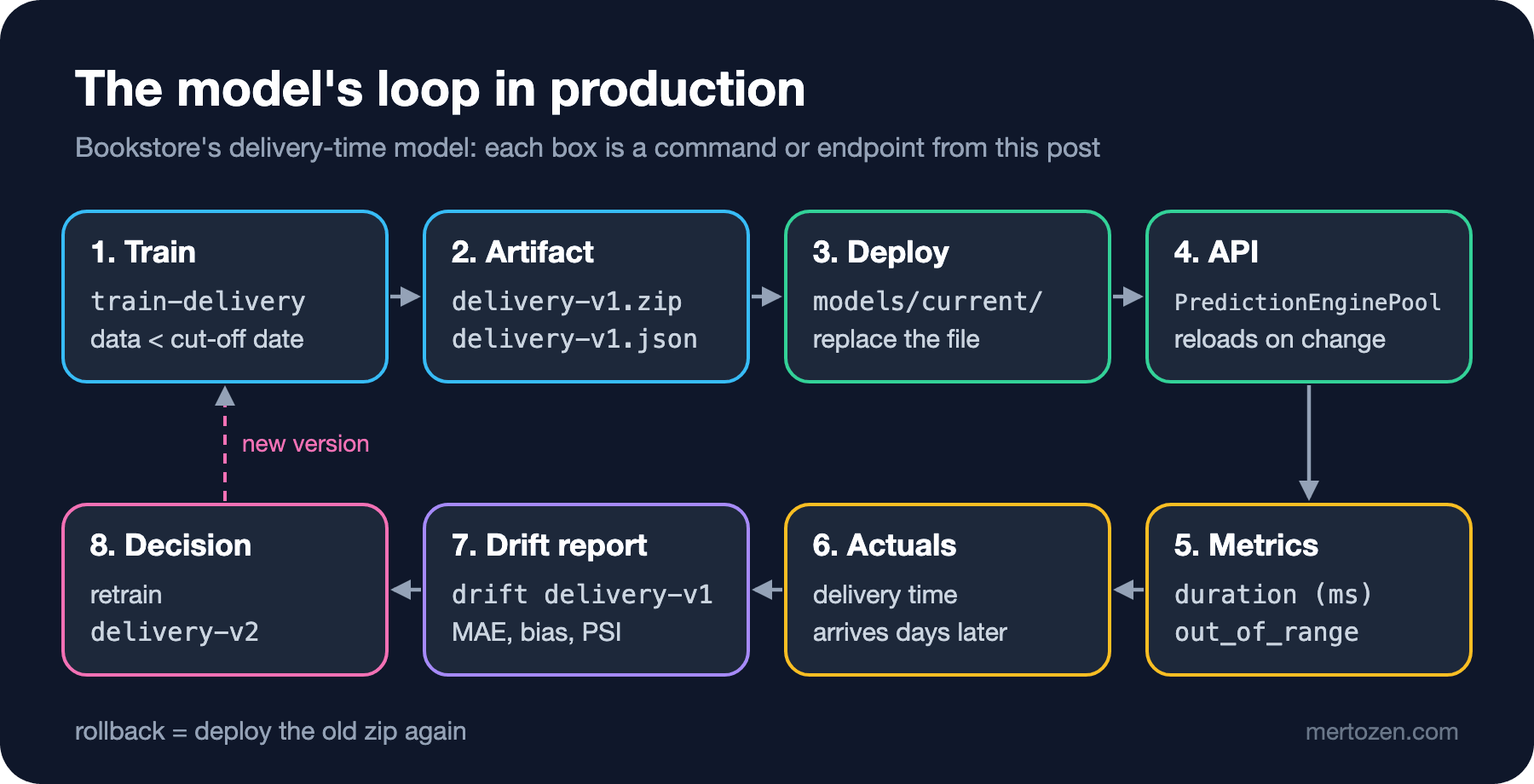
The real delivery time is known days after the order. Once it arrives, we can measure the model after the fact. The drift command computes, for every month, the error, the average deviation (bias), the orders outside the training range and how far the distance distribution has moved from the training data. The last measure is PSI, the population stability index, which sums up in one number how different the distributions of a variable are in two periods:
/// <summary>Month by month after training: error, bias, unseen inputs and how far the distance mix moved (PSI).</summary>
public static void Drift(string version)
{
    MLContext ml = new(seed: 1);
    ModelCard card = ModelCard.Load($"models/{version}.json");
    ITransformer model = ml.Model.Load($"models/{version}.zip", out _);
    List<DeliveryInput> all = Delivered();
    float[] edges = [50, 200, 400, 600, 800, 1000, 1300];
    double[] reference = Shares(all.Where(o => o.OrderedAtUtc < Utc(card.TrainedUntil)), edges);
    Console.WriteLine($"{version}, trained before {card.TrainedUntil:yyyy-MM-dd}, holdout MAE {card.HoldoutMae:F3}");
    Console.WriteLine($"{"month",-9}{"orders",7}{"MAE",7}{"bias",7}{"CarrierB MAE",14}{"out of range",14}{"PSI distance",14}");
    for (DateOnly month = new(card.TrainedUntil.Year, card.TrainedUntil.Month, 1); month < new DateOnly(2026, 11, 1); month = month.AddMonths(1))
    {
        List<DeliveryInput> rows = [.. all.Where(o => o.OrderedAtUtc >= Utc(month) && o.OrderedAtUtc < Utc(month.AddMonths(1)))];
        float[] predicted = [.. model.Transform(ml.Data.LoadFromEnumerable(rows)).GetColumn<float>("Score")];
        double mae = rows.Select((o, i) => Math.Abs(predicted[i] - o.DeliveryDays)).Average();
        double bias = rows.Select((o, i) => predicted[i] - o.DeliveryDays).Average();
        double maeB = rows.Select((o, i) => (o, i)).Where(x => x.o.Carrier == "CarrierB")
            .Average(x => Math.Abs(predicted[x.i] - x.o.DeliveryDays));
        int unseen = rows.Count(o => card.OutOfRange(o) is not null);
        double[] now = Shares(rows, edges);
        double psi = now.Zip(reference).Sum(p => (p.First - p.Second) * Math.Log(p.First / p.Second));
        Console.WriteLine($"{month:yyyy-MM}  {rows.Count,7:N0}{mae,7:F3}{bias,7:F2}{maeB,14:F3}{unseen,14:N0}{psi,14:F3}");
    }
}
dotnet run --project src/Bookstore.ML.Lab -- drift delivery-v1
dotnet run --project src/Bookstore.ML.Lab -- drift delivery-v2delivery-v1, trained before 2026-02-01, holdout MAE 0.486
month orders MAE bias CarrierB MAE out of range PSI distance
2026-02 949 0.486 -0.05 0.423 0 0.007
2026-03 916 0.401 0.08 0.390 153 0.026
2026-04 969 0.476 0.04 0.415 155 0.039
2026-05 1,004 0.488 0.03 0.424 156 0.046
2026-06 982 0.638 -0.30 0.803 141 0.052
2026-07 1,061 0.618 -0.26 0.897 170 0.067
2026-08 1,047 0.584 -0.24 0.896 184 0.036
2026-09 1,554 0.639 -0.27 0.866 218 0.049
2026-10 1,069 0.623 -0.32 0.811 187 0.069
delivery-v2, trained before 2026-09-01, holdout MAE 0.539
month orders MAE bias CarrierB MAE out of range PSI distance
2026-09 1,554 0.534 -0.14 0.598 0 0.028
2026-10 1,069 0.487 -0.20 0.489 0 0.044The table shows two separate drifts. From March 2026 on, 150 to 220 orders a month are outside the training range: the Izmir warehouse has opened. This is data drift, a change in the input distribution, and thanks to the card it can be counted directly. Interestingly, MAE does not rise because of these orders; it even falls in March, because customers in Izmir are now served from 20 km away and the distance feature captures that.
The real problem starts in June. MAE rises from 0.49 to 0.64, CarrierB's MAE from 0.42 to 0.80, and the bias falls to -0.30: the model systematically predicts delivery times that are too short. The PSI of the distance distribution, meanwhile, stays between 0.03 and 0.07. Commonly used PSI thresholds treat below 0.1 as "stable" and above 0.25 as "significant change"; an alert watching this measure would have said nothing. This is the answer to the second opening question: the inputs did not change, the relationship between input and outcome did. This is called concept drift, and it can only be seen with error metrics once real outcomes arrive.
The second model, trained on data up to September, is better (MAE 0.487 in October), but its bias is still -0.20. Only three months of its training data come after the slowdown; the model averages the old and the new period. Three signals can trigger retraining: the calendar (every month), input drift (the out-of-range count in this table, or PSI) and performance drift (MAE and bias computed with real outcomes). In this example the third one was the one that worked. When retraining, weighting the recent period more heavily or adding a feature such as the carrier's contract date are also worth trying.
Security: The Model File Must Come From a Trusted Source
The same Microsoft Learn page states that only models from trusted sources should be added to the pool and that loading a model from an untrusted source is a security risk. An ML.NET zip file does not consist of weights only; it also records which transformers to load from which assemblies. So treat the model file like code: it should come from the CI/CD pipeline, its hash should be in the card, and only the deployment account should have write access to the model folder. The API must never take a model file from a request or from a file a user uploaded. If you pull a model from a remote address with FromUri, the owner of that address can change the application's behaviour; protect the address with HTTPS and access control.
Watch Out in Production
Do not load the model per request. Even reloading this 33 KB model took between 4 and 44 milliseconds in the log; the pool loads the model once and reuses the engines.
The training code and the API must use the same model library. A model that contains a CustomMapping does not load without the mapping class's assembly next to it; if the assembly name changes, old models cannot be loaded either. Because we moved the types in this post, we retrained all the models.
Log every prediction with the order ID and the model version so you can match real outcomes to predictions. The drift table cannot be computed without this match.
Decide up front whether the model file goes into the container image or is read from a volume. Inside the image, every model update means a new deployment; read from a volume, the reload mechanism above kicks in, but who can change the file becomes a security question.
Common Pitfalls
The first pitfall is registering PredictionEngine as a singleton. The code compiles, the tests pass at low traffic, and under load one answer in eight is wrong, most of them never reaching the log.
The second is rewriting the training preprocessing by hand in the API. A small difference in the time zone, missing values or text cleaning creates a silent training-serving skew like the one in the fifth post. Save the pipeline with the model.
The third is watching only the input distribution. The biggest degradation in this post happened in months that PSI called stable. Collect real outcomes and track the error metrics too.
The fourth is trusting the version in the response blindly. When the card and the model are loaded separately, they may not match during the switch; we saw it in 949 responses.
The fifth is accepting a model file like user input. A model file is code; it should only come from a trusted pipeline.
A Small Experiment
★☆☆ Run the load test against the /demo/shared-engine endpoint with 1 parallel client instead of 16. How many wrong answers do you get? Explain the result in terms of thread safety.
★★☆ Add bias per carrier to the Drift method and show whether the change after June 2026 is limited to CarrierB.
★★★ Fix the version mismatch: register each version in the pool under its own modelName, keep the name of the active version in one place and take the version in the response from the name of the model that made the prediction. Then repeat the swap test and show that the number of wrong answers drops to 0.
In the last post of the series we solve the same problem in the Python ecosystem with scikit-learn: we map Pipeline, train_test_split and cross-validation to their ML.NET counterparts, convert the model to the ONNX format and run it in .NET, and verify that both sides give the same result.