

Internal Linking: Anchor Text, Orphan Pages, Link Depth and Building Your Own Link Graph in C#
Internal links let Google discover new pages and, through anchor text, tell it what they are about; every important page should get a real <a href> link from at least one other page on the site. We cover crawlable link rules, anchor text, orphan pages and link depth, then write a crawler with .NET 10 and AngleSharp that starts from the sitemap and reports orphans, deep pages, redirect chains and nofollow.
Version note: The code in this post was built and run with .NET 10 and AngleSharp 1.10.3; the post is based on the November 2026 state of Google's link best practices documentation and the Search Console Links report.
Guess First
There are two new posts on the Bookstore blog. "Bulk Insert with Dapper" is in the sitemap; the only way to it is a piece of text in the post comparing EF Core and Dapper: clicking it navigates to the new page with JavaScript. "Book Picks 2023" sits on the third page of the blog list, four clicks from the home page. On top of that, the team put rel="nofollow" on the "About" link in the page layout because "it's not important". Do you think Google can find these two posts through links? When it does, what will it understand about them? And does nofollow change anything for the page the link points to?
What Google Uses Links For
Google does two things with links. The first is discovery: according to Google's SEO Starter Guide, most new pages Google finds come through links. A sitemap helps, but if a page has no connection to the rest of the site, in Google's eyes it does not really look like part of the site. The second is context: the link's text (anchor text) and the sentence around it tell both readers and Google what the target page is about. The rule Google's link best practices documentation gives for internal links is short: every page you care about should get a link from at least one other page on your site.
Internal linking is what holds up the architecture we built in the previous post. The relationship between hub and cluster, the order within a series and the "link to the separate page" decision in the cannibalization fix all live on the page as links.
Crawlable Links: What Google Counts as a Link
Google can generally follow a link only if it is an <a> element with an href attribute. The href value can be a full URL, a root-relative path or a relative path; extra attributes such as class or onclick are fine. The examples the documentation does not recommend will be familiar to a frontend developer: links without an href such as <a routerLink="...">, <span href="..."> and elements that only work through onclick. href values that do not resolve to a real address, such as javascript:goTo('products'), are not recommended either.
Links added later with JavaScript are crawlable if they appear in the rendered HTML in the same <a href> form. You can check this by looking at the rendered HTML in the URL Inspection tool. We covered how Googlebot renders JavaScript in the Technical SEO series' JavaScript SEO post. The path to Bookstore's "Bulk Insert with Dapper" post is exactly the non-recommended kind: <span onclick="location.href='...'">. The page opens when a reader clicks, but for a crawler there is no link there.
Anchor Text
Anchor text is the visible text of a link. Google recommends that it be descriptive, reasonably concise and relevant to both the page it is on and the target page; a good test is whether the text still makes sense when taken out of context. Generic texts such as "click here", "read more" or "this post" fail that test. Overly long anchors are not recommended either; the documentation suggests trimming a long sentence down to the few words that carry the meaning.
The other extreme is a problem too: stuffing anchors with keywords. The documentation explicitly says not to add a keyword to an anchor if it does not help the reader. The sentence around the link matters as well; rather than linking several words separately and chaining them together, give links in context with text between them. If the link is an image, the image's alt text acts as the anchor text; an empty alt means a link without a description.
Two examples from Bookstore: in the sentence "For schema changes with EF Core click here", "click here" says nothing; when the same link is given with the text "managing schema changes with EF Core migrations", both readers and Google understand the target. On the other hand, an anchor such as "ef core migration ef core migration how to guide" gives the same information while wearing the reader out.
Orphan Pages, Depth and Series Navigation
An orphan page is a page on the site that gets no links from any other page. It may be in the sitemap, and Google can discover it from there, but it has no connection to the rest of the site: no anchor text describes it and readers cannot reach it by browsing. Posts that are left out of the CMS listing, end up in the wrong category or are connected only through a JavaScript button are typical orphans.
Link depth is the minimum number of clicks needed to reach a page from the home page. Google does not publish a depth limit; but the path to deep pages often goes through a single pagination chain, and these pages get few links. The most common cause is pagination: if the blog list shows 12 posts per page, a two-year-old post is on the tenth page, more than ten clicks from the home page. Series structure shortens this depth: the series hub links to every post directly, and the series list and previous/next cards on the post page link sibling posts to each other. On mertozen.com, when you open a post, all posts of the series sit as links in the side panel; so a crawler that reaches any post of a series is one click away from the rest of it.
The difference between editorial links and automatic "related posts" matters too. The automatic section generates links from tag or category matches; it is useful but carries no context. An editorial link is one the author gives inside the text, exactly where the reader needs it: "we covered the rollback steps in a separate post". That is also the link with the richest context for Google.
Building Your Own Link Graph in C#
The most reliable way to find these problems on your site is to look at it the way a crawler does: take the URLs in the sitemap, start from the home page and follow links, and report what you cannot reach and how deep everything is. Instead of parsing HTML with regex we will use a real HTML parser. There are two common options: AngleSharp and HtmlAgilityPack. Both are MIT-licensed and actively maintained: AngleSharp's latest stable release is 1.10.3 (13 November 2026), HtmlAgilityPack's is 1.13.1 (12 October 2026). AngleSharp parses HTML with the parsing rules WHATWG defines for browsers and supports CSS selectors; HtmlAgilityPack is older, XPath-oriented and tolerant of broken HTML. In this example we chose AngleSharp for CSS selectors.
dotnet new console -n LinkGraph -f net10.0
dotnet add package AngleSharp --version 1.10.3
The target is a small Bookstore blog running locally (http://localhost:5281): a home page, a three-page blog list, an EF Core series page, an About page and nine posts. One of the posts is only in the sitemap, one is connected only through an onclick, and one link goes through a two-hop 301 chain. Do not run the crawler against any site other than your own.
using System.Xml.Linq;
using AngleSharp.Dom;
using AngleSharp.Html.Parser;

Uri root = new(args.Length > 0 ? args[0] : "http://localhost:5281/");
using HttpClient http = new(new HttpClientHandler { AllowAutoRedirect = false }) { Timeout = TimeSpan.FromSeconds(10) };
HtmlParser parser = new();

// 1) sitemap.xml: the URLs we say "these pages matter" about
XNamespace ns = "http://www.sitemaps.org/schemas/sitemap/0.9";
XDocument sitemap = XDocument.Parse(await http.GetStringAsync(new Uri(root, "/sitemap.xml")));
HashSet<string> inSitemap = [.. sitemap.Descendants(ns + "loc").Select(l => new Uri(l.Value).PathAndQuery)];

// 2) BFS from the home page: depth = minimum clicks from the home page
Dictionary<string, int> depth = new() { ["/"] = 0 };
Queue<string> queue = new(["/"]);
Dictionary<string, List<string>> chains = [];
List<Link> links = [];
List<string> scriptOnly = [];

while (queue.TryDequeue(out string? page))
{
    using HttpResponseMessage response = await http.GetAsync(new Uri(root, page));
    if (response.Content.Headers.ContentType?.MediaType != "text/html")
    {
        continue;
    }
    IDocument doc = await parser.ParseDocumentAsync(await response.Content.ReadAsStringAsync());
    foreach (IElement a in doc.QuerySelectorAll("a[href]"))
    {
        Uri target = new(new Uri(root, page), a.GetAttribute("href")!);
        if (target.Host != root.Host)
        {
            continue;
        }
        string href = target.PathAndQuery;
        string final = await ResolveAsync(href);
        links.Add(new Link(page, href, final, a.TextContent.Trim(), a.GetAttribute("rel") ?? ""));
        if (depth.TryAdd(final, depth[page] + 1))
        {
            queue.Enqueue(final);
        }
    }
    // "Links" without <a href>: crawlers do not follow them
    scriptOnly.AddRange(doc.QuerySelectorAll("[onclick]").Select(e => $"{page}: \"{e.TextContent.Trim()}\" ({e.GetAttribute("onclick")})"));
}

// 3) Report
Console.WriteLine($"{"page",-36}{"depth",6}{"inbound",9}");
foreach ((string path, int d) in depth.OrderBy(x => x.Value).ThenBy(x => x.Key))
{
    int inbound = links.Where(l => l.Final == path && l.From != path).Select(l => l.From).Distinct().Count();
    Console.WriteLine($"{path,-36}{d,6}{inbound,9}");
}

Console.WriteLine("\norphans (in sitemap, not reachable by links):");
inSitemap.Except(depth.Keys).Order().ToList().ForEach(p => Console.WriteLine($"  {p}"));

Console.WriteLine("\ndeep pages (depth >= 4):");
depth.Where(x => x.Value >= 4).ToList().ForEach(x => Console.WriteLine($"  {x.Key} ({x.Value} clicks)"));

Console.WriteLine("\nlinks through redirects:");
foreach (Link l in links.Where(l => l.Href != l.Final).DistinctBy(l => (l.From, l.Href)))
{
    Console.WriteLine($"  {l.From}: {string.Join(" -> ", chains[l.Href])}");
}

string[] generic = ["click here", "read more", "here", "more", "this"];
Console.WriteLine("\ngeneric anchor text:");
foreach (IGrouping<string, Link> g in links.Where(l => generic.Contains(l.Anchor.ToLowerInvariant())).GroupBy(l => l.Anchor))
{
    Console.WriteLine($"  \"{g.Key}\" x{g.Count()} (e.g. {g.First().From} -> {g.First().Final})");
}

Console.WriteLine($"\ninternal nofollow links: {links.Count(l => l.Rel.Contains("nofollow"))} (pages: {links.Where(l => l.Rel.Contains("nofollow")).Select(l => l.From).Distinct().Count()})");
Console.WriteLine("\nscript-only links:");
scriptOnly.ForEach(s => Console.WriteLine($"  {s}"));

async Task<string> ResolveAsync(string path)
{
    if (chains.TryGetValue(path, out List<string>? known))
    {
        return known[^1];
    }
    List<string> hops = [path];
    for (int i = 0; i < 5; i++)
    {
        using HttpResponseMessage r = await http.GetAsync(new Uri(root, hops[^1]));
        if ((int)r.StatusCode is < 300 or > 399 || r.Headers.Location is null)
        {
            break;
        }
        hops.Add(new Uri(new Uri(root, hops[^1]), r.Headers.Location).PathAndQuery);
    }
    chains[path] = hops;
    return hops[^1];
}

record Link(string From, string Href, string Final, string Anchor, string Rel);
BFS gives depth directly, because the first path on which it reaches each page is the shortest one; we covered the algorithm itself in the "Graph Basics" post of the Algorithms and Data Structures series. We did not let HttpClient follow redirects automatically; ResolveAsync records every hop so we can see the chain.
Reading the Report
Output of dotnet run:
page                                 depth  inbound
/                                        0       12
/about                                   1       12
/blog                                    1       12
/blog/ef-core-10-yenilikleri             1        4
/series/ef-core                          1        1
/blog?page=2                             2        1
/blog/ef-core-migration-geri-alma        2        4
/blog/ef-core-migration-rehberi          2        4
/blog?page=3                             3        1
/blog/aspnet-core-di-lifetime            3        2
/blog/dependency-injection-nedir         3        2
/blog/ef-core-vs-dapper                  3        1
/blog/kitap-onerileri-2023               4        1

orphans (in sitemap, not reachable by links):
  /blog/dapper-ile-toplu-insert
  /blog/ef-core-8-yenilikleri

deep pages (depth >= 4):
  /blog/kitap-onerileri-2023 (4 clicks)

links through redirects:
  /blog/ef-core-vs-dapper: /blog/ef-core-migration -> /blog/ef-core-migrations -> /blog/ef-core-migration-rehberi

generic anchor text:
  "Read more" x7 (e.g. /blog -> /blog/ef-core-10-yenilikleri)
  "click here" x1 (e.g. /blog/ef-core-vs-dapper -> /blog/ef-core-migration-rehberi)

internal nofollow links: 13 (pages: 13)

script-only links:
  /blog/ef-core-vs-dapper: "bulk insert with Dapper" (location.href='/en/blog/dapper-ile-toplu-insert')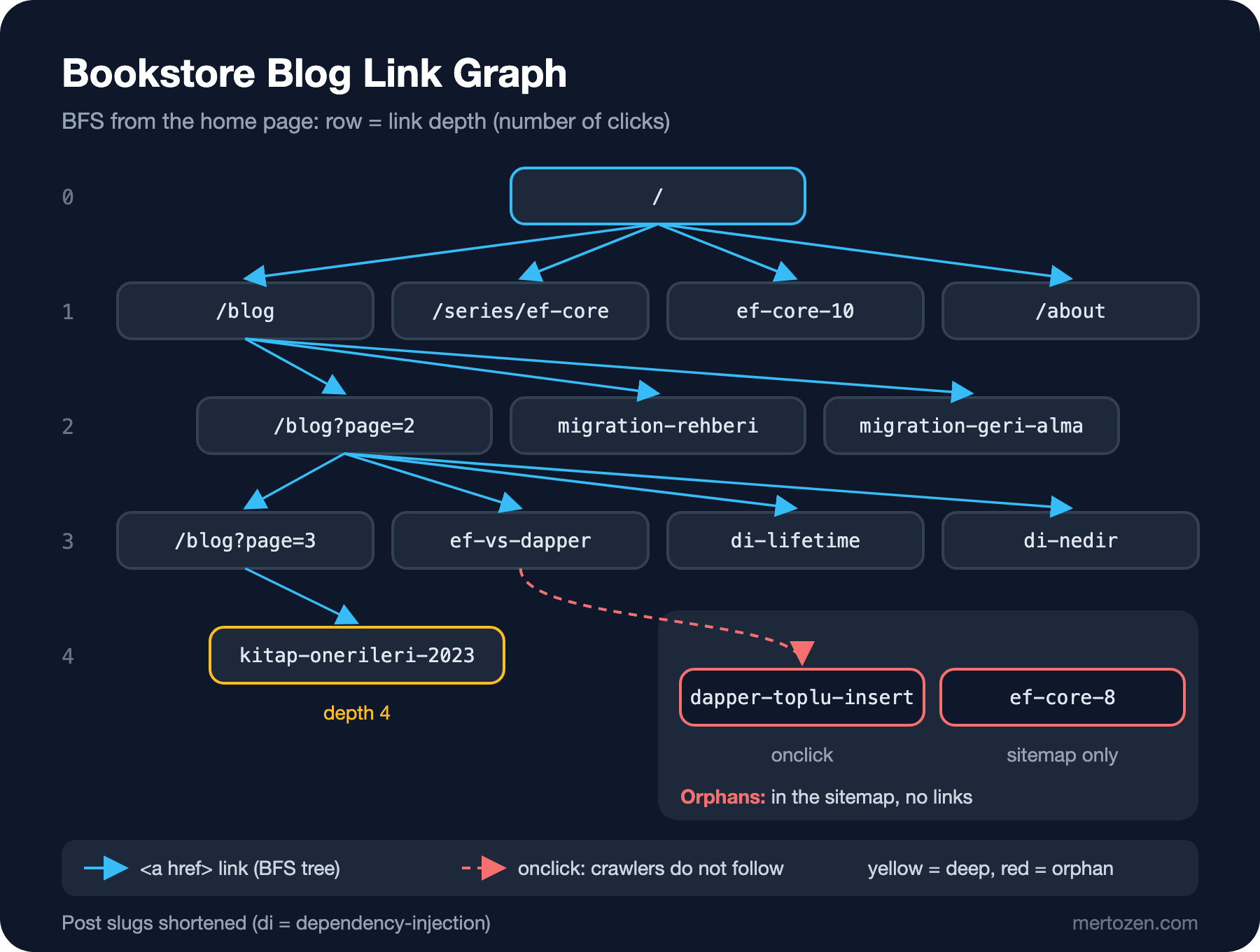
Every section of the report turns into a task. There are two orphans: ef-core-8-yenilikleri is only in the sitemap and no page links to it; the only way to dapper-ile-toplu-insert is an onclick, and the report also lists it under "script-only links". The fix: turn the span into a real <a href> and link both posts from related posts or a series page.
The depth table shows the effect of the series page: the EF Core series posts are on layer 2 thanks to the series hub. The dependency injection posts, on the other hand, are on layer 3 because they can only be reached through pagination; "Book Picks 2023" is at the end of the pagination, 4 clicks away. Linking these posts to a hub shortens their depth.
The "click here" link goes through a two-hop 301 chain. The chain ends at the right page, but it is cleaner for both crawlers and readers if every internal link goes straight to the final URL; the fix is to update the old link with the new URL. The generic anchor section found 7 "Read more" links and one "click here"; the "Read more" links are less of a problem because each has a descriptive title link next to it, but "click here" says nothing about the target. Finally, the /about page gets links from 12 pages and all of them are nofollow; putting nofollow on your own page gains you nothing, and we will see why below.
Comparing with the Search Console Links Report
Search Console's Links report has a separate table for internal links: the pages on your site with the most internal links and the pages linking to each of them. This table is the most direct way to look through Google's eyes, but it does not replace your own crawler. The report is a sample; tables are limited to 1,000 rows, target pages are grouped by canonical URL, non-indexed pages may be left out, and links found in the past that no longer exist can still appear. The report does not say whether a link is nofollow either.
Use them together: your own crawler shows the site as it is today, right after a deploy; Search Console shows what Google actually found, delayed and sampled. A page that gets many links in your crawler but never appears in Search Console may indicate that Google has not indexed it or has chosen a different canonical.
In Production
Run the crawler politely. Even on your own production site, send requests one after another with a short pause between them; if possible, run it against staging. Crawling someone else's site requires permission first and compliance with its robots.txt rules.
Mind rendering. This crawler reads raw HTML. On a site whose links are generated with JavaScript, such as an Angular app using client-side rendering, you can only see the links after rendering the page in a headless browser, for example with Playwright.
Put it in CI. Running the report against staging after every deploy and stopping the pipeline with a warning when a new orphan or a new redirect chain appears catches problems before they go live.
Memory and time on a large site. On thousands of pages, write the edges to a file or a database instead of keeping the link list in memory, and send requests with limited parallelism (for example Parallel.ForEachAsync with a low MaxDegreeOfParallelism).
Common Pitfalls
Putting hundreds of links in the footer or the sidebar. Google gives no ideal number of links, but it says a page with an excessive number of links probably has too many. Hundreds of category and tag links repeated on every page do not help readers and overshadow the real, contextual links.
Using nofollow on internal links. Google recommends nofollow for links to sources you do not trust, and since 2020 it has treated it as a hint for crawling and indexing. Putting nofollow on your own page does not protect it or strengthen other pages; it only weakens a page's connection within your own site. If a page should not be in search, the right tool is noindex.
Broken internal links and redirect chains. Not updating old links after URL changes sends readers and crawlers through one or more redirects every time. We covered redirects themselves in the Technical SEO series' redirects post; the job on the content side is keeping links current.
Relying only on automatic "related posts". The automatic section is a good complement, but it does not carry the context of a link the author gives inside the text.
A Small Experiment
★☆☆ Add a column to the crawler that prints how many outgoing links each page has. Which page links out the most on Bookstore, and how many of those links come from the page layout (nav and footer)?
★★☆ Extend ResolveAsync to report links that return 404 or 410 in a "broken links" section. To test it, add a link to a non-existent slug in one of the site's posts.
★★★ Add an option that exports the link graph in Graphviz's DOT format, with orphans in red and pages at depth 4 or more in yellow. Visualise the output with dot -Tsvg and compare it with the figure above.
Links bring the reader to the right page. In the next post we look at the page itself: writing a page that really answers the reader's question, with its heading structure, a clear answer in the first paragraph, code samples, images and bilingual content.