

Inside an Image: Layers, Tags, Digests, Registries and Multi-platform Manifests
An image is made of read-only layers, a config and a manifest listing them; for multi-platform images the tag points to an index with one manifest per architecture. Tags move, digests do not: on a local registry we repoint a tag to another image and see what a digest pin buys, read Docker Hub's rate-limit header, and look at the containerd image store and a semver plus SHA tag strategy instead of latest.
Version note: The examples in this post were run with Docker Engine 29.9.3 (containerd image store), Buildx 0.39, registry:3 (distribution 3.1.2) as a local registry, and nginx 1.30.
Guess First
You run docker pull nginx:1.30-alpine today and again in three months. Do you get the same bytes both times? Second question: an x64 Windows machine and an arm64 server run the same command. Both typed the same name; did they get the same image? By the end of this post you will be able to answer both with "no, but I know why and how to check".
Layers: An Image Is Not a File but a Stack
An image is not a single archive file. It consists of file system differences stacked on top of each other, the layers, and a configuration that says how to run them. We will later serve Bookstore's Angular app bookstore-web with nginx, so let's look at nginx:1.30-alpine as an example. docker image history shows each layer and the Dockerfile line that produced it:
docker image history --platform linux/amd64 nginx:1.30-alpineIMAGE CREATED CREATED BY SIZE COMMENT
901e593c95dc 8 days ago RUN /bin/sh -c set -x && apkArch="$(cat … 51.8MB buildkit.dockerfile.v0
<missing> 8 days ago ENV ACME_VERSION=0.4.1 0B buildkit.dockerfile.v0
<missing> 8 days ago ENV NJS_RELEASE=1 0B buildkit.dockerfile.v0
<missing> 8 days ago ENV NJS_VERSION=1.0.2 0B buildkit.dockerfile.v0
<missing> 8 days ago CMD ["nginx" "-g" "daemon off;"] 0B buildkit.dockerfile.v0
<missing> 8 days ago STOPSIGNAL SIGQUIT 0B buildkit.dockerfile.v0
<missing> 8 days ago EXPOSE map[80/tcp:{}] 0B buildkit.dockerfile.v0
<missing> 8 days ago ENTRYPOINT ["/docker-entrypoint.sh"] 0B buildkit.dockerfile.v0
<missing> 8 days ago COPY 30-tune-worker-processes.sh /docker-ent… 16.4kB buildkit.dockerfile.v0
<missing> 8 days ago COPY 20-envsubst-on-templates.sh /docker-ent… 12.3kB buildkit.dockerfile.v0
<missing> 8 days ago COPY 15-local-resolvers.envsh /docker-entryp… 12.3kB buildkit.dockerfile.v0
<missing> 8 days ago COPY 10-listen-on-ipv6-by-default.sh /docker… 12.3kB buildkit.dockerfile.v0
<missing> 8 days ago COPY docker-entrypoint.sh / # buildkit 8.19kB buildkit.dockerfile.v0
<missing> 8 days ago RUN /bin/sh -c set -x && addgroup -g 101… 5.62MB buildkit.dockerfile.v0
<missing> 8 days ago ENV DYNPKG_RELEASE=1 0B buildkit.dockerfile.v0
<missing> 8 days ago ENV PKG_RELEASE=1 0B buildkit.dockerfile.v0
<missing> 8 days ago ENV NGINX_VERSION=1.30.6 0B buildkit.dockerfile.v0
<missing> 8 days ago LABEL maintainer=NGINX Docker Maintainers <d… 0B buildkit.dockerfile.v0
<missing> 8 days ago CMD ["/bin/sh"] 0B buildkit.dockerfile.v0
<missing> 8 days ago ADD alpine-minirootfs-3.24.4-x86_64.tar.gz /… 9.09MB buildkit.dockerfile.v0You read it from the bottom up. The last line adds Alpine's root file system, 9.09 MB; that is the alpine:3 image itself. The RUN lines above it change the file system, so they produce layers; lines such as ENV, CMD, EXPOSE and STOPSIGNAL are 0 B because they only write to the configuration. <missing> is not an error: this image was built on another machine and pulled from a registry, so the intermediate steps have no local image ID. In the next post we will see with our own Dockerfile which instructions produce layers and which produce metadata.
docker image inspect shows the configuration itself:
docker image inspect --platform linux/amd64 nginx:1.30-alpine --format "Layers={{len .RootFS.Layers}} User={{.Config.User}} Entrypoint={{.Config.Entrypoint}} Cmd={{.Config.Cmd}} ExposedPorts={{.Config.ExposedPorts}} StopSignal={{.Config.StopSignal}}"Layers=8 User= Entrypoint=[/docker-entrypoint.sh] Cmd=[nginx -g daemon off;] ExposedPorts=map[80/tcp:{}] StopSignal=SIGQUITEight layers, an empty User, meaning the container starts as root and the nginx workers later drop to user 101, and the SIGQUIT we saw in the previous post. Before running an image, this is where you find the answer to "which user, which command and which port does it start with?"
Copy-on-write: The Container's Writable Layer
An image's layers are read-only. When a container starts, Docker puts an empty, writable layer on top of them and presents them all as one file system. When the container wants to change a file, the file is first copied into the writable layer and changed there: copy-on-write. A deleted file gets a "deleted" marker in the writable layer; the layer below is not touched. docker diff lists this difference:
docker run -d --name dockerseries-web nginx:1.30-alpine
docker exec dockerseries-web sh -c "echo \"<h1>Bookstore</h1>\" > /usr/share/nginx/html/index.html; rm /usr/share/nginx/html/50x.html"
docker diff dockerseries-web
docker ps -s --filter name=dockerseries-web --format "table {{.Names}}\t{{.Size}}"
C /var
C /var/cache
C /var/cache/nginx
A /var/cache/nginx/client_temp
A /var/cache/nginx/fastcgi_temp
A /var/cache/nginx/proxy_temp
A /var/cache/nginx/scgi_temp
A /var/cache/nginx/uwsgi_temp
C /etc
C /etc/nginx
C /etc/nginx/conf.d
C /etc/nginx/conf.d/default.conf
C /run
A /run/nginx.pid
C /usr
C /usr/share
C /usr/share/nginx
C /usr/share/nginx/html
C /usr/share/nginx/html/index.html
D /usr/share/nginx/html/50x.html
NAMES SIZE
dockerseries-web 119kB (virtual 66.4MB)A is an added path, C a changed one, D a deleted one. Next to our two changes, index.html and 50x.html, the list contains nginx's own runtime files and default.conf, which the entrypoint script modified for IPv6. The container's own size is 119 kB; the "virtual" value includes the image underneath. Start ten containers from the same image and the image layers are stored on disk once, while each container carries only its own writable layer. When the container is removed, that layer goes too; that is why persistent data is written to volumes, covered in post 11.
Layers are also shared between images. Since nginx's bottom layer is Alpine itself, pulling alpine:3 after nginx does not download that layer again:
docker pull --platform linux/amd64 alpine:33: Pulling from library/alpine
881fc932939e: Pulling fs layer
881fc932939e: Already exists
86ff264fe568: Download complete
c35a7d82b8fa: Download complete
Digest: sha256:f59abe656b692d901e184be3445e084786602108599d2a51d229c0f5a48c71bf
Status: Image is up to date for alpine:3
docker.io/library/alpine:3What identifies a layer is not a name but the hash of its content, 881fc932939e…. That is why services sharing a base image pull quickly and take little disk space.
Tags and Digests
The 1.30-alpine in nginx:1.30-alpine is a tag: a mutable pointer tied to a name in the registry. When the nginx team releases 1.30.7, the same tag will point to the new image; so the answer to the first question is "no". The identity that does not change is the digest: the SHA-256 hash of the content. Let's see the difference between a tag and a digest on our own registry. Instead of pushing to Docker Hub, I started a local registry with the official registry:3 image:
docker run -d --name dockerseries-registry -p 5000:5000 registry:3
docker tag nginx:1.30-alpine localhost:5000/bookstore/web:latest
docker push --platform linux/amd64 localhost:5000/bookstore/web:latest
docker tag alpine:3 localhost:5000/bookstore/web:latest
docker push --platform linux/amd64 localhost:5000/bookstore/web:latest
latest: digest: sha256:bb8f722b4be005fcd7827816a136ab779fd40185d85b5171be915cc7fc0575c7 size: 2493
latest: digest: sha256:0f49f331d9212aff11b932863be4eb01cdf962969aa86dab7d1ee21ac6f5f52b size: 1022We pushed nginx to the latest tag first and then, by mistake let's say, plain Alpine. The registry asked no questions. Now let's run by tag and by the first digest, after removing the local copy so it comes from the registry; since we pushed only amd64, I ask for that platform when running as well:
docker rmi localhost:5000/bookstore/web:latest
docker run --rm --platform linux/amd64 localhost:5000/bookstore/web:latest sh -c "cat /etc/alpine-release; command -v nginx || echo no nginx"
docker run --rm --platform linux/amd64 localhost:5000/bookstore/web@sha256:bb8f722b4be005fcd7827816a136ab779fd40185d85b5171be915cc7fc0575c7 nginx -v
3.24.4
no nginx
nginx version: nginx/1.30.6I removed the entrypoint log lines of the second command. The tag now points to an image without nginx, while the digest brings back exactly the nginx we pushed first. The image@sha256:… form is therefore the only reliable way to say "run exactly this". Pinning a digest in a Dockerfile's FROM line or in a deployment manifest prevents the base image from changing without you noticing; the cost is that you no longer get security patches automatically either. That is why we usually pair digest pins with a tool such as Dependabot or Renovate that opens a pull request when a new digest appears, covered in post 13.
Registries and Docker Hub Limits
An image name is really an address. When you type nginx:1.30-alpine, Docker completes it to docker.io/library/nginx:1.30-alpine: registry docker.io, namespace library for official images, repository nginx, tag 1.30-alpine. The registries you will meet in this series:
- Docker Hub at
docker.io: the default registry, with official images and everyone's public repositories. - Microsoft Container Registry at
mcr.microsoft.com: .NET, SQL Server and other Microsoft images. - GitHub Container Registry at
ghcr.io: same permissions as the GitHub repository; in the "Deploy 2" post of the GitHub Actions series we pushed Bookstore's image there. - Azure Container Registry at
<name>.azurecr.io: a private registry for environments running on Azure.
Before pushing to a private registry you sign in with docker login ghcr.io; Docker writes the credential to the operating system's credential store, the Credential Manager on Windows. Looking into our own local registry through its HTTP API is instructive too:
curl -s localhost:5000/v2/_catalog
curl -s localhost:5000/v2/bookstore/web/tags/list
curl -s -D - -o /dev/null -H "Accept: application/vnd.oci.image.manifest.v1+json" -H "Accept: application/vnd.oci.image.index.v1+json" localhost:5000/v2/bookstore/web/manifests/latest | grep -i -E "content-type|docker-content-digest"
{"repositories":["bookstore/web"]}
{"name":"bookstore/web","tags":["latest"]}
Content-Type: application/vnd.oci.image.manifest.v1+json
Docker-Content-Digest: sha256:0f49f331d9212aff11b932863be4eb01cdf962969aa86dab7d1ee21ac6f5f52blatest now points to the Alpine manifest from the second push, 0f49f331…. This is also what docker pull does: it resolves the tag to a manifest and downloads the digests in the manifest one by one. The registry API is defined in the OCI distribution-spec; Docker Hub, GHCR, ACR and registry:3 all speak the same API.
Docker Hub limits the number of pulls for free use. In November 2026 Docker's documentation lists 100 pulls per 6 hours per IPv4 address for anonymous users and 200 per 6 hours for a free Personal account; for a multi-platform image every architecture counts as a separate pull. Reading the limit from the registry's own response is more reliable than reading it from the documentation; the HEAD request Docker recommends does not count against the limit:
TOKEN=$(curl -s "https://auth.docker.io/token?service=registry.docker.io&scope=repository:ratelimitpreview/test:pull" | jq -r .token)
curl -s --head -H "Authorization: Bearer $TOKEN" https://registry-1.docker.io/v2/ratelimitpreview/test/manifests/latest | grep -i '^ratelimit'
ratelimit-limit: 100;w=3600
ratelimit-remaining: 45;w=3600The interesting part is w=3600: on the day I fetched this header the window was 1 hour, not the 6 hours, 21600 seconds, in the documentation. Limits can change at Docker's discretion; this header tells you what your CI is actually facing. CI runners sharing one IP burn through the anonymous limit quickly; the fix is to run docker login on the runners, keep frequently used base images in your own registry, or set up a pull-through cache, a mirror, for Docker Hub.
Multi-platform Images: Indexes and Manifests
The answer to the second question is that there is not one image but several behind the tag. docker buildx imagetools inspect shows the structure in the registry:
docker buildx imagetools inspect nginx:1.30-alpineName: docker.io/library/nginx:1.30-alpine
MediaType: application/vnd.oci.image.index.v1+json
Digest: sha256:901e593c95dc85f5a729f5765516321366ef4ac401821431d408897e95287d0a
Manifests:
Name: docker.io/library/nginx:1.30-alpine@sha256:bb8f722b4be005fcd7827816a136ab779fd40185d85b5171be915cc7fc0575c7
MediaType: application/vnd.oci.image.manifest.v1+json
Platform: linux/amd64
...
Name: docker.io/library/nginx:1.30-alpine@sha256:49c436e1cd6761d9bd9fefb92bd55b96edb6a05e8f810cbce1dfd6fe470f05d9
MediaType: application/vnd.oci.image.manifest.v1+json
Platform: unknown/unknown
Annotations:
vnd.docker.reference.type: attestation-manifest
...I shortened the output: the same list also contains linux/arm/v6, linux/arm/v7, linux/arm64/v8, linux/386, linux/ppc64le, linux/riscv64, linux/s390x, and one attestation manifest for each. The tag points to an image index, called a manifest list in Docker's older terminology. The index points to one manifest per platform, and each manifest points to a config and a list of layers. The unknown/unknown entries are not runnable images but attestations such as provenance and an SBOM describing how the image was built; we work with them in the DevSecOps series. Inside the amd64 manifest:
docker buildx imagetools inspect --raw nginx:1.30-alpine@sha256:bb8f722b4be005fcd7827816a136ab779fd40185d85b5171be915cc7fc0575c7{
"schemaVersion": 2,
"mediaType": "application/vnd.oci.image.manifest.v1+json",
"config": {
"mediaType": "application/vnd.oci.image.config.v1+json",
"digest": "sha256:1390db6b01a8b0c865b157c7f036b0772534418b1701f598737de546d208b6e4",
"size": 12296
},
"layers": [
{
"mediaType": "application/vnd.oci.image.layer.v1.tar+gzip",
"digest": "sha256:881fc932939efef04ca120ad44bbd2c0917851eb247aa4995428afb1e80ede17",
"size": 3853673
},
...
{
"mediaType": "application/vnd.oci.image.layer.v1.tar+gzip",
"digest": "sha256:4fd2a979a136065b9518cac19c8f3d11f2251813831dc2d18a4edb1d1b26374d",
"size": 20321868
}
],
...
}The layer sizes here are compressed sizes, as transferred by the registry: the Alpine layer is 3.9 MB here, while docker image history showed its unpacked form as 9.09 MB. The first layer's digest is also the 881fc932939e that said "Already exists" for alpine:3 a moment ago. The figure below shows these four levels together.
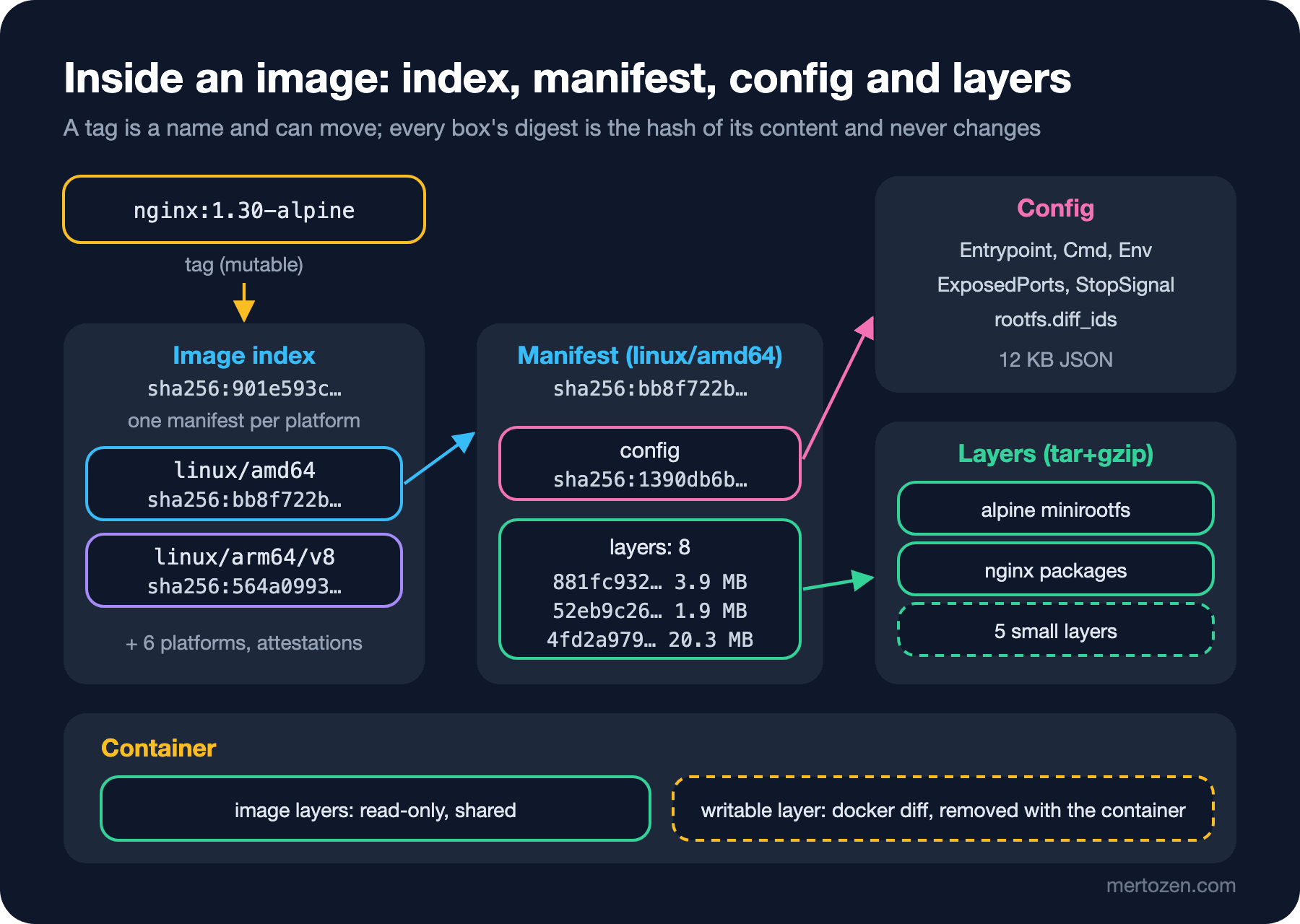
When your x64 Windows machine pulls nginx:1.30-alpine, Docker picks linux/amd64, bb8f722b…, from the index; the arm64 server picks linux/arm64/v8, 564a0993…. Both typed the same name but run with different layers; that is the answer to the second question. The index digest, being computed from content, does not change even when it is copied from one registry to another:
docker buildx imagetools create --tag localhost:5000/bookstore/web:1.0.0 nginx:1.30-alpine
docker buildx imagetools inspect localhost:5000/bookstore/web:1.0.0 | head -3
Name: localhost:5000/bookstore/web:1.0.0
MediaType: application/vnd.oci.image.index.v1+json
Digest: sha256:901e593c95dc85f5a729f5765516321366ef4ac401821431d408897e95287d0aimagetools create copied every platform and attestation from registry to registry; the digest of the index in the local registry is identical to the one on Docker Hub. When you move an image from a test registry to the production registry, this equality answers "did I move the same thing?"
The containerd Image Store
For many years Docker stored images with its own graph drivers, most commonly overlay2, and that design could only keep one platform per tag locally. According to Docker's documentation, from Engine 29.0 on, fresh installations let containerd store images by default; upgraded installations stay on overlay2 and can switch with "features": {"containerd-snapshotter": true} in daemon.json. New Docker Desktop installations also come with this store. You can see which one you use like this:
docker info -f "{{ .DriverStatus }}"[[driver-type io.containerd.snapshotter.v1]]Three things change in practice. First, several platforms of the same tag can sit side by side locally; --tree shows it:
docker image ls --tree nginx:1.30-alpineIMAGE ID DISK USAGE CONTENT SIZE EXTRA
nginx:1.30-alpine 901e593c95dc 187MB 53.8MB
├─ linux/amd64 bb8f722b4be0 92.7MB 26.1MB
├─ linux/arm/v6 dd71710d7e29 0B 0B
├─ linux/arm/v7 346f0b8473c5 0B 0B
├─ linux/arm64/v8 564a09935b00 92.2MB 26MB
├─ linux/386 7bec307c2255 0B 0B
├─ linux/ppc64le cabc376da5e4 0B 0B
├─ linux/riscv64 d7f8c0e78a33 0B 0B
└─ linux/s390x b774748ef661 0B 0BTwo platforms are downloaded on this machine; the others are only recorded in the index. Second, the image ID is now the index digest, 901e593c95dc, so the local ID and the registry digest say the same thing. Third, disk: containerd keeps both the compressed content, CONTENT SIZE at 26.1 MB, and the unpacked layers, so the space one platform takes on disk, DISK USAGE at 92.7 MB, is larger than with the old store. That is why Docker's documentation recommends watching disk usage with docker system df. One side effect shows up when pushing: if not every platform of the index is present locally, docker push sends only the available platform and prints "Not all multiplatform-content is present"; that is why I passed --platform linux/amd64 above.
Tag Strategy: Why latest Is Not Enough
latest has no special meaning; it is an ordinary name used when no tag is given, and nobody guarantees it is "the newest". In the experiment above, a single push turned latest from nginx into Alpine. In production you cannot tell from latest which version is running, and when you want to roll back there is no such thing as "the previous latest".
The scheme we recommend for Bookstore is to give every build two tags: the application's semver version, MAJOR.MINOR.PATCH, and the commit's short SHA, for example bookstore-api:1.4.2 and bookstore-api:sha-3f9c2ab. The version tag is for people, the SHA tag answers "which code did this image come from?" Never pushing the same version number twice, immutable tags, should be a team rule; registries such as Azure Container Registry and Amazon Elastic Container Registry also offer an option to make tags unchangeable. When you deploy, record the digest, not the tag. The pipeline side of this approach is covered in the CI/CD Fundamentals post "Build Once, Deploy Many: Artifacts, Versioning and Immutable Packages", and its GitHub Actions implementation in the "Deploy 2" post of the GitHub Actions series.
In Production
Know the image digest of every container running in production. docker inspect --format '{{.Image}}' or your orchestrator's records tell you the content that is actually running, not the tag; when a security advisory comes out, you answer "which services have this base image?" with digests.
Do not leave your base images dependent on one registry's availability and limits. A Docker Hub limit or outage can stop a deployment. Copy critical base images into your own registry, with the imagetools create above as the simplest form, and log in on CI.
Know the target server's architecture and publish your image for it. Trying to run a single-platform image on the wrong architecture either fails or runs slowly and unsupported under emulation. We will build our own image for several platforms in posts 6 and 9.
Common Pitfalls
FROM nginx:latest, or no tag at all. A build that works today runs on a different base image tomorrow, and when something breaks it is hard to find what changed. At least write the minor version, and pin critical images by digest.
Pushing the same tag again. Saying "I fixed 1.4.2 and pushed it again under the same tag" means servers that already pulled that tag stay on the old image and nobody knows who runs which.
Judging image size by the single number in docker image ls. The size transferred by the registry is the compressed size, the space taken on disk is larger, and shared layers are counted again for every image. docker image ls --tree and docker system df give the real picture.
Learning about the Docker Hub limit for the first time from a "toomanyrequests" error in CI. A small step that checks the limit header, plus a login, keeps morning builds from breaking at random.
A Small Experiment
★☆☆ Run docker buildx imagetools inspect for mcr.microsoft.com/dotnet/aspnet:10.0. Which platforms are there? Find the largest layer with docker image history; which instruction produced it?
★★☆ Start a local registry with registry:3, push one image under two different tags and list them with /v2/<repo>/tags/list. Explain how many manifests and how many layers were written to the registry when you pushed the same image under two tags.
★★★ Prepare a list that pins Bookstore's base images, aspnet:10.0 and nginx:1.30-alpine, by digest, and write a small script that checks these digests weekly and tells you when they change; docker buildx imagetools inspect --format '{{json .Manifest}}' makes it easier.
We have seen inside an image: layers, config, manifest and index. In the next post we produce this structure ourselves: we write the first Dockerfile for a small Bookstore helper tool and look at what each of FROM, RUN, COPY, ENV, ARG, USER, CMD and ENTRYPOINT adds to the image.