

Build Cache and BuildKit: Layer Order, Cache Mounts, Build Secrets and Bake
The build cache does not rerun a step unless its inputs change; for COPY the input is file content, so copying the csproj first and separating restore from source code keeps a code change from downloading packages again. On Bookstore.Tools we cut the build from 4.6 s to 1.6 s, measure a NuGet cache mount, pass a private feed token with a secret mount without leaking it, and look at multi-platform builds with QEMU and docker buildx bake.
Version note: The examples in this post were run with Docker Engine 29.9.3 (BuildKit 0.34.2), Buildx 0.39.0, the mcr.microsoft.com/dotnet/sdk:10.0 image (SDK 10.0.404), nginx:1.30-alpine and registry:3 (Distribution 3.1.2).
Guess First
In the Dockerfile we wrote for Bookstore.Tools in the previous post, you change a single log line in ImportWorker.cs and rebuild the image. Nothing but source code changed: not the csproj, not a package version. Are the NuGet packages downloaded again during the build? Second question: one build step needs a token to pull packages from a private NuGet feed. How do you hand the token to that step without ever writing it to the image, its history or the build cache?
How BuildKit Uses the Cache
We made a small change to Bookstore.Tools, the import tool of Bookstore, the online bookstore used as the shared example across this site's series: when the import finishes, it now logs how many books were written in how many batches. Then we rebuilt with the Dockerfile from post 5:
docker build --progress=plain -f src/Bookstore.Tools/Dockerfile -t dockerseries-bookstore-tools:1.0.0 .#8 [2/7] WORKDIR /src
#8 CACHED
#9 [3/7] COPY Bookstore.slnx ./
#9 CACHED
#10 [4/7] COPY src/ src/
#10 DONE 0.0s
#11 [5/7] RUN dotnet publish src/Bookstore.Tools/Bookstore.Tools.csproj -c Release -o /app -p:Version=1.0.0
#11 2.793 Restored /src/src/Bookstore.Tools/Bookstore.Tools.csproj (in 2.35 sec).
#11 DONE 3.5s
#12 [6/7] WORKDIR /app
#13 [7/7] COPY --chown=app:app data/books.csv data/books.csvThe answer to the first question is yes. The Restored ... (in 2.35 sec) line says restore ran from scratch, and since the image holds no packages, every package was downloaded again. To see why, you only need the question BuildKit asks at each step: "Have I run this step before with the same inputs?" The inputs depend on the kind of instruction:
- For instructions like
RUN,ENVandWORKDIR, the input is the instruction text plus the result of the previous step. The result of the command is not checked;RUN apt-get updatecomes from the cache as long as its text stays the same. - For
COPYandADD, the content of the copied files is an input too. BuildKit computes checksums of the files; content counts, not timestamps, sotouchdoes not break the cache but a single character does. - Once a step's cache is broken, every step after it runs again, because each step's input is the result of the one before.
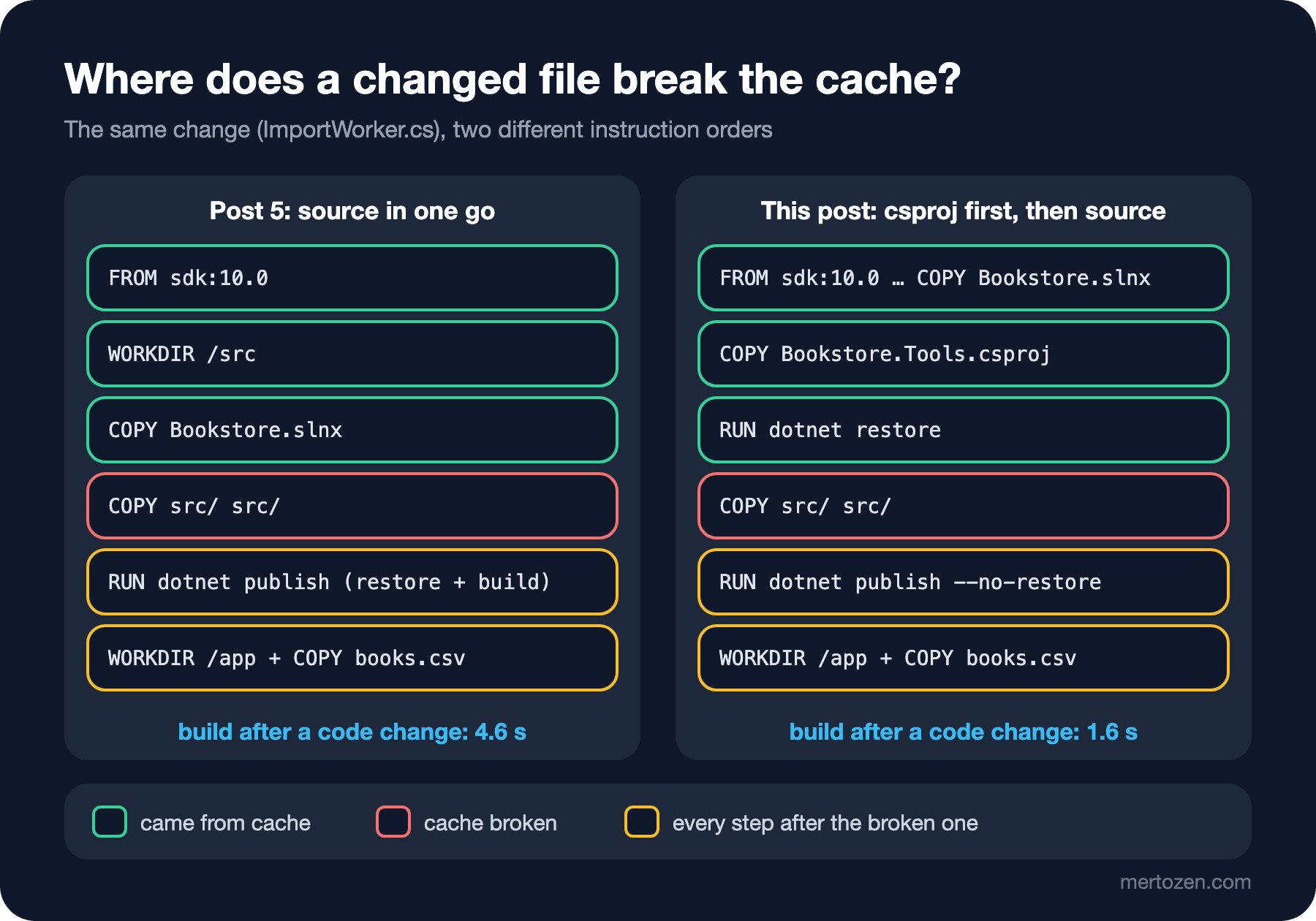
The Dockerfile from post 5 copies all source code at once with COPY src/ src/, and right after it dotnet publish does both restore and build. When any .cs file changes, the checksum of the copy step changes and the package restore runs again together with the code.
The Right Order: csproj First, Source Second
The fix is to copy rarely changing inputs before frequently changing ones. Restore only needs the solution and project files; it does not need to see the source code. We split the Dockerfile accordingly:
# syntax=docker/dockerfile:1
FROM mcr.microsoft.com/dotnet/sdk:10.0

ARG BUILD_CONFIGURATION=Release
ARG APP_VERSION=1.0.0

WORKDIR /src
# Rarely changing files first: solution and project files
COPY Bookstore.slnx ./
COPY src/Bookstore.Tools/Bookstore.Tools.csproj src/Bookstore.Tools/
RUN --mount=type=cache,id=nuget,target=/root/.nuget/packages \
    dotnet restore src/Bookstore.Tools/Bookstore.Tools.csproj

# Source code changes often: copy it after the restore layer
COPY src/ src/
RUN --mount=type=cache,id=nuget,target=/root/.nuget/packages \
    dotnet publish src/Bookstore.Tools/Bookstore.Tools.csproj -c $BUILD_CONFIGURATION -o /app \
        --no-restore -p:Version=$APP_VERSION

WORKDIR /app
COPY --chown=app:app data/books.csv data/books.csv

LABEL org.opencontainers.image.title="Bookstore.Tools" \
      org.opencontainers.image.version=$APP_VERSION
ENV DOTNET_ENVIRONMENT=Production \
    Import__File=data/books.csv

USER app
ENTRYPOINT ["dotnet", "Bookstore.Tools.dll"]
CMD ["--Import:DelayMs=500"]
We will get to the --mount=type=cache lines in a moment. First the effect of the order: we made a small fix in BookRow.Parse that trims the fields, and rebuilt:
#10 [stage-0 4/9] COPY src/Bookstore.Tools/Bookstore.Tools.csproj src/Bookstore.Tools/
#10 CACHED
#11 [stage-0 5/9] RUN --mount=type=cache,id=nuget,target=/root/.nuget/packages     dotnet restore src/Bookstore.Tools/Bookstore.Tools.csproj
#11 CACHED
#12 [stage-0 6/9] COPY src/ src/
#12 DONE 0.0s
#13 [stage-0 7/9] RUN --mount=type=cache,id=nuget,target=/root/.nuget/packages     dotnet publish src/Bookstore.Tools/Bookstore.Tools.csproj -c Release -o /app         --no-restore -p:Version=1.0.0
#13 DONE 1.0s
Restore is now CACHED; the build time (measured with time) went from 4.60 seconds to 1.62. This project has a single package reference; in a solution with dozens of projects restore can take minutes, and the gain grows with it. Restore now runs again only when a csproj changes (or a file that affects restore, such as Directory.Packages.props, nuget.config or global.json). With several projects, each csproj has to be copied into its own folder with its own COPY; we will see that in post 8 when Bookstore.Api arrives. The --no-restore we pass to dotnet publish matters too: restore has its own layer now and publish does not need to try it again.
The same rule holds in every ecosystem: on the Angular side, first package.json and package-lock.json, then npm ci, and the source code last. We will write that for bookstore-web in post 10.
Cache Mounts: Keep Packages Between Builds
The layer cache has a limit: the moment a csproj changes, the restore layer is rebuilt from scratch and every package is downloaded again, even if only one package version changed. RUN --mount=type=cache exists for this case. The given folder (/root/.nuget/packages, the NuGet global packages folder of the root user in the SDK image) is not written to the image; BuildKit keeps it between builds and hands it to every step that mounts the same id. The folder used in restore must also be mounted in publish, because the packages live in that folder, not in the image.
To see the effect, we disabled the whole layer cache with --no-cache and compared the two Dockerfiles. --no-cache ignores layers but leaves cache mounts alone:
docker build --no-cache --progress=plain -f src/Bookstore.Tools/Dockerfile -t dockerseries-bookstore-tools:1.0.0 .
docker buildx du --filter type=exec.cachemount --verbose
#11 2.635 Restored /src/src/Bookstore.Tools/Bookstore.Tools.csproj (in 2.14 sec).
...
Size: 24.73MB
Description: cached mount /root/.nuget/packages from exec /bin/sh -c dotnet restore src/Bookstore.Tools/Bookstore.Tools.csproj with id "/nuget"
Usage count: 2
Type: exec.cachemountThe honest result: in this project the difference is small. Restore took 2.25 seconds in the Dockerfile without a cache mount and 2.14 seconds with one. All of Bookstore.Tools' dependencies add up to 24.73 MB, and on a fast connection downloading them is not where restore spends its time. The gain grows with the number of packages, with a slower connection and with how often csproj files change. In post 10 we will take the same measurement for npm in the Angular build with hundreds of packages (--mount=type=cache,target=/root/.npm). Also keep in mind that a cache mount lives on the builder's local disk. On a CI runner that starts fresh for every job it starts empty; what helps there is the cache export we will see shortly.
Two properties of cache mounts shape the design. First, the build must not rely on what is in the cache: the folder may arrive empty, or full of files left by another build. NuGet and npm caches fit this well because they download whatever is missing. Second, the default sharing=shared lets several builds write to the same cache at the same time. For a tool that does not tolerate concurrent writes (for example apt's /var/cache/apt folder) you use sharing=locked; the second build waits for the first to finish.
Build Secrets: Restore from a Private NuGet Feed Without Leaking the Token
The Bookstore team turned ISBN validation into its own package and put it on the company's private feed: Bookstore.Isbn. In real life this feed is GitHub Packages (https://nuget.pkg.github.com/<owner>/index.json) or Azure Artifacts and wants a PAT. In the lab we built the same thing locally: the script in labs/06-private-feed packs the package and lays it out as a static NuGet v3 feed, and an nginx container (dockerseries-feed) returns 401 to every request without the right token. The nuget.config of the small IsbnCheck app that uses the package:
<?xml version="1.0" encoding="utf-8"?>
<configuration>
  <packageSources>
    <clear />
    <add key="nuget.org" value="https://api.nuget.org/v3/index.json" />
    <add key="bookstore" value="http://feed.bookstore.test:8085/v3/index.json" allowInsecureConnections="true" />
  </packageSources>
  <packageSourceMapping>
    <packageSource key="bookstore">
      <package pattern="Bookstore.*" />
    </packageSource>
    <packageSource key="nuget.org">
      <package pattern="*" />
    </packageSource>
  </packageSourceMapping>
  <packageSourceCredentials>
    <bookstore>
      <add key="Username" value="bookstore-ci" />
      <add key="ClearTextPassword" value="%NUGET_TOKEN%" />
    </bookstore>
  </packageSourceCredentials>
</configuration>
The file holds no token, only %NUGET_TOKEN%: NuGet replaces the %NAME% form in config values with the environment variable, on Linux too. This file can safely go into the repository and the image. allowInsecureConnections is only for the lab's HTTP feed; a real feed uses HTTPS. The Dockerfile that hands the token to the build:
# syntax=docker/dockerfile:1
FROM mcr.microsoft.com/dotnet/sdk:10.0
WORKDIR /src
COPY nuget.config ./
COPY IsbnCheck/IsbnCheck.csproj IsbnCheck/
# The token exists only while this RUN runs, as the NUGET_TOKEN environment variable
RUN --mount=type=secret,id=nuget_token,env=NUGET_TOKEN,required=true \
    dotnet restore IsbnCheck/IsbnCheck.csproj
COPY IsbnCheck/ IsbnCheck/
RUN dotnet publish IsbnCheck/IsbnCheck.csproj -c Release -o /app --no-restore
ENTRYPOINT ["dotnet", "/app/IsbnCheck.dll"]
By default a secret mount is attached as the file /run/secrets/<id>; since Dockerfile frontend 1.10 it can also go straight into an environment variable with env=. An environment variable is exactly what NuGet wants. required=true stops the step right away when the secret is missing. We built first without the secret, then with an expired token, and finally with the right one:
docker build --add-host feed.bookstore.test=host-gateway -t dockerseries-isbncheck labs/06-private-feed
NUGET_TOKEN=expired-token docker build --add-host feed.bookstore.test=host-gateway \
    --secret id=nuget_token,env=NUGET_TOKEN -t dockerseries-isbncheck labs/06-private-feed
# In the lab, the feed was started with this token
export NUGET_TOKEN=$(openssl rand -hex 16)
docker build --add-host feed.bookstore.test=host-gateway \
    --secret id=nuget_token,env=NUGET_TOKEN -t dockerseries-isbncheck labs/06-private-feed
#11 ERROR: secret nuget_token: not found
error NU1301: Unable to load the service index for source http://feed.bookstore.test:8085/v3/index.json.
error NU1301: Response status code does not indicate success: 401 (Unauthorized).
#11 [stage-0 5/7] RUN --mount=type=secret,id=nuget_token,env=NUGET_TOKEN,required=true dotnet restore IsbnCheck/IsbnCheck.csproj
#11 3.230 Restored /src/IsbnCheck/IsbnCheck.csproj (in 1.63 sec).
#11 DONE 3.3s--secret id=nuget_token,env=NUGET_TOKEN reads the secret's value from an environment variable of the shell that starts the build; in CI that variable comes from the pipeline's secret store. --add-host is only there to resolve the lab feed's name; we will cover container networks in post 12. Now the real question: did the token leave a trace in the image?
docker run --rm dockerseries-isbncheck 9780441172719 9780141439510
docker history --no-trunc --format "{{.CreatedBy}}" dockerseries-isbncheck | head -5
9780441172719: valid
9780141439510: invalid
ENTRYPOINT ["dotnet" "/app/IsbnCheck.dll"]
RUN /bin/sh -c dotnet publish IsbnCheck/IsbnCheck.csproj -c Release -o /app --no-restore # buildkit
COPY IsbnCheck/ IsbnCheck/ # buildkit
RUN /bin/sh -c dotnet restore IsbnCheck/IsbnCheck.csproj # buildkit
COPY IsbnCheck/IsbnCheck.csproj IsbnCheck/ # buildkitIn the ARG NUGET_TOKEN experiment of post 5, every RUN line in the history carried the token's value; here the restore line shows neither the token nor the mount. We also searched the image's file system for the token value with grep -r and found nothing. The secret's value is not part of the cache key either: even if the token changes, the restore step comes from the cache as long as the csproj stays the same. If you really want a fresh restore with a new token, give that build --no-cache.
The SSH counterpart of the same idea is RUN --mount=type=ssh: it attaches the SSH agent of the machine that starts the build to that step, is enabled with docker build --ssh default, and is used to clone a private Git repository without putting a key file into the image. .NET projects rarely need it; packages usually come from a feed.
Builders, --platform and QEMU
docker build is really Buildx's build command, and it goes to a builder. Let us look at the installed builders; for comparison we also created a second builder with the docker-container driver:
docker buildx create --name dockerseries-builder --driver docker-container --bootstrap
docker buildx ls
NAME/NODE DRIVER/ENDPOINT STATUS BUILDKIT PLATFORMS
dockerseries-builder docker-container
\_ dockerseries-builder0 \_ unix:///var/run/docker.sock running v0.34.2 linux/amd64 (+2), linux/arm64, linux/arm (+2), linux/ppc64le, (3 more)
default* docker
\_ default \_ default running v0.34.2 linux/amd64 (+2), linux/arm64, linux/ppc64le, linux/s390x, (2 more)The default builder is the BuildKit embedded in Docker Engine and writes images straight into the engine's image store. The docker-container driver runs BuildKit in a separate container; it is used when you want to pick the BuildKit version independently of the engine or keep several builders apart. With the containerd image store, which Engine 29 makes the default on fresh installs, the default builder also supports multi-platform images and registry cache export; with the old classic store you needed a docker-container builder for these. So for most of the work in this series default is enough.
The PLATFORMS column shows which architectures the builder can run RUN steps for. The machine's own architecture runs natively; the others run through QEMU. Docker Desktop installs QEMU for you. With a tiny test Dockerfile we built for two platforms and pushed to a local registry (we started the registry as dockerseries-registry, as in post 4):
# syntax=docker/dockerfile:1
FROM alpine:3
ARG TARGETPLATFORM
RUN echo "image for $TARGETPLATFORM, RUN executed on $(uname -m)" > /build-info.txt
CMD ["cat", "/build-info.txt"]
docker buildx build --platform linux/amd64,linux/arm64 \
-t localhost:5000/bookstore/platform-demo:1.0.0 --push labs/06-multi-platform
docker buildx imagetools inspect localhost:5000/bookstore/platform-demo:1.0.0
docker run --rm --platform linux/arm64 localhost:5000/bookstore/platform-demo:1.0.0#8 [linux/amd64 2/2] RUN echo "image for linux/amd64, RUN executed on $(uname -m)" > /build-info.txt
#10 [linux/arm64 2/2] RUN echo "image for linux/arm64, RUN executed on $(uname -m)" > /build-info.txt
...
MediaType: application/vnd.oci.image.index.v1+json
Manifests:
Platform: linux/amd64
Platform: linux/arm64
Platform: unknown/unknown
Platform: unknown/unknown
image for linux/arm64, RUN executed on aarch64TARGETPLATFORM is a build argument BuildKit fills in automatically for each platform; BUILDPLATFORM is the platform of the machine doing the build. Each platform's RUN ran with that architecture's binaries; the one that differs from the machine's architecture went through QEMU. The index, which we met in post 4, holds two platform manifests and two attestation manifests attached to them (unknown/unknown).
For an echo on Alpine, QEMU is no problem. For .NET it is: as we quoted in post 2, Microsoft does not support running .NET under QEMU, and running the SDK under emulation is both very slow and fragile. There are two right ways to produce multi-architecture .NET images. The first is native runners: each architecture is built on its own machine (for example an arm64 runner in CI) and the manifests are merged into one index. The second is cross-compilation: the SDK runs on the build machine's architecture (FROM --platform=$BUILDPLATFORM), dotnet publish -a $TARGETARCH produces output for the target architecture, and the final image uses the target architecture's runtime. The second way needs separate build and final stages, so we will set it up with a multi-stage Dockerfile in the next post; producing multi-architecture images with the SDK's own container support comes in post 9.
docker buildx bake: Several Targets in One Command
As build commands grow (Dockerfile path, tags, arguments, secrets, platforms, cache settings), copying them into a README or shell scripts gets harder. Bake collects these settings in one file: docker-bake.hcl at the repository root, written in HCL:
variable "TAG" {
  default = "1.0.0"
}

variable "REGISTRY" {
  default = "localhost:5000"
}

group "default" {
  targets = ["tools"]
}

group "ci" {
  targets = ["lint", "tools"]
}

target "tools" {
  context    = "."
  dockerfile = "src/Bookstore.Tools/Dockerfile"
  args = {
    APP_VERSION = TAG
  }
  tags = ["dockerseries-bookstore-tools:${TAG}"]
}

target "lint" {
  inherits = ["tools"]
  call     = "check"
}

target "tools-release" {
  inherits   = ["tools"]
  tags       = ["${REGISTRY}/bookstore/tools:${TAG}"]
  cache-from = ["type=registry,ref=${REGISTRY}/bookstore/tools:buildcache"]
  cache-to   = ["type=registry,ref=${REGISTRY}/bookstore/tools:buildcache,mode=max"]
  output     = ["type=registry"]
}
A target holds all the settings of one docker build call; with inherits you take another target's settings and write only the difference. The lint target does not produce an image thanks to call = "check"; it runs the docker build --check from post 5. A group runs several targets together; variable values can be overridden by environment variables of the same name (TAG=1.1.0 docker buildx bake). To see what will run without building:
docker buildx bake --print tools
docker buildx bake ci
{
"group": {
"default": {
"targets": [
"tools"
]
}
},
"target": {
"tools": {
"context": ".",
"dockerfile": "src/Bookstore.Tools/Dockerfile",
"args": {
"APP_VERSION": "1.0.0"
},
"tags": [
"dockerseries-bookstore-tools:1.0.0"
]
}
}
}
...
#12 [tools stage-0 5/9] RUN --mount=type=cache,id=nuget,target=/root/.nuget/packages dotnet restore src/Bookstore.Tools/Bookstore.Tools.csproj
#16 [tools stage-0 9/9] COPY --chown=app:app data/books.csv data/books.csv
#17 naming to docker.io/library/dockerseries-bookstore-tools:1.0.0 done
lint
Check complete, no warnings found.Bake runs the targets of a group in the same build session, in parallel where possible, and does shared steps once. Right now we have a single application; in post 7 the test stage, in post 8 Bookstore.Api and in post 10 bookstore-web will join this file as targets, and a single docker buildx bake will build them all. Docker Compose has also dropped its own builder since v5, released in December 2025, and hands the builds in compose.yaml to Bake; that is why you will meet the same logic in the Docker Compose series.
The tools-release target pushes the image to the registry and also exports the build cache to a separate tag (buildcache), reading it back on the next build. mode=max writes the cache of the intermediate steps, not just the final image. When we ran it against the local registry, the output ended with exporting cache to registry and writing cache image manifest lines. Keeping the cache in the registry rather than on the builder's disk lets CI runners that start empty for each job use the previous build's cache. GitHub Actions also has a type=gha backend for this; posts 11 and 15 of the GitHub Actions series cover setting both up in a pipeline, so here we stay with the concept. The contents of cache mounts are not part of this export; it only carries the layer cache.
In Production
Measure build time and look at which step repeats. In --progress=plain output every step that is not CACHED is a question: did this step's input really change, or is the order wrong? A sudden jump in pipeline build time often means a COPY moved up or a line was deleted from .dockerignore.
Copy every file that affects restore before restore. With Central Package Management that is Directory.Packages.props; for shared settings Directory.Build.props; for a private feed nuget.config. A forgotten file either breaks restore or, worse, restore runs with different settings and the error only shows up in the build.
Let secrets enter the build only through --secret, and use short-lived tokens in CI. A secret mount does not write the value to the image, but if the command running during the build writes it to a file (for example generating a nuget.config with the token and forgetting to delete it), that file goes into the layer. The mount's guarantee does not cover what your command does.
A base image update breaks the cache on purpose. When FROM mcr.microsoft.com/dotnet/sdk:10.0 moves to a new patch, the first step's input changes and everything is rebuilt; that is not a bug, it is how you get security fixes. With the digest pin and automatic updates from post 4, you decide when it happens.
Common Pitfalls
Writing COPY . . before restore. Every file in the repository (README included) becomes an input to restore, and the smallest change downloads every package again. Project files first, then source.
Copying a file that contains a token and deleting it in the next RUN. As we saw in post 5, a deletion only writes a "deleted" marker into a new layer; the file stays in the layer below and anyone who pulls the image can extract it. ARG and ENV write the value into the image's history and config.
Assuming localhost is the build machine in a docker-container builder. When we ran the same bake file with --builder dockerseries-builder, it could not reach the registry:
docker buildx bake --builder dockerseries-builder tools-release#18 ERROR: failed to push localhost:5000/bookstore/tools:1.0.0: failed to do request: Head "http://localhost:5000/v2/bookstore/tools/blobs/sha256:fd973353fd0802d2048e883b91ec124962890132587b3260208dd5f45665350b": dial tcp [::1]:5000: connect: connection refusedIn this builder BuildKit runs in its own container, and localhost is that container itself. The default builder lives inside the engine, so the same address works there. Keep this in mind when you experiment with a local registry; with a real registry name it is not an issue.
Treating a cache mount as persistent storage. BuildKit's garbage collection or deleting the builder takes the cache mount with it; the build must always be ready for it to arrive empty.
Running the .NET SDK under QEMU for another architecture. On a small project it sometimes seems to work, then crashes at random or takes minutes. Use cross-compilation or native runners.
A Small Experiment
★☆☆ Add a <Description> line to Bookstore.Tools.csproj and build. Which steps stayed CACHED and which ran again? What would happen if you wrote the same line into Directory.Build.props?
★★☆ In the Dockerfile in labs/06-private-feed, mount the secret as a file (target=/run/secrets/nuget_token) instead of env=, and set the variable with NUGET_TOKEN=$(cat /run/secrets/nuget_token) before dotnet restore. Do you see any difference in docker history?
★★★ Add a variable to docker-bake.hcl that builds TAG from the git commit SHA, and a second tag to tools-release (the semver plus SHA strategy from post 4). Check the result with docker buildx bake --print tools-release.
The build is fast now and secrets stay out of the image, but the image is still a package of more than 1 GB carrying the SDK, the source code and build intermediates. In the next post we split the Dockerfile into stages: build, test and final become separate targets, the final image carries only the runtime and the publish output, and with --platform=$BUILDPLATFORM we build .NET for several architectures without QEMU.