

What Is a Container? How It Differs from a VM, Namespaces, cgroups and the OCI Standard
A container is an ordinary Linux process that shares the host's kernel, with namespaces limiting what it can see and cgroups limiting how much it can use. We watch nginx from inside and outside and compare PIDs, find the docker CLI → dockerd → containerd → runc chain in the process tree, run the same image with Podman and discuss when a container is unnecessary.
Version note: The examples in this post were run with Docker Desktop 4.64 (Docker Engine 29.2, containerd 2.2, runc 1.3), nginx 1.30 and Podman 6.1.
Guess First
You start an nginx container, step inside and run ps: the nginx master process shows up as PID 1. If you looked at the process list of the machine Docker runs on at the same moment, would you find this nginx? And if you did, would its PID still be 1? Second question: if you run uname -r in an Alpine-based container and in an Ubuntu-based container, do you see two different kernel versions or the same one? We will answer both with real output halfway through this post.
The "Works on My Machine" Problem
Throughout this series we will containerize Bookstore, the online bookstore used as the shared example across this site's series, piece by piece: first Bookstore.Api, then the Angular app bookstore-web, with SQL Server next to them. But first let's be clear about what a container actually solves.
Bookstore.Api runs fine on Emre's Windows machine. Copied to the test server, it refuses to start: the server has a different .NET runtime patch installed, the ICU package that Turkish culture rules depend on is missing, and one environment variable is wrong. The application code is the same; the environment it runs in is not. "Works on my machine" really means "works with the runtime, libraries and settings on my machine".
A container image packages that environment together with the application: the app's files, the .NET runtime, the user-space files of the operating system such as libc, certificates and packages like ICU, and the start command. Whatever machine you run Microsoft's ASP.NET Core image on, you find the same runtime inside:
docker run --rm mcr.microsoft.com/dotnet/aspnet:10.0 sh -c 'dotnet --list-runtimes; grep PRETTY_NAME /etc/os-release'Microsoft.AspNetCore.App 10.0.15 [/usr/share/dotnet/shared/Microsoft.AspNetCore.App]
Microsoft.NETCore.App 10.0.15 [/usr/share/dotnet/shared/Microsoft.NETCore.App]
PRETTY_NAME="Ubuntu 24.04.5 LTS"The one big piece that is not in the image is the kernel. That is the key to understanding containers.
A Container Is a Process
A container is not a separate operating system or a small VM. It is an ordinary process wrapped by two Linux kernel features: namespaces limit what the process can see, such as its own PID numbers, network interfaces, file system view and hostname, and cgroups limit how much it can use: CPU, memory, number of processes. Let's start an nginx container to see this:
docker run -d --name dockerseries-web --cpuset-cpus 0-1 -p 8081:80 nginx:1.30-alpine
docker exec dockerseries-web ps -o pid,ppid,user,args
docker exec dockerseries-web hostname
PID PPID USER COMMAND
1 0 root nginx: master process nginx -g daemon off;
30 1 nginx nginx: worker process
31 1 nginx nginx: worker process
32 0 root ps -o pid,ppid,user,args
7bca49930cdcnginx starts one worker per CPU; to keep the output short I gave it two CPUs with --cpuset-cpus 0-1. From the inside the world is tiny: nginx is PID 1, there are two workers and our own ps. The hostname is the short container ID. Now let's look at the same processes from the outside:
docker top dockerseries-web -o pid,ppid,uid,user,argsPID PPID UID USER COMMAND
353149 353126 0 root nginx: master process nginx -g daemon off;
353193 353149 101 statd nginx: worker process
353194 353149 101 statd nginx: worker processHere is the answer to the first question: nginx is visible on the host as well, but its PID is 353149, not 1. The same process lives in two PID namespaces with two different numbers. The user column is interesting too: the workers that show up as nginx inside appear as statd outside. The kernel knows users by number, not by name, and both are uid 101. Inside, the name for 101 comes from the image's /etc/passwd; outside, it comes from the host's. This detail will matter later when we talk about non-root containers and volume permissions.
The cgroup side is just as concrete. The --memory and --cpus flags are nothing more than values written to files the kernel enforces:
docker run --rm --memory 64m --cpus 0.5 alpine:3 cat /sys/fs/cgroup/memory.max /sys/fs/cgroup/cpu.max67108864
50000 100000A 64 MB memory limit and 50 ms of CPU time every 100 ms. The "Containers from the OS Perspective" post in the Operating System Fundamentals series covers the namespace types, how to read them under /proc, the cgroup v2 tree and how .NET detects these limits in detail; here we stay with just enough to understand containers.
The Difference from a VM: The Kernel Is Shared
On to the second question. Two containers, one based on Alpine and one on Ubuntu:
docker run --rm alpine:3 grep PRETTY_NAME /etc/os-release
docker run --rm mcr.microsoft.com/dotnet/aspnet:10.0 grep PRETTY_NAME /etc/os-release
[ "$(docker run --rm alpine:3 uname -r)" = "$(docker run --rm mcr.microsoft.com/dotnet/aspnet:10.0 uname -r)" ] && echo "same kernel"
PRETTY_NAME="Alpine Linux v3.24"
PRETTY_NAME="Ubuntu 24.04.5 LTS"
same kernelThe user space differs, musl and BusyBox on one side, glibc and Ubuntu packages on the other, but the kernel is the same. When we say "an Alpine container" or "an Ubuntu container", we mean a process running on the host's kernel that sees that distribution's files. The left half of the figure below shows this difference layer by layer.
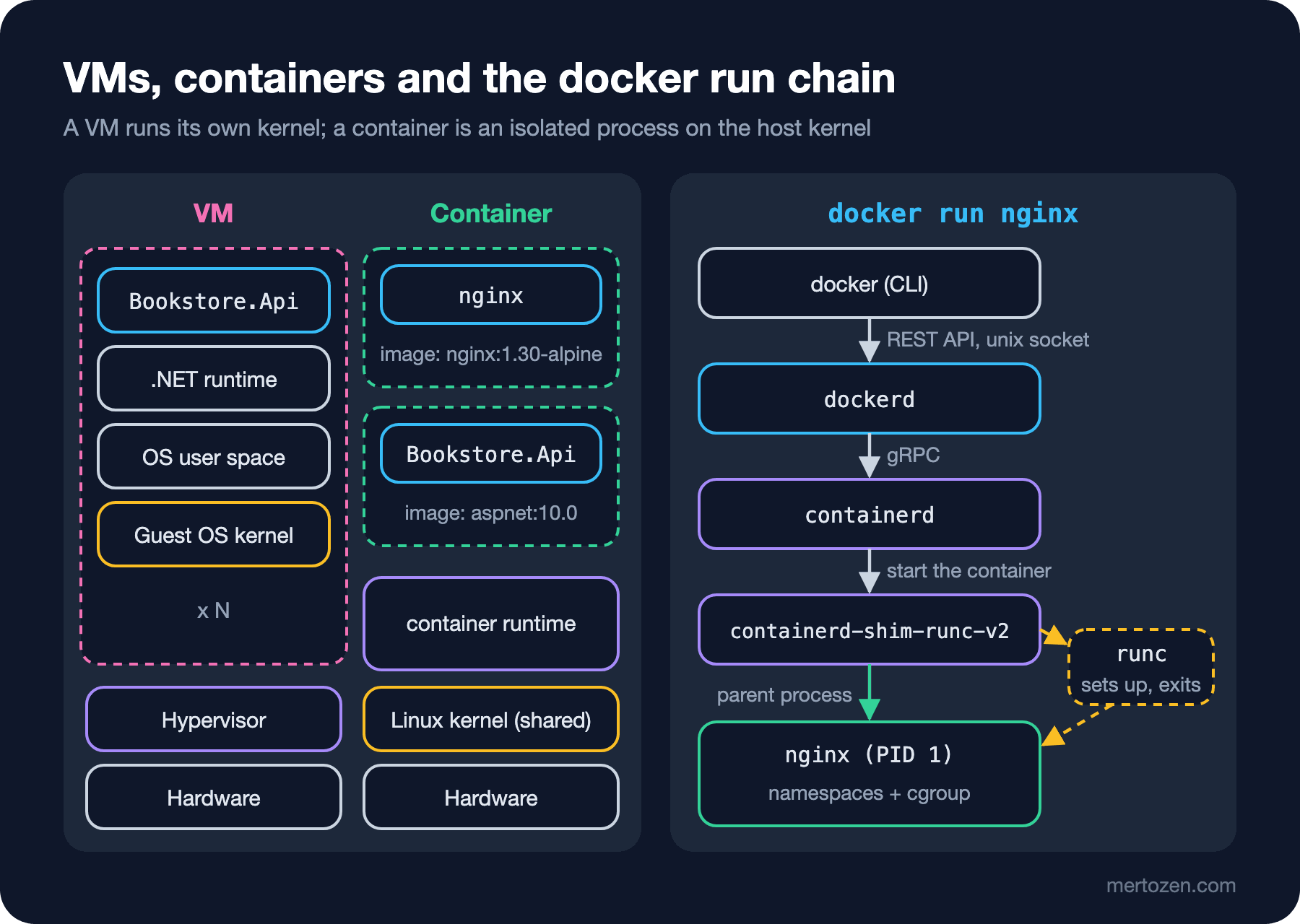
With a VM, the hypervisor gives each guest virtual hardware and every VM boots its own kernel. That is why VMs offer stronger isolation, but they take seconds if not minutes to start and each one spends memory on its own kernel and system services. A container has no kernel to boot; Docker starts the process after preparing its namespaces and cgroup. On this machine docker run --rm alpine:3 true took between 0.17 and 0.20 seconds over three runs, and most of that is Docker's own work.
The cost follows from the same fact. The boundary between containers sharing one kernel is not as thick as the boundary between VMs: a kernel vulnerability affects every container. In multi-tenant environments containers are therefore run with an extra layer, such as Kata Containers, which gives each container its own lightweight VM, or gVisor, which handles the application's system calls in its own user-space kernel. We will cover the day-to-day side of container security in post 13.
From docker run to a Process: dockerd, containerd and runc
The right half of the figure shows who does what when you type docker run. The docker command is only a client: it sends the request over a REST API to dockerd, on Linux usually through the /var/run/docker.sock unix socket. dockerd manages images, networks, volumes and the other Docker-specific concepts, and hands the job of running the container to containerd over gRPC. containerd starts a small shim process for each container, and the shim calls runc, the OCI runtime. runc sets up the namespaces and the cgroup, starts the process and exits. We can see this in the process tree of Docker's Linux VM:
docker run --rm --pid=host alpine:3 ps -o pid,ppid,argsPID PPID COMMAND
277 147 /usr/bin/containerd --config /etc/containerd/containerd.toml
297 147 /usr/local/bin/dockerd --config-file /run/config/docker/daemon.json
353126 1 /usr/bin/containerd-shim-runc-v2 -namespace moby -id 7bca49930cdc6b27a561cc86eb93a5140a8365a9f3ef1d5b2776bddb02dc21c4 -address /run/containerd/containerd.sock
353149 353126 nginx: master process nginx -g daemon off;
353193 353149 nginx: worker process
353194 353149 nginx: worker processI trimmed the output to the lines that concern this container; --pid=host shows this one-off container every process in the VM. Three things stand out. The parent of nginx is neither dockerd nor containerd but its own shim, 353126. The shim's parent is 1, so it lives independently of the containerd that started it; the container keeps running even if containerd restarts, and this design is also what makes dockerd's live-restore setting possible. runc is not in the list because it exited once its job was done. The shim's -namespace moby argument is containerd's own namespace concept: Docker keeps its containers under the name moby, while Kubernetes' containerd on the same machine would use k8s.io. Docker also gives you a summary of this:
docker info --format 'Server Version: {{.ServerVersion}}{{"\n"}}Storage Driver: {{.Driver}}{{"\n"}}Cgroup Version: {{.CgroupVersion}}{{"\n"}}Default Runtime: {{.DefaultRuntime}}{{"\n"}}OSType: {{.OSType}}'Server Version: 29.2.1
Storage Driver: overlayfs
Cgroup Version: 2
Default Runtime: runc
OSType: linuxOCI: Docker and Containers Are Not the Same Thing
In 2013 Docker was the project that turned containers into an everyday developer tool, but today a "container" is not a Docker-owned format. In 2015 Docker, CoreOS and other companies founded the Open Container Initiative under the Linux Foundation, and Docker donated its image format and runc to it. The OCI publishes three specifications: the image-spec, covering the image manifest, the layer archives and the config with the start command; the runtime-spec, covering how to run a file system bundle unpacked on disk; and the distribution-spec, covering the API registries use to distribute images. As of November 2026 the current versions are image-spec 1.1.1, runtime-spec 1.3.0 and distribution-spec 1.1.1.
The practical consequence: an image you build with Docker runs unchanged on Podman, containerd or Kubernetes. To try this without installing Podman, I ran Podman itself in a container; it needs --privileged to run nested containers, for this experiment only:
docker run --rm --name dockerseries-podman --privileged quay.io/podman/stable \
    sh -c 'podman --version; podman --storage-driver=vfs run --rm -q docker.io/library/nginx:1.30-alpine nginx -v; podman --storage-driver=vfs info --format "{{.Host.OCIRuntime.Name}}"'
podman version 6.1.3
nginx version: nginx/1.30.6
crunThe same nginx image ran in an environment with no Docker at all, under a different engine, Podman, and a different OCI runtime, crun, which is written in C. Kubernetes follows the same logic and has not used Docker directly since 1.24; the kubelet talks to containerd or CRI-O through the CRI, the Container Runtime Interface. The "Reading Old Kubernetes Manifests" post in the Kubernetes series explains the removal of dockershim. In this series we learn Docker, but the image, layer and runtime concepts you learn apply to all of these tools.
Where Do Containers Run on macOS and Windows?
Because containers rely on Linux kernel features, Linux containers cannot run directly on Windows or macOS. Docker Desktop therefore runs a Linux VM in the background and dockerd lives inside that VM; the docker command in your terminal is only the client. The process tree above was taken from that VM. On Windows, Docker Desktop uses WSL 2 by default and runs in its own docker-desktop WSL distribution; you can also reach the same engine from your own WSL distribution, such as Ubuntu, through the "WSL integration" setting. Installation details come in the next post.
There are also Windows containers. They share the Windows kernel, run from images based on Nano Server or Server Core, and only run on a Windows host. If you need to containerize a .NET Framework application running on IIS, this is the only option. This series uses Linux containers only: .NET 10 applications run on Linux, the vast majority of production container platforms are Linux, and Docker Desktop on Windows starts in Linux container mode by default.
When Is a Container Unnecessary?
A container is not the right answer everywhere. If Bookstore has a single small API and you are going to put it on a PaaS such as Azure App Service, the platform already manages the runtime and the operating system for you; a Dockerfile, an image registry and base image updates become extra work. If nobody on the team will keep images up to date, a container becomes an easy way to package an unpatched operating system and carry it everywhere.
An old .NET Framework application on IIS is a typical exception too. Putting it into a Windows container is possible, but the images are measured in gigabytes, most of the Linux container ecosystem's tooling is not available there, and the gain is usually limited. For such an application, moving to .NET 10 first is often the better investment. Containers really add value when you need to run the same application the same way in several environments, such as developer machines, CI, test and production, and when several services need different runtimes.
In Production
A container's kernel is the host's kernel. However current you keep your images, the host's kernel security patches are a separate responsibility: on a managed platform it belongs to the provider, on your own server it belongs to you. Likewise the cgroup version, kernel features and the system clock come from the host; you cannot change them inside the container.
A container is not as strong a security boundary as a VM. If you are going to run untrusted code, such as a plugin uploaded by a customer or a CI job, do not treat a container as sufficient on its own; we will look at extra isolation layers and settings such as non-root and read-only in post 13.
Do not think of a container as a long-lived server. When a container is removed, the changes to its file system go with it; database files and uploads belong in volumes, covered in post 11. Whatever you fix by hand after stepping into a container with exec does not exist in the next container.
Common Pitfalls
Thinking of a container as a lightweight VM. That wrong model produces images that run an SSH server, cron and the application together. A container should have one main process; other jobs go into their own containers.
Using "Docker" and "container" as synonyms. The difference matters when you meet containers running without Docker in a Kubernetes cluster, a team using Podman, or WSL's own container CLI. What is portable is the OCI image; what is Docker-specific is the dockerd API and its tooling.
Thinking the image's operating system is "the operating system you are using". An application running in an Ubuntu-based image runs on the host's kernel, not Ubuntu's. Kernel-dependent behaviour, such as the cgroup version or a system call, comes from the machine, not from the image.
Trusting the user name inside the container. As we saw above, the kernel works with numbers; root inside, uid 0, is uid 0 on the host as well unless a user namespace is in use.
A Small Experiment
★☆☆ Start the dockerseries-web container, get its host-side PID with docker inspect -f '{{.State.Pid}}' dockerseries-web and compare it with the master process PID in the docker top output. Then clean up with docker stop dockerseries-web and docker rm dockerseries-web.
★★☆ Start an Alpine container with --memory 128m --pids-limit 20 instead of --memory 64m and read /sys/fs/cgroup/pids.max. Write down in a table which Docker flag maps to which cgroup file.
★★★ Think of one of your team's applications: which of its dependencies cause "works on my machine" problems, such as the runtime version, a native library, an environment variable or the time zone? Which of them go into the image, and which keep coming from the host, such as the kernel, the clock or the hardware?
In this post we saw what a container is and the chain behind Docker. In the next post we install Docker properly: Docker Desktop with WSL 2 on Windows, Docker Engine from the official repository on Linux, why the docker group is equivalent to root, and alternatives such as Podman, Rancher Desktop and WSL containers.