

Real Incidents 2: Automation, Hidden Dependencies and Recovery Paths — AWS 2025, Facebook 2021, GitLab 2017, Knight Capital 2012
In the AWS, Facebook, GitLab and Knight Capital cases the outage grew because of automation's own failures, hidden dependencies and recovery paths that depended on what broke; the lesson is to rehearse the recovery path too. We tell the four cases from official sources, run a restore drill on Bookstore's SQL Server whose first run comes out red, prepare a dependency map and break-glass access, and write an alert that catches mixed versions.
Version note: The examples in this post were tried with SQL Server 2025 (sqlcmd), Prometheus 3.16.0 (promtool) and .NET 10. The information about the real incidents comes only from the companies' official publications; nothing was run on those systems.
Guess First
The BookstoreDb database of Bookstore, the online bookstore used as the shared example across this site's series, is backed up every night, and if the job fails the team gets an email. No failure email has arrived in the last six months. If the database server disappeared tomorrow, (1) how much data would you lose at most, (2) how many minutes would the restore take, (3) which machine would the person doing the restore connect to, with which permissions, with which document open? How many of the three can you answer with a measurement? Second question: does the VPN, SSO or runbook wiki you use to get into production in an emergency run on the very infrastructure you are trying to recover? At the end of the post we measure the first of these questions for Bookstore.
Four Cases
In the previous post we looked at three outages caused by globally propagated configuration. The four cases in this post come from another family: automation itself failing, a dependency showing up in unexpected places, and a recovery path that depends on the thing that broke. Everything here comes only from official sources: AWS's post-event summary, Meta's engineering blog, GitLab's postmortem and, for Knight Capital, the order of the US Securities and Exchange Commission, the SEC. Times are in the time zone the source uses.
AWS us-east-1, October 19–20, 2025
Two automations manage the DNS records of DynamoDB's regional endpoints. The DNS Planner looks at the health and capacity of the load balancers and regularly produces new DNS plans (which load balancers, with which weights). The DNS Enactor applies these plans to Route 53 and, for resilience, runs as three independent copies in three different availability zones. Each Enactor checked only once, at the start of its work, that the plan it was about to apply was newer than the current one.
On the night of October 19 (times in PDT), one of the Enactors ran into unusual delays on several endpoints. Meanwhile the Planner kept producing new plans, and a second Enactor applied the newest one and moved on to its clean-up step, which deleted plans much older than the one it had applied. At that very moment the delayed Enactor wrote its old plan, whose freshness check was no longer valid, to the regional endpoint. When the clean-up step deleted that old plan, all IP addresses of the endpoint were deleted with it, and dynamodb.us-east-1.amazonaws.com was left with an empty DNS record. The system was in an inconsistent state; no Enactor could apply later plans, and the fix had to be made by hand. According to AWS's summary, the cause was a race condition in the DNS management system that had gone unnoticed for a long time.
DynamoDB's DNS failures started at 23:48. Engineers found at 00:38 that the cause was DynamoDB's DNS state, all DNS information was restored at 02:25, and as clients' DNS caches expired the DynamoDB impact ended at 02:40. But the chain did not end there. EC2's DropletWorkflow Manager (DWFM), which manages the state of physical servers, keeps a lease with every server and depends on DynamoDB for it. During the hours without DynamoDB the leases expired; when DynamoDB came back, DWFM tried to renew a huge number of leases at once, the work timed out and went back into the queue, and the system could not recover. AWS describes this as congestive collapse and writes that there was no established recovery procedure for this state. At 04:14 engineers throttled incoming work and selectively restarted DWFM hosts; by 05:28 every lease had been renewed.
Then came the network side: Network Manager, which distributes network settings to new instances, fell behind while working through its backlog, and new instances started without network connectivity. The Network Load Balancer's health checks saw these instances flip between healthy and unhealthy, and automatic availability zone failover reduced capacity. At 09:36 engineers turned off the NLB's automatic health check failover. Lambda, container and identity services, Amazon Connect and Redshift were affected one by one; EC2 was back to normal at 13:50 and the whole event at 14:20 on October 20. Fourteen and a half hours in total; DNS itself had been fixed in about 3 hours.
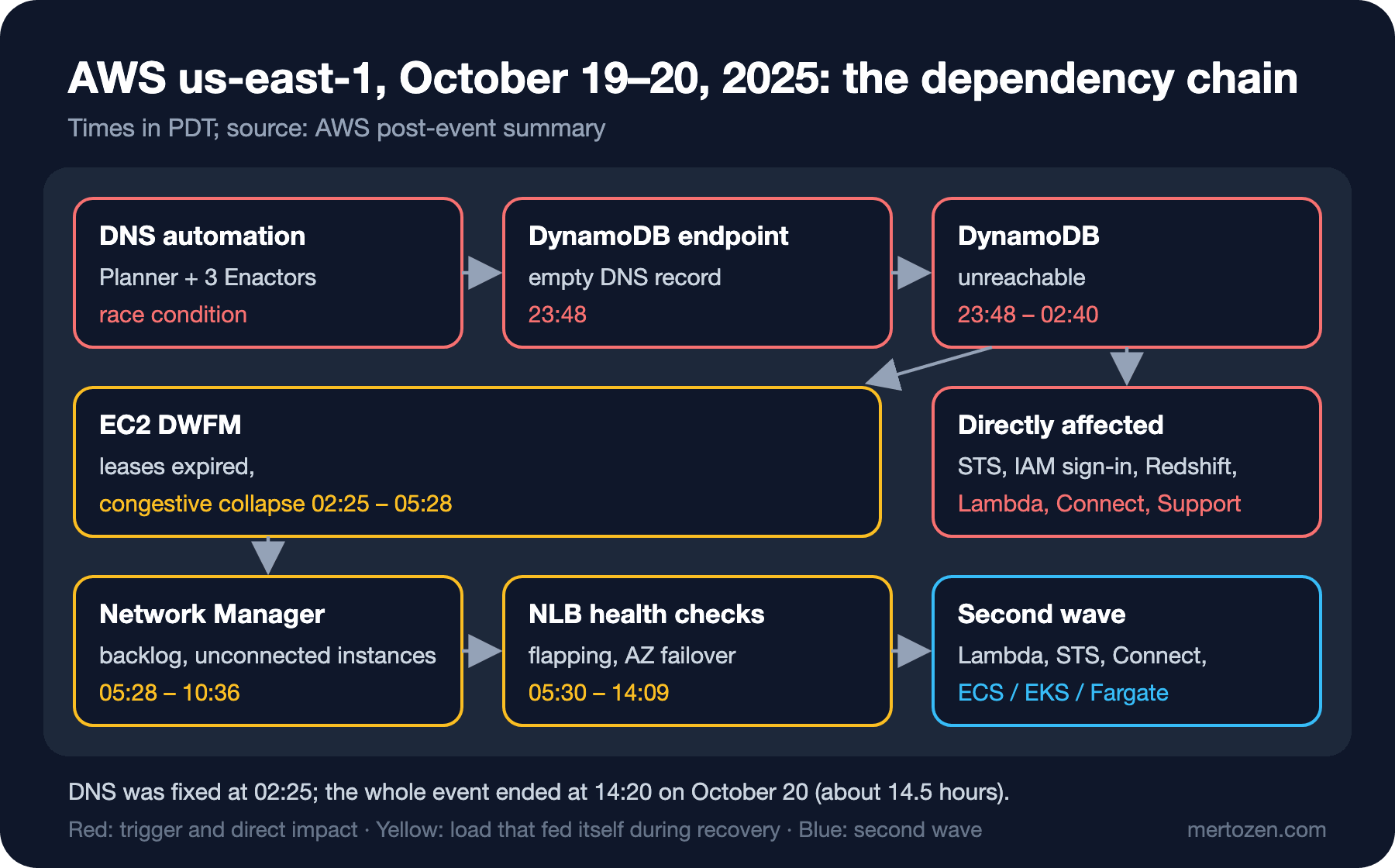
The first step AWS announced was to turn off the DNS Planner and DNS Enactor automation worldwide; it will not be turned back on until the race condition is fixed and protections against applying a wrong plan are added. A velocity control for NLB failover and a test suite that exercises DWFM's recovery workflow are being added too.
Facebook, October 4, 2021
During routine maintenance on Facebook's backbone network, a command meant to measure global backbone capacity took down all backbone connections. A bug in the audit tool that should have checked and stopped such commands let it through. When the connection between the data centers was gone, a second mechanism kicked in: when Facebook's DNS servers could not talk to the data centers, they considered themselves unhealthy and withdrew their BGP advertisements. It was a safety measure; the result was DNS servers that were running but unreachable from the internet.
What made recovery longer was that out-of-band access, the emergency access independent of the normal network, went down together with normal network access. Losing DNS also broke many of the internal tools used for diagnosis. Engineers were sent to the data centers, but these buildings are hard to get into by design, and the hardware is not easy to change even with physical access. Meta describes this as a deliberate trade-off: the barriers built for everyday security slowed down recovery from a rare event. Bringing services back needed care too: power consumption had dropped by tens of megawatts, and giving the load back at once could have put everything from electrical systems to caches at risk. Load was brought back gradually, using the experience of "storm" drills; but no drill had ever simulated losing the global backbone.
GitLab.com, January 31, 2017
GitLab.com's PostgreSQL replication fell behind during a load spike thought to come from spam, and the primary server had already deleted the WAL files the secondary needed. Around 23:30 (UTC), the engineer rebuilding the secondary from scratch ran the command that deleted the data directory on the primary (db1) while believing he was on the secondary (db2). He noticed within a second or two and stopped it, but about 300 GB of data was already gone.
The real lesson came after that. GitLab had several backup and replication methods and none of them worked. The daily pg_dump backups had never been created, because they were taken with version 9.2 tools while the database was 9.6, and the S3 bucket was empty. The cron emails that should have reported the failure were rejected because DMARC was not set up; nobody knew the backups were not being taken. Azure disk snapshots were enabled for the NFS servers but not for the database servers. Replication was set up for failover, not disaster recovery, and was broken anyway. What was left was an LVM snapshot about 6 hours old, taken by hand at 17:20 that day by an engineer for testing. The restore took about 18 hours on slow disks; GitLab.com was down for about 18 hours, and about 5,000 projects, 5,000 comments and 700 new user accounts created in those 6 hours were lost. Git repositories were not lost.
GitLab's own 5 Whys analysis ends up somewhere non-technical: the backup procedure had no owner, so it was not tested regularly. The fixes follow from that: a prompt that clearly shows which server you are on, monitoring backups with Prometheus, point-in-time recovery, disk snapshots for the database servers, automated testing of restores and an owner for data durability.
Knight Capital, August 1, 2012
For a new program of the NYSE, Knight Capital updated its high-speed order routing system called SMARS. The new code replaced an old function called "Power Peg" that had not been used since 2003 but was still in the code and callable, and it reused a flag that used to switch Power Peg on, with a new meaning. The deploy was done by hand a few days earlier, server by server across eight servers; a technician did not copy the new code to the eighth server. There was no review by a second person, and no written procedure required one.
Before the market opened, from 08:01 (US Eastern time), automated emails referring to SMARS and the phrase "Power Peg disabled" started to arrive; 97 of them before the open. They were not designed as alerts and nobody read them. When the market opened, the eighth server read the flag with its new meaning as an order to run the old Power Peg and started sending unlimited orders. During the response the team also removed the new code from the seven servers where it had been deployed correctly; this made Power Peg run on those seven servers too and made things worse. According to the SEC order, more than 4 million executions in 154 stocks happened in about 45 minutes, and Knight lost more than 460 million dollars. The SEC also found that there was no control comparing outgoing orders with incoming ones, no procedure to halt SMARS and no incident response procedure, and imposed a 12 million dollar penalty.
Common Themes
Four cases, four technologies, but the same few patterns repeat. The first is the failure modes of automation itself. At AWS, the Enactors running as three copies for resilience created a race in which they could undo each other's work; at Facebook, the audit tool that should have stopped a command was faulty. When automation makes a mistake it makes it everywhere and at the same speed; that is why AWS's first step was to turn the automation off worldwide.
The second is hidden and circular dependencies. EC2's server management depended on DynamoDB; at Facebook the diagnostic tools depended on the DNS being recovered. A dependency map must answer not only "what does the application depend on?" but also "what does the recovery path depend on?". At GitLab the recovery path was backups that had never been tried.
The third is recovery itself becoming load. As DWFM's lease renewals timed out and went back into the queue, the load grew; Google's us-central1 case in the previous post is of the same kind. The literature calls this a metastable failure: according to the 2021 paper "Metastable Failures in Distributed Systems" by Bronson, Aghayev, Charapko and Zhu, a loop, usually fed by retry load, that keeps the system in a bad state even after the trigger is gone. The way out is similar too: throttling incoming work (what AWS did at 04:14), backoff and giving the load back gradually (what Facebook did). The mechanics of retries and load shedding are in the reliability patterns post of the System Design series.
The fourth is Knight Capital's lesson: not verifying that the deploy reached every server, not deleting dead code, reusing a flag with a different meaning, and nobody reading a signal that was not designed as an alert (97 emails). And the response making things worse: rolling back the new code switched the old code on everywhere. A mitigation is a hypothesis too; its effect must be measured right away.
A Restore Drill for Bookstore
We applied GitLab's lesson to Bookstore's SQL Server. A restore drill is a rehearsal that regularly proves you can really come back from a backup: take a fresh backup, restore it next to the real database under another name, check its consistency, verify that the data the application needs is there, measure the durations, then drop it. The script is in the repository as deploy/drills/restore-drill.sql; its important parts:
/* Restore drill for BookstoreDb: take a backup, restore it under another name, check it, compare, measure, drop. */
/* Run monthly and after every change to the backup job: */
/*   sqlcmd -S <server> -U <user> -C -b -i deploy/drills/restore-drill.sql -v BackupDir="/var/opt/mssql/data" */
/* -b stops at the first error, so a failed step fails the scheduled job (and its alert). */
...
/* 3. VERIFYONLY reads the file and its checksums. It does NOT prove that a restore works; step 4 does. */
RESTORE VERIFYONLY FROM DISK = @file WITH CHECKSUM;

/* 4. Restore under another name, next to the original. */
DECLARE @data nvarchar(200), @log nvarchar(200);
SELECT @data = name FROM sys.master_files WHERE database_id = DB_ID('$(SourceDb)') AND type = 0;
SELECT @log = name FROM sys.master_files WHERE database_id = DB_ID('$(SourceDb)') AND type = 1;
DECLARE @dataFile nvarchar(400) = N'$(BackupDir)/$(DrillDb).mdf', @logFile nvarchar(400) = N'$(BackupDir)/$(DrillDb)_log.ldf';
SET @t0 = SYSUTCDATETIME();
RESTORE DATABASE [$(DrillDb)] FROM DISK = @file
    WITH MOVE @data TO @dataFile, MOVE @log TO @logFile, REPLACE, CHECKSUM;
SELECT 'restore' AS step, DATEDIFF(MILLISECOND, @t0, SYSUTCDATETIME()) AS ms;
/* 5. Is the restored database consistent? */
SET @t0 = SYSUTCDATETIME();
DBCC CHECKDB ([$(DrillDb)]) WITH NO_INFOMSGS;
SELECT 'checkdb' AS step, DATEDIFF(MILLISECOND, @t0, SYSUTCDATETIME()) AS ms;
...
/* 8. The drill fails (and so does its scheduled job) if the backup job made no full backup in the last 26 hours: */
/*    a backup job that fails silently is found here, not on the day we need it. */
IF NOT EXISTS (SELECT 1 FROM msdb.dbo.backupset
               WHERE database_name = '$(SourceDb)' AND type = 'D' AND name IS DISTINCT FROM 'restore-drill'
                 AND backup_finish_date > DATEADD(HOUR, -26, GETDATE()))
    THROW 50001, 'No full backup of the source database from the backup job in the last 26 hours.', 1;
RESTORE VERIFYONLY alone is not enough: it says the file can be read and the checksums match, not that the restore works. The real proof is steps 4 and 5. The last step answers GitLab's silent backup failure: if the backup job has not made a full backup in the last 26 hours, the drill fails, and thanks to -b sqlcmd exits with a non-zero code, so the scheduled job that runs the drill and its alert turn red. The end of the first run in the lab:
sqlcmd -S localhost -U sa -C -b -i deploy/drills/restore-drill.sql -v BackupDir="/var/opt/mssql/data" -W
...
table source_rows restored_rows
----- ----------- -------------
ordering.Orders 4787 4787
ordering.OrderItems 4787 4787
ordering.Customers 50 50
inventory.StockItems 20 20
catalog.Books 20 20
step placed_at_utc
---- -------------
newest order in the restore 2026-11-14 22:32:47.3945730
Msg 50001, Level 16, State 1, Server sql, Line 55
No full backup of the source database from the backup job in the last 26 hours.
echo $?
1
The restore worked and the row counts matched, but the drill is red: the lab database had never been backed up, and the only backup was the drill's own. In a real system this line means "the backup job has not worked for months". We took a full backup standing in for the nightly one and ran the drill again:
step finished_utc age_minutes
---- ------------ -----------
last full backup 2026-11-14 22:53:48.000 0
Processed 984 pages for database 'BookstoreDb', file 'BookstoreDb' on file 1.
Processed 2 pages for database 'BookstoreDb', file 'BookstoreDb_log' on file 1.
BACKUP DATABASE successfully processed 986 pages in 0.020 seconds (384.960 MB/sec).
step ms
---- --
backup 44
The backup set on file 1 is valid.
Processed 984 pages for database 'BookstoreDb_RestoreDrill', file 'BookstoreDb' on file 1.
Processed 2 pages for database 'BookstoreDb_RestoreDrill', file 'BookstoreDb_log' on file 1.
RESTORE DATABASE successfully processed 986 pages in 0.049 seconds (157.126 MB/sec).
step ms
---- --
restore 266
step ms
---- --
checkdb 111
table source_rows restored_rows
----- ----------- -------------
ordering.Orders 4787 4787
ordering.OrderItems 4787 4787
ordering.Customers 50 50
inventory.StockItems 20 20
catalog.Books 20 20
step placed_at_utc
---- -------------
newest order in the restore 2026-11-14 22:32:47.3945730
echo $?
0
Because the lab database is about 8 MB, the durations are in milliseconds; in production these are the numbers to measure. The restore duration is the real measure of the RTO, and the age of the last backup the real measure of the RPO. Every run is written to docs/drills/log.md; its first line is the red result above and the 26-hour check added because of it.
A Dependency Map and Break-Glass Access
The lesson of the Facebook case is that the recovery path has dependencies too. Bookstore's docs/dependencies.md answers, for every dependency, "what breaks without it, how do we see it, which lever is there" and also has a "what does the recovery path depend on" column:
| Dependency | Without it | How we see it | Lever / fallback | The recovery path needs |
|---|---|---|---|---|
| SQL Server (BookstoreDb) | everything fails | checkout SLO pages, /health | none; restore (`deploy/drills/restore-drill.sql`) | backups in a different storage account, a SQL login that is not in the same directory |
| Payment provider | checkout fails | runbook step 3, `http_client_request_duration_seconds` | `Payments:TimeoutSeconds`, `Payments:CheckoutEnabled` | the provider's status page (pinned in `docs/contacts.md`) |
| Prometheus + Alertmanager | no pages | Alertmanager's own watchdog alert at the paging tool | none | paging tool outside our cloud account |
| DNS for bookstore.example.com | nobody reaches us | external synthetic probe | none | registrar login with break-glass account |
| Identity provider (SSO) | staff cannot log in to the cloud console | — | break-glass accounts | `docs/runbooks/break-glass.md` (printed copy in the office safe) |
| Status page | customers do not hear from us | — | post on social accounts | hosted outside our cloud account |
The last rows lead to break-glass access, emergency access prepared in advance for when the normal access paths do not work. docs/runbooks/break-glass.md prepares two things in advance: two accounts that do not depend on SSO, and a printed copy that can be read while the wiki behind SSO is unreachable. Every use counts as an incident on its own; the account passwords are changed after use. This runbook is also tried from start to finish every three months, from outside the office network. A break-glass procedure tried for the first time when SSO is down will most likely get stuck somewhere.
Deploy Verification: Is Every Instance on the Same Version?
Knight Capital's eighth server is less likely today because most teams deploy with automation, but it has not gone away completely: a stuck rolling update or a single node changed by hand gives the same result. The target_info series we used in the runbook in the fifth post of the series carries every instance's version; we turned it into an alert:
# After a deploy every instance must run the same build. Two versions for longer than a rollout takes means an
# instance was missed (or a rollout is stuck): the Knight Capital lesson in docs/drills/README.md.
groups:
  - name: bookstore-deploy
    rules:
      - alert: MixedVersionsAfterDeploy
        expr: count(count by (service_version) (target_info{job="bookstore-api"})) > 1
        for: 30m
        labels:
          severity: ticket
        annotations:
          summary: "{{ $value }} different Bookstore.Api versions have been running for 30 minutes"
          description: "Versions: {{ range query \"count by (service_version) (target_info{job='bookstore-api'})\" }}{{ .Labels.service_version }} ({{ .Value }} instances) {{ end }}"

promtool test rules deploy/prometheus/tests/deploy-alerts.test.yaml
Processing test file: deploy/prometheus/tests/deploy-alerts.test.yaml
  SUCCESS
The test plays a scenario where one of three instances is not updated by the deploy, and it passes. The alert waits 30 minutes so that the short two-version state of a normal rolling update does not become a page. Knight's real lesson, though, is about dead code: delete the code of a feature that is no longer used, and open a new flag instead of giving an old one a new meaning.
In Production
Make the drill a scheduled job and connect its result to an alert. A restore tried once by hand does not catch a backup setting that changes six months later.
Give automation a stop button. Being able to turn an automation off quickly and everywhere, as AWS did, matters as much as the automation itself; where that button is must be written in the runbook.
Plan the recovery too. After a long outage all clients come back at once; the steps for throttling incoming work and opening traffic gradually must be in the runbook in advance.
Common Pitfalls
Saying "we have backups". A backup that has never been restored is a hope. The measure is the date of the last successful restore drill.
Treating the absence of failure notices as proof. At GitLab the failure emails never arrived. "No failure arrived" is not the same as "it succeeded"; measure success with a positive signal (the age of the last backup).
Mixing production and test in the same terminal. One of GitLab's fixes was a prompt that clearly shows the server and the environment; a small measure that makes running a command on the wrong server harder.
A Small Experiment
★☆☆ Write the docs/dependencies.md of your own system and fill in the "what does the recovery path depend on?" column for every row. Does the system you are trying to recover appear in that column?
★★☆ Add a step to restore-drill.sql: compare the number of orders placed in the last 24 hours in the restored database with the real one, and raise an error with THROW if the difference is above 1 percent.
★★★ In the lab, build two instances of Bookstore.Api from different commits, run them and see both versions in the description of the MixedVersionsAfterDeploy alert. Then tune the alert's 30 minutes by measuring your own rolling update time.
The common lesson of the seven cases in these two posts is that most outages happen on a path that was never tried: an untried code path, an untried configuration, an untried backup, an untried recovery. In the last post of the series we try these paths on purpose and under control: game days, and injecting faults into Bookstore's payment client with Polly's chaos strategies.