

Docker Networking: Bridge, User-defined Networks, Container DNS and Port Publishing
Containers on the default bridge cannot find each other by name; on a user-defined network Docker's embedded DNS (127.0.0.11) resolves container names and aliases. With real output we connect Bookstore.Api to SQL Server with Server=bookstore-db, make bookstore-web's nginx proxy the API on the same origin, publish only the entry point on 127.0.0.1, and look at the iptables rules that bypass ufw, the experimental nftables backend and host.docker.internal.
Version note: The examples in this post were run with Docker Engine 29.9.3 (the iptables and the experimental nftables firewall backends), SQL Server 2025 (RTM-CU11), .NET 10 (ASP.NET Core Runtime 10.0.15), Microsoft.Data.SqlClient 7.1.2 and nginxinc/nginx-unprivileged:1.30-alpine.
Guess First
The SQL Server container from the previous post is running as dockerseries-db. You start Bookstore.Api as a second container and write Server=dockerseries-db in the connection string; neither command has --network. Does GET /books return the books in the database? Second question: if you publish the API with -p 127.0.0.1:8082:8080 and set ASPNETCORE_URLS=http://127.0.0.1:8080 inside the container, what answer does curl localhost:8082/health get from the host?
Docker's Networks
Every engine starts with three networks:
docker network lsNETWORK ID NAME DRIVER SCOPE
7733fcd326d8 bridge bridge local
ec261aed95a9 host host local
a4efcd0b18f2 none null localbridge is the default bridge that every container without --network joins. Docker creates a virtual switch on the host, each container gets a virtual network card attached to that switch and a private IP, and outgoing traffic is NATed to the host's address. host means the container shares the host's network namespace: the container gets no IP of its own, listens on the host's ports directly, and -p becomes meaningless. none is for containers that have only a loopback interface and never talk to the outside. Why localhost inside a container is the container itself and not the host is covered in the Networking and HTTP series post "IP Addresses, Subnets, Ports and NAT: localhost, 0.0.0.0 and Connectivity in Containers"; here we move on with Docker's commands.
Bookstore.Api Connects to the Database
The API of Bookstore, the online bookstore used as the shared example across this site's series, has read its catalog from memory since post 8. We moved the book source behind an interface and added an implementation that reads from SQL Server:
public interface IBookSource
{
    Task<IReadOnlyList<Book>> GetAllAsync(CancellationToken cancellationToken);
}

// Reads the catalog from BookstoreDb (SQL Server)
public sealed class SqlBookSource(string connectionString) : IBookSource
{
    public async Task<IReadOnlyList<Book>> GetAllAsync(CancellationToken cancellationToken)
    {
        await using SqlConnection connection = new(connectionString);
        await connection.OpenAsync(cancellationToken);
        await using SqlCommand command = new("SELECT Isbn, Title, Author, PriceTry FROM dbo.Books", connection);
        await using SqlDataReader reader = await command.ExecuteReaderAsync(cancellationToken);

        List<Book> books = [];
        while (await reader.ReadAsync(cancellationToken))
        {
            books.Add(new Book(reader.GetString(0), reader.GetString(1), reader.GetString(2), reader.GetDecimal(3)));
        }
        return books;
    }
}
// ConnectionStrings__Default comes from the environment in containers; without it the catalog stays in memory
string? connectionString = builder.Configuration.GetConnectionString("Default");
if (string.IsNullOrWhiteSpace(connectionString))
{
builder.Services.AddSingleton<IBookSource, InMemoryBookSource>();
}
else
{
builder.Services.AddSingleton<IBookSource>(new SqlBookSource(connectionString));
}InMemoryBookSource carries the old fixed list; dotnet run without a connection string and the commands of the earlier posts work unchanged. BookCatalog's Turkish sort stayed the same; it just gets the books from the source asynchronously now. We used SqlClient directly, without a library on top because the topic is the connection itself, not data access; the published series cover the same job with EF Core and Dapper. At startup the app also logs which source it uses (Catalog source: SqlBookSource). Since the behavior changed, we build the API and web images with the 1.1.0 tag; the TAG default in docker-bake.hcl is now 1.1.0 too.
The API should not connect to the database as sa. db/02-app-login.sql creates a login that can only read; instead of putting the password in the script, it takes it from a sqlcmd variable:
USE master;
GO

IF SUSER_ID(N'bookstore_app') IS NULL
    CREATE LOGIN bookstore_app WITH PASSWORD = N'$(BOOKSTORE_DB_PASSWORD)';
ELSE
    ALTER LOGIN bookstore_app WITH PASSWORD = N'$(BOOKSTORE_DB_PASSWORD)';
GO

USE BookstoreDb;
GO

IF USER_ID(N'bookstore_app') IS NULL
    CREATE USER bookstore_app FOR LOGIN bookstore_app;
ALTER ROLE db_datareader ADD MEMBER bookstore_app;
GO
sqlcmd looks up a $(...) variable not defined with -v in the environment variables; docker exec -e BOOKSTORE_DB_PASSWORD carries the value from the shell into the container. The split between logins, users and roles is in the SQL Server Deep Dive series post "The SQL Server Security Model: Logins, Users, Schemas, Roles, Least Privilege and Row-Level Security".
No Names on the Default Bridge
The experiment for the first question. The database runs with the volume from post 11 and the API next to it; both are on the default bridge:
docker run -d --name dockerseries-db -e ACCEPT_EULA=Y -e MSSQL_SA_PASSWORD \
    -v dockerseries-sqldata:/var/opt/mssql -v "$PWD/db:/scripts:ro" \
    mcr.microsoft.com/mssql/server:2025-latest
docker exec -e SQLCMDPASSWORD="$MSSQL_SA_PASSWORD" -e BOOKSTORE_DB_PASSWORD dockerseries-db \
    /opt/mssql-tools18/bin/sqlcmd -C -S localhost -U sa \
    -i /scripts/01-bookstore.sql -i /scripts/02-app-login.sql

docker run -d --name dockerseries-api -p 8080:8080 \
    -e ConnectionStrings__Default="Server=dockerseries-db;Database=BookstoreDb;User Id=bookstore_app;Password=$BOOKSTORE_DB_PASSWORD;TrustServerCertificate=True" \
    dockerseries-bookstore-api:1.1.0
curl -s -o /dev/null -w "GET /books: %{http_code}\n" localhost:8080/books
docker logs dockerseries-api 2>&1 | grep -E "SqlException|--->"
GET /books: 500
Microsoft.Data.SqlClient.SqlException (0x80131904): A network-related or instance-specific error occurred while establishing a connection to SQL Server. The server was not found or was not accessible. Verify that the instance name is correct and that SQL Server is configured to allow remote connections. (provider: TCP Provider, error: 35 - An internal exception was caught)
---> System.Net.Sockets.SocketException (00000005, 0xFFFDFFFF): Name or service not knownThe answer is no. SqlClient's long message lists many possibilities, but the inner exception is clear: Name or service not known, the name dockerseries-db could not be resolved. Docker's documentation says so plainly: containers on the default bridge can reach each other only by IP address, and name resolution exists on user-defined networks. The two containers were on the same network and their IPs were visible in docker network inspect bridge (172.18.0.2 and 172.18.0.3), but writing an IP into the connection string is no solution: the IP can change whenever the container is recreated. The --link flag you will see in old documentation was meant to solve exactly this on the default bridge; Docker considers it legacy and has warned when it is used on the default bridge since Engine 29.6.
User-defined Networks and the Embedded DNS
docker network create dockerseries-net
docker network connect --alias bookstore-db dockerseries-net dockerseries-db
docker network disconnect bridge dockerseries-db

docker rm -f dockerseries-api
docker run -d --name dockerseries-api --network dockerseries-net --network-alias bookstore-api \
    -e ConnectionStrings__Default="Server=bookstore-db;Database=BookstoreDb;User Id=bookstore_app;Password=$BOOKSTORE_DB_PASSWORD;TrustServerCertificate=True" \
    dockerseries-bookstore-api:1.1.0
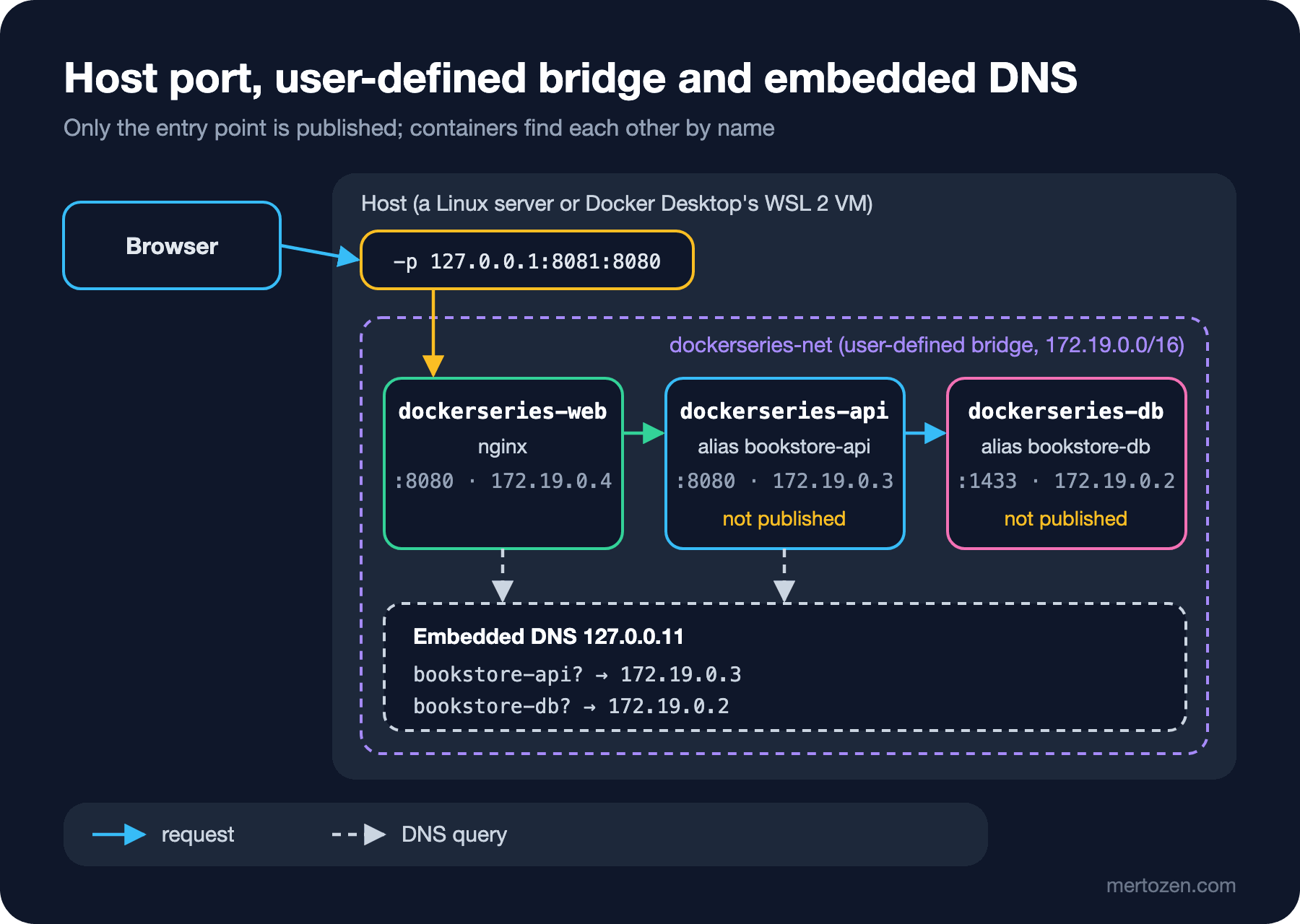
docker network create creates a new bridge network by default. We connected the database to the new network without stopping it and removed it from the default bridge; --alias gives the container a DNS name valid on that network in addition to its name. The Server=bookstore-db we promised in post 8 thus became a name independent of the container's name: if you move the database to a new container called dockerseries-db-2 tomorrow, the API's setting does not change. We looked from a container on the same network:
docker run --rm --network dockerseries-net alpine:3 sh -c \
    "grep nameserver /etc/resolv.conf; nslookup bookstore-db | tail -2; wget -qO- http://bookstore-api:8080/books | head -c 90"
nameserver 127.0.0.11
Address: 172.19.0.2
[{"isbn":"9789750738609","title":"Çalıkuşu","shelfLabel":"ÇALIKUŞU","priceTry":240.00},The DNS server of every container on a user-defined network is 127.0.0.11: Docker's embedded DNS. It turns container names and aliases into IPs on that network and forwards names it does not know to the host's DNS settings. Name resolution is per network: the name bookstore-db exists only for containers attached to dockerseries-net. The API's log shows Catalog source: SqlBookSource, and /books returns the books from the database.
We also tried the TrustServerCertificate=True at the end of the connection string. Microsoft.Data.SqlClient encrypts the connection by default and validates the server's certificate; the SQL Server container comes with a self-signed certificate it generates itself. Without the setting, the connection broke in the handshake:
Microsoft.Data.SqlClient.SqlException (0x80131904): A connection was successfully established with the server, but then an error occurred during the pre-login handshake. (provider: TCP Provider, error: 35 - An internal exception was caught)
 ---> System.Security.Authentication.AuthenticationException: Certificate failed chain validation. Error(s): 'self-signed certificate, [Status: UntrustedRoot]
This setting is acceptable locally and in test: the traffic stays on a bridge that never leaves the host. In production you give the server a trusted certificate and remove TrustServerCertificate.
Same Origin: from nginx to bookstore-api
In post 10 bookstore-web and the API were on different origins and needed CORS. Now that both containers are on the same network, it is enough for the browser to see only the web container: nginx forwards requests starting with /api/ to bookstore-api. We added a location to web/nginx/default.conf:
    # Same origin for the API: /api/books -> http://bookstore-api:8080/books on the container network.
    # Docker's embedded DNS (127.0.0.11) resolves the name per request, so nginx starts without the API.
    location /api/ {
        resolver 127.0.0.11 valid=10s;
        set $api_upstream http://bookstore-api:8080;
        rewrite ^/api/(.*)$ /$1 break;
        proxy_pass $api_upstream;
    }
We will see why we did not write a plain proxy_pass http://bookstore-api:8080/; in the Pitfalls section. We attached the web container to the network and published only it; the API address in the config is now a relative path:
docker run -d --name dockerseries-web --network dockerseries-net -p 127.0.0.1:8081:8080 \
    -e API_BASE_URL=/api -e APP_ENVIRONMENT=staging dockerseries-bookstore-web:1.1.0
curl -s localhost:8081/config.json
curl -s localhost:8081/api/books | jq -r '.[0:3][] | "\(.title) | \(.priceTry)"'
curl -s -o /dev/null -w "GET :8080/books from the host: %{http_code}\n" -m 3 localhost:8080/books
docker ps --format "table {{.Names}}\t{{.Ports}}"
{
"apiBaseUrl": "/api",
"environment": "staging"
}
Çalıkuşu | 240.00
Dune | 420.00
Emma | 180.00
GET :8080/books from the host: 000
NAMES PORTS
dockerseries-web 127.0.0.1:8081->8080/tcp
dockerseries-api 8080/tcp
dockerseries-db 1433/tcpThe rows without an arrow in the PORTS column are unpublished ports: the API and the database cannot be reached from the host (000, no connection), only containers on the network reach them. This is the easiest way to shrink the attack surface: only the entry point is opened to the outside. Nothing changed in the Angular code; apiBaseUrl is now /api, the browser sends requests to the page's own origin, and CORS is unnecessary.
Port Publishing: 0.0.0.0, 127.0.0.1 and the Firewall
When -p 8080:8080 has no host address, Docker publishes the port on all interfaces (0.0.0.0 and [::]). To see the difference we also published the API this way and connected to the server's external interface address (192.168.1.20 below); this is what another machine on the network sees:
docker port dockerseries-api
curl -s -o /dev/null -w "8080 -> %{http_code}\n" -m 3 http://192.168.1.20:8080/health
curl -sS -o /dev/null -m 3 http://192.168.1.20:8081/
8080/tcp -> 0.0.0.0:8080
8080/tcp -> [::]:8080
8080 -> 200
curl: (7) Failed to connect to 192.168.1.20:8081 after 0 ms: Could not connect to server127.0.0.1:8081 is not visible from outside, 8080 is. On Linux, Docker does this with firewall rules:
iptables -t nat -S DOCKER | grep -E "dport (8080|8081)"
iptables -S DOCKER-USER
-A DOCKER -d 127.0.0.1/32 ! -i br-aa27fb60a622 -p tcp -m tcp --dport 8081 -j DNAT --to-destination 172.19.0.4:8080
-A DOCKER ! -i br-aa27fb60a622 -p tcp -m tcp --dport 8080 -j DNAT --to-destination 172.19.0.3:8080
-N DOCKER-USEREvery published port is a DNAT rule: a packet arriving at the host is redirected to the container's IP. Here is the reason for the ufw warning in post 2. According to Docker's documentation, these nat rules divert packets before they reach ufw's INPUT and OUTPUT chains, so a "close 8080" rule you write in ufw does not protect a published port. Docker suggests two ways: if you do not really need the port open to the outside, publish it on 127.0.0.1; if you want it open but with restricted sources, write your rule in the DOCKER-USER chain, which runs before Docker's own rules and is left empty for you. The firewall rules themselves are the topic of the Linux and Shell series. Since Engine 28.0, other machines on the same local network can no longer reach ports published on 127.0.0.1 either; on older versions this was possible.
Engine 29.0 also brought an experimental nftables backend (dockerd --firewall-backend=nftables or "firewall-backend": "nftables" in daemon.json). We turned it on in a separate lab engine; the same -p 127.0.0.1:8081:8080 rule now sits in Docker's own nftables table:
docker info | grep "Firewall Backend"
nft list tables
nft list ruleset | grep "dport 8081"
iptables -S DOCKER-USER
Firewall Backend: nftables
table ip docker-bridges
table ip6 docker-bridges
iifname != "docker0" ip daddr 127.0.0.1 tcp dport 8081 counter packets 0 bytes 0 dnat to 172.18.0.2:8080 comment "DNAT"
iifname != "lo" ip daddr 127.0.0.1 tcp dport 8081 counter packets 0 bytes 0 drop comment "DROP REMOTE LOOPBACK"
iptables: No chain/target/match by that name.The last line matters: the nftables backend has no DOCKER-USER chain. Docker's documentation tells you to write your own rules in a separate nftables table; it also cannot be used with Swarm mode, and it is still experimental, so its options may change. The engine also needs to find the nft tool; on a host without it, the daemon did not start at all, failing with failed to find nft tool. Stay on the default iptables backend on production servers. On Docker Desktop, binding published ports to localhost by default can be chosen in the settings.
From a Container to the Host: host.docker.internal
The other direction is often needed too: the API in a container wants to connect to a SQL Server installed directly on the host, or to a service running on the host with dotnet run. Since localhost inside a container is the container itself, you need another name to reach the host. Docker Desktop provides the name host.docker.internal for this. Docker Engine on Linux does not have it by default; you add it with the special host-gateway value of --add-host:
docker run --rm --add-host host.docker.internal:host-gateway alpine:3 grep host.docker.internal /etc/hosts172.18.0.1 host.docker.internalThe name points to the host side of the default bridge (the gateway). We tried it by publishing SQL Server like a service on the host and connecting the API with Server=host.docker.internal,1433. With the database port published as -p 127.0.0.1:1433:1433, /books returned 500; with -p 1433:1433, 200. If a service on the host listens only on 127.0.0.1, a container cannot reach it through the gateway address. The same applies to services you install on the host yourself: if they are to be reached from containers, they must listen on the bridge's gateway address or on all interfaces, and then you have to think about the firewall as above.
In Production
Create a user-defined network for each group of applications. Containers on the same network can reach all of each other's ports; there is no reason for Bookstore's database to share a network with another application's container on the same server. Since a container can join several networks (the API on both the web's and the database's network, for example), you can draw the lines finely; docker network create --internal creates a network with no way out at all.
Publish only the entry point, and on 127.0.0.1 where possible: if there is a reverse proxy in front, that proxy listens to the outside and the containers only to localhost. If you need to publish the database port (for an admin tool), publish it on 127.0.0.1 as well and use the tool through an SSH tunnel.
Do not write any setting that depends on an IP address. Container IPs change on recreation; use container names or aliases in connection strings, nginx config and health checks.
Setting up several containers, networks and volumes by hand with docker run commands is instructive in this post but error-prone in daily work; defining the same setup in a single file is the topic of the Docker Compose series. In Kubernetes, Services and cluster DNS do the same job: see the Kubernetes series post "Kubernetes Services: ClusterIP, NodePort, LoadBalancer, DNS and EndpointSlices".
Common Pitfalls
The app binding to 127.0.0.1 inside the container. The experiment for the second question:
docker run -d --name dockerseries-api2 -p 127.0.0.1:8082:8080 \
    -e ASPNETCORE_URLS=http://127.0.0.1:8080 dockerseries-bookstore-api:1.1.0
docker logs dockerseries-api2 2>&1 | grep "Now listening"
curl -sS -m 3 localhost:8082/health
Now listening on: http://127.0.0.1:8080
curl: (56) Recv failure: Connection reset by peerThe app is running and the port is published, yet the connection is reset. The packet Docker forwards arrives at the container's network card (its 172.x address), while the app listens only on the container's own loopback. In a container the app must always listen on all interfaces: the ASPNETCORE_HTTP_PORTS=8080 default of the .NET images does that (http://[::]:8080); the problem usually appears when a launchSettings.json habit is carried into the container as ASPNETCORE_URLS=http://localhost:.... Node and Python servers have the same trap (localhost instead of 0.0.0.0).
Having nginx resolve the upstream name at startup. In our first attempt we wrote a plain proxy_pass http://bookstore-api:8080/; in the location and started the web container without the API:
nginx: [emerg] host not found in upstream "bookstore-api" in /etc/nginx/conf.d/default.conf:25nginx resolves fixed names in proxy_pass once, when it reads the config, and does not start at all if it cannot. We do not want a web tier that depends on the order in which containers start; besides, if the API container were recreated and its IP changed, nginx would keep going to the old IP. resolver 127.0.0.11 and a proxy_pass with a variable make the name resolve from Docker's DNS on every request (here with a 10-second cache). If the API is missing, only /api requests fail; the page opens. Since nginx does not fix up the path when a variable is used, the rewrite line strips the /api prefix.
Leaving containers on the default bridge. There is no name resolution, all containers share the same network, and there is no control over that. Every docker run where you forget --network lands on it; always give containers that need to find each other a user-defined network.
Assuming what works on Docker Desktop works on the server. host.docker.internal is ready on Desktop but needs --add-host on a Linux server; where ports are bound on Desktop also depends on a setting. Check both when you move a setup that works locally to a server.
A Small Experiment
★☆☆ Create a network with docker network create --internal dockerseries-internal, attach an alpine container to it and try wget -qO- https://mcr.microsoft.com. Can you reach a second container on the same network by name?
★★☆ Take the database off dockerseries-net and put it on a separate dockerseries-data network; connect the API to both networks (docker network connect). Does the name bookstore-db still resolve from the web container?
★★★ Delete the API container with docker rm -f, recreate it with the same name and request /api/books through the web container. Then build the nginx config with a plain proxy_pass http://bookstore-api:8080/; and repeat the experiment. What does the second config do when the API's IP changes?
Bookstore's three containers now find each other by name, and only the web container is open to the outside. But the containers themselves still run with default privileges: a writable file system, a set of Linux capabilities and an unlimited number of processes. In the next post we move on to container security: non-root, a read-only file system, dropping capabilities, minimal images, secrets visible in docker inspect and image scanning.