

Performance in GraphQL: N+1, DataLoaders, Batch Resolvers and Cursor Pagination
The fix for N+1 in GraphQL is a DataLoader that collects the resolvers' keys and loads them in one query; the authors of 50 books go from 51 SQL queries to 2. We show Hot Chocolate 16's DataLoaders, its batch resolvers and their hang in 16.7.5, the silent traps of combining them with projection, a cursor that is really an offset versus true keyset pagination, and OpenTelemetry spans, all with real output.
Version note: The code in this post was built and run with .NET 10, Hot Chocolate 16.7, Entity Framework Core (EF Core) 10.0, SQL Server 2025 and OpenTelemetry .NET 1.21.
Guess First
The database has 50 books and 10 authors; each author has 5 books. You wrote a simple resolver for the Book.author field:
public static async Task<Author?> GetAuthorAsync([Parent] Book book, BookstoreContext db, CancellationToken cancellationToken) =>
    await db.Authors.AsNoTracking().FirstOrDefaultAsync(a => a.Id == book.AuthorId, cancellationToken);
A client sends { books(first: 50) { title author { name } } }. How many queries reach SQL Server? 1 for the books, 10 for the authors, 11 in total? Or 51? When the same author is requested for the fifth time, does EF Core remember it from somewhere?
I give the answer in the first section by counting in the SQL log. The rest of the post covers three ways to bring that number down to 2, and the price of each.
Catching N+1 with the SQL Log
In the Catalog service we built in the previous post, I turned books into a plain list and left the author to the resolver above. With EF Core's Microsoft.EntityFrameworkCore.Database.Command log on, I sent the query and counted the Executed DbCommand lines: 51.
Executed DbCommand (4ms) [Parameters=[@p='?' (DbType = Int32)], ...]
SELECT TOP(@p) [b].[Id], [b].[AuthorId], [b].[CostPrice], [b].[Isbn], [b].[Price], [b].[Stock], [b].[SupplierNote], [b].[Title]
FROM [Books] AS [b]
ORDER BY [b].[Id]

Executed DbCommand (3ms) [Parameters=[@book_AuthorId='?' (DbType = Int32)], ...]
SELECT TOP(1) [a].[Id], [a].[Bio], [a].[Name]
FROM [Authors] AS [a]
WHERE [a].[Id] = @book_AuthorId

Executed DbCommand (1ms) [Parameters=[@book_AuthorId='?' (DbType = Int32)], ...]
SELECT TOP(1) [a].[Id], [a].[Bio], [a].[Name]
FROM [Authors] AS [a]
WHERE [a].[Id] = @book_AuthorId
# 48 more
One query for the books, then one per book: 1 + 50. Ada Byron was asked for five times. EF Core didn't remember, because FirstOrDefaultAsync doesn't look at the change tracker and goes to the database every time; the result would be the same without AsNoTracking. The resolvers know nothing of each other: each sees only its own parent and sends its own query. In the series' GraphQL fundamentals post we saw this behaviour of the resolver tree with in-memory data; here it is with real SQL.
On a local machine this query looks cheap. Release build, SQL log off, 200 sequential requests: I measured p50 7.5 ms, p95 9.0 ms. But the database is on the same machine; each round trip takes microseconds. If the database were on another server with 1 ms per round trip, network waiting alone would exceed 50 ms. Worse, when the client raises the list from 50 to 500, the query count grows with it. N+1 is less a performance bug than a design bug whose cost the client controls.
DataLoader: Batching, Grouping and a Per-Request Cache
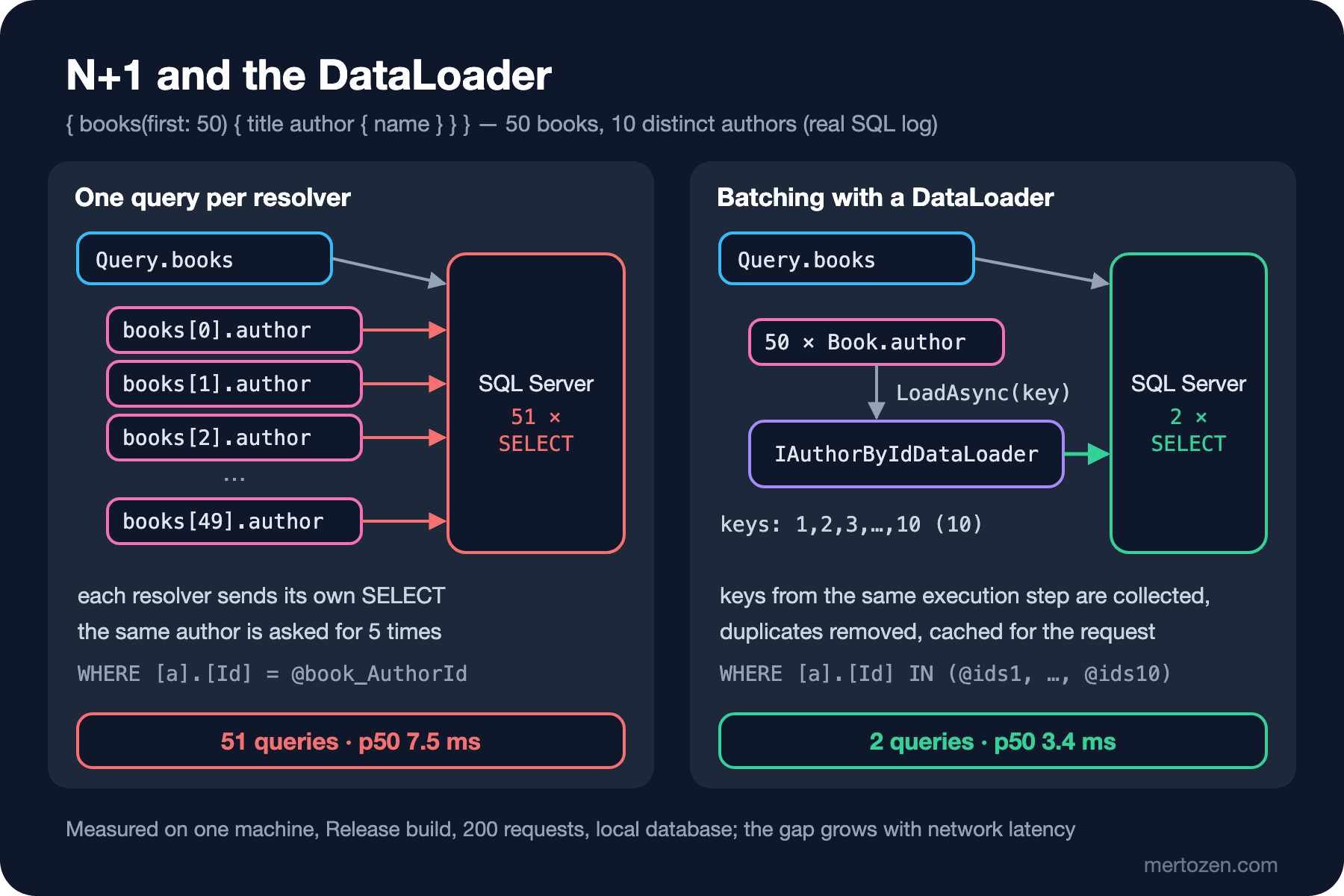
The idea behind a DataLoader is simple: a resolver says "give me the author with this id" but doesn't go to the database right away. Other resolvers in the same execution step ask for authors too; when that step is done, Hot Chocolate hands all the collected keys to the DataLoader in a single call. In Hot Chocolate 16 you write a DataLoader as a static method with the [DataLoader] attribute, and the source generator produces the class and interface:
public static class AuthorDataLoaders
{
    [DataLoader]
    public static async Task<Dictionary<int, Author>> GetAuthorByIdAsync(
        IReadOnlyList<int> ids,
        BookstoreContext db,
        CancellationToken cancellationToken) =>
        await db.Authors
            .AsNoTracking()
            .Where(a => ids.Contains(a.Id))
            .ToDictionaryAsync(a => a.Id, cancellationToken);

    [DataLoader]
    public static async Task<ILookup<int, Book>> GetBooksByAuthorIdAsync(
        IReadOnlyList<int> authorIds,
        BookstoreContext db,
        CancellationToken cancellationToken)
    {
        List<Book> books = await db.Books
            .AsNoTracking()
            .Where(b => authorIds.Contains(b.AuthorId))
            .OrderBy(b => b.Id)
            .ToListAsync(cancellationToken);
        return books.ToLookup(b => b.AuthorId);
    }
}
The first is a batch DataLoader: one value per key, with a Dictionary return type. The second is a group DataLoader: several values per key, with an ILookup return type, for one-to-many relations like "this author's books". The generator drops the Get prefix and the Async suffix from the method name and produces the IAuthorByIdDataLoader and IBooksByAuthorIdDataLoader interfaces. I wrote no extra registration; AddCatalogTypes() added these too. The resolvers now see the DataLoader instead of the database:
[ObjectType<Book>]
public static partial class BookNode
{
    public static async Task<Author?> GetAuthorAsync(
        [Parent] Book book,
        IAuthorByIdDataLoader authorById,
        CancellationToken cancellationToken) =>
        await authorById.LoadAsync(book.AuthorId, cancellationToken);
}

[ObjectType<Author>]
public static partial class AuthorNode
{
    public static async Task<Book[]> GetBooksAsync(
        [Parent] Author author,
        IBooksByAuthorIdDataLoader booksByAuthorId,
        CancellationToken cancellationToken) =>
        await booksByAuthorId.LoadAsync(author.Id, cancellationToken) ?? [];
}
Same query, same 50 books:
SELECT TOP(@p) [b].[Id], [b].[AuthorId], ... FROM [Books] AS [b] ORDER BY [b].[Id]

Executed DbCommand (3ms) [Parameters=[@ids1='?' (DbType = Int32), @ids2='?' (DbType = Int32), ... @ids10='?' (DbType = Int32)], ...]
SELECT [a].[Id], [a].[Bio], [a].[Name]
FROM [Authors] AS [a]
WHERE [a].[Id] IN (@ids1, @ids2, @ids3, @ids4, @ids5, @ids6, @ids7, @ids8, @ids9, @ids10)
51 queries became 2. The IN list has 10 parameters, not 50: the DataLoader removed duplicate keys before sending the batch. The same measurement gave p50 3.4 ms, p95 5.3 ms.
The DataLoader's third job is a per-request cache. This query goes from book to author, from the author to their books, and from there back to the author:
{ books(first: 3) { title author { name books { title author { name } } } } }SELECT TOP(@p) ... FROM [Books] AS [b] ORDER BY [b].[Id]
SELECT [a].[Id], [a].[Bio], [a].[Name] FROM [Authors] AS [a] WHERE [a].[Id] IN (@ids1, @ids2, @ids3)
SELECT [b].[Id], [b].[AuthorId], ... FROM [Books] AS [b] WHERE [b].[AuthorId] IN (@authorIds1, @authorIds2, @authorIds3) ORDER BY [b].[Id]Three levels deep, still three queries. There's no fourth query for the innermost authors; authors 1, 2 and 3 were already loaded in this request and the DataLoader served them from its cache. That cache lives for a single request only; it isn't a cross-request cache and carries no stale-data risk.
Batch Resolvers: Hot Chocolate 16's New Way
For the DataLoader we wrote two pieces: a loader and a resolver that calls it. Hot Chocolate 16's [BatchResolver] brings this down to a single method; instead of one parent, the resolver receives every parent that asked for the field at once:
[BatchResolver]
public static async Task<List<Author?>> GetAuthorAsync(
    [Parent(requires: nameof(Book.AuthorId))] List<Book> books,
    BookstoreContext db,
    CancellationToken cancellationToken)
{
    int[] ids = [.. books.Select(b => b.AuthorId).Distinct()];
    Dictionary<int, Author> authors = await db.Authors
        .AsNoTracking()
        .Where(a => ids.Contains(a.Id))
        .ToDictionaryAsync(a => a.Id, cancellationToken);
    return [.. books.Select(b => authors.GetValueOrDefault(b.AuthorId))];
}

[BatchResolver]
public static async Task<List<int>> GetSoldCountAsync(
    [Parent(requires: nameof(Book.Id))] List<Book> books,
    BookstoreContext db,
    CancellationToken cancellationToken)
{
    int[] ids = [.. books.Select(b => b.Id)];
    Dictionary<int, int> sold = await db.Set<OrderItem>()
        .Where(i => ids.Contains(i.BookId))
        .GroupBy(i => i.BookId)
        .Select(g => new { BookId = g.Key, Quantity = g.Sum(i => i.Quantity) })
        .ToDictionaryAsync(x => x.BookId, x => x.Quantity, cancellationToken);
    return [.. books.Select(b => sold.GetValueOrDefault(b.Id))];
}
The returned list must be in the same order as the parent list; if you return too few elements, the extra parents silently get null. [Parent(requires: ...)] states which property of the parent is needed; with projection in play this information is critical, as we'll see shortly. { books(first: 50) { title soldCount author { name } } } ran with three queries: the books, the authors with WHERE [a].[Id] IN (...), and the sales totals with GROUP BY [o].[BookId]. An aggregate like soldCount is the natural home of a batch resolver: not an entity loaded by key, but a field-specific calculation.
Two practical notes. First, the documentation also accepts IReadOnlyList<Book> for the parent parameter, but 16.7.5's source generator produced code that didn't compile with that type (CS0144, cannot create an instance of an interface); it compiled with List<Book>. The second is more serious: when the same request had a second root field, queries with a batch resolver never returned. { a: books(first: 2) { soldCount } b: books(first: 2) { title } } waited 70 seconds without a response; not even Hot Chocolate's default 30-second execution timeout kicked in. Queries with a single root field worked fine. To narrow it down I wrote a synchronous batch resolver that returns the title's length and never touches the database (titleLength); it worked on its own and hung the same way once a second root field was added. There are two open issues describing this behaviour in the Hot Chocolate repository (#9892 and #10416). Before using batch resolvers in a new project, try them with your own query shapes; for the rest of this post I continue with DataLoaders.
The difference in one sentence: a DataLoader batches and caches by key, merging requests that come from different fields, types and depths; a batch resolver batches by field and doesn't cache. Loading an entity by its id calls for a DataLoader; a field-specific calculation calls for a batch resolver.
Using Projection and DataLoaders Together
The DataLoader version has a flaw visible in the log: SELECT [a].[Id], [a].[Bio], [a].[Name]. The client asked only for name, yet Bio came along. The [UseProjection] from the previous post doesn't work here, because the author is now loaded through a DataLoader rather than an IQueryable. Hot Chocolate 16 brings QueryContext<T> for this: it turns the resolver's selection set into a projection, filter and sort definition, and With applies it both to a DataLoader and to an IQueryable:
[DataLoader]
public static async Task<Dictionary<int, Author>> GetAuthorByIdAsync(
    IReadOnlyList<int> ids,
    QueryContext<Author> query,
    BookstoreContext db,
    CancellationToken cancellationToken) =>
    await db.Authors
        .AsNoTracking()
        .Where(a => ids.Contains(a.Id))
        .With(query)
        .ToDictionaryAsync(a => a.Id, cancellationToken);

public static async Task<Author?> GetAuthorAsync(
    [Parent] Book book,
    IAuthorByIdDataLoader authorById,
    QueryContext<Author> query,
    CancellationToken cancellationToken) =>
    await authorById.With(query).LoadAsync(book.AuthorId, cancellationToken);
I gave the book list the same QueryContext<Book> (the code is in the pagination section). The first attempt was silently wrong:
{"data":{"books":{"nodes":[{"title":"Distributed Systems Vol. 1","author":null},{"title":"Protobuf Vol. 1","author":null},{"title":"Streaming Vol. 1","author":null}]}}}

SELECT TOP(@p) [b].[Title], [b].[Id], [b].[Price] FROM [Books] AS [b] ORDER BY [b].[Price], [b].[Id]
SELECT [a].[Name] FROM [Authors] AS [a] WHERE [a].[Id] = @ids1
No error at all, and every author is null. The book query didn't select AuthorId: projection only knows the fields visible in the query and can't know that the resolver needs AuthorId to resolve author. Every book came back with AuthorId 0, and the DataLoader was called with a single key (@ids1). The fix is to declare the resolver's needs: [Parent(requires: nameof(Book.AuthorId))] Book book. This time the book query selected [b].[AuthorId], but the result still wasn't right: every author came back with "Unexpected Execution Error". The author query was SELECT [a].[Name]; since Id wasn't selected, ToDictionaryAsync(a => a.Id) tried to put every author under key 0. The DataLoader's key has to be added to the projection explicitly:
await authorById.With(query).Include(a => a.Id).LoadAsync(book.AuthorId, cancellationToken);SELECT TOP(@p) [b].[AuthorId], [b].[Title], [b].[Id], [b].[Price] FROM [Books] AS [b] ORDER BY [b].[Price], [b].[Id]
SELECT [a].[Name], [a].[Id] FROM [Authors] AS [a] WHERE [a].[Id] IN (@ids1, @ids2, @ids3)Now both sides select only what's needed. But projection has one more cost for the DataLoader. A query asking for the same authors with two different selections:
{ a: books(first: 3) { nodes { author { name } } } b: books(first: 3) { nodes { author { name bio } } } }

SELECT [a].[Name], [a].[Id] FROM [Authors] AS [a] WHERE ...
SELECT [a].[Bio], [a].[Name], [a].[Id] FROM [Authors] AS [a] WHERE ...
The same three authors were loaded twice. Different projections land in separate branches of the DataLoader and can't use each other's cache; a DataLoader without projection would have sent a single query here. As a rule: for entities with wide columns (text, JSON (JavaScript Object Notation), binary) a projecting DataLoader pays off; for narrow tables, fetching all columns once and sharing the cache is often cheaper. Don't guess which one wins, count it in the SQL log.
Pagination: Offset, Cursor and Keyset
So far books(first: 50) was an arbitrary limit; a client could just as well write first: 100000. The established shape of list pagination in GraphQL is the Relay connection: edges (each with a cursor and a node), nodes as a shortcut, and pageInfo (hasNextPage, endCursor...). The first attempt is [UsePaging] on an IQueryable:
[UsePaging(IncludeTotalCount = true)]
public static IQueryable<Book> GetBooks(BookstoreContext db) =>
    db.Books.AsNoTracking().OrderBy(b => b.Id);
{ books(first: 3) { nodes { id title } pageInfo { hasNextPage endCursor } totalCount } }
{"data":{"books":{"nodes":[{"id":1,...},{"id":2,...},{"id":3,...}],"pageInfo":{"hasNextPage":true,"endCursor":"Mg=="},"totalCount":50}}}
{ books(first: 3, after: "Mg==") { nodes { id title } } }
SELECT [b].[Id], [b].[AuthorId], ... FROM [Books] AS [b]
ORDER BY [b].[Id]
OFFSET @p ROWS FETCH NEXT @p1 ROWS ONLYThe cursor Mg== is a Base64-encoded 2, a zero-based row index. This is offset pagination disguised as a cursor: as pages advance, SQL Server still reads the skipped rows, and if a new book is inserted in between, the next page has a duplicate or a gap. Two of the defaults are useful: 10 items if no page size is given, 50 at most. A query asking for first: 500 got HC0051 with "The maximum allowed items per page were exceeded." The schema also gained @listSize(assumedSize: 50, slicingArguments: ["first", "last"]); cost analysis will use this in the series' security post.
For real keyset pagination I use Hot Chocolate 16's PagingArguments and ToPageAsync pair. ToPageAsync lives in the GreenDonut.Data library that comes with HotChocolate.Data.EntityFramework:
[UseConnection(IncludeTotalCount = true)]
public static async Task<PageConnection<Book>> GetBooksAsync(
    PagingArguments pagingArguments,
    QueryContext<Book> query,
    BookstoreContext db,
    CancellationToken cancellationToken)
{
    Page<Book> page = await db.Books
        .AsNoTracking()
        .With(query, sort => sort.AddAscending(b => b.Price).AddAscending(b => b.Id))
        .ToPageAsync(pagingArguments, cancellationToken);
    return new PageConnection<Book>(page);
}
I also added .AddPagingArguments() to the schema builder. The sort is by price; since prices may not be unique, Id is the second key. In keyset pagination the sort key must be unique, otherwise books with the same price get lost at page boundaries.
{ books(first: 3) { nodes { id title price } pageInfo { endCursor } } }
"endCursor":"e30xNjUuMDA6Mw=="
# Base64-decoded: {}165.00:3

{ books(first: 3, after: "e30xNjUuMDA6Mw==") { nodes { id title price } pageInfo { hasNextPage endCursor } totalCount } }
{"data":{"books":{"nodes":[{"id":4,"title":"Compilers Vol. 1","price":170.00},{"id":5,"title":"GraphQL Vol. 1","price":175.00},{"id":6,"title":"Caching Vol. 1","price":180.00}],"pageInfo":{"hasNextPage":true,"endCursor":"e30xODAuMDA6Ng=="},"totalCount":50}}}

SELECT TOP(@p) (
    SELECT COUNT(*)
    FROM [Books] AS [b0]) AS [TotalCount], [b].[Id], [b].[AuthorId], ...
FROM [Books] AS [b]
WHERE [b].[Price] > @value OR ([b].[Price] = @value AND [b].[Id] > @value2)
ORDER BY [b].[Price], [b].[Id]
The cursor is no longer a row number but the sort keys of the last record: price 165.00 and id 3. The SQL says "the ones after this key"; with an index on (Price, Id) it runs at the same speed whatever page you're on, and inserted rows don't shift the pages. The price is that the client can't say "jump to page 47"; keyset navigates forwards and backwards but doesn't jump to an arbitrary page.
Note the COUNT(*) in the last statement. When totalCount was requested, Hot Chocolate added it to the same query as a subquery. On 50 rows it's free; on a filtered table with millions of rows it means a full count on every page request. Turn IncludeTotalCount on only for screens that really show "X results in total"; an infinite-scroll list is happy with hasNextPage.
Measuring: OpenTelemetry and Query Counts
The SQL log does the job in development; in production you need to read the same information from a trace. I added the HotChocolate.Diagnostics package and OpenTelemetry:
builder.Services
    .AddGraphQLServer()
    // ...
    .AddInstrumentation(o => o.Scopes = ActivityScopes.All);

builder.Services
    .AddOpenTelemetry()
    .WithTracing(tracing => tracing
        .AddAspNetCoreInstrumentation()
        .AddHotChocolateInstrumentation()
        .AddConsoleExporter());
The first attempt had only AddHotChocolateInstrumentation(), and not a single span reached the console. Once I added the ASP.NET Core instrumentation they showed up: Hot Chocolate's spans hang off the HTTP request's span. For query BookList { books(first: 5) { nodes { title author { name } } } }, the spans and their durations on a warmed-up request:
Parse HTTP Request                            00:00:00.0000320
GraphQL Document Validation                   00:00:00.0000430
GraphQL Complexity Analysis                   00:00:00.0000100
Query.books                                   00:00:00.0032150
GraphQL DataLoader Batch QueryDataLoader`2    00:00:00.0027640
          graphql.dataloader.batch.size: 5
Book.author                                   00:00:00.0030930
          graphql.field.path: books.nodes[4].author
Book.author                                   00:00:00.0031260
          graphql.field.path: books.nodes[1].author
...
GraphQL Operation Execution                   00:00:00.0074060
query                                         00:00:00.0076680
GraphQL HTTP POST                             00:00:00.0083450
POST /graphql/{**slug}                        00:00:00.0084740
Hot Chocolate 16 names spans according to the GraphQL semantic conventions. A resolver span is named after the schema coordinate (Query.books, Book.author), with graphql.field.path and graphql.field.schema_coordinate as attributes. The root span carries only the operation type (query), and the operation name (BookList) is in the graphql.operation.name attribute; this keeps span-name cardinality low. The DataLoader batch is a separate span, and graphql.dataloader.batch.size shows how many keys went in one go. On the first (cold) request the GraphQL Complexity Analysis span also carried graphql.operation.fieldCost: 61; we'll come back to that number in the security post. N+1 is easy to recognise in a trace: dozens of Book.author spans under a single Query.books and no DataLoader batch span means each one is sending its own query.
A note: ActivityScopes.All produces a span for every resolver; for a list of 50 books that means 50 Book.author spans. In production, limit this with sampling or enable only the request, operation and DataLoader scopes.
Production Notes
Measure performance claims with real requests and query counts. I didn't use BenchmarkDotNet here; a micro-benchmark of a resolver says little about GraphQL execution running together with the network and the database. Sending the same query hundreds of times on a Release build and looking at p50/p95 and the number of Executed DbCommand lines is both simple and honest.
Watch the DataLoader's IN list. 50 keys mean 50 SQL parameters; the default batch size is 1024 and SQL Server accepts at most 2100 parameters per request. Lower MaxBatchSize for very large lists.
Give every DataLoader its own DbContext. The rule from the previous post applies here too: DataLoader batches can run at the same time as resolvers, and a DbContext can't be shared. In this post's setup (a pooled factory and RegisterDbContextFactory), the BookstoreContext I passed as a parameter to the source-generated DataLoader worked without problems. In handwritten DataLoader classes, take IDbContextFactory<BookstoreContext> from the constructor and create and dispose a new context for every batch.
Make pagination the default. Constrain clients with MaxPageSize and RequirePagingBoundaries, and design every field whose list can grow without limit as a connection. Turning a plain list into a connection later is a breaking schema change.
Common Pitfalls
Assuming the change tracker prevents N+1. FirstOrDefaultAsync goes to the database on every call. FindAsync checks the change tracker first, but it only knows entities the same DbContext loaded earlier; on a GraphQL server that uses a separate DbContext per resolver this almost never helps.
Not declaring a resolver's needs in a projected query. Without [Parent(requires: ...)] the foreign key isn't selected and the related field comes back null without any error.
Dropping the DataLoader's key column from the projection. Without Include(a => a.Id) the dictionary fills up with the wrong keys.
Keyset pagination on a non-unique key. If you sort by price alone, records with the same price get lost at page boundaries; always add a unique column as the last key.
Mistaking [UsePaging]'s cursor for keyset. The cursor it produces on an IQueryable is a row index and turns into OFFSET in SQL.
A Small Experiment
★☆☆ Using the Author.books field backed by the BooksByAuthorId DataLoader, write a query that fetches 10 authors and their books, and count the queries in the SQL log. Then add each book's author to the same query; did the number change?
★★☆ Compare the SQL of two queries, one with totalCount and one without. Add 200,000 rows to the Books table and measure the keyset page and the COUNT(*) with and without a (Price, Id) index using SQL Server's execution plan.
★★★ Turn Author.books from a group DataLoader into a paged field that returns each author's first 3 books. Find in the documentation how to pass PagingArguments to a DataLoader in Hot Chocolate 16, and check whether the generated SQL is a separate query per author or a single query.
Queries are now fast and paged, but a client can still write a query that goes ten levels deep from author to book and back, or multiply the same field with a hundred aliases. In the next post we talk about operating GraphQL safely: cost analysis, persisted operations, authorization and schema evolution.