

gRPC Streaming: Server, Client and Bidirectional Streaming with Backpressure
In gRPC streaming, HTTP/2 flow control brakes a slow consumer; with many subscribers you put a bounded Channel per subscriber in between, close the one that can't keep up, and let it resume from its last sequence number. With stock watching, bulk updates from a CSV file and barcode scanning at the till, we show all three streaming types, keepalive and resync with real output.
Version note: The code in this post was built and run with .NET 10 and Grpc.AspNetCore 2.85.
Guess First
Handheld terminals in the warehouse subscribe to Inventory and watch stock changes live. One terminal has weak Wi-Fi and can only read about 200 messages a second. Meanwhile a supplier delivery is entered into the system and 3000 stock changes happen within a few seconds.
What happens on the server? Do unread messages pile up in memory without limit? Does the code that updates stock slow down waiting for the slow terminal? Or are messages silently dropped? And think about this one: if the terminal stops reading altogether, how many messages can the server still send it?
Three Streaming RPCs in the Contract
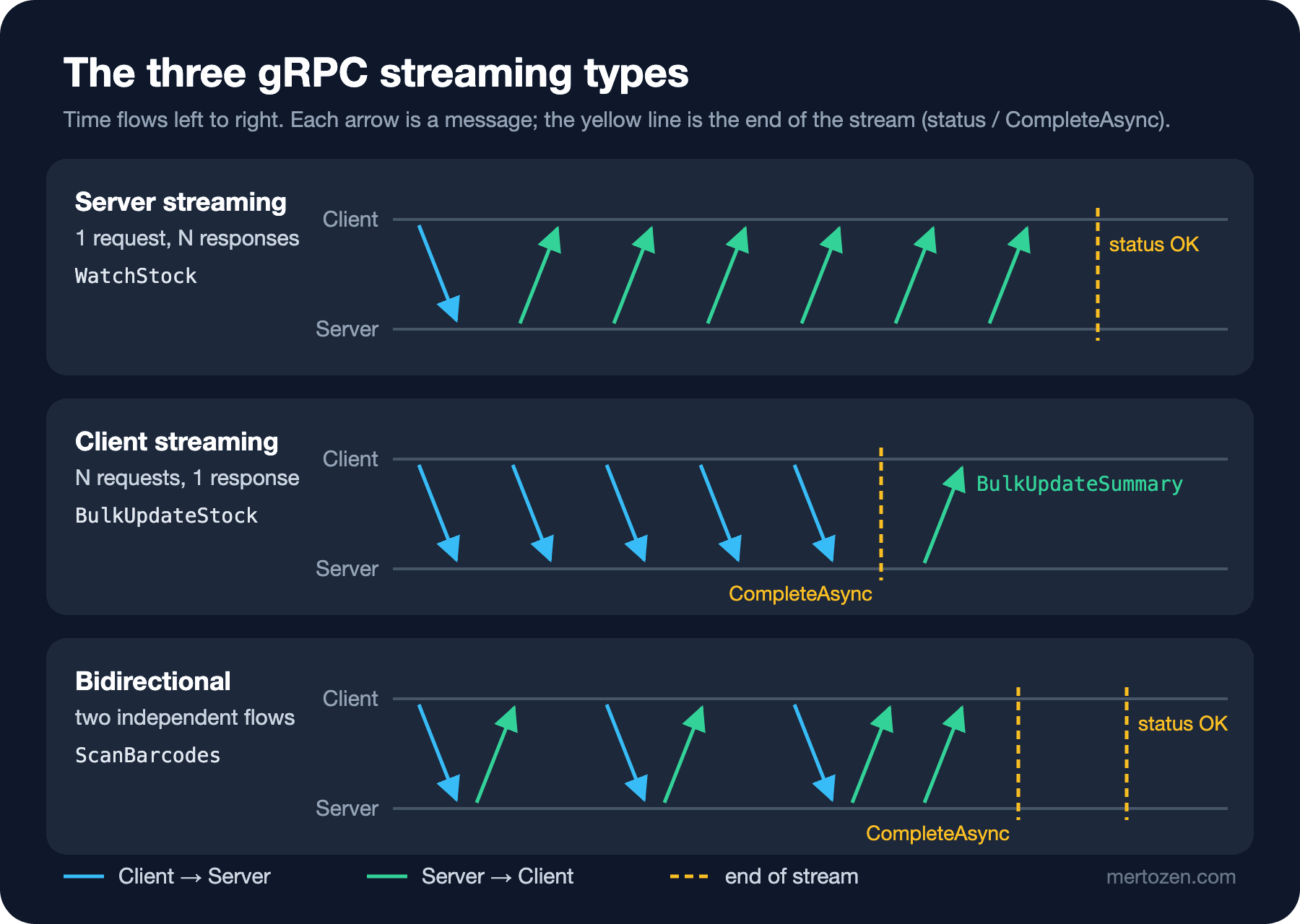
In a unary call one request goes out and one response comes back; both are part of a single HTTP request. With streaming, one or both sides send several messages over the same HTTP/2 request. We add three RPCs to inventory.proto:
service InventoryService {
  rpc GetStock (GetStockRequest) returns (GetStockResponse);
  rpc ReserveStock (ReserveStockRequest) returns (ReserveStockResponse);
  rpc ReleaseStock (ReleaseStockRequest) returns (ReleaseStockResponse);

  rpc WatchStock (WatchStockRequest) returns (stream StockChanged);
  rpc BulkUpdateStock (stream StockAdjustment) returns (BulkUpdateSummary);
  rpc ScanBarcodes (stream BarcodeScan) returns (stream ScanResult);
}

message WatchStockRequest {
  repeated string book_ids = 1;
  int64 after_sequence = 2;
}

message StockChanged {
  int64 sequence = 1;
  string book_id = 2;
  int32 available = 3;
  google.protobuf.Timestamp changed_at = 4;
}

message StockAdjustment {
  string book_id = 1;
  int32 delta = 2;
  string reason = 3;
}

message BulkUpdateSummary {
  int32 applied = 1;
  int32 rejected = 2;
  repeated string errors = 3;
}

message BarcodeScan {
  string isbn = 1;
}

message ScanResult {
  string isbn = 1;
  bool found = 2;
  string title = 3;
  bookstore.common.v1.Money price = 4;
  bookstore.common.v1.Money basket_total = 5;
}
Adding new RPCs and messages is backward compatible by the rules of the first post: old clients don't know these methods, but their existing calls aren't affected. Where the stream keyword sits determines the kind: only on the return type means server streaming, only on the parameter means client streaming, on both means bidirectional.
Server Streaming: WatchStock
A server streaming method receives one request and writes to an IServerStreamWriter<T> as many times as it wants. When the method returns, the stream ends and the client receives the status (normally OK). Inventory's service class is now partial; the streaming methods live in a separate file:
public override async Task WatchStock(
    WatchStockRequest request, IServerStreamWriter<StockChanged> responseStream, ServerCallContext context)
{
    HashSet<Guid> books = [.. request.BookIds.Select((id, i) => ParseBookId(id, $"book_ids[{i}]"))];

    StockSubscription subscription;
    try
    {
        subscription = feed.Subscribe(request.AfterSequence);
    }
    catch (HistoryGoneException ex)
    {
        throw new RpcException(new Grpc.Core.Status(StatusCode.OutOfRange,
            $"Sequence {request.AfterSequence} is gone, oldest is {ex.OldestSequence}. Resync with GetStock."));
    }

    using (subscription)
    {
        int written = 0;
        try
        {
            foreach (StockChange change in subscription.Replay.Where(c => books.Count == 0 || books.Contains(c.BookId)))
            {
                await responseStream.WriteAsync(ToMessage(change), context.CancellationToken);
                written++;
            }

            await foreach (StockChange change in subscription.Reader.ReadAllAsync(context.CancellationToken))
            {
                if (books.Count == 0 || books.Contains(change.BookId))
                {
                    // if the client doesn't read, HTTP/2 flow control makes us wait here
                    await responseStream.WriteAsync(ToMessage(change), context.CancellationToken);
                    written++;
                }
            }
        }
        catch (SlowConsumerException ex)
        {
            logger.LogWarning("WatchStock closed after {Written} messages: {Reason}", written, ex.Message);
            throw new RpcException(new Grpc.Core.Status(StatusCode.ResourceExhausted, ex.Message));
        }
    }
}
feed is a small class (StockChangeFeed) that publishes a notification whenever stock changes; we'll look inside it shortly. The method's shape is: subscribe, send any missed changes (Replay), then write new ones as they arrive. The await foreach runs until the client closes the connection or cancels. When cancellation arrives, context.CancellationToken fires, the loop exits with OperationCanceledException, and using cleans up the subscription. On the client side, cancelling is the only way to stop a stream; in server streaming there's no request channel through which the client could say "that's enough".
On the client, ResponseStream.ReadAllAsync() turns the stream into an IAsyncEnumerable<T>. The await foreach we covered in the C# Async series works here directly. What a terminal saw while subscribed for five seconds as another process sent a bulk update:
#1 3f2c9a1e available=17
#2 c4a7e2d9 available=38
#3 c4a7e2d9 available=48
received=3 last=#3
Each change carries a sequence number. For now it only shows that changes arrive in order; its real job, resuming a broken stream where it left off, comes in the second half of the post.
Client Streaming: Bulk Stock Updates from a CSV File
After a warehouse count you have a CSV file: book, delta and reason. Instead of a separate unary call per row, we open a single client streaming call; rows are sent as they are read and the server returns one summary at the end:
public override async Task<BulkUpdateSummary> BulkUpdateStock(
    IAsyncStreamReader<StockAdjustment> requestStream, ServerCallContext context)
{
    var summary = new BulkUpdateSummary();

    await foreach (StockAdjustment adjustment in requestStream.ReadAllAsync(context.CancellationToken))
    {
        string? error = Guid.TryParse(adjustment.BookId, out Guid bookId)
            ? store.Adjust(bookId, adjustment.Delta)
            : "invalid book id";

        if (error is null)
        {
            summary.Applied++;
            continue;
        }

        summary.Rejected++;
        if (summary.Errors.Count < 20)
        {
            summary.Errors.Add($"{adjustment.BookId}: {error}");
        }
    }

    return summary;
}
A bad row doesn't fail the whole operation; we count the rejected ones and put the first twenty in the summary. The cap on the error list is about message size: in a file of a hundred thousand rows where every row is bad, the summary would be huge too. The client:
using (AsyncClientStreamingCall<StockAdjustment, BulkUpdateSummary> bulk = inventory.BulkUpdateStock(
    deadline: DateTime.UtcNow.AddSeconds(30)))
{
    foreach (string line in File.ReadLines(args[1]).Skip(1))
    {
        string[] parts = line.Split(',');
        await bulk.RequestStream.WriteAsync(new StockAdjustment
        {
            BookId = parts[0],
            Delta = int.Parse(parts[1]),
            Reason = parts[2]
        });
    }

    // the "no more messages" signal; forget it and the server waits forever
    await bulk.RequestStream.CompleteAsync();

    BulkUpdateSummary summary = await bulk;
    Console.WriteLine($"applied={summary.Applied} rejected={summary.Rejected}");
    foreach (string error in summary.Errors)
    {
        Console.WriteLine($"  {error}");
    }
}
applied=3 rejected=2
8b1d4e6a-2c3f-4a5b-9e7d-1f0a2b3c4d5e: would go negative (1 -3)
not-a-guid: invalid book idCompleteAsync is the critical line. The server's await foreach only ends when the client closes the stream; forget this line and the server waits in its loop while the client waits on await bulk. Because you set a deadline, at least it won't last forever. Note the choice of File.ReadLines too: it reads the file line by line, so you can stream a CSV of a million rows without loading it into memory.
Bidirectional Streaming: Scanning Barcodes at the Till
Each time a barcode is scanned at the till, the book's title, its price and the basket's running total should appear on screen. That's a conversation in which the two directions flow independently:
public override async Task ScanBarcodes(
    IAsyncStreamReader<BarcodeScan> requestStream, IServerStreamWriter<ScanResult> responseStream, ServerCallContext context)
{
    decimal basketTotal = 0m;

    await foreach (BarcodeScan scan in requestStream.ReadAllAsync(context.CancellationToken))
    {
        StockItem? item = store.FindByIsbn(scan.Isbn);
        var result = new ScanResult { Isbn = scan.Isbn, Found = item is not null };

        if (item is not null)
        {
            basketTotal += item.UnitPrice;
            result.Title = item.Title;
            result.Price = ToMoney(item.UnitPrice);
        }

        result.BasketTotal = ToMoney(basketTotal);
        await responseStream.WriteAsync(result, context.CancellationToken);
    }
}
The basket total lives in a local variable; it lasts for the lifetime of the call and isn't shared with any other till. On the server, the stream behaves like a natural session. On the client, reading and writing need to be separated:
using (AsyncDuplexStreamingCall<BarcodeScan, ScanResult> till = inventory.ScanBarcodes(
    deadline: DateTime.UtcNow.AddMinutes(5)))
{
    // reading and writing on separate tasks: responses arrive at their own pace
    Task reader = Task.Run(async () =>
    {
        await foreach (ScanResult result in till.ResponseStream.ReadAllAsync())
        {
            Console.WriteLine(result.Found
                ? $"{result.Isbn} {result.Title,-28} {result.Price.Amount.ToDecimal(),7}  total {result.BasketTotal.Amount.ToDecimal()}"
                : $"{result.Isbn} not found                          total {result.BasketTotal.Amount.ToDecimal()}");
        }
    });

    foreach (string isbn in new[] { "9780000000001", "9780000000003", "9789999999999", "9780000000001" })
    {
        await till.RequestStream.WriteAsync(new BarcodeScan { Isbn = isbn });
        await Task.Delay(300);
    }

    await till.RequestStream.CompleteAsync();
    await reader;
}
9780000000001 Distributed Systems Primer 249.9 total 249.9
9780000000003 Streaming in Practice 320.5 total 570.4
9789999999999 not found total 570.4
9780000000001 Distributed Systems Primer 249.9 total 820.3If you don't read on a separate task and instead build a write-read-write-read sequence assuming "every write gets one response", you'll deadlock the first time the server answers a message with zero or two responses. In bidirectional streaming the two directions really are independent; the protocol doesn't guarantee "one request, one response".
Backpressure: How a Slow Consumer Brakes the Server
Let's start with the second opening question: what happens if the client doesn't read at all? I subscribed a terminal and let it wait four seconds without reading a single message, while sending a load that produced 1000 changes a second. Then it started reading:
read after stall: 1385
ResourceExhausted: Subscriber buffer full at sequence 1389.
The server's log reports the same number: WatchStock closed after 1385 messages. Of those 1385 messages, 256 were waiting in our own buffer, which we'll see in a moment. The other roughly 1130 messages, about 60 bytes each, some 70 KB in total, had already gone out even though the client wasn't reading. Then WriteAsync started waiting. That's HTTP/2 flow control at work: every stream and connection has a receive window; as long as the receiver doesn't read, the window fills up and the sender stops. This is exactly why the Task returned by WriteAsync matters in gRPC: awaiting it means keeping pace with the other side.
This mechanism is great for a single stream. But we don't have a single producer: stock changes come from ReserveStock, bulk updates and the till, and dozens of terminals are subscribed. The producer can't wait on the slowest terminal's WriteAsync; if it did, one terminal's weak Wi-Fi would slow down every reservation. We put a bounded Channel<T> per subscriber in between. It's the same producer/consumer bridge as in the Channels post of the C# Async series:
public void Publish(Guid bookId, int available)
{
    lock (_gate)
    {
        var change = new StockChange(++_sequence, bookId, available, DateTimeOffset.UtcNow);
        _history.Enqueue(change);
        if (_history.Count > HistorySize)
        {
            _history.Dequeue();
        }

        foreach (Channel<StockChange> subscriber in _subscribers.ToArray())
        {
            // the producer never waits: a subscriber that can't keep up gets its stream closed
            if (!subscriber.Writer.TryWrite(change))
            {
                subscriber.Writer.TryComplete(new SlowConsumerException(change.Sequence));
                _subscribers.Remove(subscriber);
            }
        }
    }
}
Each subscriber's channel is created with Channel.CreateBounded<StockChange>(256) and FullMode = BoundedChannelFullMode.Wait. In Wait mode TryWrite doesn't wait; if the channel is full it returns false. There were three options here. Waiting (ties the producer to the slowest subscriber). Dropping the oldest (DropOldest; tempting for "last value wins" data like stock, but the client doesn't know which message it missed). Or what we did: closing the subscription with an error. When the channel is completed with an exception, the server's await foreach sends the messages left in the buffer and then throws the exception, which we turn into a ResourceExhausted status. The client sees the break explicitly and can choose to continue from the last sequence it received.
That's also the answer to the first opening question: server memory doesn't grow without limit (256 messages per subscriber plus the window on the wire), the code that updates stock doesn't wait, and no message is silently dropped.
Long-Lived Streams: Keepalive and Resuming Where You Left Off
A watch stream stays open for hours. Two things can kill it in that time. The first is idle timeouts on network devices in between: for nginx's gRPC proxy, grpc_read_timeout defaults to 60 seconds and applies to the time between two reads; if stock doesn't change for a minute, the connection is cut. The second is real network drops and server restarts.
At connection level, HTTP/2 PING frames help. On the client they're turned on with SocketsHttpHandler:
var handler = new SocketsHttpHandler
{
    PooledConnectionIdleTimeout = Timeout.InfiniteTimeSpan,
    KeepAlivePingDelay = TimeSpan.FromSeconds(5), // short, for the experiment
    KeepAlivePingTimeout = TimeSpan.FromSeconds(10),
    EnableMultipleHttp2Connections = true
};
using (GrpcChannel keepAliveChannel = GrpcChannel.ForAddress("http://localhost:5101", new GrpcChannelOptions { HttpHandler = handler }))
{
    await WatchAsync(new InventoryService.InventoryServiceClient(keepAliveChannel), TimeSpan.Zero, TimeSpan.FromSeconds(int.Parse(args[1])));
}
I raised Kestrel's HTTP/2 logs to Trace and opened an idle watch stream:
00:28:13 trce: Microsoft.AspNetCore.Server.Kestrel.Http2[37]
      Connection id "0HNQ1PK32GTJP" received HEADERS frame for stream ID 1 with length 217 and flags END_HEADERS.
00:28:19 trce: Microsoft.AspNetCore.Server.Kestrel.Http2[37]
      Connection id "0HNQ1PK32GTJP" received PING frame for stream ID 0 with length 8 and flags NONE.
00:28:26 trce: Microsoft.AspNetCore.Server.Kestrel.Http2[37]
      Connection id "0HNQ1PK32GTJP" received PING frame for stream ID 0 with length 8 and flags NONE.
00:28:32 trce: Microsoft.AspNetCore.Server.Kestrel.Http2[37]
      Connection id "0HNQ1PK32GTJP" received PING frame for stream ID 0 with length 8 and flags NONE.
Once the silence passes five seconds, the PINGs start. In production 30–60 seconds is reasonable; 5 seconds was only for the experiment. Two warnings: a server that doesn't support PINGs may ignore the first few and then close the connection with GOAWAY, so don't turn them on without checking the server's support. In Kestrel the server side has Limits.Http2.KeepAlivePingDelay and KeepAlivePingTimeout. More importantly, a PING keeps the connection alive but doesn't reset a proxy's "no data flowed on this stream" timer, as in nginx. For a rarely changing feed you may need to send a periodic application-level heartbeat message.
Since disconnects are inevitable, the client has to be able to resume where it left off. That's what the sequence number and the feed's history of the last 10,000 changes are for. The client resubscribes with the last sequence it saw; the server first sends the changes in between via Replay:
while (!stop.IsCancellationRequested)
{
    try
    {
        using AsyncServerStreamingCall<StockChanged> call = inventory.WatchStock(
            new WatchStockRequest { AfterSequence = lastSequence },
            cancellationToken: stop.Token);

        await foreach (StockChanged change in call.ResponseStream.ReadAllAsync(stop.Token))
        {
            if (lastSequence > 0 && change.Sequence != lastSequence + 1)
            {
                Console.WriteLine($"gap: {lastSequence} -> {change.Sequence}");
            }

            lastSequence = change.Sequence;
            backoff = TimeSpan.FromMilliseconds(250);
            if (++received <= 3 || readDelay == TimeSpan.Zero)
            {
                Console.WriteLine($"#{change.Sequence} {change.BookId[..8]} available={change.Available}");
            }

            await Task.Delay(readDelay);
        }
    }
    catch (RpcException ex) when (ex.StatusCode is StatusCode.ResourceExhausted or StatusCode.Unavailable)
    {
        // resume where we left off: resubscribe with the last sequence seen
        Console.WriteLine($"{ex.StatusCode}: {ex.Status.Detail} resume after #{lastSequence}");

        // if the server is down, don't reconnect in a tight loop: wait, doubling each time
        await Task.Delay(backoff, stop.Token).ConfigureAwait(ConfigureAwaitOptions.SuppressThrowing);
        backoff = TimeSpan.FromTicks(Math.Min(backoff.Ticks * 2, TimeSpan.FromSeconds(10).Ticks));
        continue;
    }
    catch (RpcException ex) when (ex.StatusCode == StatusCode.OutOfRange)
    {
        // the history window was missed: re-read the current state, continue with the live feed
        GetStockResponse snapshot = await inventory.GetStockAsync(
            new GetStockRequest { BookId = ThirdBook }, deadline: DateTime.UtcNow.AddSeconds(2));
        Console.WriteLine($"{ex.StatusCode}: resync, {ThirdBook[..8]} available={snapshot.Available}");
        lastSequence = 0;
    }
    catch (RpcException ex) when (ex.StatusCode == StatusCode.Cancelled)
    {
        break;
    }
    catch (OperationCanceledException)
    {
        break;
    }
}
First the opening scenario: a slow terminal spending 5 ms per message, and 3000 changes arriving fast.
#2004 c4a7e2d9 available=47
#2005 c4a7e2d9 available=48
#2006 c4a7e2d9 available=47
ResourceExhausted: Subscriber buffer full at sequence 3384. resume after #3383
received=3000 last=#5003
The terminal fell behind, the server closed the stream with ResourceExhausted, the terminal resubscribed from 3383 and received the rest via replay. The result: 3000 out of 3000 changes, not a single "gap" line. Then I sent the same terminal 15,000 changes:
#5004 c4a7e2d9 available=47
#5005 c4a7e2d9 available=48
#5006 c4a7e2d9 available=47
ResourceExhausted: Subscriber buffer full at sequence 6402. resume after #6401
OutOfRange: resync, c4a7e2d9 available=48
received=1398 last=#0
When the terminal reconnected, 6401 was no longer in the history (the oldest entry was 10004). The server returned OutOfRange, the terminal re-read the current stock from scratch with GetStock and continued with the live feed. How much history to keep is a design decision. Whatever your window, this "resync" path must exist.
Don't forget to wait when reconnecting, either. The first version of this loop had no backoff. When I ran the test without starting the server, the client printed Unavailable: Error connecting to subchannel. thousands of times a second and produced 40 MB of output. Having every terminal try to reconnect in a tight loop at the same moment the server goes down is the quickest way to knock the server over again the moment it comes back up.
When Not to Use Streaming
Live data to the browser. The browser can't speak gRPC streaming directly; with gRPC-Web only server streaming is possible, and that needs extra infrastructure. For live data going to the browser, such as order status or a stock badge, SSE or SignalR, which we compared in the first post of the Real-time Applications series, are more natural.
Large files. gRPC is message-based; every message is loaded into memory in full. Splitting a PDF or a cover image into 64 KB chunks and streaming them is possible, but in ASP.NET Core a plain HTTP endpoint gives you the request and response bodies directly as streams. For files, that's usually simpler.
"Turning everything into a stream for performance." Sending messages on an open bidirectional stream is faster than opening a new unary call each time. But load balancing can't split a stream, and error handling and reconnection become your responsibility. Only consider it when measurements show gRPC is the bottleneck.
In Production
One WriteAsync at a time per stream. Stream writers aren't thread-safe. If you write to the same stream from several sources, put a Channel<T> in between and write from a single loop; that's exactly what we did in WatchStock.
Long streams use up the connection's stream quota. Most servers allow 100 concurrent streams on one HTTP/2 connection; if 100 terminals' watch streams are opened from a single channel, the 101st call (even a GetStock) waits in a queue. EnableMultipleHttp2Connections makes the client open additional connections in that case. We cover the load balancing side in the next post.
Always dispose streaming calls. A call left half-finished keeps running not only on the client but on the server too. That's why the examples have using blocks.
Choose the deadline to match the stream. Put a deadline on streams with a clear end, such as bulk updates and till sessions. A short deadline makes no sense on a watch stream that stays open for hours; there, the cancellation token, keepalive and the reconnect loop do the job.
Look at window sizes for large messages. Kestrel's default stream window is 768 KB; in a service that often receives messages larger than that, data flows in bursts. It can be raised with InitialStreamWindowSize and InitialConnectionWindowSize, but that means more memory per connection.
Common Pitfalls
Forgetting CompleteAsync. In client streaming the server waits for "was that the last message?", the client waits for the response; each waits for the other.
Write-read-write-read in bidirectional streaming. If reading isn't on its own task, you deadlock the first time a message gets no response or two responses.
Unbounded buffers. Saying "it'll read eventually" with Channel.CreateUnbounded or a List<T> turns a slow subscriber into a memory leak for the server.
Not awaiting WriteAsync. Writing fire-and-forget disables flow control's brake, and you get a concurrent-write exception on top.
Treating disconnects as exceptional. Every long-lived stream breaks one day. A watch feed without a sequence number, replay and a resync path silently shows incomplete data at the first network hiccup.
A Small Experiment
★☆☆ Remove the CompleteAsync line from the client streaming example and lower the deadline to 5 seconds. Follow what happens on both sides through the logs.
★★☆ Switch StockChangeFeed to BoundedChannelFullMode.DropOldest and run the slow terminal scenario again. Count the "gap" lines on the client and discuss when that would be acceptable.
★★★ Extend the StockChanged message with a oneof so it can also carry a Heartbeat message. Have the server send a heartbeat when nothing has changed for 20 seconds, and have the client close the connection itself and resubscribe if it receives no message at all for 45 seconds.
Inventory still runs as a single instance. In the next post we go to production: interceptors, JWT authentication, why HTTP/2 doesn't get along with classic load balancers, retries and health checks.