

Measuring GEO: Search Console, Bing AI Performance, Referral Traffic and Server Logs
There is no single measure of AI visibility: the Search Console generative AI report gives impressions only, AI Overviews clicks are merged with Web, Bing AI Performance shows citations and a grounding query sample, and on your side you have referrals and user-initiated fetch logs. We show code that records AI bot and referral events with ASP.NET Core middleware and produces a weekly summary with EF Core, and the limits of prompt panels.
Version note: This post is based on the Google Search Console generative AI (Artificial Intelligence) reports (June 2026, on all sites since August 31, 2026) and the Bing Webmaster Tools AI Performance report (February and June 2026) as of November 2026; the code examples were built and run with .NET 10 and EF (Entity Framework) Core 10.0.14.
Guess First
In the third month of its GEO (Generative Engine Optimization) work, the Bookstore team is preparing a report for management. Management's question is simple: "How many times did we appear in AI answers, and how many visitors did that bring us?" Which of these two numbers do you think you can get from Google, which from Bing, and which from your own logs? Can you tell a click from Google's AI Overviews apart from a normal Google click?
Which Data from Which Channel?
There's no single place to measure AI visibility; each channel gives a piece of the picture, and some pieces are missing entirely. The table below summarizes what the official tools and your own logs can show as of November 2026:
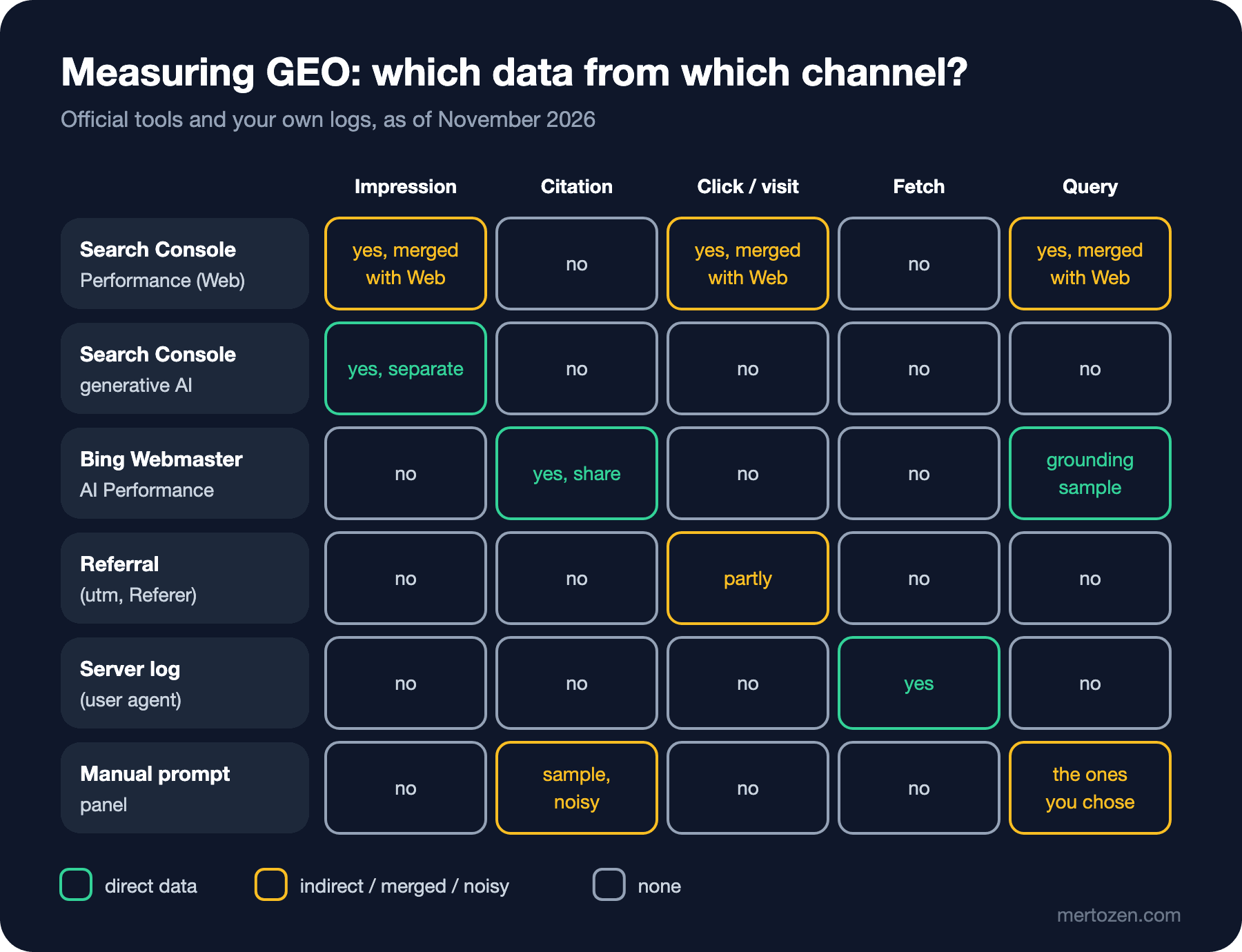
The short answers to the opening questions can be read off the table. The Google side of "how many times did we appear?" is in Search Console's generative AI report as impressions, the Bing side in the AI Performance report as citations. On the Google side of "how many visitors did it bring?", AI Overviews and AI Mode clicks are merged with normal Web clicks; there's no separate number. For some engines such as ChatGPT, a partial answer is possible through referrals.
Search Console: Performance and the Generative AI Report
According to Google's "AI features and your website" page, traffic from AI Overviews and AI Mode is counted in the Performance report under the "Web" search type, as part of the overall data. So there is click, impression and query data, but no way to separate it from classic results.
On June 3, 2026 Google added separate generative AI performance reports to Search Console; as of August 31, 2026 they're on all sites. The report shows how often the site's URLs (Uniform Resource Locator) appeared in the generative AI features in AI Overviews, AI Mode and Discover. The metric described in the announcement is impressions; clicks aren't mentioned. The dimensions are page, country, device (Search results only) and date at hourly, daily, weekly and monthly granularity. This data is also included in the overall Performance report; the new report is a separate view of the same visibility. Google also writes that it will add more metrics over time.
Don't forget two things when reading this report. First, an impression says a page was shown in an AI feature; not that the user saw the link or that the answer was based on your content. Second, if you turn off the "Search generative AI" control in Search Console, this report drops to zero too; record the control's state alongside the report.
Bing Webmaster Tools AI Performance
On February 10, 2026 Bing added the AI Performance report to Webmaster Tools as a public preview. The report shows how much the site is cited in Microsoft Copilot, in AI summaries on Bing and in select partner integrations: total citations, average cited pages per day, a sample of grounding queries (the phrases the AI used to retrieve content), page-level citation counts and a timeline. Bing's own warning matters: the page-level data reflects how often pages are cited, not their importance, ranking or placement.
On June 16, 2026 four more features came to the preview. Intents classifies grounding queries into broad categories such as Informational, Commercial and Navigational. Topics groups related queries into thematic clusters. Citation Share shows your share of all citations shown across all sites for the same grounding query; Bing stresses that it is an observational metric, not a ranking system or a competitive scoreboard. Compare overlays two periods. The report has no click data; visitors from Bing's AI answers have to be looked for in referrals and classic Bing traffic.
Referral Traffic: utm_source and Referer
The first signal you can measure on your own side is a visitor who clicked a link in an AI answer. OpenAI provides the only concrete documentation here: ChatGPT automatically adds the utm_source=chatgpt.com parameter to referral URLs. For the other engines you can only look at the Referer header, and whether that header is sent depends on the browser's referrer policy and the app. That's why the mapping list below is our own list; the rows other than ChatGPT aren't based on official documentation:
namespace Bookstore.Web.Seo;

public static class AiReferrers
{
    // Our own mapping list; only ChatGPT documents a utm_source value (chatgpt.com).
    private static readonly Dictionary<string, string> Hosts = new(StringComparer.OrdinalIgnoreCase)
    {
        ["chatgpt.com"] = "ChatGPT",
        ["perplexity.ai"] = "Perplexity",
        ["www.perplexity.ai"] = "Perplexity",
        ["copilot.microsoft.com"] = "Copilot",
        ["gemini.google.com"] = "Gemini",
        ["claude.ai"] = "Claude",
    };

    public static string? Match(HttpRequest request)
    {
        string? utmSource = request.Query["utm_source"];
        if (utmSource is not null && Hosts.TryGetValue(utmSource, out string? fromUtm))
        {
            return fromUtm;
        }

        return Uri.TryCreate(request.Headers.Referer.ToString(), UriKind.Absolute, out Uri? referrer)
            && Hosts.TryGetValue(referrer.Host, out string? fromHost)
                ? fromHost
                : null;
    }
}
Here's the answer to the second opening question too: no. The referrer of a visitor coming from AI Overviews or AI Mode is Google's own domain; it can't be told apart from a normal Google search. Google-side click data exists only in Search Console, and even there it's merged with Web.
Server Logs: Bots and User-initiated Fetches
The second signal is your own log. I combined the AiBots classifier from the third post of the series and the referral mapping in the same middleware; each event is written to a log line and to a SQLite table:
namespace Bookstore.Web.Seo;

public sealed class AiTrafficMiddleware(RequestDelegate next, ILogger<AiTrafficMiddleware> logger)
{
    public async Task InvokeAsync(HttpContext context, AnalyticsDbContext db)
    {
        await next(context);

        AiBot? bot = AiBots.Match(context.Request.Headers.UserAgent);
        string? referral = bot is null ? AiReferrers.Match(context.Request) : null;
        if (bot is null && referral is null)
        {
            return;
        }

        AiTrafficEvent traffic = new()
        {
            OccurredAt = DateTime.UtcNow,
            Kind = bot is not null ? "bot" : "referral",
            Source = bot?.Token ?? referral!,
            Purpose = bot?.Purpose.ToString(),
            Path = context.Request.Path,
            Status = context.Response.StatusCode,
        };
        logger.LogInformation("AI {Kind} {Source} {Purpose} {Path} -> {Status}",
            traffic.Kind, traffic.Source, traffic.Purpose, traffic.Path, traffic.Status);

        db.AiTraffic.Add(traffic);
        await db.SaveChangesAsync(context.RequestAborted);
    }
}
I sent eleven requests to the local app with curl: one GPTBot, two OAI-SearchBot (OAI: OpenAI), three ChatGPT-User and one Perplexity-User request; two browser requests carrying utm_source=chatgpt.com, one request with Referer: https://www.perplexity.ai/ and one with Referer: https://www.google.com/. This isn't real traffic, it's a local experiment. The lines that landed in the log:
Bookstore.Web.Seo.AiTrafficMiddleware[0] AI bot GPTBot Training /books/async-in-practice -> 200
Bookstore.Web.Seo.AiTrafficMiddleware[0] AI bot OAI-SearchBot Search /books/async-in-practice -> 200
Bookstore.Web.Seo.AiTrafficMiddleware[0] AI bot OAI-SearchBot Search /books/testing-without-fear -> 200
Bookstore.Web.Seo.AiTrafficMiddleware[0] AI bot ChatGPT-User UserFetch /books/async-in-practice -> 200
Bookstore.Web.Seo.AiTrafficMiddleware[0] AI bot ChatGPT-User UserFetch /books/async-in-practice -> 200
Bookstore.Web.Seo.AiTrafficMiddleware[0] AI bot ChatGPT-User UserFetch /books/async-in-practice -> 200
Bookstore.Web.Seo.AiTrafficMiddleware[0] AI bot Perplexity-User UserFetch /books/modeling-bounded-contexts -> 200
Bookstore.Web.Seo.AiTrafficMiddleware[0] AI referral ChatGPT (null) /books/async-in-practice -> 200
Bookstore.Web.Seo.AiTrafficMiddleware[0] AI referral ChatGPT (null) /books/testing-without-fear -> 200
Bookstore.Web.Seo.AiTrafficMiddleware[0] AI referral Perplexity (null) /books/async-in-practice -> 200
The request with the Google referrer is, as expected, not on the list. The most valuable lines in the log are the user-initiated fetches: every ChatGPT-User or Perplexity-User request means that at that moment a user asked something related to your page. That's the most direct trace of AI visibility you can see on your own server. We discussed in the third post of the series that user agents can be spoofed and that verification requires checking the operators' IP (Internet Protocol) lists.
A Weekly Summary Query
The point of writing events to a table is to be able to produce a weekly summary. The endpoint that returns requests and distinct pages per source and purpose:
public record AiTrafficRow(string Kind, string Source, string? Purpose, int Requests, int Pages);

app.MapGet("/internal/ai-traffic/weekly", async (AnalyticsDbContext db, ILogger<AiTrafficRow> logger, CancellationToken ct) =>
{
    DateTime since = DateTime.UtcNow.AddDays(-7);
    IQueryable<AiTrafficRow> query = db.AiTraffic
        .Where(e => e.OccurredAt >= since)
        .GroupBy(e => new { e.Kind, e.Source, e.Purpose })
        .OrderBy(g => g.Key.Kind).ThenByDescending(g => g.Count())
        .Select(g => new AiTrafficRow(g.Key.Kind, g.Key.Source, g.Key.Purpose,
            g.Count(), g.Select(e => e.Path).Distinct().Count()));
    logger.LogInformation("Weekly AI traffic query:\n{Sql}", query.ToQueryString());
    List<AiTrafficRow> rows = await query.ToListAsync(ct);

    IEnumerable<string> lines = rows.Select(r =>
        $"{r.Kind,-9}{r.Source,-16}{r.Purpose ?? "-",-10}{r.Requests,9}{r.Pages,7}");
    return Results.Text(
        $"{"kind",-9}{"source",-16}{"purpose",-10}{"requests",9}{"pages",7}\n" + string.Join('\n', lines) + "\n");
});
The SQL (Structured Query Language) EF Core generated and the endpoint's real output:
SELECT "a"."Kind", "a"."Source", "a"."Purpose", COUNT(*), COUNT(DISTINCT ("a"."Path")) FROM "AiTraffic" AS "a" WHERE "a"."OccurredAt" >= @since GROUP BY "a"."Kind", "a"."Source", "a"."Purpose" ORDER BY "a"."Kind", COUNT(*) DESC

kind     source          purpose    requests  pages
bot      ChatGPT-User    UserFetch         3      1
bot      OAI-SearchBot   Search            2      2
bot      GPTBot          Training          1      1
bot      Perplexity-User UserFetch         1      1
referral ChatGPT         -                 2      2
referral Perplexity      -                 1      1
A note: in my first attempt I wrote the OrderBy after the Select, over the record's properties; EF Core 10 couldn't translate that query and threw a "could not be translated" exception. Ordering on the group, before the projection, solved it and turned into an ORDER BY in the SQL.
Prompt Panels and "AI Visibility" Tools
Because none of these channels fully answers "which questions are we cited for?", many teams set up a manual prompt panel: they pick a list of questions, ask them to AI engines at regular intervals and record the sources in the answers. You can do this, but know what the result measures.
According to the 2026 survey from the fourth post of the series, commercial audits find low source overlap across platforms and large run-to-run variability; asking the same question twice can bring different sources. Personalization, location and session history can change the result. The question list is your choice; it may not represent what users actually ask. The protocol the survey proposes, that is repeated measurement, question variants, control groups and human validation, is the minimum for a panel to mean anything. There's also the rules side: sending bulk automated queries to an engine can run into that engine's terms of use; for Google, sending automated queries to Google Search without permission is explicitly a spam policy matter.
Third-party "AI visibility" tools are the commercial version of these panels. Google's AI optimization guide draws the line in one sentence: no third-party tool has access to Google's internal ranking or AI systems. The "visibility score" such a tool gives is the tool's own sample and model; not an official metric.
Production Notes
Don't write to the database on every request in the middleware. The direct SaveChangesAsync here is a demo; with real traffic it's better to write events to a Channel and save them in batches from a background service, or to send structured logs to a logging platform and query them there. We covered building a producer/consumer with a channel in the "Producer/Consumer with C# Channels" post of the C# series.
Don't store personal data. This table doesn't need IP addresses, full URLs or query strings; source, purpose, path and status are enough.
Report each channel by its own definition. A Search Console impression, a Bing citation and a fetch in your own log are three different things; don't add them up into a single "AI visibility" number.
Keep a change log. Record the generative AI control in Search Console, the bot rules in robots.txt and important content changes with dates; that's the only way to explain a break in the reports.
Common Pitfalls
Thinking you can measure AI Overviews clicks separately. In Search Console they're merged with Web, in the referrer they're the same as Google.
Taking citations for visitors. Bing's citation count and Google's AI impressions don't mean anyone clicked.
Reporting bot traffic without verifying the user agent. A chart of spoofed "GPTBot" traffic looks like a real trend.
Taking a single run of a prompt panel for a trend. Without repetition and controls you've measured variability, not visibility.
A Small Experiment
★☆☆ Open the generative AI report in Search Console for your own site and put the five pages with the most impressions next to their clicks in the Performance report. Write down why these two numbers can't be compared directly.
★★☆ Rewrite AiTrafficMiddleware with a Channel<AiTrafficEvent> and a BackgroundService; save events in batches of 50. Show with the same curl experiment that the weekly summary doesn't change.
★★★ Add a column to the weekly summary: for each page, the ratio of user-initiated fetches to AI referrals. Compute that ratio in the local experiment and write three bullet points on why it could be misleading with real traffic.
The GEO series ends here: we've seen how AI answer engines find sources, Google's guide, the bots, what the research actually shows, llms.txt, building sites for agents and the limits of measurement. The common conclusion is the same as in the SEO (Search Engine Optimization) Fundamentals series: a solid technical foundation, original content and honest measurement. The implementation of the technical foundation is in the Technical SEO series.