

Understanding and Managing AI Bots: Training vs Search vs User-Initiated Fetches
AI bots come in three classes: training crawlers such as GPTBot and ClaudeBot, search bots such as OAI-SearchBot and Claude-SearchBot, and user-initiated fetches such as ChatGPT-User; to opt out of training but stay citable, you block only the first class. We verify robots.txt scenarios against RFC 9309 rules and cover Google's snippet and Search Console controls, mertozen.com's robots.txt and separating AI bots in logs.
Version note: This post is based on the OpenAI, Anthropic, Perplexity and Google crawler documentation as of November 2026; the code examples were built and run with .NET 10.
Guess First
Bookstore's content policy decision is clear: "Our book reviews must not be used to train AI (Artificial Intelligence) models, but they should keep appearing as sources in AI answers." Someone on the team adds a single group at the bottom of robots.txt, User-agent: * with Disallow: /, and at the top an Allow: / for OAI-SearchBot. Does this file implement the decision? And when a user pastes a Bookstore link into ChatGPT and says "give me a short summary of this page", does robots.txt stop that request?
Three Classes: Training, Search and User-initiated Fetches
AI companies' bots fall into three classes by purpose, and each operator states this explicitly in its own documentation:
- Training: collects training data for future models. GPTBot at OpenAI, ClaudeBot at Anthropic. Common Crawl's CCBot collects an open web archive used in training many models. Google has no separate bot; Google-Extended is a robots.txt token that decides whether content crawled by Googlebot may be used to train Gemini models and for grounding in Gemini Apps and Vertex AI.
- Search and index: builds the index of pages to be found at query time. OAI-SearchBot at OpenAI (OAI stands for OpenAI), Claude-SearchBot at Anthropic, PerplexityBot at Perplexity; Googlebot and Bingbot on the Google and Microsoft side.
- User-initiated fetch: fetches a single page right then at a user's request. ChatGPT-User at OpenAI, Claude-User at Anthropic, Perplexity-User at Perplexity.
The third class's relationship with robots.txt is the most overlooked point. OpenAI writes that because ChatGPT-User's actions are initiated by a user, robots.txt rules "may not apply". Perplexity says Perplexity-User "generally ignores" robots.txt rules because a user requested the fetch. Anthropic writes that its bots honor robots.txt and that blocking Claude-User may reduce visibility in user-directed web search. That's why the answer to the second opening question is "it depends on the operator": robots.txt is not a guaranteed brake for this class.
These three classes also look different in the logs. Training and search bots crawl the sitemap and many pages at regular intervals. A user-initiated fetch, on the other hand, comes to a single page with a user's question at that moment; so every ChatGPT-User or Claude-User request in the log means a real person behind it asked something related to your site. In the series' measurement post we'll use this difference as one of the most direct signals of AI visibility.
The Controls and What They Affect
robots.txt isn't the only control you have, and each one affects a different class:
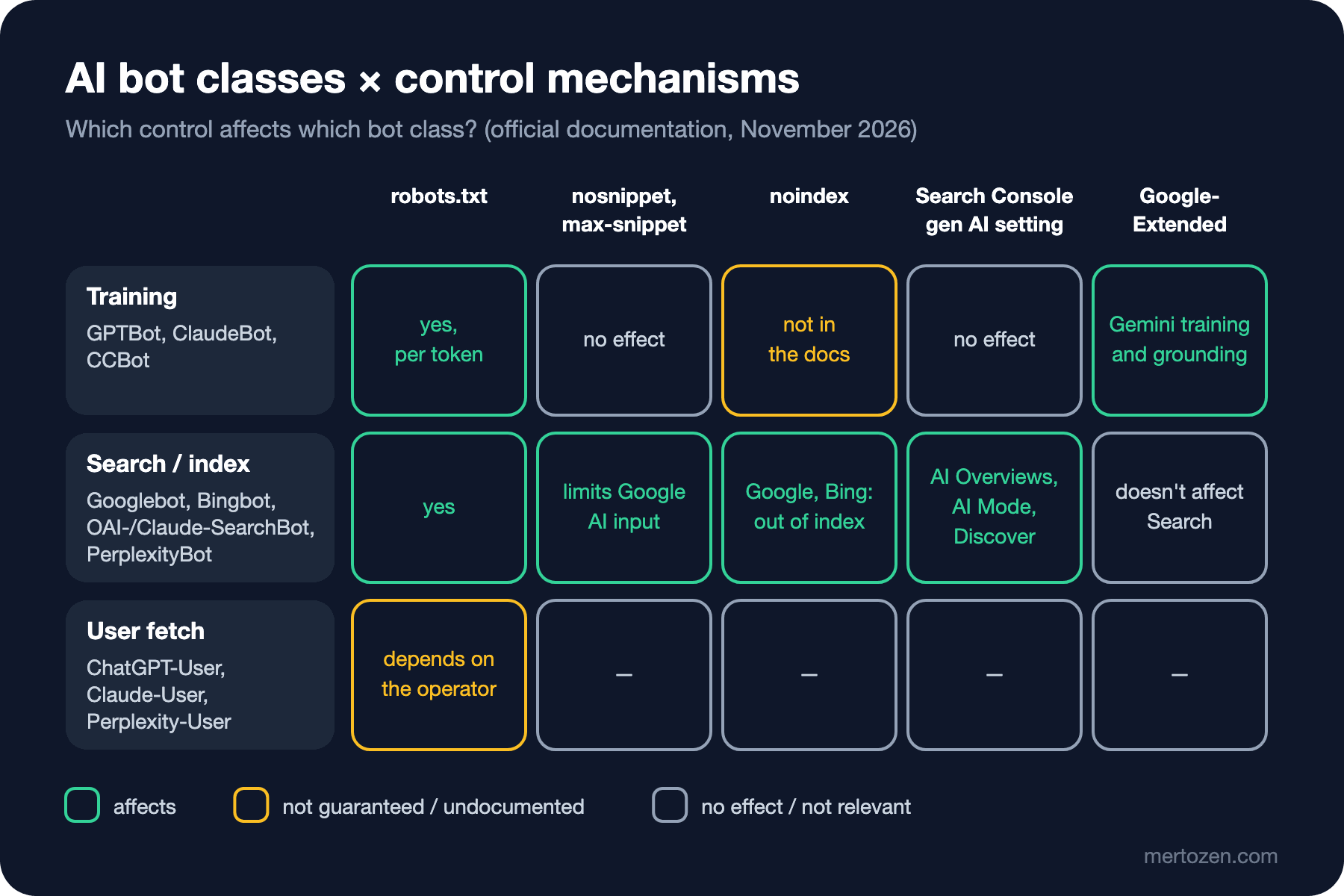
robots.txt is the only shared mechanism that works per token. The rules of robots.txt itself, that is groups, the most specific match and error cases, are in the "A robots.txt Guide" post of the Technical SEO (Search Engine Optimization) series; here we look only at the part specific to AI bots.
Snippet controls are Google-specific. According to Google's robots meta tag documentation, nosnippet prevents content from being used as direct input to AI Overviews and AI Mode, and max-snippet limits how much of it may be used; data-nosnippet leaves out part of a page. noindex removes the page from the Google and Bing indexes and therefore from AI answers built on those indexes. Other operators' documentation makes no commitment about these meta rules.
The "Search generative AI" control in Search Console arrived in June 2026 and has been on all sites since August 31, 2026. It works at site level and covers the generative AI features in AI Overviews, AI Mode and Discover. Sites that turn it off get no traffic or impressions from those features; Google writes that the control won't be used as a ranking signal for search results outside these features.
Google-Extended is a separate axis. According to Google's crawler page, Google-Extended has no separate user agent, doesn't affect inclusion in Google Search and isn't a ranking signal. So turning off Google-Extended won't take you out of AI Overviews; the way out of AI Overviews is the Search Console control or the snippet rules.
There's also something on the horizon: on October 30, 2026 Google announced that it aims to support, together with other AI providers in 2027, a "policy token" in robots.txt that states a shared training preference for multiple providers, based on the proposal of the IETF (Internet Engineering Task Force) AIPREF (AI Preferences) working group. If Google-Extended isn't specified explicitly, it will interpret a training opt-out in that token as disallowing Google-Extended. Anthropic's documentation also writes that rules naming ClaudeBot directly take precedence over a general "no AI training" signal. Because the syntax is still a draft, I'm not giving an example here.
A Decision Matrix: Scenarios with robots.txt
Here's the robots.txt that implements Bookstore's decision. The training tokens are collected in one group, and everyone else, search bots included, falls into the * group:
# training crawlers: no
User-agent: GPTBot
User-agent: ClaudeBot
User-agent: CCBot
User-agent: Google-Extended
Disallow: /

# everyone else, including search crawlers: yes, except private areas
User-agent: *
Disallow: /account/
Allow: /
I checked what the file actually says with a small .NET 10 file-based app that applies RFC (Request for Comments) 9309's group selection and longest-match rules:
using Rule = (bool Allow, string Path);
using Group = (string Agent, System.Collections.Generic.List<(bool Allow, string Path)> Rules);

string[] lines = File.ReadAllLines(args[0]);
string[] bots = ["Googlebot", "Bingbot", "OAI-SearchBot", "Claude-SearchBot", "PerplexityBot",
                 "GPTBot", "ClaudeBot", "CCBot", "Google-Extended"];
string[] paths = ["/books/async-in-practice", "/account/orders"];

Console.WriteLine($"{"token",-18}{paths[0],-28}{paths[1]}");
foreach (string bot in bots)
{
    string[] verdicts = [.. paths.Select(p => IsAllowed(lines, bot, p) ? "allow" : "DISALLOW")];
    Console.WriteLine($"{bot,-18}{verdicts[0],-28}{verdicts[1]}");
}

// RFC 9309 in short: use the group(s) naming this token, otherwise "*";
// the longest matching path wins, Allow wins a tie. No wildcards here.
static bool IsAllowed(string[] lines, string token, string path)
{
    List<Group> groups = [];
    List<Rule>? rules = null;
    bool lastWasAgent = false;
    foreach (string raw in lines)
    {
        string line = raw.Split('#')[0].Trim();
        int colon = line.IndexOf(':');
        if (colon < 0)
        {
            continue;
        }
        string key = line[..colon].Trim().ToLowerInvariant();
        string value = line[(colon + 1)..].Trim();
        if (key == "user-agent")
        {
            if (!lastWasAgent)
            {
                rules = [];
            }
            groups.Add((value.ToLowerInvariant(), rules!));
            lastWasAgent = true;
        }
        else if (key is "allow" or "disallow" && rules is not null)
        {
            rules.Add((key == "allow", value));
            lastWasAgent = false;
        }
    }

    List<Group> named = [.. groups.Where(g => g.Agent == token.ToLowerInvariant())];
    List<Group> chosen = named.Count > 0 ? named : [.. groups.Where(g => g.Agent == "*")];
    Rule match = chosen.SelectMany(g => g.Rules)
        .Where(r => r.Path.Length > 0 && path.StartsWith(r.Path))
        .OrderByDescending(r => r.Path.Length).ThenByDescending(r => r.Allow)
        .FirstOrDefault();
    return match == default || match.Allow;
}
$ dotnet run RobotsMatrix.cs -- ai-robots.txt
token /books/async-in-practice /account/orders
Googlebot allow DISALLOW
Bingbot allow DISALLOW
OAI-SearchBot allow DISALLOW
Claude-SearchBot allow DISALLOW
PerplexityBot allow DISALLOW
GPTBot DISALLOW DISALLOW
ClaudeBot DISALLOW DISALLOW
CCBot DISALLOW DISALLOW
Google-Extended DISALLOW DISALLOWThe matrix is exactly what we want: the search bots reach the book page, the training tokens reach nothing. The answer to the first opening question follows from this. Writing User-agent: * with Disallow: / and opening only OAI-SearchBot also closes Googlebot, Bingbot, Claude-SearchBot and PerplexityBot, which have no group of their own; per RFC 9309, a crawler uses the * group when there's no group carrying its name. That means leaving Google and Bing, and therefore AI Overviews and Copilot.
The other two extreme scenarios are simpler. For a site open to everything, User-agent: * with Allow: / is enough; writing extra Allows for AI bots doesn't change behavior. A "I don't want to appear in any AI product" decision requires closing the search bots too, and according to OpenAI's note, sites opted out of OAI-SearchBot may still appear as navigational links in ChatGPT. These are content policy decisions, not technical ones.
mertozen.com's robots.txt
This site's robots.txt is generated in code in SeoController and looks like this:
User-agent: *
Allow: /

User-agent: GPTBot
Allow: /

User-agent: PerplexityBot
Allow: /

User-agent: ClaudeBot
Allow: /

User-agent: Google-Extended
Allow: /

User-agent: CCBot
Allow: /

Sitemap: https://www.mertozen.com/sitemap.xml
Running it through the same tool gives allow on both paths for every token. The file tells us three things. First, the five separate Allow groups don't change today's behavior; * already allows everything. Their only effect is that if a Disallow is ever added to the * group, these five tokens won't be affected by it. Second, OAI-SearchBot and Claude-SearchBot have no group of their own; they're open through the * rule. Third, the comment in the code gives the reason for these Allows as "having the content cited in generative AI engines". Yet four of the five named, GPTBot, ClaudeBot, CCBot and Google-Extended, are training tokens; PerplexityBot is on the search side. The bots that determine citations are different ones. Keeping the site open to training may well be a deliberate choice; but to make the reasoning match the mechanism, updating the comment or simplifying the groups is a clean step. The decision is the site owner's.
Separating AI Bot Traffic in the Logs
To see the effect of the decision you need to know which bot came to the site when. I added to Bookstore a classifier that maps the tokens in the operators' documentation to their purposes, and a middleware that uses it:
namespace Bookstore.Web.Seo;

public enum AiBotPurpose { Training, Search, UserFetch }

public sealed record AiBot(string Token, string Operator, AiBotPurpose Purpose);

public static class AiBots
{
    // Tokens and purposes as documented by each operator (2026-11).
    private static readonly AiBot[] Known =
    [
        new("GPTBot", "OpenAI", AiBotPurpose.Training),
        new("OAI-SearchBot", "OpenAI", AiBotPurpose.Search),
        new("ChatGPT-User", "OpenAI", AiBotPurpose.UserFetch),
        new("ClaudeBot", "Anthropic", AiBotPurpose.Training),
        new("Claude-SearchBot", "Anthropic", AiBotPurpose.Search),
        new("Claude-User", "Anthropic", AiBotPurpose.UserFetch),
        new("PerplexityBot", "Perplexity", AiBotPurpose.Search),
        new("Perplexity-User", "Perplexity", AiBotPurpose.UserFetch),
        new("CCBot", "Common Crawl", AiBotPurpose.Training),
    ];

    public static AiBot? Match(string? userAgent) =>
        string.IsNullOrEmpty(userAgent)
            ? null
            : Known.FirstOrDefault(b => userAgent.Contains(b.Token, StringComparison.OrdinalIgnoreCase));
}
namespace Bookstore.Web.Seo;
public sealed class AiTrafficMiddleware(RequestDelegate next, ILogger<AiTrafficMiddleware> logger)
{
public async Task InvokeAsync(HttpContext context)
{
await next(context);
AiBot? bot = AiBots.Match(context.Request.Headers.UserAgent);
if (bot is not null)
{
logger.LogInformation("AI bot {Token} ({Purpose}, {Operator}) {Method} {Path} -> {Status}",
bot.Token, bot.Purpose, bot.Operator, context.Request.Method,
context.Request.Path, context.Response.StatusCode);
}
}
}I sent curl -A requests to the local app with the user agent strings from the documentation; the last request used a normal browser user agent. The lines that landed in the log:
info: Bookstore.Web.Seo.AiTrafficMiddleware[0] AI bot GPTBot (Training, OpenAI) GET /books/async-in-practice -> 200
info: Bookstore.Web.Seo.AiTrafficMiddleware[0] AI bot OAI-SearchBot (Search, OpenAI) GET /books/async-in-practice -> 200
info: Bookstore.Web.Seo.AiTrafficMiddleware[0] AI bot ChatGPT-User (UserFetch, OpenAI) GET /books/async-in-practice -> 200
info: Bookstore.Web.Seo.AiTrafficMiddleware[0] AI bot PerplexityBot (Search, Perplexity) GET /books/async-in-practice -> 200
info: Bookstore.Web.Seo.AiTrafficMiddleware[0] AI bot Perplexity-User (UserFetch, Perplexity) GET /books/async-in-practice -> 200
info: Bookstore.Web.Seo.AiTrafficMiddleware[0] AI bot PerplexityBot (Search, Perplexity) GET /account/orders -> 404
The browser request didn't land in the log. The last line is an important reminder: even though robots.txt blocks /account/, the request reached the server, because robots.txt is not access control, it's a request the bot commits to honoring. Areas that really need protection require authentication. Also, a user agent is easy to spoof; to verify that a request really comes from the bot it claims, you need to check the IP (Internet Protocol) ranges the operators publish: OpenAI publishes a separate JSON (JavaScript Object Notation) file for each bot, and Anthropic and Perplexity publish their own lists. Reverse DNS (Domain Name System) verification for Googlebot and a tool that scans large log files are in the "Crawl Budget, Server Log Analysis and Verifying Googlebot" post of the Technical SEO series; the same approach can be applied to AI bots.
Production Notes
Changes don't take effect instantly. OpenAI writes that a robots.txt change can take about 24 hours to reach its search systems; on the Google side, the effect of preview controls depends on recrawling and can take from days to months.
Generate robots.txt with the same code in every environment but vary its content per environment; don't let staging's robots.txt leak into production. The endpoint that generates robots.txt per environment is in the Technical SEO series.
Keep the decision in writing. Closing training while staying open to citations is a content policy; write down in a decision record why it was made and which tokens implement it, and update the list from there when a new bot appears.
Common Pitfalls
Closing everything with User-agent: * and opening the ones you want one by one. Every search bot you forget on that list, Googlebot included, stays closed.
Thinking turning off Google-Extended takes you out of AI Overviews. Google-Extended doesn't affect Search; the right tools for Google's AI features are the Search Console control and the snippet rules.
Assuming you can stop user-initiated fetches with robots.txt. OpenAI and Perplexity state explicitly that robots.txt may not apply to this class.
Blindly trusting the user agent. IP verification is a must for analysis, and especially for blocking decisions.
A Small Experiment
★☆☆ Run your own site's robots.txt through RobotsMatrix.cs and compare the result with your site's content policy. Is there a DISALLOW or allow you didn't expect?
★★☆ Add * wildcard and $ support to the tool, then show as a matrix which bots a rule like Disallow: /*?sort= affects on which URLs (Uniform Resource Locator).
★★★ Extend AiBots.Match with IP verification: download and cache OpenAI's published JSON file at startup, and log the bot as "unverified" if the request's IP isn't on the list. In tests, read the JSON from a local file.
We've seen the bots and the controls. In the next post we flip the question: once a bot reaches the page, what increases the chance that the content gets cited? We'll look at what the research actually shows.