

Connecting CI to GitOps: Image Tag Promotion, Promoting Environments via Pull Requests and Image Updater
In GitOps, CI builds the image once, pushes it to a registry and writes which image should run into the config repo as a commit; Argo CD does the deploy. With real output we commit tag and digest to dev from a local CI script, promote to staging and prod via pull requests, hit a conflict between two pipelines writing the same file, watch Argo CD Image Updater drop a digest, and look at the Source Hydrator.
Version note: The examples in this post were run with kind 0.33 and Kubernetes 1.37, Argo CD 3.6.1, Argo CD Image Updater 1.5.0, Kustomize 5.8, Docker 29 and registry 3.1 (distribution). The GitHub Actions workflow was only validated with actionlint 1.7.12; it was not run on GitHub.
Guess First
The dev overlay pins the API image by tag and digest: 1.2.0@sha256:.... The registry has no tag newer than 1.2.0. You install Argo CD Image Updater and tell it "run the newest 1.2.x in dev". Does a commit land in the config repo on the first pass? If so, what does it change, and are the pods in dev affected? The answer, with the real commit, is in the middle of the post.
CI's New Job: An Image and a Commit
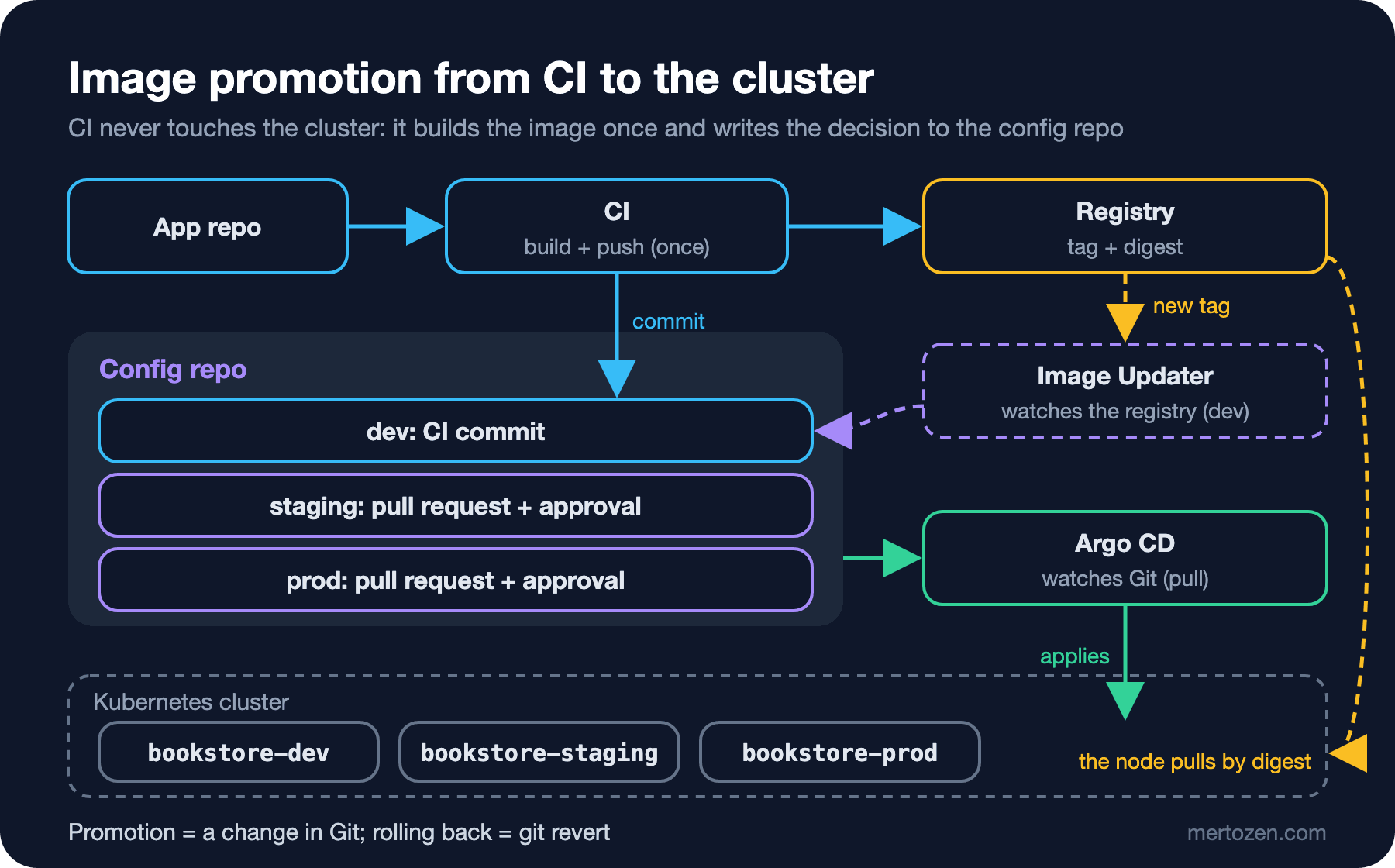
At the end of the fifth post the api and web applications of Bookstore, the online bookstore used as the shared example across this site's series, came from a single ApplicationSet in three environments, but we still changed the image tag by hand. The first post showed that in the pull model CI does not touch the cluster, so CI's job shrinks to two parts: build the image once and put it in a registry, and write which image should run into the config repo as a commit. Argo CD does the deploy. The "build once, deploy many" rule from the CI/CD Fundamentals series becomes concrete here: the image that reaches staging and prod is exactly the one tried in dev, never rebuilt.
There is no GitHub in the lab, so CI is a bash script that runs locally (ci/build-and-push.sh). The registry is a registry:3 container next to the kind node: we push from the host to localhost:52612, and the node maps the same name to that container through containerd's hosts.toml. In real life this is GHCR or the company registry. The core of the script:
for entry in "${images[@]}"; do
    name="${entry%%:*}"; dockerfile="${entry#*:}"
    image="$registry/bookstore/$name"
    echo "==> build $image:$version (source $source_commit)"
    docker build -q -f "$context/$dockerfile" -t "$image:$version" \
        --build-arg APP_VERSION="$version" --build-arg SOURCE_COMMIT="$source_commit" \
        --label org.opencontainers.image.revision="$source_commit" \
        --label org.opencontainers.image.version="$version" "$context" >/dev/null
    docker push -q "$image:$version" >/dev/null
    # The digest the registry stored: Git gets tag AND digest, the node pulls the digest.
    digest="$(docker buildx imagetools inspect "$image:$version" --format '{{json .Manifest.Digest}}' | tr -d '"')"
    # Manifests use the logical name bookstore/<name>; the overlay maps it to registry, tag and digest.
    refs+=("bookstore/$name=$image:$version@$digest")
    echo "    pushed $image:$version@$digest"
done

[ "${PUSH_ONLY:-0}" = 1 ] && exit 0

# Promote to dev: a commit in the config repo, never kubectl.
config_repo="${CONFIG_REPO:?set CONFIG_REPO to the config repo URL}"
work="$(mktemp -d)"; trap 'rm -rf "$work"' EXIT
git clone -q "$config_repo" "$work/config"
cd "$work/config/apps/$component/overlays/dev"
for ref in "${refs[@]}"; do kustomize edit set image "$ref"; done
git add kustomization.yaml
git commit -q -m "dev: bookstore-$component $version" -m "Source-Commit: $source_commit"
The API component means two images: the API itself and the image of the migration Job from the fourth post. Both are built with the same version and change in the same commit; otherwise a new API could start against the old schema. The SHA of the source commit goes to three places: an image label, the application's /api/info response and the message of the config commit. From a pod in the cluster you can walk back to the exact code it was built from. Running it:
CONFIG_REPO=../bookstore-config ci/build-and-push.sh api 1.2.0==> build localhost:52612/bookstore/api:1.2.0 (source 033d7d3deb3a)
pushed localhost:52612/bookstore/api:1.2.0@sha256:<digest-api-1.2.0>
==> build localhost:52612/bookstore/migrator:1.2.0 (source 033d7d3deb3a)
pushed localhost:52612/bookstore/migrator:1.2.0@sha256:<digest-migrator-1.2.0>
==> config repo: b6d67c4 dev: bookstore-api 1.2.0The commit that lands in the config repo touches only the dev overlay:
b6d67c4 Bookstore Lab dev: bookstore-api 1.2.0

Source-Commit: 033d7d3deb3a

--- a/apps/api/overlays/dev/kustomization.yaml
+++ b/apps/api/overlays/dev/kustomization.yaml
 images:
-- digest: sha256:<digest-api-1.1.0>
+- digest: sha256:<digest-api-1.2.0>
   name: bookstore/api
   newName: localhost:52612/bookstore/api
-  newTag: 1.1.0
-- digest: sha256:<digest-migrator-1.1.0>
+  newTag: 1.2.0
+- digest: sha256:<digest-migrator-1.2.0>
   name: bookstore/migrator
   newName: localhost:52612/bookstore/migrator
-  newTag: 1.1.0
+  newTag: 1.2.0
In this post we also removed RollingSync from the ApplicationSet and added automated sync with selfHeal to the template. Promotion now happens in Git: what goes to dev is a commit, what goes to staging and prod is a merged pull request. Since Git decides what each environment runs, it is safe for every environment to sync on its own once its overlay changes.
Tag or Digest?
Image names in the base manifests no longer carry a registry address: the Deployment says bookstore/api, the migration Job says bookstore/migrator. The real registry address, tag and digest live in each environment's overlay. Why a digest on top of the tag? Because a tag is a movable label. One commit later we built again with the same version number:
PUSH_ONLY=1 ci/build-and-push.sh api 1.2.0
docker buildx imagetools inspect localhost:52612/bookstore/api:1.2.0 --format '{{json .Manifest.Digest}}'
kubectl -n bookstore-dev get deploy api -o jsonpath='{.spec.template.spec.containers[0].image}'
==> build localhost:52612/bookstore/api:1.2.0 (source 5321a1077cd3)
pushed localhost:52612/bookstore/api:1.2.0@sha256:<digest-B>
"sha256:<digest-B>"
localhost:52612/bookstore/api:1.2.0@sha256:<digest-A>The registry did not object; 1.2.0 now points to a different image. Dev was not affected because the pod spec carries the digest and the node pulls the digest. Had we written only the tag, the same Deployment could run two different builds after a pod restart (a node replacement, an eviction, a scale-out), and the Git history would not show it. We still write the tag: humans read it, while the digest is the machine's guarantee. Some registries can also make tags immutable; that works together with the digest.
Environment Promotion: A Commit for Dev, a Pull Request for Staging and Prod
Moving the image tried in dev to staging is not a new build but a copy: the tag and digest that the dev overlay renders are written into the staging overlay. ci/promote.sh does this, and it writes to a branch, not to main:
refs=$(kustomize build "apps/$component/overlays/$from" | grep -oE 'image: [^ ]+@sha256:[0-9a-f]+' | cut -d' ' -f2 | sort -u)
[ -n "$refs" ] || { echo "no digest-pinned image in $from" >&2; exit 1; }
version=$(echo "$refs" | head -1 | sed -E 's/.*:([^:@]+)@.*/\1/')
branch="promote/$to-$component-$version"
git switch -q -c "$branch"
cd "apps/$component/overlays/$to"
# localhost:52612/bookstore/api:1.2.0@sha256:... -> logical name bookstore/api
for ref in $refs; do kustomize edit set image "$(echo "$ref" | sed -E 's#^[^/]+/##; s/:[^:@]+@.*//')=$ref"; done
git add kustomization.yaml
git commit -q -m "$to: bookstore-$component $version" -m "Promoted-From: $from"
git push -q origin "$branch"
$ ci/promote.sh api dev prod
promotion order is dev -> staging -> prod, not dev -> prod
exit=2
$ ci/promote.sh api dev staging
==> pushed promote/staging-api-1.2.0; open a pull request: promote/staging-api-1.2.0 -> mainThe script refuses an out-of-order promotion. On GitHub this is where gh pr create opens a pull request, a branch protection rule asks for approval, and after the merge Argo CD updates staging; in the lab we are the reviewer who merges it. Until the branch was merged staging still ran 1.1.0; after the merge we refreshed the Application with argocd app get --refresh and staging was Healthy on 1.2.0 within 17 seconds. Doing the same for prod turns the history of the config repo into the promotion record:
*   6cdfda5 Merge promote/prod-api-1.2.0: bookstore-api 1.2.0 to prod
|\
| * 12f4458 prod: bookstore-api 1.2.0
|/
*   c2867b8 Merge promote/staging-api-1.2.0: bookstore-api 1.2.0 to staging
|\
| * 08c075a staging: bookstore-api 1.2.0
|/
* b6d67c4 dev: bookstore-api 1.2.0
Who shipped what to prod, when, and with whose approval is answered by this graph. Rolling back takes the same road: git revert the prod merge commit (the revert post of the Git & GitHub series). Automatic dev with pull requests for staging and prod is not the only option; in a small team staging can be automatic too, but most teams want the step to prod to pass a human approval.
The Same Pipeline in GitHub Actions
We wrote the GitHub Actions version of the script as ci/github-actions/gitops-ci.yml and validated it with actionlint; we did not run it on GitHub. The critical part is the job that writes to the config repo:
  promote-dev:
    needs: build
    runs-on: ubuntu-latest
    # One writer for the dev overlay at a time; a second run waits instead of racing.
    concurrency:
      group: config-repo-dev
      cancel-in-progress: false
    steps:
      # A GitHub App installed only on the config repo, with contents: write. No personal token.
      - id: token
        uses: actions/create-github-app-token@64ab729a6294000f5aa4a4bc0b73d1f32bc45510 # v3.3.0
        with:
          app-id: ${{ vars.CONFIG_BOT_APP_ID }}
          private-key: ${{ secrets.CONFIG_BOT_PRIVATE_KEY }}
          repositories: bookstore-config
      - uses: actions/checkout@3d3c42e5aac5ba805825da76410c181273ba90b1 # v7.0.1
        with:
          repository: ${{ github.repository_owner }}/bookstore-config
          token: ${{ steps.token.outputs.token }}
Permissions are split so that each part gets as little as possible. The build job gets only packages: write on GITHUB_TOKEN and pushes to GHCR. The job that writes to the config repo uses a short-lived token of a GitHub App installed only on that repo; a deploy key works too. No job holds a kubeconfig. Someone who takes over the application repo can at most commit to the config repo, and in staging and prod branch protection still stops that commit at an approval. Pinning actions by SHA follows the security post of the GitHub Actions series.
When Two Pipelines Update the Same File
If two pipelines clone the config repo at the same time and both commit, the second push is rejected. The script then moves onto the new main with git pull --rebase and tries again. Two commits that touch different files (api and web) combine without trouble:
Rebasing (1/1)Successfully rebased and updated refs/heads/main.
c6f1525 dev: bookstore-web 1.0.1
4daa126 dev: bookstore-api 1.2.3
Two commits that touch the same line (two separate API builds, 1.2.1 and 1.2.2) do not; we tried it on a copy of the config repo:
Rebasing (1/1)Auto-merging apps/api/overlays/dev/kustomization.yaml
CONFLICT (content): Merge conflict in apps/api/overlays/dev/kustomization.yaml
error: could not apply 5195578... dev: bookstore-api 1.2.2
The script stops here because of set -e and the pipeline turns red. That is the behaviour we want: a script that tries to resolve the conflict automatically could let an older build overwrite a newer one. Better still is never hitting the conflict: in GitHub Actions a concurrency group queues the runs that write to the same overlay, and because every environment and application has its own file, different applications do not wait for each other.
Argo CD Image Updater
Image Updater works the other way round: CI only pushes the image, and Image Updater, running in the cluster, watches the registry and commits to the config repo when it sees a new tag. Since version 1.0 (November 2025) its settings live in an ImageUpdater custom resource rather than in Application annotations. We installed the official manifest into Argo CD's namespace and told it about the registry:
kubectl apply -n argocd -f https://raw.githubusercontent.com/argoproj-labs/argocd-image-updater/v1.5.0/config/install.yamldata:
# Images are named localhost:52612/...; inside the cluster the registry answers as gitopsseries-registry:5000.
registries.conf: |
registries:
- name: Lab registry
prefix: localhost:52612
api_url: http://gitopsseries-registry:5000
insecure: yes
git.user: argocd-image-updater
git.email: image-updater@example.comWhich Application follows which image is defined in the config repo, under the App of Apps root:
apiVersion: argocd-image-updater.argoproj.io/v1alpha1
kind: ImageUpdater
metadata:
  name: bookstore-dev
  namespace: argocd
spec:
  writeBackConfig:
    # Commit with the credentials Argo CD has for this repo ("repocreds").
    method: git
    gitConfig:
      branch: main
      # Edit apps/api/overlays/dev/kustomization.yaml, as `kustomize edit set image` would.
      writeBackTarget: kustomization
  applicationRefs:
    - namePattern: bookstore-api-dev
      images:
        - alias: api
          imageName: localhost:52612/bookstore/api:1.2.x
          commonUpdateSettings:
            updateStrategy: semver
          manifestTargets:
            kustomize:
              # The logical name in the base manifests.
              name: bookstore/api
        - alias: migrator
          imageName: localhost:52612/bookstore/migrator:1.2.x
          commonUpdateSettings:
            updateStrategy: semver
          manifestTargets:
            kustomize:
              name: bookstore/migrator
First we tried to pass the credential from a separate Secret (method: git:secret:git-creds). The lab git server speaks plain HTTP, and this path accepts only HTTPS and SSH URLs:
level=error msg="Could not update application spec: could not get creds for repo 'http://git-server.git-server.svc.cluster.local/bookstore-config': unknown repository type"So we registered the user that may push as an Argo CD repository Secret and went back to the default repocreds method. That has a cost: Argo CD's repo-server now holds a credential that can write to the config repo. On GitHub, an HTTPS URL with git:secret: and a GitHub App that only Image Updater can read is cleaner.
The answer to Guess First is the first pass after applying the CR. There was no new version in the registry, yet a commit arrived:
c8f8ffc argocd-image-updater <image-updater@example.com>
bookstore-api-dev: update images

bookstore/api: sha256:<digest-A> -> 1.2.0
bookstore/migrator: sha256:<digest-migrator-1.2.0> -> 1.2.0

 images:
-- digest: sha256:<digest-A>
-  name: bookstore/api
+- name: bookstore/api
   newName: localhost:52612/bookstore/api
   newTag: 1.2.0
-- digest: sha256:<digest-migrator-1.2.0>
-  name: bookstore/migrator
+- name: bookstore/migrator
   newName: localhost:52612/bookstore/migrator
   newTag: 1.2.0
The semver strategy writes only the tag to Git and removes the digest it finds. The version stayed the same, but the meaning of dev's line changed: it is no longer "digest-A" but "whatever 1.2.0 points to in the registry right now". Since we had just rebuilt 1.2.0, that means digest-B. In the lab the next commit arrived before Argo CD synced this one, so we did not see the pods switch to the new build; but which image runs after the next pod restart (or on another node) can no longer be read from Git. That is exactly what the previous section avoided. Then we only pushed 1.2.1 (PUSH_ONLY=1) and triggered an Image Updater pass at once with an annotation; the commit arrived 15 seconds later and dev moved to 1.2.1:
cd399a5 argocd-image-updater
bookstore-api-dev: update images

bookstore/api: sha256:<digest-A> -> 1.2.1
bookstore/migrator: sha256:<digest-migrator-1.2.0> -> 1.2.1{"version":"1.2.1","commit":"d3141c56b19d","environment":"Production","pod":"api-677dc85687-dfkxs","database":"Postgres"}The default check interval is two minutes; a registry webhook can trigger it immediately. When is Image Updater the wrong choice? In environments where promotion needs a pull request and an approval (1.5 can open pull requests on GitHub, GitLab, Azure DevOps and Gitea, but the decision is still "the newest tag"), where pinning by digest is required (the digest strategy follows a single tag and does not combine with a semver range), and when you already have a CI that can make the config commit. It helps in an environment like dev, where "always run the last build" is the goal; the road to prod should not be left to it.
The Rendered Manifest Pattern and the Source Hydrator
To see exactly what a commit will apply to the cluster after Kustomize or Helm, you have to look at Argo CD's diff. The rendered manifest pattern moves that step into Git: plain rendered YAML is committed to a separate branch and Argo CD applies it, so the reviewer sees the real manifests. Argo CD's version of this is the Source Hydrator: under spec.sourceHydrator an Application gets a drySource (the Kustomize folder) and a syncSource (the branch for the rendered manifests), and a separate commit-server component makes the commits. It has been beta since 3.5.0 and is off by default; 3.6 added GPG signing of hydrated commits as alpha. We do not switch to it in this series, but it is the direction to watch for teams that want tighter control of promotion. There are also projects such as Kargo that manage promotion as a separate tool; we only mention it here.
Production Notes
Keep the identities that write to the config repo few: CI's GitHub App, Image Updater if needed, and people. Branch protection should require approval for every change that touches the staging and prod overlays; CODEOWNERS can bind the apps/*/overlays/prod/ path to a separate team per folder. Make the source SHA mandatory in config commit messages; during an incident "which code did this prod image come from" should be one git log away. Make tags immutable in the registry (Harbor, ECR and ACR offer this), and when you clean up old images use a retention rule that never deletes the digest prod is running. Without a webhook Argo CD polls the repo every two to three minutes by default (timeout.reconciliation of 120 seconds plus up to 60 seconds of jitter); that delay between merge and deploy is normal, and a webhook from the Git provider to Argo CD brings it down to seconds.
Common Pitfalls
CI committing prod changes straight to main in the config repo. The pull request was the single approval point of promotion; giving CI write access to main and letting it touch the prod overlay removes that point.
The latest tag. Nothing changes in Git, so Argo CD does nothing, while pods run whatever they find when they restart. The line in Git no longer answers "what is running".
Parallel pipelines writing to the same overlay. Forcing the push (--force) lets an older build overwrite a newer one; queue them or stop on conflict.
Using the registry address as the Kustomize image name. In the first attempt the base said localhost:52612/bookstore/api, and Image Updater wrote only the last of the two images to the file. Argo CD's Kustomize image matching reads the name up to the first : in an override without =; with a registry that has a port, both images are named localhost. A logical name in the base (bookstore/api) with newName in the overlay removed the problem.
Pointing Image Updater with the semver strategy at an environment pinned by digest. As we saw, it removes the digest.
A Small Experiment
★☆☆ Run ci/build-and-push.sh web 1.0.1 for the web app, then create the branch with ci/promote.sh web dev staging. Before merging, confirm that bookstore-web-staging is still Synced in Argo CD and explain why it is not OutOfSync.
★★☆ Add a check to ci/promote.sh: refuse the promotion unless the digest to be written has been Healthy in the source environment for at least ten minutes. Take the data from status.health and status.operationState.finishedAt in the output of argocd app get -o json.
★★★ Set updateStrategy: digest with imageName: localhost:52612/bookstore/api:1.2.1 in the ImageUpdater CR, rebuild and push the same tag, and look at what Image Updater writes to Git this time. Compare it with the semver strategy for the need "dev always runs the last build".
CI now produces images without touching the cluster, and promotion is a commit or a pull request in Git. One thing is still missing from the config repo: the database password. The Secret we create by hand with the lab script is not in Git. The next post looks at safe ways to put secrets in Git: Sealed Secrets, SOPS, and keeping secrets out of Git entirely.