

Authentication and Authorization in Blazor: AuthenticationStateProvider, AuthorizeView, Auth per Render Mode and Passkeys

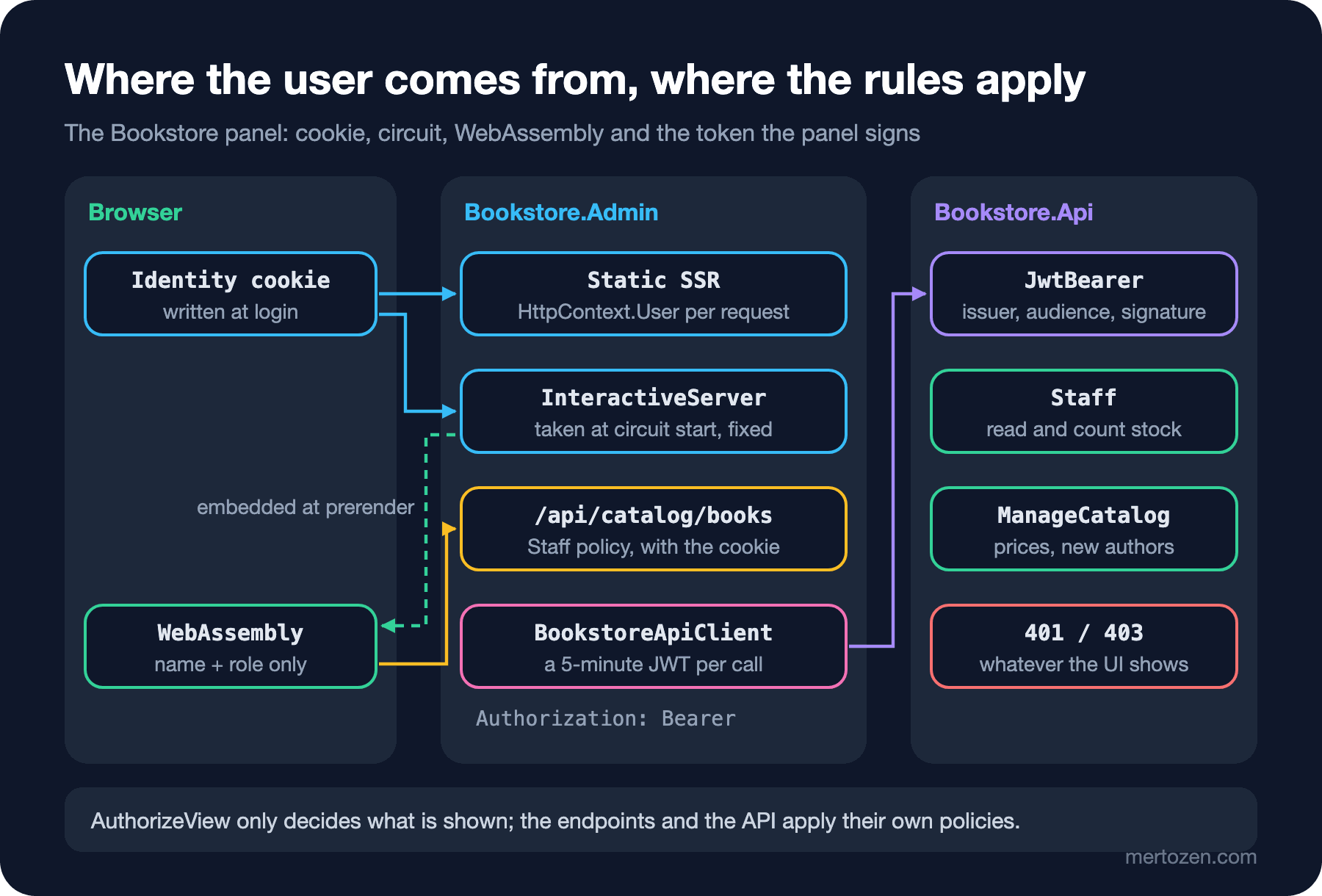
In Blazor the user comes from AuthenticationStateProvider: in InteractiveServer it is read from the cookie when the circuit starts and stays fixed, while WebAssembly receives only the serialized name and role claims, so AuthorizeView is a UI decision and security belongs to the endpoint and the API. In the Bookstore panel: Identity sign-in, a fallback policy, role-based price editing, an API protected by panel-signed tokens, and the passkey support in the .NET 10 template.
Version note: The code in this post was built and run with .NET 10 (SDK 10.0.404, ASP.NET Core 10.0.15) using Microsoft.AspNetCore.Identity.EntityFrameworkCore 10.0.15, Microsoft.AspNetCore.Authentication.JwtBearer 10.0.15 and Microsoft.IdentityModel.JsonWebTokens 8.23.0; the tests use bUnit 2.15.2, and browser behaviour was observed with Playwright 1.65's headless Chromium.
Predict First
For ten posts the admin panel of Bookstore, the online bookstore used as the shared example across this site's series, has been open to everyone. The stock count, the new-author form, the catalog endpoint the panel's WebAssembly side calls and Bookstore.Api's back-office endpoints all work for anyone who knows the address. In this post we add staff sign-in: Linus from the warehouse will count stock, and Grace from the store will also change prices. Three questions first. When you add a fallback policy that locks everything except the login page, does the login page's CSS still load? How many claims does the same user see in an InteractiveServer and in an InteractiveWebAssembly component? You hid the price form from Linus with AuthorizeView, but one day a developer forgets it; can Linus change the price?
Identity, the Cookie and the Login Page
Authentication in a Blazor Web App works as it does in any ASP.NET Core app: the user signs in once, the browser carries a cookie, and on every request the server builds HttpContext.User from that cookie. The panel's users are staff; an admin creates their accounts and there is no self-registration. So instead of the template's full Identity UI we use ASP.NET Core Identity's user and role stores, SignInManager and a login page of our own:
    public static WebApplicationBuilder AddPanelIdentity(this WebApplicationBuilder builder, string connectionString)
    {
        builder.Services.AddDbContext<AdminIdentityContext>(options => options.UseSqlServer(
            connectionString, sql => sql.MigrationsHistoryTable("__EFMigrationsHistory", "identity")));

        builder.Services.AddAuthentication(IdentityConstants.ApplicationScheme).AddIdentityCookies();
        builder.Services.ConfigureApplicationCookie(options =>
        {
            options.LoginPath = "/account/login";
            options.AccessDeniedPath = "/account/access-denied";
        });
        builder.Services.AddIdentityCore<IdentityUser>(options => options.User.RequireUniqueEmail = true)
            .AddRoles<IdentityRole>()
            .AddEntityFrameworkStores<AdminIdentityContext>()
            .AddSignInManager();

        // Every endpoint needs a staff member unless it says [AllowAnonymous].
        builder.Services.AddAuthorization(options =>
        {
            options.AddPanelPolicies();
            options.FallbackPolicy = options.GetPolicy(PanelPolicies.Staff);
        });
        builder.Services.AddCascadingAuthenticationState();

        builder.Services.AddOptions<PanelTokenOptions>()
            .BindConfiguration("PanelTokens")
            .Validate(o => o.SigningKey.Length >= 32, "PanelTokens:SigningKey must be at least 32 characters (same value as Bookstore.Api).")
            .ValidateOnStart();
        builder.Services.AddSingleton<PanelTokenIssuer>();
        return builder;
    }
The Identity tables live in BookstoreDb, but in their own identity schema with their own migrations history table; the panel's AdminIdentityContext leaves the BookstoreContext in Bookstore.Data alone. We created the migration in the panel project:
$ dotnet ef migrations add CreateIdentitySchema --project src/Bookstore.Admin --context AdminIdentityContext --output-dir Identity/Migrations
Build started...
Build succeeded.
Done. To undo this action, use 'ef migrations remove'
In Development the panel applies this migration at startup and creates two staff accounts: grace@example.com (StoreStaff) and linus@example.com (WarehouseStaff). The password is the Identity:SeedPassword value in appsettings.Development.json. The login page is one of the Static SSR forms from post 05:
    private string? error;

    [SupplyParameterFromForm(FormName = "login")]
    private LoginForm? Input { get; set; }

    [SupplyParameterFromQuery]
    private string? ReturnUrl { get; set; }

    protected override void OnInitialized() => Input ??= new();

    private async Task LogInAsync()
    {
        SignInResult result = await SignInManager.PasswordSignInAsync(
            Input!.Email, Input.Password, isPersistent: false, lockoutOnFailure: true);
        if (result.Succeeded)
        {
            Logger.LogInformation("{User} logged in", Input.Email);
            Navigation.NavigateTo(LocalReturnUrl);
            return;
        }

        error = result.IsLockedOut ? "Too many failed attempts. Try again later." : "Invalid email or password.";
    }

    // Only paths on this site: "//other.example" or "https://..." would turn the login page into an open redirect.
    private string LocalReturnUrl => ReturnUrl is "/" or ['/', not ('/' or '\\'), ..] ? ReturnUrl : "/";
PasswordSignInAsync writes the cookie to the response, so the page has to run inside an HTTP request, which means Static SSR. In an InteractiveServer component the response has long been sent and there is no request to write a cookie to; that is why all the template's Account pages are static. Logging out isn't a link either but a POST form with an antiforgery token; if a GET could sign you out, another site could do it with an image tag. The ReturnUrl check is a detail that's easy to forget: a login page that redirects to whatever address it is given is an open redirect. The list pattern only accepts paths that start with / but not with //. lockoutOnFailure: true turns on Identity's default lockout settings (five failed attempts, five minutes):
attempt 1 (wrong password): Invalid email or password.
attempt 2 (wrong password): Invalid email or password.
attempt 3 (wrong password): Invalid email or password.
attempt 4 (wrong password): Invalid email or password.
attempt 5 (wrong password): Too many failed attempts. Try again later.
attempt 6 (correct password): Too many failed attempts. Try again later.
The Fallback Policy and Static Files
Instead of marking the pages to protect one by one with [Authorize], the panel does the opposite. The FallbackPolicy applies to every endpoint that has no authorization metadata of its own and requires one of the staff roles. A new page can't forget its protection; the login page, which has to be open, opens itself with [AllowAnonymous]. The first question is about this line:
// CSS, scripts and the WebAssembly files must load on the login page too.
app.MapStaticAssets().AllowAnonymous();
app.MapAccountEndpoints();
app.MapPanelCatalogEndpoints();
Without AllowAnonymous() the fallback policy applies to the CSS and JS files as well:
$ curl -i http://localhost:5037/app.khy4lop6wu.css
HTTP/1.1 302 Found
Location: http://localhost:5037/account/login?ReturnUrl=%2Fapp.khy4lop6wu.css
$ curl -i http://localhost:5037/_framework/blazor.web.js
HTTP/1.1 302 Found
Location: http://localhost:5037/account/login?ReturnUrl=%2F_framework%2Fblazor.web.js
For a user who hasn't signed in, the stylesheet and blazor.web.js are redirected to the login page too; the login page arrives unstyled and without enhanced navigation. For a panel whose static files hold nothing secret the fix is MapStaticAssets().AllowAnonymous(). With the right setting, this is what a client that hasn't signed in sees:
$ curl -i http://localhost:5037/inventory
HTTP/1.1 302 Found
Location: http://localhost:5037/account/login?ReturnUrl=%2Finventory

$ curl -i http://localhost:5037/api/catalog/books?search=Dune
HTTP/1.1 401 Unauthorized
Location: http://localhost:5037/account/login?ReturnUrl=%2Fapi%2Fcatalog%2Fbooks%3Fsearch%3DDune

$ curl -i http://localhost:5080/api/inventory
HTTP/1.1 401 Unauthorized
WWW-Authenticate: Bearer
The page request goes to the login page with a 302, while the catalog endpoint returns 401. That is a behavioural change in .NET 10: on "known API endpoints" such as minimal APIs that read or write JSON, [ApiController]s and endpoints that return TypedResults, cookie authentication now returns 401 and 403 instead of redirecting to the login page; the Location header is still there. The same request with the IgnoreRedirectMetadata switch that restores the old behaviour:
$ curl -i http://localhost:5037/api/catalog/books?search=Dune
HTTP/1.1 302 Found
Location: http://localhost:5037/account/login?ReturnUrl=%2Fapi%2Fcatalog%2Fbooks%3Fsearch%3DDune
HttpBookCatalog in WebAssembly would follow that 302 and try to read the login page's HTML as JSON; a 401 goes straight to the error path in the code.
AuthenticationStateProvider, AuthorizeView and [Authorize]
Components get the user from AuthenticationStateProvider, not from HttpContext. AddCascadingAuthenticationState() passes the provider's Task<AuthenticationState> to the whole component tree as a root-level cascading value, like PanelOptions in post 08; AuthorizeView and AuthorizeRouteView read it. The price form on the book page:
@using System.ComponentModel.DataAnnotations
@inject BookstoreApiClient Api
@inject NavigationManager Navigation

<AuthorizeView Policy="@PanelPolicies.ManageCatalog">
    <Authorized>
        <h2>Price</h2>
        @if (error is not null)
        {
            <p class="alert alert-danger">@error</p>
        }
        <EditForm Model="Form" FormName="price" OnValidSubmit="SaveAsync" Enhance Context="editContext">
            <DataAnnotationsValidator />
            <label>
                New price
                <InputNumber @bind-Value="Form!.Price" class="form-control w-auto" />
            </label>
            <ValidationMessage For="() => Form!.Price" />
            <button type="submit" class="btn btn-primary">Change price</button>
        </EditForm>
    </Authorized>
    <NotAuthorized>
        <p class="text-muted">Only store staff can change prices.</p>
    </NotAuthorized>
</AuthorizeView>
The Authorized block is a RenderFragment<AuthenticationState> whose parameter is called context by default, and so is the content of EditForm. Nest them and the build stops:
CSC : error RZ9999: The child content element 'ChildContent' of component 'EditForm' uses the same parameter name ('context') as enclosing child content element 'Authorized' of component 'AuthorizeView'. Specify the parameter name like: '<ChildContent Context="another_name"> to resolve the ambiguityThat's why EditForm got Context="editContext". At page level the same rule is an attribute: the new-author page starts with @attribute [Authorize(Policy = PanelPolicies.ManageCatalog)], and the "New author" button on the author list sits inside an AuthorizeView with the same policy. The policies are defined in the .Client project because the WebAssembly side uses the same names:
using Microsoft.AspNetCore.Authorization;

namespace Bookstore.Admin.Client.Auth;

// The panel's roles and policies, shared by the server and the WebAssembly side.
// They decide what the UI shows; Bookstore.Api checks the same roles again on every write.
public static class PanelPolicies
{
    public const string StoreStaff = "StoreStaff";
    public const string WarehouseStaff = "WarehouseStaff";
    public const string Admin = "Admin";

    public const string Staff = "Staff";
    public const string ManageCatalog = "ManageCatalog";

    public static void AddPanelPolicies(this AuthorizationOptions options)
    {
        options.AddPolicy(Staff, policy => policy.RequireRole(StoreStaff, WarehouseStaff, Admin));
        options.AddPolicy(ManageCatalog, policy => policy.RequireRole(StoreStaff, Admin));
    }
}
The component's test runs without a browser. bUnit's AddAuthorization() helper fakes policies by name only; to test the role mapping as well I registered the real DefaultAuthorizationService. Without it, bUnit's placeholder fails the test:
failed Bookstore.Admin.Tests.PriceEditorTests.Store_staff_see_the_price_form
  Xunit.MicrosoftTestingPlatform.XunitException: Bunit.TestDoubles.MissingBunitAuthorizationException : This test requires IAuthorizationService to be supplied, because the component under test uses authentication/authorization during the test. You can fix this by calling BunitContext.Services.AddAuthorization with appropriate values. More information can be found in the documentation.
With Playwright I went through the panel as Linus first, then as Grace:
anonymous GET /inventory -> /account/login?ReturnUrl=%2Finventory
wrong password: Invalid email or password.
linus logged in -> /inventory, nav shows: linus@example.com
book page as linus: price forms 0, note: "Only store staff can change prices."
authors page as linus: "New author" links 0
GET /authors/new as linus -> /account/access-denied?ReturnUrl=%2Fauthors%2Fnew: Access denied
fetch('/api/catalog/books?search=Dune') from the page as linus -> 200 Dune
Server      linus@example.com has 6 claims: nameidentifier, name, emailaddress, AspNet.Identity.SecurityStamp, role, amr | Policy ManageCatalog: denied
WebAssembly linus@example.com has 2 claims: name, role | Policy ManageCatalog: denied
after log out -> /account/login?returnUrl=%2Fdiagnostics%2Fclaims
grace logged in -> /books/9780141439587, price: 249.90 TRY
after "Change price" -> /books/9780141439587, price: 289.50 TRY
Linus doesn't see the price form, there's no "New author" button, and typing /authors/new lands him on the access-denied page; Grace changes the price and the page reloads with the new one. On Static SSR and prerendered pages [Authorize] is checked by the authorization middleware as endpoint metadata, which is why Linus was redirected. The NotAuthorized content of AuthorizeRouteView takes over when routing itself is interactive and a page change happens inside the circuit. The POST of a hidden Static SSR form isn't processed either. When Linus sends the stock form as if it were the price form from DevTools:
forged POST _handler=price -> 400 Cannot submit the form 'price' because no form on the page currently has that name.Blazor only processes a POST when a form with that name has been rendered on the page. It's a useful side effect, but security shouldn't rest on it; the API section shows why.
Auth per Render Mode: the Circuit and WebAssembly
A small diagnostics component that shows the same user in different render modes:
@using System.Security.Claims

<div class="probe">
    <h3>@RendererInfo.Name</h3>
    <AuthorizeView>
        <Authorized>
            <p>@context.User.Identity?.Name has @context.User.Claims.Count() claims: <code>@ClaimTypes(context.User)</code></p>
            <AuthorizeView Policy="@PanelPolicies.ManageCatalog" Context="catalog">
                <Authorized><p>Policy ManageCatalog: allowed</p></Authorized>
                <NotAuthorized><p>Policy ManageCatalog: denied</p></NotAuthorized>
            </AuthorizeView>
        </Authorized>
    </AuthorizeView>
</div>

@code {
    // Short names: "http://schemas.xmlsoap.org/ws/2005/05/identity/claims/name" becomes "name".
    private static string ClaimTypes(ClaimsPrincipal user) =>
        string.Join(", ", user.Claims.Select(c => c.Type[(c.Type.LastIndexOf('/') + 1)..]));
}
The page has two copies of it, one InteractiveServer and one InteractiveWebAssembly; as Linus I got the two lines in the middle of the output above. The answer to the second question: six claims on the server, two in WebAssembly. In InteractiveServer the user is taken from the cookie of the request that opens the SignalR connection when the circuit starts, and stays fixed for the connection; the documentation says it is re-evaluated on reconnection. Page changes don't send the cookie at all, because there's no new HTTP request. So if Grace's role changes in the database, her open tab keeps working with the old role. For this the template adds a provider that derives from RevalidatingServerAuthenticationStateProvider and checks the security stamp every thirty minutes; after an operation that renews the security stamp, such as a password change, the user in the circuit is dropped at the next check at the latest.
In WebAssembly there is no server connection to provide the user; the information is embedded in the page during prerendering. AddAuthenticationStateSerialization() on the server, deserialization in .Client:
// The user comes from the server: AddAuthenticationStateSerialization there, deserialization here.
builder.Services.AddAuthorizationCore(options => options.AddPanelPolicies());
builder.Services.AddCascadingAuthenticationState();
builder.Services.AddAuthenticationStateDeserialization();
Serialization uses the persistent component state mechanism from post 06 and by default carries only the name and role claims; the user ID, the email and the security stamp don't go to the browser. If you need them all there is SerializeAllClaims = true, but then they sit in the page's HTML in plain sight. The user on the WebAssembly side is fixed when the page loads; logging in and out shows up with a full page reload.
The important difference is this: AuthorizeView in WebAssembly runs in the user's own browser. The policies and assemblies are downloaded to the user's browser and can be changed; a button hidden there is only a convenience. What gets protected is always the endpoint on the server. That's why the endpoint HttpBookCatalog calls carries its own policy:
// The endpoint HttpBookCatalog calls from WebAssembly. The browser sends the panel's cookie with it (same origin),
// so the same staff policy as the pages applies; a hidden button in the UI would protect nothing.
public static class CatalogEndpoints
{
    public static IEndpointRouteBuilder MapPanelCatalogEndpoints(this IEndpointRouteBuilder app)
    {
        app.MapGet("/api/catalog/books", (IBookCatalog catalog, string? search, CancellationToken ct, int page = 1, int pageSize = 10)
            => catalog.SearchAsync(search, page, pageSize, ct))
            .RequireAuthorization(PanelPolicies.Staff);
        return app;
    }
In post 09 we chose an endpoint on the panel's own origin for WebAssembly, and now we see the benefit. Because it's the same origin, the browser adds the panel's cookie to the request by itself, and the WebAssembly code doesn't have to keep a token. This is the Blazor counterpart of the approach in the BFF post of the Authentication and Authorization series. In Angular, too, a guard and @if are UI decisions, and security lives on the server.
Protecting the API Separately
Everything the panel writes goes through Bookstore.Api (the decision in post 09), and since post 07 the API owns the rules. Authorization should be the same: even if a page in the panel has a bug, the API should know on its own who may do what. But the API doesn't know the panel's user, and there are two ways to change that.
The first: the panel signs a short-lived JWT for the signed-in user and the API validates it with the same key. No extra infrastructure is needed; in return, the two services share a secret key, and whoever has the key can mint tokens. The second: an identity provider (Microsoft Entra ID, Keycloak) authenticates the user with OIDC and issues the access token; the panel, acting as a BFF, keeps the token on the server and adds it to API calls. That's the standard, central way, but it needs a separate server, an app registration and token refresh. For the series we chose the first. The API side stays largely the same with the second; the provider's address (Authority) replaces the signing key:
public static class PanelAuthentication
{
    // Bookstore.Admin signs a short-lived token for the signed-in staff member; the API validates it.
    public static WebApplicationBuilder AddPanelAuthentication(this WebApplicationBuilder builder)
    {
        IConfigurationSection tokens = builder.Configuration.GetSection("PanelTokens");
        string signingKey = tokens["SigningKey"] is { Length: >= 32 } key
            ? key
            : throw new InvalidOperationException(
                "PanelTokens:SigningKey is missing or shorter than 32 characters. It must match Bookstore.Admin's value.");

        builder.Services.AddAuthentication(JwtBearerDefaults.AuthenticationScheme)
            .AddJwtBearer(options =>
            {
                options.MapInboundClaims = false;
                options.TokenValidationParameters = new TokenValidationParameters
                {
                    ValidIssuer = tokens["Issuer"],
                    ValidAudience = tokens["Audience"],
                    IssuerSigningKey = new SymmetricSecurityKey(Encoding.UTF8.GetBytes(signingKey)),
                    NameClaimType = "name",
                    RoleClaimType = "role"
                };
            });

        builder.Services.AddAuthorizationBuilder()
            .AddPolicy(ApiPolicies.Staff, policy => policy
                .RequireRole(StaffRoles.StoreStaff, StaffRoles.WarehouseStaff, StaffRoles.Admin))
            .AddPolicy(ApiPolicies.ManageCatalog, policy => policy
                .RequireRole(StaffRoles.StoreStaff, StaffRoles.Admin));
        return builder;
    }
}
MapInboundClaims = false keeps the claim names as they are in the token (name, role), and NameClaimType and RoleClaimType tell RequireRole which claim to look at. If they don't match, every request gets a 403 even though the token is valid. The endpoints state their own policies:
    public static IEndpointRouteBuilder MapPriceEndpoints(this IEndpointRouteBuilder app)
    {
        app.MapPut("/api/books/{isbn}/price", SetPrice)
            .WithTags("Catalog")
            .RequireAuthorization(ApiPolicies.ManageCatalog);
        return app;
    }
The stock endpoints require Staff; adding authors and changing prices require ManageCatalog; the catalog GETs the storefront uses stay public. The tests call the API with different roles through a small helper that signs tokens with the same key:
passed Bookstore.Api.Tests.AuthorizationTests.A_token_signed_with_another_key_is_rejected
passed Bookstore.Api.Tests.AuthorizationTests.The_storefront_catalog_stays_public
passed Bookstore.Api.Tests.AuthorizationTests.Back_office_endpoints_reject_anonymous_calls(method: "GET", uri: "/api/inventory")
passed Bookstore.Api.Tests.AuthorizationTests.Back_office_endpoints_reject_anonymous_calls(method: "PUT", uri: "/api/books/9780141439587/price")
passed Bookstore.Api.Tests.AuthorizationTests.Back_office_endpoints_reject_anonymous_calls(method: "POST", uri: "/api/authors")
passed Bookstore.Api.Tests.AuthorizationTests.Back_office_endpoints_reject_anonymous_calls(method: "GET", uri: "/api/authors")
passed Bookstore.Api.Tests.AuthorizationTests.Store_staff_change_prices
passed Bookstore.Api.Tests.AuthorizationTests.Warehouse_staff_count_stock_but_cannot_change_prices
Test run summary: Passed!
  total: 8
  failed: 0
  succeeded: 8
We didn't run the second way in this post, meaning AddOpenIdConnect against Entra ID or Keycloak, token storage and refresh; the details are in the OpenID Connect and BFF posts of the Authentication and Authorization series.
Who Adds the Token: the Typed Client or a DelegatingHandler?
The usual way to add a header to every API call is a DelegatingHandler. I tried that first:
using System.Net.Http.Headers;
using Bookstore.Admin.Identity;
using Microsoft.AspNetCore.Components.Authorization;

namespace Bookstore.Admin.Services;

public sealed class BearerTokenHandler(AuthenticationStateProvider authState, PanelTokenIssuer tokens) : DelegatingHandler
{
    protected override async Task<HttpResponseMessage> SendAsync(HttpRequestMessage request, CancellationToken cancellationToken)
    {
        AuthenticationState state = await authState.GetAuthenticationStateAsync();
        if (state.User.Identity?.IsAuthenticated == true)
        {
            request.Headers.Authorization = new AuthenticationHeaderValue("Bearer", tokens.CreateToken(state.User));
        }

        return await base.SendAsync(request, cancellationToken);
    }
}
GET /books/9780141439587 -> 500
fail: Microsoft.AspNetCore.Diagnostics.DeveloperExceptionPageMiddleware[1]
An unhandled exception has occurred while executing the request.
System.InvalidOperationException: Do not call GetAuthenticationStateAsync outside of the DI scope for a Razor component. Typically, this means you can call it only within a Razor component or inside another DI service that is resolved for a Razor component.
at Microsoft.AspNetCore.Components.Server.ServerAuthenticationStateProvider.GetAuthenticationStateAsync()
at Bookstore.Admin.Services.BearerTokenHandler.SendAsync(HttpRequestMessage request, CancellationToken cancellationToken) in Services/BearerTokenHandler.cs:line 11The error message tells you why. IHttpClientFactory creates handlers in a DI scope of their own, not in the Razor component's scope; the AuthenticationStateProvider there is a different instance that knows nobody. The documentation describes an "application scope handler" built with a keyed service for this. There's a simpler way: the typed client itself is created in the scope of whoever asks for it, the circuit's scope in a circuit and the request's in Static SSR. That's why BookstoreApiClient adds the token:
// Typed HttpClient for Bookstore.Api; the base address comes from configuration (BookstoreApi:BaseUrl).
// A typed client is created in the caller's DI scope (the circuit, or the request in Static SSR), so the
// AuthenticationStateProvider here is the current user's. Message handlers live in a scope of their own.
public sealed class BookstoreApiClient(HttpClient http, AuthenticationStateProvider authState, PanelTokenIssuer tokens)
{
    // Every call carries a fresh token for the signed-in user; the API decides what that user may do.
    private async Task<HttpResponseMessage> SendAsync(HttpMethod method, string uri, HttpContent? content, CancellationToken ct)
    {
        AuthenticationState state = await authState.GetAuthenticationStateAsync();
        using HttpRequestMessage request = new(method, uri) { Content = content };
        if (state.User.Identity?.IsAuthenticated == true)
        {
            request.Headers.Authorization = new AuthenticationHeaderValue("Bearer", tokens.CreateToken(state.User));
        }

        return await http.SendAsync(request, ct);
    }
}
Now the third question. In a copy where the developer forgot the AuthorizeView in PriceEditor, Linus sees the form and tries to set the price to 1 lira:
GET /books/9780141439587 -> 200 | h1: Emma
after "Change price": Bookstore.Api refused the change: your account cannot change prices. | price: 289.50 TRY
The form showed up, was submitted and the panel's server code ran; the API looked at the WarehouseStaff role in the token, returned 403, and the price didn't change. Linus has no way to reach the API from outside the panel either, because the signing key exists only on the two servers.
Passkeys: the .NET 10 Template
When you create the .NET 10 Blazor Web App template with Individual Accounts (dotnet new blazor -au Individual), it comes with passkey support. A passkey signs you in with a key pair on the device instead of a password; the browser side is the WebAuthn API. Version 3 of the Identity schema adds the AspNetUserPasskeys table for passkeys:
builder.Services.AddIdentityCore<ApplicationUser>(options =>
    {
        options.SignIn.RequireConfirmedAccount = true;
        options.Stores.SchemaVersion = IdentitySchemaVersions.Version3;
    })
    .AddEntityFrameworkStores<ApplicationDbContext>()
    .AddSignInManager()
    .AddDefaultTokenProviders();
The login page has a PasskeySubmit component next to the password form. Its collocated JS module calls the browser's WebAuthn API and puts the result into the form as JSON; on the server the work is a single method:
        SignInResult result;
        if (!string.IsNullOrEmpty(Input.Passkey?.CredentialJson))
        {
            // When performing passkey sign-in, don't perform form validation.
            result = await SignInManager.PasskeySignInAsync(Input.Passkey.CredentialJson);
        }
I ran the template in a separate project and tried it with the virtual authenticator Chromium offers over CDP, which stands in for Windows Hello:
registered ada@example.com: Thank you for confirming your email.
after "Add a new passkey" -> /Account/Manage/RenamePasskey/{id}
virtual authenticator holds 1 credential, rpId=localhost, resident=true
passkeys page lists: Test laptop
GET /Account/Login, no password typed -> /, nav: ada@example.com is logged in
The login page asks for the passkey with mediation "conditional", that is, among the browser's autofill suggestions. The virtual authenticator gives the user's consent immediately, so the sign-in happened without typing a password; in a real browser the user picks the passkey from the suggestion and confirms it with a fingerprint or the device's lock code. Adding passkeys to the panel means copying the template's passkey files, moving the schema to version 3 and adding a migration. WebAuthn itself is covered in the two passkey posts of the Authentication and Authorization series.
In Production
The signing key is a real secret. The value in appsettings.Development.json is for development only and readable on purpose; in appsettings.json it's empty, and neither app starts without a key. In production the key comes from a secret store (such as Azure Key Vault) as an environment variable and is the same in both services; when you change it, you have to accept the old one for a while too. Key management is covered in detail in the JWT post of the Authentication and Authorization series.
The token lives five minutes and a new one is signed for every call; an HMAC signature takes microseconds, so there's no need to cache it. When a role changes, the API sees it on the next call, while the circuit keeps the old user until the tab closes unless there is revalidation. The panel has no revalidation yet; the template's provider should be added.
The Identity tables are in the same database as the API's. In post 12 we'll make the panel's database user read-only on the catalog tables, but it will need write access to the identity schema. Lockout protects a single account; against an attacker who tries many accounts the login endpoint also needs rate limiting.
Common Pitfalls
Turning on a fallback policy and forgetting the static files. The login page arrives unstyled and blazor.web.js doesn't load.
Treating AuthorizeView in WebAssembly as security. The code in the browser is in the user's hands; protect the endpoint on the server.
Trying to sign in from an InteractiveServer component. A cookie is written to an HTTP response, and in a circuit there is no response.
Injecting AuthenticationStateProvider into a DelegatingHandler. The handler's scope isn't the component's; use the typed client or the documentation's application scope handler.
Redirecting to ReturnUrl without checking it. The login page becomes an open redirect.
Not matching claim types in the JWT. If RoleClaimType isn't the claim name in the token, RequireRole never passes and every request gets a 403.
A Small Experiment
★☆☆ Add a third staff member to the seed: ada@example.com with the Admin role. Does she see the price form? Which policy on the API accepts her?
★★☆ In post 09 we said the stock filter in browser storage shows up empty for a moment on the first render. Now the user has an ID: keep the filter per user on the server (a Singleton like StaffNoteStore, or a table) and read it during prerendering. Does the flicker go away? Where does the component in the circuit get the user from?
★★★ Move the template's passkey files (PasskeySubmit, the Passkeys page and the two options endpoints) into the panel, set SchemaVersion to 3 and add a migration. Sign in to the panel with a passkey in a Playwright test with a virtual authenticator.
The panel now knows who is who. In the next post we move to production: WebAssembly download size, trimming and AOT, memory per circuit and connection settings, ReconnectModal, and hosting behind a reverse proxy.