

DI, State and Data Access in Blazor: Service Lifetimes, Circuit Scope, DbContext and a Shared Abstraction for Auto Mode
In Blazor a Scoped service lives for the circuit on InteractiveServer and for the tab on WebAssembly, so on the circuit DbContext is used through IDbContextFactory or OwningComponentBase, and in Auto mode data access is solved with two implementations of one interface. In the Bookstore panel we show a quote shared through a Singleton, stale data from a circuit-long context, the Bookstore.Data decision, IBookCatalog and the .NET 10 WebAssembly response streaming change, with real output.
Version note: The code in this post was built and run with .NET 10 (SDK 10.0.404, ASP.NET Core 10.0.15) and EF Core 10.0.15; the tests use bUnit 2.15.2, and browser behaviour was observed with Playwright 1.65's headless Chromium.
Predict First
The quote page in the admin panel of Bookstore, the online bookstore used as the shared example across this site's series, is rewritten in this post: you search the catalog and prepare a quote for an institutional customer. The quote lines live in a service called QuoteState, registered with AddScoped, and the page is InteractiveAuto. If you add lines, go to the book list through the menu and come back to the quote page, are the lines still there? Is the answer the same on the first visit and on a later visit? Second question: if you accidentally register the same service with AddSingleton and two different users prepare quotes at the same time, what happens? Third: you inject BookstoreContext directly into an InteractiveServer component and read a book's stock, then the stock changes through Bookstore.Api and you run the same query again. Which value do you see?
Lifetimes on Server and on WebAssembly
The three lifetimes from the DI post of the ASP.NET Core Web API series are here too, but in Blazor "scope" means something different:
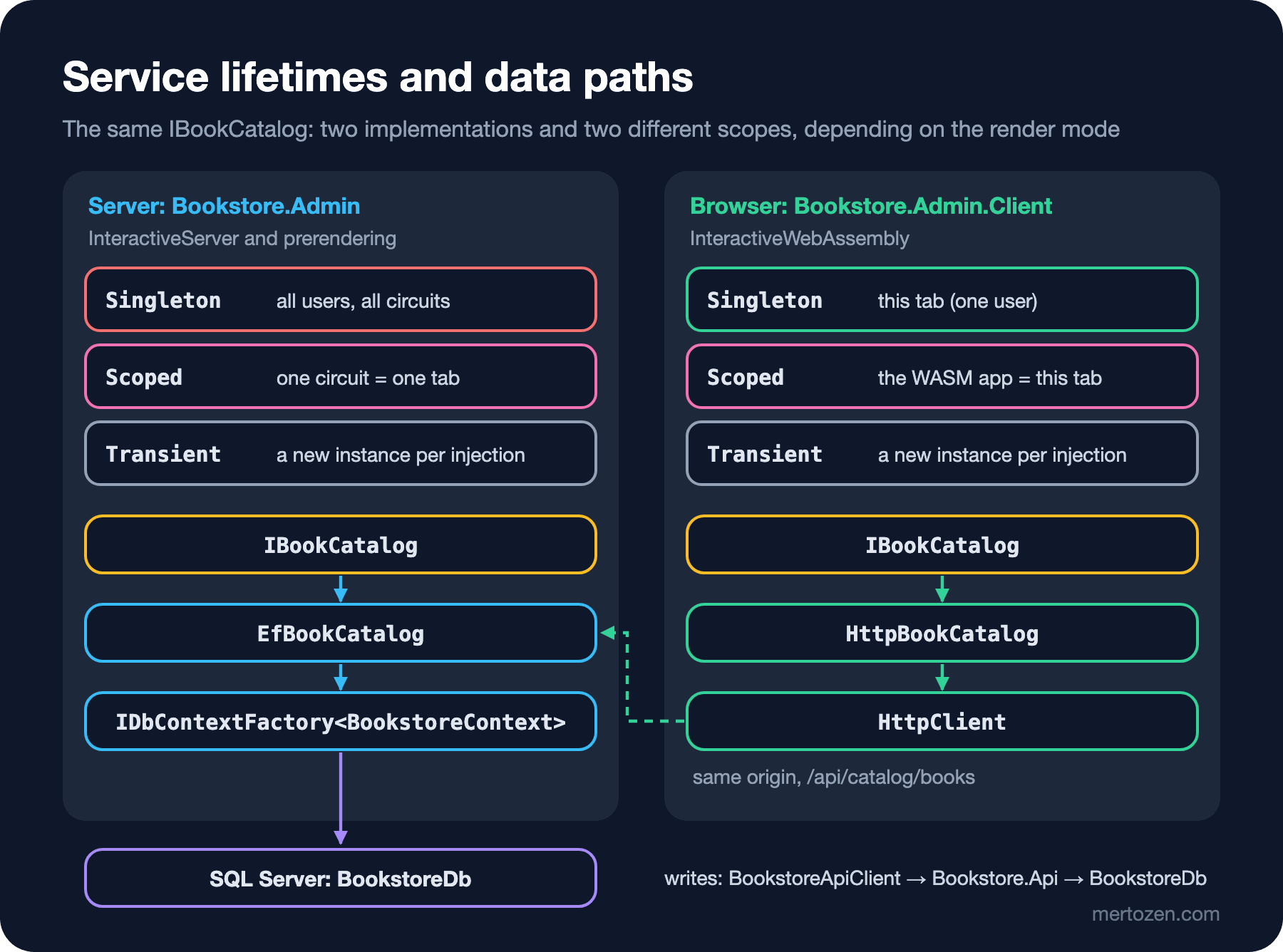
In a Web API the scope is an HTTP request. In InteractiveServer the scope is the circuit: as long as the user's tab stays open, the same scoped instance lives on and every interactive component in the tab shares it. Prerendering and Static SSR pages run as separate HTTP requests and get their own scopes. On WebAssembly there is no server; the whole app belongs to one user in one tab, and a scoped service behaves like a singleton in practice. I opened the quote page twice with Playwright: the first visit, then a new page load after the WebAssembly files had been downloaded:
first visit: running on Server
   lines: 12 x Emma, 12 x Pride and Prejudice
   24 items, subtotal 5,877.60 TRY, discount 587.76 TRY, total 5,289.84 TRY
   requests to /api/catalog from the browser: none
   after Books -> Quote preview (enhanced navigation): running on WebAssembly, lines: (none)
second visit (full page load): running on WebAssembly
   lines: 12 x Emma, 12 x Pride and Prejudice
   24 items, subtotal 5,877.60 TRY, discount 587.76 TRY, total 5,289.84 TRY
   requests to /api/catalog from the browser: GET /api/catalog/books?page=1&pageSize=5&search=Austen
   after Books -> Quote preview (enhanced navigation): running on WebAssembly, lines: 12 x Emma, 12 x Pride and Prejudice
The answer to the first question: no on the first visit, yes on the second, and the reason is not the lifetime itself but the change of render mode. On the first visit the component ran on the Server; by the time I came back from the book list, the WebAssembly files had arrived and Auto started the new component in the browser. The QuoteState in the browser knows nothing about the one on the server; it is a new, empty instance. On the second visit we were on WebAssembly from the start; enhanced navigation doesn't reload the page, so the WebAssembly app and its scoped QuoteState stayed alive. When I pinned the component to InteractiveServer and repeated the test:
on the quote page: 1 x Dune
via the inventory page (InteractiveServer) and back: 1 x Dune
via the book list (Static SSR) and back: 1 x Dune
The lines also survived a trip to another interactive page and to a Static SSR page; the scope is the circuit, and the circuit lives as long as the tab stays open. A full page reload means a new scope in both modes. In Auto the user's state can live in two separate worlds, so keep important state in a durable place rather than in a service, or pin the component to Server.
User Data in a Singleton
The StaffNoteStore we wrote for notes in 06 is a Singleton; it is data that all users share on purpose. Putting a user's own state in a Singleton, on the other hand, means every user on the server sees the same instance. As an experiment I registered QuoteState with AddSingleton, pinned the component to InteractiveServer, and opened two separate browser contexts in Playwright (two separate cookie stores, so two separate users):
Ada's quote:   30 x Dune
Grace's quote: (none)  (a separate browser context, nothing added)
Ada's quote: 30 x Dune
Grace's quote: 30 x Dune (a separate browser context, nothing added)The first is the correct registration (Scoped), the second is the Singleton. The answer to the second question: Grace sees Ada's quote, and if she adds to it she changes Ada's. There is no build error, and a test with a single user shows nothing; the bug only appears in production when two users work at the same time. Also, if a scoped service is injected into a Singleton, that scoped instance lives forever too; ASP.NET Core catches this at startup in the Development environment, but not in Production.
How the Panel Reaches the Database: Two Options
Since 02 the panel has taken all its data from Bookstore.Api through the typed BookstoreApiClient. BookstoreContext, however, sits inside the Bookstore.Api web project; for the panel to reach the database with EF Core a decision was needed. There were two options:
- Everything over HTTP from Bookstore.Api: a single door, business rules in one place, and the panel has no database knowledge or connection string. The cost: one more network round trip for every read, an API endpoint just for the panel for each of its screens, and no EF Core projections in the panel.
- Moving
BookstoreContext, the entities and the migrations into a shared class library (Bookstore.Data): the panel does its reads directly from the database, while writes still go through the API. The cost: the panel is tied to the schema (one migration affects both apps), and the panel knows the connection string too, so the attack surface grows.
The panel's read screens (search, lists, reports) kept multiplying the admin endpoints we would add to the API; on the write side, rules such as stock reservation had to stay in the API. So I chose the second option: reads with EF Core through Bookstore.Data, every write through the API. Referencing the Bookstore.Api project directly from the panel also looks like an option, but a web project depending on another web project mixes up Program, endpoints and configuration files; I didn't even try it. After the move I checked that the migrations still match the model:
Build started...
Build succeeded.
No changes have been made to the model since the last migration.
The namespaces stayed the same, so no code changed in the API; only the project files did. The panel's Program.cs:
// Reads go straight to the database through Bookstore.Data; every write still goes through Bookstore.Api.
string connectionString = builder.Configuration.GetConnectionString("BookstoreDb") is { Length: > 0 } value
    ? value
    : throw new InvalidOperationException(
        "Connection string 'BookstoreDb' is missing. Set the same one as Bookstore.Api's (user-secrets or ConnectionStrings__BookstoreDb).");
builder.Services.AddDbContextFactory<BookstoreContext>(options => options
    .UseSqlServer(connectionString)
    .UseQueryTrackingBehavior(QueryTrackingBehavior.NoTracking));
builder.Services.AddScoped<IBookCatalog, EfBookCatalog>();
builder.Services.AddScoped<QuoteState>();
The panel now needs the same connection string as the API; provide it, as for the API, with user-secrets (--project src/Bookstore.Admin) or the ConnectionStrings__BookstoreDb environment variable. The NoTracking default says in code that the panel is for reading.
Using DbContext in Components: IDbContextFactory and OwningComponentBase
AddDbContext registers the context as scoped. In a Web API that means one context per request, which is right. In InteractiveServer, however, the context lives for the whole circuit and all components in the tab share it. DbContext isn't thread-safe and isn't designed to live long either. I tested the third question with an experimental diagnostics page:
@page "/diagnostics/scoped-context"
@rendermode InteractiveServer
@using Bookstore.Data
@using Bookstore.Inventory
@using Microsoft.EntityFrameworkCore
@inject BookstoreContext Db
@inject BookstoreApiClient Api

<button class="btn btn-primary" @onclick="RunAsync">Run</button>
<pre>@output</pre>

@code {
    private string output = "";

    // Db is scoped: on the server it lives as long as the circuit, like AddDbContext's default registration.
    private async Task RunAsync()
    {
        StockItem dune = await Db.StockItems.AsTracking().SingleAsync(s => s.BookId == 1);
        int firstRead = dune.QuantityOnHand;
        await Api.SetQuantityOnHandAsync("9780441172719", firstRead + 15);

        StockItem again = await Db.StockItems.AsTracking().SingleAsync(s => s.BookId == 1);
        int noTracking = await Db.StockItems.Where(s => s.BookId == 1).Select(s => s.QuantityOnHand).SingleAsync();
        output = $"""
            first read:                         {firstRead}
            Bookstore.Api set it to:            {firstRead + 15}
            second read, same tracked context:  {again.QuantityOnHand}
            projection (not tracked):           {noTracking}
            """;
    }
}
first read: 25
Bookstore.Api set it to: 40
second read, same tracked context: 25
projection (not tracked): 40The answer to the third question: 25, the old value. The row in the database became 40, but the second query returned the StockItem instance the context was already tracking; by default EF Core doesn't overwrite a tracked entity with query results. In a context that lives for one request you don't notice; in a context that lives for the whole circuit the user may look at stale data for hours. Starting two operations at once on the same context (two queries with Task.WhenAll, for example) also leads to EF Core's "A second operation was started on this context instance" error; I couldn't reproduce that test locally because the database provider I used runs queries synchronously, but the EF Core and Blazor documentation state the rule clearly.
The documentation recommends a short-lived context per operation: IDbContextFactory<T>. The panel's catalog search looks like this:
using Bookstore.Admin.Client.Catalog;
using Bookstore.Admin.Client.Contracts;
using Bookstore.Catalog;
using Bookstore.Data;
using Microsoft.EntityFrameworkCore;

namespace Bookstore.Admin.Services;

// The server implementation: reads the catalog straight from the database. One short-lived DbContext per call,
// so two components on the same circuit never share a context.
public sealed class EfBookCatalog(IDbContextFactory<BookstoreContext> dbFactory) : IBookCatalog
{
    public async Task<PagedResult<BookSummary>> SearchAsync(string? search, int page, int pageSize, CancellationToken ct = default)
    {
        page = Math.Max(page, 1);
        pageSize = Math.Clamp(pageSize, 1, 50);
        await using BookstoreContext db = await dbFactory.CreateDbContextAsync(ct);

        IQueryable<Book> query = db.Books;
        if (!string.IsNullOrWhiteSpace(search))
        {
            string term = search.Trim();
            query = query.Where(b => b.Title.Contains(term) || b.Author.Name.Contains(term) || b.Isbn == term);
        }

        int total = await query.CountAsync(ct);
        List<BookSummary> items = await query
            .OrderBy(b => b.Title)
            .Skip((page - 1) * pageSize)
            .Take(pageSize)
            .Select(b => new BookSummary(b.Isbn, b.Title, b.Author.Name, b.Category.Name, b.Price, b.PublishedYear))
            .ToListAsync(ct);
        return new PagedResult<BookSummary>(items, total, page, pageSize);
    }
}
For work that lasts as long as a component lives and wants change tracking, the second way is OwningComponentBase<T>: the component opens a DI scope of its own, gets T from that scope and closes the scope when the component is disposed. The authors page now uses this instead of the API:
@page "/authors"
@rendermode InteractiveServer
@inherits OwningComponentBase<BookstoreContext>
@using Bookstore.Data
@using Microsoft.AspNetCore.Components.QuickGrid
@using Microsoft.EntityFrameworkCore
@code {
private readonly PaginationState pagination = new() { ItemsPerPage = 5 };
// Loaded once during prerendering (see post 06); sorting and paging then happen in memory on the circuit.
[PersistentState]
public List<AuthorView>? Authors { get; set; }
// Service is a BookstoreContext from a DI scope that belongs to this component and is disposed with it.
protected override async Task OnInitializedAsync() =>
Authors ??= await Service.Authors
.OrderBy(a => a.Name)
.Select(a => new AuthorView(a.Id, a.Name, a.Books.Count))
.ToListAsync();
}AddDbContextFactory also registers the context itself as scoped; that is why OwningComponentBase<BookstoreContext> worked without an extra registration. The rule: don't inject a scoped context on the circuit; use a factory per operation, OwningComponentBase per component.
A Shared Abstraction for Auto Mode: IBookCatalog
The quote page is InteractiveAuto. The same component runs on the server on the first visit and in the browser afterwards; on the server it can reach the database, in the browser it can't. So that the component doesn't need to know the difference, there is an interface in between, and it lives in the .Client project because both sides must see it:
using Bookstore.Admin.Client.Contracts;

namespace Bookstore.Admin.Client.Catalog;

// What an Auto component needs from the catalog. On the server it reads the database with EF Core,
// in the browser it calls the panel's own /api/catalog endpoint over HTTP.
public interface IBookCatalog
{
    Task<PagedResult<BookSummary>> SearchAsync(string? search, int page, int pageSize, CancellationToken ct = default);
}
The server implementation is the EfBookCatalog above. The browser implementation calls the panel's own endpoint over HTTP:
using System.Globalization;
using System.Net.Http.Json;
using Bookstore.Admin.Client.Contracts;

namespace Bookstore.Admin.Client.Catalog;

// The WebAssembly implementation: same origin as the page, so no CORS and no API address in the browser.
public sealed class HttpBookCatalog(HttpClient http) : IBookCatalog
{
    public async Task<PagedResult<BookSummary>> SearchAsync(string? search, int page, int pageSize, CancellationToken ct = default)
    {
        string uri = $"api/catalog/books?page={page.ToString(CultureInfo.InvariantCulture)}&pageSize={pageSize.ToString(CultureInfo.InvariantCulture)}"
            + (string.IsNullOrWhiteSpace(search) ? "" : $"&search={Uri.EscapeDataString(search)}");
        return await http.GetFromJsonAsync<PagedResult<BookSummary>>(uri, ct)
            ?? new PagedResult<BookSummary>([], 0, page, pageSize);
    }
}
using Bookstore.Admin.Client.Catalog;
using Bookstore.Admin.Client.Contracts;
namespace Bookstore.Admin.Services;
// The endpoint HttpBookCatalog calls from the browser. Like the inventory endpoints, it is protected in post 11.
public static class CatalogEndpoints
{
public static IEndpointRouteBuilder MapPanelCatalogEndpoints(this IEndpointRouteBuilder app)
{
app.MapGet("/api/catalog/books", (IBookCatalog catalog, string? search, CancellationToken ct, int page = 1, int pageSize = 10)
=> catalog.SearchAsync(search, page, pageSize, ct));
return app;
}
}The browser could call Bookstore.Api directly; that would mean enabling CORS on the API and giving the API's address to the browser. The panel's same-origin endpoint avoids both and also makes the BFF approach in post 11 easier. Like the stock endpoints, this endpoint is unprotected for now; it gets protected in 11. The registrations on both sides:
using Bookstore.Admin.Client.Catalog;
using Bookstore.Admin.Client.Ordering;
using Bookstore.Admin.Client.Shared;
using Microsoft.AspNetCore.Components.WebAssembly.Hosting;

WebAssemblyHostBuilder builder = WebAssemblyHostBuilder.CreateDefault(args);

builder.Services.AddCascadingValue(_ => new PanelOptions(Currency: "TRY", AmountFormat: "N2"));

// In the browser the panel itself is the API: same origin, the request carries the panel's cookies.
builder.Services.AddScoped(_ => new HttpClient { BaseAddress = new Uri(builder.HostEnvironment.BaseAddress) });
builder.Services.AddScoped<IBookCatalog, HttpBookCatalog>();
builder.Services.AddScoped<QuoteState>();

await builder.Build().RunAsync();
On the server side AddScoped<IBookCatalog, EfBookCatalog>(), in the browser AddScoped<IBookCatalog, HttpBookCatalog>(). The "requests to /api/catalog from the browser" line in the quote output above shows the difference: on Server no catalog request left the browser, and the query ran on the server with EF Core; on WebAssembly the search became a GET /api/catalog/books. Both implementations have tests; the component test uses a fake IBookCatalog, and the EfBookCatalog test uses a SQLite database opened in memory:
passed EfBookCatalogTests.Searches_by_author_and_pages_by_title
passed QuoteTests.The_picker_adds_a_search_result_to_the_shared_quote
passed QuoteTests.Twenty_copies_get_the_institutional_discount_and_every_change_is_announced
Test run summary: Passed!
  total: 17
  failed: 0
  succeeded: 17
The output is trimmed (only the tests added in this post). The first run of the BookPicker test failed with this error:
failed Bookstore.Admin.Tests.QuoteTests.The_picker_adds_a_search_result_to_the_shared_quote (152ms)
  Xunit.MicrosoftTestingPlatform.XunitException: Bunit.Rendering.MissingRendererInfoException : A component under test is trying to access the 'RendererInfo' property, which has not been specified. Set it via TestContext.Renderer.SetRendererInfo.
Since the component looks at RendererInfo.IsInteractive, bUnit has to be told which renderer to imitate: Renderer.SetRendererInfo(new RendererInfo("WebAssembly", isInteractive: true)).
HttpClient on WebAssembly and Response Streaming in .NET 10
In .NET 10 HttpClient on WebAssembly streams responses by default; the official documentation lists this as a breaking change. ReadAsStreamAsync no longer returns a MemoryStream but a BrowserHttpReadStream, which doesn't support synchronous reads. As an experiment I wrote HttpBookCatalog like this:
    public async Task<PagedResult<BookSummary>> SearchAsync(string? search, int page, int pageSize, CancellationToken ct = default)
    {
        string uri = $"api/catalog/books?page={page}&pageSize={pageSize}&search={Uri.EscapeDataString(search ?? "")}";
        using HttpResponseMessage response = await http.GetAsync(uri, HttpCompletionOption.ResponseHeadersRead, ct);
        using Stream body = await response.Content.ReadAsStreamAsync(ct);
        // Synchronous deserialization reads the stream with Stream.Read.
        return JsonSerializer.Deserialize<PagedResult<BookSummary>>(body, JsonSerializerOptions.Web)
            ?? new PagedResult<BookSummary>([], 0, page, pageSize);
    }
running on WebAssembly
results: 0
crit: Microsoft.AspNetCore.Components.WebAssembly.Rendering.WebAssemblyRenderer[100]
Unhandled exception rendering component: net_http_synchronous_reads_not_supported
System.NotSupportedException: net_http_synchronous_reads_not_supported
at System.Net.Http.BrowserHttpReadStream.Read(Byte[] buffer, Int32 offset, Int32 count)JsonSerializer.Deserialize(Stream) does a synchronous read and throws NotSupportedException in the browser; in the browser the message shows up as a resource key instead of the full text. When I tried the same code without HttpCompletionOption.ResponseHeadersRead, that is with the default GetAsync, there was no error; the content was buffered in memory first, so the stream could be read synchronously. The fix is to stay async all the way: GetFromJsonAsync, ReadFromJsonAsync or DeserializeAsync. If you need the old behaviour back, you can set WasmEnableStreamingResponse to false in the project file or call SetBrowserResponseStreamingEnabled(false) per request.
State Containers and Browser Storage
QuoteState is a state container: the data and the methods that change it live in a service, and changes are announced with an event:
using Bookstore.Admin.Client.Contracts;

namespace Bookstore.Admin.Client.Ordering;

public sealed record QuoteLine(string Isbn, string Title, decimal Price, int Quantity)
{
    public decimal Total => Price * Quantity;
}

// The quote being prepared, shared by the components on the quote page.
// Registered as scoped: one per circuit on the server, one per browser tab in WebAssembly.
public sealed class QuoteState
{
    // Institutional orders: at least 20 copies get 10% off (Bookstore's B2B rule).
    public const int InstitutionalMinimum = 20;
    public const decimal InstitutionalDiscountRate = 0.10m;

    private readonly List<QuoteLine> lines = [];

    public event Action? Changed;

    public IReadOnlyList<QuoteLine> Lines => lines;
    public int TotalQuantity => lines.Sum(l => l.Quantity);
    public decimal Subtotal => lines.Sum(l => l.Total);
    public decimal Discount =>
        TotalQuantity >= InstitutionalMinimum ? Math.Round(Subtotal * InstitutionalDiscountRate, 2) : 0m;
    public decimal Total => Subtotal - Discount;

    public void Add(BookSummary book, int quantity)
    {
        int index = lines.FindIndex(l => l.Isbn == book.Isbn);
        if (index >= 0)
        {
            lines[index] = lines[index] with { Quantity = lines[index].Quantity + quantity };
        }
        else
        {
            lines.Add(new QuoteLine(book.Isbn, book.Title, book.Price, quantity));
        }
        Changed?.Invoke();
    }

    public void Remove(string isbn)
    {
        lines.RemoveAll(l => l.Isbn == isbn);
        Changed?.Invoke();
    }
}
BookPicker adds lines and CartPreview shows them; both sit inside the same QuoteBuilder but know nothing about each other:
@code {
    // QuoteState changes outside this component (BookPicker adds lines), so listen for it.
    protected override void OnInitialized() => Quote.Changed += OnQuoteChanged;

    private void OnQuoteChanged() => _ = InvokeAsync(StateHasChanged);

    public void Dispose() => Quote.Changed -= OnQuoteChanged;
}
The event may come from another component's event handler or from a background thread, so StateHasChanged is called through InvokeAsync, as with the timer in 03. Releasing the subscription in Dispose is a must: the service lives longer than the component, and if the subscription stays, every change tries to render a disposed component, and the garbage collector can't collect the component either.
In 06 we saw that the stock filter survives a paused circuit but is lost on a page reload. To keep it after a reload I store the filter in the browser. In InteractiveServer there are ProtectedLocalStorage and ProtectedSessionStorage for this; the value is encrypted with Data Protection and written to the browser's localStorage or sessionStorage:
    protected override async Task OnAfterRenderAsync(bool firstRender)
    {
        if (!firstRender)
        {
            return;
        }

        Logger.LogInformation("OnAfterRender(firstRender: true): starting the refresh timer");
        timer = new System.Timers.Timer(TimeSpan.FromSeconds(30));
        timer.Elapsed += OnTimerElapsed;
        timer.Start();

        // Browser storage needs JS interop, so it can only be read once the page is interactive.
        ProtectedBrowserStorageResult<InventoryFilter> saved = await Storage.GetAsync<InventoryFilter>(FilterKey);
        if (saved.Success && saved.Value is { } stored
            && (stored.Threshold != Filter!.Threshold || stored.OnlyLow != Filter.OnlyLow))
        {
            Logger.LogInformation("Filter restored from local storage: threshold {Threshold}, only low {OnlyLow}",
                stored.Threshold, stored.OnlyLow);
            Filter = stored;
            await LoadAsync();
            StateHasChanged();
        }
    }
before reload: threshold=12, onlyLow=true, rows=2
localStorage keys: inventory-filter
stored value starts with: CfDJ8F...
right after reload (prerendered HTML): threshold=5, onlyLow=false, rows=20
once interactive: threshold=12, onlyLow=true, rows=2info: InventoryPage: Filter restored from local storage: threshold 12, only low TrueThe filter came back after the reload, but the prerendered default showed first. Accessing browser storage means JS interop, and there is no JS interop during prerendering; the value can only be read after the first interactive render. The user sees the 20-row table for a moment, then the 2 filtered rows. That is acceptable for this page; if it isn't, the preference must be kept on the server (as a user setting), which will become possible with the identity from post 11. ProtectedBrowserStorage exists only on the server side; on WebAssembly the encryption key can't be given to the browser, so you write to plain localStorage with JS interop and put nothing sensitive there.
In Production
In InteractiveServer, scoped services sit in memory with the circuit. One QuoteState, one BookstoreApiClient and everything they hold per open tab; a circuit whose connection dropped lives three more minutes, as we saw in 06. Avoid keeping large lists or caches in scoped services; read the data you need at the moment of the operation.
Giving the panel its own connection string means the panel carries a database identity too. In production, give the panel's database user read permission only; the code is already for reading, but making the permissions match limits the damage in case of a bug or a security hole.
In Auto mode the same screen has two implementations, and they can fail differently along different paths: EfBookCatalog with a database timeout, HttpBookCatalog with a 401 or a network error. Test and log both paths; with Playwright, the first visit and later visits are separate scenarios.
Common Pitfalls
Putting a user's state in a Singleton. It is invisible in a single-person test; the Ada and Grace example above is exactly what happens in production.
Injecting a context registered with AddDbContext into an InteractiveServer component. The context lives for the whole circuit; it brings stale data, a growing change tracker and concurrent-operation errors. Use a factory or OwningComponentBase.
Depending on a server type in an Auto or WebAssembly component. The .Client project can't see BookstoreContext, and it shouldn't; what the component needs should be defined as an interface in .Client, and each side should register its own implementation. If one side's registration is forgotten, the error only shows up in that render mode.
Reading a stream synchronously on WebAssembly. In .NET 10, responses received with ResponseHeadersRead throw NotSupportedException; always use the async APIs.
Subscribing to an event and not releasing it in Dispose. Memory leaks and StateHasChanged errors on disposed components.
A Small Experiment
★☆☆ Pin QuoteBuilder to InteractiveWebAssembly and repeat the quote test. On the first visit, without going through Server at all, how long do you see an empty area? Which IBookCatalog implementation runs during prerendering?
★★☆ Connect QuoteState to the persistent state from 06 with RegisterPersistentService, and check whether the lines are carried over when the first visit switches from Server to WebAssembly. What happens if you forget the documentation's requirement of a singleton registration in the .Client project?
★★★ Add a "top 5 best-selling books" card to the panel: a query that groups OrderItems with EF Core, a method on IBookCatalog for it and the two implementations. Would this query run if the panel's database user had read permission only? What if you added a method that writes?
The panel now reaches its data in two ways, and we know where state lives. In the next post we move on to Blazor talking to JavaScript: IJSRuntime, collocated JS modules, DotNetObjectReference, the new interop APIs in .NET 10 and a sales chart with a charting library.