

Many Environments, Many Apps: App of Apps, ApplicationSet Generators and AppProject
The way to manage many applications and environments in Argo CD is to apply, through an App of Apps root, an ApplicationSet that generates Applications from the folder layout, and to draw boundaries with AppProject. We generate Bookstore's api and web applications for dev, staging and prod from one ApplicationSet, update environments in order with RollingSync, and see with real output an AppProject rejecting a forbidden namespace and what preserveResourcesOnDeletion does.
Version note: The examples in this post were run with kind 0.33 and Kubernetes 1.37, Argo CD 3.6.1, Kustomize 5.8, .NET 10 and Angular 22.
Guess First
Bookstore's two applications (api and web) in three environments (dev, staging, prod) are generated from a single ApplicationSet, and the ApplicationSet has preserveResourcesOnDeletion: true. Someone deletes the apps/web/overlays/staging folder in the config repo and commits. What happens to the bookstore-web-staging Application generated by the ApplicationSet, and what happens to the web pods in staging? The two answers differ, and the real output is at the end of the post.
Writing Six Applications by Hand
So far we have managed only the API of Bookstore, the online bookstore used as the shared example across this site's series, only in dev, and with a single Application YAML file. In this post the Angular client bookstore-web joins and the environments become three. The config repo now looks like this:
apps/
  api/
    base/
    overlays/
      dev/
      staging/
      prod/
  web/
    base/
    overlays/
      dev/
      staging/
      prod/
argocd/
  root.yaml
  bootstrap/
    project.yaml
    applicationset.yaml
The web image serves the Angular build on nginx and forwards /api/ requests to the api Service of the same environment. The pod learns which environment it is in from its own namespace; the manifest does not name the environment:
          env:
            - name: POD_NAMESPACE
              valueFrom:
                fieldRef:
                  fieldPath: metadata.namespace
            # nginx proxies /api/ to the api Service of the same environment.
            - name: API_UPSTREAM
              value: http://api.$(POD_NAMESPACE).svc.cluster.local
The prod overlays ask for two replicas each, staging and dev use the base as is. Two applications and three environments mean six Applications. You could write them as six YAML files like in the second post, but a fourth environment makes it eight, a third application twelve, and all of them copies of each other. Argo CD offers two ways around this: App of Apps and ApplicationSet.
App of Apps: an Application That Manages Applications
In App of Apps a "root" Application watches a folder containing other Application YAMLs. Since an Argo CD Application is itself a Kubernetes object, the root applies them like any other manifest. Our root is the only object we apply by hand:
# App of Apps root: the only Application created by hand (kubectl apply -f argocd/root.yaml).
apiVersion: argoproj.io/v1alpha1
kind: Application
metadata:
  name: bookstore-root
  namespace: argocd
spec:
  project: default
  source:
    repoURL: http://git-server.git-server.svc.cluster.local/bookstore-config
    targetRevision: main
    path: argocd/bootstrap
  destination:
    server: https://kubernetes.default.svc
    namespace: argocd
  syncPolicy:
    automated:
      prune: true
      selfHeal: true
This solves the problem with the Application YAML we applied with kubectl apply in the second post: Argo CD now applies Argo CD's definitions too, and if someone changes an Application in the UI, the root pulls it back to what is in Git. Rebuilding a cluster from scratch (after a disaster or in a new region) takes one command. It has limits as well. Every Application under the root is still a hand-written file; App of Apps does not generate repeated structure, it only groups it. The root does not wait for the health of its child Applications by default; since the Application health check was removed in 1.8, ordering child applications with waves requires adding that check back in argocd-cm. And deleting the root, if it has a finalizer, deletes all child Applications and their resources. Under our root, instead of individual Applications, we put one AppProject and one ApplicationSet.
ApplicationSet: Generating Applications from Folders
The ApplicationSet controller produces a list of parameters from one or more generators and creates an Application from a template for each parameter set. The generators:
| Generator | Where its parameters come from | When |
|---|---|---|
list | A list of elements written into the ApplicationSet | A few environments that rarely change |
git (directories) | Paths of folders in the repo | A folder-per-environment layout |
git (files) | The content of JSON/YAML files in the repo | Per-environment values (cluster name, replicas, domain) |
cluster | Clusters registered in Argo CD and their labels | Shipping the same application to every cluster |
matrix / merge | The product or union of two generators | Combinations such as every cluster × every application |
Our folder layout already carries the information, so the git directory generator is enough. Bookstore's ApplicationSet:
apiVersion: argoproj.io/v1alpha1
kind: ApplicationSet
metadata:
  name: bookstore
  namespace: argocd
spec:
  goTemplate: true
  goTemplateOptions: ["missingkey=error"]
  generators:
    # One Application per folder: apps/<component>/overlays/<env>
    - git:
        repoURL: http://git-server.git-server.svc.cluster.local/bookstore-config
        revision: main
        directories:
          - path: apps/*/overlays/*
  strategy:
    type: RollingSync
    rollingSync:
      steps:
        - matchExpressions:
            - key: env
              operator: In
              values: [dev]
        - matchExpressions:
            - key: env
              operator: In
              values: [staging]
        - matchExpressions:
            - key: env
              operator: In
              values: [prod]
          maxUpdate: 1
  syncPolicy:
    # Deleting the ApplicationSet (or a folder) must not delete running workloads.
    preserveResourcesOnDeletion: true
  template:
    metadata:
      name: 'bookstore-{{index .path.segments 1}}-{{.path.basename}}'
      labels:
        component: '{{index .path.segments 1}}'
        env: '{{.path.basename}}'
    spec:
      project: bookstore
      source:
        repoURL: http://git-server.git-server.svc.cluster.local/bookstore-config
        targetRevision: main
        path: '{{.path.path}}'
      destination:
        server: https://kubernetes.default.svc
        namespace: 'bookstore-{{.path.basename}}'
      syncPolicy:
        syncOptions:
          - CreateNamespace=true
          - PruneLast=true
For a path such as apps/api/overlays/staging, .path.segments is [apps, api, overlays, staging] and .path.basename is staging; the template produces an Application called bookstore-api-staging going to the bookstore-staging namespace. goTemplate: true turns on Go templates (index, if, printf); missingkey=error stops a misspelled parameter name from silently becoming an empty string. If an environment needs a different Application setting (for example automated sync only in dev), you can write a Go template condition into the template with templatePatch.
Migration: Taking Over the Existing Application
Since the second post, bookstore-api-dev had been an object applied by hand; the ApplicationSet was going to generate an Application with the same name. To delete the old one without touching its resources, we first removed its finalizer. On the lab side we created the database Secrets for staging and prod and turned on progressive syncs; the feature has been beta since 3.3 and still has to be enabled explicitly:
kubectl -n argocd patch configmap argocd-cmd-params-cm --type merge \
    -p '{"data":{"applicationsetcontroller.enable.progressive.syncs":"true"}}'
kubectl -n argocd rollout restart deployment argocd-applicationset-controller
kubectl -n argocd patch application bookstore-api-dev --type merge -p '{"metadata":{"finalizers":null}}'
kubectl -n argocd delete application bookstore-api-dev
kubectl apply -f argocd/root.yaml
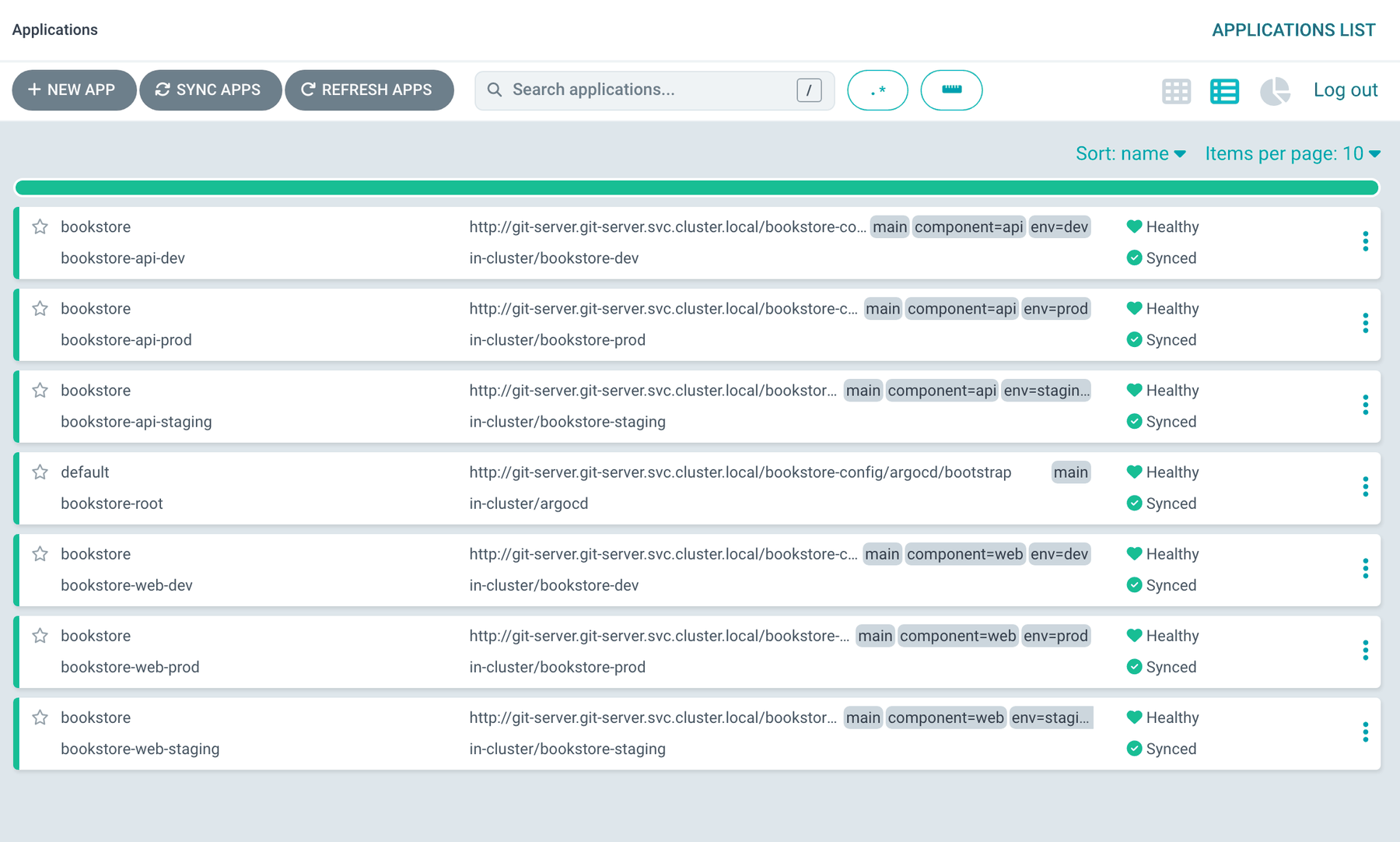
NAME CLUSTER NAMESPACE PROJECT STATUS HEALTH SYNCPOLICY
argocd/bookstore-api-dev https://kubernetes.default.svc bookstore-dev bookstore Synced Healthy Manual
argocd/bookstore-api-prod https://kubernetes.default.svc bookstore-prod bookstore OutOfSync Missing Manual
argocd/bookstore-api-staging https://kubernetes.default.svc bookstore-staging bookstore OutOfSync Missing Manual
argocd/bookstore-root https://kubernetes.default.svc argocd default Synced Progressing Auto-Prune
argocd/bookstore-web-dev https://kubernetes.default.svc bookstore-dev bookstore OutOfSync Missing Manual
argocd/bookstore-web-prod https://kubernetes.default.svc bookstore-prod bookstore OutOfSync Missing Manual
argocd/bookstore-web-staging https://kubernetes.default.svc bookstore-staging bookstore OutOfSync Missing Manualbookstore-api-dev is Synced and Healthy from the first moment: the new Application has the same name, so the tracking annotation on the resources (bookstore-api-dev:apps/Deployment:bookstore-dev/api) matched exactly and no pod restarted. With a different name, every resource would have shown OutOfSync and been relabelled.
RollingSync: Updating Environments in Order
Notice that every generated application is Manual in the SYNCPOLICY column. RollingSync forces automated sync off on the Applications it generates; it starts syncs itself, step by step. Steps select Applications by label: first env=dev, then env=staging, then env=prod, with at most one Application at a time in prod (maxUpdate: 1). The next step does not start until every Application in a step is Healthy. Sync start and finish times of the Applications on the first install:
bookstore-web-dev     2026-11-15T03:28:02Z 2026-11-15T03:28:02Z {"automated":true,"username":"applicationset-controller"}
bookstore-web-staging 2026-11-15T03:28:04Z 2026-11-15T03:28:04Z {"automated":true,"username":"applicationset-controller"}
bookstore-api-staging 2026-11-15T03:28:32Z 2026-11-15T03:28:52Z {"automated":true,"username":"applicationset-controller"}
bookstore-api-prod    2026-11-15T03:29:00Z 2026-11-15T03:29:22Z {"automated":true,"username":"applicationset-controller"}
bookstore-web-prod    2026-11-15T03:29:01Z 2026-11-15T03:29:01Z {"automated":true,"username":"applicationset-controller"}
The prod step waited until staging's API (a 20-second sync with the database, migration Job and API waves) was Healthy. The syncs were started by applicationset-controller. More interesting is the next change: a single commit moving the API image tag in the base to 1.1.0. Dev was already on 1.1.0; it affects staging and prod. We read the ApplicationSet's status every five seconds:
06:30:15 api-dev=Healthy api-prod=Waiting api-staging=Waiting web-dev=Healthy web-prod=Healthy web-staging=Healthy
06:30:46 api-dev=Healthy api-prod=Waiting api-staging=Pending web-dev=Healthy web-prod=Healthy web-staging=Healthy
06:31:16 api-dev=Healthy api-prod=Pending api-staging=Healthy web-dev=Healthy web-prod=Healthy web-staging=Healthy
06:31:50 api-dev=Healthy api-prod=Healthy api-staging=Healthy web-dev=Healthy web-prod=Healthy web-staging=Healthy
{"version":"1.1.0","environment":"Production","pod":"api-85d44bd785-42tkd","database":"Postgres"}
{"version":"1.1.0","environment":"Production","pod":"api-85d44bd785-6kmwk","database":"Postgres"}Waiting is an Application whose turn has not come; Pending is one whose sync has been started and which is expected to move to Progressing. Prod started after staging finished. Waits of some tens of seconds between steps are normal: since 3.6, when progressive sync sees a change it adds a refresh annotation to every Application and does not start the steps until all of them are reconciled, so it does not decide on stale information. The release notes say steps may be somewhat delayed in installations managing many Applications. 3.6 also added new metrics for progressive syncs and descriptive reasons and messages in the ApplicationSet conditions.
RollingSync's cost is clear: there is no automated sync or self-heal in dev either. If you want every commit to reach dev immediately, two ApplicationSets (a separate one for dev with automated sync) or promotion through commits in Git instead of RollingSync (sixth post) may fit better.
AppProject: Who Can Deploy What, Where?
The generated Applications live in the bookstore project. An AppProject draws an Application's boundaries: which repos it may read from, which clusters and namespaces it may write to, which cluster-scoped kinds it may create:
apiVersion: argoproj.io/v1alpha1
kind: AppProject
metadata:
  name: bookstore
  namespace: argocd
spec:
  description: Bookstore api and web, every environment
  sourceRepos:
    - http://git-server.git-server.svc.cluster.local/bookstore-config
  destinations:
    - server: https://kubernetes.default.svc
      namespace: bookstore-*
  # Cluster-scoped kinds the project may create: only namespaces (CreateNamespace=true).
  clusterResourceWhitelist:
    - group: ""
      kind: Namespace
  roles:
    - name: deployer
      description: CI or on-call may sync, but not create or delete applications
      policies:
        - p, proj:bookstore:deployer, applications, get, bookstore/*, allow
        - p, proj:bookstore:deployer, applications, sync, bookstore/*, allow
To test the boundary we created an Application that wanted to deploy from the same repo into kube-system:
CONDITION         MESSAGE
InvalidSpecError  application destination server 'https://kubernetes.default.svc' and namespace 'kube-system' do not match any of the allowed destinations in project 'bookstore'
Argo CD did not reject the Application, but it applied nothing. In the default project this Application would have worked fine; leaving default open to everyone means handing Argo CD's cluster-admin permission to anyone who can create an Application. With an empty clusterResourceWhitelist a project cannot create any cluster-scoped object; we allowed only Namespace, so a ClusterRole or CRD accidentally added to an overlay is rejected. roles defines project-specific roles: the deployer role can see and sync the Applications in the bookstore project but cannot create or delete them. Argo CD can issue a JWT token for a role, or you can bind the role to an SSO group; a project and a role per team is the cleanest layout. argocd proj role get bookstore deployer shows the role's policies; Argo CD adds the permission to see the project by itself:
Role Name:     deployer
Description:   CI or on-call may sync, but not create or delete applications
Policies:
p, proj:bookstore:deployer, projects, get, bookstore, allow
p, proj:bookstore:deployer, applications, get, bookstore/*, allow
p, proj:bookstore:deployer, applications, sync, bookstore/*, allow
Global RBAC (argocd-rbac-cm), SSO groups and the fine-grained update/delete permissions from 3.0 are in the last post of the series.
In Production
By default the ApplicationSet controller polls Git every three minutes; a new environment folder shows up within that time. A webhook or the argocd.argoproj.io/application-set-refresh: "true" annotation speeds it up. In RollingSync, an Application that matches no step is never synced: if you add overlays/qa tomorrow and do not add qa to the steps, that environment waits for a manual sync. Since 3.0, selectors in nested generators are always applied (the applyNestedSelectors field is ignored); when upgrading from 2.x, ApplicationSets using selectors inside a matrix may generate fewer Applications. When an ApplicationSet owns an Application, changing that Application in the UI does not stick; the ApplicationSet controller pulls it back to the template. If you need manual intervention, the applicationsSync: create-update or create-only policies limit what the controller may change or delete; if the controller is started with --policy, that wins, and for the ApplicationSet's value to override it applicationsetcontroller.enable.policy.override must be on.
Common Pitfalls
The answer to Guess First: we deleted the apps/web/overlays/staging folder and refreshed the ApplicationSet.
argocd/bookstore-web-dev
argocd/bookstore-web-prod
deployment.apps/web   1/1   1     1     5m37s
service/web   ClusterIP   <cluster-ip>   <none>   80/TCP   5m37s
The bookstore-web-staging Application was deleted; the web Deployment and Service in staging keep running. preserveResourcesOnDeletion: true keeps the finalizer off the generated Applications; the Application goes, the resources stay. Without this setting, deleting a single folder would also delete that environment's application, and deleting the ApplicationSet itself would delete all six environments. The cost: the resources now belong to no Application, they are orphaned and cleaning them up is your job. When we brought the folder back with git revert, the ApplicationSet generated the Application again and, thanks to the same tracking ID, took over the resources as Synced.
Changing a generated Application in the UI and expecting the change to stay. The ApplicationSet template always wins.
Believing dev has self-heal while RollingSync is on. Automated sync is forced off.
Running everything in default without projects. Anyone who can create an Application can deploy anywhere in the cluster.
Putting a finalizer on the App of Apps root and deleting the root "to clean up". Every environment goes with it.
A Small Experiment
★☆☆ Add an apps/api/overlays/qa folder (namespace bookstore-qa, create its Secret with the lab script). Does the ApplicationSet generate the Application, does RollingSync sync it? Add qa to the steps and try again.
★★☆ Replace the git directory generator with a matrix generator: a list generator supplying the environments (dev, staging, prod) and their replica counts, and a git directory generator supplying the applications. Set prod's replica count from a generator parameter instead of the overlay and compare the two approaches for readability.
★★★ Issue a JWT token for the deployer role (argocd proj role create-token), run argocd app sync bookstore-web-dev with it, then try argocd app delete with the same token. Read the error message, then think about why binding the role to an SSO group is better than a token.
Six Applications come from one ApplicationSet and environments update in order. But we still change the image tag by hand. In the next post we connect CI to GitOps: committing or opening a pull request in the config repo after the image is built, environment promotion and Argo CD Image Updater.