

What Is GitOps? From Push-Based CD to Pull-Based Reconciliation, and When You Don't Need It
GitOps is a deploy model where the desired state lives declaratively in Git and an agent inside the cluster keeps pulling and applying it. We show with real output why a push-based pipeline misses drift, walk through the four OpenGitOps principles, a toy reconcile loop, repo layout decisions, Argo CD versus Flux, and when GitOps is not worth it.
Version note: The examples in this post were run with kind 0.33 and Kubernetes 1.37, kubectl 1.37, Kustomize 5.8, PostgreSQL 18 and .NET 10.
Guess First
The Bookstore API reaches the cluster through kubectl apply -k, run by a CI pipeline. One night there is an incident and the on-call engineer does two things: scales the Deployment from 1 to 3 replicas with kubectl scale, and sets the log level to Debug with kubectl set env. The next morning the pipeline runs again with the manifests from Git. Which change gets undone: the replica count, the environment variable, or both? The answer is where this post starts, and the real output is below.
Push-Based Deploys: a Kubeconfig in the Pipeline
The example in this series is Bookstore, the online bookstore used as the shared example across this site's series. In the fourteenth post of the Kubernetes series we organised the Bookstore manifests with Kustomize as a base and overlays; in this series we move that structure into a separate config repo. As in the Kubernetes series, the database is PostgreSQL running inside the cluster. Bookstore defaults to SQL Server; the API switches to PostgreSQL with Database__Provider=Postgres, and the PostgreSQL migrations live in a separate project. The first version of the config repo:
apps/
  api/
    base/
      kustomization.yaml
      deployment.yaml
      service.yaml
      postgres.yaml
    overlays/
      dev/
        kustomization.yaml
Many teams deploy like this today: the pipeline builds the image, pushes it to a registry, then connects to the cluster and applies the manifests. In our lab the equivalent is a single script:
#!/usr/bin/env bash
# Push-based deploy: what a CI job does when it runs kubectl itself.
# It needs a kubeconfig with write access to the cluster.
set -euo pipefail
overlay="${1:-apps/api/overlays/dev}"
kubectl apply -k "$overlay"
kubectl -n bookstore-dev rollout status deployment/api --timeout=120s
service/api created
service/postgres created
deployment.apps/api created
statefulset.apps/postgres created
Waiting for deployment "api" rollout to finish: 0 of 1 updated replicas are available...
deployment "api" successfully rolled outIt works and took 16 seconds. The real question is what the job running this script holds: a kubeconfig that can write to the cluster. In the deploy posts of the GitHub Actions series we stored that credential as a secret and shortened its life with OIDC, but the principle does not change: the key to the cluster lives outside the cluster, in the CI system. Every step of the pipeline, every third-party action and every runner sits close to that key. The flow is also one-way: the pipeline only acts while it runs and knows nothing about what happens in the cluster in between.
Drift: the Cluster Moving Away from Git
Let us make the two changes from Guess First and compare the cluster with Git:
kubectl -n bookstore-dev scale deployment/api --replicas=3
kubectl -n bookstore-dev set env deployment/api Logging__LogLevel__Default=Debug
kubectl diff -k apps/api/overlays/dev
@@ -16,7 +16,7 @@
spec:
progressDeadlineSeconds: 600
- replicas: 3
+ replicas: 1
revisionHistoryLimit: 10
selector:
matchLabels:When the cluster no longer matches what Git says, we call it drift. kubectl diff sees one drift: the replica count. The environment variable is not in the diff. Run the pipeline again and ask:
deployment.apps/api configured
statefulset.apps/postgres configured
deployment "api" successfully rolled out
1
ASPNETCORE_ENVIRONMENT
Database__Provider
ConnectionStrings__BookstoreDb
Logging__LogLevel__Default
The answer to Guess First: the replica count went back to 1, Logging__LogLevel__Default stayed. The reason is how client-side apply works. kubectl apply keeps what it last applied in the kubectl.kubernetes.io/last-applied-configuration annotation and compares three things: the last applied version, the version to apply now and the live object. replicas is part of the last applied version, so it is written back. The manually added env entry was never applied, so kubectl does not consider it its own; like a field added by a controller or a mutating webhook, it is left alone. Server-side apply gives the same result: the owner of that field is kubectl set env, not apply.
So the push model has two separate problems. First, drift goes unnoticed until the next pipeline run; if the pipeline runs weekly, for a week. Second, even the next run does not see all of it. Settings that run in the cluster but are not in Git pile up over time and one day become the answer to "but it worked in staging".
The Four OpenGitOps Principles
The word GitOps spread in 2017 through Weaveworks' writing; today its definition is the set of principles (v1.0.0) published by the OpenGitOps working group under the CNCF. Here are the four principles in our own words, each with its counterpart in Bookstore:
| Principle | What it asks for | In Bookstore |
|---|---|---|
| Declarative | The desired state of the system is described as an outcome, not as a list of steps | Kustomize bases and overlays; manifests, not scripts |
| Versioned and immutable | The desired state is kept somewhere that cannot be changed in place, is versioned and keeps its history | Every change in the config repo is a commit; history is never deleted |
| Pulled automatically | An agent pulls the desired state from the source by itself | An agent inside the cluster reads Git; CI never connects to the cluster |
| Continuously reconciled | The agent keeps watching the actual state and tries to bring it to the desired state | Drift is noticed and closed within seconds |
Notice that the principles do not mention Git; they describe a state store. In practice it is nearly always Git, because versioning, immutable history, review through pull requests and signed commits come for free. This is the desired state and reconciliation loop from the first post of the Kubernetes series, moved one level up: Kubernetes makes pods match a Deployment object; a GitOps agent makes Kubernetes objects match the manifests in Git.
The Pull Model: Moving the Loop into the Cluster
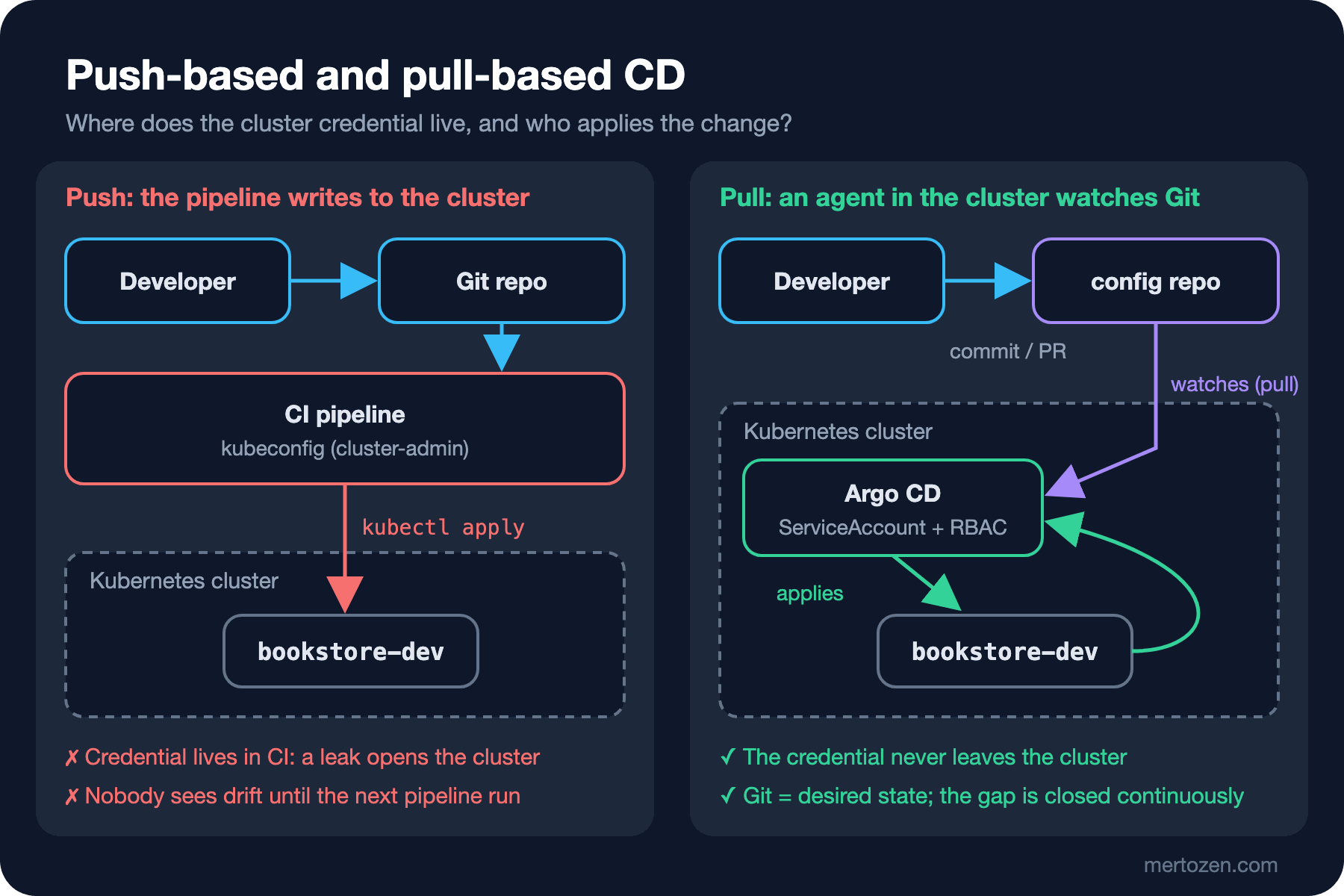
In the pull model the pipeline never touches the cluster. Its job ends with building the image and opening a commit (or a pull request) in the config repo. An agent running inside the cluster watches Git, applies changes when it sees them and, in between, compares the live state with Git. The credential moves too: the agent runs with a ServiceAccount and RBAC, and the key to the cluster never leaves the cluster. The only thing exposed to the outside is read access to Git.
To see the idea before moving to Argo CD, we wrote a toy loop. This script is not for production; it shows the core of a GitOps agent in a few lines:
#!/usr/bin/env bash
# A toy pull loop: the core idea of a GitOps agent in a few lines. Not for production.
# usage: ./reconcile-loop.sh <git-clone> <kustomize-path> [interval-seconds]
set -uo pipefail
clone="$1"; path="$2"; interval="${3:-30}"
while true; do
    git -C "$clone" pull --ff-only -q
    rev="$(git -C "$clone" rev-parse --short HEAD)"
    kubectl diff --server-side --force-conflicts -k "$clone/$path" > /dev/null 2>&1
    case $? in
        0) echo "$(date +%T) $rev in sync" ;;
        1) echo "$(date +%T) $rev drift detected, applying"
           kubectl apply --server-side --force-conflicts -k "$clone/$path" | grep -v unchanged ;;
        *) echo "$(date +%T) $rev diff failed" >&2 ;;
    esac
    sleep "$interval"
done
kubectl diff exits with 0 when there is no difference, 1 when there is one and a higher code on error; the loop decides on that. In the first attempt we had --force-conflicts only on apply, and diff failed every round with "conflict with kubectl with subresource scale": server-side diff checks field ownership too. We started the loop on a clone with a 10-second interval and then did three things: scaled to 3 replicas by hand, committed "run two replicas in dev" and undid that commit with git revert. The loop's log, with the apply lines that repeat every round shortened:
06:04:36 224edf2 in sync
06:04:46 224edf2 in sync
06:04:56 224edf2 drift detected, applying
deployment.apps/api serverside-applied
06:05:07 729d324 drift detected, applying
deployment.apps/api serverside-applied
06:05:17 df25766 drift detected, applying
deployment.apps/api serverside-applied
06:05:27 df25766 in sync
The manual scale at 06:04:47 was undone on the next round. Commit 729d324 was in the cluster one round later and the deployment went to 2 replicas; the revert commit df25766 was applied a round after that and the count was back to 1. Nobody connected to the cluster to roll back: the rollback is a git revert. The command from "Undoing Changes in Git, Part 2: git revert" in the Git & GitHub series becomes a deploy tool here, and the history becomes an audit trail by itself: the author, time, reason and approving reviewer of every change are in Git.
Even the toy loop did not remove the env variable from Guess First; server-side apply does not touch a field it does not own either. Argo CD has the same limit, and in the third post we will repeat this experiment with Argo CD's self-heal. The loop has many other gaps: no health information, no cleanup of manifests deleted from Git (prune), no record of which commit is live, no way to manage many applications and clusters. Argo CD is a controller that fills each of those gaps.
Repo Layout: App Repo, Config Repo and a Folder per Environment
The first decision when moving to GitOps is where the manifests live. The common choice is two repos: the app repo (Bookstore's source code, Dockerfiles, tests) and the config repo (Kubernetes manifests, environment overlays, Argo CD definitions). A separate repo has three benefits. A commit to the app repo does not trigger a deploy; only a change in the config repo is a deploy. Permissions split: a developer can merge app code, while writing to the prod overlay can require a separate approval. History stays readable: the config repo's log is the deploy history. The cost is that CI has to commit to the config repo after a build; we will build that in the sixth post.
For a small team a monorepo (code and a deploy/ folder in the same repo) also works. Then Argo CD should only watch deploy/, and CI must not end up in an endless loop with the tag commits it creates itself. In this series' lab the config repo is separate; in the snapshots it sits in a gitops/ folder so readers can follow everything from one repo.
The second decision is how to separate environments. The old and still common approach is a branch per environment: dev, staging and prod branches with promotion by merge. In practice it turns into an anti-pattern: branches carry not only versions but also environment-specific differences, every merge brings conflicts, a hotfix lands in one branch and not the other, and the answer to "what is in prod?" is buried in the diff between two branches. In the branching strategies post of the Git & GitHub series we saw why short-lived branches are recommended; environments should not be long-lived branches. The recommended way is a folder per environment: a single main branch, overlays/dev, overlays/staging and overlays/prod folders, and promotion as a commit that changes the image tag in an overlay. Every environment is visible at a glance and their differences are written plainly in Kustomize overlays.
Argo CD or Flux?
There are two mature GitOps tools for Kubernetes and both are graduated CNCF projects: Flux reached that level in November 2022 and Argo in December 2022. The latest releases on the day of writing are Argo CD 3.6.1 (4 November 2026) and Flux 2.10.0 (26 October 2026).
Roughly, the difference is this. Argo CD is a central application: a web UI, a CLI, its own API server, SSO, its own RBAC and a CRD called Application. It behaves like a product a platform team offers to dozens of teams: "watch and sync your applications here". Flux is a toolkit: small controllers and CRDs such as GitRepository, Kustomization and HelmRelease, with no default UI; everything goes through the Kubernetes API and the CLI. Flux is more "Kubernetes-native", Argo CD is stronger at visibility across teams.
This series uses Argo CD. The reason is what the Bookstore team needs: seeing several environments on one screen, showing sync and health status to developers, generating environments with ApplicationSet and moving to progressive delivery with Argo Rollouts. The concepts (reconcile, drift, prune, health) are the same in both tools; we will discuss when to look at Flux in the last post of the series.
When You Don't Need It
GitOps has a cost. It means an agent running in the cluster, upgrading that agent, a separate config repo, a CI that commits and a new debugging habit. You may not need it when:
- You run a single VM with Docker Compose: a pipeline that runs
docker compose upis enough; there is no control plane to reconcile. - You target a PaaS such as Azure App Service or Container Apps: the platform already gives you deploy history, slots and rollback; a push-based deploy from GitHub Actions is simple and sufficient.
- You have one cluster, one application and a small team: if nobody changes things by hand, drift is a small problem; set up a proper pipeline first.
The GitOps idea is not tied to Kubernetes; the principles ask for a state store and an agent that reconciles. But the tools (Argo CD, Flux) are built on the Kubernetes API. Outside Kubernetes, flows that plan and apply Terraform code through pull requests come close to the idea, but the continuous reconcile part is usually missing. In the Infrastructure as Code: Terraform series we saw how to detect drift with terraform plan.
In Production
Moving to GitOps usually happens on an existing cluster. When the agent takes over existing resources, the first comparison exposes every manual difference; do not enable prune (deleting what is not in Git) on day one, look at the differences first. The config repo is now production itself: block direct pushes to main, require approval on the prod overlay with CODEOWNERS and consider commit signing. The Git service becomes critical as well: if Git is unreachable, running applications are not affected, but nothing new can be deployed. Have a written break-glass procedure for emergencies: who changes the cluster by hand, with which permission, and how the change is written back to Git afterwards.
Common Pitfalls
Thinking "GitOps = keeping YAML in Git". If the manifests are in Git but the pipeline still runs kubectl apply, the model is push; without pull and reconcile, drift stays invisible.
Assuming the next apply fixes everything. We saw above that manually added fields survive an apply. The fix belongs in Git.
Separating environments with branches and promoting by merge. Folders and overlays are readable and their diffs mean something.
Committing secrets as plain text because "everything must be in Git". In this post the lab script generates the database password outside Git; the proper ways are in the seventh post.
Installing Argo CD for one application on one VM. The tool should not be bigger than the problem it solves.
A Small Experiment
★☆☆ After running the push script, add an annotation to the Deployment with kubectl annotate. Does kubectl diff -k show it? Explain the result with the content of last-applied-configuration.
★★☆ While the toy loop runs, commit a change that removes postgres.yaml from the base. Does the loop delete the StatefulSet? Think about what decides this behaviour in a real agent (prune).
★★★ Draw your own team's deploy flow: where does the credential live, who notices drift and how fast, how many steps is a rollback? Turn the same flow into the pull model and list which steps disappear and which new component has to be operated.
The idea and the toy loop are done. In the next post we install Argo CD into the kind cluster, look at its components and deploy Bookstore from Git with our first Application.