

What Changed in Blazor from .NET 8 to .NET 11: the Web App Model, RendererInfo, PersistentState, NotFound and .NET 11
.NET 8 moved Blazor to a single Web App model with render modes per component; .NET 9 and 10 filled its gaps, and .NET 11 brought more Static SSR, URL-based QuickGrid and circuit auto-pause. We upgraded the Bookstore panel to .NET 11: one using for [ValidatableType], the new BL0013/BL0016 analyzers, the removal of UseWebAssemblyDebugging, and .NET 10 LTS and .NET 11 STS support ending on the same day.
Version note: The code in this post was built and run with .NET 10 (SDK 10.0.404, ASP.NET Core 10.0.15); the .NET 11 sections were tried with the .NET 11 SDK 11.0.100 and the 11.0.0 packages (including Microsoft.AspNetCore.Components.Server.AutoPause 11.0.0), the tests use bUnit 2.15.2, and browser behaviour was observed with Playwright 1.65's headless Chromium.
Predict First
Over twelve posts we built the admin panel of Bookstore, the online bookstore used as the shared example across this site's series, on .NET 10. In this last post we look back: how Blazor has changed since .NET 8, what .NET 11 brought, and what happens when the panel is upgraded to .NET 11. Three questions first. The panel has compiled without warnings for twelve posts; does it still compile when only the TFM and the package versions change? If you go to the second page of the authors grid and press the browser's back button, where do you end up on .NET 10, and where on .NET 11? .NET 10 is an LTS release and .NET 11 an STS release; whose support ends first?
.NET 8: the Blazor Web App and Render Modes per Component
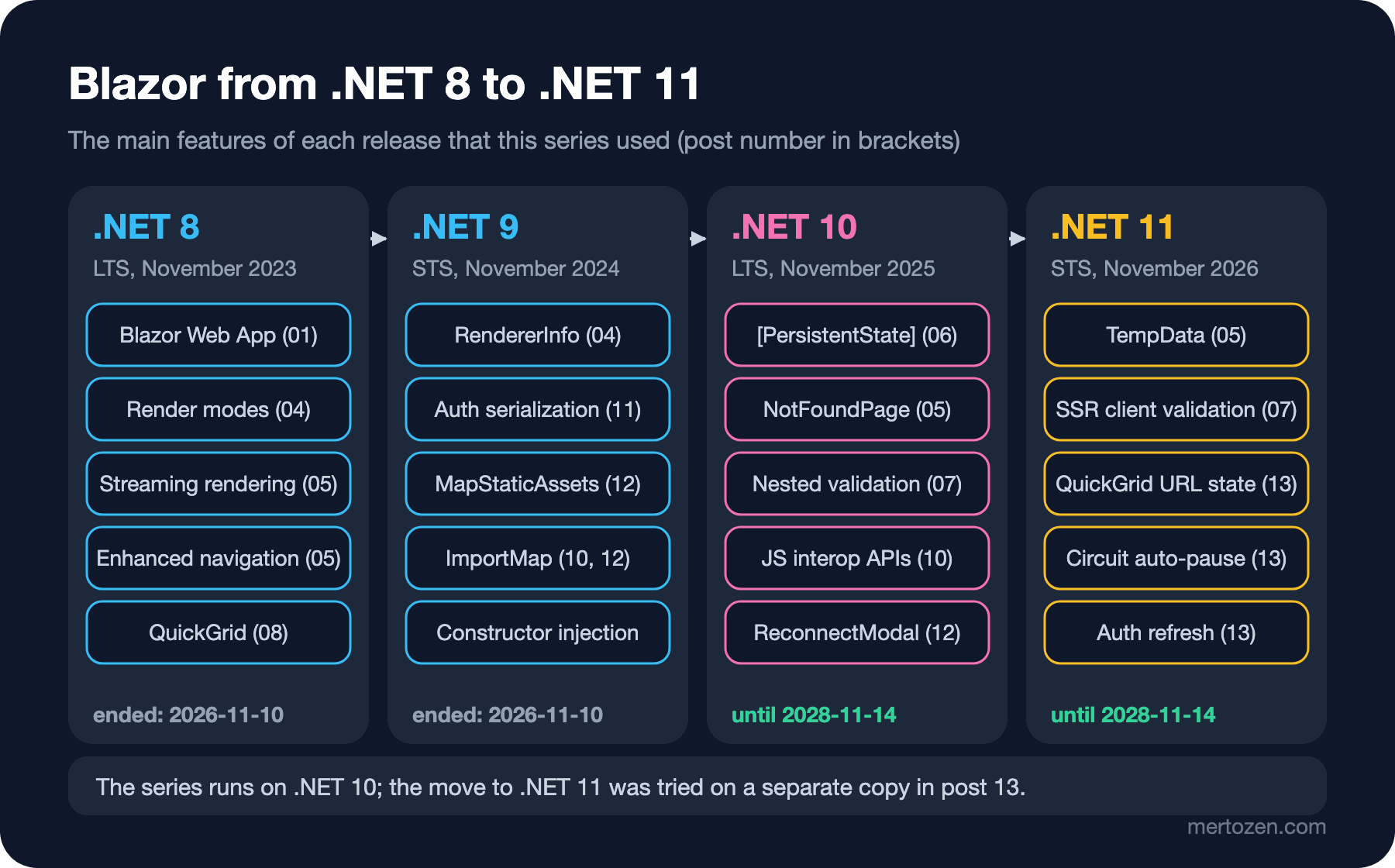
Before .NET 8 Blazor was two separate hosting models: Blazor Server and Blazor WebAssembly. You chose when creating the project, and the whole app ran with that model. .NET 8 merged them into a single Blazor Web App template and made the render mode a decision per component: Static SSR, InteractiveServer, InteractiveWebAssembly and InteractiveAuto. Posts 01 to 06 of the series are built on this model. The same release brought streaming rendering, enhanced navigation and enhanced forms, form binding with [SupplyParameterFromForm], root-level cascading values, QuickGrid and the Blazor UI for Identity. On the WebAssembly side, the Jiterpreter and packaging assemblies as .wasm files in the Webcil format are also .NET 8's work; the files we measured in post 12 are in that format.
.NET 9: RendererInfo, Auth State Serialization and Static Assets
.NET 9 didn't change the model; it filled its gaps. With RendererInfo and AssignedRenderMode a component can find out at run time where and in which mode it runs (we used them in posts 04 and 09). AddAuthenticationStateSerialization and AddAuthenticationStateDeserialization replaced the hand-written persisting providers of the .NET 8 template; the WebAssembly claims in post 11 came this way. The reconnection experience improved, [ExcludeFromInteractiveRouting] arrived to keep single pages Static SSR in a globally interactive app, and constructor injection became possible in components. For static files, MapStaticAssets, ImportMap and fingerprinted names come from .NET 9; the one-year cache header and the CSP nonce in post 12 rest on them.
.NET 10: PersistentState, NotFound, ReconnectModal and More
The Blazor features of .NET 10, the base of the series, were spread across the posts: [PersistentState] and circuit state persistence (06), NavigationManager.NotFound() and NotFoundPage (05), AddValidation and [ValidatableType] for nested validation (07), InvokeConstructorAsync, GetValueAsync and SetValueAsync (10), the passkey support in the template (11), and ReconnectModal, ResourcePreloader, the boot configuration embedded in dotnet.js and the Blazor meters (12). Two of the breaking changes affected us directly: response streaming became the default for HttpClient in WebAssembly (the synchronous read error in post 09), and cookie authentication started returning 401 on known API endpoints instead of redirecting to the login page (11). The <NotFound> fragment and the BlazorCacheBootResources property were removed from the template.
.NET 11: Static SSR, QuickGrid and the Circuit
Most of .NET 11's Blazor features make Static SSR more useful without interactivity: TempData and [SupplyParameterFromSession] (we tried carrying a message with TempData in post 05), client-side validation by default in Static SSR forms (in post 07 the message showed up when leaving a field, without a POST), async validation, and a new component that caches the output of a component subtree. QuickGrid keeps its paging and sorting state in the URL. I tried the same thing on the panel's authors page with both versions:
.NET 10: next-page control is <button>, first author Aldous Huxley -> F. Scott Fitzgerald, URL /authors
  after browser Back: URL /, first author (no grid on this page)
.NET 11: next-page control is <a>, first author Aldous Huxley -> F. Scott Fitzgerald, URL /authors?page=2
  after browser Back: URL /authors, first author Aldous Huxley
The answer to the second question: on .NET 10 the paginator is a <button>, the address stays the same when the page changes, and the back button takes the user off the authors page. On .NET 11 the control is a link, the address becomes ?page=2, the back button returns to the first page, and the link can be shared. It's a breaking change: CSS or tests that target the button need updating, and two grids on the same page need separate parameter names through QueryParameterNameOptions.
On the circuit side, two features change the memory math from post 12. The first is auto-pause: when a tab stays hidden for a while, the circuit is paused and its memory and connection on the server are released. It comes in a separate package:
// dotnet add src/Bookstore.Admin package Microsoft.AspNetCore.Components.Server.AutoPause --version 11.0.0
using Microsoft.AspNetCore.Components;

app.MapRazorComponents<App>()
    .AddInteractiveServerRenderMode(options => options.ContentSecurityFrameAncestorsPolicy = "'none'")
    .AddInteractiveWebAssemblyRenderMode()
    .AddAdditionalAssemblies(typeof(Bookstore.Admin.Client._Imports).Assembly)
    .WithBrowserOptions(options => options.AddAutoPause(p => p.HiddenDelay = TimeSpan.FromSeconds(5)));
Headless Chromium never hides a tab, so I set the Page Visibility API to "hidden" by hand and dispatched the visibilitychange event:
  0.2 s  tab hidden (visibilitychange)
  5.2 s  components-reconnect-state-changed: show
  5.2 s  components-reconnect-state-changed: paused
  9.2 s  tab visible again (visibilitychange)
  9.2 s  components-reconnect-state-changed: hide
 13.2 s  rows: 20
After five seconds the circuit was paused; when the tab became visible it resumed by itself and the stock list was still there. In post 06 we called Blazor.pauseCircuit() by hand; in .NET 11 the server can also ask the client to pause with Circuit.RequestCircuitPauseAsync, for example before a deploy. The second is authentication refresh: when the SignalR connection refreshes its authentication, the circuit receives the new ClaimsPrincipal and AuthorizeView renders again. In post 11 we said an open tab keeps the old role; .NET 11 closes that gap, which I didn't try separately in this post. Beyond these there are IHostedService in WebAssembly and environment variables in its IConfiguration, a Virtualize that no longer assumes every item has the same height, ScrollToItemAsync, the DisplayName, BasePath and EnvironmentView components, and experimental AI components.
Upgrading the Panel to .NET 11
I made the first attempt with post 12's code: SDK 11.0.100 in global.json, net11.0, and 11.0.0 for every Microsoft.AspNetCore.* and Microsoft.EntityFrameworkCore.* package. bUnit 2.15.2 already supports net11.0. The first build:
$ dotnet build Bookstore.slnx
src/Bookstore.Admin/Components/Catalog/NewAuthorForm.cs(7,2): error CS0246: The type or namespace name 'ValidatableType' could not be found (are you missing a using directive or an assembly reference?)
The answer to the first question: no. In post 07 we saw that the .NET 10 SDK generates a non-experimental copy of ValidatableTypeAttribute in web projects and adds it with a global using; in .NET 11 the attribute is no longer experimental and the copy isn't generated. The fix is the very line that caused a compile error in post 07: using Microsoft.Extensions.Validation;. Since that line doesn't work on both versions at once, it's added as part of the upgrade. The second build:
$ dotnet build Bookstore.slnx
src/Bookstore.Admin/Components/Books/CopyIsbnButton.razor(17,26): error BL0016: JS interop call 'InvokeAsync' is not guarded with a try/catch block.
src/Bookstore.Admin/Components/Reports/SalesChart.razor(28,24): error BL0016: JS interop call 'InvokeAsync' is not guarded with a try/catch block.
src/Bookstore.Admin/Components/Reports/SalesChart.razor(29,30): error BL0016: JS interop call 'GetValueAsync' is not guarded with a try/catch block.
...
src/Bookstore.Admin/Program.cs(55,5): error ASPDEPR011: 'WebAssemblyNetDebugProxyAppBuilderExtensions.UseWebAssemblyDebugging(IApplicationBuilder)' is obsolete: 'UseWebAssemblyDebugging is obsolete and should be removed along with any inspectUri configurations. Blazor WebAssembly debugging is now launched directly by Visual Studio and Visual Studio Code.' (https://aka.ms/aspnet/deprecate/011)
src/Bookstore.Admin/Services/BookstoreApiClient.cs(97,43): error BL0013: 'BookstoreApiClient' calls GetAuthenticationStateAsync on AuthenticationStateProvider without subscribing to the AuthenticationStateChanged event. This may result in using stale authentication state.
These are warnings, not errors; they stopped the build because the project has TreatWarningsAsErrors on. BL0016 is a new analyzer that flags JS interop calls outside a try/catch; all nine calls were in our code. BL0013 flags services that take the user from AuthenticationStateProvider without subscribing to AuthenticationStateChanged; in .NET 11 the user can change inside a circuit, so a stored user can go stale. ASPDEPR011 says UseWebAssemblyDebugging is no longer needed: Visual Studio and Visual Studio Code start WebAssembly debugging themselves, and the inspectUri lines in launchSettings.json should go too. As of 2026-11-15 these two analyzers have no page of their own on Microsoft Learn; the explanations above come from the compiler's messages.
What You Can Do on .NET 10 Before Upgrading
This post's commit is the panel still on .NET 10 but ready for .NET 11: the changes that are right on both versions came first. The problem BL0016 points at is real. I tried a situation where Chart.js can't be loaded (a missing file, an outage of the server that hosts it, or a CSP block) with post 12's code:
error banner visible: true
chart area says: "Chart.js"
after Refresh: error banner visible: true

fail: Microsoft.AspNetCore.Components.Server.Circuits.CircuitHost[111]
      Unhandled exception in circuit '…'.
      Microsoft.JSInterop.JSException: Failed to fetch dynamically imported module: http://localhost:5037/Components/Reports/SalesChart.san3whzjle.razor.js
      TypeError: Failed to fetch dynamically imported module: http://localhost:5037/Components/Reports/SalesChart.san3whzjle.razor.js
The JSException not caught in OnAfterRenderAsync ended the circuit; the user sees the error bar and no button on the page works. The chart component now keeps the error to itself:
        try
        {
            // There is no JS during prerendering; the first interactive render is the earliest point.
            module = await JS.InvokeAsync<IJSObjectReference>("import", "./Components/Reports/SalesChart.razor.js");
            chartVersion = await JS.GetValueAsync<string>("Chart.version");
            chart = await JS.InvokeConstructorAsync("Chart", canvas, new
            {
                type = "bar",
                data = new
                {
                    labels = Sales.Select(s => s.Category),
                    datasets = new[] { new { label = "Copies sold", data = Sales.Select(s => s.Copies) } }
                }
            });
            selfReference = DotNetObjectReference.Create(this);
            await module.InvokeVoidAsync("onBarClick", chart, selfReference);
        }
        catch (JSException ex)
        {
            // A failed import or a Chart.js error stays inside this component instead of ending the circuit.
            Logger.LogWarning(ex, "Sales chart could not be created");
            loadFailed = true;
        }
        StateHasChanged();
error banner visible: false
chart area says: "The chart couldn't be loaded. Copies sold per category:"
after Refresh: error banner visible: false
warn: Bookstore.Admin.Components.Reports.SalesChart[0]
Sales chart could not be created
Microsoft.JSInterop.JSException: Failed to fetch dynamically imported module: http://localhost:5037/Components/Reports/SalesChart.san3whzjle.razor.jsThe copy button works the same way: if the module doesn't load, it says "Copy failed". To test it with bUnit I set up the copyText call to throw a JSException; I couldn't write the same test for the chart, because bUnit 2.15.2 doesn't emulate .NET 10's GetValueAsync yet:
System.NotImplementedException : The method or operation is not implemented.BL0013 on the API client is a false alarm in this code: the user is read again on every call and never stored. The rule is turned off there, with the reason written next to it:
        // Read on every call and never cached, so a refreshed user is picked up; BL0013 (.NET 11) doesn't apply here.
#pragma warning disable BL0013
        AuthenticationState state = await authState.GetAuthenticationStateAsync();
#pragma warning restore BL0013
The third change comes from the .NET 11 template: the inline onclick in NavMenu moved to a collocated JS module.
<script type="module" src="@Assets["Components/Layout/NavMenu.razor.js"]"></script>

<div class="top-row ps-3 navbar navbar-dark">
    <div class="container-fluid">
        <a class="navbar-brand" href="">Bookstore Admin</a>
    </div>
</div>

<input type="checkbox" title="Navigation menu" class="navbar-toggler" />

<div id="nav-scrollable" class="nav-scrollable">
// Closes the mobile navigation menu after a click, as the .NET 11 template does (no inline onclick handler).
const navScrollable = document.getElementById("nav-scrollable");
const navToggler = document.querySelector(".navbar-toggler");
if (navScrollable && navToggler) {
navScrollable.addEventListener("click", () => navToggler.click());
}menu open after the toggler: true
menu open after a link click: falseA side benefit is that 'unsafe-hashes' and the hash leave the CSP from post 12; the only permission for inline script in the policy is now the import map's nonce. After these three changes, moving to .NET 11 comes down to the two expected lines:
$ dotnet build Bookstore.slnx
src/Bookstore.Admin/Program.cs(55,5): error ASPDEPR011: 'WebAssemblyNetDebugProxyAppBuilderExtensions.UseWebAssemblyDebugging(IApplicationBuilder)' is obsolete: 'UseWebAssemblyDebugging is obsolete and should be removed along with any inspectUri configurations. Blazor WebAssembly debugging is now launched directly by Visual Studio and Visual Studio Code.' (https://aka.ms/aspnet/deprecate/011)
--- a/Directory.Build.props
+++ b/Directory.Build.props
@@ -2,3 +2,3 @@
<PropertyGroup>
- <TargetFramework>net10.0</TargetFramework>
+ <TargetFramework>net11.0</TargetFramework>
<Nullable>enable</Nullable>
--- a/src/Bookstore.Admin/Components/Catalog/NewAuthorForm.cs
+++ b/src/Bookstore.Admin/Components/Catalog/NewAuthorForm.cs
@@ -2,2 +2,3 @@ using System.ComponentModel.DataAnnotations;
using Bookstore.Admin.Validation;
+using Microsoft.Extensions.Validation;
--- a/src/Bookstore.Admin/Program.cs
+++ b/src/Bookstore.Admin/Program.cs
@@ -52,7 +52,3 @@ if (app.Environment.IsDevelopment() && app.Configuration.GetValue<bool>("Identit
-if (app.Environment.IsDevelopment())
-{
- app.UseWebAssemblyDebugging();
-}
-else
+if (!app.Environment.IsDevelopment())
{With UseWebAssemblyDebugging and inspectUri deleted, the build passed cleanly and the tests ran on .NET 11:
$ dotnet --version
11.0.100
$ dotnet test tests/Bookstore.Admin.Tests
Test run summary: Passed!
  total: 27
  failed: 0
  succeeded: 27
$ dotnet test tests/Bookstore.Api.Tests -- --filter-class Bookstore.Api.Tests.AuthorizationTests
Test run summary: Passed!
  total: 8
  failed: 0
  succeeded: 8
Upgrade Checklist
What we saw in the panel, plus the Blazor items from the official migration guide and the breaking-change list:
- SDK and TFM: 11.0.100 in
global.json,net11.0, 11.0.0 for theMicrosoft.AspNetCore.*andMicrosoft.EntityFrameworkCore.*packages. using Microsoft.Extensions.Validation;in files that use[ValidatableType]; anyASP0029suppressions can go.UseWebAssemblyDebuggingandinspectUriare deleted.- The new analyzers (
BL0010,BL0013,BL0016) stop the build ifTreatWarningsAsErrorsis on; judge the warnings one by one. - The inline handler in
NavMenumoves to a module, and the hash leaves the CSP. - QuickGrid switched to links and URL state; check CSS and tests that look for buttons, and pages with more than one grid.
- Static SSR endpoints take the antiforgery verdict from the middleware; nothing changes for an app that calls
UseAntiforgery(). - Pages reached by enhanced navigation no longer get preload hints.
- Passkey sign-in is now subject to the confirmed-account and lockout rules too; rerun the sign-in tests in apps that use Identity.
- In WebAssembly, environment variables now go into
IConfigurationas well; a hand-addedAddEnvironmentVariables()is no longer needed.
In Production
The answer to the third question is in the data on .NET's release pages: support for .NET 10 LTS and .NET 11 STS ends on the same day, November 14, 2028. Because Microsoft extended STS support to 24 months, moving to .NET 11 costs no support time today; what it costs is having to do one more upgrade after November 2027, when .NET 12 is expected. For an internal app like the panel that gets touched every year, .NET 11's QuickGrid, auto-pause and authentication refresh features may be worth that price; for an app you look at once a year, staying on .NET 10 and waiting for .NET 12 is less work. Whichever way you go, do the upgrade on a separate branch with the tests and TreatWarningsAsErrors on; every warning in this post would have slipped by in a quiet build.
Some of the .NET 11 documentation still carries preview notes. After GA, checking the date of the release notes and the "Version introduced" line on breaking-change pages is enough to avoid mistaking an RC behaviour for GA.
Common Pitfalls
Thinking an upgrade is only a TFM change. The package versions, the code the SDK generates and the analyzers change too.
Suppressing the new analyzer warnings in bulk. In this panel BL0016 pointed at a real bug that ended the circuit, while BL0013 was a false alarm. Telling them apart takes looking at them one by one.
Forgetting that QuickGrid moved to the URL. Two grids on the same page share the same page parameter.
Turning on auto-pause without thinking about state. Pausing doesn't preserve state without bindings (a canvas, WebRTC) by itself; the documentation shows an onCircuitPausing handler for that.
A Small Experiment
★☆☆ Upgrade the panel to .NET 11 locally and open the address of the second authors page in another tab. Do you get the same page?
★★☆ Turn on auto-pause with a 30-second HiddenDelay and repeat the dotnet-counters measurement from post 12: how do circuit.connected and circuit.active change when 20 tabs are hidden?
★★★ Try .NET 11's authentication refresh: change Grace's role, renew her security stamp, and show with a Playwright test that AuthorizeView renders again in an open circuit.
That's the end of the Blazor series. Over thirteen posts we built Bookstore's admin panel, from Static SSR pages to InteractiveServer forms, from a quote screen running in Auto to a chart with JS interop, and from authentication to production settings. The mobile side is coming in the Flutter for Mobile series.