

Installing Argo CD and Its Architecture: Deploying Bookstore to a kind Cluster with Your First Application
Argo CD is a group of controllers running in the cluster that render manifests from a Git repo, compare them with live objects and apply them. We install Argo CD 3.6 into a kind cluster, map the repo-server, application-controller and other components, log in with the CLI, walk through the Application CRD and deploy Bookstore from Git, and we catch a commit that shows Synced yet changes nothing.
Version note: The examples in this post were run with kind 0.33 and Kubernetes 1.37, Argo CD 3.6.1 (argocd CLI 3.6.1), Kustomize 5.8 and .NET 10.
Guess First
The Bookstore API runs in dev through Argo CD with image tag 1.0.0. You write 1.1.0 into the dev overlay with kustomize edit set image and commit. A few seconds later Argo CD shows the application as "Synced to main (e771436)" and "Healthy", saying the latest commit is in the cluster. When you ask the pod, which version answers? We will see how far you can trust the word Synced in the pitfall at the end of this post, with real output.
Lab: the Git Repo Argo CD Watches
In the previous post we deployed Bookstore, the online bookstore used as the shared example across this site's series, with a push-based script. Now Argo CD will watch the same config repo. In real life this repo lives on GitHub, GitLab or Azure Repos and Argo CD connects to it with a deploy key or a token. To avoid pushing anything outside, the lab mounts the repo read-only into the kind node and serves it inside the cluster with a small Git HTTP server (nginx + git http-backend):
kind: Cluster
apiVersion: kind.x-k8s.io/v1alpha4
nodes:
  - role: control-plane
    # The config repo is visible inside the node at /srv/git/bookstore-config.
    # Replace the hostPath with your clone (on Windows e.g. C:/work/bookstore-config).
    extraMounts:
      - hostPath: /path/to/bookstore-config
        containerPath: /srv/git/bookstore-config
        readOnly: true
The Git server's Dockerfile and Deployment are in the snapshot's lab/git-server/ folder. The address Argo CD uses is http://git-server.git-server.svc.cluster.local/bookstore-config. Every commit in the local folder is a commit Argo CD sees; there is no push step. Everything else works exactly as with a real Git provider.
Installing Argo CD 3.6 with install.yaml
Argo CD has three ways to install. The official manifests (install.yaml, and ha/install.yaml for HA), the community-maintained Helm chart (the argo-cd chart in the argo-helm repo), and the core install without the UI and API server (core-install.yaml). In the lab we use the non-HA install.yaml, pinned to a version. According to the docs 3.6 is tested with Kubernetes 1.34–1.37, and kind 0.33's default node is 1.37:
kubectl create namespace argocd
kubectl apply -n argocd --server-side --force-conflicts \
    -f https://raw.githubusercontent.com/argoproj/argo-cd/v3.6.1/manifests/install.yaml
kubectl -n argocd wait --for=condition=Available deployment --all --timeout=600s
customresourcedefinition.apiextensions.k8s.io/applications.argoproj.io serverside-applied
customresourcedefinition.apiextensions.k8s.io/applicationsets.argoproj.io serverside-applied
customresourcedefinition.apiextensions.k8s.io/appprojects.argoproj.io serverside-applied
serviceaccount/argocd-application-controller serverside-applied
...
deployment.apps/argocd-server condition metThe manifest contains 60 resources: three CRDs, ServiceAccounts, Roles, ClusterRoles, ConfigMaps, NetworkPolicies, six Deployments and one StatefulSet. --server-side matters: the CRDs are large, so the last-applied annotation that client-side apply keeps can exceed the size limit, and the 3.6 release notes give the install command with these flags. In the lab the installation was ready in 43 seconds.
Components: Who Does What?
kubectl -n argocd get podsNAME READY STATUS RESTARTS AGE
argocd-application-controller-0 1/1 Running 0 46s
argocd-applicationset-controller-794bb95c9d-7dbc5 1/1 Running 0 47s
argocd-dex-server-66cf64bfcf-b9285 1/1 Running 0 47s
argocd-notifications-controller-5878c8d644-74jrl 1/1 Running 0 47s
argocd-redis-5869b7547-s8cb7 1/1 Running 0 47s
argocd-repo-server-7d55cc466b-rf2px 1/1 Running 0 46s
argocd-server-85b849c688-6l5jz 1/1 Running 0 46s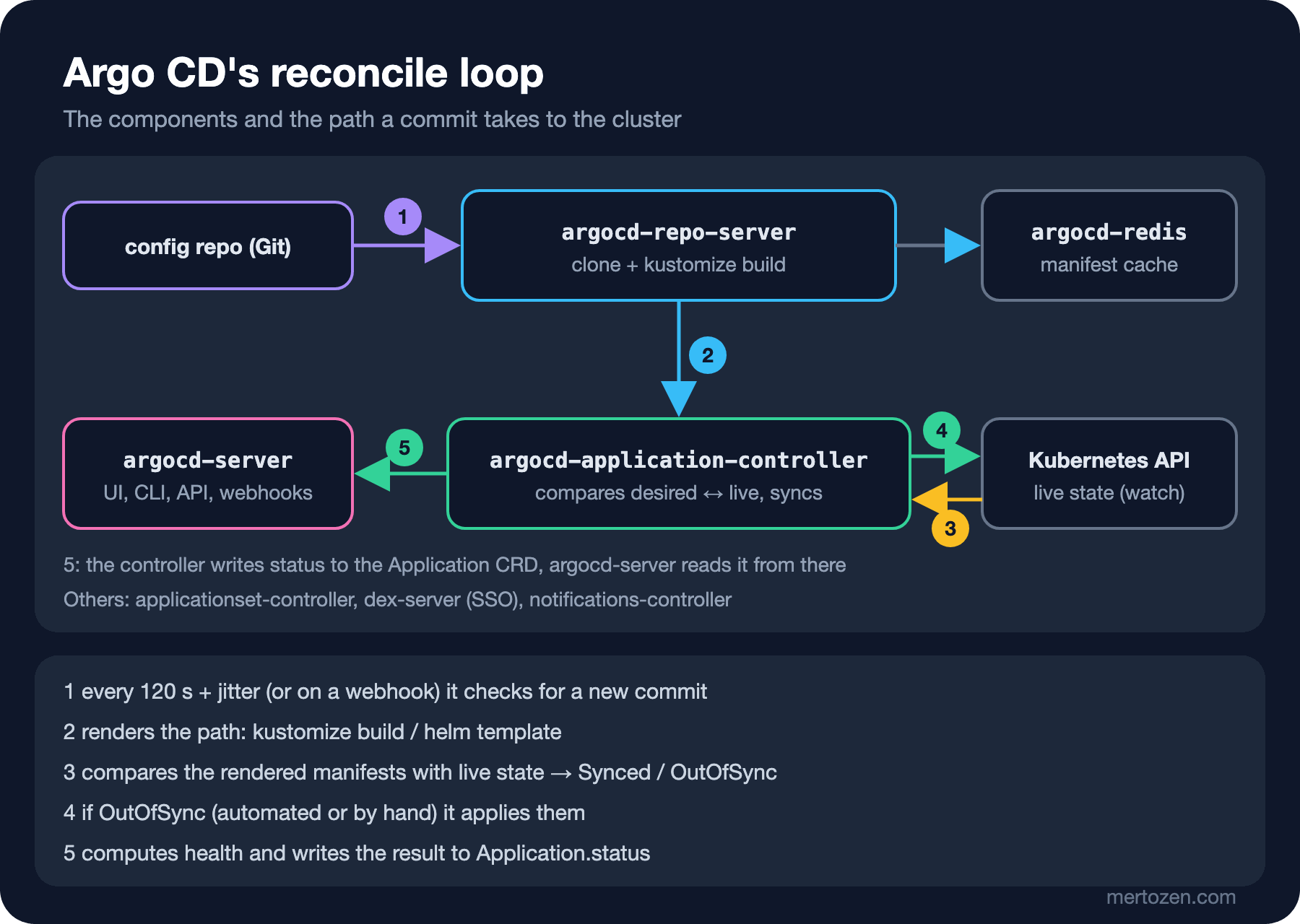
argocd-repo-server clones the repo and renders an Application's path: kustomize build for Kustomize, helm template for Helm, plain YAML files for a directory. It caches the result by commit SHA and does not render the same commit twice. The repo-server in our installation ships Kustomize 5.8.3 and Helm 4.3.1; using the same versions in CI and locally avoids "it worked on my machine" differences.
argocd-application-controller is the heart of the system. It watches the Kubernetes API, compares live objects with the manifests from the repo-server, computes sync status (Synced/OutOfSync) and health, and runs sync operations. It is installed as a StatefulSet and can be sharded when it manages many clusters. argocd-server serves the UI, the gRPC/REST API the CLI talks to, and Git webhooks; it does not deploy anything itself, it reads and writes Application objects. argocd-redis is a cache; if it is lost, it is refilled. argocd-applicationset-controller generates Applications from ApplicationSets (fifth post), argocd-dex-server is the identity bridge for SSO, and argocd-notifications-controller sends sync and health events to Slack, Teams or a webhook (last post).
The default wait time is worth knowing too: Argo CD polls Git every 120 seconds plus a random delay (jitter) of up to 60 seconds, so a new commit is seen within about three minutes at most. For something faster, the Git provider sends a webhook to argocd-server, or you refresh by hand with argocd app get --refresh. The lab has no webhook, so we used refresh.
Logging in with the CLI and the First Password
To use argocd-server only from our own machine without exposing it, a port-forward is enough. Default ports may be taken on shared machines; bind to 127.0.0.1 and pick a free port:
kubectl -n argocd port-forward --address 127.0.0.1 svc/argocd-server 52611:443
argocd admin initial-password -n argocd
<redacted>
This password must be only used for first time login. We strongly recommend you update the password using `argocd account update-password`.The installation generates a random password for the admin user and writes it to the argocd-initial-admin-secret Secret. It is meant for the first login only:
argocd login 127.0.0.1:52611 --username admin --password "$INITIAL_PASSWORD" --insecure
argocd account update-password --account admin \
    --current-password "$INITIAL_PASSWORD" --new-password "$NEW_PASSWORD"
'admin:login' logged in successfully
Context '127.0.0.1:52611' updated
Password updated
Context '127.0.0.1:52611' updated--insecure is there because of the lab's self-signed certificate; in a real setup argocd-server sits behind an Ingress or a Gateway with a valid certificate. After changing the password, delete argocd-initial-admin-secret; the docs recommend this too. In production the admin account is disabled entirely once SSO is in place; we leave that to the last post of the series.
The First Application, with the CLI
First we register the repo. For a public repo this step is optional, but it validates the connection right away; for a private repo this is where you give the credential:
argocd repo add http://git-server.git-server.svc.cluster.local/bookstore-config
argocd repo list
Repository 'http://git-server.git-server.svc.cluster.local/bookstore-config' added
TYPE NAME REPO INSECURE OCI LFS CREDS STATUS MESSAGE PROJECT
git http://git-server.git-server.svc.cluster.local/bookstore-config false false false false SuccessfulThe lab script writes the api-db Secret holding the database password into the bookstore-dev namespace, outside Git; secrets in Git are the subject of the seventh post. Then the Application:
argocd app create bookstore-api-dev \
    --repo http://git-server.git-server.svc.cluster.local/bookstore-config \
    --path apps/api/overlays/dev \
    --revision main \
    --dest-server https://kubernetes.default.svc \
    --dest-namespace bookstore-dev \
    --project default
argocd app get bookstore-api-dev
application 'bookstore-api-dev' created
Name: argocd/bookstore-api-dev
Project: default
Server: https://kubernetes.default.svc
Namespace: bookstore-dev
Source:
- Repo: http://git-server.git-server.svc.cluster.local/bookstore-config
Target: main
Path: apps/api/overlays/dev
Sync Policy: Manual
Sync Status: OutOfSync from main (df25766)
Health Status: Missing
GROUP KIND NAMESPACE NAME STATUS HEALTH HOOK MESSAGE
Service bookstore-dev api OutOfSync Missing
Service bookstore-dev postgres OutOfSync Missing
apps Deployment bookstore-dev api OutOfSync Missing
apps StatefulSet bookstore-dev postgres OutOfSync Missing Argo CD read the repo, rendered the path and saw that four resources are not in the cluster: all OutOfSync, all Missing. With a Manual sync policy it does nothing on its own. We start the sync:
argocd app sync bookstore-api-devOperation: Sync
Sync Revision: df25766057841b5ee038d5ce25ef47012850cef1
Phase: Succeeded
Duration: 0s
Message: successfully synced (all tasks run)
GROUP KIND NAMESPACE NAME STATUS HEALTH HOOK MESSAGE
Service bookstore-dev api Synced Healthy service/api created
Service bookstore-dev postgres Synced Healthy service/postgres created
apps Deployment bookstore-dev api Synced Progressing deployment.apps/api created
apps StatefulSet bookstore-dev postgres Synced Progressing statefulset.apps/postgres createdThe sync finished within a second, but the Deployment and the StatefulSet are Progressing: the manifests are applied, the pods are not ready yet. With argocd app wait bookstore-api-dev --health the application became Healthy 11 seconds later. Sync and health are two different questions: sync asks "is what Git says in the cluster?", health asks "is what is in the cluster working?". The difference between the two is the subject of the third post.
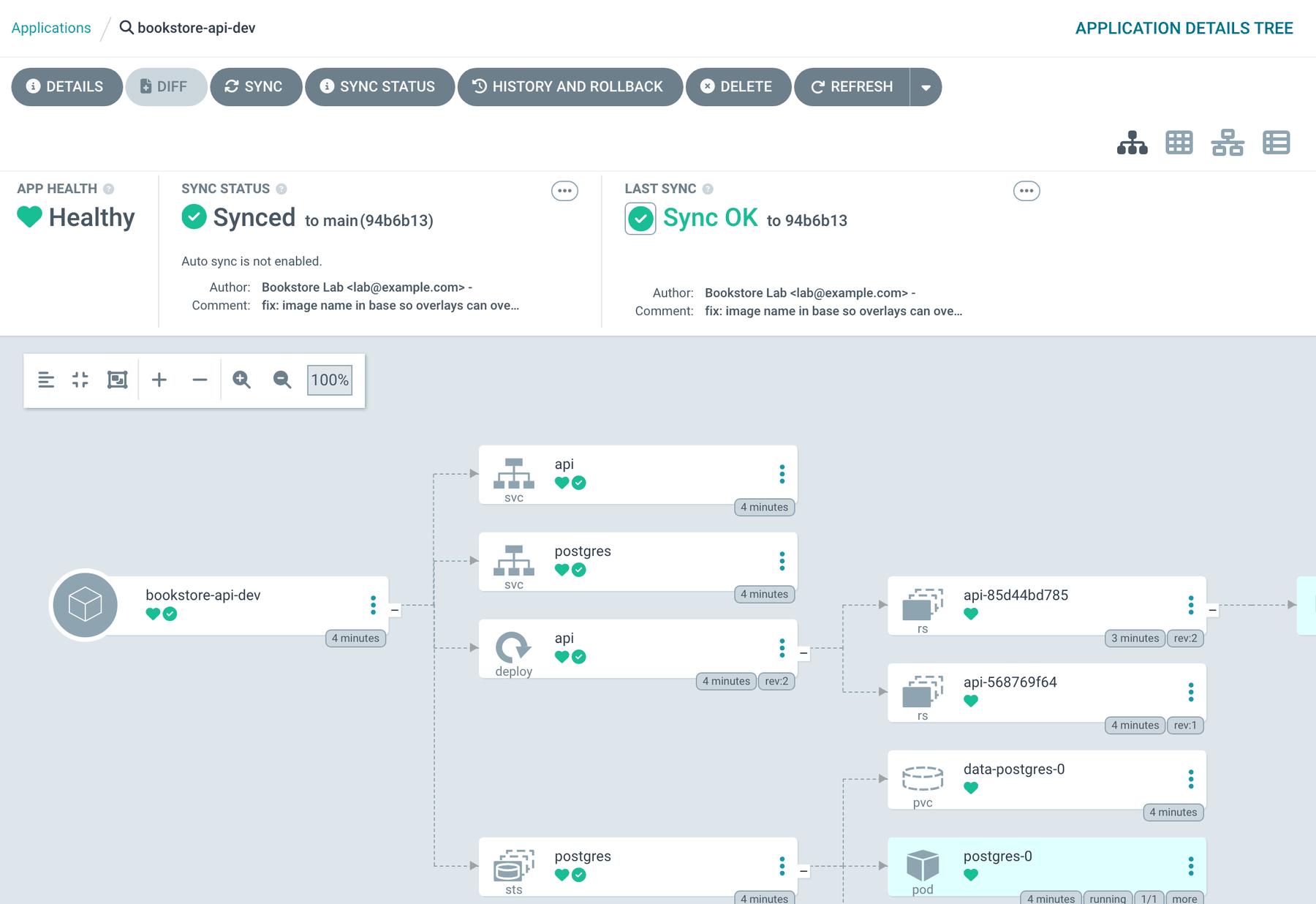
The UI shows the same information as a resource tree. Argo CD adds not only the four objects we wrote in Git but also the ReplicaSets, Pods and PVCs they produce; it follows Kubernetes owner references. It knows which object belongs to this application from an annotation:
kubectl -n bookstore-dev get deploy api -o jsonpath='{.metadata.annotations.argocd\.argoproj\.io/tracking-id}'bookstore-api-dev:apps/Deployment:bookstore-dev/apiSince 3.0 this annotation is the default resource tracking method; in 2.x it was the app.kubernetes.io/instance label. The label method could clash with Helm charts using the same label; the annotation does not have that problem. We will look at what this change means when upgrading an old installation in the last post.
The Application CRD: Fields and the Declarative Version
argocd app create really just created a Kubernetes object. Let us write it by hand and put it in the config repo; this file is the equivalent of the flags we typed in the CLI:
apiVersion: argoproj.io/v1alpha1
kind: Application
metadata:
  name: bookstore-api-dev
  namespace: argocd
  # Deleting the Application also deletes the resources it created.
  finalizers:
    - resources-finalizer.argocd.argoproj.io
spec:
  project: default
  source:
    repoURL: http://git-server.git-server.svc.cluster.local/bookstore-config
    targetRevision: main
    path: apps/api/overlays/dev
  destination:
    server: https://kubernetes.default.svc
    namespace: bookstore-dev
source says where to read from: repoURL, path and targetRevision (a branch, a tag or a commit SHA). destination says where to apply: the cluster (https://kubernetes.default.svc is the cluster Argo CD runs in) and the default namespace for resources without one. Our overlay sets namespace: bookstore-dev, so both match anyway. project decides which rules this Application follows; the default project allows everything, and in the fifth post we will write our own AppProject. The source can also be a Helm chart: you give chart, the chart repo and helm.valueFiles in source, and Argo CD renders the chart with helm template and runs the same comparison; it does not run helm install, so no Helm release appears in the cluster. Writing charts is the subject of the upcoming Helm series.
We committed the file and applied it:
kubectl apply -f argocd/applications/bookstore-api-dev.yamlWarning: resource applications/bookstore-api-dev is missing the kubectl.kubernetes.io/last-applied-configuration annotation which is required by kubectl apply. kubectl apply should only be used on resources created declaratively by either kubectl create --save-config or kubectl apply. The missing annotation will be patched automatically.
Warning: metadata.finalizers: "resources-finalizer.argocd.argoproj.io": prefer a domain-qualified finalizer name including a path (/) to avoid accidental conflicts with other finalizer writers
application.argoproj.io/bookstore-api-dev configuredBoth warnings are harmless. The first is because the object was created with the CLI. The second is Kubernetes 1.37 wanting a "/" in finalizer names; the Argo CD docs give this name, plus the resources-finalizer.argocd.argoproj.io/background variant for background deletion. Why the effort? Applications created by hand in the UI or CLI are "ClickOps": who created them, with which parameters and how to recreate them are questions with no answer in Git. Argo CD's own definitions belong in Git too. For now we apply this file with kubectl apply; in the fifth post App of Apps will make Argo CD apply it as well.
Deploying a Change from Git
The commit from Guess First:
cd apps/api/overlays/dev
kustomize edit set image bookstore-api=gitopsseries-bookstore-api:1.1.0
git commit -am "dev: bookstore-api 1.1.0"
argocd app get bookstore-api-dev --refresh
Sync Status: Synced to main (e771436)
Health Status: HealthySynced, but argocd app diff came back empty and the pod was still 1.0.0. kustomize build shows why:
        image: gitopsseries-bookstore-api:1.0.0
        image: postgres:18-alpine
The base's images field was turning the placeholder name bookstore-api into gitopsseries-bookstore-api:1.0.0. The overlay's transformer runs on the base's output; that output no longer contains an image called bookstore-api, so the overlay's rule matched nothing and was silently ignored. For Argo CD everything is right: what Git renders and what the cluster holds are the same. That is the answer to Guess First: Synced means "the rendered result of the latest commit is in the cluster", not "what you intended in the commit happened". The fix is not to rename the image in the base; the real name goes into deployment.yaml and the base only sets newTag:
 images:
-- name: bookstore-api
-  newName: gitopsseries-bookstore-api
+- name: gitopsseries-bookstore-api
   newTag: 1.1.0
Sync Status: OutOfSync from main (94b6b13)
Health Status: Healthy
===== apps/Deployment bookstore-dev/api ======
182c182
< image: gitopsseries-bookstore-api:1.0.0
---
> image: gitopsseries-bookstore-api:1.1.0This time Argo CD saw the difference. After argocd app sync we asked the pod and looked at the history:
{"version":"1.1.0","environment":"Production","pod":"api-85d44bd785-skjdw","database":"Postgres"}argocd app history bookstore-api-devSOURCE http://git-server.git-server.svc.cluster.local/bookstore-config
ID DATE REVISION
0 2026-11-15 06:08:13 +0300 +03 main (df25766)
1 2026-11-15 06:09:33 +0300 +03 main (94b6b13)e771436 is not in the history, because that commit changed nothing in the cluster and no separate sync happened. The commit SHA of every sync is in status.sync.revision and in this history; "which commit is in prod?" is a single command.
In Production
The non-HA installation in the lab is not for production, and the docs say so plainly. Production uses ha/install.yaml or the Helm chart's HA values, with several repo-server and api-server replicas and an HA Redis setup. Pin the install manifest to a version (v3.6.1, not stable) and manage Argo CD itself as an Application from Git. The repo-server goes to Git and runs Kustomize or Helm for every render; with hundreds of Applications it is the component that burns the most CPU, so replica and cache tuning starts there. Argo CD releases quickly: a minor every three months, and only the three most recent minors get patches. 3.6.0 came out on 3 November 2026; the 3.3 line got its last patch with 3.3.19 on 2 November and is now out of support. Put the upgrade plan on the calendar from day one.
Common Pitfalls
Leaving targetRevision at HEAD or a branch and not knowing which commit is live. Tracking a branch is the right choice for dev, but the answer is always the SHA in argocd app get, not the branch name. Pinning prod to a tag or a commit SHA creates a deliberate promotion step.
Installing Argo CD in the same namespace as the application. A mistake that deletes or prunes Bookstore's namespace takes Argo CD with it; Argo CD should live in its own namespace (argocd).
Reading Synced as "deployed". In the image pitfall above Argo CD was honest; our manifest was wrong. Diffing the kustomize build output in the PR catches this before the merge.
Keeping the initial admin password and leaving argocd-initial-admin-secret in the cluster.
Creating Applications in the UI. The day you have to reinstall Argo CD, you have no definitions left.
A Small Experiment
★☆☆ Compare the output of argocd app manifests bookstore-api-dev with kustomize build apps/api/overlays/dev. Is there a difference? If so, which annotation causes it?
★★☆ Change the Application's targetRevision to a commit SHA, then commit a change to the overlay. Does Argo CD see the commit? What does argocd app get show?
★★★ Install Argo CD with core-install.yaml into a separate kind cluster and manage the same Application with kubectl only. List what you lose without the UI and API server, and which tasks the argocd CLI can still do in --core mode.
The first Application works, but we trigger everything ourselves. In the next post we hand sync over to Argo CD: automated sync, prune, self-heal, how health is computed and what the diff sees and does not see.