

Variables, Quoting and Expansion: Parameter Expansion, Command Substitution, Arrays and the Word Splitting Trap

In Bash you should always use a variable inside double quotes, because an unquoted value goes through word splitting and globbing, and a file name with a space can get the wrong file deleted. Using Bookstore's health script we show the expansion order, parameter expansion, command substitution and arithmetic, indexed and associative arrays, export and ShellCheck, and explain the rm -rf with an empty variable and macOS Bash 3.2 traps with real output.
Version note: The examples in this post were run on Ubuntu 24.04 LTS with Bash 5.2.21 and Bash 5.3.20 built from source, using ShellCheck 0.11.0 and curl 8.5; the macOS comparison uses the /bin/bash of macOS 27 (3.2.57).
Guess First
The folder that holds the reports contains three files and you want to delete the monthly report:
$ ls
Monthly Report.csv
Report.csv
Sales.csv
$ f="Monthly Report.csv"
$ rm $f
The command prints an error message. Which files do you think are left when you run ls again? The answer is in the first section, and it is probably not what you expect.
In the previous post we wrote our first script and left expressions such as "$url", ${1:-...} and ${0##*/} for later. This is their post: assigning variables, single and double quotes, the order in which bash transforms a line before running it, parameter expansion, command substitution, arithmetic, arrays and export. At the end we turn on ShellCheck; it catches most of the mistakes in this post before you notice them.
Assignment and Quotes: Single, Double and None
The answer to Guess First:
$ rm $f
rm: cannot remove 'Monthly': No such file or directory
$ ls
Monthly Report.csv
Sales.csv
The file you wanted to delete is still there, and Report.csv is gone. Because $f was unquoted, bash split the value on the space and passed rm two separate arguments: Monthly and Report.csv. The first did not exist, the second did and was deleted. This behaviour is called word splitting, and a large share of bash bugs come from it. The right command is rm "$f".
The assignment rule is strict: no spaces around the = sign.
$ release = 2026-11-14-7
bash: release: command not found
$ release= 2026-11-14-7
bash: 2026-11-14-7: command not found
$ release=2026-11-14-7
$ echo "$release"
2026-11-14-7
$ echo '$release'
$release
$ version="1.4.2"; echo "Deploying \$version=$version at $(date -u +%H:%M)"
Deploying $version=1.4.2 at 03:40
In the first line bash looks for a command called release. The second is more interesting: release= puts an empty value into the environment for that one command only, and tries to run 2026-11-14-7 as a command. Everything inside single quotes stays as it is; inside double quotes, expansions starting with $ and command substitution still work, and \$ escapes a single character. The rule is simple: single quotes for fixed text, double quotes for text that contains variables, and a good reason for an unquoted variable.
The same rule applies to the arguments a script receives. $@ and $* both give all arguments; the difference shows up inside quotes:
$ set -- "Monthly Report.csv" "Sales.csv"
$ printf '[%s]\n' $@
[Monthly]
[Report.csv]
[Sales.csv]
$ printf '[%s]\n' "$@"
[Monthly Report.csv]
[Sales.csv]
$ printf '[%s]\n' "$*"
[Monthly Report.csv Sales.csv]
set -- sets the positional parameters by hand; printf '[%s]\n' prints every argument in brackets on its own line, which makes it the easiest way to see word splitting. "$@" gives each argument separately and intact; it is almost always what you want when passing arguments on to another command. "$*" joins them all into one string, which is handy for log messages. Unquoted, both go through word splitting.
In What Order Does Bash Expand a Line?
After bash splits a line into words, and before it runs the command, it transforms every word in a fixed order. This is the order given in the Bash Reference Manual:
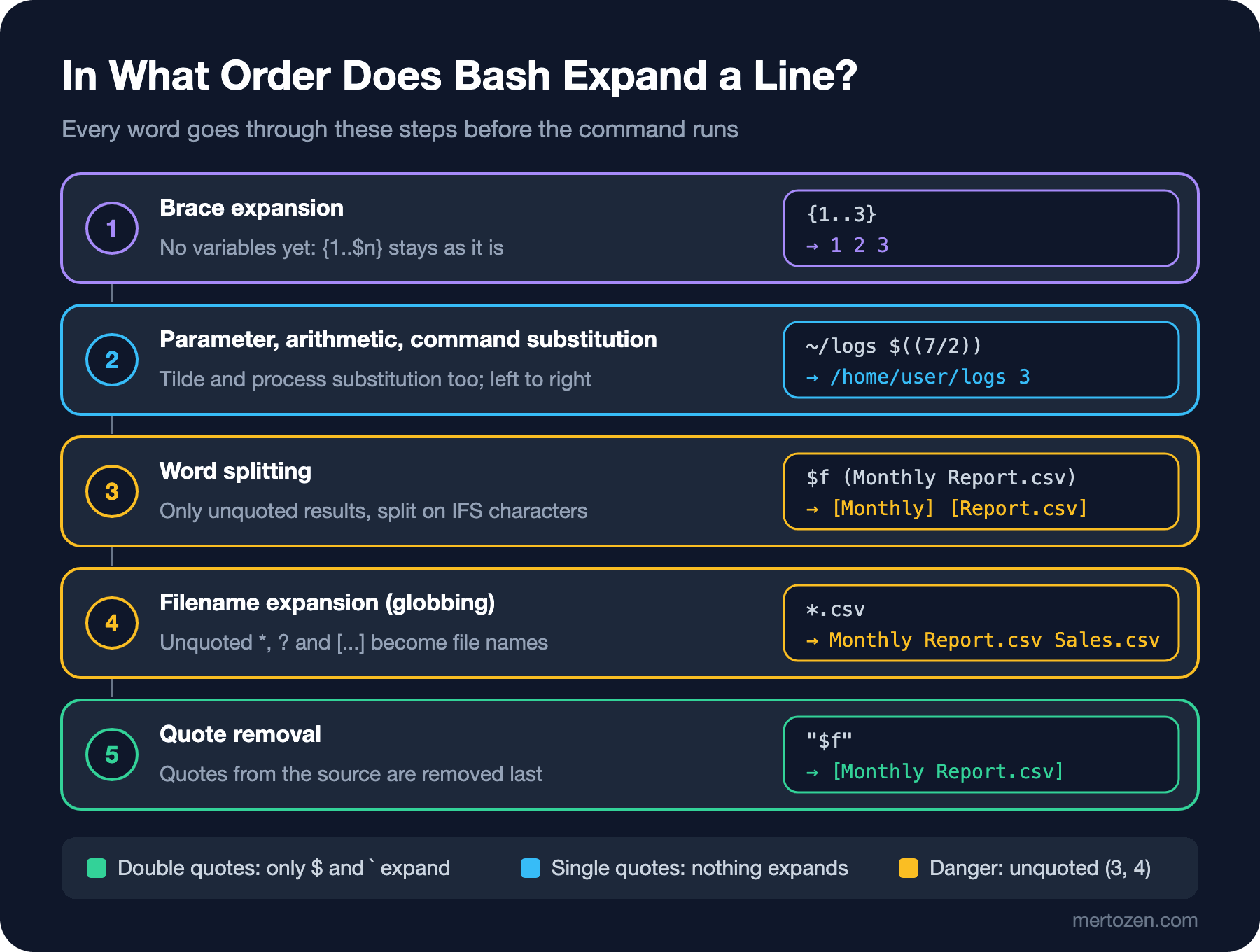
This order explains many behaviours that look strange:
$ n=3; echo {1..$n}
{1..3}
$ echo "~/releases" ~/releases
~/releases /home/user/releases
$ pattern="*.csv"; echo $pattern
Monthly Report.csv Sales.csv
$ echo "$pattern"
*.csv
$ msg="Disk usage on /var is 91% * check it"; echo $msg
Disk usage on /var is 91% Monthly Report.csv Sales.csv check it
Brace expansion is the first step, so at that moment $n is not 3 yet and {1..$n} stays as it is. The tilde only turns into the home directory when unquoted. The * in the variable's value reaches the filename expansion step, which comes after parameter expansion, unquoted, so it turns into file names; that is how the asterisk in a warning message becomes a list of the files in the directory. Double quotes switch off word splitting and globbing, and the result stays a single word. We use process substitution in the fifth post.
Parameter Expansion
Inside ${...} you can cut and reshape a variable's value without calling an external command. With the name of Bookstore's build artifact:
$ artifact=/tmp/downloads/bookstore-api-1.4.2-linux-x64.tar.gz
$ echo "${artifact##*/}"
bookstore-api-1.4.2-linux-x64.tar.gz
$ echo "${artifact%/*}"
/tmp/downloads
$ name=${artifact##*/}; echo "${name%.tar.gz}"
bookstore-api-1.4.2-linux-x64
$ echo "${name%%.*}"
bookstore-api-1
$ echo "${name%.*}"
bookstore-api-1.4.2-linux-x64.tar
$ base=${name%-linux-x64.tar.gz}; echo "${base#bookstore-api-}"
1.4.2
$ echo "${#name}"
36
$ echo "${name:0:13}"
bookstore-api
$ echo "${name//-/_}"
bookstore_api_1.4.2_linux_x64.tar.gz
$ echo "${name/linux-x64/win-x64}"
bookstore-api-1.4.2-win-x64.tar.gz
$ env_name=Staging; echo "${env_name,,} ${env_name^^}"
staging STAGING
# removes from the start, % from the end; a single sign takes the shortest match, a double sign (##, %%) the longest. ${artifact##*/} does what basename does and ${artifact%/*} what dirname does, without starting a new process. To cut an extension, ${name%.*} is right for a single dot and wrong for a double extension such as .tar.gz; %% cuts at the dot inside the version number. Writing the full extension is safest. ${var//a/b} replaces every match, ${var/a/b} the first one. Case conversion (,, and ^^) came with Bash 4.0.
The second group says what happens when there is no value:
$ unset BOOKSTORE_ENV; echo "env=${BOOKSTORE_ENV:-development}"
env=development
$ BOOKSTORE_ENV=; echo "dash-colon=[${BOOKSTORE_ENV:-development}] dash=[${BOOKSTORE_ENV-development}]"
dash-colon=[development] dash=[]
$ unset BOOKSTORE_ENV; : "${BOOKSTORE_ENV:=staging}"; echo "$BOOKSTORE_ENV"
staging
$ echo "flag=[${DRY_RUN:+--dry-run}]"; DRY_RUN=1; echo "flag=[${DRY_RUN:+--dry-run}]"
flag=[]
flag=[--dry-run]
$ bash -c 'echo "deploying ${1:?usage: deploy VERSION}"; echo "never printed"'
bash: line 1: 1: usage: deploy VERSION
:- uses the default when the value is empty or unset, - without the colon only when it is unset; an empty value counts as "deliberately empty". := also assigns the default to the variable (the : command does nothing; it is there only to trigger the expansion). :+ does the opposite: it gives the alternative when there is a value, a short way to add an optional flag to a command. :? writes the message to stderr and ends a non-interactive shell when there is no value; the second echo never ran. It is a one-line check for required arguments and environment variables.
Command Substitution and Arithmetic
$(command) puts the command's stdout in its place as a value:
$ current=$(readlink /opt/bookstore/current); echo "current release: ${current##*/}"
current release: 2026-11-14-7
$ echo "outer $(echo "inner $(date -u +%Y)")"
outer inner 2026
$ echo `echo \`date -u +%Y\``
2026
$ printf '[%s]\n' "$(printf 'line1\n\n\n')"
[line1]
$ used=$(df --output=pcent / | tail -n 1 | tr -dc '0-9'); echo "root fs: ${used}% used"
root fs: 13% used
The backtick (`command`) is the old syntax for the same thing. Nested, the inner backticks need backslashes and the inner quotes become unreadable; $(...) nests naturally. New code has no need for backticks. One detail to keep in mind: command substitution removes all trailing newlines.
$(( )) does integer arithmetic, while (( )) runs the same expression as a command and returns an exit code based on the result:
$ echo $(( 7 / 2 )) $(( 7 % 2 )) $(( 2 ** 10 ))
3 1 1024
$ count=0; (( count++ )); (( count += 5 )); echo "$count"
6
$ limit=80; if (( used > limit )); then echo "disk alert"; else echo "disk ok"; fi
disk ok
$ echo $(( 1.5 * 2 ))
bash: 1.5 * 2 : syntax error: invalid arithmetic operator (error token is ".5 * 2 ")
$ awk 'BEGIN { printf "%.1f\n", 1.5 * 2 }'
3.0
In Bash 5.3 the same error starts with "arithmetic syntax error"; watch out if something greps for the message. Inside (( )) variables can be written without $. Bash has no decimal numbers; for decimal calculations such as percentages, durations or prices you need to move to awk or bc. That is a small example of the rule from the first post: once you are processing data, consider another language.
Arrays and Associative Arrays
An array is the only safe way to hold several values, especially file names that may contain spaces:
$ releases=(/opt/bookstore/releases/*); echo "${#releases[@]} releases, newest: ${releases[-1]##*/}"
3 releases, newest: 2026-11-14-7
$ releases+=("/opt/bookstore/releases/2026-11-14 hotfix"); printf '[%s]\n' "${releases[@]}"
[/opt/bookstore/releases/2026-11-14-5]
[/opt/bookstore/releases/2026-11-14-6]
[/opt/bookstore/releases/2026-11-14-7]
[/opt/bookstore/releases/2026-11-14 hotfix]
$ printf '[%s]\n' ${releases[@]}
[/opt/bookstore/releases/2026-11-14-5]
[/opt/bookstore/releases/2026-11-14-6]
[/opt/bookstore/releases/2026-11-14-7]
[/opt/bookstore/releases/2026-11-14]
[hotfix]
Assigning a glob directly to an array keeps the file names without splitting them. "${releases[@]}", like "$@", gives each element as a separate word; unquoted, the element with a space is split again. ${#releases[@]} is the element count, ${releases[-1]} the last element, += appends.
An associative array (added in Bash 4.0) holds key-value pairs and must be declared with declare -A:
$ declare -A health_urls=([local]=http://127.0.0.1:5000/health [staging]=https://staging.bookstore.test/health)
$ health_urls[production]=https://bookstore.test/health
$ for env in "${!health_urls[@]}"; do echo "$env -> ${health_urls[$env]}"; done
local -> http://127.0.0.1:5000/health
production -> https://bookstore.test/health
staging -> https://staging.bookstore.test/health
$ [[ -v health_urls[qa] ]] || echo "no url for qa"
no url for qa
"${!health_urls[@]}" gives the keys; their order is not guaranteed. Let's apply both to Bookstore's health script: when given an environment name it takes the URL from the associative array, and it collects curl's options in an array. The HEALTH_TIMEOUT environment variable can change the timeout:
#!/usr/bin/env bash
#
# bookstore-health.sh - checks the Bookstore API health endpoint.
#
# Usage:      bookstore-health.sh [ENVIRONMENT|URL]
#             ENVIRONMENT is local (default), staging or production.
# Variables:  HEALTH_TIMEOUT  seconds before curl gives up (default 5)
# Exit codes: 0 healthy, 1 unhealthy or unreachable, 2 usage error

declare -rA HEALTH_URLS=(
    [local]="http://127.0.0.1:5000/health"
    [staging]="https://staging.bookstore.test/health"
    [production]="https://bookstore.test/health"
)

usage() {
    echo "Usage: ${0##*/} [local|staging|production|URL]" >&2
}

main() {
    if [ "$#" -gt 1 ]; then
        usage
        exit 2
    fi
    local target="${1:-local}"
    # A known environment name maps to its URL; anything else is used as a URL.
    local url="${HEALTH_URLS[$target]:-$target}"
    local curl_opts=(-fsS --max-time "${HEALTH_TIMEOUT:-5}" -o /dev/null)

    if curl "${curl_opts[@]}" "$url"; then
        echo "OK $url"
    else
        echo "FAIL $url" >&2
        exit 1
    fi
}

main "$@"; exit
$ ./scripts/bookstore-health.sh
OK http://127.0.0.1:5000/health
$ ./scripts/bookstore-health.sh staging; echo "exit=$?"
curl: (6) Could not resolve host: staging.bookstore.test
FAIL https://staging.bookstore.test/health
exit=1
$ HEALTH_TIMEOUT=abc ./scripts/bookstore-health.sh; echo "exit=$?"
curl: option --max-time: expected a proper numerical parameter
curl: try 'curl --help' or 'curl --manual' for more information
FAIL http://127.0.0.1:5000/health
exit=1The staging address does not resolve in the lab, so curl exits with 6 (could not resolve host). ${HEALTH_URLS[$target]:-$target} does two jobs in one line: for a known environment name it gives the URL, otherwise the argument itself. Keeping options in an array is the right replacement for the habit of "collecting a command's arguments in a string and using it unquoted"; "${curl_opts[@]}" passes each option separately and intact. The last command shows a gap: HEALTH_TIMEOUT=abc is a configuration mistake, but the script says "the API is unhealthy". A wrong diagnosis means a false alarm at midnight; in the next post we validate the value with [[ =~ ]] and exit with 2.
readonly, local and export
$ readonly RELEASES_DIR=/opt/bookstore/releases
$ RELEASES_DIR=/tmp
bash: RELEASES_DIR: readonly variable
$ HEALTH_TIMEOUT=2; bash -c 'echo "child sees: [$HEALTH_TIMEOUT]"'
child sees: []
$ export HEALTH_TIMEOUT; bash -c 'echo "child sees: [$HEALTH_TIMEOUT]"'
child sees: [2]
$ BOOKSTORE_ENV=staging bash -c 'echo "only for this command: [$BOOKSTORE_ENV]"'; echo "after: [$BOOKSTORE_ENV]"
only for this command: [staging]
after: []
$ bash -c 'export FROM_CHILD=1'; echo "parent sees: [$FROM_CHILD]"
parent sees: []
By default a shell variable belongs only to that shell; the curl, dotnet or other script that your script starts does not see it. export puts the variable into the environment, and every child process started after that gets a copy. The VAR=value command form puts the variable into the environment of that one command only; HEALTH_TIMEOUT=abc ./scripts/... above worked that way. The direction is one-way: what a child process exports never comes back to the parent, which is why an environment file has to be sourced. readonly protects constants against accidental overwrites; the r in the declare -rA above is the same thing. We saw local in the first post; we cover it in detail with functions and scope in the fourth post. A naming habit: environment variables and constants in upper case, the script's own variables in lower case. That way you never overwrite system variables such as PATH or HOME by accident.
Turning On ShellCheck from Day One
Instead of memorising every mistake in this post, use ShellCheck, which checks scripts with static analysis. On Ubuntu it is sudo apt install shellcheck (24.04 ships 0.9.0), on Windows winget install --id koalaman.shellcheck; the latest version is in the GitHub releases. The VS Code extension shows the warnings while you type. Here is a first draft of a script written to clean up logs:
#!/usr/bin/env bash
# Deletes old Bookstore log files (first draft)
LOG_DIR=$1
for f in $(ls $LOG_DIR/*.log); do
    echo "removing $f"
done
cd $LOG_DIR
rm -rf $LOG_DIR/*
echo "done at `date -u +%H:%M`"
$ shellcheck -f gcc clean-logs.sh
clean-logs.sh:4:10: error: Iterating over ls output is fragile. Use globs. [SC2045]
clean-logs.sh:4:15: note: Double quote to prevent globbing and word splitting. [SC2086]
clean-logs.sh:7:1: warning: Use 'cd ... || exit' or 'cd ... || return' in case cd fails. [SC2164]
clean-logs.sh:7:4: note: Double quote to prevent globbing and word splitting. [SC2086]
clean-logs.sh:8:8: warning: Use "${var:?}" to ensure this never expands to /* . [SC2115]
clean-logs.sh:8:8: note: Double quote to prevent globbing and word splitting. [SC2086]
clean-logs.sh:9:15: note: Use $(...) notation instead of legacy backticks `...`. [SC2006]The default output also shows the corrected line under each warning; -f gcc reduces each warning to one line, which reads well in a CI log. Every code has a page on the ShellCheck wiki (for example SC2086) that explains with an example why it is a problem. The one you will see most is SC2086, the unquoted variable: the rm $f from Guess First. We ran into SC2164 in the CRLF example of the first post: when cd failed, the script carried on in the wrong directory. SC2045 says that looping over $(ls) splits file names with spaces; we see how to loop over files safely in the next post. The fixed version:
#!/usr/bin/env bash
# Deletes old Bookstore log files (after ShellCheck)
LOG_DIR=${1:?usage: clean-logs.sh LOG_DIR}
for f in "$LOG_DIR"/*.log; do
    echo "removing $f"
done
cd "$LOG_DIR" || exit 1
rm -rf "${LOG_DIR:?}"/*
echo "done at $(date -u +%H:%M)"
$ shellcheck clean-logs-fixed.sh && echo "shellcheck: clean"
shellcheck: clean
$ bash clean-logs-fixed.sh; echo "exit=$?"
clean-logs-fixed.sh: line 3: 1: usage: clean-logs.sh LOG_DIR
exit=1
$ shellcheck scripts/bookstore-health.sh && echo "shellcheck: clean"
shellcheck: cleanIf you accept a warning on purpose, write # shellcheck disable=SC2086 above the line and add the reason next to it; silently ignoring a warning leaves an exception whose reason nobody knows six months later. We set ShellCheck up in CI in the last post of the series.
In Production
You do not control the script's input. File names, environment names and version numbers come from users or other systems; a space, an asterisk, a name starting with a dash or an empty value can arrive at any time. Quoting every variable protects the script against all of these at once. The only legitimate reason to leave one unquoted is that you really want word splitting or globbing, and that should be documented with a comment.
Check required values at the start. ${1:?usage: ...} or ${BOOKSTORE_ENV:?} fails before the script does anything; that beats blowing up halfway through a deploy because of an empty variable. Do not pass secrets (a database password, an API key) as command-line arguments: arguments are visible to everyone in the output of ps. Use an environment variable or a file that only the service user can read; in the seventh post Bookstore's deploy script reads the env file under /etc/bookstore. Finally, know which Bash version the script will run on: associative arrays, ${var,,} and negative indexes came with Bash 4.x and are missing from the /bin/bash on macOS (we see it in Common Pitfalls).
Common Pitfalls
rm -rf with an empty variable. If the variable is empty or unset, "$LOG_DIR/"* expands to everything in the root directory. Let's look at the command safely with echo:
$ LOG_DIR=""; echo rm -rf "$LOG_DIR/"*
rm -rf /bin /boot /dev /etc /home /lib /media /mnt /opt /proc /root /run /sbin /srv /sys /tmp /usr /var
$ echo rm -rf "${LOG_DIR:?}/"*
bash: LOG_DIR: parameter null or not set
A typo ($LOGDIR), a forgotten argument or a failed cd turns this line into a disaster. ${LOG_DIR:?} stops on an empty value before the command runs; ShellCheck's SC2115 warning asks for exactly this.
Overwriting a system variable. Naming the script's own variable PATH changes the list bash searches for commands:
$ cat list-release.sh
#!/usr/bin/env bash
# Lists files of the current release
PATH=/opt/bookstore/current
ls -l "$PATH"
$ ./list-release.sh
./list-release.sh: line 4: ls: command not found
With a lower-case path or release_dir there would have been no problem. HOME, USER, IFS, PWD and SECONDS carry the same risk.
Numbers with a leading zero. In arithmetic, bash reads a number that starts with 0 as octal:
$ echo $(( 010 + 1 )) $(( 10#010 + 1 ))
9 11
$ echo $(( 08 + 1 ))
bash: 08: value too great for base (error token is "08")
"08" and "09" coming from date +%d or date +%m break the script on the eighth and ninth of the month; it works for the rest of the month, so testing does not catch it. The 10# prefix forces base ten.
Bash 3.2 on macOS. For licensing reasons macOS keeps /bin/bash at 3.2. A script with an associative array does not just fail there, it runs wrongly:
#!/usr/bin/env bash
declare -A health_urls=([local]=http://127.0.0.1:5000/health [staging]=https://staging.bookstore.test/health)
echo "local -> ${health_urls[local]}"
echo "staging -> ${health_urls[staging]}"
$ /bin/bash --version | head -n 1 | cut -d " " -f 1-4
GNU bash, version 3.2.57(1)-release
$ /bin/bash assoc.sh
assoc.sh: line 2: declare: -A: invalid option
declare: usage: declare [-afFirtx] [-p] [name[=value] ...]
local -> https://staging.bookstore.test/health
staging -> https://staging.bookstore.test/health
$ bash assoc.sh
local -> http://127.0.0.1:5000/health
staging -> https://staging.bookstore.test/healthBash 3.2 rejects declare -A, but the rest of the line still runs: the array becomes an ordinary indexed array, the keys local and staging are evaluated arithmetically to 0, and both write to the same element. The script ends with exit code 0, and the local environment goes to staging. If some developers use macOS, add a version check at the top of the script or make sure that env bash in the shebang finds Homebrew bash; portability is the topic of the last post in the series.
A Small Experiment
★☆☆ For artifact=/tmp/downloads/bookstore-web-22.2.0.zip, print the file name, the name without extension and the version number (22.2.0) using parameter expansion only. Then make the same code work for bookstore-api-1.4.2-linux-x64.tar.gz as well.
★★☆ Create three files in a folder named "Monthly Report.csv", -rf.csv and *.csv (use touch -- -rf.csv for the second). Compare the output of for f in $(ls); do wc -l $f; done and for f in *.csv; do wc -l -- "$f"; done, and explain which expansion step causes each difference.
★★★ Rewrite bookstore-health.sh so that it also works correctly on the Bash 3.2 of macOS: use case or two parallel indexed arrays instead of an associative array. Also try adding a version check (BASH_VERSINFO) at the top of the script so that it exits with a clear message on a version you do not support.
We have learned to use variables safely; now we start making decisions with them. The next post covers if, the difference between [ ] and [[ ]], subcommands with case, for and while read loops and looping over files safely; the example is a loop that cleans up old release folders on the Bookstore server, keeping the last five.