

A Real Script: Writing a Deploy and Database Backup Script for Bookstore

A reliable deploy script verifies the artifact's checksum, prepares the release outside current, switches current atomically with mv -T instead of ln -sfn and returns to the previous release if the health check fails. We write that deploy for Bookstore, read secrets from env files instead of arguments, and add a verified, rotating SQL Server backup script scheduled with a systemd timer.
Version note: The examples in this post were run on Ubuntu 24.04 LTS with Bash 5.2.21, using ShellCheck 0.11.0, curl 8.5, rsync 3.2.7, the systemd-analyze tool from systemd 255 and actionlint 1.7.12; the atomic symlink comparison was also run in an Ubuntu 26.04 container. SQL Server, the EF Core migration bundle and systemd itself did not run in the lab; stubs that print what they do stood in for them.
Guess First
The most critical line of a deploy is the one that points the current symlink at the new release. Since the fourth post we have done that with ln -sfn releases/1.4.7 current. The same command runs on Ubuntu 24.04 and on Ubuntu 26.04. Is it "atomic" on both, or is there a moment in which the running Bookstore.Api cannot find current at all? The answer, with strace output, is in the section "Switching current Atomically".
Throughout the series we built the pieces one by one: the skeleton, quoting, loops, option parsing, data flow, error handling. In this post we bring them together in two scripts meant for a real server of Bookstore, the online bookstore used as the shared example across this site's series: a deploy that downloads and verifies the artifact, runs the migrations, switches current atomically and returns to the previous release if the health check fails; and a backup that takes a scheduled, rotating backup of the SQL Server database. The scenario is the classic setup in which Bookstore.Api runs as a systemd service and SQL Server is on the same VM; deploying Bookstore in containers with PostgreSQL, as in the Kubernetes series, is a different world. The release folder and current symlink layout itself is covered in the eighth post of the Web Servers and Hosting series.
Configuration and Secrets: /etc/bookstore/*.env
The values specific to a server (the artifact address, how many releases to keep) should live in a file separate from the code. The easiest way is source /etc/bookstore/deploy.env, but that runs the file as code: every command written into it runs as root. We added a function to the library that reads the file line by line without running it:
# Reads KEY=VALUE lines from FILE into exported variables without running the file as code.
# Empty lines and lines starting with # are skipped; values are taken literally (no quotes).
# The file must not be writable by group or others; with "private" it must not be readable either.
# Usage: load_env_file FILE [private]
load_env_file() {
    local file=$1 private=${2:-} mode line key value n=0
    [[ -r $file ]] || die "cannot read $file"
    mode=$(stat -c %a "$file")
    if (( 8#$mode & 8#022 )); then
        die "$file is writable by group or others (mode $mode)"
    fi
    if [[ $private == private ]] && (( 8#$mode & 8#077 )); then
        die "$file holds secrets and must be mode 600 or 400, not $mode"
    fi
    while IFS= read -r line || [[ -n $line ]]; do
        n=$((n + 1))
        [[ $line =~ ^[[:space:]]*(#|$) ]] && continue
        # Do not print the line itself: it may contain a secret.
        [[ $line =~ ^([A-Za-z_][A-Za-z0-9_]*)=(.*)$ ]] || die "$file:$n: not a KEY=VALUE line"
        key=${BASH_REMATCH[1]}
        value=${BASH_REMATCH[2]}
        case $key in
            PATH | IFS | BASH_ENV | ENV | SHELLOPTS | LD_*) die "$file:$n: $key may not be set from a file" ;;
        esac
        printf -v "$key" '%s' "$value"
        export "${key?}"
    done < "$file"
}
8#$mode turns the octal permission into a number, and & 8#022 looks at the write bits of group and others. printf -v assigns a value to a variable whose name is held in another variable, without eval. || [[ -n $line ]] keeps the last line of a file that does not end with a newline. The deploy reads two files: /etc/bookstore/deploy.env, which anyone may read, and /etc/bookstore/deploy-secrets.env, which only its owner may read. The repo contains only etc/*.env.example files:
# /etc/bookstore/deploy.env - read by bookstore-deploy.sh (KEY=VALUE, no quotes)
ARTIFACT_BASE_URL=https://artifacts.bookstore.test/bookstore-api
KEEP_RELEASES=5
HEALTH_RETRIES=3
I tried all three checks with the backup script:
$ chmod 644 /etc/bookstore/backup-secrets.env; ./scripts/bookstore-backup.sh; echo "exit=$?"; chmod 600 /etc/bookstore/backup-secrets.env
2026-11-15T04:34:11Z ERROR: /etc/bookstore/backup-secrets.env holds secrets and must be mode 600 or 400, not 644
exit=1
$ printf 'DB_NAME=BookstoreDb\nSQLCMDPASSWORD example-password-change-me\n' > /tmp/bad.env; chmod 600 /tmp/bad.env; BACKUP_SECRETS_FILE=/tmp/bad.env ./scripts/bookstore-backup.sh; echo "exit=$?"
2026-11-15T04:34:11Z ERROR: /tmp/bad.env:2: not a KEY=VALUE line
exit=1
$ printf 'PATH=/tmp/evil\n' > /tmp/bad.env; BACKUP_SECRETS_FILE=/tmp/bad.env ./scripts/bookstore-backup.sh; echo "exit=$?"
2026-11-15T04:34:11Z ERROR: /tmp/bad.env:1: PATH may not be set from a file
exit=1
In the second error the message gives the line number, not the line itself; otherwise a password line with a forgotten = would end up in the log. In the second post we said why secrets are passed through the environment and not as arguments; here is the demonstration. The same connection string, first as an argument, then as an environment variable:
$ ./ps-demo.sh
as an argument:
/bin/sh ./fake-efbundle --connection Server=127.0.0.1,1433;Database=BookstoreDb;User Id=bookstore_migrator;Password=example-password-change-me
in the environment:
/bin/sh ./fake-efbundle
readable by the same user in /proc/13099/environ:
1
The argument is visible in ps, which every user on the server can run. The environment variable is not; /proc/<pid>/environ can only be read by the same user and by root. It is not complete secrecy, but it is the right boundary.
Downloading the Artifact and Verifying Its Checksum
For every release, CI publishes two files: bookstore-api-1.4.7-linux-x64.tar.gz and a .sha256 file with the output of sha256sum. In the lab, a python3 -m http.server on 127.0.0.1:8085 stands in for the artifact store.
# Downloads the artifact and its .sha256 file into ARTIFACT_DIR and checks the checksum.
fetch_artifact() {
    local name="bookstore-api-$VERSION-linux-x64.tar.gz"
    local file="$ARTIFACT_DIR/$name"
    local expected actual
    run mkdir -p "$ARTIFACT_DIR"
    run curl -fsSL --retry 3 --retry-connrefused -o "$file.sha256" "$ARTIFACT_BASE_URL/$name.sha256"
    run curl -fsSL --retry 3 --retry-connrefused -o "$file.part" "$ARTIFACT_BASE_URL/$name"
    if (( DRY_RUN )); then
        return 0
    fi
    read -r expected _ < "$file.sha256"
    actual=$(sha256sum "$file.part")
    actual=${actual%% *}
    if [[ $actual != "$expected" ]]; then
        rm -f -- "$file.part"
        die "checksum mismatch for $name: expected $expected, got $actual"
    fi
    mv -f -- "$file.part" "$file"
    log "artifact verified, sha256 $actual"
}
The file is downloaded under a .part name and gets its real name only after the checksum matches; a half-finished download never looks like a verified artifact. Let us try to deploy 1.4.9, whose checksum does not match the published one:
$ PATH="$HOME/lab-stubs:$PATH" ./scripts/bookstore-deploy.sh -e staging -v 1.4.9; echo "exit=$?"
2026-11-15T04:33:51Z deploying 1.4.9 to staging (current: 1.4.7)
2026-11-15T04:33:51Z ERROR: checksum mismatch for bookstore-api-1.4.9-linux-x64.tar.gz: expected 0000000000000000000000000000000000000000000000000000000000000000, got a1f3401e3b671e4a3095d6ff3ae881c87da62cf634a05aee051d67bce659e59b
exit=1
$ ls /var/tmp/bookstore | grep 1.4.9
bookstore-api-1.4.9-linux-x64.tar.gz.sha256
A checksum catches a file that was damaged in transit or only partly downloaded. A checksum that comes from the same server as the artifact gives no protection against someone who has taken over that server; they simply change both. That takes a signature: in this series' lab we installed Bash 5.3 from tarballs verified with GPG signatures and the GNU keyring, and signing artifacts in CI with cosign or GPG and verifying them on the server is the same idea.
The Migration Bundle
The migration bundle (efbundle) described in the migrations post of the EF Core series is a single file that is produced in CI, put into the artifact and runs without the .NET SDK. The deploy runs it while the release folder still has its hidden name:
    # The bundle gets the connection string from its environment, not as an argument,
    # so it does not show up in ps. Migrations must keep working with the old release.
    ConnectionStrings__BookstoreDb=$MIGRATION_CONNECTION run "$INCOMING/efbundle"

    run mv -T "$INCOMING" "$release_dir"
    INCOMING=""
According to the EF Core documentation, without the --connection option the bundle takes the connection string from the application's own configuration, and ASP.NET Core reads the environment variable ConnectionStrings__BookstoreDb as ConnectionStrings:BookstoreDb. The assignment at the start of the line puts the variable only into that command's environment. MIGRATION_CONNECTION comes from the secrets file and belongs to a different user than the application's, one that is allowed to change the schema; the running application's user does not need that permission. Where in the deploy the migration runs matters as well: before current changes. That means the new schema runs alongside the old code for a few seconds; this is why you first add a column and remove it in a later version instead of dropping it (expand/contract). The rollback below does not undo the database either, only the code. The lab has no SQL Server, so the efbundle in the artifact is a stub that reports whether it found the connection string in its environment.
Switching current Atomically: ln -sfn and mv -T
The answer to Guess First. On Ubuntu 24.04, with GNU coreutils 9.4:
$ strace -e trace=symlinkat,unlinkat,renameat,renameat2 ln -sfn r2 current 2>&1 | grep -v '^+++'
symlinkat("r2", AT_FDCWD, "current")    = -1 EEXIST (File exists)
symlinkat("r2", AT_FDCWD, "Cupfiq7W")   = 0
renameat(AT_FDCWD, "Cupfiq7W", AT_FDCWD, "current") = 0
In an Ubuntu 26.04 container, with uutils, the coreutils written in Rust, version 0.10.0:
$ cat /etc/os-release | grep PRETTY_NAME; ln --version | head -n 1
PRETTY_NAME="Ubuntu 26.04.1 LTS"
ln (uutils coreutils) 0.10.0
$ strace -e trace=symlinkat,unlinkat,renameat,renameat2 ln -sfn r2 current 2>&1 | grep -v '^+++'
unlinkat(AT_FDCWD, "current", 0)        = 0
symlinkat("r2", AT_FDCWD, "current")    = 0
GNU ln creates the new symlink under a temporary name and moves it over the old one with rename; rename(2) replaces the target in a single step, so current always points at either the old or the new release. Ubuntu 26.04's default ln deletes first and creates afterwards; in between, current does not exist. A request or a service restart that arrives at that moment sees "No such file or directory". So ln -sfn being atomic is not a guarantee but an implementation detail of the ln you happen to use; the BSD ln on macOS deletes first too. The way that states the intent is to create the symlink under a temporary name and move it with mv -T:
# Points ROOT/current at a release atomically: a new symlink is renamed over the old one.
switch_current() {
    run ln -sfn "$1" "$ROOT/current.new"
    run mv -T "$ROOT/current.new" "$ROOT/current"
}
Without -T, the no-target-directory option, mv current.new current would move current.new into the folder that current points at. The mv on 26.04 uses renameat just like the one on 24.04; I checked both with strace. mv -T has one more benefit: if current is accidentally a real folder rather than a symlink, ln -sfn silently leaves a link inside it, while mv -T fails:
$ mkdir realdir && ln -sfn r1 realdir && ls -l realdir
total 0
lrwxrwxrwx 1 user user 2 Nov 15 04:33 r1 -> r1
$ ln -sfn r2 current.new && mv -T current.new realdir; echo "exit=$?"
mv: cannot overwrite directory 'realdir' with non-directory
exit=1
Health Check, Rollback and the Whole Flow
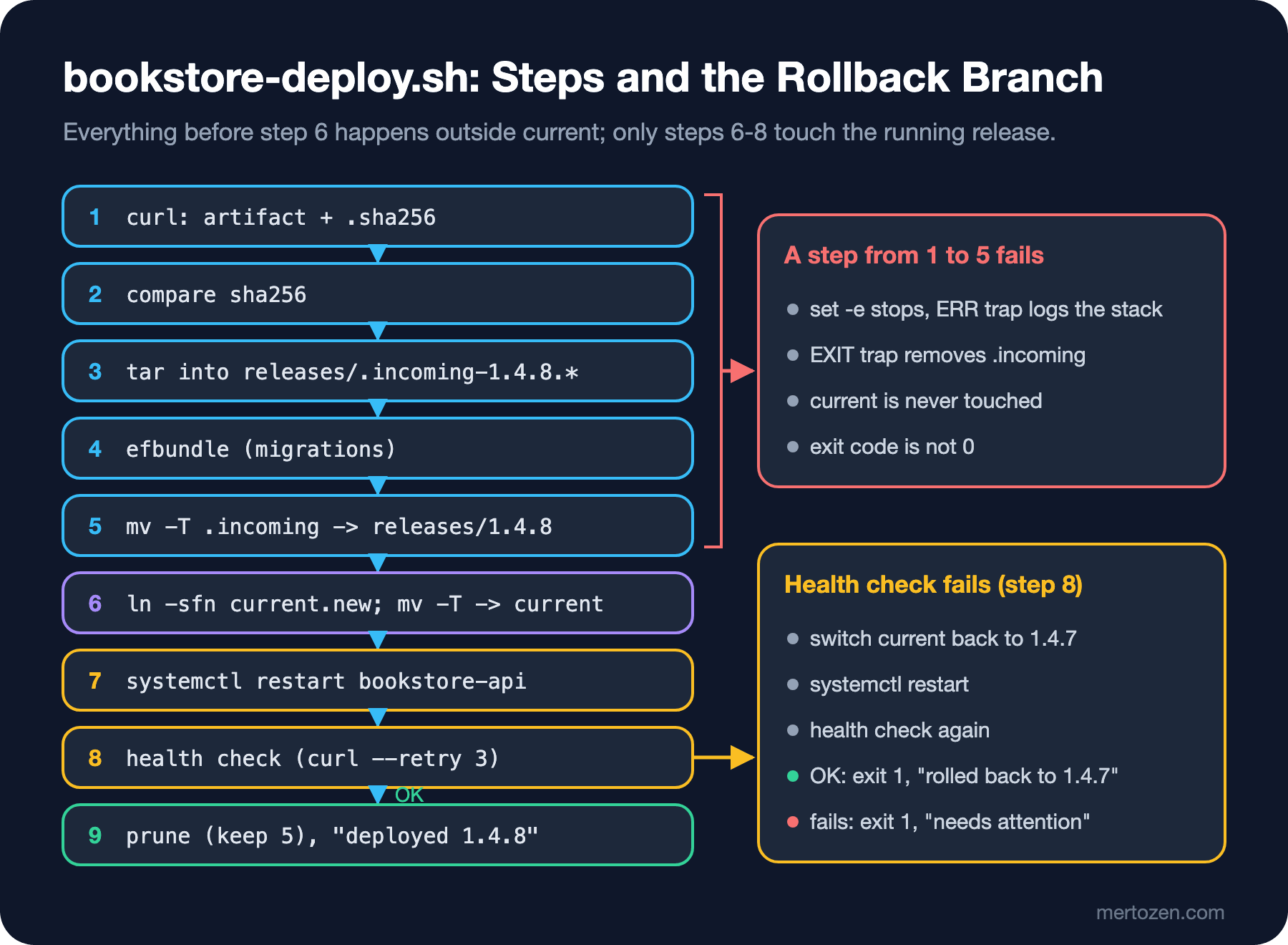
The first five steps of the flow happen outside current; the EXIT trap from the sixth post cleans up the .incoming folder on any failure in those steps. The health check now uses curl's own retries: when HEALTH_RETRIES is set, bookstore-health.sh adds --retry and --retry-connrefused to curl. According to curl's manual, it only retries transient errors (a timeout and HTTP 408, 429, 500, 502, 503 and 504), and the wait starts at one second and doubles every time. We put the restart and the health check into one function:
# Restarts the service and waits until the health check passes.
# It is called inside conditions, where set -e does not apply, so every step is checked.
restart_and_check() {
    run sudo systemctl restart "$SERVICE" || return 1
    HEALTH_RETRIES=$HEALTH_RETRIES run "$SCRIPT_DIR/bookstore-health.sh" local || return 1
}
The comment is the lesson of the sixth post: inside a function called as if ! restart_and_check there is no set -e, and without the || return 1 parts the result of the health check would become the function's result even after a failed restart. The last part of the deploy:
    switch_current "$release_dir"
    if ! restart_and_check; then
        [[ -n $current ]] || die "health check failed after deploying $VERSION; no previous release to return to"
        log "health check failed after deploying $VERSION, rolling back to $current"
        switch_current "$ROOT/releases/$current"
        restart_and_check || die "rollback to $current failed too; the service needs attention"
        die "deploy of $VERSION failed; rolled back to $current"
    fi

    if (( DRY_RUN )); then
        run "$SCRIPT_DIR/bookstore-prune-releases.sh" -n "$KEEP_RELEASES"
        log "dry run finished, nothing was changed"
    else
        "$SCRIPT_DIR/bookstore-prune-releases.sh" "$KEEP_RELEASES" >&2
        log "deployed $VERSION"
    fi
First a dry run, then the real deploy. The lab has no systemd, so sudo and systemctl are again stubs that print what they do, and the health endpoint is a small test service that gives the same answer as Bookstore.Api:
$ ./scripts/bookstore-deploy.sh -e staging -v 1.4.7 --dry-run
2026-11-15T04:33:51Z deploying 1.4.7 to staging (current: 1.4.6)
[dry-run] mkdir -p /var/tmp/bookstore
[dry-run] curl -fsSL --retry 3 --retry-connrefused -o /var/tmp/bookstore/bookstore-api-1.4.7-linux-x64.tar.gz.sha256 http://127.0.0.1:8085/bookstore-api-1.4.7-linux-x64.tar.gz.sha256
[dry-run] curl -fsSL --retry 3 --retry-connrefused -o /var/tmp/bookstore/bookstore-api-1.4.7-linux-x64.tar.gz.part http://127.0.0.1:8085/bookstore-api-1.4.7-linux-x64.tar.gz
[dry-run] tar -xzf /var/tmp/bookstore/bookstore-api-1.4.7-linux-x64.tar.gz -C /opt/bookstore/releases/.incoming-1.4.7.XXXXXX
[dry-run] write /opt/bookstore/releases/.incoming-1.4.7.XXXXXX/RELEASE
[dry-run] /opt/bookstore/releases/.incoming-1.4.7.XXXXXX/efbundle
[dry-run] mv -T /opt/bookstore/releases/.incoming-1.4.7.XXXXXX /opt/bookstore/releases/1.4.7
[dry-run] ln -sfn /opt/bookstore/releases/1.4.7 /opt/bookstore/current.new
[dry-run] mv -T /opt/bookstore/current.new /opt/bookstore/current
[dry-run] sudo systemctl restart bookstore-api
[dry-run] /home/user/bookstore-ops/scripts/bookstore-health.sh local
[dry-run] /home/user/bookstore-ops/scripts/bookstore-prune-releases.sh -n 5
2026-11-15T04:33:51Z dry run finished, nothing was changed
$ PATH="$HOME/lab-stubs:$PATH" ./scripts/bookstore-deploy.sh -e staging -v 1.4.7; echo "exit=$?"
2026-11-15T04:33:51Z deploying 1.4.7 to staging (current: 1.4.6)
2026-11-15T04:33:51Z artifact verified, sha256 48a31843a716b352e06787dd2043f4094f01169cbeaee77cff46d63d2493da7d
(lab stub) efbundle: connection string from the environment, migrations not applied
(lab stub) systemctl restart bookstore-api
OK http://127.0.0.1:5000/health
deleted 1.4.1
deleted 1.4.0
2026-11-15T04:33:51Z deployed 1.4.7
exit=0
In the dry run the efbundle line contains no connection string; the secret lives in the environment, so it is not part of the command that run prints. Now a version that cannot pass the health check: 1.4.8 contains a marker file that makes the test service return 503.
$ PATH="$HOME/lab-stubs:$PATH" ./scripts/bookstore-deploy.sh -e staging -v 1.4.8; echo "exit=$?"
2026-11-15T04:33:51Z deploying 1.4.8 to staging (current: 1.4.7)
2026-11-15T04:33:51Z artifact verified, sha256 2a611c8b39168f913389e836c4be600dc960363bec3eca06b1bf1bd3b8e8c973
(lab stub) efbundle: connection string from the environment, migrations not applied
(lab stub) systemctl restart bookstore-api
curl: (22) The requested URL returned error: 503
curl: (22) The requested URL returned error: 503
curl: (22) The requested URL returned error: 503
curl: (22) The requested URL returned error: 503
FAIL http://127.0.0.1:5000/health
2026-11-15T04:33:58Z health check failed after deploying 1.4.8, rolling back to 1.4.7
(lab stub) systemctl restart bookstore-api
OK http://127.0.0.1:5000/health
2026-11-15T04:33:58Z ERROR: deploy of 1.4.8 failed; rolled back to 1.4.7
exit=1
$ ./scripts/bookstore-ctl.sh releases
  1.4.2
  1.4.3
  1.4.4
  1.4.6
* 1.4.7
  1.4.8
One attempt and three retries took 1 + 2 + 4 = 7 seconds (from 04:33:51 to 04:33:58); then current went back to 1.4.7, the second health check passed, and the script still ended with 1. The deploy failed; even though the rollback succeeded, CI should show it as red. The 1.4.8 folder stays in place for investigation; deploying the same version again is refused, and the fix comes with a new version number. For going back by hand we also added a rollback command to bookstore-ctl.sh; it returns to the release before current:
$ ./scripts/bookstore-ctl.sh rollback -e staging --dry-run
2026-11-15T04:34:11Z rolling back from 1.4.7 to 1.4.6
[dry-run] ln -sfn /opt/bookstore/releases/1.4.6 /opt/bookstore/current.new
[dry-run] mv -T /opt/bookstore/current.new /opt/bookstore/current
[dry-run] sudo systemctl restart bookstore-api
[dry-run] /home/user/bookstore-ops/scripts/bookstore-health.sh local
2026-11-15T04:34:11Z dry run finished, nothing was changed
The Database Backup Script
The backup script uses the same library and the same patterns: set -Eeuo pipefail, the ERR trap, env files, a lock with flock, and dry runs through run. The SQL Server side is handled by sqlcmd, which reads the login from the SQLCMDUSER and SQLCMDPASSWORD environment variables. Microsoft's sqlcmd documentation also considers passing a password on the command line with -P insecure and recommends this variable.
#!/usr/bin/env bash
#
# bookstore-backup.sh - full backup of the Bookstore SQL Server database, with
# verification, retention and a copy to a second location.
#
# Usage:      bookstore-backup.sh [-n]
#             -n  dry run: print the commands instead of running them
# Files:      /etc/bookstore/backup.env          SQL_SERVER, DB_NAME, BACKUP_DIR, REMOTE_DIR,
#                                                RETENTION_DAYS (default 7), LOCK_FILE
#             /etc/bookstore/backup-secrets.env  SQLCMDUSER, SQLCMDPASSWORD (mode 600)
# Exit codes: 0 success, 1 error, 2 usage error

set -Eeuo pipefail
shopt -s inherit_errexit

SCRIPT_DIR=$(dirname "$(readlink -f "$0")")
# shellcheck source=lib/common.sh
source "$SCRIPT_DIR/lib/common.sh"

BACKUP_ENV_FILE="${BACKUP_ENV_FILE:-/etc/bookstore/backup.env}"
BACKUP_SECRETS_FILE="${BACKUP_SECRETS_FILE:-/etc/bookstore/backup-secrets.env}"
DRY_RUN=0

usage() {
    echo "Usage: ${0##*/} [-n]" >&2
}

# Runs one T-SQL statement; -b makes sqlcmd exit with an error code when the statement fails.
# sqlcmd reads the login from SQLCMDUSER and SQLCMDPASSWORD, so no secret is on the command line.
sql() {
    run sqlcmd -S "$SQL_SERVER" -d master -b -Q "$1"
}

backup() {
    local stamp file old
    stamp=$(date -u +%Y%m%dT%H%M%SZ)
    file="$BACKUP_DIR/${DB_NAME}_$stamp.bak"

    log "backing up $DB_NAME to $file"
    # The file is written by SQL Server itself, so BACKUP_DIR is a path on the database server.
    sql "BACKUP DATABASE [$DB_NAME] TO DISK = N'$file' WITH COMPRESSION, CHECKSUM, INIT"
    sql "RESTORE VERIFYONLY FROM DISK = N'$file' WITH CHECKSUM"

    log "copying $file to $REMOTE_DIR"
    run retry 3 5 rsync -a --partial "$file" "$REMOTE_DIR/"

    # Retention: delete local backups older than RETENTION_DAYS.
    while IFS= read -r -d '' old; do
        if (( DRY_RUN )); then
            log "would delete $old"
        else
            rm -f -- "$old"
            log "deleted $old"
        fi
    done < <(find "$BACKUP_DIR" -maxdepth 1 -type f -name "${DB_NAME}_*.bak" -mtime +"$RETENTION_DAYS" -print0)
    log "backup finished: $file"
}

main() {
    trap 'on_error "$?" "$LINENO" "$BASH_COMMAND"' ERR
    case ${1:-} in
        "") ;;
        -n | --dry-run) DRY_RUN=1 ;;
        -h | --help)
            usage
            exit 0
            ;;
        *)
            usage
            exit 2
            ;;
    esac

    load_env_file "$BACKUP_ENV_FILE"
    load_env_file "$BACKUP_SECRETS_FILE" private
    : "${SQL_SERVER:?}" "${BACKUP_DIR:?}" "${REMOTE_DIR:?}" "${SQLCMDUSER:?}" "${SQLCMDPASSWORD:?}"
    RETENTION_DAYS=${RETENTION_DAYS:-7}
    # DB_NAME goes into T-SQL, so only allow plain names.
    [[ ${DB_NAME:-} =~ ^[A-Za-z0-9_]+$ ]] || die "DB_NAME must be letters, digits or _, got: ${DB_NAME:-}"
    [[ $RETENTION_DAYS =~ ^[0-9]+$ ]] || die "RETENTION_DAYS must be a number, got: $RETENTION_DAYS"
    [[ -d $BACKUP_DIR ]] || die "backup folder not found: $BACKUP_DIR"

    acquire_lock "${LOCK_FILE:-/run/lock/bookstore-backup.lock}"
    backup
}

main "$@"; exit
A few decisions need explaining. DB_NAME goes into the T-SQL text; even though it comes from a config file, allowing only letters, digits and underscores closes the door to SQL injection on that line. WITH CHECKSUM makes SQL Server check the page checksums while taking the backup, and RESTORE VERIFYONLY checks that the backup is readable; the real verification is still restoring the backup on another server from time to time. Watch out for WITH COMPRESSION: according to Microsoft's backup compression page, only the Enterprise, Standard and Developer editions can create compressed backups; on Express you have to remove that word and compress the file in the script with zstd. The rsync copy goes through the retry from the sixth post; copying to a network share or another server involves exactly the kind of transient failures where retrying makes sense.
There is no SQL Server in the lab; in place of sqlcmd there is a stub that checks whether the login is in the environment, prints the query, and creates a 1 MB placeholder file for BACKUP. The remote storage is a second folder in the lab:
$ PATH="$HOME/lab-stubs:$PATH" ./scripts/bookstore-backup.sh; echo "exit=$?"
2026-11-15T04:34:11Z backing up BookstoreDb to /var/opt/mssql/backup/bookstore/BookstoreDb_20261115T043411Z.bak
(lab stub) sqlcmd: BACKUP DATABASE [BookstoreDb] TO DISK = N'/var/opt/mssql/backup/bookstore/BookstoreDb_20261115T043411Z.bak' WITH COMPRESSION, CHECKSUM, INIT
(lab stub) sqlcmd: RESTORE VERIFYONLY FROM DISK = N'/var/opt/mssql/backup/bookstore/BookstoreDb_20261115T043411Z.bak' WITH CHECKSUM
2026-11-15T04:34:11Z copying /var/opt/mssql/backup/bookstore/BookstoreDb_20261115T043411Z.bak to /srv/backup-copy/bookstore
2026-11-15T04:34:11Z backup finished: /var/opt/mssql/backup/bookstore/BookstoreDb_20261115T043411Z.bak
exit=0
$ touch -d '9 days ago' /var/opt/mssql/backup/bookstore/BookstoreDb_20261106T023000Z.bak
$ touch -d '3 days ago' /var/opt/mssql/backup/bookstore/BookstoreDb_20261112T023000Z.bak
$ PATH="$HOME/lab-stubs:$PATH" ./scripts/bookstore-backup.sh 2>&1 | grep -E 'delete|finished'
2026-11-15T04:34:11Z deleted /var/opt/mssql/backup/bookstore/BookstoreDb_20261106T023000Z.bak
2026-11-15T04:34:11Z backup finished: /var/opt/mssql/backup/bookstore/BookstoreDb_20261115T043411Z.bak
$ ls /var/opt/mssql/backup/bookstore
BookstoreDb_20261112T023000Z.bak
BookstoreDb_20261115T043411Z.bak
The nine-day-old backup was deleted and the three-day-old one stayed. The second run happened within the same second, so it got the same name and INIT overwrote it; that is no problem for a job that runs once a day, but it is why the name goes down to the second.
Scheduling with a systemd Timer
Two unit files are enough to run the script every night; the differences between timers and cron are in the systemd post of the Linux and the Shell series. They live in the repo's systemd/ folder:
[Unit]
Description=Bookstore database backup
Wants=network-online.target
After=network-online.target

[Service]
Type=oneshot
ExecStart=/opt/bookstore/ops/scripts/bookstore-backup.sh
Nice=10
[Unit]
Description=Nightly Bookstore database backup
[Timer]
OnCalendar=*-*-* 02:30:00 UTC
RandomizedDelaySec=10min
Persistent=true
[Install]
WantedBy=timers.targetPersistent=true makes sure the backup runs at boot if the server was off at 02:30. systemd does not run in the lab container, so I did not actually trigger the timer; I checked the calendar expression and the files with systemd-analyze:
$ systemd-analyze calendar --iterations=2 '*-*-* 02:30:00 UTC'
Normalized form: *-*-* 02:30:00 UTC
    Next elapse: Mon 2026-11-16 02:30:00 UTC
       From now: 21h left
   Iteration #2: Tue 2026-11-17 02:30:00 UTC
       From now: 1 day 21h left
$ cp systemd/bookstore-backup.* /tmp/ && systemd-analyze verify /tmp/bookstore-backup.timer; echo "exit=$?"
exit=0
To see verify catch something, I wrote OnCalendar as OnCalender; it returned 1 with "Unknown key name 'OnCalender'" and "Timer unit lacks value setting. Refusing.". The timer also helps with locking: systemd does not start the same service a second time while it is already running, and the script's flock also prevents a clash with a backup started by hand.
Calling It from GitHub Actions
The job in the SSH deploy post of the GitHub Actions series connected to the server and ran commands there. Now that command is this script, and the workflow's deploy step comes down to a single line (.github/workflows/deploy.yml; the step that writes the SSH key is the same as in that post):
      - name: Deploy with bookstore-deploy.sh
        env:
          VERSION: ${{ inputs.version }}
          DEPLOY_HOST: ${{ vars.DEPLOY_HOST }}
        run: |
          ssh -i ~/.ssh/deploy_key -o StrictHostKeyChecking=yes -o BatchMode=yes \
            "deploy@$DEPLOY_HOST" \
            sudo /opt/bookstore/ops/scripts/bookstore-deploy.sh -e production -v "$(printf '%q' "$VERSION")"
Two details matter. inputs.version does not go into run: directly but through env:; the reason is the script injection covered in the security post of the GitHub Actions series. The second is a lesser-known trap: ssh joins the arguments of the remote command into a string and hands it to the shell on the server, so quotes are parsed once more. printf %q quotes the value so that it survives that second parse:
$ VERSION='1.4.7; touch /tmp/owned'
$ echo sudo bookstore-deploy.sh -e production -v "$VERSION"
sudo bookstore-deploy.sh -e production -v 1.4.7; touch /tmp/owned
$ echo sudo bookstore-deploy.sh -e production -v "$(printf '%q' "$VERSION")"
sudo bookstore-deploy.sh -e production -v 1.4.7\;\ touch\ /tmp/owned
The first line would run as two commands on the server; in the second, the semicolon stays part of the argument and the script's version check rejects it. The first step of the workflow checks the version with the same regex too. I did not run the workflow on GitHub; it passed actionlint 1.7.12 without errors, with the run: blocks checked by ShellCheck 0.11.0. Limiting the deploy user's sudo rights on the server to this script alone, a single command in sudoers, is a separate security step.
In Production
A rollback undoes the code, not the database. If the migration of 1.4.8 had dropped a column, returning to 1.4.7 would not have saved the application. That is why migrations must stay compatible with at least the previous version and destructive changes (dropping or renaming a column) must wait for a separate version; the deploy script cannot enforce this, it has to be a team rule.
Look at what the health check measures. If /health only says "the process is up", a version that cannot reach the database passes too. Adding a database check to Bookstore.Api's health check, as in the health check post of the ASP.NET Core Web API series, lets the rollback react to real failures.
A backup is a backup only on the day it can be restored. RESTORE VERIFYONLY says the file can be read, not that the database can be opened. A second job that restores the backup on a separate server once a week and checks it with a few queries may be worth more than the nightly backup itself. The remote copy must not share a failure with the local disk either: a second disk on the same VM disappears together with the VM.
Be clear about who can write to which file. /etc/bookstore/*.env should belong to root, the secrets files 600. The deploy script and its library should also belong to root and live somewhere only root can write to; if the deploy user can change a script that runs with sudo, the sudo restriction means nothing.
Common Pitfalls
Expecting an exit code from a process substitution. If the command inside < <(find ...) fails, the loop runs zero times and the script goes on; neither set -e nor pipefail sees it:
$ count=0; while IFS= read -r -d '' f; do count=$((count + 1)); done < <(find /var/opt/mssql/backup/missing -name '*.bak' -print0); echo "count=$count exit=$?"
find: ‘/var/opt/mssql/backup/missing’: No such file or directory
count=0 exit=0
That is why the backup script checks that BACKUP_DIR exists before the loop. If you really need the result of a process substitution, capture the output in a file or, with mapfile, in an array first, and check the command's exit code separately.
Reading -mtime +7 as "older than 7 days". find counts age in whole days and drops the fraction; +7 means at least 8 whole days. If the retention policy is "the last 7 days", one extra day of files stays; usually fine, but know it when you plan disk space.
Reading current in the middle of a deploy. Instead of reading current_release again at every step, we read it once at the start of the deploy and keep it in the current variable; it is also the rollback target. If someone changes current by hand during the health check, the script still returns to the release from before the deploy. The lock prevents such mix-ups coming from the script; for manual ones the only rule is to deploy on the server only through the script.
Not passing -b to sqlcmd. According to Microsoft's documentation, -b makes sqlcmd exit and return an error code when an error occurs; without it a failed BACKUP may not show up in the exit code, and the script prints "backup finished" and spends a night without a backup. I could not try this in the stubbed lab; check it on a real SQL Server with a wrong database name.
A Small Experiment
★☆☆ Add REMOTE_RETENTION_DAYS to bookstore-backup.sh and delete old backups in the remote folder too. If the remote folder is a mount that is not mounted at the moment, should the script write to the local disk or fail? Check with mountpoint -q.
★★☆ Add an ARTIFACT_SHA256 environment variable to the deploy: if CI passes the checksum to the deploy command, the script should not download the .sha256 file but compare against the given value. Why is this stronger against someone who has taken over the artifact store?
★★★ Write a weekly restore test: a script that restores the newest backup as BookstoreDb_RestoreTest (RESTORE DATABASE ... WITH MOVE), checks it with a query such as SELECT COUNT(*) FROM Books and drops the test database at the end. It should use its own timer and lock file and never run at the same time as the backup.
Our scripts now do real work, and they have grown: the deploy is about 300 lines, the library 120. Testing code of this size by hand after every change does not scale. In the last post of the series we wire ShellCheck and shfmt into CI, test the library and the deploy with bats-core, and run the same tests on Bash 3.2 on macOS, on Bash 5.3 and on the new coreutils of Ubuntu 26.04 to see where portability really breaks.