

Your Own Project Template: a Bookstore Template with dotnet new and a Short Look at Angular Schematics
A dotnet new template is an ordinary .NET solution with a .template.config/template.json file; with sourceName, parameters and conditional content it generates a new Bookstore service in one command. With real output we cover packing the template, installing it from a local feed, the port generator, the .dockerignore lost without NoDefaultExcludes, a diff showing that the 1.1.0 update leaves old projects unchanged, and a custom Angular schematic.
Version note: The template in this post was packed and installed with .NET 10 (SDK 10.0.404); the generated projects were tested with xUnit v3 and Microsoft.AspNetCore.Mvc.Testing 10.0.15, and built and run as a Docker image. The Angular schematic was tried with Angular 22.2 and @angular-devkit/schematics 22.2.7.
Guess First
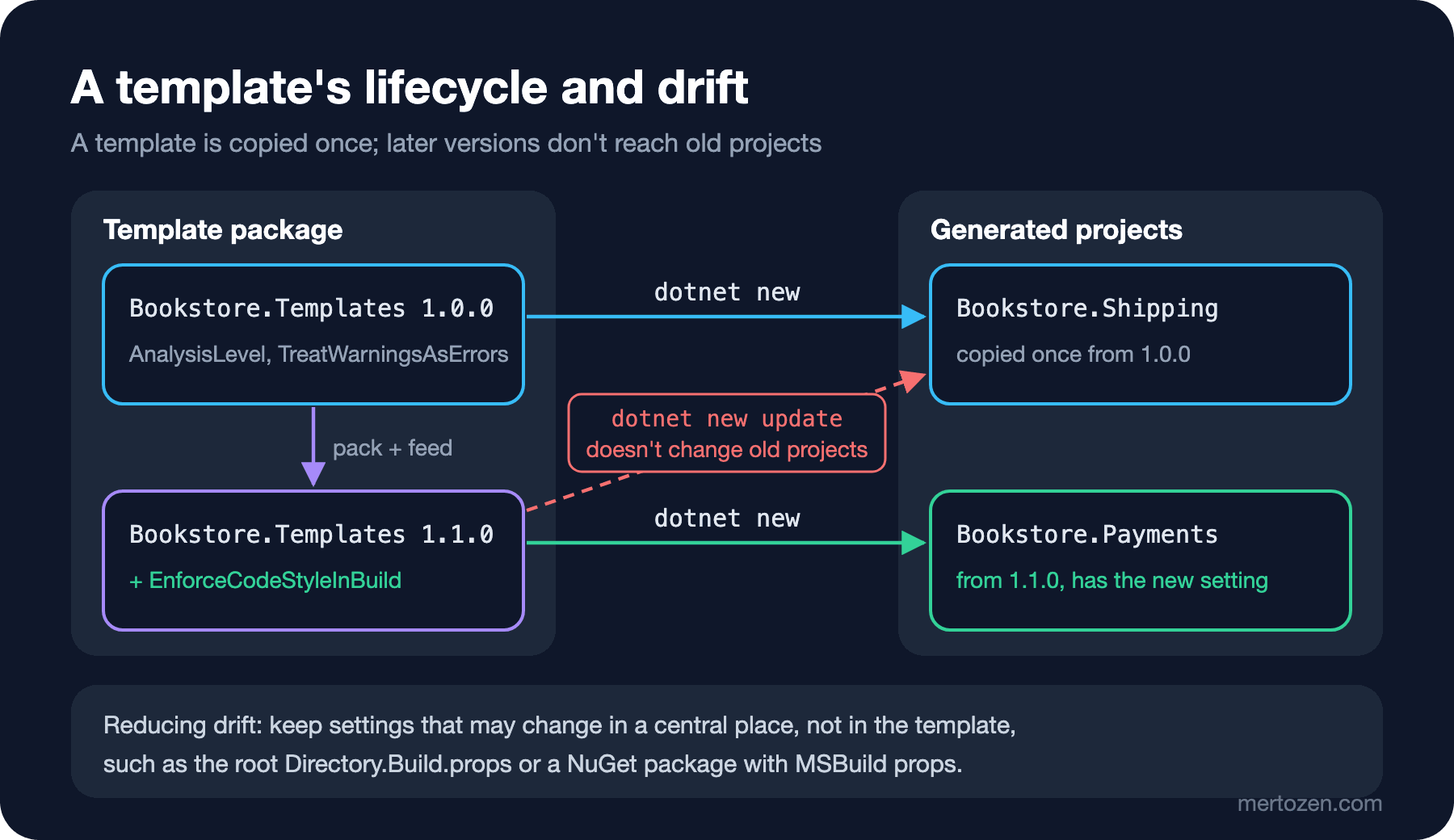
In Bookstore, the online bookstore used as the shared example across this site's series, every new service starts from the same place: the team's bookstore-service template. The Shipping service was generated three months ago with version 1.0.0 of the template. This week Emre added the EnforceCodeStyleInBuild setting to the template and published 1.1.0, and you ran dotnet new update on your machine.
What does the Shipping service's Directory.Build.props say now? Did the new setting arrive there too, and if not, who will bring it? We answer halfway through the post with real diff output.
How Does the Template Engine Work?
Behind dotnet new runs the .NET template engine. A template is an ordinary folder that contains a .template.config/template.json file. The engine copies the files in the folder to the output folder and applies the rules in template.json while copying. The template's source isn't a special file format but a normal .NET solution, so you can build, test and debug the template.
Bookstore's template folder:
templates/
├── Bookstore.Templates.csproj
├── README.md
└── bookstore-service/
    ├── .template.config/template.json
    ├── .dockerignore
    ├── Bookstore.ServiceName.slnx
    ├── Directory.Build.props
    ├── Dockerfile
    ├── global.json
    ├── src/Bookstore.ServiceName/
    └── tests/Bookstore.ServiceName.Tests/
The head of template.json:
{
  "$schema": "https://json.schemastore.org/template",
  "author": "Bookstore team",
  "classifications": ["Bookstore", "Web", "API"],
  "identity": "Bookstore.Templates.Service",
  "name": "Bookstore service",
  "shortName": "bookstore-service",
  "description": "ASP.NET Core service with Bookstore's SDK pin, analyzer settings, test project and Dockerfile.",
  "sourceName": "Bookstore.ServiceName",
  "preferNameDirectory": true,
  "tags": {
    "language": "C#",
    "type": "solution"
  }
}
Three fields are required: identity (the template's unique ID), name (the name shown in lists) and shortName (the name passed to dotnet new). sourceName does the most work: the text Bookstore.ServiceName in the source is replaced, in file names and file contents alike, with the name the user passes with -n. The folder name, the .csproj name, the namespace, the DLL name in the Dockerfile and the expected string in the test all change with one setting. preferNameDirectory writes the files into a new folder with that name when a name is given but no output folder.
tags.type takes three values: item produces one or a few files (a configuration class, an .editorconfig), project a project, and solution a solution with several projects. Ours is solution because it produces an .slnx with the service project and a test project. The classifications values go into the Tags column of dotnet new list.
Symbols: Parameters, Conditional Content and a Generated Port
Everything the user can choose is defined under symbols. Each parameter symbol becomes an option on the command line:
"symbols": {
  "Docker": {
    "type": "parameter",
    "datatype": "bool",
    "defaultValue": "true",
    "description": "Add a Dockerfile and .dockerignore."
  },
  "HealthChecks": {
    "type": "parameter",
    "datatype": "bool",
    "defaultValue": "true",
    "description": "Map /health and add a test for it."
  },
  "HttpPort": {
    "type": "generated",
    "generator": "port",
    "parameters": {
      "low": 5100,
      "high": 5199
    },
    "replaces": "5099"
  }
},
"sources": [
  {
    "modifiers": [
      {
        "condition": "(!Docker)",
        "exclude": ["Dockerfile", ".dockerignore"]
      }
    ]
  }
]
Docker works at the file level: the modifiers under sources leave the listed files out of the output when the condition is true. HealthChecks works inside the file. C# files use preprocessor syntax:
WebApplicationBuilder builder = WebApplication.CreateBuilder(args);
#if (HealthChecks)
builder.Services.AddHealthChecks();
#endif

WebApplication app = builder.Build();

app.MapGet("/", () => "Bookstore.ServiceName");
#if (HealthChecks)
app.MapHealthChecks("/health");
#endif

app.Run();
The nice part is that this file compiles in the template source too. The C# compiler doesn't know the HealthChecks symbol and skips the block; the template engine keeps or removes the block based on the parameter during generation and removes the #if lines. JSON and XML files have //#if and <!--#if --> forms for the same job.
HttpPort is a symbol the user isn't asked about. The generated type with the port generator picks a free port between 5100 and 5199 and writes it in place of the text 5099 in launchSettings.json. That's why ASP.NET Core's own templates give each project a different port; when you run two services at once, the ports don't clash.
Installing and Trying It
While developing, installing the template from its folder is fastest:
$ dotnet new install ./bookstore-service
The following template packages will be installed:
   ~/src/bookstore/templates/bookstore-service

Success: ~/src/bookstore/templates/bookstore-service installed the following templates:
Template Name      Short Name         Language  Tags
-----------------  -----------------  --------  -----------------
Bookstore service  bookstore-service  [C#]      Bookstore/Web/API
With -h you see the template's parameters; the Docker and HealthChecks symbols became options automatically, with short names:
$ dotnet new bookstore-service -h
Bookstore service (C#)
Author: Bookstore team
Description: ASP.NET Core service with Bookstore's SDK pin, analyzer settings, test project and Dockerfile.
...
Template options:
  -D, --Docker        Add a Dockerfile and .dockerignore.
                      Type: bool
                      Default: true
  -H, --HealthChecks  Map /health and add a test for it.
                      Type: bool
                      Default: true
Before writing any files, --dry-run shows what would happen. With both parameters off, the Dockerfile and .dockerignore drop off the list:
$ dotnet new bookstore-service -n Bookstore.Notifications --Docker false --HealthChecks false --dry-run
File actions would have been taken:
  Create: ./Bookstore.Notifications.slnx
  Create: ./Directory.Build.props
  Create: ./global.json
  Create: ./src/Bookstore.Notifications/Bookstore.Notifications.csproj
  Create: ./src/Bookstore.Notifications/Program.cs
  Create: ./src/Bookstore.Notifications/Properties/launchSettings.json
  Create: ./tests/Bookstore.Notifications.Tests/Bookstore.Notifications.Tests.csproj
  Create: ./tests/Bookstore.Notifications.Tests/EndpointTests.cs
In real generation Program.cs shrinks to four lines; the #if blocks and their content are gone completely:
WebApplicationBuilder builder = WebApplication.CreateBuilder(args);

WebApplication app = builder.Build();

app.MapGet("/", () => "Bookstore.Notifications");

app.Run();
A template installed from a folder is removed the same way: dotnet new uninstall ./bookstore-service. Installed templates are kept in the user profile, in the .templateengine folder.
Packing and Distributing
To distribute it to the team, the template goes into a NuGet package. The packaging project compiles no code; it only carries the folder into the package:
<Project Sdk="Microsoft.NET.Sdk">

  <PropertyGroup>
    <PackageId>Bookstore.Templates</PackageId>
    <PackageVersion>1.0.0</PackageVersion>
    <Title>Bookstore templates</Title>
    <Authors>Bookstore team</Authors>
    <Description>dotnet new templates for Bookstore services.</Description>
    <PackageTags>dotnet-new;templates;bookstore</PackageTags>
    <PackageReadmeFile>README.md</PackageReadmeFile>

    <PackageType>Template</PackageType>
    <TargetFramework>net10.0</TargetFramework>
    <IncludeContentInPack>true</IncludeContentInPack>
    <IncludeBuildOutput>false</IncludeBuildOutput>
    <ContentTargetFolders>content</ContentTargetFolders>
    <NoWarn>$(NoWarn);NU5128</NoWarn>
    <NoDefaultExcludes>true</NoDefaultExcludes>
  </PropertyGroup>

  <ItemGroup>
    <Content Include="bookstore-service\**\*" Exclude="**\bin\**;**\obj\**" />
    <None Include="README.md" Pack="true" PackagePath="\" />
    <Compile Remove="**\*" />
  </ItemGroup>

</Project>
Setting PackageType to Template makes it a template package. Because IncludeBuildOutput is false, no DLL goes into the package, and Compile Remove stops the template's .cs files from being compiled in the packaging project. I checked what happens when I delete the NoDefaultExcludes line:
warning NU5119: File 'bookstore-service/.dockerignore' was not added to the package. Files and folders starting with '.' or ending with '.nupkg' are excluded by default. To include this file, use -NoDefaultExcludes from the commandline [Bookstore.Templates.csproj]NuGet leaves files starting with a dot out of the package by default. The package is still created and the template still installs, but the generated services have no .dockerignore, and the Docker build starts copying the bin/ and obj/ folders into the image. Treating this warning as an error in CI is a good idea.
To put the package on a feed you use the company's NuGet feed or a service such as Azure Artifacts. For trying it out, a folder works as a feed too. After dotnet pack -c Release -o ./feed, I register the feed in nuget.config:
<?xml version="1.0" encoding="utf-8"?>
<configuration>
  <packageSources>
    <add key="bookstore-local" value="./feed" />
  </packageSources>
</configuration>
$ dotnet new install Bookstore.Templates
The following template packages will be installed:
Bookstore.Templates
Success: Bookstore.Templates@1.0.0 installed the following templates:
Template Name Short Name Language Tags
----------------- ----------------- -------- -----------------
Bookstore service bookstore-service [C#] Bookstore/Web/APIOn my first attempt I passed the feed on the command line as --nuget-source ./feed, and the install stopped with Warning: Failed to load NuGet source ./feed: the source is not valid. This option doesn't accept a relative folder path; a relative path in nuget.config, on the other hand, is resolved against the config file's location and works.
Verifying the Generated Project
The real test of a template is that the generated project builds and its tests pass:
$ dotnet new bookstore-service -n Bookstore.Shipping
The template "Bookstore service" was created successfully.

$ cd Bookstore.Shipping && dotnet build
    0 Warning(s)
    0 Error(s)
$ dotnet test
Test run summary: Passed!
  total: 2
  failed: 0
  succeeded: 2
  skipped: 0
  duration: 648ms
The port generator wrote "applicationUrl": "http://localhost:5128" into launchSettings.json, and the Notifications service got 5109. The generated Dockerfile works too:
$ docker build -t prodseries-shipping:dev .
...
Successfully tagged prodseries-shipping:dev
$ docker run -d --name prodseries-shipping -p 127.0.0.1:52094:8080 prodseries-shipping:dev > /dev/null
$ curl -i http://127.0.0.1:52094/health
HTTP/1.1 200 OK
Content-Type: text/plain
Date: Sun, 15 Nov 2026 12:09:25 GMT
Server: Kestrel
Cache-Control: no-store, no-cache
Expires: Thu, 01 Jan 1970 00:00:00 GMT
Pragma: no-cache
Transfer-Encoding: chunked

Healthy
One of the tests uses WebApplicationFactory<Program>. Before .NET 10 this needed public partial class Program; at the end of Program.cs; with the .NET 10 SDK it compiles without that line, so I left it out of the template.
Versioning and Updates
The change from Guess First: EnforceCodeStyleInBuild was added to the template's Directory.Build.props and the package version became 1.1.0. Once the new package is on the feed:
$ dotnet new update --check-only
An update for template packages is available:
Package              Current  Latest
-------------------  -------  ------
Bookstore.Templates  1.0.0    1.1.0

To update the package use:
   dotnet new install <package>@<version>
   dotnet new install Bookstore.Templates@1.1.0

To update all the packages use:
   dotnet new update
$ dotnet new update
The following template packages will be updated:
   Bookstore.Templates@1.1.0

Bookstore.Templates@1.0.0 was successfully uninstalled.
Success: Bookstore.Templates@1.1.0 installed the following templates:
...
Now I generate a new Payments service with 1.1.0 and compare it with the old Shipping service:
$ diff Bookstore.Shipping/Directory.Build.props Bookstore.Payments/Directory.Build.props
7a8
>     <EnforceCodeStyleInBuild>true</EnforceCodeStyleInBuild>
That's the answer: a template update only affects projects generated from now on. A template is a starting point copied once; no link remains between it and the generated project. The new setting reaches the Shipping service only if someone adds it by hand. This gap is called template drift, and we look at how to reduce it in "Common Pitfalls".
dotnet new also checks for updates every time it creates something; --no-update-check turns that off. Version the package by NuGet rules: a change that breaks behaviour (a file was renamed, a parameter was removed) means a major version.
The Angular Side: A Short Look at Schematics
In the Angular CLI, schematics run behind ng generate. A schematic is a Rule function that makes changes to a virtual file tree (Tree) representing the project; changes are first collected in memory and written to disk only if there are no errors. In Bookstore we kept writing the same service for each API resource, so I turned it into a schematic. The collection file:
{
  "$schema": "../node_modules/@angular-devkit/schematics/collection-schema.json",
  "schematics": {
    "api-service": {
      "description": "Service that calls a Bookstore API resource with HttpClient.",
      "factory": "./api-service/index#apiService",
      "schema": "./api-service/schema.json"
    }
  }
}
The factory reads the templates in the files/ folder, fills in the names and moves them to the target folder:
import { normalize, strings } from '@angular-devkit/core';
import { Rule, apply, applyTemplates, mergeWith, move, url } from '@angular-devkit/schematics';

interface ApiServiceOptions {
  name: string;
  path: string;
}

export function apiService(options: ApiServiceOptions): Rule {
  const source = apply(url('./files'), [
    applyTemplates({ ...strings, name: options.name }),
    move(normalize(options.path)),
  ]);
  return mergeWith(source);
}
The template file is named __name@dasherize__-api.ts.template: the __name@dasherize__ part becomes book and the .template extension is dropped. Inside are expressions like <%= classify(name) %>:
import { HttpClient } from '@angular/common/http';
import { Injectable, inject } from '@angular/core';
import { Observable } from 'rxjs';
import { <%= classify(name) %> } from './<%= dasherize(name) %>';

@Injectable({ providedIn: 'root' })
export class <%= classify(name) %>Api {
  private readonly http = inject(HttpClient);
  private readonly baseUrl = '/api/<%= dasherize(name) %>s';

  getAll(): Observable<<%= classify(name) %>[]> {
    return this.http.get<<%= classify(name) %>[]>(this.baseUrl);
  }
}
I built the package under tools/schematics with TypeScript 6.0 and added it to the Angular project as a local dependency (npm install --save-dev ../../tools/schematics). The "schematics": "./dist/collection.json" field in package.json tells the CLI where the collection is:
$ npx ng generate @bookstore/schematics:api-service book --dry-run
CREATE src/app/book-api.spec.ts (622 bytes)
CREATE src/app/book-api.ts (406 bytes)

NOTE: The "--dry-run" option means no changes were made.
$ npx ng generate @bookstore/schematics:api-service book
CREATE src/app/book-api.spec.ts (622 bytes)
CREATE src/app/book-api.ts (406 bytes)
$ npx ng test --watch=false
 Test Files  3 passed (3)
      Tests  3 passed (3)
When is it worth the effort? If several files are generated, if they depend on each other (service, spec, route registration) or if an existing file has to be updated (adding a route to app.routes.ts), a schematic is a good investment. For a one-file template, the snippet from the previous post is enough; a schematic has a build step, a version and maintenance with every Angular upgrade.
Production Notes
Test the template in CI: after packing, generate at least two variants in a clean folder (the default and --Docker false --HealthChecks false) and run dotnet build and dotnet test in each. The Shipping and Notifications services above are exactly these two variants, and both pass their tests. The template source compiles on its own, but the #if blocks turn into real code only after generation; that's where real errors show up. In CI, point the DOTNET_CLI_HOME variable to a temporary folder so the install doesn't write to the user profile.
The documentation stresses that templates can run MSBuild tasks and code during creation, so they should be installed only from sources you trust. For company templates, an internal feed is the right place. The "Create a new project" window of Visual Studio 2026 lists project and solution templates installed with dotnet new install without extra setup; item templates don't show up in the Add New Item window and are used only from the CLI. A 128×128 icon.png placed in the .template.config folder appears next to the template in Visual Studio.
This section is based on the official documentation.
Common Pitfalls
The first is drift. Every project generated from a template goes its own way. The way to reduce it is to keep settings likely to change in a central place, not in files copied from the template: services in a single repo inherit the Directory.Build.props and Directory.Packages.props files at the root, and the template doesn't carry them. For services in separate repos, putting analyzer and build settings into a NuGet package (an SDK package with MSBuild props) and updating its version with Dependabot or Renovate is more robust than regenerating from the template. The template is the day-one skeleton, not the source of the rules.
The second is embedding environment-specific values. If a developer's local connection string, a personal token for the internal feed or a fixed port ends up in the template, it is copied into every generated project. Use the port generator for ports and user-secrets or environment variables for secrets; the template should know only the key (ConnectionStrings__Bookstore).
The third is a sourceName that is too generic. If you pick a word like Service as sourceName, the engine also replaces the Service inside ServiceCollection. Choose a name that appears nowhere else in the source; that's why Bookstore.ServiceName is long. The fourth is the missing NoDefaultExcludes and the relative --nuget-source path we saw above.
A Small Experiment
★☆☆ Add a choice parameter named Framework to the bookstore-service template (net10.0 and net11.0) and tie the TargetFramework value in Directory.Build.props to it with replaces. See the new parameter in the --dry-run and -h output.
★★☆ Add a bool parameter named --Database to the template; when true, it should add the Microsoft.EntityFrameworkCore.SqlServer package reference to the .csproj with a <!--#if (Database) --> block. Generate both variants and run dotnet build in each.
★★★ Add a second rule to the schematic: it should add a route that uses the generated service to app.routes.ts. Check the change with --dry-run and note why a schematic that updates an existing file needs more maintenance than a snippet.
With the template we can generate a new service in one command, but running it, testing it, resetting the database and formatting are still done with commands scattered across the README. In the next post we collect those commands in a single entry point with a justfile, a Makefile, npm scripts, local .NET tools and C# file-based apps.