

Angular Signal Forms in Practice: form(), Schemas, Built-in and Custom Validators, Async Validation and submit()
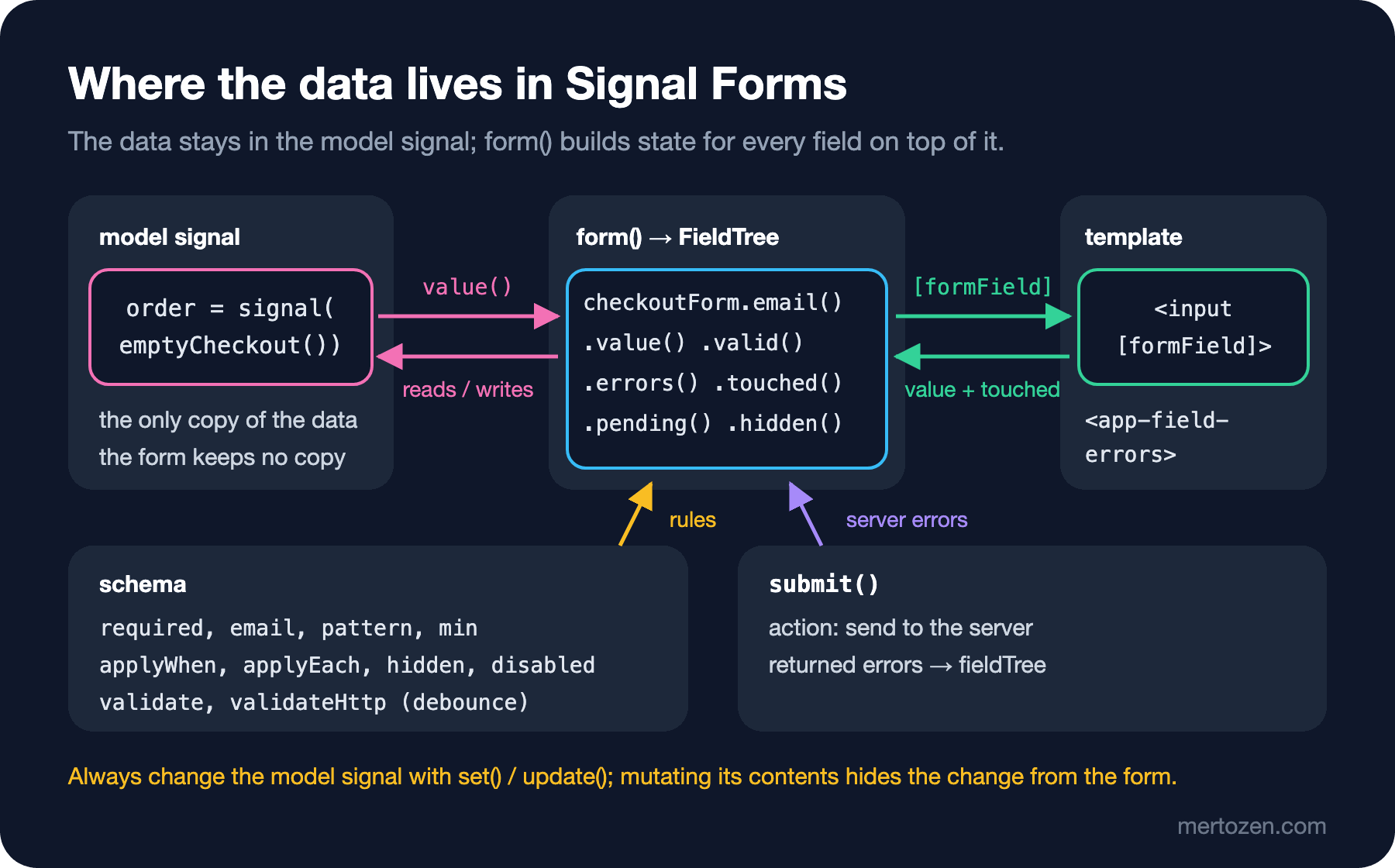
In Signal Forms the data lives in a model signal and form() builds a typed FieldTree on top of it. We build the Bookstore checkout form with a schema, built-in and custom validators, applyWhen/applyEach, a debounced validateHttp coupon check and submit() that maps server errors to fields.
Version note: The examples in this post were run with Angular 22.2, TypeScript 6.0 and Vitest 4.1.
Guess First
In post 30 we met Signal Forms in their experimental form, and in post 31 we saw them become stable in Angular 22. Every example was a single email field. In the "Practical topics with Angular 22" part of the series, which starts with this post, we use the same API on a real form: the checkout page of bookstore-web, the Angular client of Bookstore, the online bookstore used as the shared example across this site's series. We wrote this form template-driven in post 15; now we rebuild it with an address, a shipping choice, cart lines, the institutional order rule, a coupon code checked on the server, and errors coming back from the server.
A question before we start. The form's data lives in a signal, and inside the component you write this:
this.order().couponCode = 'BOOK10';What does the coupon input show? What is the form's couponCode().value()? The answer, with real test output, is in "Common Pitfalls".
The Model and form(): Where Does the Data Live?
With Signal Forms you start from the data, not from the form. We put every field of the checkout page into one interface:
export type ShippingMethod = 'standard' | 'express' | 'pickup';

export interface CheckoutLine {
  isbn: string;
  title: string;
  quantity: number;
}

export interface CheckoutModel {
  fullName: string;
  email: string;
  shipping: ShippingMethod;
  address: { city: string; street: string; zip: string };
  institutional: boolean;
  institutionName: string;
  couponCode: string;
  lines: CheckoutLine[];
}
The emptyCheckout() function returns the starting value: empty fields and the two books in the cart (Dune and Emma, one of each). The component puts that value into a signal and builds form() on top of it:
export class CheckoutFormComponent {
  private readonly orderApi = inject(OrderApiService);
  protected readonly placedOrderId = signal<number | null>(null);
  protected readonly order = signal<CheckoutModel>(emptyCheckout());

  protected readonly checkoutForm = form(this.order, checkoutSchema, {
    submission: { /* see below */ }
  });
}
form() does not copy the data. It produces a FieldTree: a tree that follows the shape of the model, where you reach every field through a typed path such as checkoutForm.address.zip. Call a field like a function and you get its state: value(), valid(), invalid(), errors(), touched(), dirty(), pending(), hidden(), disabled(). All of them are signals. Whatever is typed into an input goes straight into the order signal; call order.set(...) in code and the input updates.
Every function in this post (form, validate, validateHttp, applyWhen, applyEach, submit, FormRoot) is marked @publicApi 22.0 in the type definitions of the Angular 22.2.6 package, and the Signal Forms guide on angular.dev uses the same names as of 15 November 2026. The renaming period we saw in post 30 is over.
The Schema: Built-in Validators and Error Messages
We wrote the rules in a schema in a separate file rather than inside the component. Rules defined with schema() can be tested and reused in another form:
export const checkoutSchema = schema<CheckoutModel>((order) => {
  required(order.fullName, { message: 'Full name is required' });
  minLength(order.fullName, 3, { message: 'Enter at least 3 characters' });
  required(order.email, { message: 'Email is required' });
  email(order.email, { message: 'Enter a valid email' });

  required(order.address.city, { message: 'City is required' });
  required(order.address.street, { message: 'Street is required' });
  pattern(order.address.zip, /^[0-9]{5}$/, { message: 'Postal code must be 5 digits' });
  // ...
});
The function's parameter (order) is not the data itself but a tree of paths to the fields. required(order.email) means "the email field is required"; to read the current value you use value and valueOf, which we will see below.
In the template every input is bound with [formField]. Instead of writing the error markup for each field, we moved it into a small component:
@Component({
  selector: 'app-field-errors',
  template: `
    @if (field()().touched()) {
      @for (error of field()().errors(); track error.kind) {
        <p class="error">{{ error.message }}</p>
      }
    }
  `
})
export class FieldErrorsComponent {
  readonly field = input.required<FieldTree<unknown>>();
}
<form [formRoot]="checkoutForm">
<label for="email">Email</label>
<input id="email" type="email" [formField]="checkoutForm.email" />
<app-field-errors [field]="checkoutForm.email" />
<!-- the other fields follow the same shape -->
</form>field()() looks odd at first: the first call takes the FieldTree from the input signal, the second takes that field's state. <form [formRoot]> adds novalidate to the form, stops the page reload on the submit event and runs the form's submission options. When we clicked "Place order" on the empty form in the browser, this is the error list Playwright read:
after empty submit: ["Full name is required","Email is required","City is required","Street is required"]The submit attempt marked every interactive field as touched, so all of their messages appeared at once. The postal code was empty, so pattern reported nothing; pattern does not check empty values, and being required is a separate rule.
Conditional Rules: hidden, disabled, applyWhen and applyEach
The hard part of checkout is rules that depend on each other. We don't ask for an address when the customer picks the order up at the store. For an institutional order (a school, library or company) the institution name is required, at least 20 books are needed, and since institutional orders get a 10% discount, coupon codes don't apply. The rest of the schema says exactly that:
  hidden(order.address, { when: ({ valueOf }) => valueOf(order.shipping) === 'pickup' });

  applyEach(order.lines, (line) => {
    min(line.quantity, 1, { message: 'Quantity must be at least 1' });
  });

  applyWhen(order, ({ valueOf }) => valueOf(order.institutional), (inst) => {
    required(inst.institutionName, { message: 'Institution name is required' });
    validate(inst.lines, ({ value }) => {
      const books = value().reduce((sum, line) => sum + line.quantity, 0);
      return books < MIN_INSTITUTIONAL_BOOKS
        ? { kind: 'minInstitutionalBooks', message: `Institutional orders need at least ${MIN_INSTITUTIONAL_BOOKS} books (now ${books})` }
        : null;
    });
  });

  disabled(order.couponCode, {
    when: ({ valueOf }) => valueOf(order.institutional) && 'Coupons do not apply to institutional orders'
  });
valueOf(order.shipping) reads the current value of another field, and that read is reactive: when the shipping choice changes, the rule is recomputed on its own. hidden marks a field as hidden, and a hidden field takes no part in its parent's validation. Removing it from the template is your job: @if (!checkoutForm.address().hidden()). When we set delivery to "pickup" and filled in only the name and email, checkoutForm().valid() returned true even though the address fields were empty.
The rule inside applyEach is applied to every line of the array separately. applyWhen makes all the rules inside it depend on a condition. For the institutional rule we used validate(): your own validator returns an error object or null. The error is attached to the lines array itself, not to the lines, which is why the template has an <app-field-errors [field]="checkoutForm.lines" /> line.
The when function of disabled can return a string instead of true. The string ends up as a message in the field's disabledReasons() list, and we print it under the input. When we ticked the institutional box and submitted the empty form, the browser showed:
coupon disabled: true [ 'Coupons do not apply to institutional orders' ]
institutional submit: ["Institutional orders need at least 20 books (now 2)","Institution name is required"]
Setting Dune's quantity to 19 made the total 20, and both errors went away. Unticking the box turned the rules off and enabled the coupon input again.
Async Validation: Asking the Server About the Coupon
Only the server knows whether a coupon is valid. validateHttp creates an httpResource and turns the response into errors:
  validateHttp(order.couponCode, {
    request: ({ value }) =>
      value() ? `${environment.apiUrl}/coupons?code=${encodeURIComponent(value())}` : undefined,
    debounce: 400,
    onSuccess: (coupons: Coupon[]) =>
      coupons.length ? null : { kind: 'unknownCoupon', message: 'This coupon code is not valid' },
    onError: () => ({ kind: 'couponCheckFailed', message: 'Could not check the coupon, try again' })
  });
If request returns undefined, no request is sent, so an empty coupon counts as valid. Async validation runs only after the field's synchronous rules pass. While the request is in flight, the field's pending() is true; we show that as "Checking the coupon..." in the template. onError is required: you decide what happens when the server can't be reached.
We added a single coupon (BOOK10) to the sample API's db.json. In the browser, typing BOOK5 into the coupon field and leaving it first showed "Checking the coupon...", then "This coupon code is not valid". BOOK10 produced no error. Even though we typed the letters one by one, the server received one request per code:
requests: ["GET /coupons?code=BOOK5","GET /coupons?code=BOOK10","POST /orders","GET /coupons?code=BOOK10"]That is what debounce: 400 does: the request goes out 400 milliseconds after the last key press. We will come back to the last entry in the list under "In Production".
submit() and Server Errors
The server still has the final say on validation. If the Bookstore API rejects an order, it returns 422 with a list of errors per field. The submission options we passed to form():
submission: {
  action: async (f) => {
    try {
      const placed = await firstValueFrom(this.orderApi.place(f().value()));
      this.placedOrderId.set(placed.id);
      return undefined;
    } catch (error) {
      return toFieldErrors(error, f);
    }
  }
}
function toFieldErrors(error: unknown, f: FieldTree<CheckoutModel>): TreeValidationResult {
if (error instanceof HttpErrorResponse && error.status === 422) {
const targets: Record<string, FieldTree<unknown>> = {
email: f.email,
'address.zip': f.address.zip,
couponCode: f.couponCode
};
return (error.error.errors as ApiFieldError[]).map((e) => ({
kind: 'server',
message: e.message,
fieldTree: targets[e.field] ?? f
}));
}
return { kind: 'server', message: 'The order could not be placed, try again' };
}action runs only when the form is valid. The fieldTree in each returned error decides which field shows it; without one, the error goes to the root of the form. While the action runs, checkoutForm().submitting() is true, and we disable the button with it. After we filled in the whole form and submitted it, the sample API stored the new order and the page said "Order 1044 placed." We produced the 422 case in a Vitest test with HttpTestingController: the server said "We do not deliver to 35000 yet" for address.zip, and the message appeared under the postal code input. The result of the test file:
 ✓ |bookstore-web| src/app/checkout-form/checkout-form.component.spec.ts > CheckoutFormComponent > shows errors only after the field is touched 38ms
 ✓ |bookstore-web| src/app/checkout-form/checkout-form.component.spec.ts > CheckoutFormComponent > shows every error after a submit attempt 10ms
 ✓ |bookstore-web| src/app/checkout-form/checkout-form.component.spec.ts > CheckoutFormComponent > hides the address for store pickup 10ms
 ✓ |bookstore-web| src/app/checkout-form/checkout-form.component.spec.ts > CheckoutFormComponent > applies the institutional rules only for institutional orders 12ms
 ✓ |bookstore-web| src/app/checkout-form/checkout-form.component.spec.ts > CheckoutFormComponent > checks the coupon once after typing stops 628ms
 ✓ |bookstore-web| src/app/checkout-form/checkout-form.component.spec.ts > CheckoutFormComponent > puts server errors on the matching field 22ms
 Test Files  1 passed (1)
      Tests  6 passed (6)
Across the whole project, ng test passed 69 tests in 58 test files. We won't go into how the tests are written here; the Frontend Testing series covers that in detail.
The Same Form with Reactive Forms: When to Migrate?
We wrote part of the same rules with the typed Reactive Forms from post 21 and ran them in a test:
readonly checkoutForm = this.fb.group({
  fullName: ['', [Validators.required, Validators.minLength(3)]],
  email: ['', [Validators.required, Validators.email]],
  institutional: [false],
  couponCode: [''],
  lines: this.fb.array([
    this.fb.group({ isbn: ['9780441172719'], quantity: [1, Validators.min(1)] })
  ])
}, { validators: minInstitutionalBooks });

constructor() {
  this.checkoutForm.controls.institutional.valueChanges.subscribe((institutional) => {
    const coupon = this.checkoutForm.controls.couponCode;
    institutional ? coupon.disable() : coupon.enable();
  });
}
The difference shows up in two places. In Reactive Forms the data lives inside the form, and the "no coupons for institutional orders" rule is managed by hand with a valueChanges subscription; the group validator also works with string paths such as group.get('lines'). In Signal Forms the same rule is one line in the schema, the data is a plain signal and the paths are typed.
When should you migrate? Write new forms with Signal Forms. Don't migrate a working Reactive Forms screen just because the API is new; migrate it when you are changing that screen anyway, when its rules are spread over many valueChanges subscriptions, or when its value already comes from a signal. As we will see in post 33, custom controls can work in both worlds, so you can migrate one screen at a time.
In Production
Back to the request list: POST /orders went out before the last coupon check. Unticking the institutional box enabled the coupon field again and started a new check for BOOK10. We submitted the form before the 400 millisecond debounce was over. The default setting of submit() (ignoreValidators: 'pending') does not treat pending async validation as a blocker. A coupon changes the price, so on this screen the server must check it again anyway. When you can't rely on the server for that, ignoreValidators: 'none' makes pending validation stop the submit.
The other notes are short. Keeping error messages in the schema puts them in one place, which helps when you translate them (post 34). Swallowing the error in onError and treating the coupon as valid is tempting but wrong: the customer won't see the discount and will complain after the order. In the production build, the initial bundle of bookstore-web came to 498.90 kB, and the budget warning is at 500 kB. The Signal Forms package is in the main bundle now, and we will keep an eye on that limit in the next posts.
Common Pitfalls
The first pitfall is the question from the start of the post. In a test component we changed the inside of the model signal directly, then set the same value with update:
c.model().code = 'BOOK10';                          // the contents changed
// model: {"code":"BOOK10"}  form: ""  input: ""
c.model.update((m) => ({ ...m, code: 'BOOK10' }));  // a new object
// form: "BOOK10"  input: "BOOK10"
The object's contents changed, but the signal's reference stayed the same, so neither the form nor the input saw it. Change the value either by giving set/update a new object or through checkoutForm.couponCode().value.set(...).
The second pitfall is leaving an async validator without a debounce. We set up the same validator without debounce and typed BOOK5 letter by letter, and four requests went out:
"/coupons?code=B cancelled=true",
"/coupons?code=BO cancelled=true",
"/coupons?code=BOO cancelled=true",
"/coupons?code=BOOK5 cancelled=false",
The resource cancels the older requests, so a stale result never reaches the screen, but the server still gets one request per key press. With the debounce the count dropped to one.
The third is writing a separate computed for each field and repeating the "if touched and invalid, show the first error's message" logic ten times. The message already sits next to the validator; a single component like FieldErrorsComponent writes that logic once. Finally, remember that hidden is only a flag: removing the field from the template is up to you.
A Small Experiment
★☆☆ Add a phone field to the schema: not required, but checked with pattern(order.phone, /^5[0-9]{9}$/) when filled in. See that leaving it empty gives no error and typing "123" does.
★★☆ Make the postal code required when express shipping is selected. Use the when option of required and valueOf(order.shipping), and check with a test that the error disappears when you switch back to standard shipping.
★★★ Add ignoreValidators: 'none' to the submission options. Click "Place order" while the coupon check is running and see that POST /orders no longer goes out and submit() returns false.
In this post the quantity was a plain type="number" input. In the next post we turn it into a quantity stepper with −/+ buttons: we write our own form control with FormValueControl, use the same component with Reactive Forms and ngModel, and read the ControlValueAccessor you will meet in existing code.