

i18n in Angular: $localize, the i18n Attribute, ICU Messages, ng extract-i18n and Per-Locale Builds
Angular's build-time i18n marks text with the i18n attribute and $localize, extracts it to an XLIFF file with ng extract-i18n and builds a separate app per language. We make the Bookstore UI Turkish and English and cover ICU plural/select, LOCALE_ID, /tr and /en routing in ASP.NET Core and catching missing translations at build time.
Version note: The examples in this post were run with Angular 22.2, @angular/localize 22.2, TypeScript 6.0 and .NET 10 (ASP.NET Core).
Guess First
Angular's i18n messages use ICU syntax. If you know that syntax from other tools, this line looks familiar:
<p i18n>{book.stock, plural, =0 {Out of stock} other {# in stock}}</p>With 12 books in stock, what does the page show? "12 in stock"? We will see the answer in this post, with the real text read from the browser.
The example is again bookstore-web, the Angular client of Bookstore, the online bookstore used as the shared example across this site's series. All of its UI text, including the checkout we built in posts 32 and 33, is in English. In this post we make the catalog, the top menu and the checkout Turkish and English. Angular's own approach is build-time i18n: translations are baked into the code during the build, and each language comes out as a separate application.
Adding @angular/localize
ng add @angular/localize✔ Searching for compatible package version
...
UPDATE src/main.ts (1701 bytes)
UPDATE tsconfig.app.json (489 bytes)
UPDATE tsconfig.spec.json (307 bytes)
UPDATE angular.json (3233 bytes)The command installed the package, added @angular/localize/init to the polyfills list in angular.json, wrote @angular/localize into the types list of two tsconfig files, and put a /// <reference types="@angular/localize" /> line at the top of main.ts. These type definitions let us use $localize in code.
Marking Text: i18n, i18n-* and $localize
In a template you add an i18n attribute to the element that should be translated. The value is optional but has three parts: meaning|description@@id. The book card in the catalog:
<div class="book">
  <h4><a [routerLink]="['/books', book.isbn]">{{ book.title }}</a></h4>
  <p>{{ book.price | currency: 'TRY' : 'symbol-narrow' }}</p>
  <p i18n="Stock line on a book card@@catalog.stock">{book.stock, plural, =0 {Out of stock} =1 {Last copy} other {{{ book.stock }} in stock}}</p>
  <button (click)="onAdd()" i18n="Button on a book card|Adds the book to the shopping cart@@catalog.addToCart">Add to cart</button>
</div>
The part before | is the meaning: it separates the same English text when it has to be translated differently in different contexts. The next part is the description, a note for the translator. The part after @@ is the message's permanent ID; without one, Angular computes an ID from the text. We will see why that matters in "Common Pitfalls".
When an attribute of the element should be translated rather than its content, you use the i18n- prefix. In the search box:
<input (input)="query.set($any($event.target).value)" placeholder="Search books..." i18n-placeholder="@@catalog.searchPlaceholder">The links in the top menu, the footer and the "Show cart" button are marked the same way. The footer has an amount of money inside the sentence; instead of baking it into the string, we left it to a pipe:
<span i18n="Footer promotion@@footer.freeShipping">Free shipping on orders over {{ freeShippingLimit | currency: 'TRY' : 'symbol-narrow' }}.</span>Some text lives outside templates: the error messages of the checkout schema from post 32 are in TypeScript. For those you use the $localize tagged template, with the ID written at the start as :@@id::
required(order.fullName, { message: $localize`:@@checkout.fullNameRequired:Full name is required` });
// ...
? { kind: 'minInstitutionalBooks', message: $localize`:@@checkout.minInstitutionalBooks:Institutional orders need at least ${MIN_INSTITUTIONAL_BOOKS}:min: books (now ${books}:books:)` }
The ${books}:books: part in the second line gives the interpolation a name that shows up in the translation file. Because we collected the error messages in the schema in post 32, this job ended in a single file.
ICU Messages: plural and select
Back to the question at the start. We first wrote the stock line as other {# in stock}. The text read from the browser in the English and Turkish builds:
[en] stock lines=["# in stock","# in stock"]
[tr] stock lines=["Stokta # adet","Stokta # adet"]
In other ICU implementations # stands for the number; Angular's ICU support doesn't do that, and the character is printed as is. To show the number you use a normal interpolation inside the category: other {{{ book.stock }} in stock}. After the fix:
[en] first card=["₺450.00","12 in stock"] button=Add to cart
[tr] first card=["₺450,00","Stokta 12 adet"] button=Sepete ekle
The counter on the catalog page is a plural message too: {itemCount(), plural, =0 {No books to show} =1 {Showing 1 book} other {Showing {{ itemCount() }} books}}. The Turkish translation doesn't need the =1 branch, because in Turkish a noun stays singular after a number: "1 kitap", "2 kitap". The translator doesn't have to copy the categories of the source message; they write the ones their language needs.
select picks text based on a value. We added a line to the checkout that shows the chosen delivery type:
<p i18n="@@checkout.delivery">Delivery: {checkoutForm.shipping().value(), select, standard {standard} express {express, next business day} pickup {pick up at the store}}</p>With express selected, the English build showed "Delivery: express, next business day" and the Turkish build "Teslimat: ekspres, ertesi iş günü".
ng extract-i18n and XLIFF 2
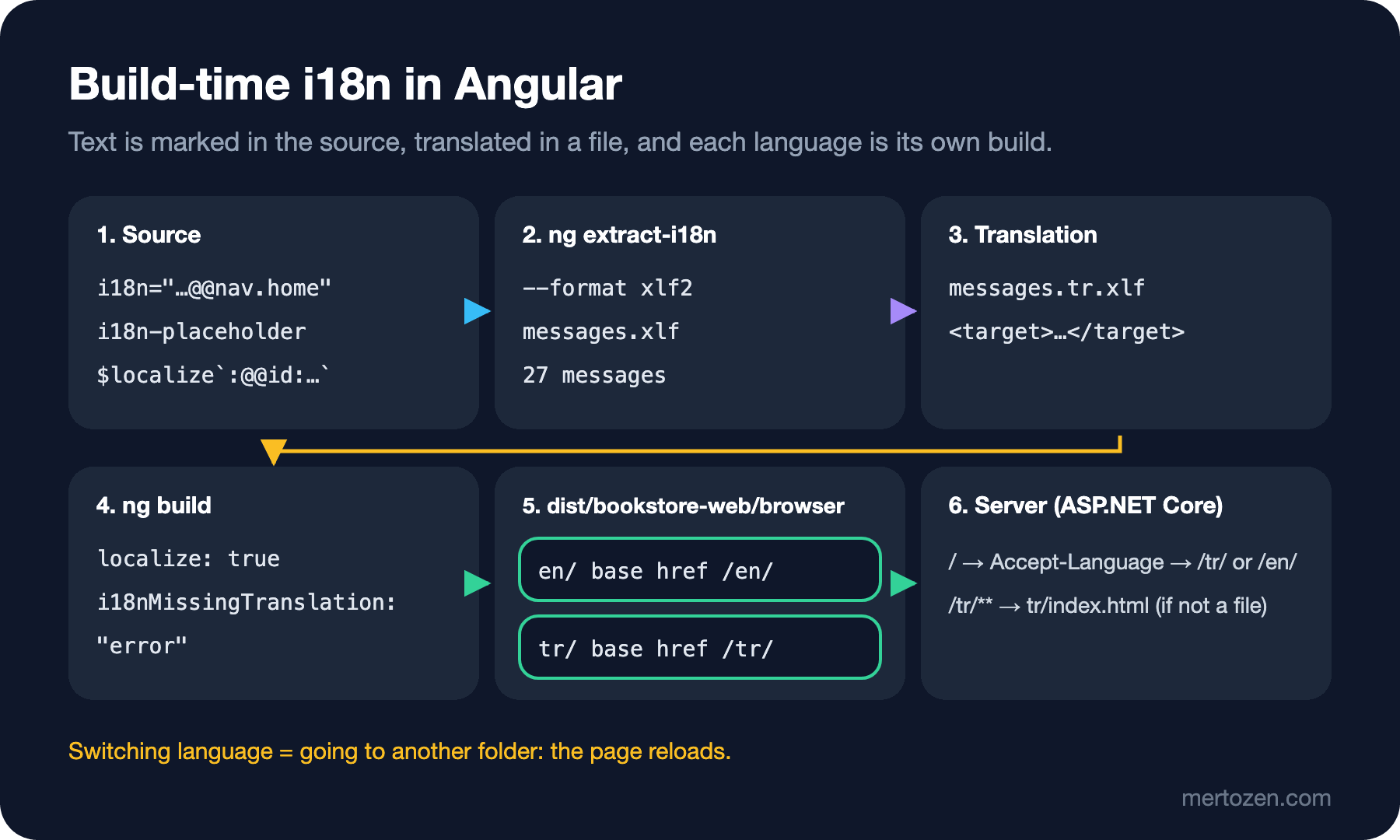
ng extract-i18n --format xlf2 --output-path src/localeExtraction Complete. (Messages: 27)The command built the application and wrote every marked message to src/locale/messages.xlf. With --format xlf2 we asked for XLIFF 2.0; translation teams and translation platforms can open this file directly. We copied the file as messages.tr.xlf, added trgLang="tr" to the root element, and wrote a <target> under every <source>:
<unit id="catalog.addToCart">
  <notes>
    <note category="location">src/app/catalog/book-item/book-item.component.html:7,9</note>
    <note category="description">Adds the book to the shopping cart</note>
    <note category="meaning">Button on a book card</note>
  </notes>
  <segment>
    <source>Add to cart</source>
    <target>Sepete ekle</target>
  </segment>
</unit>
The meaning and description became notes for the translator. Interpolations arrive as <ph> elements; in the translation you can move them anywhere as long as you don't delete them. For the footer we wrote <ph id="0" .../> üzeri siparişlerde kargo ücretsiz.; in Turkish the amount moved to the start of the sentence.
angular.json and Per-Locale Builds
"i18n": {
  "sourceLocale": {
    "code": "en-US",
    "subPath": "en"
  },
  "locales": {
    "tr": {
      "translation": "src/locale/messages.tr.xlf"
    }
  }
},
The i18n block sits at project level, next to architect. The source language is en-US; without subPath the output folder would be named en-US, which is what our first build produced. We added two lines to the build options:
"localize": true,
"i18nMissingTranslation": "error"
ng build now produces two applications:
dist/bookstore-web/browser/en/index.html:<html lang="en-US" dir="ltr" data-beasties-container>
dist/bookstore-web/browser/en/index.html:<base href="/en/">
dist/bookstore-web/browser/tr/index.html:<html lang="tr" dir="ltr" data-beasties-container>
dist/bookstore-web/browser/tr/index.html:<base href="/tr/">
The CLI set each language's base href and <html lang> itself. The same goes for LOCALE_ID. In post 09 we added registerLocaleData(localeTr) and { provide: LOCALE_ID, useValue: 'tr' } to main.ts. In a localized build those lines cause trouble: when we tried keeping them, the footer of the English build became "Free shipping on orders over ₺500,00." with English text and a Turkish number format. We deleted both; every build brings its own locale data and LOCALE_ID. You can see the result in the cards above: the same currency pipe printed ₺450.00 in English and ₺450,00 in Turkish.
At first we used currency: 'TRY' without choosing a symbol; the en-US build wrote TRY500.00 in the footer. With 'symbol-narrow' as the second parameter, both languages got the ₺ sign.
/tr and /en on the Server
To serve the two folders we added a small ASP.NET Core host to Bookstore's .NET side (dotnet new web):
WebApplicationBuilder builder = WebApplication.CreateBuilder(args);
WebApplication app = builder.Build();

string[] locales = ["tr", "en"];

// "/" → the visitor's language, Turkish by default
app.MapGet("/", (HttpRequest request) =>
{
    string first = request.Headers.AcceptLanguage.ToString().Split(',')[0];
    string locale = first.StartsWith("en", StringComparison.OrdinalIgnoreCase) ? "en" : "tr";
    return Results.Redirect($"/{locale}/");
});

app.UseStaticFiles();

// /tr/books/9780441172719 → tr/index.html, so a refresh does not end in 404
foreach (string locale in locales)
{
    app.MapFallbackToFile($"/{locale}/{{**path:nonfile}}", $"{locale}/index.html");
}

app.Run();
dotnet run -- --webroot ../web/dist/bookstore-web/browser --urls http://127.0.0.1:52234The "404 on refresh" problem we solved for Nginx in post 19 becomes one fallback per language here. Testing with curl, a client sending Accept-Language: en-GB was redirected from / to /en/ with a 302, one sending tr-TR to /tr/; /tr/books/9780441172719 returned tr/index.html with a 200. When we opened the pages of both languages with Playwright:
[en] lang=en-US nav=["Home","Books","About"]
[en] count="Showing 2 books"
[en] checkout errors=["Full name is required","Email is required","City is required","Street is required"]
[tr] lang=tr nav=["Ana sayfa","Kitaplar","Hakkında"]
[tr] count="2 kitap gösteriliyor"
[tr] checkout errors=["Ad soyad zorunlu","E-posta zorunlu","Şehir zorunlu","Sokak zorunlu"]
The $localize messages from the schema were translated too. When you add a link to switch languages, the user actually goes to another application and the page reloads.
Build-time i18n or Runtime Translation?
This section is based on the official documentation. Libraries such as Transloco (@jsverse/transloco) carry all languages in a single build; they usually load translations from JSON files and can switch the language without reloading the page. The two approaches also behave differently for SSR and SEO. This table helps with the decision:
| Topic | @angular/localize | Runtime library (Transloco) |
|---|---|---|
| Switching language | Go to another folder, the page reloads | Without a reload |
| Build output | One application per language | One application plus translation files |
| Runtime cost | None, text is baked into the code | Loading and looking up translations |
| SSR and SEO | Each language at its own URL, with its own lang attribute | The language has to be put into the URL separately |
| Missing translation | Caught at build time | Noticed while running |
For a store like Bookstore, where the language is chosen once and the shop should appear in search engines in both languages, the build-time approach fits. For an admin panel where users switch languages often within a session, or an application whose translations you want to change after release, a runtime library is more comfortable.
In Production
ng serve can serve only one language at a time. With localize: true on, a plain ng serve printed this line and turned localization off:
Localization (`localize` option) has been disabled. The development server only supports localizing a single locale per build.For that we added a "tr": { "localize": ["tr"] } configuration to the build and a "tr": { "buildTarget": "bookstore-web:build:development,tr" } configuration to serve; on the page opened with ng serve -c tr the menu read "Ana sayfa, Kitaplar, Hakkında".
When we first wrote the fallback route it had no :nonfile constraint. In that version a request for a file that doesn't exist, such as /en/main-nonexistent.js, got index.html back with a 200 and text/html. When the browser tries to run that HTML as JavaScript, the error shows up somewhere far away. With the constraint the same request returned 404.
The initial bundle grew from 449.20 kB to 467.02 kB; the $localize runtime and the locale data go into every language's bundle. The unit tests keep running in the source language: ng test passed 75 tests in 61 files, because the test build is not localized and $localize messages return the English text. If you add a new message and forget to run ng extract-i18n again and move the new units into messages.tr.xlf, it is not the tests but the build with i18nMissingTranslation: error that catches it.
Common Pitfalls
Changing the text of a message without an ID. We first marked the "Sort by price" link in the catalog with a bare i18n and translated it. Then we changed the text to "Sort by lowest price" and built with i18nMissingTranslation at its default value:
▲ [WARNING] No translation found for "1746357590359649354" ("Sort by lowest price").When the text changed, the computed ID changed too, and the old translation is no longer attached to any message. The build finished and the link stayed English in the Turkish application. With "i18nMissingTranslation": "error" the same build stopped:
✘ [ERROR] No translation found for "1746357590359649354" ("Sort by lowest price").The fix has two parts: give the message a permanent ID such as @@catalog.sortByPrice, and keep this setting at error in CI. Then the ID stays the same when the text changes, and the build breaks when a translation is missing.
Building dates or money by concatenating strings. An expression like 'Free shipping on orders over ' + limit + ' TRY' can neither be translated nor formatted for the locale; in Turkish the amount has to move to the start of the sentence and the decimal separator is a comma. Leaving an interpolation with a pipe inside the message solved both.
Finally #: Angular ICU messages don't print the number with it; use {{ }}.
A Small Experiment
★☆☆ Mark the "Add to cart" button on the book detail page with i18n, but give it the same ID as the one in the catalog (@@catalog.addToCart). After ng extract-i18n, look at how many units the file has and at the location notes.
★★☆ Translate the statuses in the order list (pending, shipped, delivered) with an ICU select. Use the other branch to decide what to show for an unknown status.
★★★ Delete a <target> from messages.tr.xlf and run ng build. Read the error message, then add the same check to a CI pipeline.
The UI is bilingual now, but it still doesn't move: a product line added to the cart appears all at once, and a removed line disappears instantly. In the last post of the series we cover animate.enter and animate.leave, which came with Angular 20.2, plain CSS transitions, and moving away from old @angular/animations code.