

Animation in Angular: animate.enter, animate.leave, CSS Transitions and Moving Off @angular/animations
animate.enter and animate.leave, added in Angular 20.2, put a CSS class on an element as it enters or leaves the DOM and wait for the animation, with no need for @angular/animations. We animate Bookstore cart lines and toasts and cover prefers-reduced-motion, @starting-style, withViewTransitions and migrating old trigger code.
Version note: The examples in this post were run with Angular 22.2, TypeScript 6.0, Vitest 4.1 and Playwright 1.65 (Chromium).
Guess First
The cart page has two lines: Dune and Emma. The lines are listed with @for using track $index, and every line has a leave animation. You click the "Remove" button on the first line (Dune). Which line slides away on the screen?
The answer is in "Common Pitfalls", with the real behaviour we recorded in Chromium. First, let's look at Angular's new animation API. The example is bookstore-web, the Angular client of Bookstore, the online bookstore used as the shared example across this site's series: a line added to the cart will enter smoothly, a removed line will slide out, and the catalog will show an "added to the cart" toast.
animate.enter and animate.leave: With a CSS Class
We added a new cart page to bookstore-web (/cart). CartService now gives every line a lineId and has a remove(lineId) method. The template:
@for (line of lines(); track line.lineId) {
  <div class="cart-line" animate.enter="cart-line-enter" animate.leave="cart-line-leave">
    <span>{{ line.title }}</span>
    <span>{{ line.price | currency: 'TRY' : 'symbol-narrow' }}</span>
    <button type="button" (click)="remove(line)" i18n="@@cart.remove">Remove</button>
  </div>
} @empty {
  <p i18n="@@cart.empty">Your cart is empty.</p>
}
.cart-line-enter { animation: line-in 300ms ease-out; }
.cart-line-leave { animation: line-out 250ms ease-in forwards; }
@keyframes line-in {
from { opacity: 0; transform: translateY(-8px); }
}
@keyframes line-out {
to { opacity: 0; transform: translateX(24px); }
}animate.enter adds the class you give it when the element enters the DOM and removes it when the animation ends. animate.leave adds its class before removing the element and waits for the animation to finish. The animation itself is plain CSS; Angular only adds and removes the class at the right moment. You can pass the value as a fixed string, bind it as [animate.enter]="enterClass()", or pass more than one class.
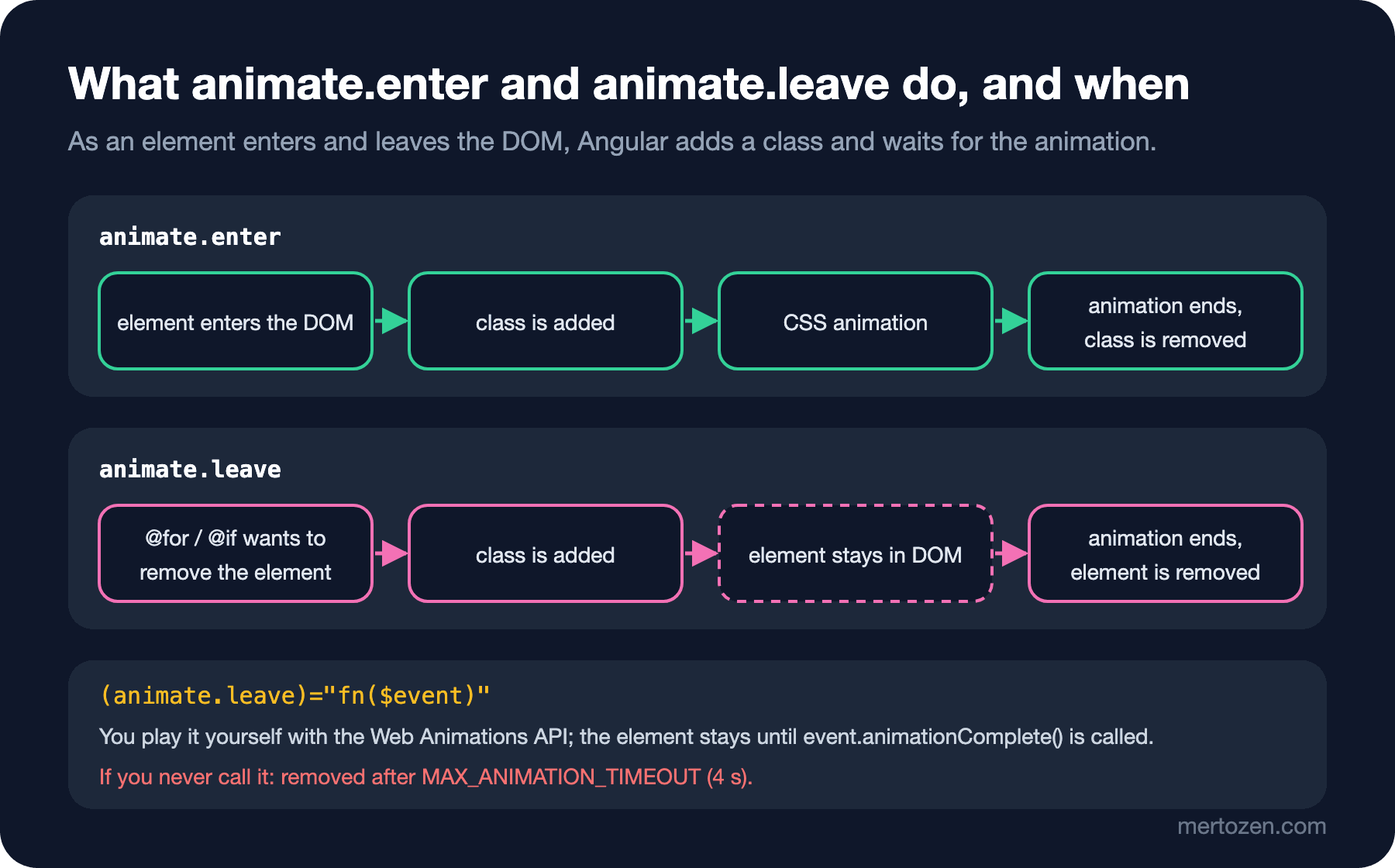
In Chromium, after adding two books from the catalog and opening the cart, the lines' classes were cart-line cart-line-enter at first and only cart-line 400 milliseconds later. Clicking "Remove" on the first line changed the element's class to cart-line cart-line-leave, and the element left the DOM 279 milliseconds later: the 250 millisecond animation plus a few frames.
This API arrived with Angular 20.2; in the type definitions of the 22.2.6 package, AnimationCallbackEvent and MAX_ANIMATION_TIMEOUT are marked @publicApi 20.2. Notice that we didn't add any animation provider to main.ts, and there isn't a single import from @angular/animations. The new API lives in Angular's core.
(animate.leave) with the Web Animations API: Toast Notifications
Sometimes you want to play the animation in JavaScript rather than with a CSS class: to compute the duration, to use the element's current size, or to call a library. For that there is the event binding form. The component that shows a toast for every book added to the cart in the catalog:
@Component({
  selector: 'app-toast-host',
  styleUrl: './toast-host.component.css',
  template: `
    @for (toast of toasts.items(); track toast.id) {
      <p class="toast" role="status" animate.enter="toast-enter" (animate.leave)="slideOut($event)">
        {{ toast.text }}
      </p>
    }
  `
})
export class ToastHostComponent {
  protected readonly toasts = inject(ToastService);

  protected slideOut(event: AnimationCallbackEvent): void {
    if (matchMedia('(prefers-reduced-motion: reduce)').matches) {
      event.animationComplete();
      return;
    }
    const animation = event.target.animate(
      [{ opacity: 1, transform: 'none' }, { opacity: 0, transform: 'translateY(16px)' }],
      { duration: 200, easing: 'ease-in' }
    );
    // Angular removes the element only after this call
    animation.finished.then(() => event.animationComplete());
  }
}
$event is an AnimationCallbackEvent: target is the leaving element, and animationComplete is the "I'm done, you can remove it" function. ToastService takes every toast off the list after three seconds. In the browser, clicking "Add to cart" brought in a toast with the toast toast-enter class, and the page showed "Dune added to the cart" and "Emma added to the cart". The first toast took 3155 milliseconds to leave the DOM: the three second wait, the 200 millisecond leave animation and a few frames. The toast text is marked with $localize as in post 34; the Turkish build shows "Dune sepete eklendi".
prefers-reduced-motion: For Users Who Want Less Motion
Some users turn on the "reduce motion" setting in their operating system; for some of them, sliding and growing elements cause dizziness. For CSS animations a single media query is enough:
@media (prefers-reduced-motion: reduce) {
  .cart-line-enter, .cart-line-leave { animation: none; }
  .free-shipping { transition: none; }
}
The JavaScript animation in the toast doesn't see this CSS, so at the start of slideOut we check the same preference with matchMedia and call animationComplete() right away. In Playwright with reducedMotion: 'reduce', removing a line still gave the element the cart-line-leave class, but it left the DOM in 19 milliseconds; with no animation, Angular didn't wait.
The Plain CSS Way: @starting-style and transition-behavior
Not every enter and leave needs Angular. CSS alone can animate an element that never leaves the DOM and only changes its display. The free shipping line that appears when the cart total passes 500 TRY:
<p class="free-shipping" [hidden]="total() < 500" i18n="@@cart.freeShipping">Your order ships for free.</p>.free-shipping {
opacity: 1;
transition: opacity 400ms, display 400ms allow-discrete;
}
.free-shipping[hidden] {
display: none;
opacity: 0;
}
@starting-style {
.free-shipping { opacity: 0; }
}@starting-style says which value the transition starts from when the element first appears. allow-discrete makes display, which normally changes instantly, wait until the transition is over. Post 13 of the CSS3: Flexbox, Grid and Modern CSS series covers both in detail. With Dune (450) and Emma (320) in the cart the line was visible. Removing Dune dropped the total to 320 and set hidden to true; the values we measured at that moment were {"display":"block","opacity":"0.08","hidden":true}, and 500 milliseconds later {"display":"none","opacity":"0"}. So the element stayed on screen, although hidden, until the opacity transition was over.
Route Transitions: withViewTransitions
For transitions between pages the browser has the View Transitions API, and the Angular router uses it through a single feature:
provideRouter(routes, withPreloading(PreloadAllModules), withComponentInputBinding(), withViewTransitions()),::view-transition-old(root),
::view-transition-new(root) {
animation-duration: 200ms;
}The router calls document.startViewTransition on every navigation; by default the browser cross-fades between pictures of the old and new page. To count the calls we loaded a small script in Playwright that wraps startViewTransition. After going from the catalog to the cart and from there to the "About" page, the counter was 3: two clicks plus the initial navigation. If you don't want the transition on the first load, there is a skipInitialTransition option. withViewTransitions is still marked @developerPreview 19.0 in 22.2.6; its behaviour may change in minor versions. The CSS side is covered in post 14 of the CSS3 series.
Reading Old @angular/animations Code
In a project written before Angular 20.2, the same cart line probably looks like this:
@Component({
  selector: 'app-legacy-cart',
  animations: [
    trigger('cartLine', [
      transition(':enter', [
        style({ opacity: 0, transform: 'translateY(-8px)' }),
        animate('300ms ease-out')
      ]),
      transition(':leave', [
        animate('250ms ease-in', style({ opacity: 0, transform: 'translateX(24px)' }))
      ])
    ])
  ],
  template: `
    @for (line of lines(); track line.lineId) {
      <div class="cart-line" @cartLine>{{ line.title }}</div>
    }
  `
})
class LegacyCart { /* ... */ }
trigger names an animation, transition(':enter') and transition(':leave') define the entering and leaving states, and style and animate define the steps. For this to work, the application needed provideAnimationsAsync() (or the older provideAnimations()); in the test we ran it with provideNoopAnimations(). The migration is usually direct: the styles in :enter become the from of a @keyframes, the styles in :leave its to, and @cartLine is replaced by animate.enter and animate.leave.
In the type definitions of Angular 22.2.6, the public APIs of @angular/animations and provideAnimationsAsync have been deprecated since 20.2 with the note "use animate.enter or animate.leave"; the note also says the package is planned to be removed in v23. The new API doesn't need these providers; once you have migrated every component, you can remove both the provider and the package. In bookstore-web, @angular/animations had been in package.json since the first project we created with Angular 12, but no file imported it; grep came back empty. We removed it with npm uninstall @angular/animations, and ng build and the 79 tests in 64 files still passed. Run the same check in your own project: an unused package still waits to be updated and checked for compatibility on every ng update.
You can migrate one component at a time, but you can't use both in the same component. When we compiled a component that had both an animations property and animate.enter in its template:
✘ [ERROR] NG2027: A component cannot have both the '@Component.animations' property (legacy animations) and use 'animate.enter' or 'animate.leave' in the template. [plugin angular-compiler]In Production
Unit tests have no animations. According to Angular's animation guide, TestBed turns animations off by default; in the CartComponent test the line was gone from the list right after clicking "Remove", and the free shipping line's hidden was already true. That is a good thing: the tests don't wait for animation durations. If you want to test the animation itself, you need the animationsEnabled: true setting from the guide or an E2E test running in a real browser.
During the leave animation the element stays in the DOM. In a three-line cart we clicked the "Remove" button inside the first line a second time while it was sliding out; since remove(lineId) filters by ID, no other line was removed and Emma and Dune stayed in the cart. With a method that removed by index, the second click could have removed the wrong line. We marked the toasts with role="status"; screen readers read the content of an element with this role when it changes, without interrupting what the user is doing. The animation only changes the visual side; the announcement itself comes from this attribute. Finally, keep animations short: 200–300 milliseconds is noticeable without making the user wait.
Common Pitfalls
The question from the start: track $index. With Dune and Emma in the cart, we clicked "Remove" on the first line and recorded the text of the line that got the cart-line-leave class:
rows before: ["Dune","Emma"]
clicked Remove on the first row; leaving row text: ["Emma"]
rows after: ["Emma"]
On screen the Emma line slid out, while the text of the Dune line turned into Emma instantly. In a list tracked by index, what gets removed is "the last index", so the animation plays on the wrong line. The fix is to track each line by its own identity: track line.lineId.
The opposite also happens. Imagine tracking object references with track line while the service publishes the lines as new objects on every change (like a list fetched again from an API each time). In a three-line cart, after removing the first line:
["Emma: cart-line cart-line-enter","Dune: cart-line cart-line-enter","Dune: cart-line cart-line-leave","Emma: cart-line cart-line-leave","Dune: cart-line cart-line-leave"]The two remaining lines were recreated and played the enter animation, and all three old lines played the leave animation. For a moment the list looks like five lines all moving together. Tracking by ID solves both. In post 25 we met @for, which became stable in post 27, and saw that track is required; in an animated list, picking the right expression makes a visible difference.
The last pitfall is forgetting animationComplete(). We changed the toast line to animation.finished.then(() => console.log(...)) and measured: the toast went away after 6963 milliseconds. The four seconds of MAX_ANIMATION_TIMEOUT were added to the three second wait. Worse, because no fill was given, the element went back to opacity 1 when the 200 millisecond animation ended; after its leave animation, the toast was visible again for about four more seconds.
A Small Experiment
★☆☆ Change the cart line's enter animation so that it slides in from the left, then turn on "reduced motion" in your operating system or in the browser's developer tools and see the animation switch off.
★★☆ Show the free shipping line with @if instead of [hidden] and build the same effect with animate.enter/animate.leave. Compare what the two approaches leave in the DOM.
★★★ Pick a trigger based animation in one of your old projects, remove the animations property from that component, move it to CSS classes, and see it compile without the NG2027 error.
This post completes the series' "Practical topics with Angular 22" block. We built the basics with Angular 12 (01–19), followed what changed version by version up to Angular 22 (20–31), and in the last four posts worked on bookstore-web through topics you will meet in daily work with Angular 22: a checkout with Signal Forms, your own form controls, a bilingual UI and animation. If you want to keep going, the State Management in Angular, Frontend Testing and Angular Material and CDK series build on the same application. When Angular 23 comes out, as promised in post 31, we will continue this series with version posts.