

A Feature Workflow with AI: Explore → Plan → Implement → Verify and Spec-Driven Development
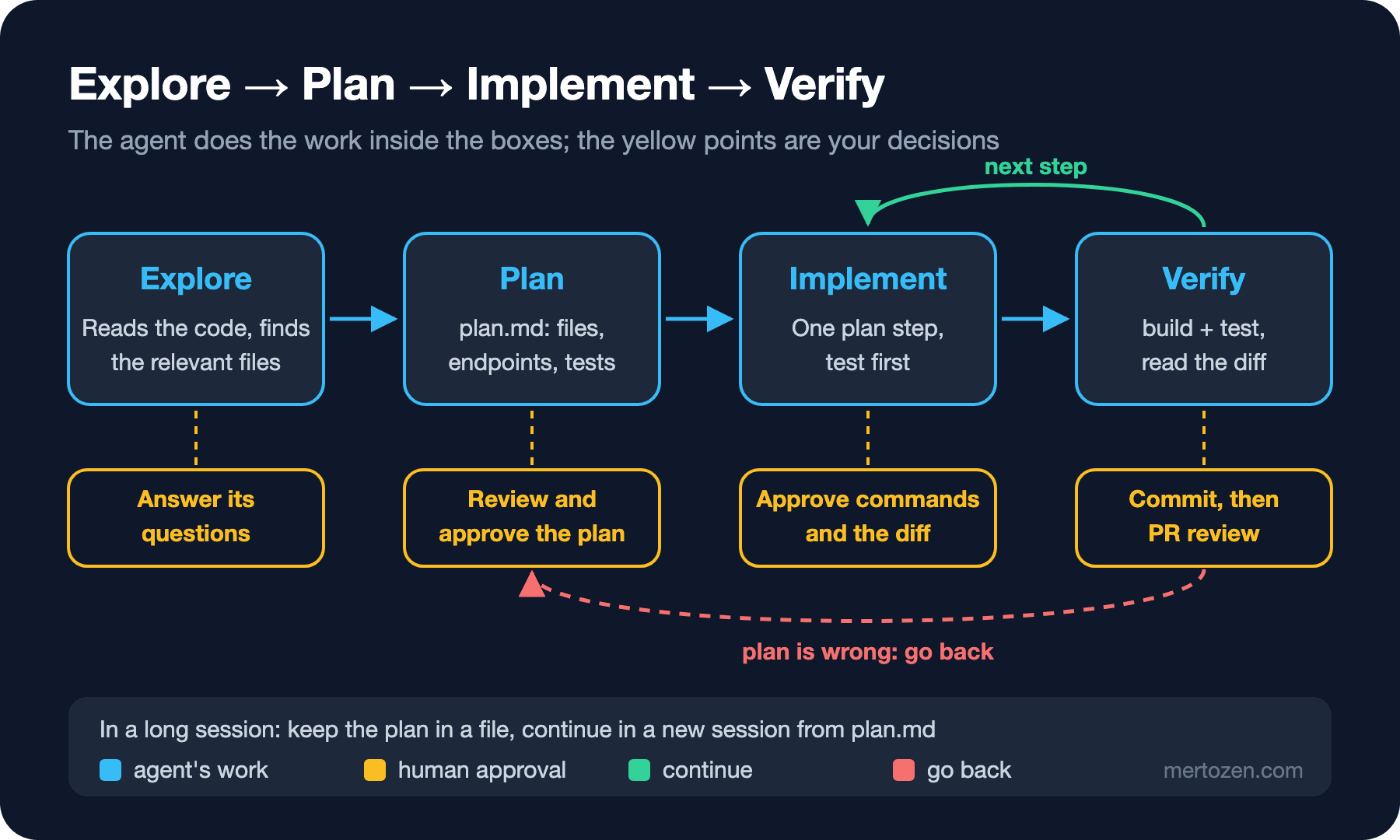
The safe way to build a feature with an agent is to split the work into explore, plan, implement and verify, and keep the plan written down and approved, so you read every diff against it. We add a wishlist to Bookstore with real model output, review the plan, go test-first, catch code that deviates from the plan, and cover Spec Kit's flow, context management and parallel agents with git worktree.
Version note: The code in this post was built and run with .NET 10, EF Core 10.0.15 and xUnit.net v3 4.0.3; model outputs come from gemma3:12b on a local Ollama 0.34.4. Spec Kit information is taken from the v1.4.0 (10 November 2026) documentation.
Guess First
Bookstore is getting a wishlist: a customer creates a list, adds books by ISBN, removes them, and sees the list with each book's current title and price. You gave this to an agent in one sentence and got back a diff of 10 files and 1,200 lines, including a migration, a new module and a change to Program.cs.
Where do you start the review? And more importantly: how will you tell whether this diff does what you wanted, no more and no less? Without a written plan there is nothing to compare it with. In this post we build the same feature in four steps, and at each step you will see what you are approving.
Why One Big Prompt Is a Bad Start
The prompt "add the wishlist feature" leaves three decisions to the agent at once: what to build (scope), how to build it (design) and when it counts as done (verification). The agent makes these decisions silently, and you can only dig them out of the diff one by one. If one of them is wrong, say a quantity was added to the list or a new service layer was invented, fixing it means undoing half of the code.
Splitting the work into steps is not about slowing the agent down; it is about seeing each decision while it is still cheap. Changing a line in the plan takes ten seconds; changing the same decision after merge means a migration and a rollback. The plan-file approach from Kent Beck that we mentioned in the first post is exactly this: what the agent will do, and in which order, is written down and approved first.
Explore: Make It Read the Code First
In the second post we saw that an instructions file gives the rules, not the code. The explore step closes that gap: the agent reads the relevant files, and you see what it read. A real agent finds the files itself; in the experiment I gave the local model six files along with AGENTS.md (Program.cs, BookstoreContext, the cart entity, its configuration and endpoints, CatalogService) and explicitly forbade it to write code:
Task: customers want a wishlist. They can create a wishlist, add a book to it by ISBN, remove a book, and see the list
with title and current price. There is no login yet; carts are anonymous and identified by a Guid, wishlists can work the same way.

Do NOT write code yet. Read the files above and reply with a plan:
1. Files to add and files to change (exact paths).
2. Endpoints with method, path, request and response, status codes.
3. Data model and the migration step.
4. Tests to write first.
5. Open questions you would ask before implementing.
Keep it under 400 words.
The context took 4,109 tokens and the answer came in 71 seconds. Tools give "do not write code, give me a plan first" different names (plan mode, ask mode, read-only mode); whichever you use, the goal is the same: no file changes in the first round.
Plan: Reviewing the Plan
A few parts of the model's plan, verbatim:
*   **New File:** `src/Bookstore.Api/Wishlist/WishlistService.cs` - Implements the `IWishlistService` interface.
*   **New File:** `src/Bookstore.Api/Data/BookstoreContext.cs` - Add `Wishlist` and `WishlistBook` entities.
*   **Change:** `src/Bookstore.Api/Program.cs` - Add `AddWishlistModule()` to service registration.

*   **Add Book to Wishlist:**
    *   Method: `POST`
    *   Path: `/api/wishlists/{wishlistId:guid}/items/{isbn}`

    *   `WishlistBook`: `WishlistId (Guid)`, `BookId (int)`, `Quantity (int)`

*   What happens if a book's price changes between when it's added to the wishlist and when the user views it?
*   What is the maximum quantity of a book that can be added to a wishlist?
The plan is mostly reasonable; the endpoints, the Guid identity and testing first are right. But some things need fixing in review, and all of them are caught before any code is written:
Quantity: the request has no quantity. The plan quietly widened the scope, then asked about it as an open question. Decision: no quantity; a book is either on the list or not.WishlistServiceandIWishlistService: in Bookstore the cart endpoints useBookstoreContextdirectly; a new abstraction with a single caller is unnecessary.POSTfor adding: the same operation on the cart isPUT; adding the same book twice should not be an error, so the operation is idempotent. The plan also lacks the unique index on (WishlistId, BookId) that this needs.BookstoreContext.csis listed as a "New File" although it already exists, and theMapWishlistEndpoints()call that maps the endpoints is missing.- The price question is a good one, and the request answers it: show the current price, do not store prices.
I wrote these decisions into a file the agent reads at every following step. The plan file lives in the repository; the agent and whoever reviews the pull request look at the same text:
# Plan: wishlist

Goal: an anonymous customer keeps a list of books to buy later and sees each book's current title and price.

## Decisions (reviewed)
- Module folder `src/Bookstore.Api/Wishlists/`, SQL schema `wishlists`. No separate service class:
  endpoints use `BookstoreContext` and `ICatalogService`, like `OrderingModule`.
- A wishlist is identified by a Guid (`Guid.CreateVersion7()`), like a cart. No quantity: a book is either on the list or not.
- Prices are not stored; `GET` shows the current price from the catalog.
- Adding the same book twice is not an error (idempotent `PUT`). Unique index on (WishlistId, BookId).

## Endpoints
- `POST /api/wishlists` → 201 + `WishlistView`, Location `/api/wishlists/{id}`
- `GET /api/wishlists/{id}` → 200 `WishlistView` | 404
- `PUT /api/wishlists/{id}/items/{isbn}` → 200 `WishlistView` | 404 (wishlist or book not found)
- `DELETE /api/wishlists/{id}/items/{isbn}` → 200 `WishlistView` | 404

`WishlistView(Guid Id, IReadOnlyList<WishlistLineView> Items)`,
`WishlistLineView(string Isbn, string Title, decimal Price, DateTime AddedAtUtc)`, items ordered by title.

## Steps
- [x] 1. Integration tests in `tests/Bookstore.Api.Tests/WishlistTests.cs` (red)
- [x] 2. Entities `Wishlist`, `WishlistItem` + configuration + `DbSet` + migration `AddWishlists`
- [x] 3. `WishlistsModule` with the four endpoints; register in `Program.cs` (green)
- [x] 4. Review the diff, run all tests, commit
Implement: Test First and Small Steps
The first step of the plan is the tests. I asked the model to do only step one, using WishlistView, which does not exist yet. It wrote six tests; a short part of two of them:
        Assert.Equal(HttpStatusCode.Ok, response.StatusCode);
        WishlistView? wishlist = await response.Content.ReadFromJsonAsync<WishlistView>(ct);

        Assert.NotNull(wishlist);
        Assert.Equal(1, wishlist.Items.Count);
> dotnet build
WishlistTests.cs(45,37): error CS0117: 'HttpStatusCode' does not contain a definition for 'Ok'
WishlistTests.cs(46,75): error CS0246: The type or namespace name 'WishlistView' could not be found (are you missing a using directive or an assembly reference?)
Build FAILED.Tests that do not compile are the expected red at this step; WishlistView does not exist yet. But one of the errors is unexpected: there is no HttpStatusCode.Ok; the right name is OK. The model also forgot using Bookstore.Wishlists; and added five unused using lines. More importantly, two decisions from the plan are missing from the tests: adding the same book twice and an unknown ISBN. There is no test checking the current title and price either, which is the actual value of the feature. I rewrote the tests against the plan items; one of the remaining five is this:
[Fact]
public async Task Adding_the_same_book_twice_keeps_one_line()
{
    Guid id = await CreateWishlistAsync();
    await client.PutAsync($"/api/wishlists/{id}/items/{TheHobbit}", null, ct);
    HttpResponseMessage second = await client.PutAsync($"/api/wishlists/{id}/items/{TheHobbit}", null, ct);

    Assert.Equal(HttpStatusCode.OK, second.StatusCode);
    WishlistView? wishlist = await second.Content.ReadFromJsonAsync<WishlistView>(ct);
    Assert.Single(wishlist!.Items);
}
The lesson: having the agent write the tests does not give you permission not to review them. The tests referee the code the agent writes in the next step; if the agent also picks the referee, it is approving its own code. How test-first works with an agent is covered separately in the seventh post of the TDD series.
I gave the model steps two and three (entities, configuration, migration and endpoints) in one go. In 200 seconds it produced 6 files and 187 lines. I read the diff against the plan first:
// src/Bookstore.Api/Data/Wishlist.cs
namespace Bookstore.Data;

public sealed class Wishlist
{
    public Guid Id { get; set; }
    public DateTime CreatedAtUtc { get; set; }
    public DateTime UpdatedAtUtc { get; set; }
    public IReadOnlyCollection<WishlistItem> Items { get; } = [];
}

// src/Bookstore.Api/Wishlists/WishlistsModule.cs
    public static IServiceCollection AddWishlistsModule(this IServiceCollection services) =>
        services.AddScoped<WishlistService>();
The entities went under Data/ instead of the Wishlists/ folder named in the plan, and a WishlistService that does not exist was registered although the plan said "no separate service class". WishlistItem is linked to the book by its ISBN string instead of an int BookId; that differs from the cart's model and does not fit the signature of ICatalogService.GetByIdsAsync. The build said the same:
> dotnet build
Data/Wishlist.cs(18,19): error CS8618: Non-nullable property 'Isbn' must contain a non-null value when exiting constructor.
Data/WishlistConfiguration.cs(24,21): error CS0246: The type or namespace name 'Book' could not be found
Wishlists/WishlistsModule.cs(12,28): error CS0246: The type or namespace name 'WishlistService' could not be found
Wishlists/WishlistsModule.cs(46,49): error CS1061: 'DbSet<Wishlist>' does not contain a definition for 'AsNoTracking'
Wishlists/WishlistsModule.cs(73,13): error CS1929: 'IReadOnlyCollection<WishlistItem>' does not contain a definition for 'Add'
Wishlists/WishlistsModule.cs(113,83): error CS1503: Argument 1: cannot convert from 'string[]' to 'System.Collections.Generic.IReadOnlyCollection<int>'
# ... 13 distinct errors in total
That is an expected result from a small local model; cloud models usually return a step of this size in a state that compiles. The real lesson is not in the compile errors but in the deviations from the plan: even if the code had compiled, the location of the entities, the service class and the ISBN-based relationship broke the plan, and you can only see them as deviations if you have a written plan. That is why combining steps two and three was a mistake; with separate steps I would have seen the entity deviation before any endpoint was written.
I threw away the model's code and wrote the steps myself, following the plan. The add endpoint looks like this:
// PUT /api/wishlists/{id}/items/{isbn} → adds the book; adding it again changes nothing
private static async Task<Results<Ok<WishlistView>, NotFound<string>>> AddItem(
    Guid wishlistId, string isbn, BookstoreContext db, ICatalogService catalog, TimeProvider clock, CancellationToken ct)
{
    Wishlist? wishlist = await db.Wishlists.Include(w => w.Items).FirstOrDefaultAsync(w => w.Id == wishlistId, ct);
    if (wishlist is null)
    {
        return TypedResults.NotFound("Wishlist not found.");
    }
    BookInfo? book = await catalog.FindByIsbnAsync(isbn, ct);
    if (book is null)
    {
        return TypedResults.NotFound($"Book {isbn} not found.");
    }

    if (wishlist.Items.All(i => i.BookId != book.Id))
    {
        DateTime now = clock.GetUtcNow().UtcDateTime;
        wishlist.Items.Add(new WishlistItem { BookId = book.Id, AddedAtUtc = now });
        wishlist.UpdatedAtUtc = now;
        await db.SaveChangesAsync(ct);
    }
    return TypedResults.Ok(await ToViewAsync(wishlist, catalog, ct));
}
I generated the migration with the command from AGENTS.md and did not touch a single line of it by hand:
> dotnet ef migrations add AddWishlists --project src/Bookstore.Api
Build started...
Build succeeded.
Done. To undo this action, use 'ef migrations remove'
Verify: Build, Tests and the Diff
Verification has three parts: the build, all of the tests, and reading the diff against the plan. We run all tests, not just the new ones; the cart and order tests show the new table did not break anything:
> dotnet test
Test run summary: Passed!
  total: 15
  failed: 0
  succeeded: 15
  skipped: 0
  duration: 3s 231ms
> git diff --cached --stat
docs/plans/wishlist.md | 8 +-
src/Bookstore.Api/Data/BookstoreContext.cs | 4 +-
.../20261114092201_AddWishlists.Designer.cs | 927 +++++++++++++++++++++
.../Data/Migrations/20261114092201_AddWishlists.cs | 87 ++
.../Migrations/BookstoreContextModelSnapshot.cs | 64 ++
src/Bookstore.Api/Program.cs | 2 +
src/Bookstore.Api/Wishlists/Wishlist.cs | 17 +
.../Wishlists/WishlistConfiguration.cs | 24 +
src/Bookstore.Api/Wishlists/WishlistContracts.cs | 5 +
src/Bookstore.Api/Wishlists/WishlistsModule.cs | 93 +++
10 files changed, 1226 insertions(+), 5 deletions(-)Most of the 1,200 lines from the opening is the migration's generated designer file; the hand-written code is under 150 lines. There is no file outside the plan in the diff: only two lines in Program.cs, one DbSet and one using in BookstoreContext. I ticked the steps in the plan file and committed. A commit after every green step works as a checkpoint when you work with an agent: if the next step goes wrong, going back one step with git restore or git reset is more reliable than asking the agent to "undo the last change".
Spec-Driven Development and Spec Kit
The plan file in this post is a light form of spec-driven development: first a written spec, then a plan, a task list and code derived from it. GitHub's open-source Spec Kit splits this flow into commands. As of November 2026 the latest release is v1.4.0 (10 November 2026), and its documentation lists these commands; the summary below comes from the documentation:
| Command | What it does | What it produces |
|---|---|---|
/speckit.constitution | Writes the project's fixed principles | The constitution file |
/speckit.specify | Describes the feature as "what and why" | spec.md |
/speckit.clarify | Asks up to five questions and writes the answers into the spec (optional) | spec.md |
/speckit.plan | Derives the technical design from the spec | plan.md and design files |
/speckit.tasks | Writes a dependency-ordered task list | tasks.md |
/speckit.analyze | Reports inconsistencies between spec, plan and tasks (read-only) | A report |
/speckit.implement | Carries out the tasks | Code |
/speckit.converge | Compares the code with spec, plan and tasks and appends gaps as new tasks | tasks.md |
The commands run inside your coding agent, not in the terminal; specify init sets up the files the chosen agent needs, and the documentation lists more than 40 agent integrations. The value of the flow is that each step takes the previous step's output as input and every file in between can be reviewed. The price is ceremony: writing a constitution, spec, plan and task file for a change of a few lines takes longer than the work itself. My practical rule: features that touch several files, the data model or several people are worth a spec and a plan; for a one-file fix, the plan can stay as two sentences in the prompt.
Long Sessions, Context and Parallel Agents
In a long session with an agent the context fills up: files read, command output, paths tried and abandoned. Tools make room by summarizing the context (compaction), but a summary always loses something, and the agent forgetting its early decisions is a typical symptom. This is the second benefit of the plan file: opening a new session and saying "read docs/plans/wishlist.md and continue from the first unticked step" usually works better than carrying on in a polluted session. How context is managed is covered in the fourth post of the AI Agents and MCP series.
If you want to run two agents at once, say one writing the API and the other the Angular page, do not run them in the same folder; they will write to the same files and break each other's builds. Give each agent its own git worktree (the 24th post of the Git and GitHub series):
> git worktree add ../bookstore-wishlist-ui -b feature/wishlist-ui
Preparing worktree (new branch 'feature/wishlist-ui')
HEAD is now at 5b4bb5f 03: wishlist module, migration AddWishlists
> git worktree list
C:/src/bookstore             5b4bb5f [main]
C:/src/bookstore-wishlist-ui 5b4bb5f [feature/wishlist-ui]
Your review capacity sets the number of parallel agents, not the agents' speed. If you cannot read the two pull requests from two agents carefully, the second agent does not save time; it builds up a review queue.
In Production
Include the plan file in the pull request and read it together with the diff in review; the reviewer's first question should be "does this diff carry out the steps in the plan?". If there is a change outside the plan, either the plan is updated or the change is reverted. Migrations should always be generated by the tool and checked separately in the diff: table names, schema, indexes and onDelete behavior affect production data.
Do not lose sight of the commands the agent runs. A dotnet ef database update that applies a migration to the database, or a dotnet add package that adds a package, should not run without approval. How to restrict them is the topic of the fifth post.
Common Pitfalls
- Saying "do it all" in one huge prompt: scope, design and verification decisions are all left to the agent.
- Approving the plan without reading it: an unrequested field such as
Quantitymoves from the plan into the code and from there into a migration. - Letting the agent write the tests and not reviewing them: a missing case means a referee that does not test the agent's code.
- Having several plan steps implemented at once: you notice deviations late.
- Missing changes outside the plan: reading the diff line by line instead of against the plan lets them slip through.
- Carrying on in a polluted long session instead of starting a new one from the plan file.
- Running two agents in the same folder.
A Small Experiment
★☆☆ Write a separate test for GET /api/wishlists/{id}: add two books, read the list with GET and check that it is ordered by title. Which plan item does this test protect?
★★☆ To add a wishlist page to Bookstore's Angular client, first ask only for a plan: files, store, route and tests. Compare the plan with the rules in web/bookstore-web/AGENTS.md, fix the items that do not match and save it under docs/plans/.
★★★ Build "move a book from the wishlist to the cart" in four steps. In the plan, answer these questions: what happens if there is no cart, what if the book is out of stock, is the book removed from the list? Commit after each step, and at the end check whether git log shows the plan steps readably.
In this post we read the agent's code against the plan and threw it away because it did not compile and it deviated from the plan. It will not always be this easy: code that compiles and passes the tests but is still wrong is more dangerous. In the fourth post we look at the typical mistakes in AI-written code, a review checklist, and what AI reviewers catch and miss.