

Web Push Notifications: VAPID, Angular SwPush and Sending Notifications from ASP.NET Core
In Web Push the browser gives a subscription bound to the backend's VAPID public key; when an order ships, the backend sends a VAPID-signed, aes128gcm-encrypted message to that endpoint and the Angular Service Worker shows the notification. We run the flow end to end with Angular SwPush, ASP.NET Core 10 and Lib.Net.Http.WebPush through a local test push service, and show permission UX, an endpoint check against SSRF, 404/410 cleanup and what happens when the key changes.
Version note: The examples in this post were run with Angular 22.2 (TypeScript 6.0), @angular/service-worker 22.2.6, .NET 10 (ASP.NET Core 10), Lib.Net.Http.WebPush 3.3.1, Node.js 24 and Playwright 1.65; browser output comes from Playwright's Chromium 158 build. No real push service (Google, Mozilla, Apple, Microsoft) was subscribed to: subscription and delivery went through a local test push service described in the post. Support data was read from MDN browser-compat-data 8.1.9; Firefox, Safari and iOS could not be run.
Predict First
In Bookstore, the online bookstore used as the shared example across this site's series, a customer said "let me know when my order ships" and the browser created a push subscription. For now the backend's VAPID key pair is regenerated every time the app starts; the reasoning was "the client fetches the public key from the API every time anyway". The next day a new deploy goes out and the order ships. Does the notification reach the user?
In the previous post we made Bookstore installable and showed unread order updates on the app icon, but the number only updated while the app was open. In this post we build Web Push end to end: the permission, PushManager.subscribe, storing the subscription in ASP.NET Core, sending a signed and encrypted message to the push service with VAPID, showing the notification in the service worker and handling the click.
Who Sends What to Whom in Web Push?
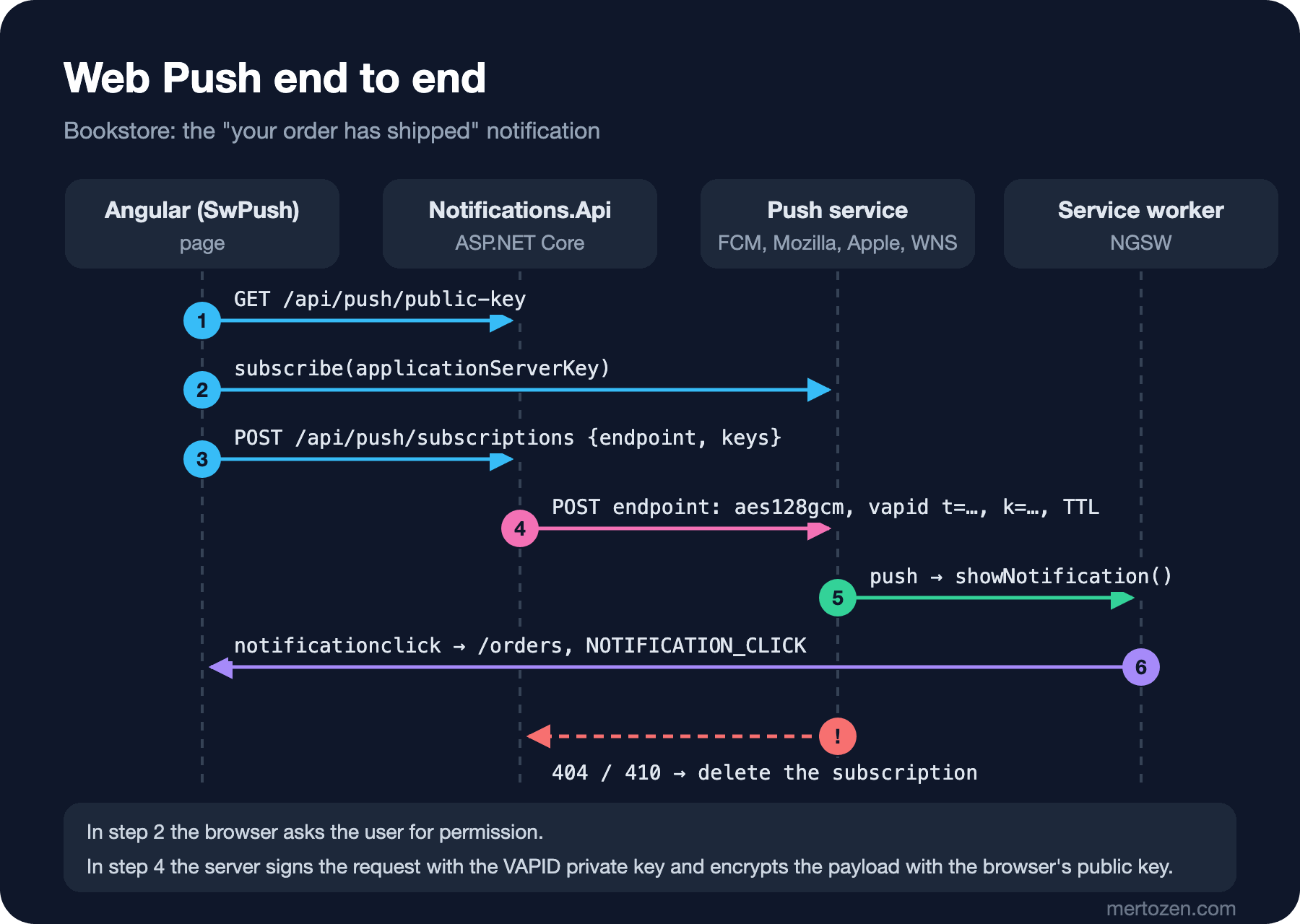
There are four parties in the flow. The page fetches the backend's VAPID public key and asks the browser for a subscription (applicationServerKey). The browser asks for permission and registers with its own push service: Google's FCM in Chrome, Mozilla's service in Firefox, Apple's in Safari, Microsoft's WNS in Edge. Then it gives the page a subscription: an endpoint URL and two keys (p256dh, auth). The page stores it on the backend. When the order ships, the backend POSTs to that endpoint; the body is encrypted with the browser's keys (RFC 8291, aes128gcm) and the request is signed with the VAPID private key (RFC 8292). The push service stores the message and delivers it when the browser is online; the browser wakes the service worker and gives it the push event. The push service cannot see the message's content, it only carries it (RFC 8030).
I did not use a real push service in this post's experiments. Chromium's PushManager.subscribe would register with Google's service; instead, in the Playwright test I replaced subscribe with a small stub that registers with a local test push service. That service (tools/local-push-service.ts) does what the RFCs expect from a push service: it checks the VAPID signature and the aud and exp claims, decrypts the aes128gcm body with the browser side's private key and stores the message. For delivery I used ServiceWorker.deliverPushMessage from Chromium's DevTools protocol; the "Push" button in DevTools' Application panel does the same. So the Angular code, the ASP.NET Core code and Angular's service worker are real; only the push service is replaced.
Bookstore.Notifications.Api: VAPID Keys and Subscriptions
Generate the Keys Once, Store Them as a Secret
A VAPID key is an ECDSA key pair on the P-256 curve. The public key is given to the browser as applicationServerKey and the subscription is bound to it; the private key stays on the backend only. Bookstore's push side is a separate small ASP.NET Core project, Bookstore.Notifications.Api. It has a command that generates the key pair:
using Bookstore.Notifications.Api;
using Lib.Net.Http.WebPush;
using Microsoft.Extensions.Options;

if (args is ["generate-vapid-keys"])
{
    // run once per environment and keep the pair in a secret store
    VapidKeys keys = VapidKeys.Generate();
    Console.WriteLine($"Push__PublicKey={keys.PublicKey}");
    Console.WriteLine($"Push__PrivateKey={keys.PrivateKey}");
    return;
}

WebApplicationBuilder builder = WebApplication.CreateBuilder(args);
builder.Services.AddOptions<PushOptions>()
    .Bind(builder.Configuration.GetSection(PushOptions.Section))
    .ValidateDataAnnotations()
    .ValidateOnStart();
builder.Services.AddSingleton<PushSubscriptionStore>();
builder.Services.AddHttpClient<PushServiceClient>();
builder.Services.AddTransient<OrderNotifier>();

WebApplication app = builder.Build();
Push__PublicKey=<87 characters>
Push__PrivateKey=<43 characters>I am not showing the values here; these two lines are generated once and put into the environment's secret store (Azure Key Vault, an environment variable, a Kubernetes secret). They do not live in appsettings.json or in the repo. Where and how to keep them is the topic of the Configuration and Secret Management series. The app must not start without the keys; ValidateOnStart makes sure of that:
using System.ComponentModel.DataAnnotations;

namespace Bookstore.Notifications.Api;

public sealed class PushOptions
{
    public const string Section = "Push";

    // never in appsettings.json: environment variables or a secret store (Push__PublicKey, Push__PrivateKey)
    [Required] public string PublicKey { get; set; } = "";
    [Required] public string PrivateKey { get; set; } = "";
    [Required] public string Subject { get; set; } = "";

    // push services we are willing to call; an exact host or a ".suffix"
    public string[] AllowedEndpointHosts { get; set; } = [];

    public bool IsAllowed(Uri endpoint) =>
        (endpoint.Scheme == Uri.UriSchemeHttps || endpoint.IsLoopback)
        && AllowedEndpointHosts.Any(h => h.StartsWith('.') ? endpoint.Host.EndsWith(h) : endpoint.Host == h);
}
fail: Microsoft.Extensions.Hosting.Internal.Host[11]
Hosting failed to start
Microsoft.Extensions.Options.OptionsValidationException: DataAnnotation validation failed for 'PushOptions' members: 'PublicKey' with the error: 'The PublicKey field is required.'.; DataAnnotation validation failed for 'PushOptions' members: 'PrivateKey' with the error: 'The PrivateKey field is required.'.To pick a library I checked NuGet on the day of writing. The most downloaded package, WebPush, was updated in April 2026 with version 1.0.13 and targets net10.0, but when I tried it, it sent requests with the old draft encryption format Content-Encoding: aesgcm and an Authorization: WebPush … header. Lib.Net.Http.WebPush 3.3.1 (MIT licensed, last release March 2025) uses aes128gcm from RFC 8291 and the vapid t=…, k=… format from RFC 8292. Bookstore uses the latter.
Storing the Subscription: Do Not Trust the endpoint
// no sign-in in this series: every request belongs to the customer Ada
const string customer = "ada";

app.MapGet("/api/push/public-key", (IOptions<PushOptions> options) =>
    TypedResults.Ok(new { publicKey = options.Value.PublicKey }));

app.MapPost("/api/push/subscriptions", (PushSubscription subscription, PushSubscriptionStore store, IOptions<PushOptions> options) =>
{
    // the endpoint comes from the client: never POST to an arbitrary URL (SSRF)
    if (!Uri.TryCreate(subscription.Endpoint, UriKind.Absolute, out Uri? endpoint) || !options.Value.IsAllowed(endpoint))
        return Results.Problem("Unknown push service.", statusCode: StatusCodes.Status400BadRequest);
    if (subscription.Keys is null || !subscription.Keys.ContainsKey("p256dh") || !subscription.Keys.ContainsKey("auth"))
        return Results.Problem("The subscription has no keys.", statusCode: StatusCodes.Status400BadRequest);
    store.Save(customer, subscription);
    return Results.Created();
});

app.MapDelete("/api/push/subscriptions", (string endpoint, PushSubscriptionStore store) =>
    store.Remove(endpoint) ? Results.NoContent() : Results.NotFound());

// in Bookstore the Shipping module raises this; here a request stands in for it
app.MapPost("/api/orders/{orderId:int}/shipped", async (int orderId, OrderNotifier notifier, CancellationToken ct) =>
    TypedResults.Ok(await notifier.OrderShippedAsync(customer, orderId, ct)));

app.Run();
The subscription JSON the browser gives (endpoint, expirationTime, keys) binds directly to the library's PushSubscription type. The point to watch is endpoint: this URL comes from the client and the backend will POST to it later. Without a check, an attacker can register an address on your internal network as the endpoint and make your server send requests there; that is an SSRF vulnerability. Bookstore only allows known push service hosts (AllowedEndpointHosts in appsettings.json; Development adds 127.0.0.1 for the local test service). Three registration attempts with production settings:
http://169.254.169.254/latest/meta-data -> 400
https://fcm.googleapis.com/fcm/send/abc -> 201
https://evil.example.com/push -> 400
In this post subscriptions live in memory. In a real application they go into a table keyed by endpoint, with the customer's identity and the creation date; every browser and device of the same customer is a separate row.
The Angular Side: SwPush and Permission UX
Angular's SwPush service uses the NGSW registration from the previous posts. In Bookstore all the push logic lives in one service:
import { HttpClient } from '@angular/common/http';
import { inject, Service, signal } from '@angular/core';
import { toSignal } from '@angular/core/rxjs-interop';
import { Router } from '@angular/router';
import { SwPush } from '@angular/service-worker';
import { firstValueFrom, map } from 'rxjs';
import { OrderBadge } from './order-badge';

@Service()
export class PushNotifications {
  private readonly swPush = inject(SwPush);
  private readonly http = inject(HttpClient);

  // no service worker (ng serve), or no Push API in this browser
  readonly supported = this.swPush.isEnabled && 'PushManager' in window;
  readonly permission = signal(
    typeof Notification === 'undefined' ? 'denied' : Notification.permission,
  );
  readonly subscribed = toSignal(this.swPush.subscription.pipe(map((s) => s !== null)), {
    initialValue: false,
  });

  constructor() {
    if (!this.swPush.isEnabled) return;
    const badge = inject(OrderBadge);
    const router = inject(Router);
    // a push arrived while a tab is open: the number in the header and on the icon changes
    this.swPush.messages.subscribe((message) => {
      console.log(`push message: ${JSON.stringify(message)}`);
      void badge.refresh();
    });
    // the service worker already focused or opened a window; the app decides what to show
    this.swPush.notificationClicks.subscribe(({ action, notification }) => {
      console.log(`notification click: "${notification.title}" action="${action}"`);
      void router.navigateByUrl('/orders');
    });
  }

  // call only from a click: the permission prompt needs a user gesture
  async enable(): Promise<string> {
    try {
      const { publicKey } = await firstValueFrom(
        this.http.get<{ publicKey: string }>('/api/push/public-key'),
      );
      const subscription = await this.swPush.requestSubscription({ serverPublicKey: publicKey });
      await firstValueFrom(this.http.post('/api/push/subscriptions', subscription));
      return 'subscribed';
    } catch (err) {
      return `failed: ${(err as Error).message}`; // permission denied, or the push service is unreachable
    } finally {
      this.permission.set(Notification.permission);
    }
  }

  async disable() {
    const subscription = await firstValueFrom(this.swPush.subscription);
    if (!subscription) return;
    await this.swPush.unsubscribe();
    await firstValueFrom(
      this.http.delete('/api/push/subscriptions', { params: { endpoint: subscription.endpoint } }),
    );
  }
}
requestSubscription asks the browser for permission and a subscription, and we send the result to the backend. messages emits every push that arrives while the app is open, notificationClicks emits the user's click on a notification. When you ask for permission matters at least as much as the code. A permission window that pops up as soon as the page opens arrives when the user has no context and is usually denied; a page cannot ask again for a denied permission, the user has to go into the browser settings. Bookstore asks only on the "My orders" page, with a button that states the value clearly, and only after a click:
    <!-- ask only here, where the value is obvious, and only after a click -->
    @if (push.supported && !push.subscribed() && push.permission() !== 'denied') {
      <button class="notify" (click)="enablePush()">Notify me when my orders ship</button>
    }
    @if (push.subscribed()) {
      <p class="push">
        Shipping notifications are on. <button (click)="push.disable()">Turn off</button>
      </p>
    }
    @if (push.permission() === 'denied') {
      <p class="push">Notifications are blocked for Bookstore in your browser settings.</p>
    }
In headless Chromium I tried a user who does not allow it first, then one who does:
--- 1. the user has not decided yet
[chromium] Notification.permission = default, button visible = true
[chromium] push: failed: Registration failed - permission denied
[chromium] after the click: Notification.permission = denied, Notifications are blocked for Bookstore in your browser settings.
--- 2. the user allows notifications
[chromium] push: subscribed
[chromium] Shipping notifications are on. Turn off
Headless Chromium denied the permission window on its own; Notification.permission became denied, and the page removed the button and explained how to turn notifications on. In the context with the permission granted, the subscription was created and stored on the backend. In Playwright's default headless shell Notification.permission was already denied when the page opened; I had to run this test with full Chromium.
Sending the Notification: Lib.Net.Http.WebPush
In Bookstore, when an order ships the event comes from the Shipping module; here an endpoint stands in for it. The class that sends:
    public async Task<NotifyResult> OrderShippedAsync(string customer, int orderId, CancellationToken ct)
    {
        // the payload format the Angular service worker understands
        string payload = JsonSerializer.Serialize(new
        {
            notification = new
            {
                title = "Your order has shipped",
                body = $"Order {orderId} is on its way.",
                icon = "icons/icon-192.png",
                tag = $"order-{orderId}",
                data = new
                {
                    onActionClick = new
                    {
                        @default = new { operation = "navigateLastFocusedOrOpen", url = "/orders" },
                    },
                },
            },
        });
        PushMessage message = new(payload)
        {
            Topic = $"order-{orderId}", // a newer message with the same topic replaces an undelivered one
            Urgency = PushMessageUrgency.Normal,
            TimeToLive = 24 * 60 * 60, // seconds; after a day the news is old
        };
        PushOptions push = options.Value;
        VapidAuthentication vapid = new(push.PublicKey, push.PrivateKey) { Subject = push.Subject };

        int sent = 0, removed = 0, failed = 0;
        foreach (PushSubscription subscription in store.For(customer))
        {
            try
            {
                await pushClient.RequestPushMessageDeliveryAsync(subscription, message, vapid, ct);
                sent++;
            }
            catch (PushServiceClientException ex) when (ex.StatusCode is HttpStatusCode.NotFound or HttpStatusCode.Gone)
            {
                // the browser unsubscribed or the subscription expired: it will never work again
                store.Remove(subscription.Endpoint);
                removed++;
                logger.LogInformation("Removed subscription {Endpoint}: {Status}", subscription.Endpoint, (int)ex.StatusCode);
            }
            catch (PushServiceClientException ex)
            {
                // 400/413: our request is wrong; 429/5xx: try again later (a background job, not this request)
                failed++;
                logger.LogWarning("Push to {Endpoint} failed: {Status} {Reason}", subscription.Endpoint, (int)ex.StatusCode, ex.Message);
            }
        }
        logger.LogInformation("Order {OrderId} shipped: {Sent} sent, {Removed} removed, {Failed} failed", orderId, sent, removed, failed);
        return new NotifyResult(sent, removed, failed);
    }
The payload's format is what NGSW expects: a notification object with showNotification options such as title, body, icon and tag. data.onActionClick says what happens on a click. Each header has a job: TTL is required and sets how many seconds the push service keeps the message while the browser is offline; Topic lets a newer message replace an undelivered older one on the same topic; Urgency (very-low, low, normal, high) affects delivery depending on the device's battery. "Your order has shipped" is old news after 24 hours, so the TTL is one day. I triggered a send and followed the result. The local push service's log:
[push] #1 POST /subscriptions -> 201 subscription 1
[push] #2 POST /push/1 vapid ok (aud=http://127.0.0.1 without the port, exp in 12 h, sub=mailto:push@bookstore.example.com), aes128gcm 331 bytes, TTL=86400, Topic=order-1042, Urgency=- -> 201
The signature was verified, the JWT's exp is 12 hours ahead (RFC 8292 allows at most 24 hours), and the body is aes128gcm and decrypted. There is no Urgency header because the library does not send the default value normal. I caught one more detail: in its first version the test service checked aud against the full origin and rejected the request:
[push] #2 POST /push/1 -> 400 aud http://127.0.0.1 is not http://127.0.0.1:5291Lib.Net.Http.WebPush 3.3.1 does not put the endpoint's port into the aud claim. Real push services run on 443, so in practice this has no effect; the test service accepts an aud without the port and notes it.
push and notificationclick in the Service Worker
When the message is delivered, NGSW does two things: it broadcasts the payload to open tabs as a PUSH message (SwPush.messages), and if there is a notification.title it calls showNotification. At that moment the user was on the catalog page:
POST /api/orders/1042/shipped -> 200 {"sent":1,"removed":0,"failed":0}
[chromium] push message: {"notification":{"title":"Your order has shipped","body":"Order 1042 is on its way.","icon":"icons/icon-192.png","tag":"order-1042","data":{"onActionClick":{"default":{"operation":"navigateLastFocusedOrOpen","url":"/orders"}}}}}
notifications shown: [{"title":"Your order has shipped","body":"Order 1042 is on its way.","tag":"order-1042"}]
[chromium] nav "Catalog Order report Covers My orders (1) Settings"
The notification was shown, the app received the message and OrderBadge.refresh() set the number in the header to 1 (the mock API counts every shipped order as an unread update). Had the app been closed, only the notification would have appeared. Chrome does not give a subscription without userVisibleOnly: true; according to Chrome's documentation, for pushes that show no visible notification it shows a generic notification of its own. A "silent" push with no notification in the payload is therefore of no use in Chrome.
I could not make a real click on the notification in a headless browser. Inside the service worker, using Playwright's support for running code in workers, I dispatched a synthetic notificationclick event:
dispatch: dispatched
[chromium] page after the click: /orders
service worker errors: ["Uncaught InvalidStateError: Failed to execute 'waitUntil' on 'ExtendableEvent': Can not call waitUntil on a script constructed ExtendableEvent.","InvalidAccessError: Not allowed to focus a window."]
NGSW's navigateLastFocusedOrOpen operation took the open tab to /orders. Both errors are instructive: waitUntil cannot be called on an event created by script, and a window cannot be focused without the permission that a user's click grants. Because focusing failed, the NOTIFICATION_CLICK message NGSW sends afterwards, in other words SwPush.notificationClicks, did not reach the page in this attempt; I could not verify the behaviour of a real click. The other onActionClick operations are openWindow, focusLastFocusedOrOpen and sendRequest. NGSW does not let you add your own code to its push handler; if, for example, you want to call setAppBadge from inside the service worker when a push arrives, you need to write your own service worker file that includes ngsw-worker.js with importScripts.
When a Subscription Dies and When the Key Changes
The answer to the prediction: no. A subscription is bound to the applicationServerKey it was created with. A second backend instance running with a new key sent to the same subscription:
POST /api/orders/1042/shipped (new keys) -> 200 {"sent":0,"removed":0,"failed":1}
[push] #4 POST /push/1 -> 400 k is not the applicationServerKey of this subscription
Push to http://127.0.0.1:5291/push/1 failed: 400 Bad Request
The test service rejected the request because k did not match; real push services reject such requests too, with a status code that depends on the service. When the key changes, every existing subscription stops working, and nobody gets a notification until browsers subscribe again with the new key. If you really need to change the key, you need a migration plan that checks SwPush.subscription at app startup and, if the key is old, calls unsubscribe and requestSubscription again.
The second case is the push service no longer knowing the subscription: the user revoked the permission, cleared browser data, or the subscription expired. The push service returns 404 or 410 then:
POST /api/orders/1043/shipped -> 200 {"sent":0,"removed":1,"failed":0}
[push] #5 POST /subscriptions/1/expire -> 204 (the subscription is now gone)
[push] #6 POST /push/1 -> 410 Gone
Removed subscription http://127.0.0.1:5291/push/1: 410
Order 1043 shipped: 0 sent, 1 removed, 0 failed
OrderNotifier deleted that subscription. If you don't, you keep sending requests to dead endpoints on every send, and the real error rate gets lost in that noise.
iOS, Background Sync and Periodic Sync
According to web-features, the Push API has existed since Chrome 50, Firefox 44, Safari 16 (macOS) and iOS 16.4, and it has been Baseline since March 2023, that is, in all major browsers. iOS has one condition: according to WebKit's iOS 16.4 announcement, Web Push works only in web apps added to the home screen, and the permission request must come directly from a user interaction (tapping a button). Showing the button in Bookstore opened in a Safari tab is therefore wrong; the add-to-home-screen instructions from the previous post must come first. On iOS the badge on the app icon also becomes visible with the notification permission.
Two more APIs sit close to push, and both exist only in Chromium. Background Sync (SyncManager, Chrome 49) gives the service worker a sync event when the connection comes back; Periodic Background Sync (PeriodicSyncManager, Chrome 80) gives an installed app a chance to run in the background at intervals. Neither was defined in Playwright's WebKit. That is why emptying the outbox from this series' IndexedDB post on the online event and at app startup is the right fallback: Background Sync is an extra improvement where it exists, and where it doesn't the same work is done while the page is open.
In Production
Do not send inside the HTTP request. The endpoint in this post sends synchronously because we wanted to show the result; in a real application the "shipped" event goes to a background job or a message queue, the push is sent there and retried on 429 and 5xx responses, honouring Retry-After. Since a customer has several devices, sends can run in parallel, but take the push services' rate limits into account.
Keep the payload small. RFC 8030 requires push services to accept payloads of at least 4096 bytes; in practice that is the safe limit. Do not send personal data (address, payment details) in a notification: the payload is encrypted, but the notification is visible on the lock screen. The order number and "open the app for details" are enough.
Measure: messages sent, accepted by the push service (201), removed (404/410) and failed should be separate metrics. The notification click rate can be measured with notificationClicks. Since a denied notification permission does not come back, also track how often you ask and how often the user accepts.
Common Pitfalls
- Putting the VAPID private key in the frontend, in
environment.tsor in the repo. The browser only sees the public key; the private key stays in a secret store. - Generating a new key on every deploy or every app start. Every subscription stops working at that moment.
- POSTing to the
endpointfrom the client without validating it. Without an allow-list of known push service hosts this is an SSRF vulnerability. - Not deleting subscriptions that return 404 and 410. Dead endpoints cost time and quota on every send and distort the metrics.
- Asking for permission as soon as the page opens. A page cannot ask again for a denied permission; ask after the value is clear, and from a click.
- Showing the push button in a Safari tab on iOS. Push only works in a web app added to the home screen.
A Small Experiment
★☆☆ Lower the TTL in OrderNotifier to 60 seconds and remove the Topic. Send "shipped" twice for the same order and see in the local push service's log that both messages are stored; read in section 5.4 of RFC 8030 what a real push service does with a Topic.
★★☆ Add actions to the payload: "Track" and "Dismiss". Define an operation in onActionClick that opens /orders for "Track", and behave differently in SwPush.notificationClicks depending on the action value.
★★★ Write a migration plan for key rotation: let the backend know both public keys, and at app startup compare SwPush.subscription's options.applicationServerKey with the new key and subscribe again if needed. With the second backend instance from this post, verify that the old subscription is deleted and the new one is stored.
A push notification arrives even when no tab is open; but with several tabs open, each one receives messages separately and each one refreshes the badge separately. Before we move on to sharing work between tabs, the next post looks at another load: taking heavy work off the main thread and moving it to a Web Worker.