

The Service Worker Lifecycle and Caching Strategies: install, activate, waiting, skipWaiting and Stale-While-Revalidate
A new service worker waits in waiting until every tab of the old version closes or skipWaiting is called; reloading the only tab is not enough. With a framework-free worker we walk through the lifecycle in Chromium and WebKit, and look at skipWaiting mixing an old page with a new chunk, updateViaCache, cache-first/network-first/stale-while-revalidate strategies, the HTTP cache trap and a kill switch that withdraws the worker.
Version note: The examples in this post were run with framework-free JavaScript, Node.js 24 and Playwright 1.65; browser output comes from Playwright's Chromium 158 and WebKit 27.2 builds. Support data was read from MDN browser-compat-data 8.1.9; Firefox could not be run in this environment.
Predict First
The catalog page of Bookstore, the online bookstore used as the shared example across this site's series, is served with a service worker, and the user has a single tab open. You deploy a new version: sw.js, app.js and chunk.js have changed. The user reloads the tab. Which version serves the page, v1 or v2? What if they reload once more? What if they close the tab and open the site again?
In this post we write a service worker by hand, without Angular's ready-made package. The goal is to see the mechanism behind what the Angular Service Worker does with ngsw-config.json in the next post: registration and scope, the install → waiting → activate lifecycle, the risk that skipWaiting brings, how the SW file itself is updated, and caching strategies in the fetch event. I played every scenario in a real browser with Playwright; for a "deploy", tools/set-sw-version.ts changes the VERSION constant in three files.
Registration, Scope and Why a New Version Waits
Registration happens from the page. The scope decides which pages the worker controls; its default is the folder the script lives in, and a scope wider than the script's folder is possible only if the server sends a Service-Worker-Allowed header. The worker here controls the pages under /sw/; every request those pages make, including URLs outside the scope such as /api/books, goes through the fetch event:
// asks a worker which version it is
function ask(worker) {
  return new Promise((resolve) => {
    if (!worker) return resolve("-");
    const channel = new MessageChannel();
    channel.port1.onmessage = (event) => resolve(event.data);
    worker.postMessage("version", [channel.port2]);
  });
}

async function track(worker) {
  const version = await ask(worker);
  log(`worker ${version}: ${worker.state}`);
  worker.addEventListener("statechange", () => log(`worker ${version}: ${worker.state}`));
}

// updatefound fires for the first install and for every new version found later
const watched = new WeakSet();
function watch(registration) {
  if (watched.has(registration)) return;
  watched.add(registration);
  registration.addEventListener("updatefound", () => track(registration.installing));
}
navigator.serviceWorker.getRegistration("./").then((registration) => registration && watch(registration));

export async function register(options = {}) {
  const registration = await navigator.serviceWorker.register("./sw.js", { scope: "./", ...options });
  log(`registered, scope ${new URL(registration.scope).pathname}`);
  watch(registration);
}
The worker's install and activate steps:
// A framework-free service worker for Bookstore's catalog (scope /sw/)
const VERSION = "v1";
const STATIC_CACHE = `static-${VERSION}`;
const API_CACHE = "api";
const SHELL = ["./", "./app.js", "./chunk.js", "./styles.css"];

// tell every page of this scope what happened (so the lifecycle is visible in the page)
async function tell(text) {
  for (const client of await self.clients.matchAll({ includeUncontrolled: true })) {
    client.postMessage({ version: VERSION, text });
  }
}

self.addEventListener("install", (event) => {
  event.waitUntil(
    caches
      .open(STATIC_CACHE)
      .then((cache) => cache.addAll(SHELL)) // if one file fails, the install fails and the old version stays
      .then(() => tell(`install: precached ${SHELL.length} files into ${STATIC_CACHE}`)),
  );
});

self.addEventListener("activate", (event) => {
  event.waitUntil(
    (async () => {
      for (const key of await caches.keys()) {
        if (key.startsWith("static-") && key !== STATIC_CACHE) {
          await caches.delete(key); // safe only now: no page uses the old version any more
          await tell(`activate: deleted ${key}`);
        }
      }
      await self.registration.navigationPreload?.enable();
      await tell("activate: done");
    })(),
  );
});

self.addEventListener("message", (event) => {
  if (event.data === "version") event.ports[0].postMessage(VERSION);
  if (event.data === "skipWaiting") self.skipWaiting();
});
The answer to the Predict First question, step by step:
--- 1. first visit, register v1
A: registered, scope /sw/
A: worker v1: installing
A: [sw v1] install: precached 4 files into static-v1
A: worker v1: installed
A: worker v1: activating
A: [sw v1] activate: done
A: worker v1: activated
A: page v1, controller -, active v1, waiting -; caches: static-v1
--- 2. reload
A: page v1, controller v1, active v1, waiting -; caches: static-v1
--- 3. deploy v2, check for an update
A: worker v2: installing
A: [sw v2] install: precached 4 files into static-v2
A: worker v2: installed
A: page v1, controller v1, active v1, waiting v2; caches: static-v1, static-v2
--- 4. reload the only tab
A: page v1, controller v1, active v1, waiting v2; caches: static-v1, static-v2
--- 5. close the tab, open a new one
B: page v2, controller v2, active v2, waiting -; caches: static-v2
--- 6. deploy v3, skipWaiting without a reload, then a lazy chunk
B: worker v3: installing
B: [sw v3] install: precached 4 files into static-v3
B: worker v3: installed
B: page v2, controller v2, active v2, waiting v3; caches: static-v2, static-v3
B: worker v3: activating
B: controllerchange: a new service worker controls this page
B: page v2, controller v3, active v3, waiting -; caches: static-v2, static-v3
B: [sw v3] activate: deleted static-v2
B: worker v3: activated
B: [sw v3] activate: done
B: page v2 loaded chunk v3
--- 7. deploy v4, skipWaiting and reload on controllerchange
B: worker v4: installing
B: [sw v4] install: precached 4 files into static-v4
B: worker v4: installed
B: page v2, controller v3, active v3, waiting v4; caches: static-v3, static-v4
B: worker v3: redundant
B: worker v4: activating
B: controllerchange: a new service worker controls this page
B: page v2, controller v4, active v4, waiting -; caches: static-v3, static-v4
B: [sw v4] activate: deleted static-v3
B: worker v4: activated
B: [sw v4] activate: done
B: page v4, controller v4, active v4, waiting -; caches: static-v4
On the first visit the worker was installed and became active, but it does not control the page (controller -): the page was loaded without a worker, and a page's controller is decided while it loads. After the reload, v1 is in control. When v2 was deployed, the browser downloaded the new sw.js, installed it, and v2 stayed in the installed state, that is, waiting. The answer to the question is in step four: reloading the only tab did not bring v2 in, the page is still v1. During a reload the old page has not closed yet while the new one loads; the browser activates the new worker when no page running the old version is left. When the tab was closed and a new one opened, v2 became active and the static-v1 cache was deleted. This waiting is not a flaw: it prevents a page from running half on v1 files and half on v2 files.
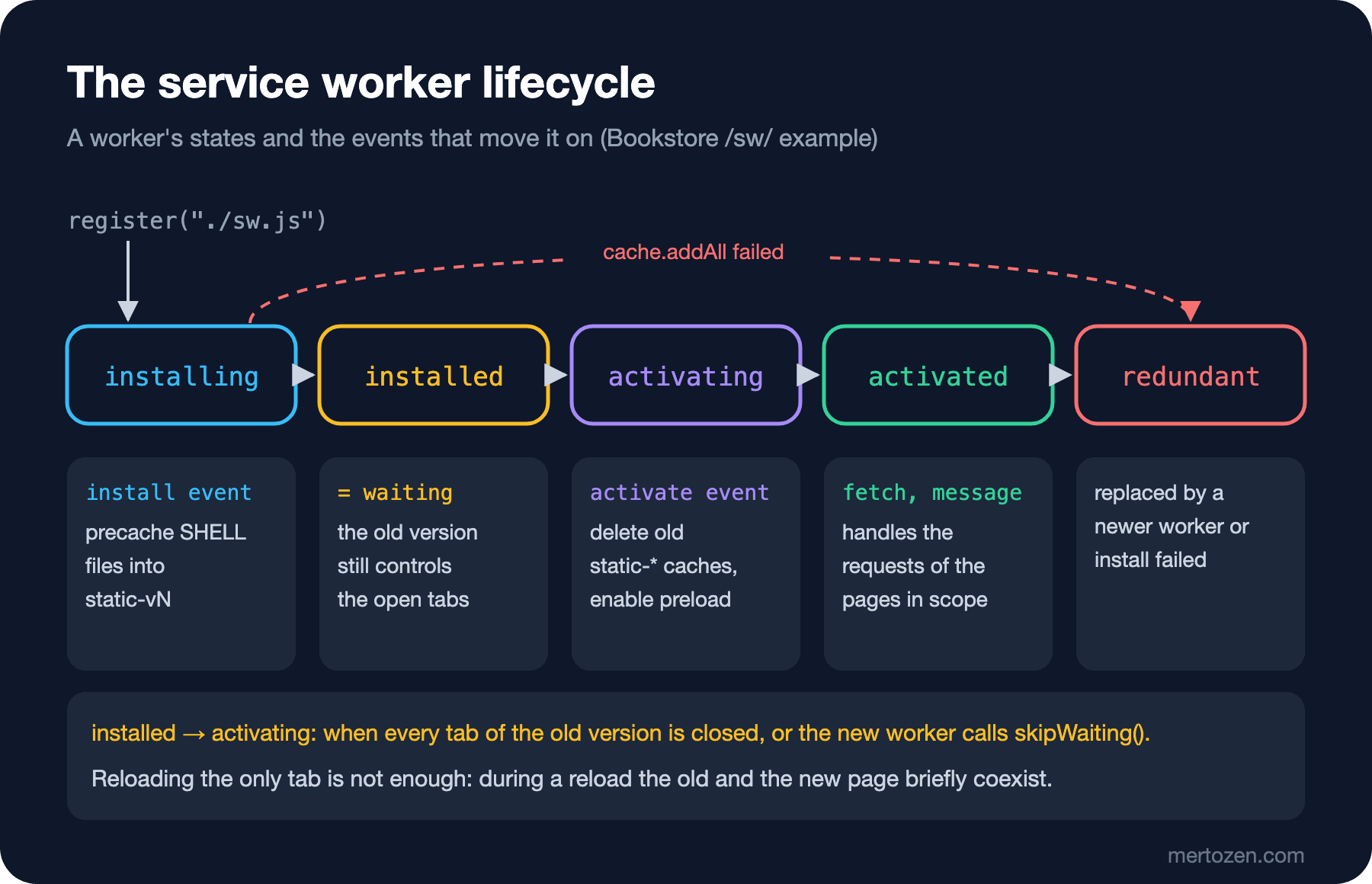
Two details in this flow matter. cache.addAll is atomic: if a single file in the list returns 404, the install fails, the new worker becomes redundant and the user stays on the old version. The right place to delete old caches is activate: had we deleted them in install, we would have taken the files away from the tab still running v1.
skipWaiting and clients.claim: An Old Page, a New Worker
The way to skip the waiting is self.skipWaiting(). Most apps tie it to a button that tells the user "a new version is available, reload": the button sends a message to the waiting worker and the worker calls skipWaiting. The risk skipWaiting brings shows in step six: the page was loaded with v2, controllerchange arrived when v3 became active, and before reloading the page requested a lazily loaded file. The result is "page v2 loaded chunk v3": the page's code is v2, the part that came later is v3. In Angular this means an old main.js loading a lazy route chunk of the new version; any change between them turns into a runtime error.
// "Reload to update" button: tell the waiting worker to take over, then reload once it does
export async function activateWaiting({ reload }) {
  const registration = await navigator.serviceWorker.getRegistration("./");
  if (!registration?.waiting) return "nothing waiting";
  if (reload) navigator.serviceWorker.addEventListener("controllerchange", () => location.reload(), { once: true });
  registration.waiting.postMessage("skipWaiting");
  await new Promise((resolve) => setTimeout(resolve, 500));
  return status();
}
In step seven I did the same while reloading the page on controllerchange, and the page went briefly through "page v2, controller v4" and loaded as v4. The rule: if you use skipWaiting, always reload the page afterwards, and do it at a moment that does not interrupt the user's work (so they do not lose a form they were filling in). clients.claim() is something else: it puts pages that no worker controls yet (as on the first visit) under the active worker's control. It helps if offline support must start immediately on the first visit, but it carries the same mixing risk: requests of a page loaded without a worker start going through the worker halfway.
The SW File Itself: Update Checks and the HTTP Cache
The browser checks for a new version on every navigation to a page in the scope and on register() and update() calls; it downloads the script, compares it byte by byte with the current one, and does nothing if they are the same. The server log during the scenario above:
[api] #30 GET /sw/sw.js
[api] #35 GET /sw/ (navigation preload)
[api] #36 GET /sw/sw.js
[api] #41 GET /sw/sw.js
[api] #42 GET /sw/ (navigation preload)
[api] #43 GET /sw/ (navigation preload)
[api] #44 GET /sw/sw.js
[api] #49 GET /sw/sw.js
[api] #50 GET /sw/sw.js
[api] #55 GET /sw/ (navigation preload)
The mock API deliberately serves /sw/sw.js with Cache-Control: max-age=3600, imitating a careless hosting rule that gives every .js file an hour of caching. Even so, every update check reached the server. The reason is updateViaCache: its default value is "imports", meaning the main script is downloaded without looking at the HTTP cache and only scripts loaded with importScripts may come from the cache. I compared the same check with two registrations:
--- updateViaCache: default (imports)
register + 3 x update(): 4 request(s) for /sw/sw.js reached the server
--- updateViaCache: all
register + 3 x update(): 1 request(s) for /sw/sw.js reached the server
With "all", the three update() calls after the first request were answered from the HTTP cache; had you deployed a new version, users would not have seen it for an hour. Before Chrome 68 that was the default behaviour, and the advice in some older guides to "give the SW file no-cache" comes from there. Today the default is safe, but giving sw.js no-cache is still a good habit because it also stops a CDN in between from keeping the file. We will come back to the "(navigation preload)" lines in the log below.
Caching Strategies in the fetch Event
The worker's main job is the fetch event: for each request it either gives its own answer with respondWith or does nothing and leaves the request to the browser. Bookstore has four strategies, depending on the request type:
self.addEventListener("fetch", (event) => {
  const { request } = event;
  const url = new URL(request.url);
  if (request.method !== "GET" || url.pathname.startsWith("/api/me/")) {
    return; // network-only: no respondWith, the browser handles it as if there were no service worker
  }
  if (request.mode === "navigate") {
    event.respondWith(networkFirst(event));
  } else if (url.pathname === "/api/books") {
    event.respondWith(staleWhileRevalidate(event));
  } else if (url.origin === location.origin && url.pathname.startsWith("/sw/")) {
    event.respondWith(cacheFirst(request));
  }
});

// static files of this version: from this version's cache, the network only for misses
async function cacheFirst(request) {
  const cache = await caches.open(STATIC_CACHE); // not caches.match(): that would search every version
  const cached = await cache.match(request);
  if (cached) return cached;
  const response = await fetch(request);
  if (response.ok) await cache.put(request, response.clone());
  return response;
}

// pages: fresh when possible, the cached shell when offline
async function networkFirst(event) {
  try {
    const response = (await event.preloadResponse) ?? (await fetch(event.request));
    return response;
  } catch {
    const cache = await caches.open(STATIC_CACHE);
    return (await cache.match(event.request)) ?? (await cache.match("./"));
  }
}
Cache-first is right only for static files whose content changes together with the version: v1's app.js is always the same, so going to the network is a waste of time. What matters here is searching that version's own cache instead of using caches.match(); caches.match() looks in every cache and can give v1's file to a v2 page. Network-first is for page navigations: with a network the user always sees the current HTML, without one the cached shell. Network-only means not calling respondWith; POSTs and the personal /api/me/ requests never enter the cache.
Network-first has a cost: the navigation request waits until the worker is running. If the worker is asleep it has to be started first, and that time is added to every page load. Navigation preload (Chrome 59, Firefox 99, Safari 15.4) solves this: the browser sends the navigation request in parallel while starting the worker, and the worker gets that response through event.preloadResponse. The Service-Worker-Navigation-Preload header in the server log showed that the feature we enabled in activate works. When I stopped the server and reloaded the page:
[sw v1] install: precached 4 files into static-v1
[sw v1] activate: done
[sw v1] cache updated: /api/books
books: 6, 505 ms, from network
--- server stopped
page reloaded: Bookstore catalog (service worker lab)
books: 6, 1 ms, from service worker cache
The page came from the cached shell and the catalog from the Cache API. WebKit gave the same result.
Stale-While-Revalidate and the HTTP Cache Trap
For the catalog we want a strategy that is neither completely stale nor waiting for the network every time: answer from the cache at once, fetch a new copy in the background and update the cache. The user sees fresh data the next time.
// catalog: answer from the cache at once, refresh the cache in the background
async function staleWhileRevalidate(event) {
  const cache = await caches.open(API_CACHE);
  const cached = await cache.match(event.request);
  // no-cache: ask the server (a cheap 304 with ETag); without it the HTTP cache may answer for max-age seconds
  const refresh = fetch(event.request, { cache: "no-cache" }).then(async (response) => {
    if (response.ok) {
      await cache.put(event.request, response.clone());
      await tell(`cache updated: ${new URL(event.request.url).pathname}`);
    }
    return response;
  });
  event.waitUntil(refresh.catch(() => {})); // keep the worker alive until the refresh is done
  if (!cached) return refresh;
  const headers = new Headers(cached.headers);
  headers.set("x-served-by", "service worker cache");
  return new Response(cached.body, { status: cached.status, headers });
}
event.waitUntil keeps the worker alive until the background refresh finishes, even after the response has been returned; otherwise the browser may stop an idle worker. The mock API adds 500 ms to every response:
[sw v1] cache updated: /api/books
books: 6, 506 ms, from network
books: 6, 1 ms, from service worker cache
[sw v1] cache updated: /api/books
books: 6, 2 ms, from service worker cache
[sw v1] cache updated: /api/books
[api] #155 GET /api/books?delay=500
[api] #155 200 557 bytes
[api] #156 GET /api/books?delay=500 (If-None-Match)
[api] #156 304 Not Modified
[api] #158 GET /api/books?delay=500 (If-None-Match)
[api] #158 304 Not Modified
The first request came from the network in 506 ms, the later ones from the worker cache in 1–2 ms. The first version of the code had fetch(event.request) without cache: "no-cache". In Chromium I saw four "cache updated" messages, yet only one request had reached the server: /api/books arrives with max-age=60, and the worker's fetch also goes through the browser's HTTP cache. For 60 seconds the "revalidate" step wrote the HTTP cache's copy into the Cache API without ever asking the server. Even with the server stopped, Chromium said "cache updated". With cache: "no-cache", every refresh asks the server with If-None-Match; if the content has not changed, the answer is a cheap 304. Playwright's WebKit build does not use the HTTP cache, so I could not see this difference there, which is another reason to test separately in real Safari.
Authenticated Responses and Withdrawing the Service Worker
Telling a service worker to "cache every GET" is easy and dangerous. The Cache API's key is the URL; the Authorization header is not part of the key. If Ada's orders were cached, Alan, signing in on the same browser and requesting the same URL, gets Ada's response:
// The Cache API keys on the URL; the Authorization header is not part of the key unless the response says Vary
export async function perUserCache(vary) {
  const cache = await caches.open("per-user-demo");
  const url = `/api/me/orders${vary ? "?vary=1" : ""}`;
  const ada = new Request(url, { headers: { Authorization: "Bearer ada" } });
  await cache.put(ada, await fetch(ada));
  const alan = new Request(url, { headers: { Authorization: "Bearer alan" } });
  const hit = await cache.match(alan);
  log(`Vary: ${vary ? "Authorization" : "(none)"} -> Alan gets ${hit ? JSON.stringify(await hit.json()) : "nothing, a cache miss"}`);
}
Chromium: Vary: (none) -> Alan gets {"customer":"ada","orders":[1042]}
Chromium: Vary: Authorization -> Alan gets nothing, a cache miss
WebKit: Vary: (none) -> Alan gets {"customer":"ada","orders":[1042]}
WebKit: Vary: Authorization -> Alan gets nothing, a cache missWhen the server adds Vary: Authorization to the response, cache.match compares that header too and returns nothing to Alan. But do not rely on it: an API that authenticates with cookies needs Vary: Cookie, code using ignoreVary breaks it, and the cache is not cleaned on logout either. The most robust approach is to leave personal endpoints network-only in the service worker; Bookstore's worker never touches anything under /api/me/. If you did cache anything personal, delete that cache on logout.
The second risk is a faulty worker trapping the user on an old version: an index.html served cache-first never asks for the new version. In that case deleting sw.js from the server does not help; I tried:
update(): TypeError: Failed to update a ServiceWorker for scope ('http://localhost:5281/sw/') with script ('http://localhost:5281/sw/sw.js'): A bad HTTP response code (404) was received when fetching the script.
after sw.js returned 404: controller still there
The update check failed with a 404, but the registered worker kept controlling the page. The right fix is to deploy a worker that removes itself at the same address:
// Deploy this file as sw.js to remove the service worker from every user's browser
self.addEventListener("install", () => self.skipWaiting());

self.addEventListener("activate", (event) => {
  event.waitUntil(
    (async () => {
      for (const key of await caches.keys()) await caches.delete(key);
      await self.registration.unregister();
      // reload open pages so they are no longer controlled by this worker
      for (const client of await self.clients.matchAll({ type: "window" })) client.navigate(client.url);
    })(),
  );
});
[sw v1] install: precached 4 files into static-v1
[sw v1] activate: done
page v1, controller v1, active v1, waiting -; caches: static-v1
--- kill switch deployed as sw.js
controllerchange: a new service worker controls this page
after reload: controller none, registrations 0, caches []The new worker became active immediately with skipWaiting, deleted every cache, removed its registration and reloaded the open tabs; in the end no worker controlled the page and no cache was left. WebKit gave the same result. On the server side, a Clear-Site-Data: "storage" header can do the same job by deleting all of the origin's storage from the browser, but that also deletes the outbox in IndexedDB.
In Production
Deploy order matters. The new worker downloads the files in SHELL during install; if they are not on the server yet, or the new index.html points to old bundle names, the install fails. Publish the new static files first and sw.js last, and keep the old version's files on the server for a while: tabs still running v1 may request them.
Do not let precache requests go through the HTTP cache. cache.addAll uses the HTTP cache by default; if file names have no hash and a long max-age, v1's file can end up in v2's cache. Download with new Request(url, { cache: "reload" }) or put hashes into file names; Angular's build and the next post's Angular Service Worker do exactly that.
For diagnosis, the Service workers section in the Browser DevTools series post "The Application Panel: Storage, Cookie Flags, Cache Storage and the Angular Service Worker" shows the waiting worker and the cache contents. In the field, send the worker's version to analytics to know which version runs for how many users; the messaging in the status function above is enough for that.
Common Pitfalls
- Expecting the new version after reloading the only tab. The worker stays in
waiting; either all tabs must close, or you needskipWaitingplus a reload. - Using
skipWaitingwithout reloading the page. The old page loads the new version's files and a "page v2 + chunk v3" mix appears. - Using
caches.match()for cache-first. It searches every version's cache; open the version's own cache. - Using a plain
fetchin stale-while-revalidate. The HTTP cache answers and the "revalidate" never reaches the server; addcache: "no-cache". - Caching GET responses that carry auth or cookies. The cache key is the URL; another user on the same browser sees the wrong data.
- Trying to remove a faulty worker by deleting
sw.js. Deploy a worker that removes itself at the same address.
A Small Experiment
★☆☆ Add ./missing.css, which does not exist on the server, to the SHELL list and deploy v2. Confirm with status() that the install fails, the worker becomes redundant and the page stays on v1.
★★☆ Add a "New version ready" banner to the page that appears while registration.waiting exists. Pressing its button should run activateWaiting({ reload: true }); if the user has typed something into a textarea, ask for confirmation first.
★★★ Turn staleWhileRevalidate into a strategy that computes the age of the cached copy from its Date header and, if it is older than 24 hours, waits for the network instead of the cache (with a 5-second timeout). Try the three cases by stopping and restarting the server: a fresh copy, a stale copy and no network.
We wrote everything in this post by hand: the version constant, cache names, strategy selection, cleaning up old caches. In the next post we leave the same job to the Angular Service Worker: ng add @angular/pwa, assetGroups and dataGroups in ngsw-config.json, the hash-based ngsw.json, telling the user "a new version is available" with SwUpdate, and withdrawing the worker with safety-worker.js when something goes wrong.