

Which Browser Storage? localStorage, IndexedDB, Cache API, OPFS, cookieStore and Quota Management
Put a small preference in localStorage, queryable records in IndexedDB, HTTP responses in the Cache API, files in OPFS and values the server also reads in cookieStore; all share the origin's quota and can be evicted without persist(). In Chromium 158 and WebKit 27.2 we show localStorage's 5 MiB limit, the Cache API ignoring max-age, OPFS failing in an ephemeral session, estimate()/persist() results and Safari's 7-day deletion rule.
Version note: The examples in this post were run with Angular 22.2 (TypeScript 6.0), Node.js 24 and Playwright 1.65; browser output comes from Playwright's Chromium 158 and WebKit 27.2 builds. Support data was read from MDN browser-compat-data 8.1.9 and web-features 3.46 (November 2026); Firefox could not be run in this environment, so Firefox statements come from that data.
Predict First
The Angular client of Bookstore, the online bookstore used as the shared example across this site's series, writes the user's reading list to localStorage as JSON. As the list grows, one day it will hit the limit. The function below uses a binary search to find the longest string that fits into a single value:
// How many characters fit into one localStorage value?
export function localStorageLimit() {
  let low = 0;
  let high = 20 * 1024 * 1024;
  let lastError = null;
  while (low < high) {
    const size = Math.ceil((low + high) / 2);
    try {
      localStorage.setItem("probe", "x".repeat(size));
      low = size;
    } catch (err) {
      lastError = err;
      high = size - 1;
    }
  }
  localStorage.removeItem("probe");
  console.log(`largest value: ${low} chars; error: ${lastError?.name}`);
}
How many characters fit in Chromium and WebKit: around 5 million, 10 million, or does the browser allow as much as the disk has room for? What happens when the limit is exceeded: is the value truncated and saved, silently ignored, or is an error thrown?
We covered the basics of Web Storage and cookies in the Intermediate JavaScript series post "JavaScript Web Storage and Cookies: localStorage, sessionStorage and document.cookie"; where to keep a token is the subject of the Frontend Security series post "Where Should Tokens Live? The Threat Model of localStorage, Memory, Cookies, Service Workers and the BFF". This post is about choosing: which data goes to localStorage, which to IndexedDB, the Cache API, OPFS or cookieStore, how the quota is measured, and when the browser deletes data.
The Options in One Table
The answer: the same number and the same error in both engines.
Chromium: largest value: 5242875 chars; error: QuotaExceededError
WebKit:   largest value: 5242875 chars; error: QuotaExceededError
Chromium: 2148891 chars: write 2.4 ms, read 2.0 ms, 20000 items
WebKit:   2148891 chars: write 1.0 ms, read 3.0 ms, 20000 items
The 5,242,875 in the first two lines is 5 MiB (5,242,880) minus the five characters of the "probe" key: the limit applies to the total number of characters in keys and values, and exceeding it throws QuotaExceededError. The value is not truncated, and the old value stays in place. We will come back to the last two lines later in the post.
I ran the browser's storage options on the same page and checked which ones exist:
Chromium: {"localStorage":true,"indexedDB":true,"caches":true,"opfs":true,"createWritable":true,"cookieStore":true,"storageBuckets":true}
WebKit: {"localStorage":true,"indexedDB":true,"caches":true,"opfs":true,"createWritable":true,"cookieStore":true,"storageBuckets":false}| API | Data | Access | Worker / service worker | Support (BCD 8.1.9) |
|---|---|---|---|---|
localStorage | strings | synchronous | no | all browsers |
| IndexedDB | objects, Blobs, ArrayBuffers | asynchronous, with transactions | yes | Baseline (since 2021) |
| Cache API | Request → Response pairs | asynchronous | yes | Chrome 43, Firefox 41, Safari 11.1 |
| OPFS | files and directories (bytes) | asynchronous; synchronous in a dedicated worker | yes | Baseline (since March 2023) |
cookieStore | cookies | asynchronous, with change events | yes (no service worker change events in Safari) | Chrome 87, Firefox 140, Safari 18.4 |
| Storage Buckets | the above, split into separate groups | asynchronous | yes | Chromium 122+ only, experimental |
Two questions decide the choice. The first is the type of data: a single preference, a list of records you will query, an HTTP response, or a file? The second is who reads it: only the page, a worker or service worker, or the server? For Bookstore the decisions are:
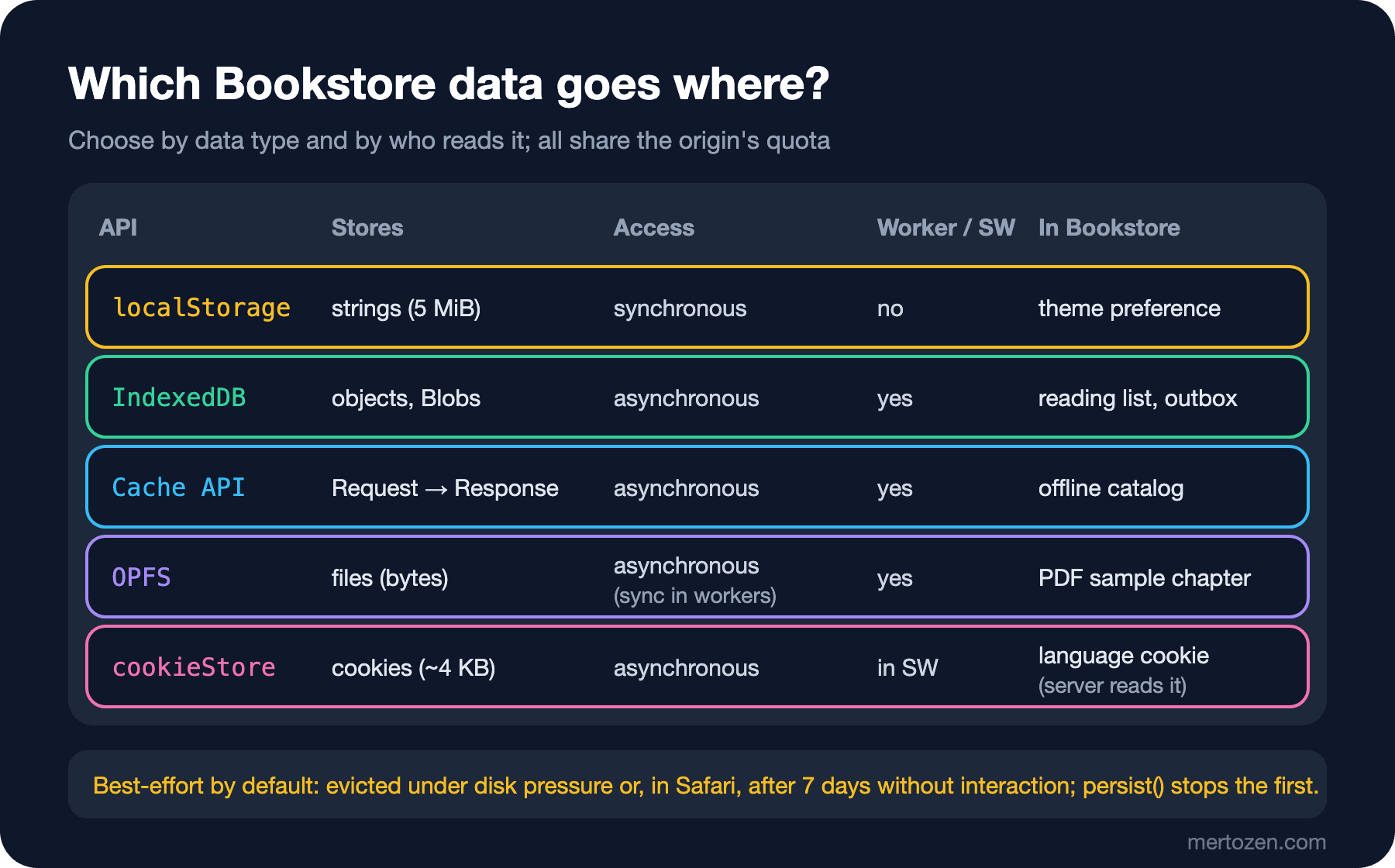
I mention IndexedDB in this post only to show where it fits; schema versioning, transactions and using it in Angular are the subject of the next post.
localStorage: Small, Synchronous and 5 MiB
The real constraints of localStorage are that it is synchronous and that service workers and workers cannot access it. I measured the cost of the synchronous API by writing and reading a reading list of 20,000 entries:
// A reading list of 20,000 entries written to and read from localStorage on the main thread
export function readingListInLocalStorage() {
  const list = Array.from({ length: 20_000 }, (_, i) => ({
    isbn: String(9780000000000 + i),
    title: `Book ${i}`,
    addedAt: new Date(Date.UTC(2026, 10, 1, 0, 0, i)).toISOString(),
    note: "Read after Dune",
  }));
  let started = performance.now();
  const json = JSON.stringify(list);
  localStorage.setItem("readingList", json);
  const writeMs = performance.now() - started;

  started = performance.now();
  const back = JSON.parse(localStorage.getItem("readingList"));
  const readMs = performance.now() - started;
  console.log(`${json.length} chars: write ${writeMs.toFixed(1)} ms, read ${readMs.toFixed(1)} ms, ${back.length} items`);
  localStorage.removeItem("readingList");
}
The last two lines in the Predict First section are the output of this function: writing 2.1 million characters of JSON took 1–2.5 ms, reading and parsing it 2–3 ms. These numbers are smaller than I expected; modern engines also keep localStorage in memory. So the claim that "localStorage locks the main thread" is not true at this size. The problems lie elsewhere. You can never go beyond 5 MiB. Code that stringifies and writes the whole list on every change of an input pays these few milliseconds on every keystroke. Values are strings only; types such as dates and Blobs are lost in the conversion. A service worker cannot see localStorage; data you need offline has to live somewhere else. For a single value, a single preference, localStorage is still the simplest choice: the theme is the typical example.
The Cache API: Storage for Responses
The Cache API is not the HTTP cache; despite the similar name it is a separate storage. It stores a Request as the key and a Response as the value, together with its headers:
// The Cache API stores Request/Response pairs; it is not the HTTP cache
export async function cacheCatalog() {
  const cache = await caches.open("catalog-v1");
  await cache.add("/api/books"); // fetches and stores the response; fails on a non-2xx status

  const cached = await cache.match("/api/books");
  const books = await cached.json();
  console.log(`cached: ${books.length} books, ETag ${cached.headers.get("ETag")}, Cache-Control ${cached.headers.get("Cache-Control")}`);
  console.log("keys:", (await cache.keys()).map((request) => new URL(request.url).pathname).join(", "));
  console.log("caches:", (await caches.keys()).join(", "));

  // a query string makes a different key unless you ask to ignore it
  console.log("match with ?page=1:", Boolean(await cache.match("/api/books?page=1")));
  console.log("ignoreSearch:", Boolean(await cache.match("/api/books?page=1", { ignoreSearch: true })));
}
cached: 6 books, ETag "5c066e3af808", Cache-Control max-age=60
keys: /api/books
caches: catalog-v1
match with ?page=1: false
ignoreSearch: trueThe response arrived with Cache-Control: max-age=60, but the Cache API does not interpret it: the entry stays until you delete it, and match returns the same response after 60 seconds too. The staleness decision lives entirely in your code; in the Service Worker post we will build the stale-while-revalidate strategy on top of this. The key is the full URL: a request with a different query string does not match, and ignoreSearch changes that. cache.add rejects instead of storing a non-2xx response; cache.put stores whatever you give it, so you must check the status yourself to avoid writing a 500 error page into the cache. You can use the Cache API from a page, but its main user is the service worker; that is why the offline catalog responses live here.
OPFS: The Browser's File System
OPFS, the Origin Private File System, is a file system reserved for each origin and invisible on the user's disk. For large binary data it is more natural than IndexedDB: you can write a file in parts and read from a given offset. Bookstore writes the sample chapter PDF the user downloads here:
// Origin Private File System: files only this origin can see, not the user's disk
export async function saveSampleChapter() {
  const pdf = new Uint8Array(2 * 1024 * 1024).fill(37); // a 2 MB stand-in for the sample chapter of Dune
  const root = await navigator.storage.getDirectory();
  const samples = await root.getDirectoryHandle("samples", { create: true });
  const handle = await samples.getFileHandle("dune-chapter-1.pdf", { create: true });

  const started = performance.now();
  const writable = await handle.createWritable();
  await writable.write(pdf);
  await writable.close(); // the file changes only when the stream closes
  const file = await handle.getFile();
  console.log(`main thread: wrote ${file.size} bytes in ${(performance.now() - started).toFixed(1)} ms`);

  const names = [];
  for await (const name of samples.keys()) names.push(name);
  console.log("samples/:", names.join(", "));
}
// createSyncAccessHandle exists only in dedicated workers: synchronous, fast reads and writes
self.onmessage = async ({ data: path }) => {
const [dir, name] = path.split("/");
const root = await navigator.storage.getDirectory();
const handle = await (await root.getDirectoryHandle(dir)).getFileHandle(name);
const access = await handle.createSyncAccessHandle(); // locks the file until close()
try {
const size = access.getSize();
const buffer = new Uint8Array(size);
const started = performance.now();
const read = access.read(buffer, { at: 0 });
self.postMessage(`worker: read ${read} of ${size} bytes in ${(performance.now() - started).toFixed(1)} ms, first byte ${buffer[0]}`);
} finally {
access.close();
}
};Chromium:
main thread: wrote 2097152 bytes in 3.6 ms
samples/: dune-chapter-1.pdf
worker: read 2097152 of 2097152 bytes in 0.7 ms, first byte 37
WebKit, default (ephemeral) context:
UnknownError: The operation failed for an unknown transient reason (e.g. out of memory).
WebKit, persistent profile:
main thread: wrote 2097152 bytes in 7.0 ms
samples/: dune-chapter-1.pdf
worker: read 2097152 of 2097152 bytes in 0.0 ms, first byte 37On the main thread, createWritable gives you a stream; the file changes only when close() is called, so an interrupted write does not corrupt the old content. In a dedicated worker, createSyncAccessHandle offers synchronous read/write and locks the file until close(); this is where libraries such as the WebAssembly build of SQLite keep a database file in the browser. For worker basics, see the Advanced JavaScript series post "JavaScript Web Workers: postMessage, Transferable Objects and Module Workers".
The WebKit lines show an important detail. Playwright's default WebKit context (an ephemeral session that writes nothing to disk) threw UnknownError on the first OPFS call; the same code ran fine with a persistent profile. createWritable arrived in Safari 26, while OPFS itself has been there since 15.2. For a real user, a private window, a restricted WebView or a full disk can produce the same result: always wrap OPFS calls in try/catch and fall back to a download or to reading from the network when the file cannot be stored.
cookieStore: An Asynchronous Cookie API
document.cookie is a single string; reading it means parsing, writing it means joining all attributes by hand, and there is no way to learn that a cookie has changed. cookieStore solves these:
// cookieStore: an asynchronous cookie API with change events (also available in service workers)
export async function languageCookie() {
  cookieStore.addEventListener("change", (event) => {
    for (const cookie of event.changed) console.log(`change: ${cookie.name}=${cookie.value}`);
    for (const cookie of event.deleted) console.log(`deleted: ${cookie.name}`);
  });

  await cookieStore.set({ name: "lang", value: "tr", expires: Date.now() + 365 * 24 * 60 * 60 * 1000, sameSite: "lax" });
  const lang = await cookieStore.get("lang");
  console.log(`get: ${lang.name}=${lang.value}, sameSite ${lang.sameSite}, path ${lang.path}`);
  console.log(`document.cookie: ${document.cookie}`);
  await cookieStore.delete("lang");
  await new Promise((resolve) => setTimeout(resolve, 100)); // change events are asynchronous
}
Chromium:
change: lang=tr
get: lang=tr, sameSite lax, path /
document.cookie: lang=tr
deleted: lang
WebKit:
change: lang=tr
get: lang=tr, sameSite undefined, path undefined
document.cookie: lang=tr
deleted: langIn Bookstore the language preference is a cookie because the server also uses it to choose the language of e-mails and invoices; for a preference only the client reads, a cookie travels to the server on every request for nothing. With Firefox 140 and Safari 18.4, cookieStore exists in all three engines, but web-features does not count it as Baseline: CookieStoreManager, which lets a service worker subscribe to cookie changes, is missing in Safari. WebKit's get result contained only name and value; sameSite and path are filled in Chromium and undefined in WebKit. Do not write code that branches on these attributes. cookieStore works only in a secure context (HTTPS or localhost) and, like document.cookie, cannot see HttpOnly cookies.
Quota, Eviction and persist()
All these storages (except localStorage) share one quota per origin. navigator.storage.estimate() tells you how much of it is used:
const mb = (bytes) => (bytes / 1024 / 1024).toFixed(2);

export async function quota() {
  const { usage, quota, usageDetails } = await navigator.storage.estimate();
  const persisted = await navigator.storage.persisted();
  console.log(`usage ${mb(usage)} MB of ${(quota / 1024 ** 3).toFixed(1)} GB, persisted: ${persisted}`);
  if (usageDetails) console.log("usageDetails:", JSON.stringify(usageDetails));
}

// Ask only after a user action that shows the data matters (e.g. "keep my offline library")
export async function requestPersistence() {
  const granted = await navigator.storage.persist();
  console.log(`persist() -> ${granted}`);
  return granted;
}
Chromium: usage 0.00 MB of 10.0 GB, persisted: false
Chromium: usageDetails: {}
Chromium: usage 2.00 MB of 10.0 GB, persisted: false
Chromium: usageDetails: {"caches":919,"fileSystem":2097494}
Chromium: persist() -> false
WebKit: usage 0.00 MB of 1.0 GB, persisted: false
WebKit: persist() -> falseChromium's second measurement comes after the OPFS file and the Cache API entry were written: usageDetails splits usage by storage type, but only Chromium has it. Do not read too much into the quota values: Playwright's contexts are sessions similar to a private window, and 10 GB and 1 GB are the limits of those sessions. According to MDN's quota page, in a normal profile Chromium allows up to 60% of the disk per origin; since Safari 17, about 60% per origin in the browser app and about 15% in WebViews embedded in apps; Firefox, for best-effort data, the smaller of 10% of the disk and 10 GiB. The values are deliberately rounded to prevent fingerprinting and usage may be padded; estimate() is not a guarantee, and a write can always fail with QuotaExceededError.
Data is "best-effort" by default: when the disk fills up, the browser deletes the data of the least recently used origin, all of it at once, including IndexedDB, the Cache API and OPFS. navigator.storage.persist() asks for the origin to become "persistent"; persistent data goes away only if the user deletes it in the browser settings. Firefox asks the user for permission; Chromium and Safari decide without asking, based on the site's history with the user (being installed or added to the home screen, for example). In a fresh session both browsers returned false, which is the expected result. Call persist() not on page load but when the user shows that the offline data matters to them.
Safari has one more rule. According to WebKit's 2020 Intelligent Tracking Prevention announcement, if the user does not interact with a site during seven days of Safari use, all storage the site wrote from script (localStorage, IndexedDB, service worker registrations and the Cache API) is deleted; cookies written by the server with Set-Cookie are exempt. Web apps added to the home screen are not considered part of Safari and count their own days of use. The practical consequence: in Safari, offline data can disappear if the user does not visit the site for a week. Your app must then be able to download the data from the server again, and data the user created locally that has not reached the server yet (like the next post's outbox) should be sent at the first opportunity. Chromium's Storage Buckets let you split data into groups and set a separate eviction priority for each; since other engines do not have it, treat it only as an extra improvement today.
In Angular: Theme Preference and Offline Data Status
I added a settings page to bookstore-web. The theme lives in localStorage; since access can throw (a full quota, disabled storage, some embedded browsers), reading and writing are inside try/catch and the app works without storage too:
import { Service, signal } from '@angular/core';

export type Theme = 'light' | 'dark';

// A small, synchronous preference: localStorage is the right place for it
@Service()
export class ThemeService {
  readonly theme = signal<Theme>(this.read());

  set(theme: Theme) {
    this.theme.set(theme);
    try {
      localStorage.setItem('theme', theme);
    } catch (err) {
      // storage can be full, disabled or blocked; the app must keep working without it
      console.warn('theme not saved', err);
    }
  }

  private read(): Theme {
    try {
      return localStorage.getItem('theme') === 'dark' ? 'dark' : 'light';
    } catch {
      return 'light';
    }
  }
}
Quota and persistence status live in a separate service; persist() is called only when the button is pressed:
@Service()
export class StorageStatusService {
  async status(): Promise<StorageStatus> {
    const { usage = 0, quota = 0 } = await navigator.storage.estimate();
    return {
      usageMb: Math.round(usage / 1024 / 1024),
      quotaMb: Math.round(quota / 1024 / 1024),
      persisted: await navigator.storage.persisted(),
    };
  }

  // call it from a click handler, when the user asked to keep offline data
  requestPersistence(): Promise<boolean> {
    return navigator.storage.persist();
  }
}
export class SettingsPage {
private readonly statuses = inject(StorageStatusService);
protected readonly themes = inject(ThemeService);
protected readonly result = signal('');
protected readonly storage = resource({ loader: () => this.statuses.status() });
async keep() {
const granted = await this.statuses.requestPersistence();
this.result.set(
granted
? 'Your offline library will be kept.'
: 'The browser did not grant persistent storage.',
);
this.storage.reload();
}
}In Playwright I opened the page, switched the theme to "dark", pressed the button and reloaded the page:
[chromium] Offline data: 0 MB of 10240 MB, may be deleted by the browser
[chromium] The browser did not grant persistent storage.
[chromium] after reload: theme=dark, localStorage.theme=dark
[webkit] Offline data: 0 MB of 1000 MB, may be deleted by the browser
[webkit] The browser did not grant persistent storage.
[webkit] after reload: theme=dark, localStorage.theme=dark
The theme is still there after the reload; the persistence request was denied in both browsers and the UI tells the user so plainly. A denial is not an error: the data is still stored, it may just be deleted under disk pressure.
In Production
Storage filling up and being deleted happens silently in the field. Send the estimate() and persisted() results to analytics when the app starts; knowing what percentage of users are persistent and the average usage shows how the offline features really behave. Count every QuotaExceededError too.
Remember that data in storage has a schema. The shape of a JSON in localStorage or a response in the Cache API can change in a new version of the app; put a version in the key (catalog-v1) and clean up old versions. When diagnosing something, the steps in the Browser DevTools series post "The Application Panel: Storage, Cookie Flags, Cache Storage and the Angular Service Worker" show all of an origin's storage on one screen.
Do not write sensitive data to these storages in plain form. Every script running on the same origin, including one injected through XSS, can read all of them; OPFS being "private" means hidden from the user's file system, not from other scripts.
Common Pitfalls
- Calling
localStorage.setItemwithouttry/catch. When the quota is full it throwsQuotaExceededError, and code that does not catch it leaves, for example, a save button's work half done. - Writing large, frequently changing data to localStorage as JSON. You cannot exceed 5 MiB and you re-serialize the whole list on every change; the list belongs in IndexedDB.
- Assuming the Cache API honours
max-age. The entry stays until you delete it; manage the lifetime yourself. - Storing error responses with
cache.put. A 500 page written without checking the status is shown to the user offline. - Relying on OPFS and the result of
persist(). OPFS may not work at all in an ephemeral session, andpersist()often returnsfalse; have a backup path for both. - Treating offline data in Safari as permanent. Everything written from script can be deleted after seven days without interaction; send locally created data to the server without delay.
A Small Experiment
★☆☆ Add an effect to ThemeService that writes the selected theme to the data-theme attribute of document.documentElement. Then, in the DevTools console, replace localStorage.setItem with a function that throws and check that the app keeps working.
★★☆ Turn cacheCatalog into a function that writes the response with cache.put, stores it only if response.ok, and adds a header named x-cached-at while writing. When reading, treat an entry older than 10 minutes as stale based on that header.
★★★ Add an "Offline library" section to the settings page: a UI that downloads Dune's sample chapter into OPFS, shows its size and the total usage measured with estimate(), and removes the file with a "delete" button. When OPFS does not work (try it in Playwright's default WebKit context), the UI should say "offline storage is not available in this browser" instead of downloading.
In this post we decided to move the reading list out of localStorage into IndexedDB but did not show how. In the next post we use IndexedDB in Angular: schema versioning with onupgradeneeded, when transactions close on their own, how another tab blocks an upgrade, and an outbox that sends reviews added offline once the connection is back, without creating duplicates.