

Database Replication: Physical vs Logical, Sync vs Async, Always On and PostgreSQL Streaming Replication
Replication means shipping the commit log to another server and applying it again; whether a commit waits for the replica decides both the data you can lose (RPO) and availability. In the lab sync commit cut throughput by 37%, writes stopped when the single sync replica went down, and a canceled INSERT turned out to be committed anyway. Streaming replication, measuring lag, log shipping, Always On, a replication slot filling the disk, and logical replication.
Version note: The PostgreSQL examples in this post were run with PostgreSQL 18.7 (one primary and one streaming replica, two containers on the same machine) and the SQL Server examples with SQL Server 2025 (CU10, 17.0.5035.5), in a single-machine lab. We didn't set up a SQL Server Always On availability group in the lab; that part is based on Microsoft's documentation and is marked as such.
Guess First
Bookstore, the online bookstore used as the shared example across this site's series, writes payment events to PostgreSQL. To avoid losing data, the team made the replica synchronous: synchronous_standby_names = 'pg2'. One night the replica's server shuts down. The payment service sends its usual command:
INSERT INTO order_events (order_id, kind) VALUES (42, 'Paid') RETURNING event_id;What happens? Does the command fail, write to the primary and carry on, or wait? Three seconds later we look at the primary:
SELECT pid, state, wait_event_type, wait_event, left(query, 40) AS query
FROM pg_stat_activity
WHERE wait_event = 'SyncRep';
pid | state | wait_event_type | wait_event | query
-------+--------+-----------------+------------+------------------------------------------
36060 | active | IPC | SyncRep | INSERT INTO order_events (order_id, kindIt's waiting, and it will keep waiting until the replica comes back. We lose patience and cancel the request (pg_cancel_backend):
INSERT 0 1
WARNING:  canceling wait for synchronous replication due to user request
DETAIL:  The transaction has already committed locally, but might not have been replicated to the standby.
The application sees an error or a timeout, but the row is committed on the primary. A retry that writes the same payment event again, thinking it "didn't happen", produces a duplicate. This small experiment shows two basic truths about replication: what a commit waits for decides both the data that can be lost and the availability, and the application has to know that behavior. In this post we set up replication from the engine's point of view, measure it and look at its traps.
Reading Replication from the Engine's Side
Both engines write a change to a log first: the WAL in PostgreSQL, the transaction log in SQL Server. Replication means shipping that log to another server and applying it again there. There are two basic kinds:
| Physical replication | Logical replication | |
|---|---|---|
| What is shipped | Log records, byte for byte (page changes) | Row changes (INSERT/UPDATE/DELETE) |
| Target | An exact, read-only copy | A separate database; writable, can have its own indexes |
| Scope | The whole instance (PostgreSQL) or database (AG) | Selected tables |
| Version | Same major version | Works across major versions |
| Example | PostgreSQL streaming replication, SQL Server AGs and log shipping | PostgreSQL publication/subscription, SQL Server transactional replication |
The second axis is whether a commit waits for the replica: synchronous or asynchronous. The theory (leader-based replication, quorums, consistency models) is in the Distributed Systems Fundamentals series post "Replication: Leader-Based, Multi-Leader, Leaderless and Quorums"; here we look at how the engines implement and measure those ideas.
Setting Up PostgreSQL Streaming Replication
A replica starts from a copy of the primary and then follows the WAL stream. The primary needs a role with the replication privilege and a line in pg_hba.conf that allows it (host replication replicator all scram-sha-256). In the replica container we fill the empty data directory with pg_basebackup:
pg_basebackup -h pg1 -U replicator -D "$PGDATA" -R -X stream -C -S pg2_slot-R writes the primary the replica will connect to (primary_conninfo) and creates the standby.signal file; -C -S pg2_slot creates a replication slot on the primary. When the replica starts, its log shows the line started streaming WAL from primary. The state on the primary side:
SELECT application_name, state, sync_state, sent_lsn, write_lsn, flush_lsn, replay_lsn,
       write_lag, flush_lag, replay_lag
FROM pg_stat_replication;
-[ RECORD 1 ]----+---------------
application_name | pg2
state | streaming
sync_state | async
sent_lsn | 1/8DD0C08
write_lsn | 1/8DD0C08
flush_lsn | 1/8DD0C08
replay_lsn | 1/8DD0C08
write_lag | 00:00:00.00008
flush_lag | 00:00:00.00008
replay_lag | 00:00:00.00008The four LSNs show a record's journey: the primary sent it (sent), the replica wrote it to the operating system (write), flushed it durably to disk (flush) and applied it to the data (replay). The replica side has pg_stat_wal_receiver and a few functions:
SELECT pg_is_in_recovery(), pg_last_wal_replay_lsn(), now() - pg_last_xact_replay_timestamp() AS replay_delay;-[ RECORD 1 ]----------+----------------
pg_is_in_recovery | t
pg_last_wal_replay_lsn | 1/8DD0C08
replay_delay | 00:04:13.628531The LSNs match, so the replica has fully caught up; yet replay_delay shows 4 minutes. The function returns the primary's commit time of the last replayed transaction; if the primary hasn't written anything for 4 minutes, the delay also shows 4 minutes. Teams that forget this when setting up alerts get false alarms all night. The reliable way to measure lag is the byte difference on the primary and replay_lag.
Sync and Async Commit: How Much Data Can You Lose?
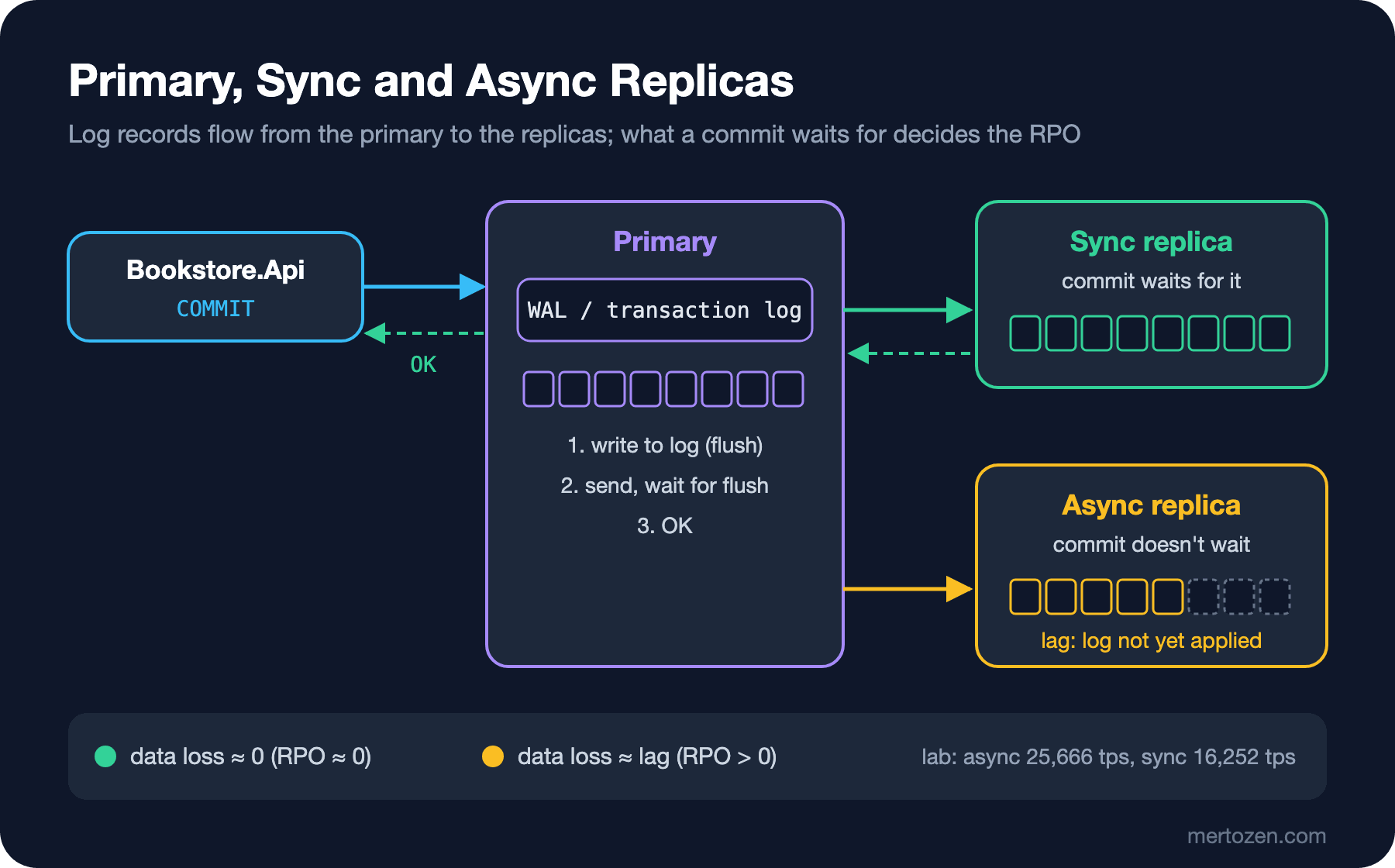
In async mode a commit returns when the record is written to the primary's own disk; sending to the replica follows behind. If the primary is lost at that moment, commits that haven't reached the replica are lost too. The upper bound of that loss is the RPO. In sync mode the commit waits until the replica says it has received the record. In PostgreSQL two settings decide this: synchronous_standby_names says which replicas are synchronous, and synchronous_commit says what to wait for (remote_write: the replica wrote it to the operating system, on: flushed durably to disk, remote_apply: applied, visible to queries).
We measured the price with pgbench: 8 clients, 15 seconds, each transaction a single-row INSERT:
\set order_id random(1, 1000000)
INSERT INTO order_events (order_id, kind) VALUES (:order_id, 'Paid');
== async: async on
latency average = 0.312 ms
tps = 25665.588701 (without initial connection time)
== on: sync on
latency average = 0.492 ms
tps = 16252.474704 (without initial connection time)
== remote_apply: sync remote_apply
latency average = 0.515 ms
tps = 15525.947505 (without initial connection time)Even with the replica on the same machine, sync commit cut throughput by 37%; every commit gained a round trip. In a real system the replica sits in another availability zone and a round trip takes milliseconds; for short transactions the gap grows many times over. The experiment at the start of the post showed the other price: losing a single sync replica stops all writes. That's why in production sync replication is usually set up either with two or more replicas (with a quorum definition like ANY 1 (pg2, pg3)), or with sync chosen for critical data and async for the rest. In PostgreSQL, synchronous_commit can also be set per transaction: the payment event can be written with SET LOCAL synchronous_commit = on, a click log with local.
Measuring Replication Lag and Turning It into a Metric
Lag comes in two forms: bytes (how many bytes the replica is behind) and time. On the primary, for each replica:
SELECT application_name,
       pg_wal_lsn_diff(pg_current_wal_lsn(), replay_lsn) AS replay_lag_bytes,
       replay_lag
FROM pg_stat_replication;
In post 03 we ran this query every 100 ms during a large single-statement delete and saw the replica fall 22 MB behind, while with batched deletes it never went above 1.1 MB. This value should be an application metric too: a service that reads from a replica wants to know the lag is below a threshold before reading (we'll use this in .NET in post 06). If a replica doesn't show up in pg_stat_replication at all, that's an alert too: the connection is gone.
In SQL Server Always On the counterpart is sys.dm_hadr_database_replica_states. We didn't run the query below in the lab (we didn't set up an AG); the meaning of the columns comes from Microsoft's documentation:
SELECT ar.replica_server_name,
       drs.is_primary_replica,
       drs.synchronization_state_desc,
       drs.log_send_queue_size,
       drs.redo_queue_size,
       drs.secondary_lag_seconds,
       drs.last_commit_time
FROM sys.dm_hadr_database_replica_states AS drs
JOIN sys.availability_replicas AS ar ON ar.replica_id = drs.replica_id
WHERE drs.database_id = DB_ID('BookstoreDb');
log_send_queue_size shows log not yet sent from the primary (KB), redo_queue_size shows log that has reached the replica but isn't applied yet (KB). The first is close to the data you'd lose if the primary were lost, the RPO; the second to how long the database takes to open after a failover. According to the documentation, the difference between last_commit_time on the primary row and on a replica row gives an approximate RPO; secondary_lag_seconds has existed since 2016.
SQL Server: Always On, Log Shipping and Transactional Replication
SQL Server has three mechanisms for replication. An Always On availability group (AG) copies one or more databases to replicas by continuously sending the transaction log; synchronous or asynchronous commit is chosen per replica, replicas can be made readable, and a listener supports automatic failover. Enterprise edition has full AGs; Standard has basic AGs limited to one database and two replicas. A read-scale AG set up on Linux or without a cluster (CLUSTER_TYPE = NONE) gives read scale but no automatic failover. Listeners and failover are the subject of post 05.
Log shipping is older and simpler than AGs: a log backup is taken on the primary, copied to the replica and restored there. In the lab we did it by hand, without SQL Server Agent jobs, between two databases on the same instance. First we restore the full backup with STANDBY; this mode opens the database read-only and allows later log backups to be applied:
BACKUP DATABASE dbscaleseries_04 TO DISK = '/tmp/dbscaleseries_04_full.bak' WITH INIT, COMPRESSION;

RESTORE DATABASE dbscaleseries_04_standby FROM DISK = '/tmp/dbscaleseries_04_full.bak'
WITH MOVE 'dbscaleseries_04' TO '/var/opt/mssql/data/dbscaleseries_04_standby.mdf',
     MOVE 'dbscaleseries_04_log' TO '/var/opt/mssql/data/dbscaleseries_04_standby.ldf',
     STANDBY = '/tmp/dbscaleseries_04_undo.tuf';
We write a new order to the primary and look at both sides, then take a log backup and apply it on the replica:
last_order_on_primary
---------------------
2
last_order_on_standby
---------------------
1
BACKUP LOG successfully processed 6 pages in 0.006 seconds (7.161 MB/sec).
RESTORE LOG successfully processed 6 pages in 0.002 seconds (21.484 MB/sec).
last_order_on_standby
---------------------
2
Msg 3906, Level 16, State 1, Line 1
Failed to update database "dbscaleseries_04_standby" because the database is read-only.
With log shipping, lag is the log backup interval plus copy and restore time; a backup every 15 minutes means an RPO of at least 15 minutes. The replica can't be read while a log is being restored (in STANDBY mode users are disconnected during the restore). Today it's mostly used for a disaster recovery copy or in environments where an AG can't be set up. Transactional replication is a logical mechanism: it carries changes to selected tables through a publisher, a distributor and subscribers. It still has a place for moving data to a different schema, a subset, or Azure SQL Database, but for read scale and HA the first choice is an AG.
Replication Slots: A Forgotten Replica That Fills the Disk
In PostgreSQL a replication slot guarantees that the primary won't delete WAL a replica hasn't received yet. Even if a replica is disconnected for a while, it can continue where it left off when it comes back. The price: if nobody uses the slot, WAL piles up forever. Let's try what happens when a slot is created for a reporting replica that is never set up:
SELECT pg_create_physical_replication_slot('reporting_slot', true);Then we generated WAL by updating the whole order_events table a few times:
SELECT slot_name, active, wal_status,
       pg_size_pretty(pg_wal_lsn_diff(pg_current_wal_lsn(), restart_lsn)) AS retained
FROM pg_replication_slots;
slot_name | active | wal_status | retained
----------------+--------+------------+----------
pg2_slot | t | reserved | 0 bytes
reporting_slot | f | extended | 1598 MB
pg_wal_size
-------------
1616 MBAn unused slot holds 1.6 GB of WAL; the pg_wal directory went past max_wal_size (1 GB by default). In production this fills the disk within days, and when the disk is full the primary stops accepting writes. The protection is to cap the WAL a slot can hold:
ALTER SYSTEM SET max_slot_wal_keep_size = '256MB';
SELECT pg_reload_conf();
CHECKPOINT;
slot_name | active | wal_status | safe_wal_size
----------------+--------+------------+---------------
pg2_slot | t | reserved | 265 MB
reporting_slot | f | lost |
pg_wal_size
-------------
848 MB
LOG: invalidating obsolete replication slot "reporting_slot"The slot was invalidated and the WAL was cleaned up. It's a trade-off: the same cap also makes a real replica that stays disconnected for long lose its slot, and that replica has to be rebuilt from scratch. safe_wal_size shows how much more WAL a slot can take before it's invalidated; set your alert on it. PostgreSQL 18 also added idle_replication_slot_timeout, which invalidates slots unused for a given time.
Logical Replication: A Reporting Database and Low-Downtime Upgrades
Logical replication carries the row changes of selected tables to another database. Because the target is a writable database, it can have report-specific indexes, extra tables or a different major version. We set up a separate reporting database for Bookstore's report queries. A publication on the publisher side:
CREATE PUBLICATION bookstore_orders FOR TABLE orders, order_items;On the subscriber side the tables' schema is created beforehand (logical replication doesn't carry DDL), then the subscription is opened. For report queries we added an index on created_at only here:
CREATE INDEX ix_orders_created ON orders (created_at);

CREATE SUBSCRIPTION reporting_sub
CONNECTION 'host=127.0.0.1 dbname=bookstore user=postgres'
PUBLICATION bookstore_orders
WITH (create_slot = false, slot_name = 'reporting_sub');
Because publisher and subscriber are on the same server, we created the slot beforehand with pg_create_logical_replication_slot('reporting_sub', 'pgoutput'); across separate servers CREATE SUBSCRIPTION does that itself. First the tables' existing data is copied, then changes start to flow:
    subname    | substream | subenabled
---------------+-----------+------------
 reporting_sub | p         | t

 table_name  | srsubstate
-------------+------------
 orders      | r
 order_items | r

 orders
--------
 937501
srsubstate = r means the initial copy is done and the table is ready. substream = p comes from the default being parallel in PostgreSQL 18: large transactions are streamed without waiting for the commit and applied in parallel on the subscriber. With 18 generated columns can also be published (publish_generated_columns), and conflicts during apply are written to the log and to pg_stat_subscription_stats. When a new order is added on the primary, it shows up on the reporting side within a second, and the primary now has two senders:
 application_name |   state   | sync_state |   replay_lag
------------------+-----------+------------+-----------------
 pg2              | streaming | async      | 00:00:00.00028
 reporting_sub    | streaming | async      | 00:00:00.001525
One of the most valuable uses of logical replication is a low-downtime major upgrade: an empty cluster is set up on the new version, the schema is moved, the data is caught up with logical replication, and the application switches to the new server with a short outage. You need to know its limits: DDL isn't carried (schema changes must be applied on both sides in order), tables need a primary key or REPLICA IDENTITY for UPDATE and DELETE, and sequence values aren't carried in 18 (they're set by hand during the switch). PostgreSQL 19's release notes announce logical replication of sequences (ALL SEQUENCES, REFRESH SEQUENCES); 19 is still at the release candidate stage and we didn't try it. The classic upgrade with pg_upgrade is in the PostgreSQL series post "Security and Operations Basics".
Production Notes
Don't set up a replica without monitoring it. On the primary: each replica's state and lag in bytes, the slots' wal_status and safe_wal_size, the size of the pg_wal directory; in SQL Server: log_send_queue_size, redo_queue_size and synchronization_health_desc. Each of these should be watched with an alert threshold.
Don't leave a sync replica alone. A single sync replica ties the primary's availability to the replica's; as we saw at the start, when the replica goes down, writes stop. Use two replicas and a quorum, or selective sync for critical transactions.
Account for the replica's own load. A replica applies every write from the primary; if a read load comes on top, replay falls behind. In PostgreSQL long read queries can conflict with replay (max_standby_streaming_delay, hot_standby_feedback); we'll deal with that balance together with read routing in post 06.
A replica isn't a backup. A DELETE run by mistake on the primary is applied to the replica within milliseconds. Going back in time needs backups and a WAL archive (point-in-time recovery); that's why we separate HA from DR in post 05.
Common Pitfalls
Thinking an async replica is lossless: when the primary goes down, commits that hadn't reached the replica are gone. Saying "we have a replica, we won't lose data" without measuring the RPO is wrong.
Leaving an unused replication slot behind: the slot of a replica created for a test or shut down later silently fills the primary's disk. Any job that creates a slot should also remove it; max_slot_wal_keep_size is the last line of defense.
Alerting on lag with pg_last_xact_replay_timestamp(): when the primary is idle, lag looks large. Use the byte difference and replay_lag.
Forgetting schema changes with logical replication: if a column added on the publisher doesn't exist on the subscriber, replication stops. In the lab, when we added a column to orders for post 05, the subscriber's apply worker stopped with logical replication target relation "public.orders" is missing replicated column: "idempotency_key" and hit the same error every time it restarted. Add it on the subscriber first, then on the publisher.
Treating a canceled request under sync commit as failed: a cancel or timeout doesn't mean the transaction wasn't committed. Write operations like payments to be idempotent (post 05).
A Small Experiment
★☆☆ Run SELECT pg_wal_replay_pause(); on the replica, write a few thousand rows to the primary and watch how write_lsn, flush_lsn and replay_lsn in pg_stat_replication diverge. Then pg_wal_replay_resume().
★★☆ Repeat the pgbench run with synchronous_commit set to remote_write, on and remote_apply; then add 2 ms of network delay to the replica container with tc and measure again.
★★★ Move Bookstore from one PostgreSQL 18 cluster to another with logical replication: copy the schema with pg_dump --schema-only, open a subscription, set the sequence values by hand right before the switch and measure how many seconds of write outage the switch causes.
In the next post we use the replica as a stand-in: RPO and RTO, the difference between HA and DR, the SQL Server listener and Patroni for PostgreSQL, and most importantly keeping Bookstore's payment flow up without duplicate orders when the primary goes down.