

Read/Write Splitting in .NET: Routing to Read Replicas and the Read-Your-Writes Problem
Moving reads to a replica takes more than two contexts; you need a router that knows when the replica is behind. In the lab, customers reading from a replica with apparently zero lag missed 4 of 1,000 new orders, and 300 of 300 once replay was paused; a router that checks a lag threshold and the LSN of the user's last write missed none. Npgsql prefer-standby, SQL Server read-only routing and hot standby conflicts.
Version note: The examples in this post were run with PostgreSQL 18.7 (two containers: a primary and a streaming replica), SQL Server 2025 (CU10, 17.0.5035.5), .NET 10, Npgsql 10.0.3, Npgsql.EntityFrameworkCore.PostgreSQL 10.0.3 and Microsoft.Data.SqlClient 7.1.2 in a single-machine lab. A SQL Server Always On availability group (AG) and read-only routing were not set up in the lab; that section is based on Microsoft's documentation.
Guess First
Bookstore, the online bookstore used as the shared example across this site's series, no longer wants to keep the streaming replica we built in post 04 as a spare only: reads for the "My orders" page will go to the replica, and the primary will deal with writes. The flow is simple: the customer completes an order, the order is written to the primary, the browser moves straight to "My orders", and the list is read from the replica. In the lab we ran this flow for 1,000 orders. The replica is on the same machine, idle, and its lag according to pg_stat_replication is zero.
Guess: in how many of the 1,000 orders does the customer not see the order they just placed?
strategy=naive orders=1000 missing_in_list=4 replica_reads=5000 primary_reads=0
replica: reachable=True lag=0.0 s
Four. Even in a lab with no load and network latency measured in microseconds, one customer in 250 wondered "where is my order?". Then we stopped the replica's replay with pg_wal_replay_pause(); that is the controlled version of a big delete job from post 03, or a heavy report running on the replica, leaving the replica a few seconds behind:
strategy=naive orders=300 missing_in_list=300 replica_reads=1500 primary_reads=0
replica: reachable=True lag=7.8 s
None of the 300 orders were in the list. In this post we build the .NET side of moving reads to a replica: Npgsql's multi-host data source, SQL Server's read-only routing, two separate DbContext types and, most importantly, a small router that decides when not to go to the replica.
Which Reads Go to the Replica?
A read replica adds read capacity, not write capacity. Most of Bookstore's traffic is reads: the catalog, book details, search, "My orders", back office reports. Most of them work fine with data a few seconds old; nobody notices a book added yesterday appearing in the catalog one second late. Some reads need current data and must stay on the primary: stock and price checks during checkout, payment status, an "does it exist?" check right before a write, and screens that show a change the user just made.
This split maps naturally onto the read side of CQRS. The CQRS and Event Sourcing series covered the design side of building the read side as a separate model in its post on CQRS in a single database. Here we build the simplest database-level version of the same idea: the same schema, the same tables, two different servers.
PostgreSQL: Multi-Host Data Source and Target Session Attributes
In post 05 we used Npgsql's multi-host data source for failover. The same data source can route reads too. The connection string lists both hosts:
Host=pg1:5432,pg2:5432;Database=bookstore;Username=bookstore_api;Password=<secret>;Timeout=3When Npgsql connects to a host it asks whether it is a primary or a standby and caches that for Host Recheck Seconds (10 by default). WithTargetSession derives data sources from the same multi-host data source that only hand out connections to servers in a given role. According to Npgsql's documentation the options are any, primary, standby, prefer-primary, prefer-standby, read-write and read-only; Load Balance Hosts=true spreads connections across the eligible hosts in turn. Bookstore uses three data sources:
NpgsqlMultiHostDataSource cluster = new NpgsqlDataSourceBuilder(Db.Env("BOOKSTORE_PG_HA")).BuildMultiHost();
NpgsqlDataSource primary = cluster.WithTargetSession(TargetSessionAttributes.Primary);
NpgsqlDataSource preferStandby = cluster.WithTargetSession(TargetSessionAttributes.PreferStandby);
NpgsqlDataSource standbyOnly = cluster.WithTargetSession(TargetSessionAttributes.Standby);

ServiceCollection services = new();
services.AddDbContext<BookstoreContext>(o => o.UseNpgsql(primary));
services.AddDbContext<BookstoreReadContext>(o => o
    .UseNpgsql(preferStandby)
    .UseQueryTrackingBehavior(QueryTrackingBehavior.NoTracking));
primary is for writes and prefer-standby for reads: it goes to a standby if there is one, otherwise to the primary. We'll use standbyOnly shortly to measure the replica's state. The application has two contexts. BookstoreContext is the usual EF Core context. BookstoreReadContext maps the same entities but doesn't allow writes:
// reads that may be slightly stale: a replica when possible, never tracked, never saved
public sealed class BookstoreReadContext(DbContextOptions<BookstoreReadContext> options) : DbContext(options)
{
    public IQueryable<Order> Orders => Set<Order>();

    protected override void OnModelCreating(ModelBuilder modelBuilder) => OrderMapping.Configure(modelBuilder);

    public override Task<int> SaveChangesAsync(bool acceptAllChangesOnSuccess, CancellationToken cancellationToken = default) =>
        throw new InvalidOperationException("BookstoreReadContext is read-only.");
}
Exposing IQueryable instead of DbSet and shutting down SaveChangesAsync catches anyone trying to write through the read context at compile time or on the first test. NoTracking also removes the change tracker's unnecessary cost on the read side. In a project that uses Dapper, the same split is built on an IDbConnectionFactory with two methods such as OpenWriteAsync and OpenReadAsync. To see which server each context reaches, we asked both for current_setting('cluster_name'):
write -> pg1, read -> pg2 (271 ms)
write -> pg1, read -> pg2 (19 ms)
write -> pg1, read -> pg2 (0 ms)
The time on the first line is the cost of Npgsql learning both hosts' roles for the first time and opening connections; after that the pool takes over.
SQL Server: Read-Only Routing and ApplicationIntent
In SQL Server the routing is done not by the client but by the Always On availability group's listener. The client connects to the listener with ApplicationIntent=ReadOnly in its connection string; the listener redirects it to the first available readable secondary in the primary replica's read-only routing list. Since SQL Server 2016 the list can balance load across a group of replicas using nested parentheses. A configuration based on the example in Microsoft's documentation (not run, since the lab has no AG):
ALTER AVAILABILITY GROUP [BookstoreAG]
MODIFY REPLICA ON N'SQL2' WITH
(SECONDARY_ROLE (ALLOW_CONNECTIONS = READ_ONLY, READ_ONLY_ROUTING_URL = N'TCP://sql2.bookstore.example:1433'));

ALTER AVAILABILITY GROUP [BookstoreAG]
MODIFY REPLICA ON N'SQL1' WITH
(PRIMARY_ROLE (READ_ONLY_ROUTING_LIST = (('SQL2', 'SQL3'), 'SQL1')));
The read connection string looks like this:
Server=tcp:bookstore-listener,1433;Database=BookstoreDb;Integrated Security=True;ApplicationIntent=ReadOnly;MultiSubnetFailover=TrueBecause the primary itself is last in the list, reads fall back to the primary if both secondaries are unreachable; similar to Npgsql's prefer-standby. The documentation stresses two conditions: the connection must go through the listener, and the connection string must name a database; otherwise there is no routing. ApplicationIntent by itself is only a request. We saw this on the lab's single SQL Server: we wrote to the same table with two different intents and asked for the database's state:
ApplicationIntent=ReadWrite: updateability=READ_WRITE, insert ok
ApplicationIntent=ReadOnly: updateability=READ_WRITE, insert ok
A server without an AG ignores the intent and lets a ReadOnly connection write. So in tests and development this setting won't answer "is my read connection writing by accident?"; on a readable secondary the same write fails with error 3906 (we saw it on a log shipping standby in post 04). That is why shutting down the read context's SaveChangesAsync pays off on SQL Server too.
Read-Your-Writes: Customers Must See Their Own Orders
Here is the code of the experiment at the top of the post: the order is written to the primary, then the customer and four other random customers read their own order lists:
Order order = new() { CustomerId = customerId, TotalAmount = 249.90m, CreatedAt = DateTime.UtcNow };
write.Orders.Add(order);
await write.SaveChangesAsync();
orderId = order.OrderId;
lastWriteByCustomer[customerId] = await write.Database
    .SqlQueryRaw<NpgsqlLogSequenceNumber>("SELECT pg_current_wal_lsn() AS \"Value\"")
    .SingleAsync();
List<long> myOrders = await read.Orders
.Where(o => o.CustomerId == reader)
.OrderByDescending(o => o.CreatedAt)
.Select(o => o.OrderId)
.Take(20)
.ToListAsync();With async replication the commit completes on the primary and the replica applies the same change a little later. The time in between is the lag, and it breaks the read-your-writes guarantee: a user must always see their own write in their later reads. The theory is in the Distributed Systems Fundamentals series, in the post on consistency models. In practice there are four ways:
- Keep critical reads on the primary all the time: checkout, payment, stock. The simplest, and the first thing to do.
- Send a user's reads to the primary for a short time after a write, say 5 seconds. Simple, but the time is a guess; if the lag goes past 5 seconds, stale data shows up again.
- Keep the WAL position (LSN) of the user's last write and read from the primary if the replica hasn't applied that position yet. Exact and measurable.
- Take the replica out for all reads once the lag passes a threshold. Independent of read-your-writes, this solves the "far too stale" problem.
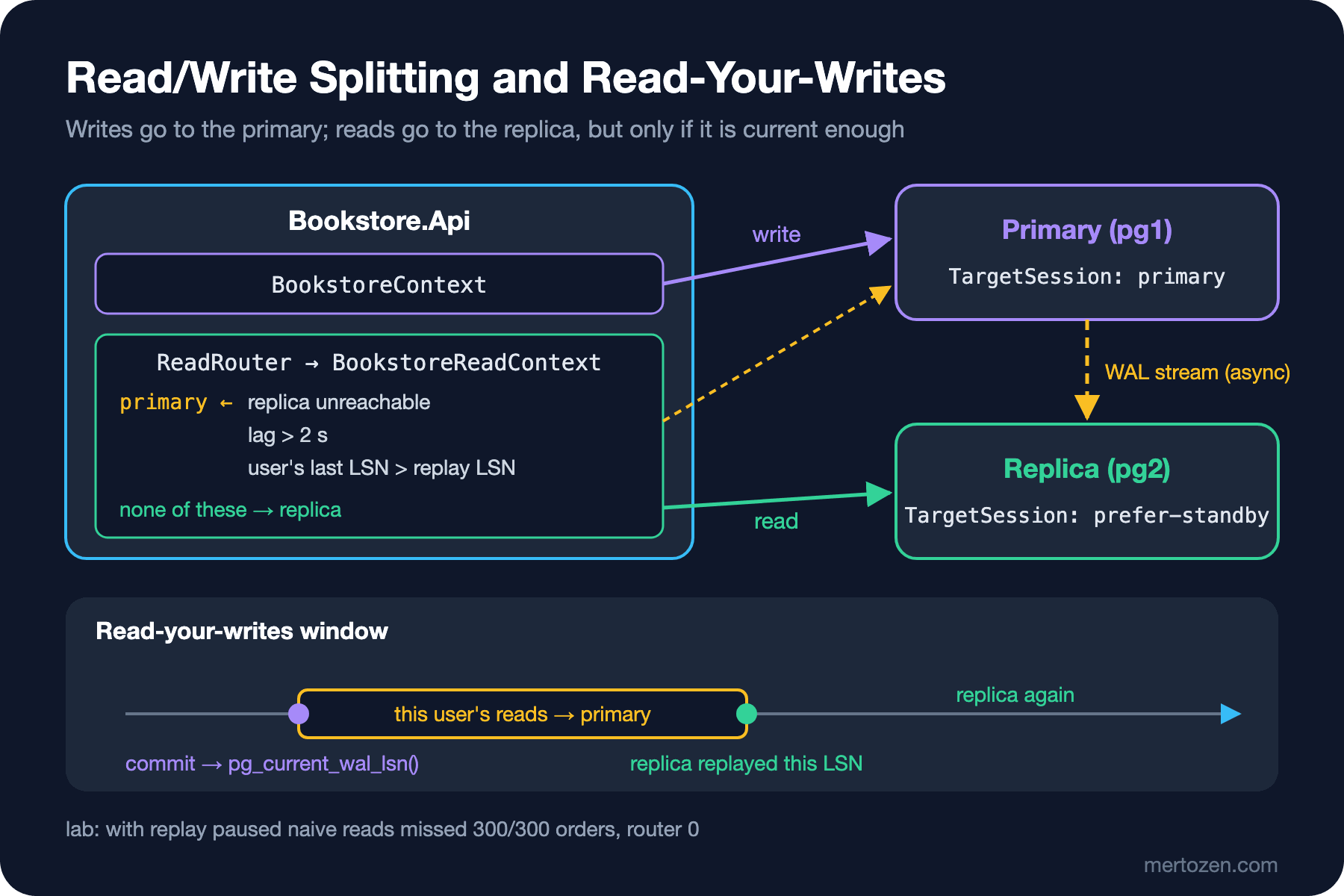
We built the last two together. We take the LSN with pg_current_wal_lsn() right after the write; the commit record has been written to the WAL before that position. In a web application the value lives in a short-lived cookie or in the session; in the lab it lives in a dictionary per customer.
The Router: Lag Threshold and LSN Check
Asking how far behind the replica is on every read adds a round trip to every read. Instead a monitor asks the replica every 200 ms and keeps the result in memory:
SELECT pg_last_wal_replay_lsn(),
       CASE WHEN pg_last_wal_receive_lsn() = pg_last_wal_replay_lsn() THEN 0
            ELSE coalesce(extract(epoch FROM now() - pg_last_xact_replay_timestamp()), 0)
       END::float8
pg_last_wal_replay_lsn() is the last position the replica applied. The common lag formula is zero if the received and applied positions are equal, otherwise the time since the commit of the last applied transaction; that way the lag doesn't grow for no reason while the primary has no writes. The monitor uses the standbyOnly data source, because prefer-standby connects to the primary when the replica is down and we would end up measuring the primary's "lag". The router makes the decision:
public sealed class ReadRouter(ReplicaLagMonitor monitor, TimeSpan maxLag, TimeSpan maxSampleAge)
{
    // lastWrite: the WAL position of this user's last write (kept in a short-lived cookie)
    public ReadTarget Choose(NpgsqlLogSequenceNumber? lastWrite)
    {
        ReplicaState replica = monitor.Current;
        if (!replica.Reachable || DateTime.UtcNow - replica.SampledAt > maxSampleAge)
        {
            return ReadTarget.Primary;
        }
        if (replica.Lag > maxLag)
        {
            return ReadTarget.Primary;
        }
        if (lastWrite is { } lsn && replica.ReplayLsn < lsn)
        {
            return ReadTarget.Primary;
        }
        return ReadTarget.Replica;
    }
}
There are three rules: if there is no news from the replica, or the news is old, use the primary; if the lag is over 2 seconds, use the primary; if the user's last write hasn't been applied on the replica yet, use the primary. Since the monitor's value is at most 200 ms old, the LSN check errs on the cautious side: even if the replica has actually caught up, the first few hundred milliseconds go to the primary. ReadContextFactory applies the decision and returns a BookstoreReadContext connected to the right server:
public BookstoreReadContext Create(NpgsqlLogSequenceNumber? lastWrite, out ReadTarget target)
{
    target = router.Choose(lastWrite);
    return new BookstoreReadContext(target == ReadTarget.Replica ? replicaOptions : primaryOptions);
}
The same 1,000-order experiment, with the router:
strategy=routed orders=1000 missing_in_list=0 replica_reads=4000 primary_reads=1000
replica: reachable=True lag=0.0 s
No missed orders. The read right after the order by the customer who placed it (1,000 reads) went to the primary, and the other customers' 4,000 reads stayed on the replica. With the replica's replay paused:
strategy=routed orders=300 missing_in_list=0 replica_reads=24 primary_reads=1476
replica: reachable=True lag=8.0 s
In the first two seconds, until the lag threshold was crossed, 24 reads by other customers were served from the replica; after that all reads went back to the primary and no order was missed. The cost is visible too: when the replica falls behind, the whole read load lands on the primary. So the threshold and whether the primary can carry that load have to be thought through together; if the primary can't carry the reads, you have to choose deliberately between showing stale data and slowing down.
PostgreSQL 19 brings a WAIT FOR LSN command that moves this check to the server: the replica waits until it has applied the given position. Since 19 isn't GA yet on the day of writing we don't show an example; until then "read from the primary if it hasn't caught up" is the main solution.
If the Replica Goes Down
The router's first rule covers an unreachable replica. Npgsql's prefer-standby does the same at the connection level. We stopped the replica container while the read loop was running:
write -> pg1, read -> pg2 (281 ms)
write -> pg1, read -> pg2 (19 ms)
write -> pg1, read -> pg2 (2 ms)
--- pg2 stopped
write -> pg1, read -> InvalidOperationException: An exception has been raised that is likely due to a transient failure. (5 ms)
write -> pg1, read -> pg1 (2 ms)
write -> pg1, read -> pg1 (1 ms)
One read failed and the following ones went to the primary. The failed read used a connection waiting in the pool that was open to the replica; according to Npgsql's documentation failover only happens when a connection is opened, and a command that fails on an open connection is never retried on another host. The fix from post 05 applies here too: we added a retry strategy to the read context:
npgsql.EnableRetryOnFailure(maxRetryCount: 3, maxRetryDelay: TimeSpan.FromSeconds(1), errorCodesToAdd: null);write -> pg1, read -> pg2 (261 ms)
write -> pg1, read -> pg2 (19 ms)
write -> pg1, read -> pg2 (2 ms)
--- pg2 stopped
write -> pg1, read -> pg1 (6 ms)
write -> pg1, read -> pg1 (2 ms)
write -> pg1, read -> pg1 (1 ms)The retry opened a new connection, prefer-standby couldn't find the replica and handed out the primary, and the user saw nothing. Reads are idempotent, so retrying is safe here; the idempotency discussion from post 05 is only needed for writes.
Long Queries on the Replica: Hot Standby Conflicts
Reports moved to the replica bring a new problem. On the primary, VACUUM removes old row versions that no transaction sees any more; that removal reaches the replica through the WAL as well. If a long query on the replica still needs to see those rows, the two conflict. In post 04 we mentioned the two settings that balance this. We built the replica with hot_standby_feedback=off and max_standby_streaming_delay=3s and started a 15-second report query on the replica; at second 2 we updated 4,900 orders on the primary and ran VACUUM:
SELECT pg_sleep(15), count(*) AS orders_in_report FROM orders;ERROR: canceling statement due to conflict with recovery
DETAIL: User query might have needed to see row versions that must be removed.
Time: 5705.984 ms (00:05.706)The replica held replay back for 3 seconds, then cancelled the query; the confl_snapshot counter in pg_stat_database_conflicts went up by 1. We repeated the experiment with hot_standby_feedback=on. The report finished in 15 seconds, but the relevant line in the primary's VACUUM output shows the cost:
tuples: 0 removed, 1690171 remain, 8801 are dead but not yet removableWith feedback on, the replica reports its oldest snapshot to the primary and the primary doesn't remove those rows. After the report ended and the feedback was updated (every 10 seconds by default), VACUUM cleaned up the 8,801 rows. So the choice is this: either long queries on the replica get cancelled, or replay waits and the lag grows (raising max_standby_streaming_delay), or bloat builds up on the primary (hot_standby_feedback=on). The cleanest way for reports that run for hours is to separate them from this replica: a separate reporting database fed by the logical replication from post 04.
In Production
Make the lag a metric and an alert. The value the router uses should also be a dashboard metric. Watch "what share of reads were served by the replica" too; if that ratio drops, the replica is in trouble and the load is silently landing on the primary.
Make sure the primary can carry the read load. The router errs on the safe side; when the replica falls behind, all reads go back to the primary. If you shrink the primary because you rely on the replica, the primary struggles too at the first big lag.
Work out the connection budget separately for the two servers. Every API instance now holds two pools; when the replica is down, the prefer-standby pool connects to the primary as well. The budget calculation from post 02 must use the sum of both pools for the primary.
With several replicas Load Balance Hosts=true spreads the reads, but each replica has its own lag. The router has to be extended to keep state per replica, or a replica whose lag crosses the threshold has to be taken off the list.
Common Pitfalls
Splitting a transaction across two servers: if stock is read from the replica and the order is written to the primary, the stock read may be stale and the two operations aren't in the same transaction. The read that decides a write must run on the primary, in the same transaction as the write.
A write that looks like a read: in Bookstore the book_details function, which returns a book's details, also inserted a row into book_views for statistics. Called from the read context:
read context on pg2: PostgresException 25006: cannot execute INSERT in a read-only transaction
write context on pg1: The Hobbit #42 374.00
Every transaction on a replica is read-only. If the development environment has no replica, this error never shows up and appears for the first time in production; have at least one replica in the test environment.
Measuring lag only in seconds: lag based on commit time becomes meaningless while the primary has no writes. The difference in bytes (pg_wal_lsn_diff) and a per-user LSN comparison are more reliable.
Trusting ApplicationIntent=ReadOnly: on a SQL Server without an AG the flag restricts nothing; in the lab the write succeeded.
A Small Experiment
★☆☆ Add a fifth way to the router: send a customer's reads to the primary for 5 seconds after a write. Compare it with the LSN check: over the same 1,000 orders, how many reads go to the primary?
★★☆ Add a second replica (pg3) and spread reads across both with Load Balance Hosts=true. Pause only pg3's replay; measure missed orders before and after changing the router to keep state per replica.
★★★ Move the LSN into an ASP.NET Core middleware: endpoints that write leave an X-Last-Write-Lsn cookie in the response, and read endpoints pass that value to ReadContextFactory. Pick the cookie's lifetime based on the lag threshold and write down why.
The replica now carries the reads, but the data keeps growing. In the next post we move on to partitioning in PostgreSQL: splitting the orders table into months, what partition pruning speeds up and what it doesn't, and doing the archiving we did with batches in post 03 by detaching the oldest month's partition with a single command.