

Partitioning in SQL Server: Partition Functions, Schemes, Aligned Indexes, Partition Elimination and SWITCH
The real gain of partitioning in SQL Server is archiving in milliseconds with SWITCH; query gains only come if partition elimination works. In the lab we moved eleven months to the archive in under 10 ms per month; on the other hand, AddWithValue(DateTime), Scale = 0 and EF Core's datetime2(7) parameters turned elimination off on a datetime2(0) column and all 52 partitions were read. RANGE LEFT/RIGHT, aligned indexes, SPLIT/MERGE cost and LOCK_ESCALATION = AUTO.
Version note: The examples in this post were run with SQL Server 2025 (CU10, 17.0.5035.5), .NET 10, Microsoft.Data.SqlClient 7.1.2 and Microsoft.EntityFrameworkCore.SqlServer 10.0.15 in a single-machine lab. Don't read the timings as absolute speed; what matters in the comparisons is logical reads, the number of partitions read and the amount of log.
Guess First
Bookstore, the online bookstore used as the shared example across this site's series, did on SQL Server what it did on PostgreSQL in post 07: dbo.OrdersP, a copy of dbo.Orders split into monthly partitions on the CreatedAt column, 52 partitions, the same 1 million orders. The accounting team's October revenue query:
SELECT COUNT(*), SUM(TotalAmount) FROM dbo.OrdersP WHERE CreatedAt >= '2026-10-01' AND CreatedAt < '2026-11-01';All of October's rows are in a single partition. Guess: how many partitions does SQL Server read for this query? The SET STATISTICS IO output and the RunTimePartitionSummary value from the actual execution plan's XML, next to the same query on the unpartitioned table:
'OrdersP'. Scan count 52, logical reads 5799, physical reads 0
  partitions accessed: 52
'Orders'. Scan count 11, logical reads 5785, physical reads 0
All 52. The partitioned table read almost exactly as many pages as the unpartitioned one. The cause isn't partitioning but the way the query is written: SQL Server parameterized this simple query automatically and turned the date literals into varchar(8000) parameters. The type mismatch turned partition elimination off. The same trap is easy to fall into from .NET; in this post we first set up the partition function, scheme and aligned indexes, then measure when elimination works, and finally bring post 03's archiving down to milliseconds with a sliding window.
Partition Function, Scheme and RANGE LEFT/RIGHT
In SQL Server partitioning is built from two objects. The partition function decides which partition number a value falls into; the partition scheme maps those numbers to filegroups. RANGE LEFT or RANGE RIGHT decides which side a boundary value falls on. With two functions with two boundaries each and the $PARTITION function the difference is easy to see:
CREATE PARTITION FUNCTION pf_left (datetime2(0)) AS RANGE LEFT FOR VALUES ('2026-10-01', '2026-11-01');
CREATE PARTITION FUNCTION pf_right (datetime2(0)) AS RANGE RIGHT FOR VALUES ('2026-10-01', '2026-11-01');
GO
SELECT v.CreatedAt, $PARTITION.pf_left(v.CreatedAt) AS LeftPartition, $PARTITION.pf_right(v.CreatedAt) AS RightPartition
FROM (VALUES (CAST('2026-09-30 23:59:59' AS datetime2(0))), ('2026-10-01 00:00:00'), ('2026-10-31 23:59:59'), ('2026-11-01 00:00:00')) AS v(CreatedAt);
CreatedAt|LeftPartition|RightPartition
---------|-------------|--------------
2026-09-30 23:59:59|1|1
2026-10-01 00:00:00|1|2
2026-10-31 23:59:59|2|2
2026-11-01 00:00:00|2|3With RANGE LEFT, midnight on 1 October falls into the September partition; October's first moment is in the wrong month. With RANGE RIGHT the boundary value becomes the lower bound of the partition on its right, and every month starts at its own midnight. That's why RANGE RIGHT is practical for date columns; Microsoft's documentation makes the same recommendation for date types. If you don't specify one, the default is LEFT, and forgetting that is a common mistake.
Bookstore's monthly function generates the 51 boundaries between November 2022 and January 2027 with GENERATE_SERIES:
DECLARE @boundaries nvarchar(max) = (
    SELECT STRING_AGG(CONCAT('''', CONVERT(char(10), DATEADD(MONTH, value, '2022-11-01'), 23), ''''), ', ')
           WITHIN GROUP (ORDER BY value)
    FROM GENERATE_SERIES(0, 50));
EXEC (N'CREATE PARTITION FUNCTION pf_orders_month (datetime2(0)) AS RANGE RIGHT FOR VALUES (' + @boundaries + N')');
GO
CREATE PARTITION SCHEME ps_orders_month AS PARTITION pf_orders_month ALL TO ([PRIMARY]);
51 boundaries mean 52 partitions: the leftmost (before November 2022) and the rightmost (after January 2027) stay empty; those empty ends matter in the sliding window. All partitions are on the PRIMARY filegroup. According to the documentation, separate filegroups only make sense if you want to put old partitions on cheaper storage or back up and restore per filegroup; otherwise they add management overhead. GENERATE_SERIES exists since SQL Server 2022; on 2019 you write the boundary list with a loop or by hand. Partitioning itself is available in all editions since SQL Server 2016 Service Pack 1.
The Table, Aligned Indexes and Foreign Keys
Tables and indexes are created on the scheme, naming the partitioning column:
CREATE TABLE dbo.OrdersP (
    OrderId     bigint IDENTITY NOT NULL,
    CustomerId  int NOT NULL,
    Status      varchar(20) NOT NULL,
    TotalAmount decimal(12,2) NOT NULL,
    Currency    char(3) NOT NULL CONSTRAINT DF_OrdersP_Currency DEFAULT 'TRY',
    CreatedAt   datetime2(0) NOT NULL,
    CONSTRAINT PK_OrdersP PRIMARY KEY CLUSTERED (OrderId, CreatedAt)
) ON ps_orders_month (CreatedAt);

CREATE TABLE dbo.OrderItemsP (
    OrderId    bigint NOT NULL,
    LineNumber smallint NOT NULL,
    CreatedAt  datetime2(0) NOT NULL,
    BookId     int NOT NULL,
    Quantity   int NOT NULL,
    UnitPrice  decimal(10,2) NOT NULL,
    CONSTRAINT PK_OrderItemsP PRIMARY KEY CLUSTERED (OrderId, LineNumber, CreatedAt)
) ON ps_orders_month (CreatedAt);

CREATE INDEX IX_OrdersP_CustomerId_CreatedAt ON dbo.OrdersP (CustomerId, CreatedAt DESC)
    INCLUDE (Status, TotalAmount) ON ps_orders_month (CreatedAt);
The rule from PostgreSQL holds here too: a unique clustered index or primary key must include the partitioning column. An index built on the same scheme is called an aligned index. A non-aligned index (for example a single unique index on OrderId) guarantees OrderId's uniqueness but makes it impossible to take a partition out of the table; for SWITCH, all of the table's indexes must be aligned. Order items were split with the same function and the CreatedAt column was copied into the items. On the first try we put a foreign key between the two tables and tried to take the old month out of the table:
ALTER TABLE dbo.OrderItemsP ADD CONSTRAINT FK_OrderItemsP_OrdersP
    FOREIGN KEY (OrderId, CreatedAt) REFERENCES dbo.OrdersP (OrderId, CreatedAt);
GO
ALTER TABLE dbo.OrdersP SWITCH PARTITION 2 TO dbo.OrdersArchiveStage;
Msg 4967, Level 16, State 1, Server sql1, Line 1
ALTER TABLE SWITCH statement failed. SWITCH is not allowed because source table 'dbscaleseries_08.dbo.OrdersP' contains primary key for constraint 'FK_OrderItemsP_OrdersP'.On PostgreSQL we could go ahead by detaching the items first and dropping the foreign key. On SQL Server the referenced table can't be switched at all while the foreign key is enabled, even if the items' partition has been emptied. With the foreign key disabled via NOCHECK the SWITCH worked, but a disabled foreign key becomes is_not_trusted = 1 and guarantees nothing. In Bookstore we removed the foreign key: the Ordering module writes an order and its items in one transaction, and integrity comes from there. That is a deliberate trade-off, and a common choice for big partitioned tables.
Seeing Partition Elimination in the Plan
The cause of the problem at the top of the post is the parameter type. The parameter list in the query plan shows it: ParameterDataType="varchar(8000)". When the same query is compiled with literal values via OPTION (RECOMPILE), a single partition is read:
'OrdersP'. Scan count 1, logical reads 239, physical reads 0
  partitions accessed: 1
  partition range: 49 - 49
239 logical reads instead of 5,799. Since queries from the application are always parameterized, the real question is which parameter type .NET sends. We ran the same revenue query through SqlClient and EF Core and read the plan XML each time:
await RunAsync(connection, "AddWithValue(DateTime)", command =>
{
    command.Parameters.AddWithValue("@from", from);
    command.Parameters.AddWithValue("@to", to);
});
await RunAsync(connection, "SqlDbType.DateTime2, Scale = 0", command =>
{
    command.Parameters.Add(new SqlParameter("@from", SqlDbType.DateTime2) { Scale = 0, Value = from });
    command.Parameters.Add(new SqlParameter("@to", SqlDbType.DateTime2) { Scale = 0, Value = to });
});
AddWithValue(DateTime)
Table 'OrdersP'. Scan count 52, logical reads 5799
parameter types: datetime
partitions accessed: 52
SqlDbType.DateTime2, Scale = 0
Table 'OrdersP'. Scan count 52, logical reads 5799
parameter types: datetime2(7)
partitions accessed: 52
DateTime2 + CAST(@p AS datetime2(0)) in SQL
Table 'OrdersP'. Scan count 2, logical reads 340
parameter types: datetime2(7)
partitions accessed: 2
EF Core LINQ (HasColumnType datetime2(0)): revenue=60212828.00
parameters: (@from datetime2(7),@to datetime2(7)) logical reads: 5799There are four results. AddWithValue sends a DateTime with the old datetime type. Setting Scale = 0 didn't help: SqlClient still declared the parameter as datetime2(7). EF Core also sent datetime2(7), even though it knows the column's type is datetime2(0). In all three, elimination didn't work. Only writing CAST(@from AS datetime2(0)) on the SQL side got 2 partitions read. The reason is type precedence: when a datetime2(7) value is compared with a datetime2(0) column, the conversion is applied on the column side, and SQL Server can't work out the partition from the column's value. We repeated the same query with sp_executesql, the way SqlClient sends it, with different parameter types and on a second table whose partitioning column is datetime2(7) (OrdersP7):
| Column type | datetime parameter | datetime2(7) parameter | datetime2(0) parameter |
|---|---|---|---|
datetime2(0) | 52 partitions, 5,799 reads | 52 partitions, 5,799 reads | 2 partitions, 340 reads |
datetime2(7) | 52 partitions, 4,818 reads | 2 partitions, 284 reads | 2 partitions, 284 reads |
The practical takeaway: choose the partitioning column's type to match what .NET sends by default (datetime2(7), EF Core's default for DateTime) and don't use AddWithValue. On an existing datetime2(0) column, write the query with CAST or declare the parameter explicitly, and verify elimination in the plan. Partitioning done without knowing this silently loses all of its query benefit.
One more detail: the parameterized queries read 2 partitions, not 1. Even though the upper bound is < @to, SQL Server included the partition that @to falls into at run time (partition range: 49 - 50 in the plan); the query with literals and RECOMPILE read only 49. Apart from the first pages of the second partition the cost is small, but it will matter in the lock example below.
Queries Without the Partitioning Column
The second case without elimination is a query that doesn't contain the partitioning column at all:
SELECT TOP (20) OrderId, Status, TotalAmount, CreatedAt FROM dbo.OrdersP WHERE CustomerId = 4242 ORDER BY CreatedAt DESC;
SELECT Status, TotalAmount FROM dbo.OrdersP WHERE OrderId = 750000;
'OrdersP'. Scan count 52, logical reads 96, physical reads 0
'Orders'. Scan count 1, logical reads 4, physical reads 0
'OrdersP'. Scan count 52, logical reads 96, physical reads 0
'Orders'. Scan count 0, logical reads 3, physical reads 0"My orders" read 96 instead of 4 logical reads, and reading a single row by order number 96 instead of 3. Microsoft's documentation also says that single-row seeks without the partitioning column do as many seeks as there are partitions, and that this is why partitioning rarely speeds up OLTP systems. In Bookstore the order details page opens by order number in the URL; to write that query together with CreatedAt, the date has to be added to the URL or to the data coming from the previous screen. Otherwise every order details page means 42–52 seeks.
Sliding Window: SPLIT, SWITCH and MERGE
A sliding window keeps a fixed window in the table: every month a new empty partition is opened at the right end and the oldest month at the left end is taken out of the table. The cost of the three operations depends on whether the partition is empty. We measured the log they generate inside the same transaction:
ALTER PARTITION SCHEME ps_orders_month NEXT USED [PRIMARY];
ALTER PARTITION FUNCTION pf_orders_month() SPLIT RANGE ('2027-02-01');
SELECT 'split empty' AS step, database_transaction_log_bytes_used / 1024 AS log_kb, DATEDIFF(ms, @t, SYSDATETIME()) AS ms
FROM sys.dm_tran_database_transactions WHERE database_id = DB_ID() AND transaction_id = CURRENT_TRANSACTION_ID();
step|log_kb|ms
----|------|--
split empty|6|6
step|log_kb|ms
----|------|--
split populated|13080|448
step|log_kb|ms
----|------|--
merge populated|3851|180The code shows the step that splits the empty right end; we took the same measurement by splitting October's populated partition with SPLIT RANGE ('2026-10-16') and merging it back with MERGE RANGE. Splitting an empty partition is a metadata change only: 6 KB of log. Splitting the populated partition produced 13 MB of log, because SQL Server moved rows to the new partition; merging it back, another 3.8 MB. Meanwhile a schema modification lock is held on the table, so the table is closed to all reads and writes. 448 ms for a month with 42 thousand orders; minutes for a month with 4 million. The rule: split only empty partitions, open new months ahead.
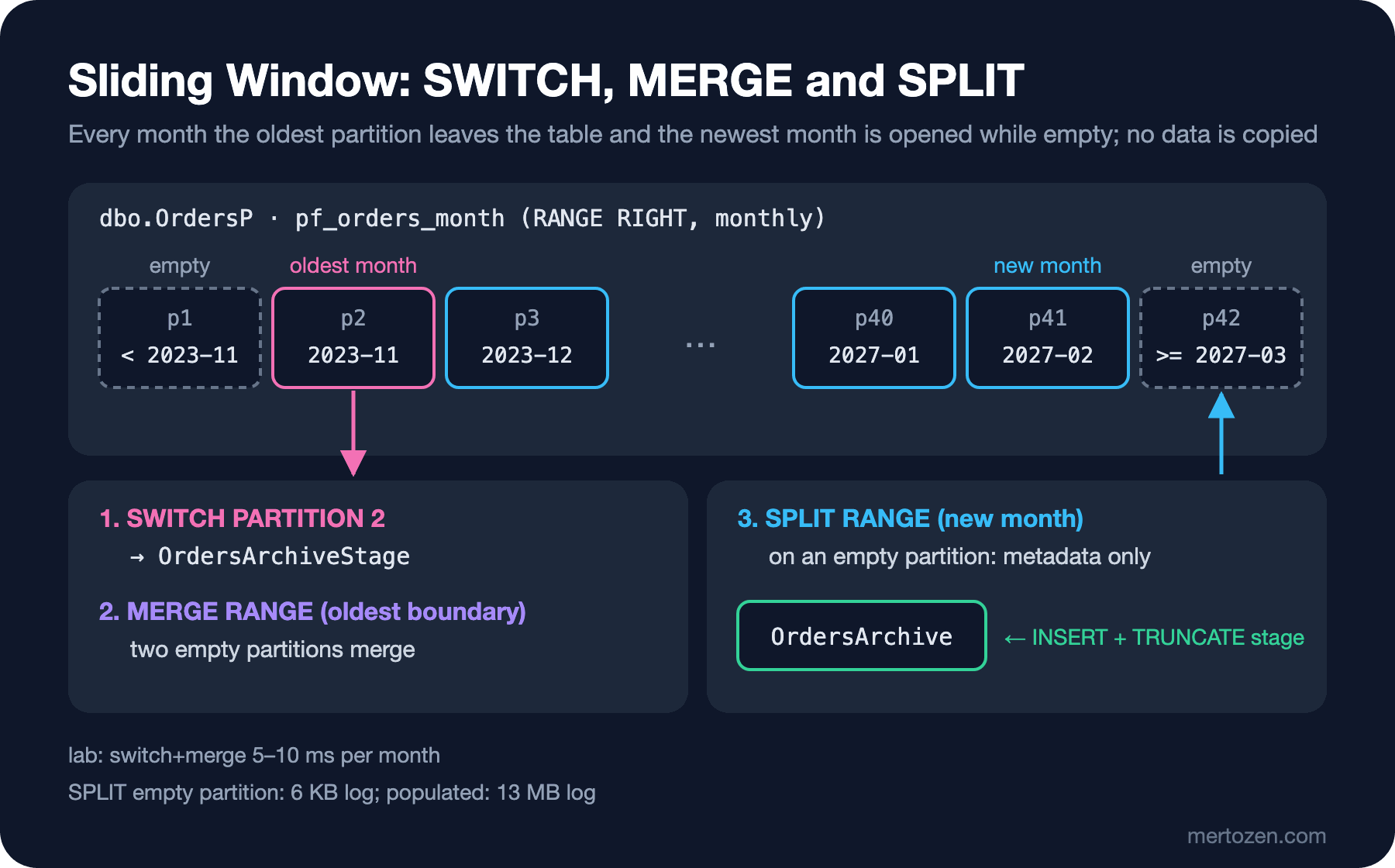
The way to take out the oldest month: the partition's data moves, with a metadata change only, to an empty table on the same filegroup with the same structure and the same indexes (SWITCH). Then MERGE RANGE merges two empty partitions. We put all the steps into a procedure; its core:
BEGIN TRANSACTION;
ALTER TABLE dbo.OrderItemsP SWITCH PARTITION 2 TO dbo.OrderItemsArchiveStage
    WITH (WAIT_AT_LOW_PRIORITY (MAX_DURATION = 1 MINUTES, ABORT_AFTER_WAIT = SELF));
ALTER TABLE dbo.OrdersP SWITCH PARTITION 2 TO dbo.OrdersArchiveStage
    WITH (WAIT_AT_LOW_PRIORITY (MAX_DURATION = 1 MINUTES, ABORT_AFTER_WAIT = SELF));
ALTER PARTITION FUNCTION pf_orders_month() MERGE RANGE (@oldest);
COMMIT;
SET @switchMs = DATEDIFF(MILLISECOND, @t, SYSDATETIME());

BEGIN TRANSACTION;
INSERT INTO dbo.OrdersArchive (OrderId, CustomerId, Status, TotalAmount, Currency, CreatedAt)
SELECT OrderId, CustomerId, Status, TotalAmount, Currency, CreatedAt FROM dbo.OrdersArchiveStage;
SET @orders = @@ROWCOUNT;
INSERT INTO dbo.OrderItemsArchive (OrderId, LineNumber, BookId, Quantity, UnitPrice)
SELECT OrderId, LineNumber, BookId, Quantity, UnitPrice FROM dbo.OrderItemsArchiveStage;
TRUNCATE TABLE dbo.OrdersArchiveStage;
TRUNCATE TABLE dbo.OrderItemsArchiveStage;
COMMIT;
SWITCH needs a schema modification lock on both tables; if a long query holds the table, it waits, and while waiting it makes everyone behind it wait. WAIT_AT_LOW_PRIORITY keeps it from jumping ahead of other queries while waiting, and ABORT_AFTER_WAIT = SELF makes it give up itself if it can't get the lock within a minute; the job tries again the next day. Having the three steps in the same transaction guarantees everything is rolled back if the items are taken out but the orders can't be. Copying into post 03's dbo.OrdersArchive tables is a second, separate transaction; it doesn't touch the live table. We ran the procedure with a 3-year window:
EXEC dbo.SlideOrdersWindow @keepFrom = '2023-11-01', @openUntil = '2027-02-01';archived 2022-12: 944 orders, switch+merge 10 ms, copy 10 ms
archived 2023-01: 1844 orders, switch+merge 5 ms, copy 20 ms
archived 2023-02: 2440 orders, switch+merge 10 ms, copy 20 ms
archived 2023-03: 3558 orders, switch+merge 5 ms, copy 30 ms
archived 2023-04: 4301 orders, switch+merge 10 ms, copy 30 ms
archived 2023-05: 5330 orders, switch+merge 10 ms, copy 35 ms
archived 2023-06: 6016 orders, switch+merge 5 ms, copy 39 ms
archived 2023-07: 7101 orders, switch+merge 5 ms, copy 40 ms
archived 2023-08: 8003 orders, switch+merge 5 ms, copy 50 ms
archived 2023-09: 8601 orders, switch+merge 5 ms, copy 55 ms
archived 2023-10: 9774 orders, switch+merge 6 ms, copy 63 msWe had taken November 2022 out by hand in the foreign key experiment; the remaining eleven months moved to the archive with the part touching the live table under 10 ms per month. 58,047 orders in total; none of the log and locks post 03's keyset batch job produced for the same work are on the live table. If there's no need to copy to an archive, TRUNCATE TABLE dbo.OrdersP WITH (PARTITIONS (2 TO 4)) empties partitions directly; in the lab it deleted 2,923 rows on a separate table. The procedure also opens empty months up to @openUntil; on the next run, with @openUntil = '2027-03-01', it printed opened partition from 2027-03-01.
Moving Lock Escalation to the Partition Level
In post 03 we saw a delete that crossed 5,000 locks lock the whole table. On a partitioned table, LOCK_ESCALATION = AUTO escalates to the partition (HoBT) level instead of the table. While one session updated October's 41 thousand orders and kept its transaction open, another session read September:
ALTER TABLE dbo.OrdersP SET (LOCK_ESCALATION = AUTO);== LOCK_ESCALATION = AUTO
resource_type|request_mode|locks
-------------|------------|-----
HOBT|IX|1
OBJECT|IX|1
HOBT|X|1
(3 rows affected)
SeptemberOrders
---------------
39410
(1 rows affected)
== LOCK_ESCALATION = TABLE
resource_type|request_mode|locks
-------------|------------|-----
OBJECT|X|1
(1 rows affected)
Msg 1222, Level 16, State 56, Server sql1, Line 6
Lock request time out period exceeded.With the default TABLE, the update locked the table with X and the September read hit the 3-second lock timeout. With AUTO, only October's partition was locked with X and the read completed. On one condition: the read must not touch the October partition at all. When we wrote the same read with parameters, the "include the next partition too" behaviour we saw above made it visit the October partition, and it waited again. Microsoft's documentation also notes that AUTO can increase the risk of deadlocks between sessions escalating on different partitions; that's why it isn't the default.
SQL Server and PostgreSQL Compared
| Topic | PostgreSQL (07) | SQL Server (08) |
|---|---|---|
| Definition | Parent table + PARTITION OF child tables | Partition function + scheme, table on the scheme |
| Boundary | Lower bound inclusive, upper bound exclusive | Choose RANGE LEFT or RIGHT (default LEFT) |
| Archive | DETACH PARTITION ... CONCURRENTLY | SWITCH + MERGE RANGE |
| Foreign key | Detach the referencing side first, drop the foreign key | The referenced table can't be switched while the foreign key is enabled |
| New period | Open empty partitions ahead; avoid a default partition | Only SPLIT an empty partition |
| Elimination trap | Wrapping the partition key in a function | Parameter type not matching the column type |
In Production
Verify elimination in the plan. RunTimePartitionSummary in the plan XML and Scan count in SET STATISTICS IO show the number of partitions clearly. If a query against the partitioned table shows up among the top logical-read queries in Query Store, the parameter type is the first place to look.
Always keep the window with empty ends. Keep at least one, preferably several, empty partitions at the right; if the job doesn't run for a few days, new orders pile up in the last partition and splitting it turns into splitting a populated partition. Set an alert on the row count of the rightmost partition.
Limit lock waits. SWITCH, SPLIT and MERGE need a schema modification lock; without WAIT_AT_LOW_PRIORITY and the job's own timeout, a long report query locks the whole table. Run the job at the quietest hour.
Keep the number of partitions reasonable. SQL Server supports up to 15,000 partitions per table, but the documentation warns about the effect of hundreds and thousands of partitions on memory, index operations and DBCC CHECKDB time, and doesn't support creating non-aligned indexes on tables with more than 1,000 partitions. Monthly partitions with a 3-year window mean around 40 partitions.
Common Pitfalls
Not writing the RANGE type: since the default is LEFT, the month's first midnight falls into the previous month.
Running SPLIT on a populated partition: in the lab, 13 MB of log and a half-second table lock for a month with 41 thousand orders; minutes at the size of production months.
Adding a non-aligned index: a single non-aligned index stops the whole SWITCH flow. Always create indexes on the scheme.
Querying the partitioned table with AddWithValue(DateTime): the parameter goes out as datetime and all 52 partitions are read.
Using partitioning in place of index design: "My orders" and order details did 24–32 times as many logical reads on the partitioned table. Partitioning's gain is in archiving and maintenance; query speed comes from indexes.
A Small Experiment
★☆☆ Repeat the AddWithValue(DateTime) experiment with a table whose partitioning column is datetime2(7), as in OrdersP7. How many partitions are read? Look at which side the CONVERT_IMPLICIT in the plan applies to.
★★☆ Write the order details query as WHERE OrderId = @id AND CreatedAt = @createdAt and measure the logical reads. Find a way to get the same gain without adding the date to Bookstore's order details URL (hint: can the month be derived from OrderId?).
★★★ Call SlideOrdersWindow from a .NET background job: the job runs every night, and if the procedure gives up because of WAIT_AT_LOW_PRIORITY, it logs that and raises an alert. Verify the behaviour by running the job while a long report query is open.
Partitioning split the data inside a single server. In the next post we split data across servers: sharding. Choosing a shard key, an application-level shard resolver in .NET, making PostgreSQL distributed with Citus, and the cost of cross-shard queries.