

Inside TLS: The Record Layer, Key Schedule, Forward Secrecy and SslStream Settings in .NET
Recorded TLS 1.3 traffic can't be decrypted with the server's private key, because the traffic keys are derived with HKDF from a new X25519 key exchange on every connection. With real outputs we verify the key schedule against RFC 8448 test vectors and show AES-GCM in the record layer, decrypting our own traffic with .NET's SSLKEYLOGFILE support, the resumption and 0-RTT risk, and the EnabledSslProtocols and CipherSuitesPolicy settings.
Version note: The code in this post was built and run with .NET 10 and xUnit v3 4.0; the outputs were taken on Ubuntu 24.04 (OpenSSL 3.0).
Guess First
At Bookstore a request between Ordering and Bookstore.Api occasionally arrives corrupted, and someone on the team proposes a plan: "Let's record the traffic in front of the server; when there's a problem we give the server's private key to Wireshark, open the capture and look." The mTLS connection we built in the previous post speaks TLS 1.3. We have the capture and we have the private key. Can we decrypt the capture?
We can't. In TLS 1.3 the key in the server's certificate only signs; the keys that encrypt the traffic are derived from a temporary key exchange that is generated anew for every connection and disappears when the connection ends. That property is called forward secrecy. In this post we look at how those keys are derived (the key schedule), how AEAD is used in the record layer, TLS settings in .NET, and how to decrypt our own traffic with .NET's key log. The handshake's message flow, the certificate chain, SNI and ALPN were covered in the TLS 1.3 handshake post of the Networking and HTTP series; here we pick up where it left off, at the secrets that come out of the handshake.
The Key Schedule: From Secrets to Traffic Keys
All of TLS 1.3's keys are produced with HKDF, which we saw in the second post of the series. The chain has three stages: Early Secret, Handshake Secret and Master Secret. The Handshake Secret is where the key exchange comes in, the shared secret computed with X25519; that secret is produced anew for every connection. From each stage a separate traffic secret is derived for each direction, and from each traffic secret come that direction's AES key and IV:
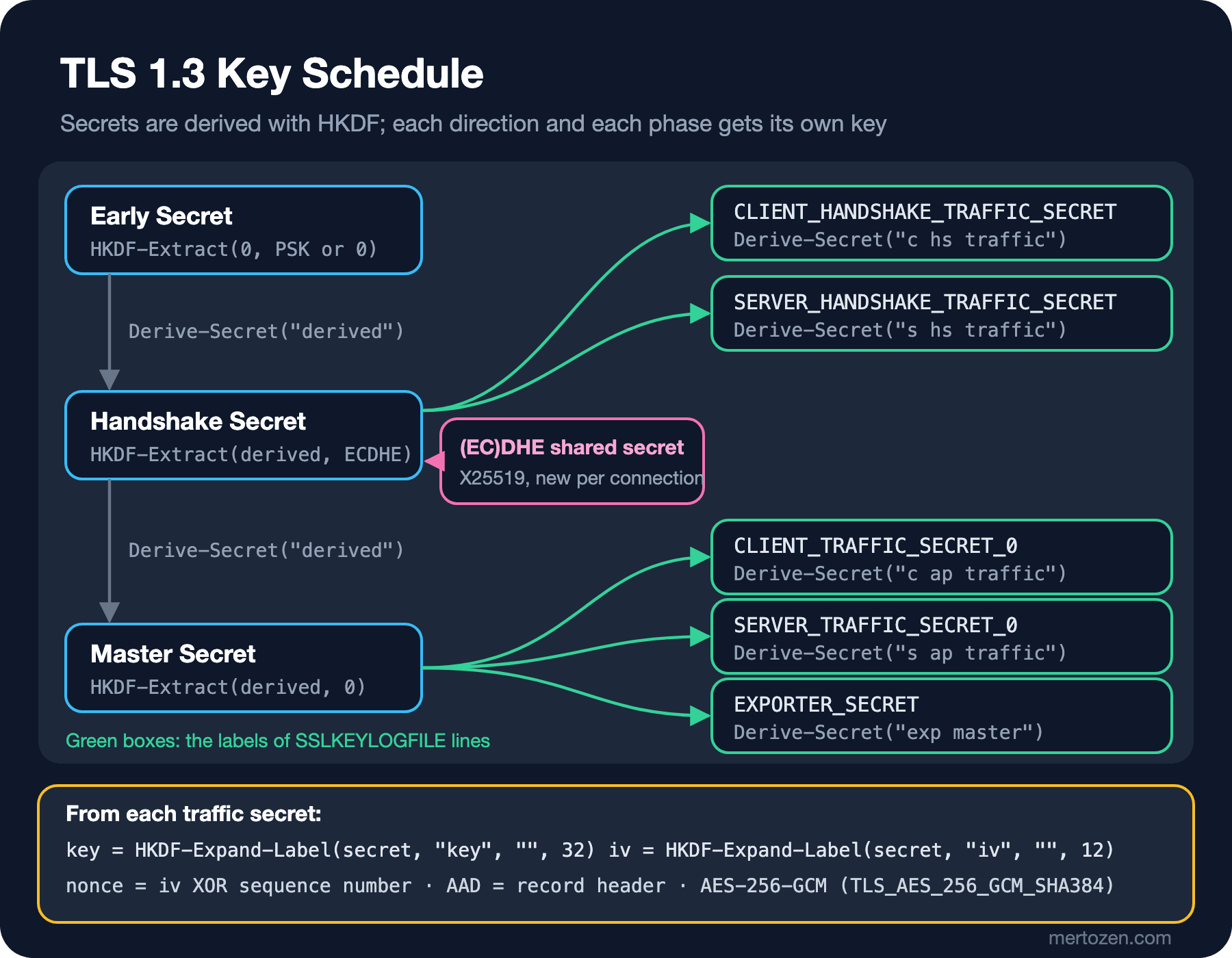
Underneath every derivation there's a single helper: HKDF-Expand-Label. According to RFC 8446 it amounts to building the info parameter for HKDF-Expand in a specific structure: the requested length, the label prefixed with "tls13 ", and a context. In the second post of the series we separated keys with info; TLS uses the same idea. We added a small Tls folder to the Bookstore.Crypto library, for learning and diagnostics only:
// HKDF-Expand-Label(Secret, Label, Context, Length): info = length(2) | "tls13 " + label (1+n) | context (1+m)
public static byte[] ExpandLabel(HashAlgorithmName hash, ReadOnlySpan<byte> secret, string label, ReadOnlySpan<byte> context, int length)
{
    byte[] fullLabel = Encoding.ASCII.GetBytes("tls13 " + label);
    byte[] info = [(byte)(length >> 8), (byte)length, (byte)fullLabel.Length, .. fullLabel, (byte)context.Length, .. context];
    byte[] output = new byte[length];
    HKDF.Expand(hash, secret, output, info);
    return output;
}

// [sender]_write_key and [sender]_write_iv from a traffic secret
public static TlsTrafficKeys TrafficKeys(HashAlgorithmName hash, ReadOnlySpan<byte> trafficSecret, int keyLength) =>
    new(ExpandLabel(hash, trafficSecret, "key", [], keyLength), ExpandLabel(hash, trafficSecret, "iv", [], 12));
Don't trust crypto code you wrote yourself until you've checked it against a test vector. RFC 8448 publishes every intermediate value of a complete TLS 1.3 handshake, and our tests use those values. From the Handshake Secret and the transcript hash we get the "s hs traffic" secret, and from that the key and IV, exactly as in the RFC:
[Theory]
[InlineData("b67b7d690cc16c4e75e54213cb2d37b4e9c912bcded9105d42befd59d391ad38", "3fce516009c21727d0f2e4e86ee403bc", "5d313eb2671276ee13000b30")]
[InlineData("9e40646ce79a7f9dc05af8889bce6552875afa0b06df0087f792ebb7c17504a5", "17422dda596ed5d9acd890e3c63f5051", "5b78923dee08579033e523d9")]
public void Traffic_key_and_iv_match_rfc8448(string trafficSecret, string key, string iv)
{
    TlsTrafficKeys keys = TlsKeySchedule.TrafficKeys(HashAlgorithmName.SHA256, Hex(trafficSecret), keyLength: 16);
    Assert.Equal(key, Convert.ToHexStringLower(keys.Key));
    Assert.Equal(iv, Convert.ToHexStringLower(keys.Iv));
}
That the transcript hash goes into the derivation is an important detail: the traffic secrets depend on the hash of every handshake message so far. If a single byte of the handshake changes, the two sides derive different keys and the connection breaks at the Finished message.
AEAD in the Record Layer
Once the handshake is over, everything travels in records: a 5-byte header (type, a legacy version field, length) and the encrypted content. In TLS 1.3 every encrypted record shows application_data as its type from the outside; the real type is hidden at the end of the encrypted content. To decrypt a record, what we learned about AES-GCM in the third post of the series is enough:
// RFC 8446 5.2-5.3: nonce = iv XOR sequence number, AAD = record header,
// plaintext = content | real content type | zero padding
public static (TlsContentType Type, byte[] Content) Decrypt(TlsTrafficKeys keys, ulong sequenceNumber, TlsRecord record)
{
    byte[] nonce = keys.Iv.ToArray();
    Span<byte> sequence = stackalloc byte[8];
    BinaryPrimitives.WriteUInt64BigEndian(sequence, sequenceNumber);
    for (int i = 0; i < 8; i++)
    {
        nonce[nonce.Length - 8 + i] ^= sequence[i];
    }

    const int TagSize = 16;
    ReadOnlySpan<byte> fragment = record.Fragment;
    byte[] plaintext = new byte[fragment.Length - TagSize];
    using AesGcm aes = new(keys.Key, TagSize);
    aes.Decrypt(nonce, fragment[..^TagSize], fragment[^TagSize..], plaintext, record.Header);

    int end = plaintext.Length - 1;
    while (end >= 0 && plaintext[end] == 0)
    {
        end--;
    }

    return ((TlsContentType)plaintext[end], plaintext[..end]);
}
Remember the nonce rule from the third post: never use the same nonce twice with one key. TLS solves this with a counter: each direction has its own sequence number, which goes up by one per record and is XORed with the fixed IV. As long as the counter doesn't repeat, neither does the nonce, and there's no random nonce anywhere. The record header goes in as AAD; changing a single byte of the header or the sequence number breaks authentication. Our tests decrypt the client record from RFC 8448 and lock in both of those tampering cases too:
$ dotnet test
Test run summary: Passed!
  total: 61
  failed: 0
  succeeded: 61
  skipped: 0
  duration: 5s 358ms
Decrypting Your Own Traffic: SSLKEYLOGFILE
Here's the real answer to the question in Guess First. To decrypt traffic later you don't need the private key, you need the connection's traffic secrets. The standard format for writing those secrets to a file is SSLKEYLOGFILE; it was published as RFC 9850 in July 2026, and tools like Wireshark can read the file. The RFC states plainly that the mechanism is for development and diagnostics only and must not be used in a production system.
In .NET the situation is this: SslStream on Linux (the path that uses OpenSSL) can write the secrets to the file named by the SSLKEYLOGFILE environment variable. Release builds also require the System.Net.EnableSslKeyLogging AppContext switch to be on; I verified this in the SslKeyLogger source in the dotnet/runtime repository. According to the same source, the Schannel path that SslStream uses on Windows doesn't write this file. The lab command turns the switch on before the first TLS connection, opens a loopback connection between two endpoints, records the raw bytes on the client side with a wrapper stream, and then decrypts that recording with the secrets from the key log:
string path = Environment.GetEnvironmentVariable("SSLKEYLOGFILE") ?? throw new InvalidOperationException("Set SSLKEYLOGFILE");
// Release builds of .NET also need this switch; it is read once, at the first TLS connection
AppContext.SetSwitch("System.Net.EnableSslKeyLogging", true);
$ SSLKEYLOGFILE=certs/keylog.txt dotnet run --project src/Bookstore.CryptoLab -- tls-keylog
Tls13, TLS_AES_256_GCM_SHA384
key log labels: SERVER_HANDSHAKE_TRAFFIC_SECRET, CLIENT_HANDSHAKE_TRAFFIC_SECRET, EXPORTER_SECRET, SERVER_TRAFFIC_SECRET_0, CLIENT_TRAFFIC_SECRET_0
connection 1: client_random 21b63924684e7c35..., CLIENT_TRAFFIC_SECRET_0 c06953236efc8c6d...
client -> server
Handshake 277 B plaintext: ClientHello
ChangeCipherSpec 1 B plaintext: (compatibility, ignored in TLS 1.3)
ApplicationData 69 B c hs traffic, seq 0: Handshake Finished
ApplicationData 103 B c ap traffic, seq 0: ApplicationData "{"orderId":"0197f001-0000-7000-8000-0000..."
server -> client
Handshake 122 B plaintext: ServerHello
ChangeCipherSpec 1 B plaintext: (compatibility, ignored in TLS 1.3)
ApplicationData 23 B s hs traffic, seq 0: Handshake EncryptedExtensions
ApplicationData 1060 B s hs traffic, seq 1: Handshake Certificate
ApplicationData 95 B s hs traffic, seq 2: Handshake CertificateVerify
ApplicationData 69 B s hs traffic, seq 3: Handshake Finished
ApplicationData 282 B s ap traffic, seq 0: Handshake NewSessionTicket
ApplicationData 282 B s ap traffic, seq 1: Handshake NewSessionTicket
ApplicationData 25 B s ap traffic, seq 2: ApplicationData "reserved"
connection 2: client_random d8fb21b0d5e575af..., CLIENT_TRAFFIC_SECRET_0 ed444d0d4b2b1bc6...
same certificate, different traffic secret: TrueThis output shows the key schedule live. ClientHello and ServerHello are plaintext; the key exchange happens in exactly these two messages. Even the server's certificate is encrypted: in TLS 1.2 it could be read off the network, in 1.3 it travels under the handshake traffic key. Each direction first counts from 0 under its own handshake key; after the Finished message it switches to the application traffic key and starts the sequence number from 0 again. The two NewSessionTickets the server sends are tickets for resuming the session later. Out of records whose outer type is ApplicationData come handshake messages and our JSON. The lab writes the key log for its own loopback connection and I delete it afterwards; the secrets and client random are shown shortened here.
Forward Secrecy, Resumption and 0-RTT
The last two lines of the output show where forward secrecy comes from: the second connection, made with the same certificate, has a completely different traffic secret, because the X25519 shared secret that goes into the Handshake Secret comes from temporary keys generated anew for each connection. The certificate's key only signs, in the CertificateVerify message; even if it's stolen later, it isn't enough to recompute the secrets of past connections. In TLS 1.2 cipher suites that used RSA key transport, it was different: the premaster secret was encrypted with the server's public key and sent, and whoever held the private key could open recorded traffic later. RFC 8446 removed these static RSA and Diffie-Hellman cipher suites from TLS 1.3 entirely.
Resumption reduces the cost of a full handshake with a PSK obtained through NewSessionTicket. I connected to the lab's tls-server command with openssl s_client, saved the ticket and used it on a second connection:
$ echo hi | openssl s_client -connect 127.0.0.1:7444 -servername localhost -CAfile certs/root-ca.crt.pem -sess_out certs/sess.pem -ign_eof
New, TLSv1.3, Cipher is TLS_AES_256_GCM_SHA384
$ echo hi | openssl s_client -connect 127.0.0.1:7444 -servername localhost -CAfile certs/root-ca.crt.pem -sess_in certs/sess.pem -ign_eof
Reused, TLSv1.3, Cipher is TLS_AES_256_GCM_SHA384
Early data was not sent
    Max Early Data: 0
TLS 1.3 resumption can do a new key exchange together with the PSK, which keeps forward secrecy. What really needs care is 0-RTT: with the PSK, the client can send data in its first message without waiting for the server's response. According to RFC 8446 this "early data" is encrypted only under keys derived from the PSK, so it has no forward secrecy, and it isn't protected against replay between connections; someone on the network can send the same request to the server again. A stock reservation or a payment running twice is exactly what we don't want. On the .NET side you can't opt into this risk anyway: there's no early data setting among the public properties of SslClientAuthenticationOptions and SslServerAuthenticationOptions, only AllowTlsResume, which turns resumption off. The server announcing "Max Early Data: 0" in the ticket shows the same thing. If you turn on 0-RTT at a reverse proxy or CDN, make sure it's allowed only for idempotent requests.
The TLS 1.2 and 1.3 Cipher Suite Models
In TLS 1.2 a cipher suite name said everything: TLS_ECDHE_ECDSA_WITH_AES_256_GCM_SHA384 picks the key exchange (ECDHE), the certificate signature (ECDSA), the encryption and the hash together. In TLS 1.3 the suite picks only the AEAD and the hash: TLS_AES_256_GCM_SHA384. The key exchange group (such as X25519) and the signature algorithm are negotiated through separate extensions, and RFC 8446 defines just five suites. The tls-handshake command tries different settings with the same certificate:
$ dotnet run --project src/Bookstore.CryptoLab -- tls-handshake
OS defaults             : Tls13, TLS_AES_256_GCM_SHA384
both TLS 1.2            : Tls12, TLS_ECDHE_ECDSA_WITH_AES_256_GCM_SHA384
server 1.3, client 1.2  : AuthenticationException: SSL Handshake failed with OpenSSL error - SSL_ERROR_SSL.
server ChaCha20 only    : Tls13, TLS_CHACHA20_POLY1305_SHA256
The first line matters most: when we don't set EnabledSslProtocols at all (its value is SslProtocols.None), the operating system picks the version and the result is TLS 1.3. Microsoft's TLS guide also recommends not writing the version into code and leaving the decision to the operating system: new versions get used without code changes, and versions found to be insecure are turned off by the operating system. The third line is the price of pinning the version: a client that asks only for TLS 1.2 can't connect to a server that accepts only 1.3. The OpenSSL in the error message shows that this output comes from Linux; on Windows the same case comes back with a Schannel error.
In the fourth line the server allowed only ChaCha20-Poly1305 through CipherSuitesPolicy. This setting works on Linux; according to Microsoft's SslStream guidance, on Windows even creating a CipherSuitesPolicy throws NotSupportedException, and cipher suites aren't configured from application code but machine-wide with the Enable-TlsCipherSuite and Disable-TlsCipherSuite PowerShell cmdlets. Keeping a suite list in code also shuts out the improvements the operating system brings with updates; unless you have a hard compliance requirement, leave it alone.
Observing with openssl s_client
The quickest way to see what the other side speaks is openssl s_client. Connecting to the lab's server shows the negotiated version, suite and key exchange group at a glance:
$ echo hi | openssl s_client -connect 127.0.0.1:7444 -servername localhost -CAfile certs/root-ca.crt.pem -brief
CONNECTION ESTABLISHED
Protocol version: TLSv1.3
Ciphersuite: TLS_AES_256_GCM_SHA384
Peer certificate: O = Bookstore, CN = api.bookstore.test
Hash used: SHA256
Signature type: ECDSA
Verification: OK
Server Temp Key: X25519, 253 bits
$ echo hi | openssl s_client -connect 127.0.0.1:7444 -servername localhost -CAfile certs/root-ca.crt.pem -tls1_2 -brief
Protocol version: TLSv1.2
Ciphersuite: ECDHE-ECDSA-AES256-GCM-SHA384
Server Temp Key: X25519, 253 bits
The "Server Temp Key" line is the evidence of forward secrecy: a temporary X25519 key. The TLS 1.2 connection uses ECDHE too, so it has forward secrecy; the problem isn't TLS 1.2 itself but the old RSA key transport suites and weak algorithms it allows. If your server still accepts TLS 1.2, this is how you can check that suites without ECDHE are off.
Production Notes
Decide consciously where TLS terminates. If it terminates at a reverse proxy, the network between the proxy and the application is also an attack surface; internal traffic may need its own TLS connection or the mTLS from the previous post. The Web Servers and Hosting series covers these setups. If it terminates in the application, the version and suite decision depends on the operating system of the machine Kestrel runs on; add the Schannel settings of your Windows servers, and the OpenSSL version and /etc/ssl/openssl.cnf in your Linux container images, to your inventory.
You have two layers of protection against leaking the key log into production: turn the switch on only in development configuration, and verify with a build check that SSLKEYLOGFILE isn't set in your container images. A key log file is a key file that opens every connection in it; protect it like a private key and delete it when you're done.
For measurement, log or collect as a metric which version and suite were negotiated: SslStream.SslProtocol and NegotiatedCipherSuite give you that. The answer to "can we turn off TLS 1.2?" is in that metric.
Common Pitfalls
The first pitfall is the one from Guess First: believing recorded TLS 1.3 traffic can be decrypted with the server's private key. Diagnosis needs the traffic secrets; in production the right tool is application-level logging and tracing.
The second is enabling old protocols "for compatibility". TLS 1.0 and 1.1 were deprecated by RFC 8996. If an old partner needs them, isolate that connection on a separate endpoint, a separate machine or a separate proxy; don't lower the version floor of the whole service.
The third is pinning the version in code. A client that writes EnabledSslProtocols = SslProtocols.Tls12 stays on 1.2 even if the operating system supports TLS 1.3. Microsoft's guide also warns that SslProtocols.Default picks old protocols.
The fourth is turning the key log mechanism on for diagnosis and forgetting to turn it off, or writing the file to a shared directory.
The fifth is assuming CipherSuitesPolicy works on every platform. On Windows, creating the object throws; if your code also runs on Windows, put this setting behind a platform check; our lab command guards it with OperatingSystem.IsLinux().
A Small Experiment
★☆☆ Add a line to the tls-handshake command where the server allows only TLS_AES_128_GCM_SHA256 through CipherSuitesPolicy. Does tls-keylog work with that suite? Which hash and key length are used?
★★☆ Write a test that decrypts the client's encrypted Finished record from RFC 8448 (17 03 03 00 35 ...). For that you'll first need to derive the "c hs traffic" secret with DeriveSecret from the RFC's Handshake Secret and transcript hash.
★★★ In the tls-keylog output, parse the NewSessionTicket messages the server sends: print the ticket lifetime and the ticket length. Then check whether the server stops sending tickets with AllowTlsResume = false.
In this post we saw that the keys encrypting the traffic are regenerated for each connection with X25519. That's enough against today's attacker, but not against someone who records traffic today and plans to decrypt it years later with a quantum computer. In the next post we move to post-quantum cryptography: NIST's new standards and hybrid key exchange in TLS.