

Rollback or Roll Forward? Rollback Plans, Kill Switches and Automated Rollback Criteria
There are four ways back: kill switch, artifact rollback, roll forward and limiting the impact; the choice depends on flags, the readiness of the previous artifact and schema compatibility. An atomic symlink switch, a Down migration that restores the column but not its 300,004 names, git revert of a merge commit, an automated trigger rolling back a 20%-failing version in 10 s (18 of 85 requests failed), a runbook template and measuring with DORA.
Version note: The examples in this post were run with .NET 10 (SDK 10.0.402), EF (Entity Framework) Core 10.0.14, PostgreSQL 18.6, Nginx 1.30, Docker 29 and Git 2.54.
Guess First
In the sixth post of the series we dropped the Customers.FullName column. Now a bug makes you want to go back, and you run EF Core's Down() method. Does the column come back? What about the 300,000 names inside it?
Second question: you put a new version live with blue-green and 20% of requests fail. A script measures the error rate every five seconds and switches back when it crosses a threshold. How many users see an error?
Four Ways Back
When something goes wrong after a deploy, you have four options. A rollback returns to the previous working version. A roll forward quickly ships a new version that fixes the bug. A kill switch turns the behavior off without changing code. Limiting the impact means reducing traffic, narrowing the feature to certain users or going into maintenance mode; it doesn't solve the problem, it buys time. The right choice depends on where the bug is, whether the previous version is still ready, and whether data changed. The decision tree below asks those questions in order:
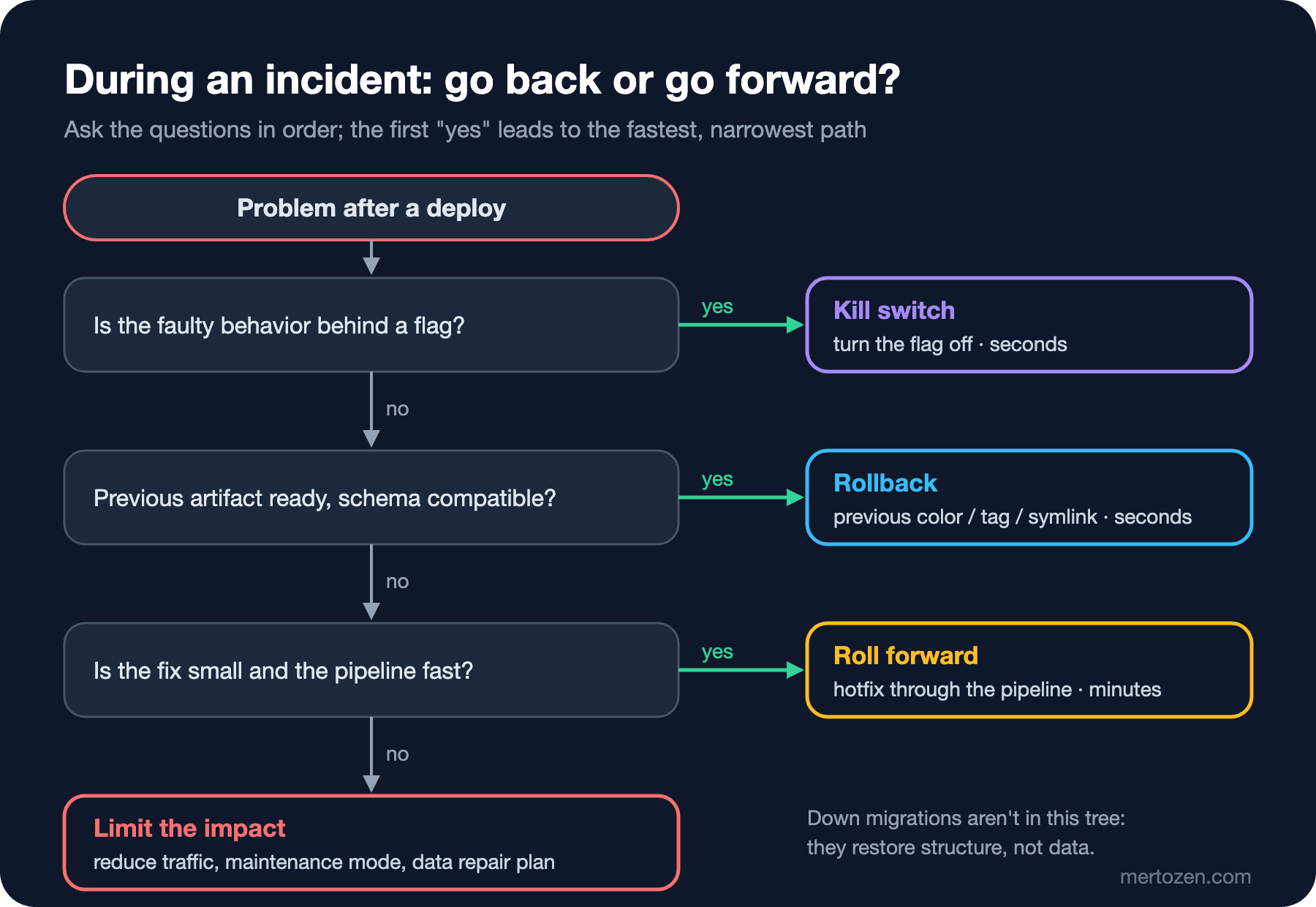
The tree's first question is deliberately "is there a flag?". A kill switch is both the fastest and the narrowest: it turns off only the faulty behavior and doesn't revert the other fixes in the same deploy. In the seventh post of the series, Bookstore's recommendations flag took effect 0.4 seconds after the config change.
Artifact Rollback: Is the Previous Version Ready?
Rollback speed depends on one thing: how ready is the previous version's artifact? The immutable artifact idea from the "Build Once, Deploy Many" post of the upcoming Continuous Integration and Continuous Delivery (CI/CD) Fundamentals series earns its value right here. There are four common forms.
On a VM (Virtual Machine) or bare-metal server, each version is unpacked into its own folder and a current symlink points at the active one. Going back means pointing the symlink at the previous folder:
#!/usr/bin/env bash
# activate.sh VERSION: point current at releases/VERSION in one atomic rename
set -euo pipefail
root=/srv/bookstore
test -d "$root/releases/$1"
ln -sfn "$root/releases/$1" "$root/current.tmp"
mv -Tf "$root/current.tmp" "$root/current"
echo "current -> $(readlink "$root/current")"
activate.sh 1.4.0
activate.sh 1.5.0
activate.sh 1.4.0
activate.sh 1.3.9 || echo "exit=$?"current -> /srv/bookstore/releases/1.4.0
current -> /srv/bookstore/releases/1.5.0
current -> /srv/bookstore/releases/1.4.0
exit=1ln -sfn alone isn't atomic: it removes the old link first and then creates the new one, and for an instant current doesn't exist. Creating a temporary link first and moving it over with mv -T makes a single rename(2) call, which is atomic. Trying to switch to a version that doesn't exist stops the script at test -d. Don't forget to restart the app process after changing the symlink, because the running process was loaded from the old folder.
In the container world the artifact is an image, and rollback means going back to the previous tag. That's why you don't deploy with moving tags like latest. You must always know which tag is in production. In Kubernetes, going back to the previous ReplicaSet from the Deployment's rollout history is done with kubectl rollout undo; the mechanics are in the Deployment post of the upcoming Kubernetes series. In blue-green, rollback is a single switch as in the fourth post of the series, as long as the old environment is still up.
Why a Database Rollback Is Almost Never a Down Migration
EF Core generates a Down() for every migration, and when you give a bundle a target migration name it rewinds to that point. From the final state of the sixth post, I reverted the migration that dropped FullName:
./artifacts/efbundle-r4 MakeNamePartsRequired --connection "$DB_CONNECTION"Acquiring an exclusive lock for migration application. See https://aka.ms/efcore-docs-migrations-lock for more information if this takes too long.
Reverting migration '20261108034901_DropCustomerFullName'.
Done.The column came back. Let's look inside:
 Id | FullName | FirstName | LastName
----+----------+-----------+----------
  1 |          | Alan      | Lovelace
  2 |          | Grace     | Lovelace
(2 rows)

 fullname_null | total
---------------+--------
        300004 | 300004
(1 row)
FullName is empty in all 300,004 rows. Down() brings back the structure, not the data; the data in the dropped column now only exists in backups. Worse, the old code (v2) still doesn't work on this "rolled back" schema. The column exists, but v2 reads it as a required string and can't handle the empty value:
System.InvalidCastException: Column 'FullName' is null.
   at Npgsql.ThrowHelper.ThrowInvalidCastException_NoValue(FieldDescription field)
The answer to the first opening question: the column comes back, the names don't. EF Core's documentation also says plainly that a rollback runs the Down operations of every newer migration and may lose data. The practical rule is this: you don't rewind the database, you move forward in a way that never needs a rewind. The expand-contract from the sixth post does exactly that. Because expand steps are backward compatible, you don't need to undo them; the old code works with them. The contract step only runs once there's no longer any need to go back. If data really was corrupted, the fix isn't a migration but a data repair: restoring from a backup or with point-in-time recovery into a separate place and fixing the affected rows.
Roll Forward: When Is It Safer?
Roll forward means fixing the bug with a new version. In some cases it's safer than a rollback. If the new version changed a data format that the old version can't read, going back starts a second incident. If the same deploy contains other critical fixes, a rollback reverts those too. And if the previous version's artifact is gone, or it has its own security vulnerabilities, going back stops being an option.
The precondition for rolling forward is a fast and reliable pipeline. A hotfix must go through the normal pipeline, because tests skipped under stress bring the second bug. If the pipeline takes 45 minutes, rolling forward means a 45-minute outage. In that case, limit the impact first (kill switch, move traffic to the old environment), then ship the fix calmly.
The cleanest way to undo code is git revert; it produces a new commit that reverses the change without rewriting history. We covered it in detail in the Git & GitHub series post "Undoing Changes in Git, Part 2: git revert". One note from the deploy angle: when reverting a merged pull request you need to pick the mainline with -m 1:
git log --oneline --graph
git revert -m 1 --no-edit HEAD
* 8f1610d Merge pull request #42 from feature/discounts
|\
| * 67282f4 Apply 10% discount at checkout
|/
* 87c4173 Add pricing
[main 0056d49] Revert "Merge pull request #42 from feature/discounts"
Date: Sun Nov 8 07:02:38 2026 +0300
1 file changed, 1 deletion(-)A revert is a commit too, so it goes through the normal pipeline and is deployed as a new version. In other words, git revert is technically a roll forward.
Automated Rollback Triggers
A human takes minutes to see a bug and decide; a script takes seconds. I added a watcher to the blue-green environment from the fourth post of the series: after a switch it measures the 5xx rate of live traffic every five seconds and switches back to the previous color if it crosses the threshold:
#!/usr/bin/env bash
# auto-rollback.sh PREVIOUS_COLOR SECONDS: watch live 5xx after a switch, switch back if it is too high
set -euo pipefail
previous=$1
end=$((SECONDS + $2))
min_requests=50
max_error_pct=2
docker exec depwork-nginx sh -c ': > /var/log/nginx/bookstore.log'
while [ $SECONDS -lt $end ]; do
    sleep 5
    read -r total errors < <(docker exec depwork-nginx cat /var/log/nginx/bookstore.log |
        awk '{ n++; if ($2 >= 500) e++ } END { print n + 0, e + 0 }')
    echo "$(date +%T) requests=$total 5xx=$errors"
    if [ "$total" -ge "$min_requests" ] && [ $((errors * 100)) -gt $((total * max_error_pct)) ]; then
        echo "$(date +%T) error rate above ${max_error_pct}%, rolling back to $previous"
        ./switch.sh "$previous"
        exit 1
    fi
done
echo "$(date +%T) watch window passed, keeping the release"
I put a version on green that fails 20% of requests (BUG_FAIL_RATE=0.2), started the probe sending ten requests per second in the background, and switched:
./switch.sh green
./auto-rollback.sh blue 60
07:02:07 live=green preview=blue
07:02:12 requests=40 5xx=9
07:02:17 requests=81 5xx=17
07:02:17 error rate above 2%, rolling back to blue
07:02:17 live=blue preview=greenThe probe's totals:
200 1.1.0 67
500  18
200 1.0.0 121
Ten seconds after the switch, traffic was back on the old version. During that time 85 requests went to the new version and 18 of them failed. That's the answer to the second opening question, and it holds two details. The first measurement had 40 requests, so because of the min_requests=50 rule the script didn't decide. Not deciding on too little data is right, but errors happened during those first five seconds too. A shorter check interval, or a threshold tuned to the traffic, shortens that time. The second detail: this calculation is for blue-green as a whole. Had the same bug shipped in a 10% canary, the number of failed requests in the same ten seconds would have dropped to a tenth; the blast radius × detection time product from the first post of the series becomes concrete here.
In a real system you don't tie the trigger to a single metric. Common triggers: new instances that never become ready (Kubernetes' progressDeadlineSeconds), the 5xx rate within a window, p95 latency rising against the control group, and a business metric such as checkout completion dropping. All of them share the same two parameters: a minimum sample size and a window length. Argo Rollouts' analysis and Flagger let you define them declaratively. In the fifth post of the series we saw Argo Rollouts stop a faulty canary automatically.
A Runbook Template
Automated triggers don't catch everything. When a human steps in, the decision needs to be written down too. A one-page runbook per service answers these questions in advance:
- Where is the previous version, and which command goes back to it? (
./switch.sh blue,activate.sh 1.4.0, the image tag) - Which migrations are in this release, and are they backward compatible? If not, rollback isn't an option, so what's the roll-forward plan?
- Which flags came with this release, which are kill switches, and where are they turned off?
- Which metric at which threshold means "go back"? Who decides, and who gets notified?
- What do we verify after going back? (smoke test, error rate, data consistency queries)
Write the runbook before the deploy and run the rollback command for real at least once. Incident management itself is the topic of the upcoming SRE (Site Reliability Engineering) and Production Incidents series; the goal here is only that the technical way back is ready in advance.
Measuring with DORA
Two DORA (DevOps Research and Assessment) metrics show whether your rollback strategy works. With their current definitions on dora.dev: change fail rate is the ratio of deployments that require immediate intervention (a rollback or a hotfix) after the deploy; failed deployment recovery time is how long it takes to recover from such a deployment. DORA used to call the second one MTTR (Mean Time to Recovery), and in the current five-metric model it's joined by deployment rework rate: the ratio of unplanned deployments made because of an incident.
Adding two fields to your deploy records is enough to compute these metrics: "did this deploy require immediate intervention?" and "if so, when was it recovered?". The automated rollback above is a change failure from DORA's point of view, with a recovery time of ten seconds. A feature turned off with a kill switch counts the same way. Hiding failed deploys from the records to make the metric look nicer makes it meaningless.
Common Pitfalls
- Counting a down migration as a rollback plan. The structure comes back, the data doesn't; the column from the sixth post is the proof.
- Deleting the old artifact or old environment right away. The way back is most valuable in the first hours after a deploy.
- Deploying with the
latesttag. "The previous version" becomes ambiguous and rollback turns into guesswork. - Setting up automated rollback without a minimum sample size. A single 500 at night with low traffic rolls back a healthy version.
- Shipping a hotfix outside the pipeline. Tests skipped under stress are the most common cause of a second incident.
A Small Experiment
★☆☆ Change activate.sh to write directly to current with ln -sfn instead of mv -T, and switch versions quickly while calling readlink current in a loop. Do you ever see "No such file"?
★★☆ Lower the check interval of auto-rollback.sh to 1 second and min_requests to 10, and try again with the same faulty version. How much does the number of failed requests drop? With the same settings, does a healthy version get rolled back by mistake?
★★★ Write your last ten deploys to a CSV (Comma-Separated Values) file (date, version, required immediate intervention, recovery time) and write a small script that computes change fail rate and failed deployment recovery time.
Rolling, blue-green, canary, migrations, flags and the way back are now in our hands separately. In the final post we bring them together in one place: a pipeline that builds Bookstore with GitHub Actions, applies the expand migration, deploys to green and runs a smoke test, opens traffic in canary steps, and goes back when needed.