

Where Migrations Fit in a Deploy: Expand-Contract, EF Core Migration Bundles and Backward-Compatible Schemas
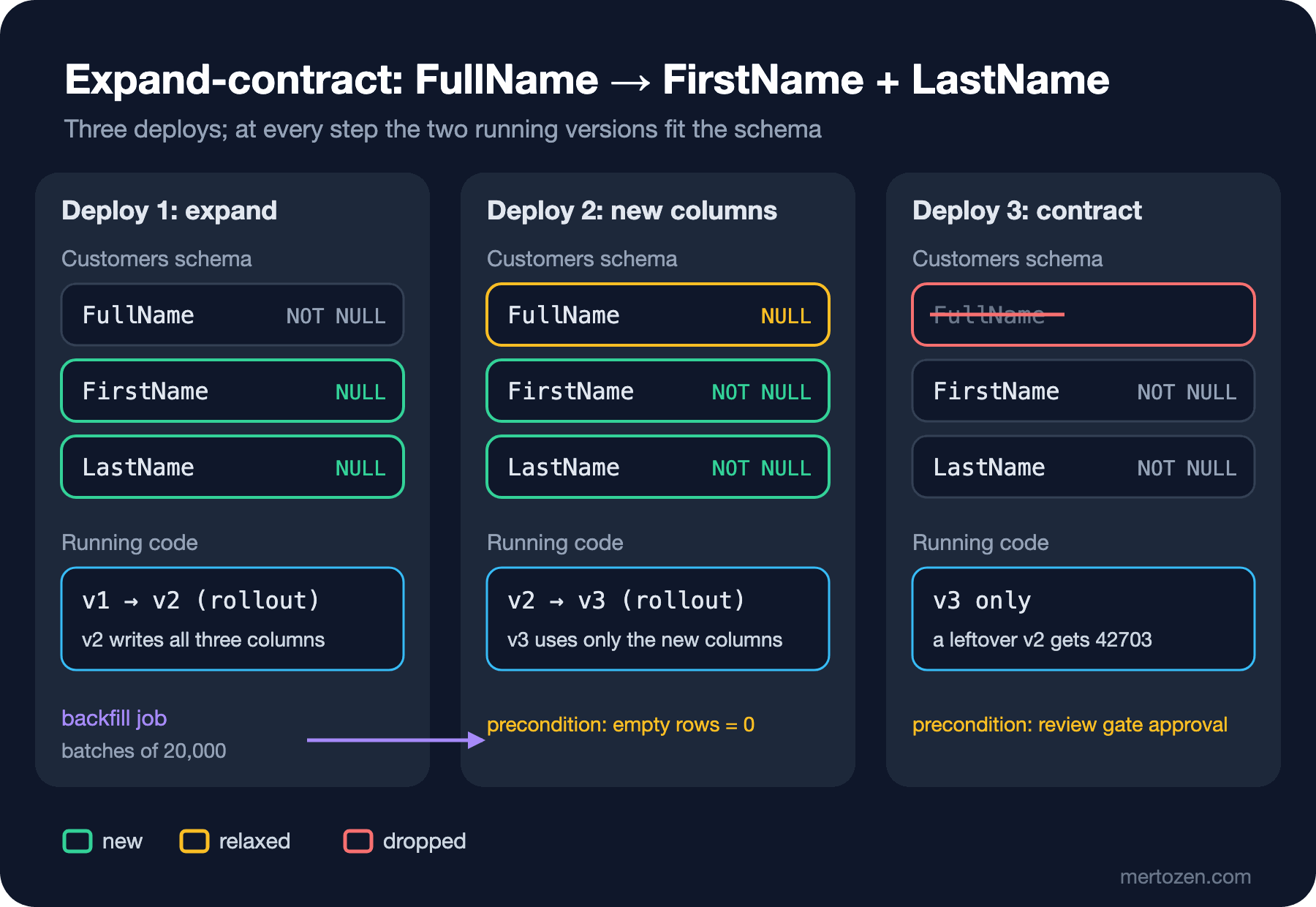
Safely splitting a column while two versions run side by side takes three deploys: add and dual-write, switch to the new columns, remove the old one. Real runs on PostgreSQL with 300,000 rows: v1 and v2 working together on one schema, the transaction error of a CONCURRENTLY index, deadlocks in parallel bundles because Npgsql's migration lock is tied to the transaction, 135 ms batches instead of an UPDATE locking for 8 s, and a review gate that stops DROP COLUMN.
Version note: The examples in this post were run with .NET 10 (SDK 10.0.402), EF (Entity Framework) Core 10.0.14, Npgsql.EntityFrameworkCore.PostgreSQL 10.0.3 and PostgreSQL 18.6.
Guess First
Bookstore's Customers table has 300,000 rows, and you want to split the FullName column into FirstName and LastName. The app is deployed with blue-green, so the old and new versions will use the same database for a while. How many deploys does it take: one, two or three?
Second question: since EF Core 9, Migrate() and migration bundles take a database lock. What happens if three pipelines run the same bundle at the same time? Does the lock always put them in line?
Why Not Database.Migrate() at Startup?
The easiest path is calling await db.Database.MigrateAsync() when the app starts. In a single-instance development environment that's fine, but combined with deployment strategies it has four problems, and EF Core's "Applying Migrations" document lists them too.
The first is concurrency. In rolling or blue-green, several instances start at the same time and all try to apply the migration. EF Core 9 solves this with a lock, but as we'll see shortly, that lock has an exception. The second is permissions. To change the schema, the app's database user needs DDL (Data Definition Language) permissions; normally the app should only be allowed to read and write. The third is duration. Creating an index on a large table takes minutes; meanwhile the instance can't become ready and the orchestrator may kill it as "failed to start". The fourth is control. The migration's SQL (Structured Query Language) runs in production without anyone seeing it, and if it goes wrong, the only way to stop it is to kill the process.
Instead, the document recommends two paths: a migration bundle for automated deploys, and a SQL script where review is required. A bundle is a single-file executable produced in CI (Continuous Integration). It needs neither the SDK, the EF tools nor the source code to run. We covered its commands in the EF Core series post "EF Core Migrations: migrations add, database update, Script and Bundle". Our question here is where in the deploy this step belongs.
Deploy Order: Expand Migration First, Then Code
The rule is simple: a migration meets the needs of the version about to be deployed without breaking the version still running. So the pipeline ships the migration first and the code second. Adding a new column follows this rule: old code doesn't see the column, new code uses it. Dropping or renaming a column doesn't: if old code still reads that column, it starts failing the moment the migration runs.
Danilo Sato's "ParallelChange" article calls this idea expand-contract: first add the new structure next to the old one (expand), move everyone to the new structure (migrate), finally remove the old one (contract). We saw the same approach for API (Application Programming Interface) contracts in the Microservices series post "Service Contracts and Versioning"; it works the same way in the database.
Step 1: Expand and Dual Write
The starting model has a single column:
public class Customer
{
    public int Id { get; set; }
    public required string FullName { get; set; }
    public required string Email { get; set; }
}
We add the new columns as nullable. The old version won't provide values for them when it INSERTs; if they were NOT NULL, the old version's INSERTs would fail:
public class Customer
{
    public int Id { get; set; }
    public required string FullName { get; set; }
    public string? FirstName { get; set; }
    public string? LastName { get; set; }
    public required string Email { get; set; }
}
protected override void Up(MigrationBuilder migrationBuilder)
{
migrationBuilder.AddColumn<string>(
name: "FirstName",
table: "Customers",
type: "text",
nullable: true);
migrationBuilder.AddColumn<string>(
name: "LastName",
table: "Customers",
type: "text",
nullable: true);
}Turning the migration into a bundle and running it:
dotnet ef migrations add AddCustomerNameParts --project Bookstore.Api
dotnet ef migrations bundle --project Bookstore.Api --output artifacts/efbundle-r2 --force
./artifacts/efbundle-r2 --connection "$DB_CONNECTION"
The new code (v2) ships in the same deploy. v2 writes to both places, and when reading it falls back to the old column if the new ones are empty:
app.MapGet("/api/customers/{id:int}", async (int id, BookstoreDbContext db) =>
{
    Customer? customer = await db.Customers.FindAsync(id);
    if (customer is null)
    {
        return Results.NotFound();
    }
        // use the new columns when they are filled, otherwise fall back to FullName
    (string first, string last) = customer.FirstName is not null
        ? (customer.FirstName, customer.LastName ?? "")
        : SplitFullName(customer.FullName);
    return Results.Ok(new { customer.Id, FirstName = first, LastName = last, customer.Email });
});

app.MapPost("/api/customers", async (CreateCustomer request, BookstoreDbContext db) =>
{
        // dual write: v1 still reads FullName, v2 reads the new columns
    Customer customer = new()
    {
        FirstName = request.FirstName,
        LastName = request.LastName,
        FullName = $"{request.FirstName} {request.LastName}",
        Email = request.Email,
    };
    db.Customers.Add(customer);
    await db.SaveChangesAsync();
    return Results.Created($"/api/customers/{customer.Id}", new { customer.Id });
});
After the expand migration I connected v1 and v2 to the same database and wrote and read from both:
v1 POST: {"id":300001}
v2 POST: {"id":300002}
v1 GET 1: {"id":1,"fullName":"Alan Lovelace","email":"user1@example.com"}
v2 GET 1: {"id":1,"firstName":"Alan","lastName":"Lovelace","email":"user1@example.com"}
v2 GET 300001: {"id":300001,"firstName":"Edsger","lastName":"Dijkstra","email":"edsger@example.com"}
v1 GET 300002: {"id":300002,"fullName":"Margaret Hamilton","email":"margaret@example.com"}
Id | FullName | FirstName | LastName
--------+-------------------+-----------+----------
1 | Alan Lovelace | |
300001 | Edsger Dijkstra | |
300002 | Margaret Hamilton | Margaret | HamiltonEach version can read what the other wrote. The new columns are empty in the row v1 wrote, but v2 derives them from FullName. FullName is filled in the row v2 wrote, so v1 can read it too. This is exactly what it means for two versions to live side by side during a rolling, blue-green or canary deploy. Rolling back is safe at this step as well: if you go back to v1, the new columns simply remain as two unused columns.
Indexes and the Limit of the Migration Lock
We'll search by LastName, so let's add an index. On a 300,000-row table a normal CREATE INDEX blocks writes to the table until the index is finished. PostgreSQL's CREATE INDEX CONCURRENTLY runs without blocking writes:
protected override void Up(MigrationBuilder migrationBuilder)
{
    migrationBuilder.Sql(
        """CREATE INDEX CONCURRENTLY "IX_Customers_LastName" ON "Customers" ("LastName");""");
}
Running the bundle:
Applying migration '20261108034511_AddCustomerNameParts'.
Acquiring an exclusive lock for migration application. See https://aka.ms/efcore-docs-migrations-lock for more information if this takes too long.
Applying migration '20261108034523_AddCustomerLastNameIndex'.
Failed executing DbCommand (2ms) [Parameters=[], CommandType='Text', CommandTimeout='30']
CREATE INDEX CONCURRENTLY "IX_Customers_LastName" ON "Customers" ("LastName");
Npgsql.PostgresException (0x80004005): 25001: CREATE INDEX CONCURRENTLY cannot run inside a transaction block
MigrationId
-------------------------------------
20261108034426_InitialCreate
20261108034511_AddCustomerNameParts
(2 rows)There are two lessons. First, EF Core runs each migration inside its own transaction, and CONCURRENTLY can't run inside a transaction. Second, and more important: the first migration was committed and the second failed. The database is stuck in the middle of a half-finished deploy. Because the expand migration is backward compatible, that's harmless. A destructive migration stopping halfway, though, can leave you in a state with no way back. Keep every migration applicable on its own and safe on its own.
The fix is to run this command outside a transaction:
migrationBuilder.Sql(
    """CREATE INDEX CONCURRENTLY "IX_Customers_LastName" ON "Customers" ("LastName");""",
    suppressTransaction: true);
Now to the second opening question. I imitated three pipelines running the same bundle at the same time:
for n in 1 2 3; do
    ./artifacts/efbundle-r2 --connection "$DB_CONNECTION" 2>&1 | sed "s/^/[run $n] /" &
done
wait
[run 1] Acquiring an exclusive lock for migration application. See https://aka.ms/efcore-docs-migrations-lock for more information if this takes too long.
[run 1] Applying migration '20261108034523_AddCustomerLastNameIndex'.
[run 1] ---> Npgsql.PostgresException (0x80004005): 40P01: deadlock detected
[run 2] Acquiring an exclusive lock for migration application. See https://aka.ms/efcore-docs-migrations-lock for more information if this takes too long.
[run 2] Applying migration '20261108034523_AddCustomerLastNameIndex'.
[run 2] ---> Npgsql.PostgresException (0x80004005): 40P01: deadlock detected
[run 3] Acquiring an exclusive lock for migration application. See https://aka.ms/efcore-docs-migrations-lock for more information if this takes too long.
[run 3] Applying migration '20261108034523_AddCustomerLastNameIndex'.
[run 3] Done.The output is shortened. All three processes started applying the migration, and two hit PostgreSQL's deadlock detection. Npgsql's source code shows why. Npgsql implements EF Core 9's migration lock with this command:
LOCK TABLE "__EFMigrationsHistory" IN ACCESS EXCLUSIVE MODEThe lock's release behavior is Transaction: the lock lives and dies with the migration's transaction. A migration with suppressTransaction: true has no transaction to hold the lock. As a check, I ran a transactional migration (the one from the next step) three times in parallel the same way:
[run 1] Applying migration '20261108034827_MakeNamePartsRequired'.
[run 1] Done.
[run 2] No migrations were applied. The database is already up to date.
[run 2] Done.
[run 3] No migrations were applied. The database is already up to date.
[run 3] Done.
This time the lock worked as expected: one applied it, two waited and said "already up to date". The conclusion: EF Core 9's lock prevents concurrent application as long as migrations run inside transactions. For non-transactional steps, the only protection is running migrations from a single place in the pipeline, one at a time. The simplest way is a concurrency group in GitHub Actions or a lock step in Jenkins. We covered the lock itself in the EF Core series post "What's New in EF Core 9: UseSeeding, Migration Locking and PendingModelChangesWarning".
Backfill: Small Steps on a Large Table
The new columns are empty in existing rows. The first way that comes to mind to fill them is a single UPDATE:
BEGIN;
UPDATE "Customers"
SET "FirstName" = split_part("FullName", ' ', 1),
    "LastName" = substr("FullName", length(split_part("FullName", ' ', 1)) + 2)
WHERE "FirstName" IS NULL;
I started this UPDATE inside a transaction and, a second and a half later, tried to update a single row from another session:
SET lock_timeout = '1s';
UPDATE "Customers" SET "Email" = 'alan@example.com' WHERE "Id" = 1;
ERROR: canceling statement due to lock timeout
CONTEXT: while updating tuple (0,1) in relation "Customers"The big UPDATE itself took this long:
Time: 7976.373 ms (00:07.976)For eight seconds every updated row is locked. Any request that wants to change a customer's email meanwhile either waits or (with a lock timeout) fails. With ten times the rows, that becomes minutes. The thing to do is split the work into small, separate transactions:
#!/usr/bin/env bash
# backfill.sh: copy FullName into FirstName/LastName in small, separate transactions
set -euo pipefail
batch=20000
max_id=$(psql -qtAX -c 'SELECT coalesce(max("Id"), 0) FROM "Customers"')
from=0
while [ "$from" -lt "$max_id" ]; do
    to=$((from + batch))
    result=$(psql -qtAX -c "\timing on" -c "
        UPDATE \"Customers\"
        SET \"FirstName\" = split_part(\"FullName\", ' ', 1),
            \"LastName\" = substr(\"FullName\", length(split_part(\"FullName\", ' ', 1)) + 2)
        WHERE \"Id\" > $from AND \"Id\" <= $to AND \"FirstName\" IS NULL")
    echo "ids $((from + 1))-$to: $(echo "$result" | tr '\n' ' ')"
    from=$to
    sleep 0.2
done
ids 1-20000: Time: 87.293 ms
ids 20001-40000: Time: 62.599 ms
ids 40001-60000: Time: 108.794 ms
ids 60001-80000: Time: 79.123 ms
ids 160001-180000: Time: 120.531 ms
ids 200001-220000: Time: 132.343 ms
ids 280001-300000: Time: 114.703 ms
ids 300001-320000: Time: 2.518 ms
./backfill.sh 0.28s user 0.20s system 8% cpu 5.668 totalThe output is shortened. Each batch took between 60 and 135 ms, so no row stayed locked longer than that. The total was 5.7 seconds, including a 0.2-second breather between batches. Walking by Id range (keyset) is much cheaper than scanning the table from the start with WHERE "FirstName" IS NULL LIMIT 20000 on every batch. Running the script again is safe, because it doesn't touch rows that are already filled.
The timing of the backfill is a subtle point. What happens if a v1 instance that's still running writes a new customer after the backfill finishes?
v1 POST: {"id":300003}
 missing
---------
       1
(1 row)
v1 left the new columns empty because it doesn't know about them. So you run the backfill after every instance is on v2, or run it once more before the contract, and you make the check "is the count of empty rows 0?" a pipeline step before moving on. I stopped v1, ran the script again, and the count dropped to 0.
Step 2: Switch to the New Columns
In the second deploy the code (v3) reads and writes only the new columns. The migration makes the new columns NOT NULL and turns FullName nullable, so INSERTs don't break even though v3 doesn't write it. When adding this migration EF again warned "may result in the loss of data". The idempotent script shows why:
dotnet ef migrations script AddCustomerLastNameIndex MakeNamePartsRequired --idempotent --project Bookstore.ApiDO $EF$
BEGIN
IF NOT EXISTS(SELECT 1 FROM "__EFMigrationsHistory" WHERE "MigrationId" = '20261108034827_MakeNamePartsRequired') THEN
UPDATE "Customers" SET "LastName" = '' WHERE "LastName" IS NULL;
ALTER TABLE "Customers" ALTER COLUMN "LastName" SET NOT NULL;
ALTER TABLE "Customers" ALTER COLUMN "LastName" SET DEFAULT '';
END IF;
END $EF$;
DO $EF$
BEGIN
IF NOT EXISTS(SELECT 1 FROM "__EFMigrationsHistory" WHERE "MigrationId" = '20261108034827_MakeNamePartsRequired') THEN
ALTER TABLE "Customers" ALTER COLUMN "FullName" DROP NOT NULL;
END IF;
END $EF$;Part of the script is above. When switching to NOT NULL with AlterColumn, EF first silently fills empty rows with an empty string because of defaultValue: "". Had you run this migration before finishing the backfill, the name of the customer v1 wrote would have disappeared without any error. That's exactly why reading the SQL a migration produces matters. One more note: in PostgreSQL, SET NOT NULL scans the whole table to validate and locks the table meanwhile. On very large tables, adding a CHECK ("LastName" IS NOT NULL) NOT VALID constraint first and VALIDATE-ing it in a separate step shortens that lock.
Step 3: Contract and a Gate for Destructive Migrations
Once every instance is on v3 and no code touches FullName, the third deploy drops the column:
dotnet ef migrations add DropCustomerFullName --project Bookstore.ApiAn operation was scaffolded that may result in the loss of data. Please review the migration for accuracy.
Done. To undo this action, use 'ef migrations remove'Dropping a column can't be undone, so the pipeline shouldn't do it without a human's approval. A simple gate generates the script for just the migrations this release will apply and searches it for destructive commands:
#!/usr/bin/env bash
# review-gate.sh SCRIPT: stop the pipeline when the migration script contains destructive SQL
set -euo pipefail
pattern='DROP (TABLE|COLUMN)|TRUNCATE|ALTER COLUMN .* TYPE|SET NOT NULL'
if grep -nE "$pattern" "$1"; then
    if [ "${ALLOW_DESTRUCTIVE_MIGRATION:-false}" != "true" ]; then
        echo "Destructive migration found. Get a review and set ALLOW_DESTRUCTIVE_MIGRATION=true." >&2
        exit 1
    fi
    echo "Destructive migration approved."
fi
dotnet ef migrations script MakeNamePartsRequired --idempotent --project Bookstore.Api --output artifacts/release.sql
./review-gate.sh artifacts/release.sql
ALLOW_DESTRUCTIVE_MIGRATION=true ./review-gate.sh artifacts/release.sql6: ALTER TABLE "Customers" DROP COLUMN "FullName";
Destructive migration found. Get a review and set ALLOW_DESTRUCTIVE_MIGRATION=true.
exit=1
6: ALTER TABLE "Customers" DROP COLUMN "FullName";
Destructive migration approved.
exit=0Starting the script from MakeNamePartsRequired matters. If I scanned the idempotent script of the whole history, a SET NOT NULL applied months ago would stop every deploy. The gate exists so that people ask "do we really want this?"; approving it with a variable means the answer is on record. After approval I applied the migration. Responses from v2, still running, and the new v3 at that moment:
Applying migration '20261108034901_DropCustomerFullName'.
Done.
v2 GET 1 after contract: 500
      Npgsql.PostgresException (0x80004005): 42703: column c.FullName does not exist
v3 GET 1: {"id":1,"firstName":"Alan","lastName":"Lovelace","email":"user1@example.com"}
This output shows why the contract is a separate deploy. v2 selects FullName in every query, so it started returning 500 the moment the column was dropped. If the contract migration ran in the same step as the v3 deploy, the v2 instances still up during a rolling or blue-green deploy would return errors to users. That's also why the answer to the first opening question is three deploys: add and dual-write, switch to the new columns, remove the old one. The backfill is a job that runs between the first and the second.
In Production
Measure migrations. Record each migration's duration and the table size at the time it was applied. The answer to "how long will this take?" for the next big change lives there. Running the migration against a production-sized copy before going to production tells you much more than a rehearsal against a 200-row table in staging.
Use a lock timeout. A limit such as SET lock_timeout = '5s' in the migration session prevents an ALTER TABLE waiting behind a long-running query from locking the whole table. In PostgreSQL a waiting ACCESS EXCLUSIVE lock request queues even the read queries that come after it. The migration fails and is retried, and the app doesn't stop.
Make migration and code deploy separate jobs, but keep them in the same pipeline. If the migration job fails, the code deploy must not start. If the code deploy fails, the expand migration can stay, because the old code works with it. That's exactly what happened in the pipeline in the last post of the series.
Common Pitfalls
- Renaming a column in a single migration.
RenameColumnbreaks all of the old version's queries at once; a renamed column needs expand-contract too. - Adding a new column as
NOT NULLwithout a default. The old version, still running, doesn't know the column and every INSERT fails. - Doing the backfill with a single UPDATE. The bigger the table, the longer the lock, and writes wait during the deploy.
- Not reading the SQL EF generates. Side effects such as the UPDATE that silently fills empty rows when switching to
NOT NULLonly show up in the script. - Trusting the migration lock unconditionally. Steps that run with
suppressTransactionstay unlocked; you need de-duplication at the pipeline level too. - Forgetting the contract. Teams that expand and never contract end up, years later, with columns nobody is sure anyone uses. Put the contract on the backlog on the day of the deploy.
A Small Experiment
★☆☆ Run backfill.sh with batch sizes of 2,000 and 100,000. How do the per-batch time and the total time change? Which one disturbs the app's write requests less?
★★☆ Add RENAME COLUMN and DROP INDEX rules to review-gate.sh and see what the gate prints for an approved RenameColumn migration.
★★★ Instead of SET NOT NULL, write the steps CHECK ... NOT VALID + VALIDATE CONSTRAINT + SET NOT NULL as two separate migrations. Measure the lock time of both approaches on the 300,000-row table (watch pg_locks on the side).
Expand-contract keeps rollback safe at every step by spreading the schema change across deploys. But it still ties "when does this feature go live?" to a deploy. In the next post we break that tie too: decoupling deploy from release with feature flags, Microsoft.FeatureManagement and OpenFeature.