

Blue-Green Deployment: Two Environments with Nginx, App Service Slots and Instant Switchback
Blue-green installs the new version on the idle environment, runs a smoke test and switches traffic with a single reload; going back is the same reload. A preview port in Nginx, a smoke test with a version check, an error-free probe through switch and switchback, a 4 s request finishing on blue during the reload; App Service slot swap warm-up and slot setting pitfalls, a Service selector switch in Kubernetes, and the limit a shared database imposes.
Version note: The examples in this post were run with .NET 10 (SDK 10.0.402), Nginx 1.30, Docker 29 and kind 0.33 on Kubernetes 1.37. The Azure App Service section is based on the documentation and was not run.
Guess First
Blue runs 1.0.0 and green runs 1.1.0. You tell Nginx "go to green now" and reload the config. One second before the reload, a request that takes four seconds was sent to blue. What happens to it: is it cut off, moved to green, or completed on blue?
Second question: you made the switch and five minutes later you see a bug on green. How long does going back take, and what does it depend on?
The Idea Behind Blue-Green
In blue-green, production consists of two identical environments. One takes live traffic, the other is idle. The new version is fully installed on the idle environment, warmed up and tested. When it's ready, the router (load balancer, reverse proxy, DNS (Domain Name System)) switches traffic to the new environment in one move. The old environment stays as it is. If something goes wrong, traffic goes back with the same move. That's the description in Martin Fowler's 2010 "BlueGreenDeployment" article; the colors mean nothing, what matters is that the "live" and "idle" roles swap on every deploy.
Compared with rolling there are two gains. The mixed-version window shrinks to the switch moment, because users see either all blue or all green. Going back is a config change rather than a deploy, and takes seconds. There are two costs too: during the switch you need capacity for two full environments, and the two environments usually share the same database. That second one is the hard part of blue-green; we'll come back to it at the end of the post.
Two Environments on One Machine, and Nginx
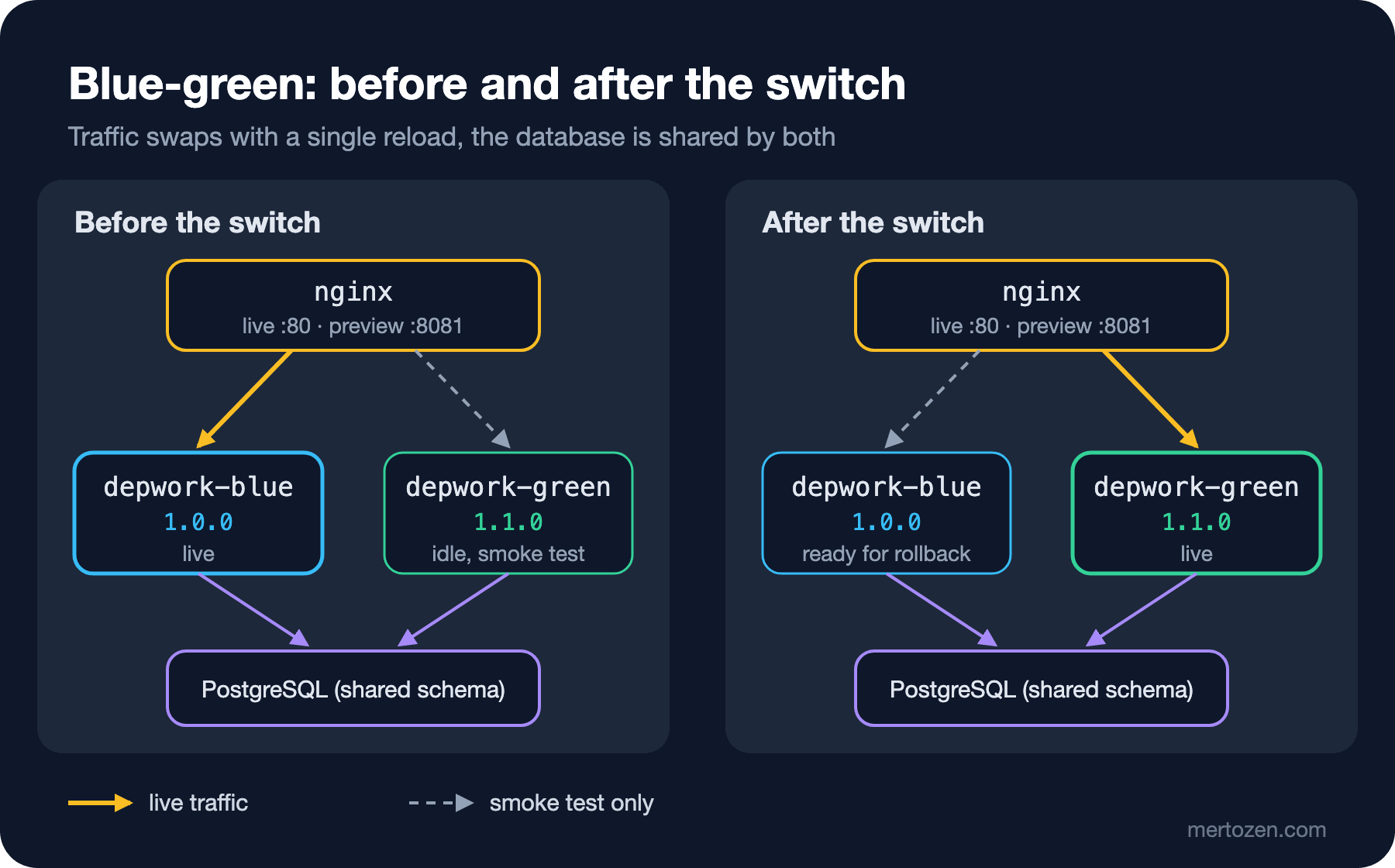
The planned scenario is two systemd units on a single Linux VM (Virtual Machine): bookstore-blue on 5001, bookstore-green on 5002. In this post I built the same layout with two Docker containers (depwork-blue and depwork-green, both on 8080, on the same Docker network). From Nginx's point of view there's no difference; only the address in the upstream changes. The details of running a .NET app as a systemd service are in the upcoming Web Servers and Hosting series.
Nginx listens on two ports. 80 is for live traffic, 8081 is the "preview": a door to the idle environment that only our smoke test uses.
events {}

http {
    resolver 127.0.0.11 valid=1s ipv6=off;
    log_format live '$msec $status $upstream_http_x_app_version $request_time';
    access_log /var/log/nginx/bookstore.log live;

    include /etc/nginx/bookstore/upstreams.conf;

    server {
        listen 80;
        location / {
            proxy_pass http://bookstore_live;
        }
    }

    server {
        listen 8081;
        location / {
            proxy_pass http://bookstore_preview;
        }
    }
}
Which color is live is decided by upstreams.conf, and the switch script writes it:
#!/usr/bin/env bash
# switch.sh COLOR: send live traffic to COLOR, keep the other color as preview
set -euo pipefail
live=$1
if [ "$live" = blue ]; then idle=green; else idle=blue; fi
cat > nginx/bookstore/upstreams.conf <<CONF
upstream bookstore_live {
    zone bookstore_live 64k;
    server depwork-$live:8080 resolve;
}

upstream bookstore_preview {
    zone bookstore_preview 64k;
    server depwork-$idle:8080 resolve;
}
CONF
docker exec depwork-nginx nginx -t -q
docker exec depwork-nginx nginx -s reload 2>/dev/null
echo "$live" > nginx/bookstore/LIVE
echo "$(date +%T) live=$live preview=$idle"
nginx -t won't let a reload through without validating the config. If you reload with a broken config, Nginx keeps running with the old one, but thanks to set -e the script fails and stops, so you notice.
Smoke Test First, Then Switch
The deploy goes to the idle environment. Live traffic is still on blue:
docker stop depwork-green && docker rm depwork-green
docker run -d --name depwork-green --network depwork-net --stop-timeout 40 \
    -e WARMUP_SECONDS=2 depwork-bookstore-api:1.1.0
./smoke.sh http://localhost:18602 1.1.0
#!/usr/bin/env bash
# smoke.sh BASE_URL EXPECTED_VERSION: minimal checks before a switch
set -euo pipefail
base=$1
expected=$2
check() {
local code
code=$(curl -s -o /dev/null -w '%{http_code}' -m 3 "$base$1")
echo "$1 -> $code"
[ "$code" = 200 ]
}
check /health/ready
check /api/books
actual=$(curl -s -m 3 "$base/api/version" | sed 's/.*"version":"\([^"]*\)".*/\1/')
echo "version -> $actual"
[ "$actual" = "$expected" ]The smoke test output:
/health/ready -> 200
/api/books -> 200
version -> 1.1.0
The smoke test is deliberately short: readiness, the most critical read endpoint, and the correct version. Don't skip the version check. It's the only thing that catches a preview pointing at the wrong environment or an image tagged wrongly. When I ran the same script after the switch (the preview now pointed at the old blue), the result was:
/health/ready -> 200
/api/books -> 200
version -> 1.0.0
exit=1
The health checks passed but the version didn't match. Without this check you could switch traffic to the wrong environment believing "green is healthy". In the pipeline in the last post of the series this exact bug happened once, and this exact line caught it.
Now the switch. In the background a probe sends ten requests per second, and a request that takes four seconds has been sent to blue:
./switch.sh green
curl -s localhost:18600/api/version
06:30:47 live=green preview=blue
{"version":"1.0.0","instance":"96b0ba51efa0"}An interesting detail: the request sent right after the switch script finished still returned 1.0.0. nginx -s reload signals the master process and returns immediately. Starting the new workers and the old ones stopping to listen happen asynchronously. That window of a few milliseconds is a reminder that the switch isn't "atomic". Verify after a switch with a short retry loop, not a single request.
The four-second request ended like this:
{"version":"1.0.0","instance":"96b0ba51efa0","waitedMs":4000} -> 200 in 4.005074sThe answer to the first opening question: the request completed on blue. During a reload the old workers live until they finish their connections; new connections go to the new workers, that is, the new config. That's why you shouldn't stop blue right after the switch. There are still connections finishing work there.
Instant Switchback
Six seconds after the switch I went back, and three seconds later switched to green again:
06:30:53 live=blue preview=green
06:30:56 live=green preview=blue
The probe output for the same period (shortened):
   8 06:30:45 200 1.0.0
   9 06:30:46 200 1.0.0
   2 06:30:47 200 1.0.0
   6 06:30:47 200 1.1.0
   9 06:30:48 200 1.1.0
   8 06:30:52 200 1.1.0
   5 06:30:53 200 1.0.0
   4 06:30:53 200 1.1.0
   8 06:30:54 200 1.0.0
   4 06:30:56 200 1.0.0
   3 06:30:56 200 1.1.0
   9 06:30:57 200 1.1.0
Every request returned 200. Each switch moved requests to the other version within a second. That's the answer to the second question as well: going back takes as long as a reload, as long as blue is still up and healthy. The "as long as" part matters. If you stopped blue, put a new version on it, or the database changed into a shape blue doesn't understand, going back is no longer a reload but a new deploy.
Azure App Service Deployment Slots
Managed platforms provide the same idea out of the box. In Azure App Service each slot is a live app with its own host name. You deploy the new version to the staging slot and bring it to production with a swap. I didn't run this section; according to the Microsoft Learn document "Set up staging environments", the important points are:
- Slots exist in the Standard, Premium and Isolated tiers. There's no extra charge per slot, but they all share the resources of the same App Service plan.
- During a swap, the target slot's slot-specific settings are applied to the source slot, and the source slot's instances restart and warm up. Production isn't affected during this time. Once all are warm, the routing rules are switched.
- The default warm-up sends an HTTP (Hypertext Transfer Protocol) request to the app's root and considers the instance warm if any response comes back. An app returning 500 also counts as "warmed up". That's why setting
WEBSITE_SWAP_WARMUP_PING_PATHto your readiness endpoint andWEBSITE_SWAP_WARMUP_PING_STATUSESto 200 matters. - App settings and connection strings marked as "Deployment slot setting" don't move during a swap. If you forget to mark a connection string that points to the staging database, production connects to the staging database after the swap.
- Swap with preview pauses the swap after the first step, so you can validate the source slot with production settings. After the swap completes, the former production instances move to staging and are recycled in the last step; according to the documentation, long-running operations are abandoned at that point.
Going back means swapping the same two slots again. The rule from the Nginx example applies here too: the moment you deploy a new version to the staging slot, your way back is closed.
Changing the Service Selector in Kubernetes
Kubernetes needs no extra tool for blue-green. Two Deployments (bookstore-blue and bookstore-green) run with different color labels, and traffic goes to whichever one the Service selector picks:
apiVersion: v1
kind: Service
metadata:
  name: bookstore-api
spec:
  selector:
    app: bookstore-api
    color: blue
  ports:
    - port: 80
      targetPort: 8080
On the kind cluster I sent requests to the Service from a curl pod and changed the selector:
kubectl exec curl -- sh -c 'for i in 1 2 3 4; do curl -s http://bookstore-api/api/version; echo; done'
kubectl patch service bookstore-api -p '{"spec":{"selector":{"color":"green"}}}'
kubectl exec curl -- sh -c 'for i in 1 2 3 4; do curl -s http://bookstore-api/api/version; echo; done'
{"version":"1.0.0","instance":"bookstore-blue-6c749fc4fb-6jwqh"}
{"version":"1.0.0","instance":"bookstore-blue-6c749fc4fb-6jwqh"}
{"version":"1.0.0","instance":"bookstore-blue-6c749fc4fb-mgvpv"}
{"version":"1.0.0","instance":"bookstore-blue-6c749fc4fb-6jwqh"}
service/bookstore-api patched
{"version":"1.1.0","instance":"bookstore-green-59cffbc476-ncrqn"}
{"version":"1.1.0","instance":"bookstore-green-59cffbc476-4748d"}
{"version":"1.1.0","instance":"bookstore-green-59cffbc476-ncrqn"}
{"version":"1.1.0","instance":"bookstore-green-59cffbc476-4748d"}The first request after the patch went to green. kube-proxy rules are updated as soon as the Service's EndpointSlices show the new pods. Open TCP (Transmission Control Protocol) connections, however, such as HTTP connections kept open with keep-alive, may keep going to the old pod. How Services and EndpointSlices work is covered in the upcoming Kubernetes series. Argo Rollouts' blueGreen strategy adds steps on top of this idea, such as a preview Service, automatic promotion and keeping the old ReplicaSet up for a while (scaleDownDelaySeconds).
The Shared Database and Other Realities
Blue-green separates traffic between two environments, not data. If the two environments had separate databases, at switch time green's database wouldn't know about the orders placed on blue in the last few minutes. So in practice both environments connect to the same database. The consequence is clear: a migration you run before deploying green is applied while blue is still live, and if you go back, blue has to work with that schema. In other words, blue-green doesn't guarantee a way back without backward-compatible migrations. Expand-contract in the sixth post of the series exists for exactly this.
Long-lived connections are the second reality. WebSocket and SignalR connections don't move to the new environment on reload; the old Nginx worker carries them until they close. Nginx's worker_shutdown_timeout puts an upper bound on that wait. When the connections eventually close, the client reconnects and goes to green this time. Still, these connections can stay on blue for minutes, so check the active connection count before stopping blue.
The third is cost. During the switch window you need two full environments. In the cloud, bringing green up only for the deploy and shutting it down some time after the switch lowers cost, but that "some time" is your rollback window. Choose it consciously; the share of bugs found in the first hour usually decides it.
The fourth is background work. If a scheduled job or queue consumer runs in both environments, the idle environment is doing work too. In blue-green, "idle" only applies to HTTP traffic. You either turn background jobs on and off per color or limit them to a single instance with a distributed lock.
In Production
Blue-green has three critical numbers. The smoke test duration sets the time from deploy to switch. The error rate in the first minutes after the switch drives the rollback decision; compare it with blue before the switch. The time the old environment stays up is your rollback window.
If a person performs the switch, keep the rollback command ready in advance and run it for real at least once. The most common problem in "we'll switch back if needed" plans is that the rollback command runs for the first time during an incident.
Common Pitfalls
- Stopping blue right after the switch. In-flight requests are cut and the way back is lost. Blue should stay up for at least a verification window.
- Running the smoke test against the live port. The smoke test must validate the idle environment before the switch; a test that goes through the live port tests the old environment.
- Putting the migration in the same step as the switch. A backward-incompatible migration makes going back meaningless.
- Forgetting to mark a slot-specific connection string in App Service. After the swap, production connects to the wrong database.
- Forgetting background work. A consumer in the idle environment may process messages with a half-deployed version.
A Small Experiment
★☆☆ Right after switch.sh, send 20 requests and count how many go to the old version. Repeat with a sleep 1 after nginx -s reload.
★★☆ Open a WebSocket connection to blue (for example with websocat), switch, and watch how long the connection stays on blue. Add worker_shutdown_timeout 10s; and repeat.
★★★ Extend switch.sh to roll back automatically: after the switch, send requests to the live port for 30 seconds and go back to the previous color if the 5xx rate exceeds 2%. We'll run this against a real bug in the eighth post of the series.
Blue-green switches traffic in one move, but that move sends every user to the new version at the same time. In the next post we split the move into percentages: canary releases with weight and split_clients in Nginx, deciding with metrics, and automated analysis with Argo Rollouts.