

Razor Component Fundamentals: Parameters, Event Handling, Data Binding and the Component Lifecycle
A Razor component receives values through [Parameter], notifies its parent with EventCallback, binds to inputs with @bind, and ComponentBase calls its lifecycle methods in a fixed order; with prerendering on, OnInitializedAsync runs twice. We build the Bookstore admin panel's stock screen with BookList, BookRow and LowStockBadge and show @bind:after, @bind:get/set, rendering in async handlers and a timer that needs InvokeAsync with real logs and Angular equivalents.
Version note: The code in this post was built and run with .NET 10 (SDK 10.0.404, ASP.NET Core 10.0.15); browser behaviour was observed with Playwright 1.65's headless Chromium.
Predict First
In this post we write the panel's stock screen. The page component is interactive with @rendermode InteractiveServer and loads its data in OnInitializedAsync; every time the method runs it writes a line to the log. When you open the page once in the browser, how many times do you see that line in the log? Second question: the box where you enter the threshold is bound with @bind:event="oninput". When you type "12" into it, how many times does OnParametersSet run in the child component that takes the threshold as a parameter? Third: what happens if the code that refreshes the data every 30 seconds with a timer calls StateHasChanged() directly at the end? Write down your answers; we will see all of them in the logs.
Data for the Stock Screen
In the API of Bookstore, the online bookstore used as the shared example across this site's series, stock information was only available on a single book's details. So that the panel can list all books with their stock and update the stock after a warehouse count, I added two back-office endpoints to Bookstore.Api:
public sealed record StockView(string Isbn, string Title, int OnHand, int Reserved, int Available);

public sealed record SetStockRequest([property: Range(0, 10_000)] int QuantityOnHand);

// Back-office endpoints used by Bookstore.Admin. Authorization comes later in the Blazor series.
public static class InventoryEndpoints
{
    public static IEndpointRouteBuilder MapInventoryEndpoints(this IEndpointRouteBuilder app)
    {
        RouteGroupBuilder inventory = app.MapGroup("/api/inventory").WithTags("Inventory");
        inventory.MapGet("/", GetStock);
        inventory.MapPut("/{isbn}", SetQuantityOnHand);
        return app;
    }
GET /api/inventory returns the books starting with the scarcest, PUT /api/inventory/{isbn} updates the quantity on hand and does not allow it to drop below the reserved quantity. The integration tests for the endpoints are in the InventoryTests class. These endpoints are open to everyone for now; the panel's authorization is the topic of post 11. On the panel side, BookstoreApiClient got GetStockAsync and SetQuantityOnHandAsync methods, and the contracts in .Client got a StockView record with the same shape.
Parameters and EventCallback
I split the screen into three components: BookList, which draws the table, BookRow, which draws each row, and LowStockBadge, which appears when stock runs low. Let us start with the smallest:
@if (Available == 0)
{
    <span class="badge bg-danger">Out of stock</span>
}
else if (Available <= Threshold)
{
    <span class="badge bg-warning text-dark">Low: @Available left</span>
}

@code {
    [Parameter, EditorRequired]
    public int Available { get; set; }

    [Parameter]
    public int Threshold { get; set; } = 5;
}
The values a component receives from outside are public properties marked with [Parameter]. You write them like HTML attributes when you use the component: <LowStockBadge Available="3" Threshold="5" />. Same role as @Input() or input() in Angular. [EditorRequired] says the parameter is required; if you use the component without a required parameter, the Razor compiler produces warning RZ2012. Bookstore has TreatWarningsAsErrors on, so this warning breaks the build:
src/Bookstore.Admin/Components/Inventory/BookList.razor(10,13): error RZ2012: Component 'BookRow' expects a value for the parameter 'Item', but a value may not have been provided.The check happens only at compile time and only looks at whether the attribute is written in the markup; it does not prevent a null at run time. The row component has to tell its parent something: "add 10 to this book's stock". For that I use EventCallback<T>:
namespace Bookstore.Admin.Components.Inventory;

// What BookRow tells its parent when the user restocks a book.
public sealed record RestockRequest(string Isbn, int Amount);
<tr>
<td>@Item.Title <LowStockBadge Available="Item.Available" Threshold="LowStockThreshold" /></td>
<td class="text-end">@Item.OnHand</td>
<td class="text-end">@Item.Reserved</td>
<td class="text-end">@Item.Available</td>
<td>
<input type="number" min="1" max="500" class="form-control form-control-sm d-inline w-auto" @bind="amount" />
<button class="btn btn-sm btn-primary" disabled="@saving" @onclick="RestockClicked">
@(saving ? "Saving..." : "Restock")
</button>
</td>
</tr>
@code {
private int amount = 10;
private bool saving;
[Parameter, EditorRequired]
public StockView Item { get; set; } = null!;
[Parameter]
public int LowStockThreshold { get; set; }
[Parameter]
public EventCallback<RestockRequest> OnRestock { get; set; }
private async Task RestockClicked()
{
saving = true;
await OnRestock.InvokeAsync(new RestockRequest(Item.Isbn, amount));
saving = false;
}
}EventCallback<RestockRequest> is the counterpart of @Output() / output() in Angular. Why not a plain Func<RestockRequest, Task>? There are two differences. First, when the call finishes, EventCallback itself calls StateHasChanged on the component that owns the callback, the parent; no extra code is needed for the parent to render again. Second, it is a struct and InvokeAsync completes quietly when the parent bound nothing, so no null check is needed. @onclick="RestockClicked" binds a C# method to a DOM event; the method can be parameterless or take the event argument such as MouseEventArgs, and you can write a lambda too (@onclick="() => amount++").
@inject ILogger<BookList> Logger

<table class="table table-sm align-middle">
    <thead>
        <tr><th>Title</th><th class="text-end">On hand</th><th class="text-end">Reserved</th><th class="text-end">Available</th><th></th></tr>
    </thead>
    <tbody>
        @foreach (StockView item in Items)
        {
            <BookRow Item="item" LowStockThreshold="LowStockThreshold" OnRestock="OnRestock" />
        }
    </tbody>
</table>
<p>@Items.Count(i => i.Available <= LowStockThreshold) of @Items.Count books are at or below the threshold.</p>

@code {
    [Parameter, EditorRequired]
    public IReadOnlyList<StockView> Items { get; set; } = [];

    [Parameter]
    public int LowStockThreshold { get; set; }

    [Parameter]
    public EventCallback<RestockRequest> OnRestock { get; set; }

    public override Task SetParametersAsync(ParameterView parameters)
    {
        if (parameters.TryGetValue(nameof(LowStockThreshold), out int next) && next != LowStockThreshold)
        {
            Logger.LogInformation("SetParametersAsync: threshold {Old} -> {New}", LowStockThreshold, next);
        }
        return base.SetParametersAsync(parameters);
    }

    protected override void OnParametersSet() =>
        Logger.LogInformation("OnParametersSet: {Count} items, threshold {Threshold}", Items.Count, LowStockThreshold);
}
BookList passes the OnRestock it receives straight to the rows; the event climbs two levels from the row to the page. I overrode SetParametersAsync only for logging: ParameterView shows the new values before they are written to the properties, and when base.SetParametersAsync is called the lifecycle continues normally. You will rarely write this override in real code; the goal here is to see what runs when.
Event Handling and Data Binding
The page itself:
@page "/inventory"
@rendermode InteractiveServer
@implements IDisposable
@inject BookstoreApiClient Api
@inject ILogger<InventoryPage> Logger

<PageTitle>Inventory</PageTitle>

<h1>Inventory</h1>

<p>
    <label>Low-stock threshold
        <input type="number" class="form-control form-control-sm d-inline w-auto"
               @bind:get="threshold" @bind:set="SetThreshold" @bind:event="oninput" />
    </label>
    <label class="ms-3">
        <input type="checkbox" @bind="onlyLow" @bind:after="LoadAsync" /> Only low stock
    </label>
</p>

@if (stock is null)
{
    <p>Loading...</p>
}
else
{
    <BookList Items="stock" LowStockThreshold="threshold" OnRestock="RestockAsync" />
    <p class="text-muted">Refreshed at @refreshedAt.ToString("HH:mm:ss") UTC</p>
}

@code {
    private IReadOnlyList<StockView>? stock;
    private int threshold = 5;
    private bool onlyLow;
    private DateTime refreshedAt;
    private System.Timers.Timer? timer;

    protected override async Task OnInitializedAsync()
    {
        Logger.LogInformation("OnInitializedAsync (renderer: {Renderer}, interactive: {Interactive})",
            RendererInfo.Name, RendererInfo.IsInteractive);
        await LoadAsync();
    }

    protected override void OnAfterRender(bool firstRender)
    {
        if (!firstRender)
        {
            return;
        }

        Logger.LogInformation("OnAfterRender(firstRender: true): starting the refresh timer");
        timer = new System.Timers.Timer(TimeSpan.FromSeconds(30));
        timer.Elapsed += OnTimerElapsed;
        timer.Start();
    }

    private async Task LoadAsync()
    {
        IReadOnlyList<StockView> all = await Api.GetStockAsync();
        stock = onlyLow ? [.. all.Where(s => s.Available <= threshold)] : all;
        refreshedAt = DateTime.UtcNow;
    }

    private void SetThreshold(int value) => threshold = Math.Clamp(value, 0, 50);

    private async Task RestockAsync(RestockRequest request)
    {
        StockView current = stock!.Single(s => s.Isbn == request.Isbn);
        await Api.SetQuantityOnHandAsync(request.Isbn, current.OnHand + request.Amount);
        await LoadAsync();
        Logger.LogInformation("Restocked {Isbn} by {Amount}", request.Isbn, request.Amount);
    }

    // Runs on a thread-pool thread, outside Blazor's event handling: switch to the renderer with InvokeAsync.
    private void OnTimerElapsed(object? sender, System.Timers.ElapsedEventArgs e) =>
        _ = InvokeAsync(async () =>
        {
            await LoadAsync();
            StateHasChanged();
            Logger.LogInformation("Timer refresh rendered");
        });

    public void Dispose()
    {
        Logger.LogInformation("Dispose: stopping the refresh timer");
        timer?.Dispose();
    }
}
There are three different bindings. The quantity box in the row is the simplest form: @bind="amount" binds the input's value to the field and by default updates on onchange, when you leave the box or press Enter. It is the counterpart of [(ngModel)] in Angular. The checkbox has @bind:after="LoadAsync": first onlyLow is updated, then LoadAsync is called and the returned Task is awaited. You used to have to drop @bind and write value and @onchange by hand for that.
The threshold box uses @bind:get and @bind:set: the value is read from threshold, but what the user types is not written to the field directly; it goes through SetThreshold and is clamped between 0 and 50. @bind:event="oninput" updates on every keystroke. When I typed "12" with Playwright and then "80" in one go:
[step] loaded: 2 of 20 books are at or below the threshold.
[step] threshold typed 12: 2 of 20 books are at or below the threshold.
[step] threshold filled 80, input now shows 50
The box where 80 was typed shows 50: the setter clamped the value, and Blazor wrote the field's real value back into the input during rendering. This "route the binding through a method" feature is Blazor's ready-made version of what you set up by hand in Angular with signals or ngModelChange.
Reading the Lifecycle from the Log
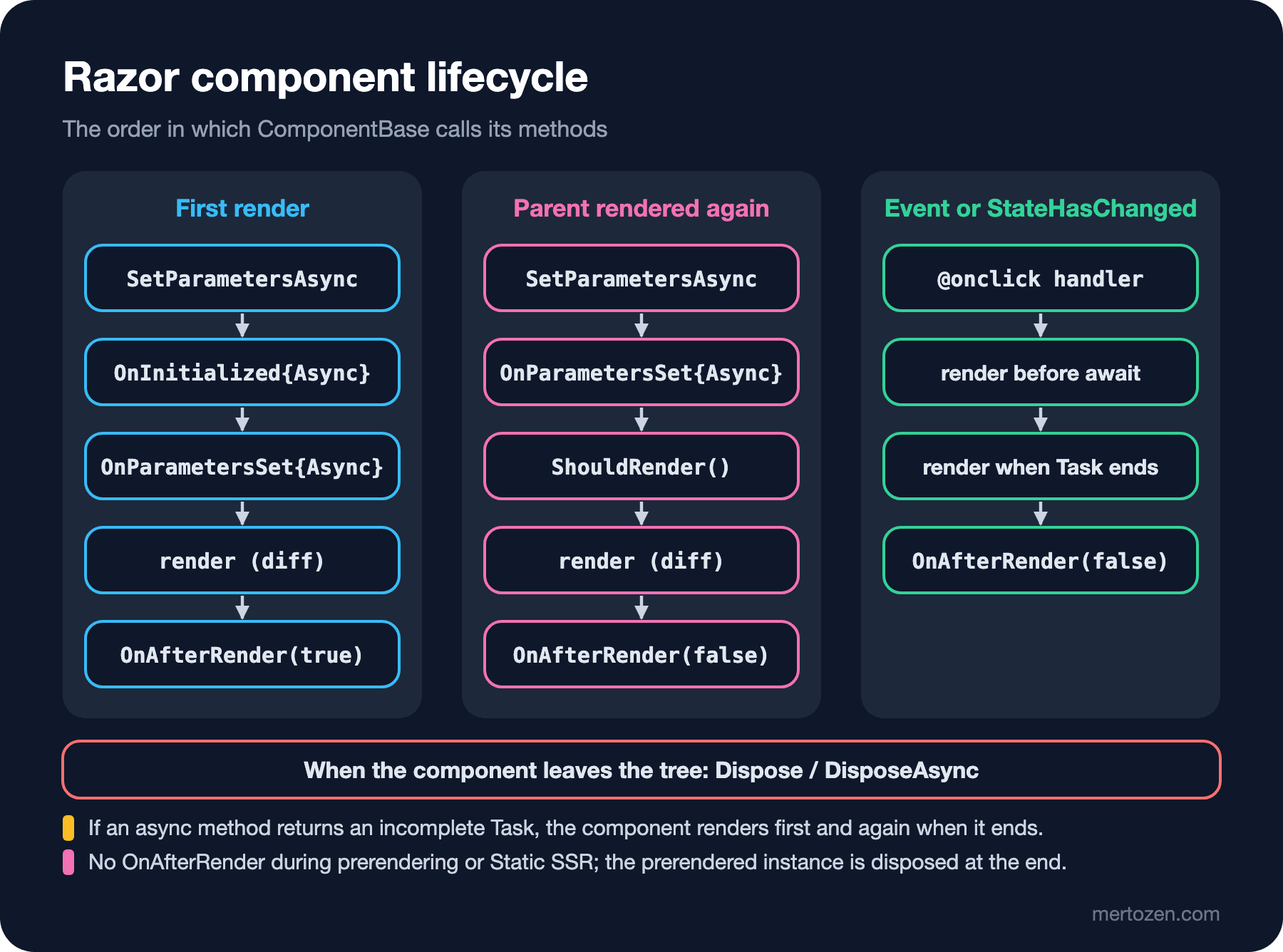
On the first render, ComponentBase follows the order SetParametersAsync, OnInitialized{Async}, OnParametersSet{Async}, render and OnAfterRender{Async}(firstRender: true). For methods with a synchronous and an asynchronous version, the synchronous one is called first. If an async method returns an incomplete Task, the component renders once with the current state and once more when the Task ends; that is why we can show a "Loading..." message. The start of the log when I opened the page once in the browser:
info: Bookstore.Admin.Components.Pages.Inventory.InventoryPage[0]
  OnInitializedAsync (renderer: Static, interactive: False)
info: Bookstore.Admin.Components.Inventory.BookList[0]
  SetParametersAsync: threshold 0 -> 5
info: Bookstore.Admin.Components.Inventory.BookList[0]
  OnParametersSet: 20 items, threshold 5
info: Bookstore.Admin.Components.Pages.Inventory.InventoryPage[0]
  Dispose: stopping the refresh timer
info: Bookstore.Admin.Components.Pages.Inventory.InventoryPage[0]
  OnInitializedAsync (renderer: Server, interactive: True)
info: Bookstore.Admin.Components.Inventory.BookList[0]
  SetParametersAsync: threshold 0 -> 5
info: Bookstore.Admin.Components.Inventory.BookList[0]
  OnParametersSet: 20 items, threshold 5
info: Bookstore.Admin.Components.Pages.Inventory.InventoryPage[0]
  OnAfterRender(firstRender: true): starting the refresh timer
The answer to the first question: twice. The first four entries belong to prerendering. The server rendered the page once, like Static SSR, and sent the HTML; in this instance RendererInfo.Name was Static, OnAfterRender was never called, and the component was disposed when the response finished. That is also why the timer starts in OnAfterRender: it never starts in the prerendered instance, and there is nothing to dispose. Then the circuit was established in the browser and the page was created from scratch, this time interactively: a second OnInitializedAsync, a second request to the API. The user does not notice, but the API sees two requests, and if the data changed in between, the screen changes for a moment. We will solve this double load with [PersistentState] in 06.
The mapping for those coming from Angular:
| Blazor | Angular | Note |
|---|---|---|
[Parameter] | @Input() / input() | The value arrives when the parent renders |
EventCallback<T> | @Output() / output() | Renders the parent by itself |
@bind, @bind:get/@bind:set | [(ngModel)], model() | @bind:event picks the triggering event |
OnInitialized{Async} | ngOnInit | Runs twice with prerendering |
OnParametersSet{Async} | ngOnChanges | No list of changed parameters |
OnAfterRender{Async}(firstRender) | ngAfterViewInit, afterNextRender | Not called during prerendering; JS interop goes here |
Dispose / DisposeAsync | ngOnDestroy, DestroyRef | With @implements IDisposable |
ShouldRender() | OnPush change detection | In 08 |
If you have read the "Angular Lifecycle Hooks" post of the Angular series, the biggest difference is this: Blazor has no change detection. A component renders after an event handler, after a lifecycle method or after StateHasChanged; the framework does not watch your fields.
Parameter Changes
What landed in the log while typing "12" into the threshold box:
info: Bookstore.Admin.Components.Inventory.BookList[0]
  SetParametersAsync: threshold 5 -> 1
info: Bookstore.Admin.Components.Inventory.BookList[0]
  OnParametersSet: 20 items, threshold 1
info: Bookstore.Admin.Components.Inventory.BookList[0]
  SetParametersAsync: threshold 1 -> 12
info: Bookstore.Admin.Components.Inventory.BookList[0]
  OnParametersSet: 20 items, threshold 12
info: Bookstore.Admin.Components.Inventory.BookList[0]
  SetParametersAsync: threshold 12 -> 50
info: Bookstore.Admin.Components.Inventory.BookList[0]
  OnParametersSet: 20 items, threshold 50
The answer to the second question: twice, once per keystroke. When "1" was typed the threshold became 1, when "2" was added it became 12. With Interactive Server, each of them is a message from the browser to the server, a render and a DOM diff coming back. Not a problem for a cheap calculation like the threshold; but if a field bound to oninput calls the API on every key, you need to notice it. Also look at the last line: BookList's OnParametersSet can run even when the threshold did not change. Items is an IReadOnlyList<StockView>; Blazor cannot know whether a parameter of such a complex type changed, so it sets the parameters again every time the parent renders. If all of a child's parameters are simple types Blazor recognises, such as strings, numbers or enums, and none of them changed, the child is not rendered again; LowStockBadge is in that situation, it only takes two ints.
When Is StateHasChanged Needed?
Most of the time it is not. After event handlers and lifecycle methods, ComponentBase triggers the render itself. The button states Playwright recorded with a MutationObserver when I clicked "Restock", and the log:
[step] War and Peace before: War and Peace Low: 3 left 3 0 3 Restock
[step] button states seen: Saving... (disabled) -> Restock
[step] War and Peace after: War and Peace Low: 13 left 13 0 13 Restock
info: Bookstore.Admin.Components.Inventory.BookList[0]
OnParametersSet: 20 items, threshold 50
info: Bookstore.Admin.Components.Pages.Inventory.InventoryPage[0]
Restocked 9781400079988 by 10
info: Bookstore.Admin.Components.Inventory.BookList[0]
OnParametersSet: 20 items, threshold 50
info: Bookstore.Admin.Components.Inventory.BookList[0]
OnParametersSet: 20 items, threshold 50When RestockClicked set saving = true and started waiting for the parent's work, the Task had not finished yet; Blazor rendered the row in that state and the button appeared disabled with "Saving...". When the work finished, the handler completed and another render came. The parent rendered in between too: EventCallback called the page's RestockAsync, which produced one render at its first await and one more when it finished. We wrote StateHasChanged nowhere.
Where it is needed is code that runs without Blazor knowing: a timer, a C# event, background work that finishes. The Elapsed event of the page's System.Timers.Timer runs on a thread-pool thread. First I wrote the handler without InvokeAsync: a version that updates refreshedAt, calls StateHasChanged() directly and logs the error. The log:
fail: Bookstore.Admin.Components.Pages.Inventory.InventoryPage[0]
Timer refresh failed
System.InvalidOperationException: The current thread is not associated with the Dispatcher. Use InvokeAsync() to switch execution to the Dispatcher when triggering rendering or component state.
   at Microsoft.AspNetCore.Components.ComponentBase.StateHasChanged()
That exception is the answer to the third question. With Interactive Server every circuit has its own dispatcher, and component state must only be changed through it; the same rule as going back to the UI thread in WinForms or WPF. In the final version of the code, the handler hands all of the work to InvokeAsync: loading the data and StateHasChanged run on the dispatcher. When I waited 30 seconds with the page open and then moved to another page:
[step] timer: "Refreshed at 02:51:17 UTC" -> "Refreshed at 02:51:42 UTC"
[step] navigated to /books
info: Bookstore.Admin.Components.Pages.Inventory.InventoryPage[0]
Timer refresh rendered
info: Bookstore.Admin.Components.Pages.Inventory.InventoryPage[0]
Dispose: stopping the refresh timerWhen we left the page, the router removed it from the tree and Dispose was called; the timer stopped. Without Dispose the timer would keep loading data for a dead component and stay in memory until the circuit closes. The mechanism explained in the SynchronizationContext post of the C# Async series is at work here: Blazor Server's renderer uses its own synchronization context, and InvokeAsync moves the work onto it.
In Production
With Interactive Server, every render is a network message. Every OnParametersSet you see in the log is a diff computed on the server and a packet sent to the browser. Not a problem for a 20-row table; a 2,000-row table and a filter bound to oninput slow down with the same code. Lowering render cost in large lists (@key, ShouldRender, Virtualize) is the topic of post 08; for now, track the number of renders in the log like a metric.
Everything done in OnInitializedAsync is done twice because of prerendering. For an API call that only reads, the cost is one extra request; but if there is a write here (a row in a log table, incrementing a counter, sending an email), it is written twice. Do not put work with side effects in lifecycle methods; tie it to a user action.
Every component that holds a resource such as a timer, an event subscription or a CancellationTokenSource should implement IDisposable or IAsyncDisposable. With Interactive Server, a subscription that is not disposed stays in memory for as long as the circuit lives, that is, until the user closes the tab. The _ = InvokeAsync(...) line in our code is fire-and-forget: if an exception happens inside it, nobody sees it. In production code that block should be wrapped in a try/catch that logs the error.
Common Pitfalls
Changing a child component's parameter from inside the component. If you write Item = Item with { OnHand = 99 } in BookRow, the value is overwritten on the next parent render; the Blazor documentation has a separate page for this case ("Avoid overwriting parameters"). A parameter belongs to the parent; if you want to change it, tell the parent through an EventCallback or use a separate field inside the component, like amount in the row.
Async void event handlers. If you bind an async void method to @onclick, Blazor cannot see the Task: there is no second render when the handler finishes and exceptions are not caught. Handlers always return Task.
Changing state in OnAfterRender and calling StateHasChanged. That means a new render, which means a new OnAfterRender; without a firstRender check you build an infinite loop.
Putting code that cannot run during prerendering into OnInitializedAsync. JavaScript calls, browser storage or anything that assumes "the user's screen" cannot run during prerendering. Their place is OnAfterRenderAsync(firstRender: true); details in post 10.
A Small Experiment
★☆☆ Add a [Parameter] public string? Label { get; set; } to LowStockBadge and show "Order now" in BookRow only for books that are out of stock. What happens to the build if you make the parameter [EditorRequired]?
★★☆ Bind the threshold box with the default onchange instead of @bind:event="oninput" and repeat the "12" experiment. How many lines do you see in the BookList log? What changed for the user?
★★★ Rewrite the System.Timers.Timer in InventoryPage with a PeriodicTimer and a CancellationTokenSource; start the loop in OnAfterRenderAsync and cancel it in DisposeAsync. Do you still need InvokeAsync in this version? Does the answer change when you start the loop inside Task.Run? (Hint: the SynchronizationContext post in the C# Async series.)
The stock screen is interactive, but we gave the whole page its render mode with @rendermode InteractiveServer and did not discuss why. In the next post we look at render modes in detail: where to define the mode, how it propagates to child components, how to switch prerendering off and which code runs where; as an example we leave the catalog page in Static SSR and add a cart preview that runs in the browser.