

Render Modes in Depth: Static SSR, InteractiveServer, InteractiveWebAssembly, InteractiveAuto and Prerendering

A render mode is set on the component definition, where it is used or for the whole app, propagates to child components, and an interactive component cannot switch to another interactive mode inside; parameters from a Static parent are serialized to JSON in the HTML. We add a WebAssembly quote calculator to the Bookstore panel and show the ChildContent error, a silently dropped EventCallback, turning prerendering off and why everything in .Client is visible in the browser.
Version note: The code in this post was built and run with .NET 10 (SDK 10.0.404, ASP.NET Core 10.0.15); browser behaviour was observed with Playwright 1.65's headless Chromium.
Predict First
In this post we add a quote calculator that runs entirely in the browser to the admin panel. The page is Static SSR; it gets book prices from the API on the server and passes them as a parameter to a component that runs on WebAssembly. Three questions. When you open the page's HTML source, can you see the price list of the 20 books? What happens if you give the same component child content such as <p>Prices include VAT.</p>? If you add @inject HttpClient Http to the component, where does the error show up: in the build, in prerendering on the server, or in the browser?
Where Do You Write the Render Mode?
There are three places. The first is the component's definition: the stock page from 03 carries the line @rendermode InteractiveServer in its own file and runs as Interactive Server wherever it is used. For a page this is the most readable option: anyone who opens the page sees its mode on the first line. The second is where it is used: the component is written without knowing its mode, and the parent that uses it provides the mode. This post's quote page works that way:
@page "/orders/preview"
@inject BookstoreApiClient Api

<PageTitle>Quote preview</PageTitle>

<h1>Quote preview</h1>
<p>Prices come from the catalog; the calculation runs in the browser.</p>

<CartPreview Books="prices" @rendermode="InteractiveWebAssembly" />

@code {
    private BookPrice[] prices = [];

    protected override async Task OnInitializedAsync()
    {
        PagedResult<BookSummary> page = await Api.GetBooksAsync(page: 1, pageSize: 50);
        prices = [.. page.Items.Select(b => new BookPrice(b.Isbn, b.Title, b.Price))];
    }
}
The third is the whole app. The --all-interactive template from 02 put the render mode at the very top in App.razor:
<HeadOutlet @rendermode="InteractiveServer" />
<Routes @rendermode="InteractiveServer" />
In that case routing becomes interactive too: page changes happen without a new HTML request, over the open circuit or the runtime in the browser. If a page in a globally interactive app has to stay Static SSR (for example a sign-in page that writes an HTTP cookie), that page gets @attribute [ExcludeFromInteractiveRouting]. Bookstore.Admin does not use a global mode; list pages are Static SSR, and interactivity is per page or per component.
The quote calculator itself is in the .Client project, because it will run on WebAssembly:
<div class="card p-3">
    <p class="text-muted mb-2">Calculated on: <code>@RendererInfo.Name</code></p>
    <div class="d-flex gap-2 mb-3">
        <select class="form-select w-auto" @bind="selectedIsbn">
            @foreach (BookPrice book in Books)
            {
                <option value="@book.Isbn">@book.Title (@book.Price.ToString("N2") TRY)</option>
            }
        </select>
        <input type="number" min="1" max="500" class="form-control w-auto" @bind="quantity" />
        <button class="btn btn-primary" disabled="@(!RendererInfo.IsInteractive)" @onclick="Add">Add</button>
    </div>

    <table class="table table-sm">
        <tbody>
            @foreach (CartLine line in lines)
            {
                <tr><td>@line.Quantity x @line.Title</td><td class="text-end">@line.Total.ToString("N2") TRY</td></tr>
            }
        </tbody>
    </table>
    <p>
        @TotalQuantity items, subtotal @Subtotal.ToString("N2") TRY,
        discount @Discount.ToString("N2") TRY, total <strong>@((Subtotal - Discount).ToString("N2")) TRY</strong>
    </p>
</div>

@code {
    // Institutional orders: at least 20 copies get 10% off (Bookstore's B2B rule).
    private const int InstitutionalMinimum = 20;
    private const decimal InstitutionalDiscountRate = 0.10m;

    private readonly List<CartLine> lines = [];
    private string selectedIsbn = "";
    private int quantity = 1;

    [Parameter, EditorRequired]
    public IReadOnlyList<BookPrice> Books { get; set; } = [];

    private int TotalQuantity => lines.Sum(l => l.Quantity);
    private decimal Subtotal => lines.Sum(l => l.Total);
    private decimal Discount =>
        TotalQuantity >= InstitutionalMinimum ? Math.Round(Subtotal * InstitutionalDiscountRate, 2) : 0m;

    protected override void OnParametersSet()
    {
        if (selectedIsbn.Length == 0 && Books.Count > 0)
        {
            selectedIsbn = Books[0].Isbn;
        }
    }

    private void Add()
    {
        BookPrice book = Books.Single(b => b.Isbn == selectedIsbn);
        int index = lines.FindIndex(l => l.Isbn == book.Isbn);
        if (index >= 0)
        {
            lines[index] = lines[index] with { Quantity = lines[index].Quantity + quantity };
        }
        else
        {
            lines.Add(new CartLine(book.Isbn, book.Title, book.Price, quantity));
        }
    }

    private sealed record CartLine(string Isbn, string Title, decimal Price, int Quantity)
    {
        public decimal Total => Price * Quantity;
    }
}
The calculation applies Bookstore's institutional order rule: 10% off for 20 or more copies in total. While Hakan from institutional sales is on the phone with a school, he changes the quantities and sees the total immediately; no click goes to the server. When I added 12 copies of Dune and 8 of The Hobbit with Playwright:
right after load: Calculated on: Static, Add disabled: true
after start-up:   Calculated on: WebAssembly, Add disabled: false
  12 x Dune 5,868.00 TRY
  8 x The Hobbit 2,639.20 TRY
  20 items, subtotal 8,507.20 TRY, discount 850.72 TRY, total 7,656.48 TRY
websockets: none
No WebSocket was opened on the page: on a page without an Interactive Server component, no circuit is set up. Look at the first line too: the moment the page loads, the component says Static and the "Add" button is disabled. That is the prerendered HTML; until the WebAssembly runtime is downloaded and the component comes to life, pressing the button would do nothing. disabled="@(!RendererInfo.IsInteractive)" shows this gap to the user honestly.
How Does a Render Mode Propagate?
A render mode passes down to child components. The stock page is Interactive Server, so BookList, BookRow and LowStockBadge inside it run on the Server too; none of them has @rendermode. Sibling components can be in different modes; the page in 01 had four modes side by side. But inside an interactive component you cannot switch to another interactive mode. To try it, I put RenderModeProbe from 01 inside CartPreview with @rendermode="InteractiveServer". The build passed and prerendering on the server passed too; the error showed up in the browser, in the WebAssembly renderer:
crit: Microsoft.AspNetCore.Components.WebAssembly.Rendering.WebAssemblyRenderer[100]
Unhandled exception rendering component: Cannot create a component of type 'Bookstore.Admin.Client.Diagnostics.RenderModeProbe' because its render mode 'Microsoft.AspNetCore.Components.Web.InteractiveServerRenderMode' is not supported by WebAssembly rendering.
Because of that the component never came to life, and the page stayed Static with the button disabled. The reason for the rule is simple: a component running on WebAssembly has no link to the circuit on the server and cannot move a part of itself there. The opposite holds as well: you cannot put a WebAssembly component inside a Server component.
Parameters Must Be Serializable
Parameters going from a Static parent to an interactive child are serialized to JSON and written into the HTML; the component is recreated from that JSON in the browser (or on the server once the circuit is up). Delegates cannot be serialized. Child content is a RenderFragment, which is a delegate. When I added a ChildContent parameter to CartPreview and passed a paragraph from the quote page, the request failed with a 500:
System.InvalidOperationException: Cannot pass the parameter 'ChildContent' to component 'CartPreview' with rendermode 'InteractiveWebAssemblyRenderMode'. This is because the parameter is of the delegate type 'Microsoft.AspNetCore.Components.RenderFragment', which is arbitrary code and cannot be serialized.With EventCallback there is not even an error. I added an EventCallback<decimal> OnTotalChanged parameter to CartPreview, bound it to a handler on the quote page and called it in "Add". The page opened, the calculation worked, the handler on the server was never called; the value I printed to the browser console:
browser console: OnTotalChanged.HasDelegate: FalseThe callback silently turned into an empty value during serialization. You cannot open a feedback channel from a Static page to an interactive component; if the component has to send its result to the server, do it with an HTTP call or by putting the whole page in the same interactive mode. I ran into a sneakier error on my first attempt. The field on the quote page was first typed IReadOnlyList<BookPrice> and filled with the collection expression [.. page.Items.Select(...)]. The build passed, prerendering passed, but the browser console showed:
ManagedError: AggregateException_ctor_DefaultMessage (The parameter 'Books' with type '<>z__ReadOnlyList`1[[Bookstore.Admin.Client.Contracts.BookPrice, Bookstore.Admin.Client, Version=1.0.0.0, Culture=neutral, PublicKeyToken=null]]' in assembly 'Bookstore.Admin' could not be found.)For a collection expression that targets IReadOnlyList<T>, the C# compiler uses a type it generates itself, named <>z__ReadOnlyList, and that type lives in the Bookstore.Admin assembly. When Blazor serializes the parameter it also writes the name of the runtime type; that assembly is not in the browser and the type cannot be found. Making the field a BookPrice[] made the problem go away. The rule: the runtime types of parameters going from the server to an interactive child must also be types both sides know (arrays, List<T>, records in .Client).
Switching Prerendering On and Off
Prerendering is on by default in all interactive modes. Its advantage, as we saw above, is that the user sees the content right away; its cost is the double execution we saw in 03 and the gap of "visible but not working yet". To turn it off you create the render mode instance with a parameter. When I wrote @rendermode="new InteractiveWebAssemblyRenderMode(prerender: false)" on the quote page, only the markers were left in the component's place in the curl response (line shortened):
<h1>Quote preview</h1>
<p>Prices come from the catalog; the calculation runs in the browser.</p>

<!--Blazor-WebAssembly:{"environmentName":"Development","environmentVariables":{}}--><!--Blazor:{"type":"webassembly","key":{"locationHash":"D8A099B26F34E03610CAFDCA07D8EF9C11F820BA5431849D1B09986B0D6D58B2:6","formattedComponentKey":""},"assembly":"Bookstore.Admin.Client","typeName":"Bookstore.Admin.Client.Ordering.CartPreview","parameterDefinitions":"W3sibmFtZSI6...","parameterValues":"W1t7ImlzYm4i..."}-->
The user sees an empty area until the runtime is downloaded. It makes sense for components that search engines do not need to see, that cannot run during prerendering (for example ones that need a browser API on the first render), or whose second load after prerendering is expensive. If you use it a lot in the app, you can write a short property holding InteractiveWebAssemblyRenderMode(prerender: false) in _Imports.razor or a static class and use it everywhere.
The component code also runs during prerendering, but on the server. That is why a component in .Client must be able to run in both environments. You learn the environment at run time with RendererInfo.Name (Static, Server, WebAssembly, WebView), RendererInfo.IsInteractive and AssignedRenderMode; all three arrived in .NET 9. During prerendering IsInteractive is false, while AssignedRenderMode shows the mode given to the component.
Which Code Runs Where?
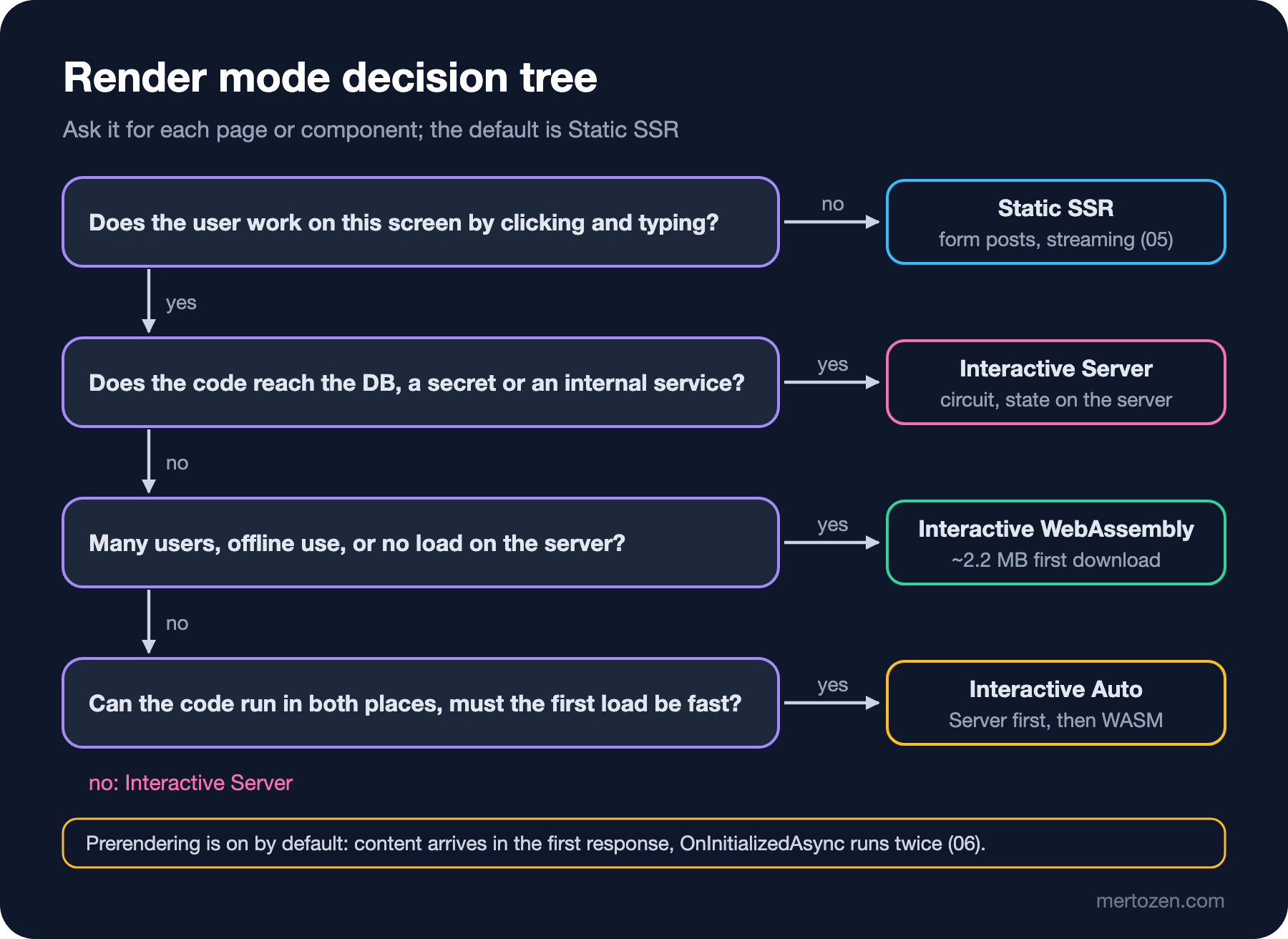
Static SSR and Interactive Server components run on the server and can reach everything on the server: services in the DI container, the database, secrets in configuration. That is why BookstoreApiClient is in the server project and the stock page uses it directly. In a later post the same page will be able to go straight to BookstoreContext as well. A WebAssembly component runs in the user's browser; it can only reach the server through a public HTTP endpoint and cannot see the server's DI container. The compiler protects this partly: since the .Client project cannot reference the server project, you cannot write BookstoreApiClient in CartPreview. But it does not protect everything. I tried adding @inject HttpClient Http to CartPreview: the build passed, and so did prerendering on the server, because the AddHttpClient registration on the server also adds a default HttpClient to the container. In the browser, however:
ManagedError: AggregateException_ctor_DefaultMessage (Cannot provide a value for property 'Http' on type 'Bookstore.Admin.Client.Ordering.CartPreview'. There is no registered service of type 'System.Net.Http.HttpClient'.)The answer to the third question from the start: in the browser. The Program.cs of .Client builds a separate DI container, and right now there is almost nothing in it. Every service a WebAssembly component needs must be registered in both containers or reach the component as a parameter. Two implementations of the same interface for Server and WebAssembly are the topic of post 09.
Then there is visibility. The answer to the first question is yes: the parameterValues field of the WebAssembly marker in the quote page's HTML is base64-encoded JSON. Decoded:
[[{"isbn":"9780451524935","title":"1984","price":279.0},{"isbn":"9780143035008","title":"Anna Karenina","price":429.0},{"isbn":"9780060850524","title":"Brave NeA price list is public information anyway, so there is no problem. But if a user's address, a cost price or a token travels the same way, anyone who looks at the page source sees it. In an Interactive Server component's marker, the parameters travel inside a descriptor encrypted with Data Protection (we saw it in the curl output in 01). The same rule applies to the wwwroot/appsettings.json file of .Client: it is a public file the browser downloads when it starts the runtime. When I put a fake API key in it and requested it:
HTTP/1.1 200 OK
Content-Type: application/json

{
  "Logging": {
    "LogLevel": {
      "Default": "Information",
      "Microsoft.AspNetCore": "Warning"
    }
  },
  "BookstoreApi": {
    "ApiKey": "fake-api-key-for-tests"
  }
}
A JSON file anyone can download without authentication. The same goes for the compiled code in the .Client project: the assemblies are downloaded under _framework/ and can be decompiled. No secret goes anywhere that reaches the browser; how the WebAssembly side reaches the API with the right permissions is in post 11, with the BFF approach, where the browser only talks to its own server and the tokens stay on that server.
In Production
When modes are mixed on one page, the costs add up. If you put Interactive Server and WebAssembly components on the same page, the user both opens a circuit and downloads the WebAssembly runtime; remember the Auto behaviour from 01, that is also why Auto preferred the existing runtime. In the panel, keeping a page tied to a single interactive mode is cheaper for both the user and the server.
During prerendering the WebAssembly component's code runs on the server; the services that code needs must be registered on the server as well, and it uses the server's resources. For every WebAssembly component you leave prerendering on for, know what the server is doing too. Finally, the size of the data you send as a parameter is added to the page size. A price list of 20 books is a few KB; a catalog of 5,000 books bloats the HTML. For large data it is better for the component to fetch it from the API itself.
Common Pitfalls
Putting the component in the wrong project. If a component that will run with WebAssembly or Auto lives in the server project, it cannot be downloaded to the browser even if you write @rendermode InteractiveWebAssembly; the page fails at run time. The rule: every component that can run in the browser lives in .Client.
Giving @rendermode to a child component on a Static SSR page and assuming the rest of the page is interactive too. Only that component and its children are interactive; the page's own @onclicks still do nothing.
Passing large or sensitive objects as parameters to an interactive child. The parameter is written into the page's HTML and sits there in plain text with WebAssembly; the base64 encoding above is not encryption.
Thinking you solved the problem by switching prerendering off. prerender: false hides the double load and the missing service during prerendering, but leaves the user an empty area and search engines a page without content. The real fix for the double load is the persistent state in 06.
A Small Experiment
★☆☆ Change @rendermode="InteractiveWebAssembly" to InteractiveServer in QuotePreviewPage. Does the calculator still work? Look at the WebSocket messages in the developer tools: how many messages does an "Add" click produce?
★★☆ Write a component named QuoteWorkspace in .Client: it uses CartPreview and binds the OnTotalChanged callback to a field of its own. On the quote page use <QuoteWorkspace @rendermode="InteractiveWebAssembly" /> instead of CartPreview. What does HasDelegate print now, and why?
★★★ Add builder.Services.AddScoped(sp => new HttpClient { BaseAddress = new Uri(builder.HostEnvironment.BaseAddress) }) to the Program.cs of .Client and make CartPreview fetch the prices from a minimal API endpoint on the server (/admin-api/prices) instead of a parameter. While the same code runs on the server during prerendering, what happens to the HttpClient's BaseAddress, and how would you solve it?
The quote page itself was Static SSR, and we did nothing for that. In the next post we look at Blazor with no interactivity at all: while writing book search and paging with Static SSR, we will see streaming rendering, enhanced navigation, form posts and NavigationManager.NotFound() from .NET 10.