

Passkeys 1: How WebAuthn and FIDO2 Work: RP ID, Challenge, Attestation and Assertion
A passkey resists phishing because the browser uses the credential only on origins of its registered RP ID, and the signature covers the clientDataJSON that carries the origin and the challenge. We decode real attestation and assertion data captured in the Bookstore lab with CBOR, verify the signature by hand, and explain the UV, BE and BS flags, synced versus device-bound passkeys and account recovery design.
Version note: The code in this post was built and run with .NET 10 (ASP.NET Core 10.0.13 runtime), Microsoft.AspNetCore.Identity.EntityFrameworkCore 10.0.14, System.Formats.Cbor 10.0.14 and Chrome 156's virtual authenticator.
Guess First
Ada has a passkey on her Bookstore account. An attacker publishes an exact copy of Bookstore's sign-in page on another domain and sends Ada a link saying "your order is delayed, sign in". Ada presses "sign in with a passkey" on the fake page. With TOTP (Time-based One-Time Password) she would type the code and the attacker would relay it to the real site instantly. What happens with a passkey?
origin          -> http://127.0.0.1:19170
passkey login   -> error: SecurityError This is an invalid domain.
The browser doesn't even take the request to the authenticator. In the lab I imitated "another site" by opening the same application through 127.0.0.1 instead of localhost; the passkey is registered for localhost, the page's origin is something else. Even if the attacker somehow got hold of a signature it would be useless, because the page's origin is inside the signature:
signature valid: True
signature valid with another origin: False
This post opens up where passkeys get this property from: the public key credential, the RP (Relying Party) ID, the challenge, user verification, attestation and assertion. The examples are WebAuthn (Web Authentication) data captured from a real registration and sign-in in the Bookstore lab; in the next post we build the same flow end to end with ASP.NET Core Identity 10 and Angular.
A Key Pair Instead of a Password
A passkey is a public key credential bound to a website. During registration the authenticator (a phone's secure enclave, Windows Hello, a password manager or a USB (Universal Serial Bus) security key) generates a new key pair. The private key stays in the authenticator; the server stores only the public key. At sign-in the server sends a random challenge, the authenticator signs it with the private key, and the server verifies the signature with the public key. Even if the server's database is stolen, there is no secret in it that helps anyone sign in; public keys are public anyway.
FIDO2 (Fast IDentity Online 2) is the two-part name of this model: WebAuthn, the W3C (World Wide Web Consortium) standard between the browser and the website, and CTAP2 (Client to Authenticator Protocol 2) between the browser and an external authenticator. WebAuthn Level 3 became a W3C Recommendation on 25 August 2026; serializing options and credentials with JSON (JavaScript Object Notation) (parseCreationOptionsFromJSON), hints and related origins came with Level 3. In the specification, "passkey" appears as the everyday name for a discoverable credential.
RP ID and Origin: Where Phishing Resistance Comes From
Every credential is bound to an RP ID. The RP ID is a domain (bookstore.example for Bookstore, localhost in the lab), and the browser enforces a rule: the RP ID must equal the domain of the page's origin or be a registrable parent domain of it. A page on shop.bookstore.example can use the RP ID bookstore.example; bookstore-login.example cannot. Because the browser, not JavaScript, does the check, the fake page's code cannot get around it. The SecurityError above comes from this rule.
The second layer is the content of the signature. The first 32 bytes of the authenticatorData returned by the authenticator are the Secure Hash Algorithm 256 (SHA-256) hash of the RP ID; the clientDataJSON produced by the browser carries the origin and the challenge. The signature covers both. I wrote a small inspector to decode the data I captured in the lab:
static void PrintAuthenticatorData(byte[] data)
{
    // rpIdHash (32) | flags (1) | signCount (4) | ...
    bool rpMatches = data.AsSpan(0, 32).SequenceEqual(SHA256.HashData("localhost"u8));
    byte flags = data[32];
    string[] names = ["UP", "RFU1", "UV", "BE", "BS", "RFU2", "AT", "ED"];
    string set = string.Join(" ", names.Where((_, bit) => (flags & (1 << bit)) != 0));
    uint signCount = (uint)(data[33] << 24 | data[34] << 16 | data[35] << 8 | data[36]);
    Console.WriteLine($"authenticatorData: {data.Length} bytes, rpIdHash == SHA-256(\"localhost\"): {rpMatches}, flags=0x{flags:x2} [{set}], signCount={signCount}");
}
On the server the validation order is: is the type in clientDataJSON the expected one (webauthn.create or webauthn.get), is the challenge the value issued for this session, is the origin one of the allowed origins; is rpIdHash the hash of your own RP ID; are the flags as expected; and finally the signature. ASP.NET Core Identity 10 does all of these steps; in the next post we will see which settings affect them. What matters here is that phishing resistance rests on the structure of the protocol, not on the user's attention.
Challenge and User Verification
The challenge is the single-use random value the server generates for each ceremony. Identity's default is 32 bytes. Without a challenge a captured assertion could be sent again; that is why the server generates and keeps the challenge itself and expects exactly the same value in the response. In the next post we will try this by sending Identity an old captured assertion.
The authenticator can prove two different things. UP (User Presence) means "someone touched the device". UV (User Verification) means "the device owner was verified with a fingerprint, face or PIN (Personal Identification Number)". A passkey with UV carries two factors on its own: the device you have, and what you know or are to unlock it. That is why a passkey should be thought of not as a second factor next to the password, but as the primary method replacing it. If the server asks for userVerification: "required", it rejects a response without the UV flag.
Registration: Attestation
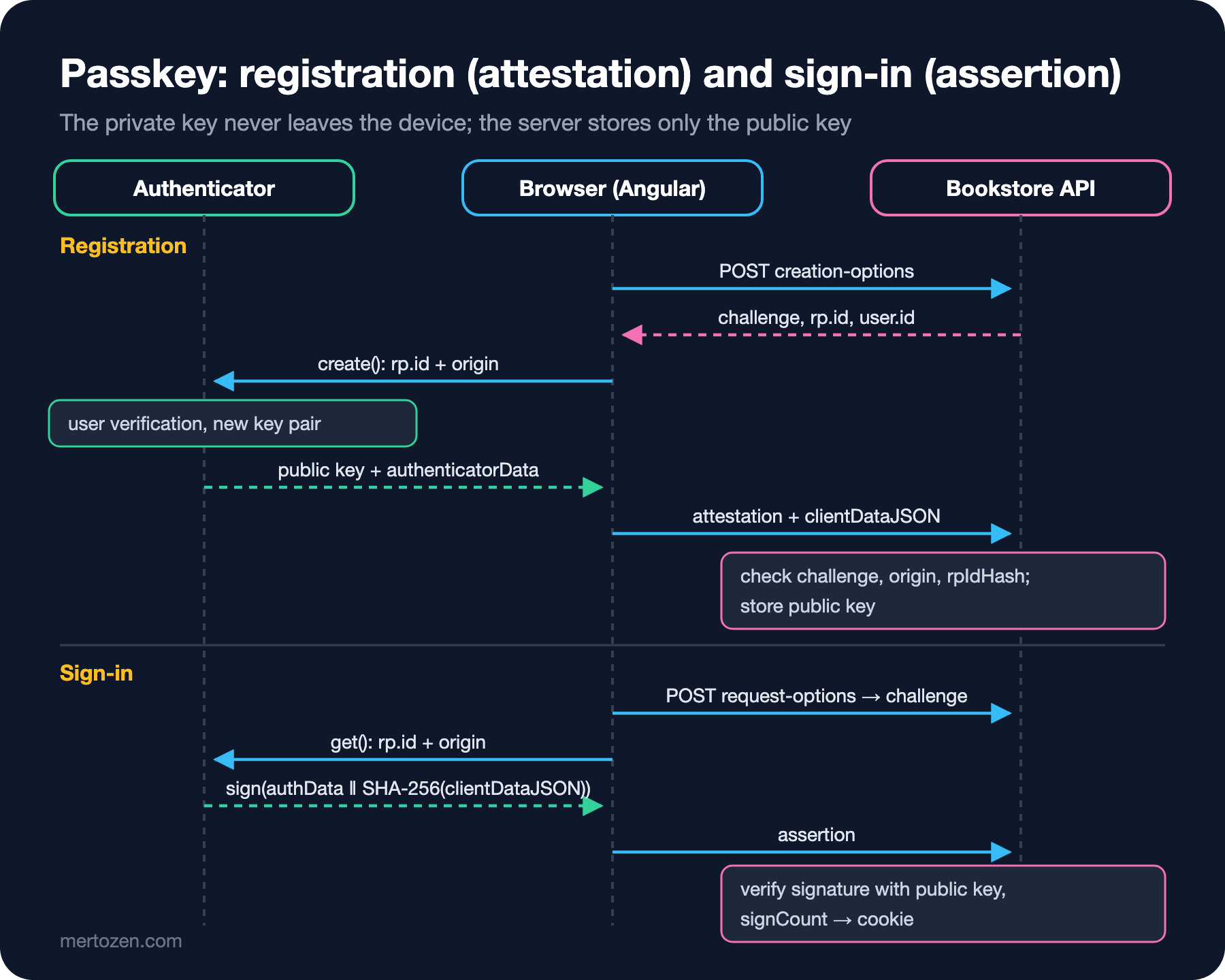
Registration starts with the creation options generated by the server. The real output from the lab:
{"rp":{"name":"localhost","id":"localhost"},"user":{"id":"NDQ3ZjY0NmItZmI0Mi00YWFiLTk3NjYtMTZlMjcwYzk3ZTBk","name":"ada@bookstore.test","displayName":"ada@bookstore.test"},"challenge":"tIH5wpkAq7J-cDdENtx03Fpa5mCU6BPRa9PhMboNtoI","pubKeyCredParams":[{"type":"public-key","alg":-7},{"type":"public-key","alg":-37},{"type":"public-key","alg":-35},{"type":"public-key","alg":-38},{"type":"public-key","alg":-39},{"type":"public-key","alg":-257},{"type":"public-key","alg":-36},{"type":"public-key","alg":-258},{"type":"public-key","alg":-259}],"timeout":120000,"excludeCredentials":[],"authenticatorSelection":{"residentKey":"required","requireResidentKey":true,"userVerification":"required"},"hints":[],"attestationFormats":[]}user.id is not the user's e-mail but the Identity user id encoded as Base64Url; WebAuthn asks that no personal data be put in this field, because the authenticator stores it. pubKeyCredParams are the algorithms the server accepts, in order of preference; -7 is ES256 in the COSE (CBOR Object Signing and Encryption) registry, that is ECDSA (Elliptic Curve Digital Signature Algorithm) on the P-256 curve with SHA-256. residentKey: "required" asks for the credential to be stored on the authenticator together with the user information, that is, to be discoverable.
The browser asks the authenticator for a new credential with these options and sends the response to the server. The attestationObject inside the response is a map encoded with CBOR (Concise Binary Object Representation); the inspector opens it with System.Formats.Cbor:
== registration (attestation)
clientDataJSON: {"type":"webauthn.create","challenge":"tIH5wpkAq7J-cDdENtx03Fpa5mCU6BPRa9PhMboNtoI","origin":"http://localhost:19170","crossOrigin":false}
fmt: none
attStmt entries: 0
authenticatorData: 164 bytes, rpIdHash == SHA-256("localhost"): True, flags=0x45 [UP UV AT], signCount=1
aaguid: 01020304-0506-0708-0102-030405060708
credentialId: 32 bytes
COSE key: kty=2 alg=-7 crv=1 x=32 bytes y=32 bytes
Line by line: the challenge in clientDataJSON is the same as the one in the options, and the origin is the application's origin. fmt: none means the authenticator sent no attestation statement proving its own model. The AT (Attested credential data) flag says the end of authenticatorData contains the new credential's data: the AAGUID (Authenticator Attestation Globally Unique Identifier) that identifies the authenticator model, the credential id and the public key in COSE format. The public key is an EC2 (Elliptic Curve) key (kty=2) on the P-256 curve (crv=1), with 32-byte x and y coordinates. The AAGUID here belongs to Chrome's virtual authenticator; real devices return their own model identifiers.
Attestation is the proof that "this key was really generated on a device of this model", and it is verified with manufacturer certificates. Most consumer applications don't need it and settle for none; Identity doesn't verify attestation statements by default either. If you want to allow only certain security keys in an enterprise environment, you need attestation verification and a trust store (such as the FIDO (Fast IDentity Online) Metadata Service).
Sign-in: Assertion
At sign-in the server generates a new challenge. If allowCredentials is left empty, the browser offers the user the discoverable credentials registered for this RP ID; there is no need to ask for the user name first:
{"challenge":"QZ4MrCdIZWBlTJ8khN-jVnT57EnaGXG974iGxD3qwrQ","timeout":120000,"rpId":"localhost","allowCredentials":[],"userVerification":"required","hints":[]}Decoding the assertion returned by the authenticator:
== sign-in (assertion)
clientDataJSON: {"type":"webauthn.get","challenge":"1uDa5TXLAKJnRnv4-10pzL33lH_7N71sGPDBqAbaW6U","origin":"http://localhost:19170","crossOrigin":false}
authenticatorData: 37 bytes, rpIdHash == SHA-256("localhost"): True, flags=0x05 [UP UV], signCount=2
signature valid: True
signature valid with another origin: False
This time authenticatorData is only 37 bytes: the RP ID hash, the flags and the counter; no AT, since there is no new credential. To see what the signature covers, I did the verification by hand:
// The signature covers authenticatorData || SHA-256(clientDataJSON)
using ECDsa publicKey = ECDsa.Create();
publicKey.ImportSubjectPublicKeyInfo(Decode(attResponse, "publicKey"), out _);
byte[] signature = Decode(asResponse, "signature");
Console.WriteLine($"signature valid: {Verify(assertionAuthData, clientData)}");

// A phishing site would produce a different origin inside clientDataJSON
byte[] phished = Encoding.UTF8.GetBytes(Encoding.UTF8.GetString(clientData).Replace("http://localhost:19170", "https://bookstore-login.example"));
Console.WriteLine($"signature valid with another origin: {Verify(assertionAuthData, phished)}");

bool Verify(byte[] authenticatorData, byte[] clientDataJson)
{
    byte[] signed = [.. authenticatorData, .. SHA256.HashData(clientDataJson)];
    return publicKey.VerifyData(signed, signature, HashAlgorithmName.SHA256, DSASignatureFormat.Rfc3279DerSequence);
}
A single change in the origin invalidates the signature. A fake page cannot stop the browser from writing its own origin into clientDataJSON; to produce a signature with the right origin it needs the private key, and the private key never leaves the authenticator. signCount is 1 at registration and 2 at sign-in: the authenticator increments the counter on every use. If the server sees a smaller or equal value it can suspect the credential was cloned.
Discoverable, Synced and Device-Bound Passkeys
The BE (Backup Eligible) and BS (Backup State) bits in the flags tell you the type of passkey. With BE off the credential is bound to the device (device-bound): like a USB security key or the virtual authenticator in the lab. With BE on, the credential can be synced to other devices through a password manager or a platform account; BS shows whether it is currently backed up. Synced passkeys usually always return 0 for the counter, because the same key is used on several devices and no shared counter can be kept; the counter check has to be disabled in that case.
The distinction matters for compliance requirements. NIST (National Institute of Standards and Technology) SP (Special Publication) 800-63B-4 accepts syncable authenticators at AAL2 (Authentication Assurance Level 2) but forbids them at AAL3 (Authentication Assurance Level 3), because they require the private key to be exportable. For a consumer application like Bookstore, synced passkeys give the best user experience and sufficient assurance; a bank's admin panel may require device-bound security keys.
Account Recovery: What Happens When a Passkey Is Lost?
A passkey's strength is also its risk: the private key exists only in the authenticator. Synced passkeys tolerate a lost phone on their own; sign in to the platform account on the new phone and the passkey comes back. A device-bound passkey goes with the device. A few rules for designing recovery:
Encourage users to register at least two passkeys (for example phone and laptop), and warn them if they have a single passkey whose IsBackedUp value is false. The strength of the recovery path decides the strength of the account: if a passkey account can be fully reset with a link sent by e-mail, the easiest way in for an attacker is not the passkey but the e-mail. Recovery codes (post 5) are a good middle ground for passkey-only accounts. After a recovery, ask the user to review old passkeys and send them a notification.
In Production
Choose the RP ID right from the start; changing it later invalidates every passkey. Choosing bookstore.example instead of login.bookstore.example allows use on all subdomains, but it also means anyone who takes over any subdomain can start a ceremony with this RP ID. Don't host untrusted content on subdomains.
WebAuthn requires a secure context: HTTPS (HTTP Secure) or localhost. That is why the lab runs on http://localhost; in production HTTPS is mandatory. You can query browser and platform support at run time with PublicKeyCredential.getClientCapabilities(); check it in your target browsers before relying on it.
On the scale side, passkey verification is one signature verification and one database read; much cheaper than a password hash (PBKDF2: Password-Based Key Derivation Function 2, 100,000 iterations). On a system with a busy sign-in page you can expect a noticeable drop in CPU (Central Processing Unit) usage.
Common Pitfalls
First, adding a passkey as a second factor next to the password and asking the user for two things. A passkey with UV is already multi-factor; password plus passkey tires the user and brings back the password's phishing risk.
Second, generating the challenge on the client or validating it against a value that comes from the client. The challenge is generated on the server, kept on the server and used once.
Third, putting an e-mail or user name in user.id. This value is stored on the authenticator and can leak the user's personal data; use a random or opaque id.
Fourth, interpreting the 0 counter of synced passkeys as "cloned" and locking the user out. Fifth, creating accounts with a single device-bound passkey and no recovery path.
A Small Experiment
★☆☆ Run the inspector with data you captured yourself. Decode the flag byte in authenticatorData by hand and write down which values the UP, UV and AT bits correspond to.
★★☆ Add a line to the inspector that changes the challenge in the assertion's clientDataJSON and verifies the signature again. Compare the result with the origin change and explain why the server must also check the challenge separately.
★★★ Recreate the virtual authenticator in the Chrome DevTools Protocol with hasResidentKey: false and try registering. Observe what happens with options asking for residentKey: "required", then what changes with preferred, and explain why you lose the "sign in without a user name" experience.
We have seen the pieces of the protocol. In the next post we put them together with ASP.NET Core Identity 10's passkey APIs (Application Programming Interfaces): registration and passwordless sign-in from an Angular client, conditional UI (User Interface), the security of the attestation state and Identity's limits.