

The Logic of OAuth 2.0: Roles, Grant Types, Scopes and What RFC 9700 and OAuth 2.1 Bring
OAuth 2.0 is a delegation protocol, not a sign-in protocol. We run the four roles, the front/back channel split, confidential vs public clients, and the authorization code, client credentials and device grants against a Keycloak lab with .NET 10 code; then show why implicit and password grants were removed, what RFC 9700 and the OAuth 2.1 draft bring, and why an access token is not proof of sign-in.
Version note: The code in this post was built and run with .NET 10 and Keycloak 26.8.2.
Guess First
Bookstore's inventory service will run at night and read the book catalog. No user is signing in. Where does the service get a token, and whose identity ends up in the token's sub claim? Now think about this: the Bookstore app on a smart TV (television) has no keyboard; is the user supposed to type their password with the remote? Last question: an old SPA (Single-Page Application) still uses the implicit grant, which is still enabled on the authorization server. Do you have to migrate it, or is it "working, so leave it"?
The answers to all three come from the same place: OAuth 2.0 is not a sign-in protocol, it is a delegation protocol. Who acts on whose behalf, against which resource, for how long; that is what OAuth standardizes. Up to now this series stayed inside our own application with cookie sessions (02), ASP.NET Core Identity (03, 04), MFA (Multi-Factor Authentication, 05), passkeys (06, 07), JWT (JSON Web Token, 08) and refresh tokens (09). With this post we move into Block D, the world where identity and authorization are delegated to an authorization server outside the application. The lab's authorization server is Keycloak running in Docker; every output comes from that lab.
Four Roles and Two Channels
The document that defines OAuth 2.0 is RFC (Request for Comments) 6749, The OAuth 2.0 Authorization Framework; it defines four roles. The resource owner owns the resource; usually the user, Ada. The client is the application that wants to reach the resource: Bookstore's web app, its TV app or the inventory service. The authorization server gets the resource owner's approval and issues tokens; Keycloak in our lab. The resource server accepts the token and returns data; the Bookstore API (Application Programming Interface).
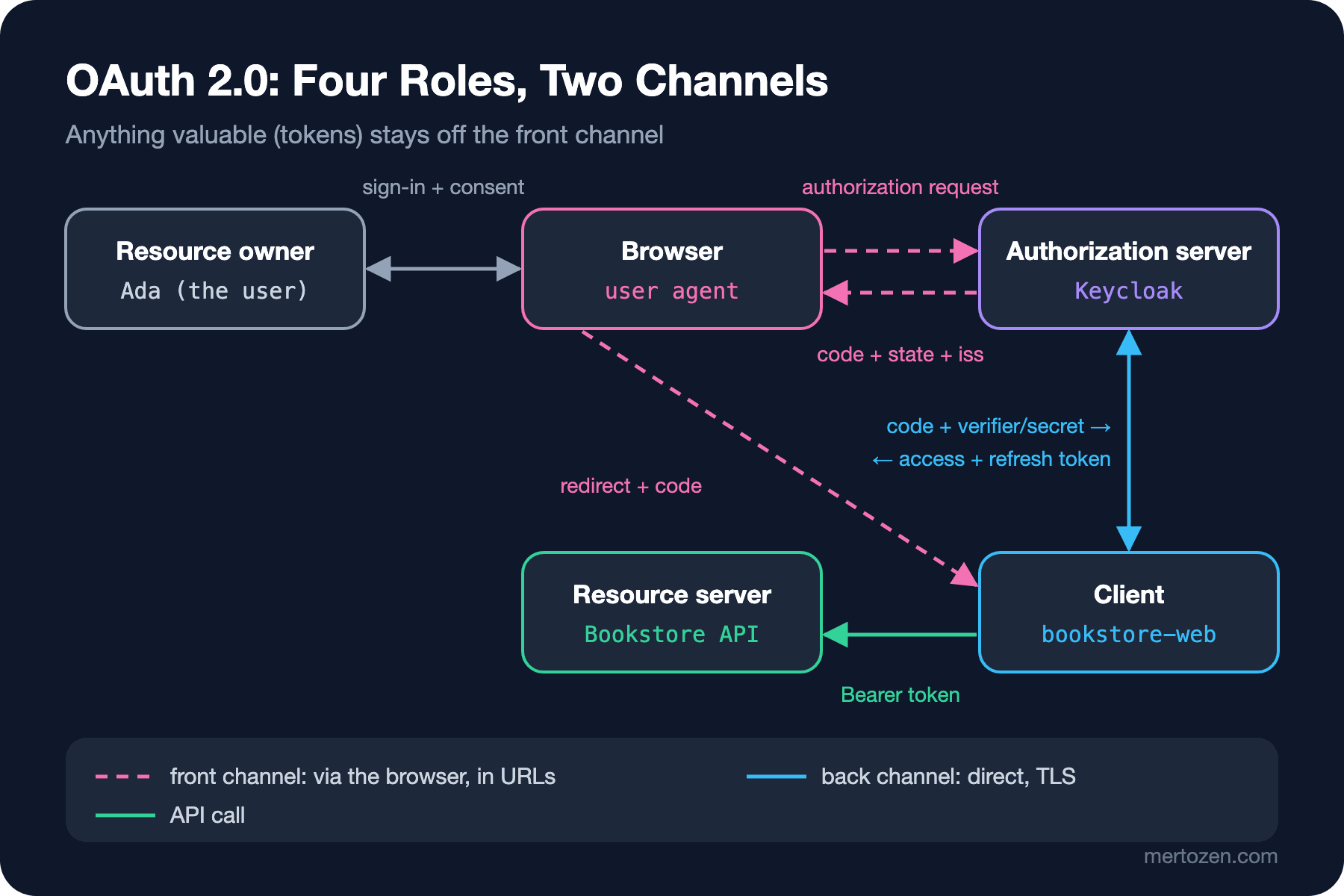
Just as important as the roles is the channel each message travels on. The front channel is redirects through the browser: the authorization request and response pass through the address bar and can end up in browser history, logs or the Referer header. The back channel is the HTTP (Hypertext Transfer Protocol) request in which the client talks to the authorization server directly over TLS (Transport Layer Security): the POST to the token endpoint. Almost all of modern OAuth rests on one rule: anything valuable (access tokens, refresh tokens) must not travel through the front channel.
Clients come in two kinds. A confidential client can keep a secret or a private key safe: an ASP.NET Core app running on a server, a worker. A public client cannot: an Angular app in the browser, a mobile app, a TV app. A secret inside anything whose code lives on the user's device is not a secret. In Keycloak this is the "Client authentication" switch; the lab's inventory service is defined like this:
# from kc-setup.sh: machine-to-machine client (confidential, client credentials only)
$K create clients -r bookstore -f - <<'EOF'
{ "clientId": "bookstore-inventory-worker", "enabled": true, "publicClient": false, "secret": "dev-only-inventory-worker-secret",
  "standardFlowEnabled": false, "implicitFlowEnabled": false, "directAccessGrantsEnabled": false,
  "serviceAccountsEnabled": true, "optionalClientScopes": ["books.read", "orders.read"] }
EOF
Each client has only the grants it actually uses. standardFlowEnabled means authorization code, implicitFlowEnabled implicit, directAccessGrantsEnabled the password grant, serviceAccountsEnabled client credentials. The secret starts with dev-only- on purpose: this value lives only in the local lab.
Authorization Code: The Browser Is Only a Courier
Whenever there is a user, the grant you use is authorization code. Roughly: the client redirects the browser to the authorization server, the user signs in and consents there, the authorization server sends the browser back to the client with a single-use, short-lived code, and the client exchanges that code for tokens over the back channel. The only valuable thing on the front channel is the code, and it is useless on its own, because exchanging it needs either the client secret or PKCE's (Proof Key for Code Exchange) code_verifier.
Send a request with the correct registered redirect URI (Uniform Resource Identifier) but without PKCE to the lab's public client bookstore-spa and Keycloak rejects it at the very first step:
$ curl -s -o /dev/null -w "%{http_code}\n%{redirect_url}\n" \
  "$B/auth?client_id=bookstore-spa&response_type=code&redirect_uri=http://localhost:19211/callback&scope=openid&state=af0ifjsldkj"
302
http://localhost:19211/callback?error=invalid_request&error_description=Missing+parameter%3A+code_challenge_method&state=af0ifjsldkj&iss=http%3A%2F%2Flocalhost%3A19200%2Frealms%2Fbookstore
Even the error comes back by redirect, over the front channel; state is returned, and at the end there is an iss parameter. That iss is the issuer information RFC 9207 added against mix-up attacks. We will cover the details of PKCE, state and nonce in the next post by reading the HTTP traffic line by line; here it is enough to hold on to the logic of the grant.
Client Credentials: A Token Without a User
When a machine like the inventory service calls on its own behalf, the resource owner is the client itself. There is no redirect, no browser, no consent screen; the client authenticates and gets a token. In .NET 10, writing this without a library takes a few lines:
async Task ClientCredentialsAsync()
{
    // No user: the client gets a token on its own behalf with its own secret (back channel)
    using HttpResponseMessage response = await http.PostAsync($"{Realm}/token", new FormUrlEncodedContent(
    [
        new("grant_type", "client_credentials"),
        new("client_id", "bookstore-inventory-worker"),
        new("client_secret", Environment.GetEnvironmentVariable("WORKER_SECRET") ?? ""),
        new("scope", "books.read")
    ]));
    TokenResponse? token = await response.Content.ReadFromJsonAsync<TokenResponse>();
    Console.WriteLine($"{(int)response.StatusCode} token_type={token?.TokenType} expires_in={token?.ExpiresIn} scope={token?.Scope}");
}
$ dotnet run -- client-credentials
200 token_type=Bearer expires_in=300 scope=books.readLooking at the token's payload (only in the lab, to read our own token), two things stand out:
{
  "exp": 1794115682,
  "iat": 1794115382,
  "jti": "trrtcc:e3dc0c70-62d8-bab3-70b1-08a435e58ff3",
  "iss": "http://localhost:19200/realms/bookstore",
  "aud": "bookstore-api",
  "sub": "ed0f36d8-8358-45d0-8314-adce15677661",
  "typ": "Bearer",
  "azp": "bookstore-inventory-worker",
  "scope": "books.read",
  "clientHost": "172.66.2.5",
  "clientAddress": "172.66.2.5",
  "client_id": "bookstore-inventory-worker"
}
The first is sub: not a user's identity but that of the service account Keycloak created for this client. On the API side you answer "did a human or a machine make this request?" with client_id/azp and the absence of user-specific claims. The second is aud: thanks to the audience mapper attached to the books.read scope, the token is valid only for bookstore-api. The scopes are client scopes we defined ourselves; each adds both the scope and the audience to the token.
Let's be clear about what a scope is. A scope is the boundary of the delegation the client asked for and received: "this token can read the catalog". It says nothing about what the user may do. Ask for a scope that is not assigned to the client and you get:
$ curl -s -X POST $B/token -d grant_type=client_credentials -d client_id=bookstore-inventory-worker \
    -d client_secret=$WORKER_SECRET -d scope=orders.write
{"error":"invalid_scope","error_description":"Invalid scopes: orders.write"}
$ curl -s -X POST $B/token -d grant_type=client_credentials -d client_id=bookstore-spa
{"error":"unauthorized_client","error_description":"Public client not allowed to retrieve service account"}
The second line is instructive too: client credentials make no sense for a public client, because it has no secret to prove. The wider topic of machine-to-machine identity (API keys, workload identity) belongs to post 03 of the upcoming "API Security" series; a DelegatingHandler that caches and renews the token comes in post 13.
Device Authorization: A Device Without a Keyboard
The TV app is a public client, and asking the user for a password there is unacceptable. RFC 8628 (OAuth 2.0 Device Authorization Grant) exists for this: the device requests a user_code and shows it on screen, the user opens the verification address on a phone or computer, enters the code and approves, and meanwhile the device polls the token endpoint at fixed intervals.
async Task DeviceFlowAsync()
{
    // 1) The device asks for a short code to show the user
    using HttpResponseMessage start = await http.PostAsync($"{Realm}/auth/device", new FormUrlEncodedContent(
    [
        new("client_id", "bookstore-tv"),
        new("scope", "orders.read")
    ]));
    DeviceAuthorization device = (await start.Content.ReadFromJsonAsync<DeviceAuthorization>())!;
    Console.WriteLine($"Open {device.VerificationUri} and enter {device.UserCode}");

    // 2) Poll the token endpoint until the user approves on another device
    TimeSpan interval = TimeSpan.FromSeconds(device.Interval);
    Stopwatch clock = Stopwatch.StartNew();
    while (clock.Elapsed < TimeSpan.FromSeconds(device.ExpiresIn))
    {
        await Task.Delay(interval);
        using HttpResponseMessage poll = await http.PostAsync($"{Realm}/token", new FormUrlEncodedContent(
        [
            new("grant_type", "urn:ietf:params:oauth:grant-type:device_code"),
            new("client_id", "bookstore-tv"),
            new("device_code", device.DeviceCode)
        ]));
        if (poll.IsSuccessStatusCode)
        {
            TokenResponse token = (await poll.Content.ReadFromJsonAsync<TokenResponse>())!;
            Console.WriteLine($"[{clock.Elapsed.TotalSeconds,4:0}s] {(int)poll.StatusCode} token_type={token.TokenType} scope={token.Scope}");
            return;
        }
        OAuthError error = (await poll.Content.ReadFromJsonAsync<OAuthError>())!;
        Console.WriteLine($"[{clock.Elapsed.TotalSeconds,4:0}s] {(int)poll.StatusCode} {error.Error}");
        switch (error.Error)
        {
            case "authorization_pending":
                continue;
            case "slow_down":
                // RFC 8628: on slow_down the interval grows by 5 seconds
                interval += TimeSpan.FromSeconds(5);
                continue;
            default:
                return; // access_denied, expired_token ...
        }
    }
}
I started the app, signed in as Ada on the verification page from a second terminal, and accepted on the consent screen:
$ dotnet run -- device
Open http://localhost:19200/realms/bookstore/device and enter BRAM-PEDM
[   5s] 400 authorization_pending
[  10s] 400 authorization_pending
[  15s] 200 token_type=Bearer scope=orders.read
Keycloak returned an interval of 5 seconds and expires_in of 600 seconds. The weak point of this grant is human, not technical: an attacker can send a victim the user_code of a flow the attacker started ("enter this code"). That is why the consent screen must clearly show which application asks for which permission, and why the code's lifetime should be short. Enable the device grant only for genuinely input-constrained devices.
The Removed Grants: Implicit and Password
Keycloak's discovery document still lists implicit and password in grant_types_supported; the server supports them, but they are off on every client in the lab. When they are off, the client sees:
$ curl -s -o /dev/null -w "%{http_code}\n%{redirect_url}\n" \
  "$B/auth?client_id=bookstore-spa&response_type=token&redirect_uri=http://localhost:19211/callback&scope=openid&state=af0ifjsldkj&nonce=n-0S6"
302
http://localhost:19211/callback#error=unauthorized_client&error_description=Client+is+not+allowed+to+initiate+browser+login+with+given+response_type.+Implicit+flow+is+disabled+for+the+client.&state=af0ifjsldkj&iss=http%3A%2F%2Flocalhost%3A19200%2Frealms%2Fbookstore
$ curl -s -X POST $B/token -d grant_type=password -d client_id=bookstore-spa \
    -d username=ada@bookstore.test --data-urlencode "password=$ADA_PASSWORD"
{"error":"unauthorized_client","error_description":"Client not allowed for direct access grants"}
In the implicit grant (response_type=token) the access token came directly in the authorization response, in the URL (Uniform Resource Locator) fragment. That is why even the error comes back in a fragment starting with #. The token travels the front channel, can leak into browser history and, through an open redirect, to another site; the client has no way to verify whom the token was issued for, and the token cannot be bound to a sender. It existed in 2012 because JavaScript in the browser could not call a token endpoint on another origin; once CORS (Cross-Origin Resource Sharing) and PKCE arrived, its reason to exist was gone.
The password grant, ROPC (Resource Owner Password Credentials), hands the user's password to the client. That is the very problem OAuth exists to solve: the client sees the password, everything that lives on the authorization server's screen such as MFA and passkeys is bypassed, and phishing-resistant sign-in becomes impossible. So "it's our own mobile app, a trusted client" is not a valid excuse either.
What RFC 9700 and OAuth 2.1 Change
RFC 6749 dates from 2012. The lessons of the years since were published in January 2025 as RFC 9700 (BCP 240, Best Current Practice for OAuth 2.0 Security). OAuth 2.1 collects those lessons and several follow-up RFCs into a single core document; it is not an RFC yet but an IETF (Internet Engineering Task Force) draft: the latest revision is draft-ietf-oauth-v2-1-17, dated 31 October 2026. So a product claiming "OAuth 2.1 compliance" is really claiming compliance with a draft; in practice, a setup that follows RFC 9700 already meets most of what 2.1 asks.
| Topic | RFC 6749 (2012) | RFC 9700 / OAuth 2.1 draft |
|---|---|---|
| PKCE | None (later RFC 7636) | Required for public clients, recommended for confidential; method S256 |
| Redirect URI | Loose matching against registered URI | Exact string matching (except loopback port) |
| Implicit | Defined | Should not be used, absent from 2.1 |
| Password (ROPC) | Defined | Forbidden, absent from 2.1 |
| Token replay | Bearer tokens | Sender-constrained tokens recommended (mTLS, DPoP) |
| Public client refresh token | No rule | Sender-constrained or rotation required |
| Audience | Undefined | Tokens restricted to specific resource servers |
| Client authentication | Secrets common | Asymmetric methods recommended (private_key_jwt, mTLS) |
DPoP (Demonstrating Proof of Possession, RFC 9449) and mTLS (mutual TLS, RFC 8705) in the table bind a token to a key held by the client that received it, so a stolen token is useless on its own. We will try DPoP with Keycloak in post 13. We built refresh token rotation and reuse detection by hand in post 09; that is exactly what RFC 9700 asks of public clients.
OAuth Is Not an Authentication Protocol
This sentence is repeated in every OAuth talk, but the reason rarely is. An access token is not a message written for the client; it is an authorization document written for the resource server. OAuth's contract does not include the client reading the token; the token may well be opaque (a meaningless string). When the client gets the token, all it learns is "with this token I can call an API". Who the user is, when and how they signed in, whether the token was issued for this client: none of this is defined by OAuth.
A concrete attack shows it: if an app with a "Sign in with Bookstore" button calls a /me endpoint with whatever access token it receives and signs in the returned user, anyone who hands it a token obtained for another client can sign in as that user. OIDC (OpenID Connect) fills exactly this gap: a signed ID token written for the client, with the client as its aud, plus claims describing the sign-in event such as nonce, auth_time and amr. That is the subject of post 12.
In Production
On the authorization server, enable only the grants each client uses, and do not leave this to defaults. In the lab I created a client with kcadm without setting any field: standardFlowEnabled came on, implicit and direct access grants came off. But the admin console, imported old realms or another product may come with different defaults; check a client's settings by eye once after creating it. Check the discovery document (.well-known/openid-configuration) regularly: grant_types_supported tells you what the server supports, the client settings tell you what is actually allowed.
Device clients that poll the token endpoint and ignore slow_down keep the authorization server needlessly busy; always take the interval from the server and increase it. Don't fetch a client credentials token on every request: each token request is a network round trip, a client authentication and a signing operation; asking for a 5-minute token every second means 300 times the load on the authorization server. A cache that renews the token a little before it expires is enough.
Keep client secrets in a secret store, not in code (details in the upcoming "Configuration and Secret Management" series); where possible use asymmetric client authentication such as private_key_jwt instead of a secret. If a secret leaks, regenerating it on the authorization server should be a one-step job; rehearse it once.
Common Pitfalls
First, treating an access token as proof that "the user signed in"; that is exactly the attack above. Second, mistaking a scope for the user's permission: the orders.read scope says "this client may read orders", not "Ada may read Grace's order". Resource-level checks still belong in the API; we saw that with an IDOR (Insecure Direct Object Reference) example in the "Broken Access Control (1)" post of the Web Security (OWASP Top 10) series. Third, embedding a secret in a public client and believing it is confidential; the secret in an Angular bundle is in everyone's hands.
Fourth, enabling the password grant "just this once" for a mobile app or an internal tool. Fifth, writing OAuth 2.1 into contracts as if it were a published standard; the right reference is RFC 9700 plus every extension RFC you use. Sixth, using the device grant in web apps as an "easy login"; training users to copy codes opens the door to phishing.
A Small Experiment
★☆☆ Start the device flow for bookstore-tv in the lab and deny instead of approving on the verification page. Observe which error value the app receives and how the loop ends.
★★☆ In the device flow, replace the Task.Delay on interval with a fixed 1 second. Measure whether, and on which attempt, Keycloak returns slow_down; show in the output how the code grows the interval.
★★★ Set up client authentication for bookstore-inventory-worker with private_key_jwt instead of a client secret: generate an RSA (Rivest-Shamir-Adleman) key in the work folder, give the public key to Keycloak and send a signed client_assertion in the token request.
Roles, channels and grants are in place. In the next post we go inside the authorization code flow: we will generate code_verifier and code_challenge ourselves, read all the HTTP traffic against Keycloak with curl, see what state and nonce prevent, and use PAR (Pushed Authorization Requests) to pull the authorization request off the front channel entirely.