

MFA: TOTP, Recovery Codes, Step-up Authentication and the Weakness of SMS
ASP.NET Core Identity's default authenticator provider accepts a TOTP code within ±2 time steps (five codes) and again and again, while NIST requires a code to be accepted once. We compute TOTP ourselves against the RFC 6238 test vector and show setup, lockout, a replay-protected provider, recovery codes, a step-up policy with the amr claim and the risks of SMS and 'remember this device' with real outputs.
Version note: The code in this post was built and run with .NET 10 (ASP.NET Core 10.0.13 runtime) and Microsoft.AspNetCore.Identity.EntityFrameworkCore 10.0.14.
Guess First
Ada turned on MFA (Multi-Factor Authentication) with an authenticator app on her Bookstore account. She typed the 6-digit code from her phone on her laptop and signed in. Within the same 30 seconds, someone who knows Ada's password enters the same code on another machine (seen over her shoulder, or relayed from a fake sign-in page). With ASP.NET Core Identity's default settings, does the second sign-in succeed?
== right code on device B
{"status":"signed-in"}
== same code on device C
{"status":"signed-in"}
It does. Identity's default authenticator provider accepts a code as many times as you like while it is valid. NIST's (National Institute of Standards and Technology) SP (Special Publication) 800-63B-4 guideline is explicit: a verifier must accept an OTP (One-Time Password) only once while it is valid. In this post we take TOTP (Time-based One-Time Password) apart byte by byte, set up the authenticator and the two-step sign-in in Identity, measure the acceptance window, close replay, and add recovery codes and step-up authentication for sensitive operations. The basics of lockout and brute force were covered in post 12 of the Web Security (OWASP Top 10) series.
How Does TOTP Work?
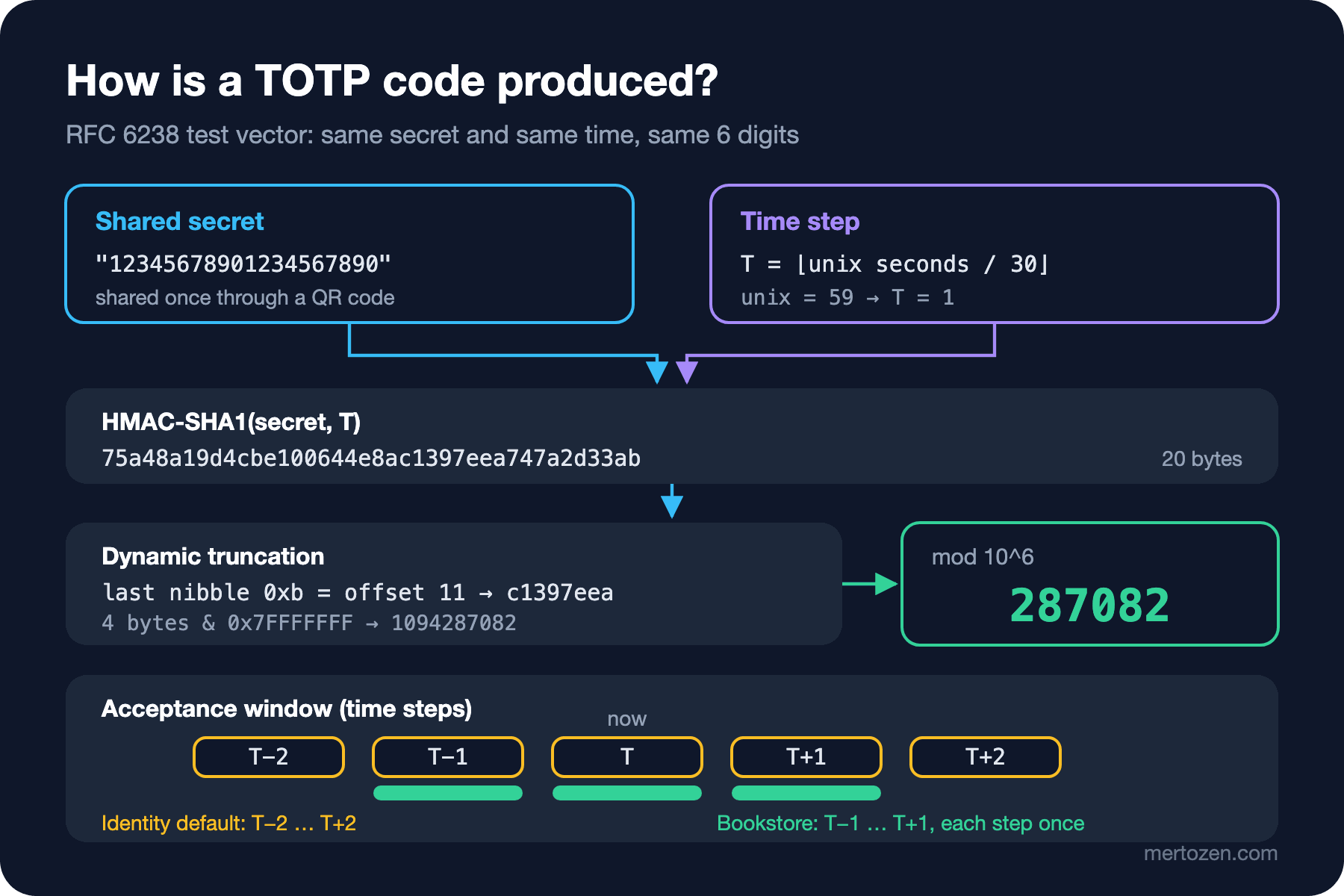
TOTP is the variant of HOTP (HMAC-based One-Time Password) from RFC (Request for Comments) 4226 that uses time instead of a counter, and it is defined in RFC 6238. The server and the authenticator app share a secret once, through a QR (Quick Response) code. After that both do the same computation independently: divide the Unix time by 30, turn that time step into an 8-byte big-endian counter, compute HMAC-SHA1 (Hash-based Message Authentication Code, Secure Hash Algorithm 1) with the secret, reduce the result to a 31-bit number with dynamic truncation and take the last 6 digits. No network, no synchronization; just a shared secret and roughly the same clock.
To imitate the authenticator app in the lab I wrote the algorithm myself:
public static class Totp
{
    // RFC 6238 on top of RFC 4226: HMAC-SHA1 over the time-step counter, dynamic truncation, 6 digits
    public static string Compute(byte[] secret, long timeStep, int digits = 6)
    {
        Span<byte> counter = stackalloc byte[8];
        BinaryPrimitives.WriteInt64BigEndian(counter, timeStep);
        Span<byte> hash = stackalloc byte[HMACSHA1.HashSizeInBytes];
        HMACSHA1.HashData(secret, counter, hash);
        int offset = hash[^1] & 0x0F;
        int binary = BinaryPrimitives.ReadInt32BigEndian(hash[offset..]) & 0x7FFFFFFF;
        return (binary % (int)Math.Pow(10, digits)).ToString(new string('0', digits), CultureInfo.InvariantCulture);
    }
}
Never use cryptographic code you wrote yourself without checking it against a test vector. The first vector in the appendix of RFC 6238 is the ASCII (American Standard Code for Information Interchange) secret 12345678901234567890 and, for second 59, the 8-digit 94287082:
$ dotnet Lab05.dll rfc6238
94287082
It matches. The figure shows why dynamic truncation exists: the last nibble of the HMAC selects which 4 bytes are taken, so the code comes from a different place in the hash each time rather than a fixed one. Masking the top bit avoids signed/unsigned integer differences.
Authenticator Setup and Storage in Identity
Setup takes two steps: first generate a key and show it to the user, then turn on 2FA (Two-Factor Authentication) once the user enters the first code from their app.
manage.MapPost("/2fa/setup", async (HttpContext context, UserManager<BookstoreUser> users) =>
{
    BookstoreUser user = (await users.GetUserAsync(context.User))!;
    string? key = await users.GetAuthenticatorKeyAsync(user);
    if (string.IsNullOrEmpty(key))
    {
        await users.ResetAuthenticatorKeyAsync(user);
        key = await users.GetAuthenticatorKeyAsync(user);
    }
    string label = Uri.EscapeDataString($"Bookstore:{user.Email}");
    return TypedResults.Ok(new
    {
        sharedKey = key,
        authenticatorUri = $"otpauth://totp/{label}?secret={key}&issuer=Bookstore&digits=6"
    });
});

manage.MapPost("/2fa/enable", async (CodeRequest request, HttpContext context, UserManager<BookstoreUser> users) =>
{
    BookstoreUser user = (await users.GetUserAsync(context.User))!;
    bool valid = await users.VerifyTwoFactorTokenAsync(user, users.Options.Tokens.AuthenticatorTokenProvider, request.Code);
    if (!valid)
    {
        return Results.BadRequest(new[] { "InvalidCode" });
    }
    await users.SetTwoFactorEnabledAsync(user, true);
    IEnumerable<string>? codes = await users.GenerateNewTwoFactorRecoveryCodesAsync(user, 10);
    return TypedResults.Ok(new { recoveryCodes = codes });
});
The Angular side turns authenticatorUri into a QR code; for people without a camera it also shows sharedKey in groups of four characters. The output for the fake lab user:
{"sharedKey":"43ZQISQ66FZBGUZEIVYJN2IBYSKYBL33","authenticatorUri":"otpauth://totp/Bookstore%3Aada%40bookstore.test?secret=43ZQISQ66FZBGUZEIVYJN2IBYSKYBL33&issuer=Bookstore&digits=6"}
{"recoveryCodes":["KVQVD-H8T7R","KD2QB-W42KR","3QBW9-4G8H7","Y56GD-NP465","D7VM9-MNQXW","GFPFC-B2KGC","BF28P-MVQJN","QX93X-VVK4P","DMTQF-NHF6J","VW73J-D9HDM"]}
The key is 32 characters of Base32, that is 160 bits; the length RFC 4226 recommends for HMAC-SHA1. Not enabling 2FA before the first code matters: if the user closes the page without scanning the QR code, on the next sign-in they face a second step they have no code for and cannot get into their account. SetTwoFactorEnabledAsync also regenerates the security stamp; so when 2FA is turned on, sessions on other devices drop at the next stamp check.
So where are the key and the recovery codes?
$ sqlite3 bookstore-identity.db "select LoginProvider, Name, Value from AspNetUserTokens;"
[AspNetUserStore]|AuthenticatorKey|43ZQISQ66FZBGUZEIVYJN2IBYSKYBL33
[AspNetUserStore]|RecoveryCodes|KVQVD-H8T7R;KD2QB-W42KR;3QBW9-4G8H7;Y56GD-NP465;D7VM9-MNQXW;GFPFC-B2KGC;BF28P-MVQJN;QX93X-VVK4P;DMTQF-NHF6J;VW73J-D9HDM
Both are plain text. By its nature the server must be able to read the shared secret back (it cannot be hashed like a password), but anyone who reaches this row can generate every user's codes. Recovery codes could be hashed, but Identity's default store doesn't hash them. Protect database backups, read replicas and access to this table more tightly than password hashes; if needed, encrypt UserTokens at column level.
The Sign-in Flow and Lockout
When a user with 2FA enabled enters the right password, PasswordSignInAsync returns RequiresTwoFactor and writes the user's identity into a temporary cookie called Identity.TwoFactorUserId. The real session cookie arrives when the second step is completed:
account.MapPost("/login/2fa", async (TwoFactorRequest request, SignInManager<BookstoreUser> signIn) =>
{
    SignInResult result = await signIn.TwoFactorAuthenticatorSignInAsync(request.Code, isPersistent: false, rememberClient: request.RememberMachine);
    return result.Succeeded
        ? TypedResults.Ok(new { status = "signed-in" })
        : Results.Json(new { status = result.ToString() }, statusCode: StatusCodes.Status401Unauthorized);
});
== password step
HTTP/1.1 401 Unauthorized
Set-Cookie: Identity.TwoFactorUserId=CfDJ8EINq_wm4TFCv7guzy6SHCftuaQUX4DyHuViBcO_UexYdNSJq...
{"status":"RequiresTwoFactor"}
== lockout
#1 {"status":"Failed"}
#2 {"status":"Failed"}
#3 {"status":"Failed"}
#4 {"status":"Failed"}
#5 {"status":"LockedOut"}
#6 {"status":"LockedOut"}
$ sqlite3 bookstore-identity.db "select AccessFailedCount, LockoutEnd from AspNetUsers;"
0|2026-11-08 05:56:32.783333+00:00Wrong codes go to the same counter as password attempts, and on the fifth failure the account is locked for the default 5 minutes. This matters: a 6-digit code has a one-in-a-million guessing chance, and because several codes are valid inside the acceptance window the chance is somewhat higher. Without lockout, an attacker who knows the password could pass the second step by guessing. NIST also mandates rate limiting for authenticators whose output is shorter than 64 bits.
The Acceptance Window and Replay
The phone's clock can be a few seconds off from the server, and the step can change while the user reads and types the code. That is why verifiers also accept a few neighbouring steps. Instead of searching the documentation for how many steps Identity accepts, I measured it: I generated codes for the neighbours from -4 to +4 of the current step and asked VerifyTwoFactorTokenAsync:
offset -4 (-120s) 296541 -> {"valid":false}
offset -3 ( -90s) 814908 -> {"valid":false}
offset -2 ( -60s) 490716 -> {"valid":true}
offset -1 ( -30s) 673681 -> {"valid":true}
offset +0 (  +0s) 498268 -> {"valid":true}
offset +1 ( +30s) 996559 -> {"valid":true}
offset +2 ( +60s) 397021 -> {"valid":true}
offset +3 ( +90s) 391809 -> {"valid":false}
offset +4 (+120s) 744076 -> {"valid":false}
== replay
{"valid":true}
{"valid":true}
Five steps: at any moment five different codes are valid, and each can be used again and again. The two-device scenario at the start was the result. A real-time phishing proxy uses the code the user typed in its own session immediately; replay protection doesn't stop that, but it does stop the same code being used a second time, for example after being seen over a shoulder or taken from a logged request. Identity's IUserTwoFactorTokenProvider<TUser> interface makes adding it easy:
public sealed class ReplayProtectedAuthenticatorTokenProvider<TUser>(TimeProvider time) : IUserTwoFactorTokenProvider<TUser>
    where TUser : class
{
    public const string ProviderName = "ReplayProtectedAuthenticator";
    private const string LastStepName = "LastTotpStep";

    public async Task<bool> CanGenerateTwoFactorTokenAsync(UserManager<TUser> manager, TUser user) =>
        !string.IsNullOrEmpty(await manager.GetAuthenticatorKeyAsync(user));

    // The code comes from the user's authenticator app; the server never generates one
    public Task<string> GenerateAsync(string purpose, UserManager<TUser> manager, TUser user) => Task.FromResult(string.Empty);

    public async Task<bool> ValidateAsync(string purpose, string token, UserManager<TUser> manager, TUser user)
    {
        string? key = await manager.GetAuthenticatorKeyAsync(user);
        if (string.IsNullOrEmpty(key) || token.Length != 6 || !token.All(char.IsAsciiDigit))
        {
            return false;
        }

        byte[] secret = Base32.Decode(key);
        long current = time.GetUtcNow().ToUnixTimeSeconds() / 30;
        string? stored = await manager.GetAuthenticationTokenAsync(user, ProviderName, LastStepName);
        long lastUsed = long.TryParse(stored, NumberStyles.Integer, CultureInfo.InvariantCulture, out long parsed) ? parsed : 0;

        // One step of drift in each direction (about 30 s) instead of Identity's two
        for (long step = current - 1; step <= current + 1; step++)
        {
            byte[] expected = Encoding.ASCII.GetBytes(Totp.Compute(secret, step));
            if (step > lastUsed && CryptographicOperations.FixedTimeEquals(expected, Encoding.ASCII.GetBytes(token)))
            {
                // A code is accepted once: store the step so the same or an older code is rejected
                IdentityResult saved = await manager.SetAuthenticationTokenAsync(
                    user, ProviderName, LastStepName, step.ToString(CultureInfo.InvariantCulture));
                return saved.Succeeded;
            }
        }
        return false;
    }
}
Registering it and telling Identity "use this for the authenticator":
builder.Services.AddIdentity<BookstoreUser, IdentityRole<Guid>>(options =>
    {
        options.Stores.SchemaVersion = IdentitySchemaVersions.Version3;
        options.Password.RequiredLength = 12;
        if (builder.Configuration.GetValue("Lab:ReplayProtection", true))
        {
            options.Tokens.AuthenticatorTokenProvider = ReplayProtectedAuthenticatorTokenProvider<BookstoreUser>.ProviderName;
        }
    })
    .AddEntityFrameworkStores<BookstoreIdentityDbContext>()
    .AddDefaultTokenProviders()
    .AddTokenProvider<ReplayProtectedAuthenticatorTokenProvider<BookstoreUser>>(ReplayProtectedAuthenticatorTokenProvider<BookstoreUser>.ProviderName);
Because TwoFactorAuthenticatorSignInAsync and VerifyTwoFactorTokenAsync read the provider from Options.Tokens.AuthenticatorTokenProvider, nothing else needs to change. The same scenario with the new provider:
== same code on two devices
device b: {"status":"signed-in"}
device c: {"status":"Failed"}
I compare codes with CryptographicOperations.FixedTimeEquals so that the comparison time doesn't leak how many characters matched. SetAuthenticationTokenAsync, which writes the last used step, updates the user with a ConcurrencyStamp check, and the provider returns false if it fails. Of the requests I sent at the same moment from four devices with the same code, only one got through; still, test this race separately in a setup with multiple instances and a different database. The price of narrowing the window to ±1 step is that codes from phones whose clock drifted more than a minute get rejected; keep an eye on that through support tickets.
Recovery Codes
Recovery codes exist so that the user can get back into their account if the phone is lost. Each one is used once:
account.MapPost("/login/recovery", async (TwoFactorRequest request, SignInManager<BookstoreUser> signIn) =>
{
    SignInResult result = await signIn.TwoFactorRecoveryCodeSignInAsync(request.Code);
    return result.Succeeded
        ? TypedResults.Ok(new { status = "signed-in" })
        : Results.Json(new { status = result.ToString() }, statusCode: StatusCodes.Status401Unauthorized);
});
== recovery code on device D
{"status":"signed-in"}
{"name":"ada@bookstore.test","amr":["mfa"],"stepUpAt":null}
{"status":"Failed"}
$ sqlite3 bookstore-identity.db "select Name, length(Value) - length(replace(Value, ';', '')) + 1 from AspNetUserTokens where Name='RecoveryCodes';"
RecoveryCodes|9The code was consumed, the second use was rejected, nine codes remain. The thing to watch is the amr claim: a recovery code sign-in is also marked mfa. A recovery code can be the sign of a moment when the phone was lost or the account was taken over; after such a sign-in send the user an e-mail, show how many codes remain and suggest generating new ones when they run low. Show recovery codes to the user once, and protect regenerating them with the password or a current 2FA code.
Step-up Authentication
Ada signed in with MFA in the morning; in the afternoon she wants to change her delivery address. The session is open, but an address change (and payment, e-mail change, turning off 2FA) is among the operations an attacker wants most. Step-up means asking for a fresh verification right before the sensitive operation. First let's see how the session was authenticated:
{"name":"ada@bookstore.test","amr":["pwd"],"stepUpAt":null}
{"name":"ada@bookstore.test","amr":["mfa"],"stepUpAt":null}
The first is the password sign-in before 2FA was enabled, the second the two-step sign-in. SignInManager writes values from RFC 8176 (Authentication Method Reference Values) into the amr claim. There is no "when" information, so we add our own claim at step-up time:
manage.MapPost("/step-up", async (CodeRequest request, HttpContext context, UserManager<BookstoreUser> users, SignInManager<BookstoreUser> signIn, TimeProvider time) =>
{
    BookstoreUser user = (await users.GetUserAsync(context.User))!;
    if (!await users.VerifyTwoFactorTokenAsync(user, users.Options.Tokens.AuthenticatorTokenProvider, request.Code))
    {
        await users.AccessFailedAsync(user);
        return Results.BadRequest(new[] { "InvalidCode" });
    }
    await users.ResetAccessFailedCountAsync(user);
    // Re-issue the cookie with fresh authentication-time claims
    await signIn.SignInWithClaimsAsync(user, isPersistent: false,
    [
        new Claim("amr", "mfa"),
        new Claim("step_up_at", time.GetUtcNow().ToUnixTimeSeconds().ToString(CultureInfo.InvariantCulture))
    ]);
    return TypedResults.NoContent();
});
public sealed record RecentStepUpRequirement(TimeSpan MaxAge) : IAuthorizationRequirement;
public sealed class RecentStepUpHandler(TimeProvider time) : AuthorizationHandler<RecentStepUpRequirement>
{
protected override Task HandleRequirementAsync(AuthorizationHandlerContext context, RecentStepUpRequirement requirement)
{
string? raw = context.User.FindFirstValue("step_up_at");
if (raw is not null
&& long.TryParse(raw, NumberStyles.Integer, CultureInfo.InvariantCulture, out long seconds)
&& time.GetUtcNow() - DateTimeOffset.FromUnixTimeSeconds(seconds) <= requirement.MaxAge)
{
context.Succeed(requirement);
}
return Task.CompletedTask;
}
}
builder.Services.AddSingleton<IAuthorizationHandler, RecentStepUpHandler>();
builder.Services.AddAuthorizationBuilder()
.AddPolicy("RecentStepUp", policy => policy
.RequireAuthenticatedUser()
.AddRequirements(new RecentStepUpRequirement(TimeSpan.FromMinutes(5))));
app.MapPut("/account/shipping-address", (AddressRequest request) => TypedResults.Ok(new { saved = request.City }))
.RequireAuthorization("RecentStepUp");== step-up
HTTP/1.1 403 Forbidden
step-up 204
{"saved":"Izmir"} 200
{"name":"ada@bookstore.test","amr":["mfa"],"stepUpAt":"1794116960"}The first request gets 403: there is a session, but no step-up in the last five minutes. When the Angular client gets a 403 from this endpoint it opens a dialog asking for a code, goes to /manage/step-up and repeats the request. How policies and handlers are evaluated is the topic of the upcoming ASP.NET Core Security series; what matters here is the design: tie step-up to time, not to a role. For an API (Application Programming Interface) protected by OAuth, the standard form of the same idea is RFC 9470 (OAuth 2.0 Step Up Authentication Challenge Protocol): the resource server returns an insufficient_user_authentication error, and the client goes back to the authorization server with acr_values or max_age. We will see that in the OAuth and OIDC (OpenID Connect) posts of the series.
SMS, "Remember This Device" and MFA Fatigue
Sending codes by SMS (Short Message Service) is easy for users, but NIST SP 800-63B-4 puts out-of-band verification over the telephone network in the "restricted" class, because of SIM (Subscriber Identity Module) swaps, number porting and network attacks. A verifier that uses a restricted authenticator must offer an alternative authenticator type to all users and warn them about this weakness. The same guideline also requires offering at least one phishing-resistant option at AAL2 (Authentication Assurance Level 2). TOTP is not phishing-resistant: a fake page can take the code and relay it to the real site instantly. The phishing-resistant option is the passkey; the next two posts of the series are about it.
"Remember this device" (rememberClient: true) writes the Identity.TwoFactorRememberMe cookie and skips the second step in that browser:
== remember machine: password-only login again on device b
{"status":"signed-in"}
{"name":"ada@bookstore.test","amr":["pwd"],"stepUpAt":null}
Anyone who knows the password and reaches that browser now signs in with a single factor. The good part is that amr honestly says pwd; your step-up policy won't count this session as MFA. Keep the remember period short and don't offer the option on shared computers.
MFA fatigue is used against systems that ask for approval through push notifications: the attacker knows the password and keeps sending notifications until the user taps "approve" by mistake. TOTP isn't directly exposed to this attack because the user doesn't approve anything, they type a code. If you add a push-based method, the basic defences are having the user pick in the app a number shown on screen (number matching), limiting the number of notifications and showing where the request comes from.
In Production
Keep the server clock synchronized with NTP (Network Time Protocol); a drifting server clock rejects everyone's codes, and the support team is the first to notice. In containers the clock comes from the host, but virtual machines can drift after sleeping.
Put turning off 2FA, resetting the authenticator and regenerating recovery codes behind step-up, and send the user an e-mail for each. These are the first things someone who took over the account does to stay. Among Identity's .NET 10 metrics, aspnetcore.identity.sign_in.two_factor_clients_remembered and aspnetcore.identity.user.verify_token_attempts can be used directly to watch these flows.
On the scale side, replay protection adds a write to every successful verification. Unless sign-in traffic is high you won't notice; if it is very high, keeping the last step somewhere fast like Redis, with a short per-user TTL (Time To Live), is an option.
Common Pitfalls
First, assuming Identity's default authenticator provider prevents replay. As you saw above, it doesn't.
Second, enabling 2FA before the user's first code is verified. Third, forgetting that the authenticator key and the recovery codes sit in the database in plain text and opening that table to every reporting tool.
Fourth, not tying 2FA code attempts to lockout. TwoFactorAuthenticatorSignInAsync does this itself; but if you write your own step-up endpoint and don't call AccessFailedAsync, you leave a door open to code guessing.
Fifth, enforcing step-up only in the UI (User Interface). The Angular dialog is a convenience; the real check is the policy in the API.
A Small Experiment
★☆☆ Run the lab with --Lab:ReplayProtection=false and repeat the acceptance window measurement. Then do the same measurement with replay protection on and explain which steps are rejected and why (hint: the measurement itself consumes steps).
★★☆ Write an IUserTwoFactorRecoveryCodeStore<TUser> implementation that stores recovery codes as Secure Hash Algorithm 256 (SHA-256) hashes instead of plain text. Show with sqlite3 that a code gets consumed and is no longer readable in the database.
★★★ Signal step-up with a standard response instead of a bare 403: add a WWW-Authenticate header with insufficient_user_authentication to the 403 from the endpoint, and write an Angular interceptor that opens the code dialog when it sees this header and repeats the request once after the step-up.
TOTP is a strong second step, but it is not phishing-resistant. In the next post we move to the method that solves this structurally: passkeys, WebAuthn and FIDO2 (Fast IDentity Online 2); what the RP (Relying Party) ID, the challenge, attestation and assertion are for.