

Mapping Authentication and Authorization: Credentials, Sessions, Tokens, Claims and ASP.NET Core's Authentication Handler Model

Authentication finds out who you are, authorization decides what you may do; in ASP.NET Core the first fills HttpContext.User through named schemes and handlers, the second checks policies and calls challenge (401) or forbid (403). We name credentials, sessions, tokens and claims, combine cookies and JWT with a policy scheme, and show why an endpoint returning Results.Ok still answers 302 on .NET 10.
Version note: The code in this post was built and run with .NET 10 (ASP.NET Core 10.0.13 runtime) and Microsoft.AspNetCore.Authentication.JwtBearer 10.0.14.
Guess First
The Bookstore API (Application Programming Interface) has two endpoints; both are open only to the Admin role and both return the same JSON (JavaScript Object Notation) response. The only difference is that one uses TypedResults.Ok(...) and the other Results.Ok(...). Ada, who has the Customer role, calls both with her cookie. On .NET 10, do both return 403?
$ curl -i -b ada.txt http://localhost:19110/admin/sales-report
HTTP/1.1 403 Forbidden
Location: http://localhost:19110/Account/AccessDenied?ReturnUrl=%2Fadmin%2Fsales-report

$ curl -i -b ada.txt http://localhost:19110/admin/sales-report-legacy
HTTP/1.1 302 Found
Location: http://localhost:19110/Account/AccessDenied?ReturnUrl=%2Fadmin%2Fsales-report-legacy
No. Same user, same policy, same response body; yet one is a 403 and the other is a redirect to a page that does not exist. To see where that difference comes from we need to take ASP.NET Core's authentication model apart piece by piece. This post is the map for the series: we name the concepts, set up the Bookstore lab and follow, through log lines, how a request moves from "who are you?" to "may you do this?".
Two Separate Questions: Who Are You and What May You Do?
Authentication answers "who sent this request?". Authorization answers "may this identity do this operation on this resource?". Because they run back to back in the same pipeline they are often confused, but their answers come from different places. Authentication derives its answer from a credential; authorization derives it from policies, roles and the owner of the resource.
A credential is what the user presents to prove who they are: a password, a one-time code from an authenticator app, a private key on a device. NIST's (National Institute of Standards and Technology) digital identity guideline SP (Special Publication) 800-63B-4 sorts these into three factor types: something you know, such as a password or a PIN (Personal Identification Number); something you have, such as a phone or a security key; and something you are, such as a fingerprint or a face. MFA (Multi-Factor Authentication) means combining two different types; asking for two passwords is not MFA. We go deep into this with TOTP (Time-based One-Time Password) in post 5 and with passkeys in posts 6 and 7.
A credential is verified once. The user is not asked for a password on every later request; instead the server hands out proof and the client brings that proof back on each request. The second half of the question is the shape of that proof.
Session or Token?
In the session-based model the server establishes a session after login and gives the browser a cookie. The cookie carries either the session's identifier (the real data lives on the server) or, as in ASP.NET Core, an encrypted and signed ticket. The browser attaches the cookie to every request on its own. In the token-based model the client receives an access token and puts it into the Authorization: Bearer ... header itself. The token is usually a JWT (JSON Web Token): it contains claims and a signature, and the API can validate it without asking anyone.
The two models cost you in different places. A cookie works naturally with the browser and can be hidden from JavaScript (HttpOnly), but because the browser attaches it automatically it brings CSRF (Cross-Site Request Forgery) risk. A token works easily with non-browser clients (mobile apps, other services), but it is hard to revoke and, if stored in the browser, can be stolen through XSS (Cross-Site Scripting). Cookie flags, the basics of JWT validation and CSRF were covered in post 13 of the Web Security (OWASP Top 10) series; I won't repeat them here.
The question of who produces the identity brings out three roles. The IdP (Identity Provider) is the party that authenticates the user: Keycloak, Microsoft Entra ID or your own ASP.NET Core Identity application. The RP (Relying Party) is the application that trusts the identity the IdP issued; in the OIDC (OpenID Connect) world it is also called the "client". The resource server is the API that accepts access tokens and protects the data. In a small application all three can live in one process; in the second half of the series they come apart with OAuth 2.0 and OIDC.
We grow the same sample throughout the series: Bookstore. An API written with ASP.NET Core 10 and a web client written with Angular 22. The test users are ada@bookstore.test (Customer), grace@bookstore.test (Admin) and alan@bookstore.test (Support). In this first post the user list is hard-coded; real password verification arrives with ASP.NET Core Identity in post 3.
ASP.NET Core's Model: Schemes and Handlers
ASP.NET Core does not model authentication as one mechanism but as named schemes. A scheme is the name given to a handler plus its options. The lab's authentication configuration:
builder.Services.AddAuthentication(options =>
    {
        options.DefaultScheme = "CookieOrBearer";
        options.DefaultChallengeScheme = "CookieOrBearer";
    })
    .AddPolicyScheme("CookieOrBearer", "Cookie or bearer token", options =>
    {
        // If there is a Bearer header forward to the JWT handler, otherwise to the cookie handler
        options.ForwardDefaultSelector = context =>
            context.Request.Headers.Authorization.ToString().StartsWith("Bearer ", StringComparison.Ordinal)
                ? JwtBearerDefaults.AuthenticationScheme
                : CookieAuthenticationDefaults.AuthenticationScheme;
    })
    .AddCookie(options =>
    {
        options.Cookie.Name = "bookstore.auth";
        options.ExpireTimeSpan = TimeSpan.FromHours(8);
    })
    .AddJwtBearer(options =>
    {
        options.MapInboundClaims = false;
        options.TokenValidationParameters = new TokenValidationParameters
        {
            ValidIssuer = Issuer,
            ValidAudience = Audience,
            IssuerSigningKey = signingKey,
            ValidAlgorithms = [SecurityAlgorithms.HmacSha256],
            NameClaimType = "name",
            RoleClaimType = "role"
        };
    });

builder.Services.AddAuthorizationBuilder()
    .AddPolicy("Admin", policy => policy.RequireRole("Admin"));

var app = builder.Build();

app.UseAuthentication();
app.UseAuthorization();
There are three schemes here: Cookies, Bearer and CookieOrBearer standing in front of both. AddCookie and AddJwtBearer are really shortcuts for AuthenticationBuilder.AddScheme; each registers a name, a handler type (CookieAuthenticationHandler, JwtBearerHandler) and an options instance. A handler is created per request and implements IAuthenticationHandler. If you need your own handler, you derive from AuthenticationHandler<TOptions> and override HandleAuthenticateAsync; handlers that go to a remote server and wait for a callback, such as OAuth and OIDC, derive from RemoteAuthenticationHandler<TOptions>.
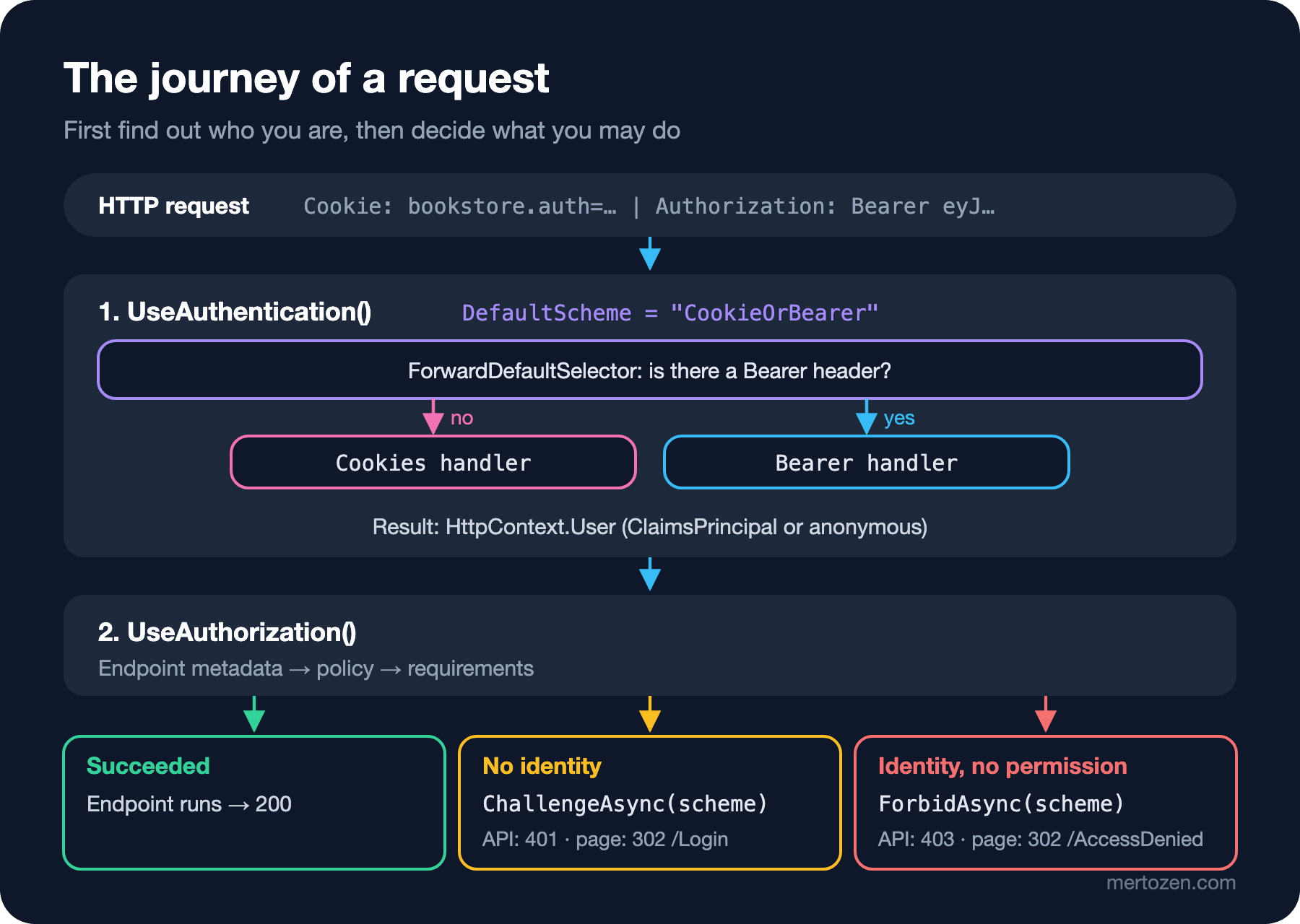
The UseAuthentication() middleware runs the default authenticate scheme and writes the result to HttpContext.User. If no identity is found the request still continues; User becomes an anonymous principal. Blocking is not authentication's job, it is UseAuthorization()'s.
ClaimsPrincipal, Claims and AuthenticationProperties
What a handler produces is an AuthenticationTicket: a ClaimsPrincipal plus an AuthenticationProperties. The principal answers "who"; it carries one or more ClaimsIdentity instances and each identity carries a list of claims. A claim is a type-value pair an issuer states about the user: sub, email, role. The properties describe the session itself: when it was issued, when it ends, whether it is persistent. The login endpoint builds both:
app.MapPost("/login", async (LoginRequest request, HttpContext context) =>
{
    // Lab-only fixed user list; real password checks arrive with Identity in post 3
    string[] roles = request.Email switch
    {
        "grace@bookstore.test" => ["Admin"],
        "ada@bookstore.test" => ["Customer"],
        _ => []
    };
    if (roles.Length == 0)
    {
        return Results.Unauthorized();
    }

    List<Claim> claims = [new("sub", request.Email), new("name", request.Email)];
    claims.AddRange(roles.Select(role => new Claim("role", role)));
    var identity = new ClaimsIdentity(claims, CookieAuthenticationDefaults.AuthenticationScheme, "name", "role");

    var properties = new AuthenticationProperties { IsPersistent = request.RememberMe };
    properties.Items["login_source"] = "password-form";

    await context.SignInAsync(CookieAuthenticationDefaults.AuthenticationScheme, new ClaimsPrincipal(identity), properties);
    return Results.Ok(new { message = "Signed in" });
});
The second argument of the ClaimsIdentity constructor is the authentication type; leave it empty and IsAuthenticated returns false, so the user counts as anonymous even though the claims are there. The third and fourth arguments tell Identity.Name and IsInRole which claim type to look at. The /me endpoint returns both the principal and the cookie ticket's properties:
$ curl -s -c ada.txt -X POST http://localhost:19110/login -H "Content-Type: application/json" -d '{"email":"ada@bookstore.test"}'
{"message":"Signed in"}
$ curl -s -b ada.txt http://localhost:19110/me
{"name":"ada@bookstore.test","authenticationType":"Cookies","roles":["Customer"],"cookieTicket":{"isPersistent":false,"issuedUtc":"2026-11-08T05:20:26+00:00","expiresUtc":"2026-11-08T13:20:26+00:00","loginSource":"password-form"}}
expiresUtc is exactly 8 hours later; it comes from ExpireTimeSpan. Because isPersistent is false the cookie has no expires, so the browser drops it when it closes. The login_source I wrote into the Items dictionary was encrypted into the cookie along with the ticket and came back. The details of these lifetimes and of what is inside the ticket are the topic of the next post.
Five Actions: Authenticate, Challenge, Forbid, SignIn, SignOut
Every handler follows the same small contract. AuthenticateAsync extracts an identity from the request and returns an AuthenticateResult: success (with a ticket), failure (with an error message) or no result. ChallengeAsync tells a user without an identity "introduce yourself"; the cookie handler redirects to the login page, the JWT handler returns 401 with WWW-Authenticate: Bearer. ForbidAsync tells a user who has an identity but no permission "I know you, but no". SignInAsync and SignOutAsync exist only on handlers that can keep a session (IAuthenticationSignInHandler); the cookie handler has them, the JWT handler does not, because the JWT handler never produces tokens, it only validates them.
To see who calls these actions I raised the Microsoft.AspNetCore.Authentication and Microsoft.AspNetCore.Authorization categories to Debug. Ada's /admin/sales-report request:
dbug: Microsoft.AspNetCore.Authentication.Cookies.CookieAuthenticationHandler[8]
      AuthenticationScheme: Cookies was successfully authenticated.
info: Microsoft.AspNetCore.Authorization.DefaultAuthorizationService[2]
      Authorization failed. These requirements were not met:
      RolesAuthorizationRequirement:User.IsInRole must be true for one of the following roles: (Admin)
info: Microsoft.AspNetCore.Authentication.Cookies.CookieAuthenticationHandler[13]
      AuthenticationScheme: Cookies was forbidden.
The order matches the figure: authentication succeeds first, then authorization fails, and the authorization middleware calls ForbidAsync. Calling the same endpoint without a cookie changes the last line to Cookies was challenged.. The rule is simple: no identity means challenge, an identity that fails the policy means forbid. That is exactly the difference between 401 and 403; post 23 of the ASP.NET Core Web API series (Authorization: Roles, Policies and Resource-Based Authorization) covered it from the status code side.
Multiple Schemes: Default Selection and Policy Schemes
If you register a single scheme, since .NET 7 it automatically becomes the default. If there are two or more and you specify no default, the first [Authorize] without a scheme name throws an InvalidOperationException. AuthenticationOptions has five separate defaults: DefaultAuthenticateScheme, DefaultChallengeScheme, DefaultForbidScheme, DefaultSignInScheme, DefaultSignOutScheme. Any that are not set fall back to DefaultScheme. ASP.NET Core Identity also writes its own defaults; calling AddAuthentication("Bearer") after Identity only changes DefaultScheme, and the authenticate and challenge defaults Identity set stay in place. Most "I added JWT but it still redirects to the login page" complaints come from here.
If you want the same API to be called both with a browser cookie and with a mobile client's bearer token, a policy scheme helps. AddPolicyScheme does not authenticate anything itself; it inspects the request in ForwardDefaultSelector and forwards all five actions to the scheme it picks. Grace gets a token and calls the same endpoints:
$ curl -s -H "Authorization: Bearer $T" http://localhost:19110/me
{"name":"grace@bookstore.test","authenticationType":"AuthenticationTypes.Federation","roles":["Admin"],"cookieTicket":null}
$ curl -i -H "Authorization: Bearer $T" http://localhost:19110/admin/sales-report
HTTP/1.1 200 OK
Content-Type: application/json; charset=utf-8

{"totalOrders":42}
authenticationType is no longer Cookies but the type of the identity the JWT handler produced. Alternatively you can write AddAuthenticationSchemes("Cookies", "Bearer") on the policy; then authorization runs both schemes and merges the results. The difference: a policy scheme runs one handler per request, while a scheme list on a policy tries every handler in the list on each request and sends the challenge to all of them as well.
The Answer to the Opening Question: 401/403 or 302?
Before .NET 10 the cookie handler redirected with a 302 to the login page on every challenge and to the AccessDenied page on every forbid. For an API that makes no sense: fetch silently follows the redirect and the Angular side receives an HTML (HyperText Markup Language) page instead of a 401. .NET 10 changed this. If the endpoint has IApiEndpointMetadata, the cookie handler returns 401 or 403 instead of redirecting. This metadata is added automatically: to [ApiController] controllers, to minimal API endpoints that read a JSON body or write JSON, to endpoints with TypedResults return types and to SignalR hubs.
The reason for the opening difference hides in that list. The lambda that returns TypedResults.Ok(new SalesReport(42)) has the return type Ok<SalesReport>; the framework knows at build time that it writes JSON and adds the metadata. Results.Ok(...) returns IResult; what it writes is decided at run time, so the endpoint does not count as an "API" and the old behaviour continues. A request without a cookie shows the same split:
$ curl -i http://localhost:19110/admin/sales-report
HTTP/1.1 401 Unauthorized
Location: http://localhost:19110/Account/Login?ReturnUrl=%2Fadmin%2Fsales-report
The status code is 401, but the Location header is still written; the client ignores it. If you don't want to leave this behaviour to any endpoint, override Events.OnRedirectToLogin and Events.OnRedirectToAccessDenied in the cookie options and write context.Response.StatusCode directly. The Microsoft documentation shows the opposite, bringing the redirect back everywhere, with the same two events.
In Production
Solve authentication problems with logs, not guesses. Don't keep the Microsoft.AspNetCore.Authentication category at Debug permanently in production, but drive it from configuration so you can turn it on when there is a problem. On the JWT side error messages can mislead: when I changed the last character of the signature in the lab, this is what went to the client:
HTTP/1.1 401 Unauthorized
WWW-Authenticate: Bearer error="invalid_token", error_description="The signature key was not found"
The log said IDX10517: Signature validation failed. The token's kid is missing.. The problem is not a missing key but a signature that does not match. Because the token has no kid (key ID) header, the library tried the single key it had, the signature failed, and it reported the failure as "key not found". The kid and JWKS (JSON Web Key Set) side of JWT is the topic of post 8.
.NET 10 also brought metrics for authentication and authorization: authenticated request duration, challenge, forbid, sign-in and sign-out counts, and the number of requests that require authorization. A sudden rise in the forbid count can be the first sign that a deploy changed a policy by mistake or that someone is scanning endpoints. If you collect them with OpenTelemetry they deserve their own dashboard.
Finally, scale: the cookie ticket is decrypted on every request and a JWT goes through signature validation on every request. Both are in the microsecond range and neither touches the database. The moment you go to the database (server-side sessions, security stamp checks, token revocation lists) the cost changes; we measure that in posts 2 and 9.
Common Pitfalls
First, mistaking the authentication result for authorization. UseAuthentication() blocks nobody; if you don't put RequireAuthorization() or a fallback policy on an endpoint, anonymous users get in too. The fallback policy that forces authentication on everyone by default was covered in post 3 of the Web Security series.
Second, mixing up 401 and 403. If you return 401 to a user who has an identity but lacks permission, the client sends them to login; they sign in again, get 401 again and end up in a loop. 401 means "I don't know who you are", 403 means "I know, but you are not allowed".
Third, swapping the order of UseAuthentication() and UseAuthorization(), or forgetting authentication. If authorization runs first, User is always anonymous and every protected endpoint returns 401.
Fourth, building a ClaimsIdentity without an authentication type. The claims are there, yet IsAuthenticated is false and you spend hours looking for the problem in the claims.
Fifth, assuming every API endpoint returns 401/403 after moving to .NET 10. As you saw, minimal API endpoints that return Results.Ok and endpoints that return strings can still redirect; in post 7 of the series we will see an endpoint that returns a ready-made JSON string with TypedResults.Content answer 302 as well. After the upgrade, test every protected endpoint with one unauthenticated and one unauthorized request.
A Small Experiment
★☆☆ In the lab, delete the DefaultScheme and DefaultChallengeScheme lines and keep only AddCookie and AddJwtBearer. Call /me and read the message of the exception that is thrown. Then delete AddJwtBearer too and confirm that the single scheme becomes the default automatically.
★★☆ Without changing the /admin/sales-report-legacy endpoint, use the two events in the cookie options so that every API request gets 401/403 instead of 302. Try deciding whether an endpoint is an API from endpoint metadata instead of context.Request.Path.
★★★ Write a TestAuthHandler that derives from AuthenticationHandler<AuthenticationSchemeOptions> and is registered only in the Testing environment: it builds a principal from the e-mail in the X-Test-User header. Write in two sentences why it is useful in integration tests and why it becomes a full authentication bypass if it leaks into production; show how you guard the registration with an environment check.
We have drawn the map: credentials, sessions, tokens, claims, schemes and handlers. In the next post we go inside cookie authentication: what is in the ticket, how sliding expiration works, how to add an absolute timeout and how to really sign a user out of "all devices".