

Authorization Code Flow + PKCE Step by Step: state, nonce, PAR and Reading the HTTP Traffic with Keycloak
PKCE binds the code that crosses the front channel to the client that asked for it; a stolen code is useless without the verifier. In a Keycloak lab we read the flow step by step with curl, show what state and nonce prevent, that a code is burned after a wrong verifier and why redirect URIs must match exactly; then we move parameters to the back channel with PAR and trace ASP.NET Core's OIDC handler end to end.
Version note: The code in this post was built and run with .NET 10, Microsoft.AspNetCore.Authentication.OpenIdConnect 10.0.14 and Keycloak 26.8.2.
Guess First
Ada signs in to Bookstore through Keycloak. When the browser comes back, there is a code in the address bar. If an attacker got hold of that code, say through a browser extension or a proxy log, could they get a token with it? And if they tried the code once with a wrong code_verifier and failed, could the real client still use the same code? Then the ASP.NET Core side: if you change one character of the state parameter on the sign-in response, what does the app do?
In the previous post we laid out the logic of the authorization code grant. In this post we go inside the flow: we will walk to Keycloak ourselves with curl, read every request and response, then hand the same flow to ASP.NET Core's OIDC (OpenID Connect) handler and see what it does on our behalf. Every experiment runs in the lab on my own machine; nothing is sent to an outside system.
The Lab: Keycloak, a Realm and Two Clients
I run Keycloak in development mode, in my own port range. The admin password is generated in the work folder and stays in a file; it never goes into the post:
$ openssl rand -hex 16 > .kc-admin
$ docker run -d --name authwork2-keycloak -p 19200:8080 \
    -e KC_BOOTSTRAP_ADMIN_USERNAME=admin -e KC_BOOTSTRAP_ADMIN_PASSWORD="$(cat .kc-admin)" \
    quay.io/keycloak/keycloak:26.8.2 start-dev
$ sh kc-setup.sh
realm ready
kc-setup.sh uses Keycloak's own CLI (Command Line Interface), kcadm.sh, to create the bookstore realm, the roles, the books.read/orders.read/orders.write scopes, the test users and the clients. User passwords are generated randomly on every setup. The realm's sslRequired setting is none in the lab; Docker's port forwarding makes requests look "external", and otherwise Keycloak refuses to issue tokens over HTTP (Hypertext Transfer Protocol). In production this stays at external or stricter. This post uses two clients. The first is the public client we walk through step by step with curl:
# Public client for the step-by-step curl flow
$K create clients -r bookstore -f - <<'EOF'
{ "clientId": "bookstore-spa", "enabled": true, "publicClient": true, "standardFlowEnabled": true,
  "implicitFlowEnabled": false, "directAccessGrantsEnabled": false,
  "redirectUris": ["http://localhost:19211/callback"], "webOrigins": [],
  "attributes": { "pkce.code.challenge.method": "S256", "post.logout.redirect.uris": "http://localhost:19211/" },
  "defaultClientScopes": ["basic", "profile", "email", "roles", "acr", "web-origins"],
  "optionalClientScopes": ["books.read", "orders.read"] }
EOF
With pkce.code.challenge.method set to S256, Keycloak makes PKCE (Proof Key for Code Exchange) mandatory for this client and rejects the plain method. The second client, bookstore-web, is our ASP.NET Core app's confidential client; we get to it in the PAR (Pushed Authorization Requests) section.
A note: I did not write the defaultClientScopes line in the first setup. When the JSON (JavaScript Object Notation) contained only optionalClientScopes, Keycloak left the client's default scope list empty, and claims such as email and name never appeared in the ID token. If you create clients through REST (Representational State Transfer) or kcadm, spell out both scope lists.
PKCE: Binding the Code to Whoever Asked for It
The idea of PKCE is simple. For every sign-in attempt the client generates a random code_verifier and keeps it. It puts the SHA (Secure Hash Algorithm)-256 hash of the verifier, the code_challenge, into the authorization request. The authorization server binds the code to that challenge. In the token request the client sends the verifier itself; the server computes the hash and rejects the code if it doesn't match. Someone who steals the code from the front channel does not know the verifier, so the code is useless to them.
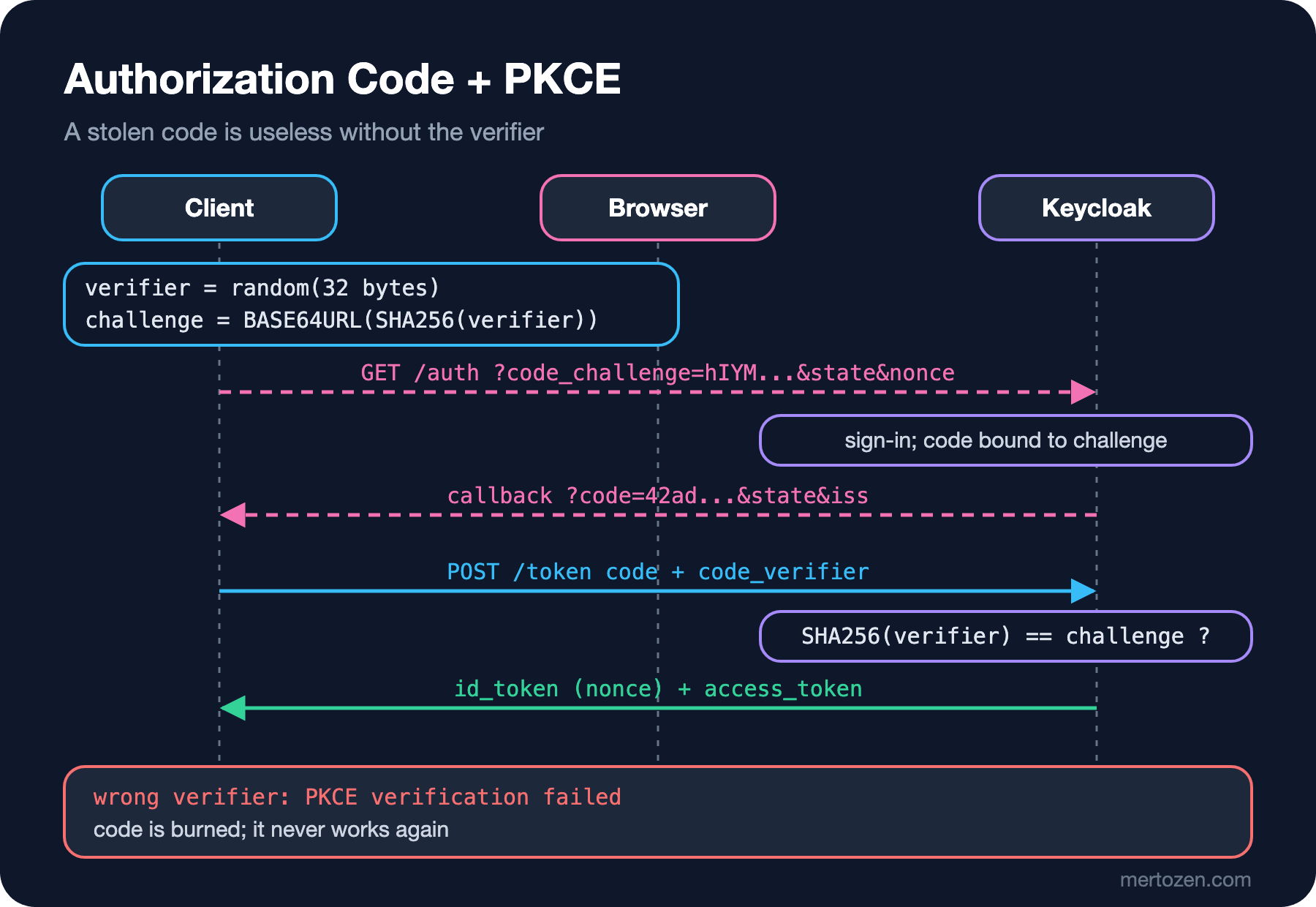
With .NET 10's file-based apps, generating a verifier and challenge doesn't even need a project:
using System.Buffers.Text;
using System.Security.Cryptography;
using System.Text;

// RFC 7636: verifier is 43-128 chars; 32 random bytes in base64url give 43 chars
string verifier = args.Length > 0 ? args[0] : Base64Url.EncodeToString(RandomNumberGenerator.GetBytes(32));
string challenge = Base64Url.EncodeToString(SHA256.HashData(Encoding.ASCII.GetBytes(verifier)));
Console.WriteLine($"code_verifier  = {verifier} ({verifier.Length} chars)");
Console.WriteLine($"code_challenge = {challenge}");
$ dotnet run pkce.cs -- wpXcnBjHpSy2Y_wbJWecTSaYfE5aFbrOTMRTPQdkhsE
code_verifier = wpXcnBjHpSy2Y_wbJWecTSaYfE5aFbrOTMRTPQdkhsE (43 chars)
code_challenge = hIYMuMJf_BsAv40uTKW-h24GvxU3idGrqcIcE1LlL8sThe shell script of the curl flow had generated the verifier with openssl; C# computed the same challenge. The Base64Url class has lived in System.Buffers.Text since .NET 9; it works without padding and with URL (Uniform Resource Locator)-safe characters, so the old hand-written Replace('+', '-') chain is no longer needed. With the plain method the challenge is the verifier itself, so anyone reading the front channel sees the verifier too; that is why RFC (Request for Comments) 9700 says S256.
The Authorization Request, state and nonce
The values the script generated and the address the browser will visit:
verifier=wpXcnBjHpSy2Y_wbJWecTSaYfE5aFbrOTMRTPQdkhsE
challenge=hIYMuMJf_BsAv40uTKW-h24GvxU3idGrqcIcE1LlL8s
state=29c258ef06e655831e56f8d752803639 nonce=9a8cc1a06f517632c4d9b6a04a251102

GET /realms/bookstore/protocol/openid-connect/auth?response_type=code&client_id=bookstore-spa
    &redirect_uri=http%3A%2F%2Flocalhost%3A19211%2Fcallback&scope=openid%20orders.read
    &state=29c258ef06e655831e56f8d752803639&nonce=9a8cc1a06f517632c4d9b6a04a251102
    &code_challenge=hIYMuMJf_BsAv40uTKW-h24GvxU3idGrqcIcE1LlL8s&code_challenge_method=S256
Keycloak returns its sign-in page. The lab's kc-login.sh fills in that page's form with curl (only for our own realm, to imitate what the browser does); Ada's password is in a local file the script reads. After a successful sign-in Keycloak sends the browser back to the client:
redirect: http://localhost:19211/callback?state=29c258ef06e655831e56f8d752803639
    &session_state=DLUaeOI0oISA5WeLwGoGXQTI&iss=http%3A%2F%2Flocalhost%3A19200%2Frealms%2Fbookstore
    &code=42ad8543-bd67-150a-81da-8e043a1791ad.DLUaeOI0oISA5WeLwGoGXQTI.405a7e9e-e386-45cf-b7a3-23117ad26033
state came back unchanged. Verifying it is the client's job, and its only purpose is this: is this response the answer to a request I started? A client that doesn't check it can be sent a code the attacker obtained with their own account, and the victim ends up signed in to the attacker's account (login CSRF (Cross-Site Request Forgery), Cross-Site Request Forgery). PKCE blocks the same attack, because the attacker's code does not match the verifier in the victim's browser; that is why RFC 9700 does not require state for CSRF when the client uses PKCE. But state is still useful: ASP.NET Core uses it to carry the return address and the pre-sign-in context.
The iss parameter comes from RFC 9207. A client that talks to several authorization servers checks here which one the response came from; this is called the mix-up attack defense.
The Token Request: Exchanging the Code
The client now goes to the token endpoint over the back channel. It is a public client, so there is no secret; the only proof it has is the verifier:
$ curl -s -X POST $B/token -d grant_type=authorization_code -d client_id=bookstore-spa -d code=$CODE \
    -d redirect_uri=http://localhost:19211/callback -d code_verifier=$VERIFIER
{
  "access_token": "eyJhbGciOiJSUzI1NiIs...",
  "expires_in": 300,
  "refresh_expires_in": 1800,
  "refresh_token": "eyJhbGciOiJIUzUxMiIs...",
  "token_type": "Bearer",
  "id_token": "eyJhbGciOiJSUzI1NiIs...",
  "not-before-policy": 0,
  "session_state": "DLUaeOI0oISA5WeLwGoGXQTI",
  "scope": "openid profile orders.read email"
}
The ID token's payload contains the nonce:
{
  "exp": 1794115985,
  "iat": 1794115685,
  "auth_time": 1794115685,
  "jti": "4431e029-a9ee-21a7-b5d7-d0eae933c0d8",
  "iss": "http://localhost:19200/realms/bookstore",
  "aud": "bookstore-spa",
  "sub": "813c410a-8e19-4979-85aa-5cc46f3cb5ab",
  "typ": "ID",
  "azp": "bookstore-spa",
  "nonce": "9a8cc1a06f517632c4d9b6a04a251102",
  "sid": "DLUaeOI0oISA5WeLwGoGXQTI",
  "at_hash": "atSVIv9odwMtZsW0NuIdBw",
  "acr": "1",
  "email_verified": true,
  "name": "Ada Lovelace",
  "preferred_username": "ada@bookstore.test",
  "given_name": "Ada",
  "family_name": "Lovelace",
  "email": "ada@bookstore.test"
}
state bound the authorization response to the request; nonce binds the ID token to the request. The client keeps the nonce it sent and compares it with the value in the ID token it receives. An ID token stolen from another flow, or replayed, fails this check. We will cover the details in the next post when we validate the ID token.
Now the questions from Guess First. Using the same code a second time:
--- same code again
{"error":"invalid_grant","error_description":"Code not valid"}
The rejection was expected; the interesting part is what the second attempt does to the first. RFC 6749 says that if a code is used more than once, the server should revoke, when possible, the tokens issued from it. Keycloak does:
$ sh reuse.sh
userinfo with first access token: 200
same code again: {"error":"invalid_grant","error_description":"Code not valid"}
userinfo with first access token: 401
WWW-Authenticate: Bearer realm="bookstore", error="invalid_token", error_description="user_session_not_found"
The access token from the first exchange became invalid the moment the code was replayed; Keycloak closed the whole user session. The reasoning: if a code arrives twice, someone stole it, and the server cannot tell which party is legitimate; the safest answer is to drop both.
In a fresh sign-in I first tried a wrong verifier, then the right one:
--- wrong verifier
{"error":"invalid_grant","error_description":"PKCE verification failed: Code mismatch"}
--- right verifier after a failed attempt
{"error":"invalid_grant","error_description":"Code not valid"}
Keycloak burns the code after a failed PKCE attempt; the real client can no longer get a token with it either. This is the right behavior: someone holding the code cannot keep guessing the verifier, because the code dies at the first wrong attempt. For the user the result is "sign in once more", not a security hole.
Redirect URI: Exact Matching
The registered address is http://localhost:19211/callback. Adding a path segment to it and sending the request:
$ curl -s -o r.html -w "%{http_code} redirect=%{redirect_url}\n" \
  "$B/auth?response_type=code&client_id=bookstore-spa&redirect_uri=http%3A%2F%2Flocalhost%3A19211%2Fcallback%2Fevil&scope=openid&state=s1&code_challenge=abc&code_challenge_method=S256"
400 redirect=
$ grep -o 'Invalid parameter[^<]*' r.html
Invalid parameter: redirect_uri
Note: this time the response is not a redirect but Keycloak's own error page. If the redirect URI (Uniform Resource Identifier) is not trusted, the authorization server does not even send the error there; otherwise it would itself be an open redirect. This was the oldest way to steal codes: a loose registration like https://*.bookstore.example/* delivers the code to an attacker-controlled page on a subdomain or path. That is why RFC 9700 requires exact string comparison; the only exception is the port number in native apps' loopback addresses.
PAR: Moving the Authorization Request to the Back Channel
Every parameter of the authorization request above was in the browser's address bar: scope, redirect URI, challenge. Nobody signs them; the user or a browser extension can change them, they end up in logs, and long requests hit URL length limits. PAR (Pushed Authorization Requests, RFC 9126) turns this around: the client first sends the parameters over the back channel, authenticating itself, gets a short-lived request_uri in return, and gives only that to the browser.
$ curl -s -X POST $B/ext/par/request -u bookstore-web:$WEB_SECRET \
    -d response_type=code -d client_id=bookstore-web -d redirect_uri=http://localhost:19212/signin-oidc \
    -d scope=openid -d state=s1 -d nonce=n1 \
    -d code_challenge=hIYMuMJf_BsAv40uTKW-h24GvxU3idGrqcIcE1LlL8s -d code_challenge_method=S256
{"request_uri":"urn:ietf:params:oauth:request_uri:a425a93c-ab4c-fff3-20e5-452e5f4dfb6e","expires_in":60}
Because the authorization server receives the parameters after authenticating the client, it knows the redirect URI and scope really came from that client. In Keycloak, require.pushed.authorization.requests is on for bookstore-web; sending a classic request without PAR gives:
302 redirect=http://localhost:19212/signin-oidc?error=invalid_request&error_description=Pushed+Authorization+Request+is+only+allowed.&state=s1&iss=http%3A%2F%2Flocalhost%3A19200%2Frealms%2FbookstoreASP.NET Core's OIDC handler has supported PAR since .NET 9, and the default behavior is PushedAuthorizationBehavior.UseIfAvailable: if the discovery document has a pushed_authorization_request_endpoint, PAR is used. I chose Require; if the server does not advertise PAR support, the handler fails instead of starting a sign-in:
builder.Services.AddAuthentication(options =>
    {
        options.DefaultScheme = CookieAuthenticationDefaults.AuthenticationScheme;
        options.DefaultChallengeScheme = OpenIdConnectDefaults.AuthenticationScheme;
    })
    .AddCookie()
    .AddOpenIdConnect(options =>
    {
        options.Authority = builder.Configuration["Oidc:Authority"];
        options.RequireHttpsMetadata = false; // local lab only: Keycloak runs on HTTP
        options.ClientId = builder.Configuration["Oidc:ClientId"];
        options.ClientSecret = builder.Configuration["Oidc:ClientSecret"];
        options.ResponseType = OpenIdConnectResponseType.Code;
        options.UsePkce = true; // already true by default
        options.PushedAuthorizationBehavior = PushedAuthorizationBehavior.Require;
        options.Scope.Add("orders.read");
        options.MapInboundClaims = false;
        options.SaveTokens = true;
        options.Events.OnRemoteFailure = context =>
        {
            // A readable page instead of a 500; the details stay in the log
            context.Response.Redirect("/login-failed");
            context.HandleResponse();
            return Task.CompletedTask;
        };
    });
The client secret comes from configuration, in the lab from an environment variable. Going to the protected /me endpoint without signing in, the handler responds with:
$ curl -s -c $J -b $J -o /dev/null -D - http://localhost:19212/me
HTTP/1.1 302 Found
Location: http://localhost:19200/realms/bookstore/protocol/openid-connect/auth?client_id=bookstore-web&request_uri=urn%3Aietf%3Aparams%3Aoauth%3Arequest_uri%3A80017a6c-7036-1336-49cb-c5a39fb61d1e&x-client-SKU=ID_NET10_0&x-client-ver=8.19.2.0
Set-Cookie: .AspNetCore.OpenIdConnect.Nonce.CfDJ8EINq_wm4TFCv7guzy6SHCeuOtSoMRF...
Set-Cookie: .AspNetCore.Correlation.t48krqAVVqWBPBzW7xjhPVMNE70F8v7XQsO9ZKAeMvg=N; expires=Sun, 08 Nov 2026 05:43:55 GMT; path=/signin-oidc; secure; samesite=none; httponly
The address sent to the browser has no scope, no redirect URI and no challenge; only client_id and request_uri. The handler generated the PKCE verifier and the nonce itself, put the nonce in a cookie and the verifier inside the state, which is encrypted with Data Protection. The correlation cookie is there to prove that the state belongs to a sign-in started in this browser.
Reading the ASP.NET Core Handler End to End
After sign-in, Keycloak responds with the handler's default response_mode=form_post: the code is not in a redirect URL but inside an HTML (HyperText Markup Language) form that submits itself. So the code never lands in the address bar, browser history or the Referer header. I submit the form with curl:
POST http://localhost:19212/signin-oidc
code=5d3485ed-f751-cd3c-adf9-ae4473eabebd.Dz09ULJGGeLDc-Gt5kPEM2kl.03d6f275-1a6e-4be6-abde...
iss=http%3A%2F%2Flocalhost%3A19200%2Frealms%2Fbookstore
state=CfDJ8EINq_wm4TFCv7guzy6SHCf432YIkpqMLbTf10VRbzuqu724eGtR-EmbZNFTEXUqKv9e9wNb1C2a-Ctp...
session_state=Dz09ULJGGeLDc-Gt5kPEM2kl

HTTP/1.1 302 Found
Location: /me
Set-Cookie: .AspNetCore.Correlation.YM0VoegJZX_OCnBas2tRuBlI63mQQS_bgb0PgMuGiQw=; expires=Thu, 01 Jan 1970 00:...
Set-Cookie: .AspNetCore.OpenIdConnect.Nonce.CfDJ8EINq_wm4TFCv7guzy6SHCcD9xz9BLLVzzYxfsn0inpO-VSQXKSYwhGBI-hdBF...
Set-Cookie: .AspNetCore.Cookies=chunks-2; path=/; samesite=lax; httponly
Set-Cookie: .AspNetCore.CookiesC1=CfDJ8EINq_wm4TFCv7guzy6SHCeVsDpecHFlSPnOXIh6ALmixyqA1X4ydQWU8e2cPFrIKoSA4MN5...
Set-Cookie: .AspNetCore.CookiesC2=loF0LRcSi2KayQojTy8FVbIatzlUp5l2_KMbMVRhuim6yn4gv8g2DzyCOuBljBUEzS8DImR1CdIh...

$ curl -s -b $J http://localhost:19212/me
{"name":"Ada Lovelace","email":"ada@bookstore.test","sub":"813c410a-8e19-4979-85aa-5cc46f3cb5ab"}
The handler deleted the correlation and nonce cookies, exchanged the code for tokens over the back channel, validated the ID token and the nonce, and signed in with cookie authentication. SaveTokens = true puts all three tokens in the cookie, so the cookie was split into two chunks; the chunking we saw in post 02. The debug log shows these steps in order:
dbug: Microsoft.AspNetCore.Authentication.OpenIdConnect.OpenIdConnectHandler[13]
      Updating configuration
dbug: Microsoft.AspNetCore.Authentication.OpenIdConnect.OpenIdConnectHandler[19]
      Redeeming code for tokens.
info: Microsoft.AspNetCore.Authentication.Cookies.CookieAuthenticationHandler[10]
      AuthenticationScheme: Cookies signed in.
Now I change one character of the state and submit the same form. This is the output from before adding OnRemoteFailure:
--- tampered state
500
fail: Microsoft.AspNetCore.Server.Kestrel[13]
      Microsoft.AspNetCore.Authentication.AuthenticationFailureException: An error was encountered while handling the remote login.
       ---> Microsoft.AspNetCore.Authentication.AuthenticationFailureException: Unable to unprotect the message.State.
The state is encrypted and signed with Data Protection, so a single changed character makes it undecryptable. Submitting the same (valid) form a second time, that is, replaying the code, also fails: the correlation cookie was deleted on the first successful sign-in.
warn: Microsoft.AspNetCore.Authentication.OpenIdConnect.OpenIdConnectHandler[15]
      '.AspNetCore.Correlation.CObPNGzsOQveOqZMC_MHFadfBLtAwk40N_wJtmNinAU' cookie not found.
      Error from RemoteAuthentication: Correlation failed..
replay: 302 http://localhost:19212/login-failed
With OnRemoteFailure in place the user goes to /login-failed instead of a 500 page; the details stay in the log. If you see "Correlation failed" in production, look at cookies first: the correlation cookie is written with SameSite=None; Secure, and in a non-HTTPS environment, or behind a proxy that terminates TLS (Transport Layer Security) without the right forwarded headers, the browser does not send it back.
In Production
In an app running behind several instances, the state, nonce and correlation cookies are protected with Data Protection; if you don't share the key ring between instances, a sign-in that starts on one instance and finishes on another shows "Unable to unprotect the message.State". The fix is a shared key ring, not sticky sessions on the load balancer.
PAR adds one more request to the authorization server: a back channel round trip at the start of sign-in. Unless you have thousands of sign-ins per second it is not worth measuring, but Require and UseIfAvailable behave differently when the authorization server is unreachable or stops advertising PAR: the former stops sign-in completely. Choose it knowingly. RequireHttpsMetadata = false is for the local lab only; in production, if discovery and the JWKS (JSON Web Key Set) do not come over HTTPS (HTTP Secure), the handler's signature validation loses its meaning.
Register redirect URIs per environment: separate clients for development, test and production, or at least separate exact URI lists. Adding http://localhost to a production client "for convenience" means letting an app running on any machine receive production codes.
Common Pitfalls
First, wildcard redirect URIs. Keycloak still supports *; using it goes against RFC 9700. Second, not generating and checking state in a callback you write yourself, or using a fixed value. Third, believing PKCE is "only for mobile and SPAs (Single-Page Application)": RFC 9700 recommends it for confidential clients too, because a secret does not prevent code injection; only the verifier proves who started the flow. There is no good reason to turn off UsePkce in ASP.NET Core.
Fourth, writing response_mode=query into the authorization request and moving the code into the address bar; unless you have a reason, keep the form_post default. Fifth, lowering the correlation cookie's SameSite value or trying to skip the check to silence "Correlation failed". Sixth, a server setting that accepts the plain PKCE method. Keycloak's discovery document lists plain in code_challenge_methods_supported. In the lab I sent a request with a plain challenge to a temporary client without that setting, and the sign-in page opened (200); the same request to bookstore-spa returned code challenge method is not matching the configured one. Set S256 on the client explicitly.
A Small Experiment
★☆☆ Run flow.sh and use the code you get after waiting 60 seconds. Find Keycloak's code lifetime (the "Client login timeout" realm setting) and compare the response with it.
★★☆ Turn off require.pushed.authorization.requests on the bookstore-web client and choose PushedAuthorizationBehavior.Disable in ASP.NET Core. Compare the challenge response's Location header with the PAR version; list which parameters came back to the address bar.
★★★ Set up two realms (bookstore and bookstore-partner) and add two OIDC schemes to ASP.NET Core, one for each. Send one realm's authorization response to the other's callback and show in the log how the handler catches it through iss and state.
We have seen how a code turns into tokens and everything that can get in the way. In the next post we move to OIDC itself: how the ID token differs from the access token, UserInfo and discovery, why AddOpenIdConnect changes claim mapping, and the three kinds of logout, in other words actually ending the session.