

The NgRx Signal Store Events Plugin: Event-Driven State with event, eventGroup, withReducer and withEventHandlers
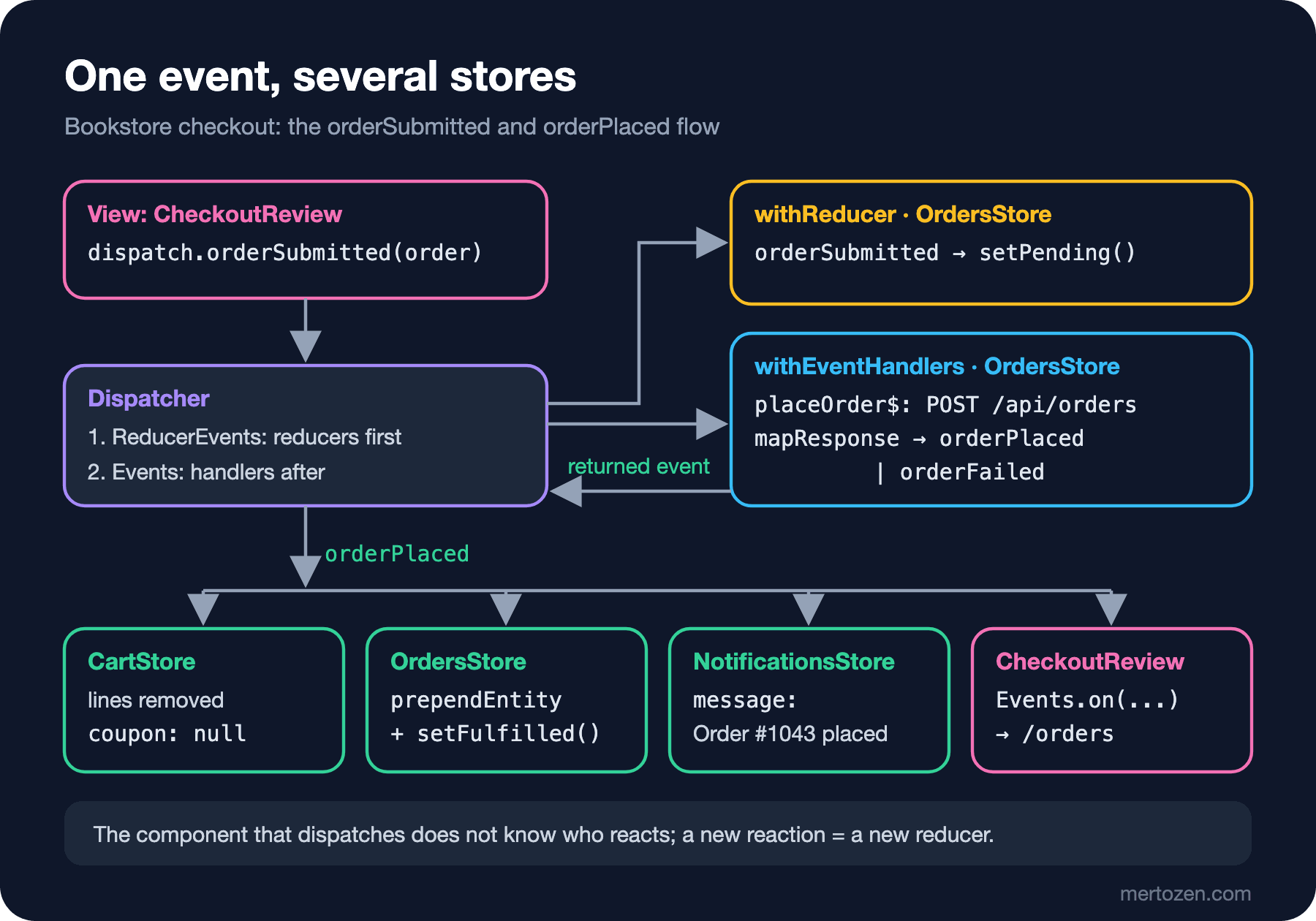
The Events plugin separates "what happened" from "how state changes" in flows where several stores react to the same occurrence: a component dispatches an event, each store changes its own state with withReducer, and withEventHandlers runs side effects. In Bookstore's checkout a single orderPlaced event empties the cart, records the order and shows a notification; we compare it with a method-based version and show with real output how a store that does not exist yet misses the event.
Version note: The examples in this post were run with Angular 22.2, NgRx 22.0.1 (@ngrx/signals and its Events plugin @ngrx/signals/events, @ngrx/operators), TypeScript 6.0 and Node.js 24 (Angular 22.2 projects use TypeScript 6.0); browser behaviour was observed with Playwright 1.65 in headless Chromium against the mock Bookstore API in the snapshot.
Predict First
We are adding a notifications store to bookstore-web, the Angular client of Bookstore, the online bookstore used as the shared example across this site's series. It shows a message when an order is placed, and it does so as a reaction to an event:
import { signalStore, withState } from '@ngrx/signals';
import { on, withReducer } from '@ngrx/signals/events';
import { ordersApiEvents } from '../checkout/checkout-events';

// Reacts to the same events as the cart and the orders store, without knowing either of them
export const NotificationsStore = signalStore(
  { providedIn: 'root' },
  withState({ message: null as string | null }),
  withReducer(
    on(ordersApiEvents.orderPlaced, ({ payload }) => ({ message: `Order #${payload.id} placed` })),
    on(ordersApiEvents.orderFailed, ({ payload }) => ({ message: `Order failed (${payload})` })),
  ),
);
A teammate decides to show the message only on the orders page and injects the store there for the first time:
export class OrdersPage {
  protected readonly orders = inject(OrdersStore);
  // wrong: the first inject() happens here, after the event was dispatched
  protected readonly notifications = inject(NotificationsStore);
The user clicks "Place order" in checkout, the order succeeds, the orderPlaced event is dispatched and the app moves to the orders page. Does the page show "Order #1043 placed"? Write down your prediction; the answer is in "Common Pitfalls".
In the previous two posts every store changed through its own methods. In this post we build a flow in which several stores react to the same occurrence, using NgRx Signal Store's Events plugin: an order placed in checkout will empty the cart, add a record to the orders store and show a notification. We will also write the same flow with methods and compare the two approaches.
Why Events? A Checkout Written with Methods
An order flow written only with methods, without events, looks like this; the checkout store injects every store that has to react and calls them in turn:
    // Method version: the checkout store calls every store that has to react
    async placeOrder(): Promise<void> {
      const request: OrderRequest = { items: store._cart.items(), shipping: store.shipping(), total: store.payable() };
      store._orders.markPending();
      try {
        const { id } = await firstValueFrom(store._http.post<{ id: number }>(`${apiUrl}/orders`, request));
        store._cart.clear();
        store._orders.add({ id, ...request });
        store._notifications.show(`Order #${id} placed`);
        await store._router.navigate(['/orders']);
      } catch (error) {
        const message = error instanceof HttpErrorResponse ? `HTTP ${error.status}` : String(error);
        store._orders.fail(message);
        store._notifications.show(`Order failed (${message})`);
      }
    },
This code works (we will see its output shortly) and is enough for a small application. The problem is the direction of the dependency: checkout knows how the cart is emptied, where the orders are kept and how the notification is shown. Tomorrow, when an analytics record or a step that refreshes stock information is added after an order, this method changes again. The stores also have to expose methods such as markPending, add, fail and show that exist only for this flow.
The event approach turns this around: checkout only says "what happened" (an order was submitted), and each store decides by itself how its own state changes in response. This is the Signal Store counterpart of the Flux idea from the UI Architecture Patterns series post "Flux and Unidirectional Data Flow: Why Didn't Two-Way Binding Scale?". The Events plugin arrived as experimental in NgRx 19.2 and became stable with the NgRx 21 announcement; in the same release withEffects was renamed to withEventHandlers, which is why you may see withEffects in older examples.
event and eventGroup
import { type } from '@ngrx/signals';
import { eventGroup } from '@ngrx/signals/events';
import type { OrderRequest, PlacedOrder } from '../models';

// What happened, not what to do: the checkout page does not know who reacts
export const checkoutEvents = eventGroup({
  source: 'Checkout Page',
  events: {
    orderSubmitted: type<OrderRequest>(),
  },
});

export const ordersApiEvents = eventGroup({
  source: 'Orders API',
  events: {
    orderPlaced: type<PlacedOrder>(),
    orderFailed: type<string>(),
  },
});
eventGroup defines event creators from the same source together. Each creator returns a plain object when called: checkoutEvents.orderSubmitted(order) → { type: '[Checkout Page] orderSubmitted', payload: order }. The payload type is given with type<...>(), and type<void>() for an event without a payload. If you need a single event, there is also event('[Checkout Page] Opened'); the NgRx documentation recommends the "[Source] Event name" format for event types, and eventGroup produces that format itself.
Names are a contract: events are in the past tense and describe what happened (orderSubmitted, orderPlaced, orderFailed). A command name such as clearCart means the dispatcher knows who will do what; that brings back the dependency of the method version.
withReducer: How State Changes When an Event Arrives
The orders store carries both the state transitions and the HTTP request:
import { HttpClient, HttpErrorResponse } from '@angular/common/http';
import { inject } from '@angular/core';
import { mapResponse } from '@ngrx/operators';
import { signalStore } from '@ngrx/signals';
import { prependEntity, withEntities } from '@ngrx/signals/entities';
import { Events, on, withEventHandlers, withReducer } from '@ngrx/signals/events';
import { exhaustMap } from 'rxjs';
import { apiUrl } from '../api';
import { checkoutEvents, ordersApiEvents } from '../checkout/checkout-events';
import type { PlacedOrder } from '../models';
import { withRequestLog } from '../shared/with-request-log';
import { setError, setFulfilled, setPending, withRequestStatus } from '../shared/with-request-status';

// Orders placed in this browser session; the full order history is server state
export const OrdersStore = signalStore(
  { providedIn: 'root' },
  withEntities<PlacedOrder>(),
  withRequestStatus(),
  withRequestLog('orders'),
  // State transitions: event in, partial state out
  withReducer(
    on(checkoutEvents.orderSubmitted, () => setPending()),
    on(ordersApiEvents.orderPlaced, ({ payload }) => [prependEntity(payload), setFulfilled()]),
    on(ordersApiEvents.orderFailed, ({ payload }) => setError(payload)),
  ),
  // Side effects: the HTTP call; the event returned by the handler is dispatched
  withEventHandlers((store, events = inject(Events), http = inject(HttpClient)) => ({
    placeOrder$: events.on(checkoutEvents.orderSubmitted).pipe(
      // a second click while the order is being sent is ignored
      exhaustMap(({ payload }) =>
        http.post<{ id: number }>(`${apiUrl}/orders`, payload).pipe(
          mapResponse({
            next: ({ id }) => ordersApiEvents.orderPlaced({ id, ...payload }),
            error: (error: HttpErrorResponse) => ordersApiEvents.orderFailed(`HTTP ${error.status}`),
          }),
        ),
      ),
    ),
  })),
);
withReducer binds events to case reducers with on(...). The handler receives the event (and the current state as its second argument) and returns a partial state, an updater, or an array of them. The setPending(), setFulfilled() and setError() functions from the previous post and the entity updater prependEntity are used here unchanged; one more benefit of writing a custom feature's updaters as plain functions.
The cart empties itself without knowing where the order came from:
  // The cart empties itself when an order is placed; it does not know who placed it
  withReducer(on(ordersApiEvents.orderPlaced, () => [removeAllEntities(lineConfig), { coupon: null }])),
The notifications store from "Predict First" reacts to the same event with its own reducer. All three stores listen to the same orderPlaced, and none of them imports another.
withEventHandlers and mapResponse: Side Effects
The HTTP request is not a reducer's job; it lives in withEventHandlers. The function receives the store and returns a dictionary (or an array) of Observables. The on(...) method of the Events service gives an Observable of the given events. When a handler returns an event, the plugin dispatches it automatically: mapResponse maps a successful response to orderPlaced and an error to orderFailed, and in both cases the stream stays alive. It is the event-producing sibling of the tapResponse we used for rxMethod in the previous post.
exhaustMap ignores a second orderSubmitted that arrives while the order is being sent; the button is already disabled through isPending(), but in the small gap between a double click and the UI update, the store keeps its own rule. switchMap was right for search (the old query no longer matters); for an order, both cancelling and queueing are wrong.
There is a detail in the plugin's source code: a value returned by a handler is dispatched if it is an event, but events coming from Events.on(...) are marked and not dispatched again. So a handler like events.on(x).pipe(tap(...)) that only writes a log does not create an endless loop, even though it returns the same event.
injectDispatch and Listening from a Component
import { Component, inject } from '@angular/core';
import { takeUntilDestroyed } from '@angular/core/rxjs-interop';
import { Router } from '@angular/router';
import { Events, injectDispatch } from '@ngrx/signals/events';
import { CartStore } from '../cart/cart-store';
import { OrdersStore } from '../orders/orders-store';
import { checkoutEvents, ordersApiEvents } from './checkout-events';
import { CheckoutStore } from './checkout-store';

@Component({
  selector: 'app-checkout-review',
  template: `
    <h1>Checkout: review</h1>
    <p class="review">
      Books {{ cart.payable() }} TRY + {{ checkout.shipping() }} shipping
      {{ checkout.shippingPrice() }} TRY = {{ checkout.payable() }} TRY
    </p>
    <button class="place-order" [disabled]="orders.isPending()" (click)="placeOrder()">Place order</button>
    @if (orders.requestError(); as error) {
      <p class="order-error">Could not place the order ({{ error }})</p>
    }
  `,
})
export class CheckoutReview {
  protected readonly cart = inject(CartStore);
  protected readonly checkout = inject(CheckoutStore);
  protected readonly orders = inject(OrdersStore);
  readonly #dispatch = injectDispatch(checkoutEvents);

  constructor() {
    const router = inject(Router);
    // A component can listen to events too; the subscription ends with the component
    inject(Events)
      .on(ordersApiEvents.orderPlaced)
      .pipe(takeUntilDestroyed())
      .subscribe(() => void router.navigate(['/orders']));
  }

  protected placeOrder(): void {
    this.#dispatch.orderSubmitted({
      items: this.cart.items(),
      shipping: this.checkout.shipping(),
      total: this.checkout.payable(),
    });
  }
}
injectDispatch(checkoutEvents) returns an object with a method for every event in the group; this.#dispatch.orderSubmitted(...) creates and dispatches the event. The component still reads state from the store (orders.isPending(), orders.requestError()); the Events plugin does not change how state is read, only how it is changed. Moving to the orders page is a UI concern; the component listens to orderPlaced itself, and the subscription closes with the component through takeUntilDestroyed(). To observe the flow, we also added a small development aid to the header component that writes every event to the console:
  constructor() {
    // Development aid: every dispatched event in the console
    inject(Events)
      .on()
      .pipe(takeUntilDestroyed())
      .subscribe((event) => console.log(`[event] ${event.type}`));
  }
The Flow: One Event, Several Stores
First a successful order with Dune×2 and Emma, then an order for 4 copies of Middlemarch, which has 3 in stock, rejected by the API:
 1.8 s console: [checkout] store #1 created
          review: Books 1220 TRY + express shipping 90 TRY = 1310 TRY
 2.4 s console: [orders] idle -> pending
 2.4 s console: [event] [Checkout Page] orderSubmitted
 2.7 s console: [orders] pending -> fulfilled
 2.7 s console: [event] [Orders API] orderPlaced
 2.7 s console: [checkout] store #1 destroyed
          url /orders | Order #1043 placed | Cart (0) | -
          orders page: #1043: Dune x 2 Emma x 1 - 1310 TRY (express)
 7.1 s console: [checkout] store #2 created
          review: Books 1520 TRY + standard shipping 0 TRY = 1520 TRY
 7.4 s console: [orders] fulfilled -> pending
 7.4 s console: [event] [Checkout Page] orderSubmitted
 7.7 s console: Failed to load resource: the server responded with a status of 409 (Conflict)
 7.7 s console: [orders] pending -> error (HTTP 409)
 7.7 s console: [event] [Orders API] orderFailed
          url /checkout/review | Order failed (HTTP 409) | Cart (4) | Could not place the order (HTTP 409)
In the successful order a single orderPlaced changed three stores at once: the cart was emptied (Cart (0)), #1043 was added to the orders list and the notification appeared; the component moved to the orders page as well. In the second order the API answered 409; orderFailed changed only the orders store and the notification, and the cart stayed as it was with 4 copies of Middlemarch. That is also a consequence of the event design: the cart has no reducer for orderFailed, so leaving the cart untouched after a failed order required no extra code.
The order of the log tells us something too: [orders] idle -> pending was written before [event] [Checkout Page] orderSubmitted. According to the NgRx documentation, a dispatched event goes to ReducerEvents, the reducers, first, and to Events after that; in the plugin's source the second step is queued with queueScheduler. As a result, handlers and listening components always see the state after the reducers have run.
Comparison with the Method Version
The same Playwright scenario with the method-based placeOrder from the beginning of the post:
 1.8 s console: [checkout] store #1 created
          review: Books 1220 TRY + express shipping 90 TRY = 1310 TRY
 2.4 s console: [orders] idle -> pending
 2.7 s console: [orders] pending -> fulfilled
 2.7 s console: [checkout] store #1 destroyed
          url /orders | Order #1043 placed | Cart (0) | -
          orders page: #1043: Dune x 2 Emma x 1 - 1310 TRY (express)
 7.0 s console: [checkout] store #2 created
          review: Books 1520 TRY + standard shipping 0 TRY = 1520 TRY
 7.3 s console: [orders] fulfilled -> pending
 7.6 s console: Failed to load resource: the server responded with a status of 409 (Conflict)
 7.6 s console: [orders] pending -> error (HTTP 409)
          url /checkout/review | Order failed (HTTP 409) | Cart (4) | Could not place the order (HTTP 409)
Everything the user sees is the same; the only difference is that there are no [event] lines. So the choice is not about behaviour but about how the code will grow:
| Question | Methods | Events plugin |
|---|---|---|
| Who knows whom? | Checkout injects four dependencies | Checkout only knows the events |
| Adding a new reaction | placeOrder changes | An on(...) is added to the new store |
| Reading the flow | In one method, top to bottom | Spread across several files |
| Public API of the stores | Flow-specific methods such as add, show, fail | Only state that is read |
| Files and amount of code | Less | Event file, reducers, handlers |
For simple CRUD inside a single store, an event layer only adds ceremony: writing a bookAddedToCart event, a reducer and a dispatch instead of CartStore.add() reduces readability and gains nothing. The NgRx documentation also says that the default Signal Store approach is enough for most use cases and that the Events plugin stands out in more advanced scenarios such as coordination between stores. Our rule: if more than one store reacts to an occurrence, or the number of reactions will grow over time, use an event; otherwise, a method.
In Production
Treat events like an API: the type ([Orders API] orderPlaced) and the payload are a contract for every store that listens. Put only serialisable, plain data in the payload; instead of an object such as HttpErrorResponse, we gave orderFailed a string. That makes your life easier later if you want to log events or send them to a devtools. The official NgRx packages have no Redux DevTools integration for Signal Store events; a log like the one in the header or the community package @angular-architects/ngrx-toolkit can be used (in the tool choice post).
By default Dispatcher and Events are single, application-wide instances; every dispatched event is heard everywhere. To keep a feature's events inside the feature, NgRx offers a local scope with provideDispatcher(); when dispatching, { scope: 'parent' } or { scope: 'global' } forwards an event to an outer scope. This matters for a widget with several instances on the same page or for a micro frontend whose events must not leak out; for Bookstore's checkout the global scope is right.
Because the event flow is spread out, testing becomes more important: testing each reducer on its own, such as "the cart empties when orderPlaced arrives", is easy, while only an integration test shows the whole flow. Store tests are the subject of the ninth post.
Common Pitfalls
The store that should hear the event does not exist yet
The answer to "Predict First", the first part of the same scenario:
 1.8 s console: [checkout] store #1 created
          review: Books 1220 TRY + express shipping 90 TRY = 1310 TRY
 2.3 s console: [orders] idle -> pending
 2.3 s console: [event] [Checkout Page] orderSubmitted
 2.6 s console: [orders] pending -> fulfilled
 2.6 s console: [event] [Orders API] orderPlaced
 2.6 s console: [checkout] store #1 destroyed
          url /orders | - | Cart (0) | -
The order was placed and the cart emptied, but there is no message on the orders page (-). NotificationsStore is provided in root, but a Signal Store is created the first time it is injected, and its reducer is connected at that moment. When orderPlaced was dispatched, the store did not exist; it was created when the orders page opened and started with its initial state (message: null). Events are not stored anywhere and are not replayed to a store that arrives later. The fix is to make sure that a store that must react to an event exists before the event: in our code the header component injects NotificationsStore, and the checkout page injects the orders store (it already uses it for isPending).
Not catching the error in a handler
In the previous post we saw an rxMethod without tapResponse stop at the first error. In withEventHandlers the effect is a bit wider: in the source of @ngrx/signals 22.0.1 all handlers of a store are connected to a single subscription with merge, so one handler that does not catch its error also stops the other handlers in the same store. We did not run this separately; the rule is the same: every HTTP call in its own inner stream with mapResponse or tapResponse.
Naming events like commands
Events such as clearCart, showNotification or addOrder show that the dispatcher knows the outcome, and every new reaction needs a new event. Name the occurrence (orderPlaced) and let the stores provide the reactions.
Side effects in a reducer
An on(...) handler should only return the new state. Writing to localStorage, navigating or making an HTTP call is the job of withEventHandlers (or a component); once it gets into a reducer, handling the same event twice or testing it becomes harder.
A Small Experiment
★☆☆ Close the notification automatically after 4 seconds: add a withEventHandlers to NotificationsStore that listens to orderPlaced and orderFailed, waits for timer(4000) with switchMap and returns a notificationDismissed event.
★★☆ Consider that the stock information in the catalog becomes stale when an order is placed: write a listener that calls reload() on the catalog httpResource from the third post when orderPlaced arrives. Is it better to do this with an event or with a method called from checkout?
★★★ Move the search box (previous post) into its own event scope with provideDispatcher(): keep searchEvents.queryChanged local, and when the user picks a suggestion, send a bookOpened event to the application with { scope: 'global' } and let the recently viewed list listen to it. Verify that two search boxes on the same page do not affect each other.
In the next post we move to the first, and still common, form of the Redux model in NgRx: the classic NgRx Store. We will write an orders feature for Bookstore's back office with createActionGroup, createFeature, selectors and functional effects, and watch it with Store DevTools.