

Choosing the Right State Tool and the Evolution of Angular State: From BehaviorSubject to Signal Store
The right state tool follows from the kind of state: derived values use computed, server state a resource, shareable state the URL, and client state, depending on its scope, a signal, a signal service, Signal Store, the Events plugin or the classic Store. We sum up the choices for Bookstore's nine features, the bundle cost measured from the snapshots, the rules for dependencies between stores, NgRx Toolkit withDevtools, and the version-checked evolution from BehaviorSubject to Signal Store.
Version note: The examples in this post were run with Angular 22.2, NgRx 22.0.1, @angular-architects/ngrx-toolkit 22.0.0, TypeScript 6.0 and Node.js 24 (Angular 22.2 projects use TypeScript 6.0); bundle sizes come from ng build (production) output, and browser behaviour was observed with Playwright 1.65 in headless Chromium. Release dates were checked against the NgRx CHANGELOG, npm and NgRx's release announcements.
Predict First
bookstore-web, the Angular client of Bookstore, the online bookstore used as the shared example across this site's series, was built as a snapshot in every post of this series. In the eighth post the classic NgRx Store (@ngrx/store, @ngrx/effects, @ngrx/store-devtools) and the back office page using it were added. Roughly how much did that grow the compressed initial bundle of the production build: 1 kB, 10 kB or 50 kB? Write down your prediction; the measurement is in the "Cost: Bundle Size" section.
This is the last post of the series. Over nine posts we used seven different state tools in Bookstore: component signals and signalState, the URL, a signal-based service, resources, NgRx Signal Store, the Events plugin and the classic NgRx Store. Here we put them side by side and sum up when to choose which, what we chose in Bookstore and why, the rules for keeping stores tidy as they grow, and where these tools came from.
The Decision Matrix
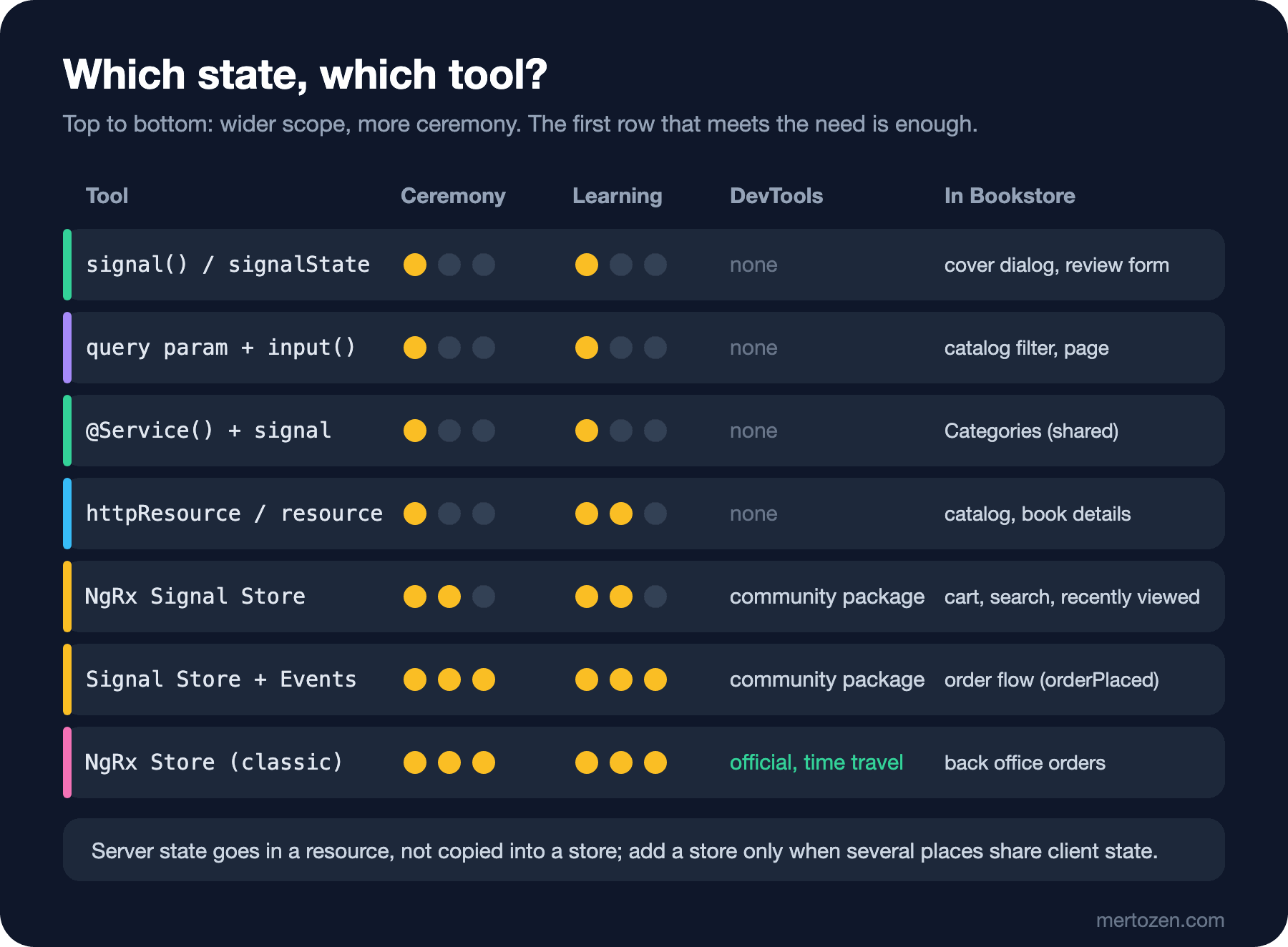
Read the matrix from top to bottom and stop at the first row that meets your need. The first question is the same as in the first post: what kind of state is this? If it can be derived, it is not stored (computed). If it is the API's data, it is server state and belongs in a resource; copying it into a store makes staleness and synchronisation your job. If it must survive a shared link, a reload and the Back button, it goes in the URL. What remains is client state, and here the tool grows with how many places read the state and how complex its changes are.
For the state of a single component, a signal, or a signalState for a few fields that change together, is enough. If several components share the same state, a @Service() with private signals inside; a shared resource such as Bookstore's category list lives in such a service too. When the methods that change state start carrying business rules, and async work, entity collections and repeated parts (request status, persistence) are added, NgRx Signal Store: withEntities, rxMethod and custom features provide ready-made what the hand-written service solves again and again. When several stores react to the same occurrence, the Events plugin. When every change really needs to be logged as an action, with official Redux DevTools support and time travel, or the codebase is already written that way, the classic Store.
The "ceremony" and "learning" axes of the matrix are a reminder that everything a tool provides has a price: with the Events plugin and the classic Store you write an event or action, a reducer and often an effect for one state change, and someone new to the team cannot see the flow in a single file. That price pays off in coordinating several stores or in a large team; it does not pay off for the state of a single page.
One more note on server state: the resource family does not itself handle sharing requests (dedupe), background refresh or a cache across pages; in the third post we solved part of this by putting a shared resource in a service. If these needs are large, TanStack Query's Angular adapter is an alternative; however, the package is still published on npm as @tanstack/angular-query-experimental (5.107.1 at the time of writing), and it was not run in this series.
The Choices for Bookstore's Features
| Feature | Kind of state | Tool | Reason |
|---|---|---|---|
| Catalog filters, page | URL | query param + input() | Shareable link, Back button (04) |
| Book list, book details | Server | httpResource | A copy of the API; loading and error states built in (03) |
| Categories | Server, shared | @Service() + httpResource | One request, two components (03) |
| Cover dialog, review form | Local UI | linkedSignal, signalState | A single component (02, 05) |
| Cart | Global client | Signal Store + entities | Read everywhere, persisted, has business rules (05, 06) |
| Checkout | Feature | Route-level Signal Store | Lifetime limited to checkout (05) |
| Quick search | Local UI + server call | Component-level Signal Store + rxMethod | Debounce and cancellation (06) |
| Order flow | Several stores | Signal Store + Events | Cart, orders and notification react to the same occurrence (07) |
| Back office orders | Feature (separate team) | Classic NgRx Store | Action log, DevTools, strict discipline (08) |
The last row of the table is a deliberate exception: back office orders are a copy of an API list in a reducer, which is the opposite of the matrix's footnote. It is a common pattern with the classic Store, and we limited staleness by fetching the list again every time the page opens; if it were written from scratch today, we would start with a resource.
Cost: Bundle Size
We ran ng build on each snapshot with the same node_modules and compared the initial bundle:
| Snapshot | Added | Initial (raw) | Estimated compressed |
|---|---|---|---|
| 02 | Angular only: signal service stores | 252.99 kB | 68.87 kB |
| 05 | @ngrx/signals: Signal Store, resource extensions | 263.00 kB | 71.65 kB |
| 07 | Entities, rxMethod, @ngrx/operators, Events plugin + new pages | 285.66 kB | 77.99 kB |
| 08 | Classic Store, effects, Store DevTools + back office page | 326.21 kB | 89.58 kB |
| 10 | NgRx Toolkit withDevtools | 329.49 kB | 90.54 kB |
The answer to "Predict First": from 07 to 08 the initial bundle grew by 11.59 kB estimated compressed (40.55 kB raw). Read this number carefully: application code was added at every step as well (search and the orders page in 07, the back office page in 08), and since the back office route is not lazy loaded, all of it is in the initial bundle. Still, the direction is clear: from 02 to 05, the basic Signal Store together with the code added in between, the difference is about 2.8 kB; what the classic Store and its tools bring is several times that. In a real app, moving the back office into a separate chunk with loadChildren takes that difference out of the bundle the customer downloads.
Architecture: A Store per Feature and the Direction of Dependencies
In Bookstore every store belongs to one feature: CartStore, CheckoutStore, SearchStore, RecentlyViewedStore, OrdersStore, NotificationsStore. The opposite is a single "god store" holding all of the app's state: every feature adds fields to it, every component injects it, and in the end nobody knows what changing a field affects. The same principle applies to the classic Store: one global store, but each feature is a separate slice with its own createFeature.
Dependencies between stores should go one way. CheckoutStore injects CartStore (it reads the payable amount); the cart does not know about checkout. When a need arose in the other direction (emptying the cart when an order is placed), we solved it not by adding an inject(CheckoutStore) to the cart but with an event, as in the seventh post. If two stores inject each other, Angular throws a circular dependency error at runtime; more importantly, neither can be understood or tested on its own any more. The rule: a feature store may read a global store, a global store does not know the feature; stores on the same level talk through events.
A store's lifetime is part of the architecture as well: a root store lives as long as the app and is not reset by itself when the user logs out (the clear() from the fifth post); a route-level store is destroyed when you leave the route with withAutoCleanupInjectors() (second post); a component-level store goes with the component (the search box from the sixth post).
Persistence and SSR
We have been writing the cart to localStorage since the second post, and in the sixth post we learned two rules: save a versioned copy, not the state itself, and keep a migration that reads the old shapes for a while. localStorage is synchronous and small (a few MB depending on the browser); IndexedDB fits large or structured data better. NgRx Toolkit has ready-made features for these (withStorageSync, withIndexedDB); we did not use them in this series, our own effect was enough at this scale. The storage APIs themselves and synchronisation across tabs are the subject of the Browser APIs and PWA series.
With SSR, part of the state is produced on the server and carried to the browser embedded in the HTML (TransferState; the id option on resources, the transfer cache in HttpClient). The danger is that a user-specific response gets into the HTML this way and that HTML is served to another user from a CDN or a shared cache. Angular 22's HTTP transfer cache by default does not cache requests carrying an Authorization header, requests sent with credentials, responses with Cache-Control: private/no-store, or responses that return Set-Cookie (we checked this in the type definitions of @angular/common); think twice before relaxing these defaults. Not producing user-specific state such as the cart and orders on the server at all is the safest path. This section was written from the documentation and type definitions without setting up SSR; it was not run in this series.
DevTools: NgRx Toolkit withDevtools
The official NgRx packages have no Redux DevTools support for Signal Store; withDevtools from the community package @angular-architects/ngrx-toolkit, which we have been promising since the fifth post, fills that gap. Installation is npm install @angular-architects/ngrx-toolkit and one line in the store:
  // Community package: shows this store's state in Redux DevTools under the name 'cart'
  withDevtools('cart'),
);
We added withDevtools('orders') to OrdersStore as well. As in the eighth post, with a stub that mimics the extension, adding two copies of Dune and placing an order:
 0.1 s console: [devtools] connect name=NgRx Store DevTools
 0.1 s console: [devtools] connect name=NgRx SignalStore
 0.1 s console: [devtools] Store Update | cart: [] idle | no orders store yet
 1.2 s console: [devtools] Store Update | cart: [Dune x 1] idle | no orders store yet
 1.5 s console: [devtools] Store Update | cart: [Dune x 2] idle | no orders store yet
 1.9 s console: [devtools] Store Update | cart: [Dune x 2] idle | orders.ids=[]
 2.2 s console: [event] [Checkout Page] orderSubmitted
 2.2 s console: [devtools] Store Update | cart: [Dune x 2] idle | orders.ids=[]
 2.5 s console: [event] [Orders API] orderPlaced
 2.5 s console: [devtools] Store Update | cart: [] idle | orders.ids=[1043]
There are two separate connections on the page: the classic Store's NgRx Store DevTools and the toolkit's NgRx SignalStore. The toolkit sends every store with withDevtools in a single state tree under the given names (cart, orders); the orders store joined the tree when it was first injected (the checkout page). Every change arrives as Store Update by default; even the events from the seventh post do not appear under their own names. To name a change, the package offers updateState(store, 'action name', ...), used instead of patchState, and withDevToolsStub for production builds; we used neither. It is a community package: its versions follow NgRx (22.0.0 requires @ngrx/signals ^22.0.0 as a peer), but it is not maintained by the NgRx team.
Evolution: From BehaviorSubject to Signal Store
In the Angular 12 era the cart would most likely have been written like this:
import { Injectable } from '@angular/core';
import { BehaviorSubject, map, type Observable } from 'rxjs';
import type { Book, CartItem } from '../models';

// The cart as an Angular 12 era app would write it; kept only for comparison (post 10), the app does not use it
@Injectable({ providedIn: 'root' })
export class LegacyCartService {
  private readonly itemsSubject = new BehaviorSubject<CartItem[]>([]);
  readonly items$: Observable<CartItem[]> = this.itemsSubject.asObservable();
  readonly count$ = this.items$.pipe(map((items) => items.reduce((sum, item) => sum + item.quantity, 0)));

  add(book: Book): void {
    const items = this.itemsSubject.value;
    const line = items.find((item) => item.isbn === book.isbn);
    this.itemsSubject.next(
      line
        ? items.map((item) => (item === line ? { ...item, quantity: item.quantity + 1 } : item))
        : [...items, { isbn: book.isbn, title: book.title, price: book.price, quantity: 1 }],
    );
  }
}
This code still compiles and is tested today (it has a test in the snapshot; the app does not use it):
 ✓ |bookstore-web| src/app/legacy/legacy-cart.service.spec.ts > LegacyCartService > counts copies through an Observable 14ms
 Test Files  10 passed (10)
      Tests  20 passed (20)
The idea is the same as the @Service() store from the second post: a private, writable source, a read-only view to the outside, derived values and methods that change state. The difference is the tool: every read is a subscription (the async pipe in a template, firstValueFrom in code), a derived value is a pipe(map(...)), and change detection knows nothing about the Observable. Signals changed these three points: a read is a synchronous function call, derivation is computed, and zoneless change detection knows which signal changed. Where BehaviorSubject is still the right tool is streams of time and events; the RxJS series post "RxJS Subject Types: Subject, BehaviorSubject, ReplaySubject, AsyncSubject and When to Use None of Them" covers that.
On the NgRx side, the order in which the APIs used in this series arrived (from the NgRx CHANGELOG, npm publish dates and NgRx's release announcements):
- NgRx 4 (2017): today's
@ngrx/platformpackage layout,createSelectorandcreateFeatureSelector. - NgRx 8 (2019): the class-free creator functions
createReducerandcreateEffect. - NgRx 12.1 (June 2021):
createFeature. NgRx 14 (2022):createActionGroup. - NgRx 15.2 (January 2023): functional effects and
extraSelectorsincreateFeature. NgRx 16 (May 2023):store.selectSignal. - NgRx 17 (November 2023):
@ngrx/signals(signalStore,signalState) as a developer preview.@ngrx/signals18 (July 2024): stable, protected state and private members. - NgRx 19 (December 2024):
signalMethodandwithProps. NgRx 19.2 (May 2025): the Events plugin as experimental. NgRx 20 (July 2025):withLinkedState. - NgRx 21 (December 2025): the Events plugin stable,
withEffects→withEventHandlers, scoped events. NgRx 22 (August 2026): resource extensions, dynamic deep signals,SignalStoreFeatureType, DevToolsactionCreators.
On the Angular side, signals arrived in Angular 16 (the Angular series post "What's New in Angular 16: Signals, Required Inputs and takeUntilDestroyed"), the resource API in 19 ("Angular 19: Standalone by Default, linkedSignal and Data Loading with resource()"), and Angular 22 brought OnPush by default ("Angular 22: OnPush by Default, Stable Signal Forms and a File-by-File Comparison with Angular 12"); the project in this series was set up zoneless from the start. The list shows one thing clearly: the classic Store's API got simpler over the years (creator functions, createFeature, functional effects), and Signal Store came as the next step of that simplification once Angular signals were stable. The classic Store was not abandoned; it got a new feature in NgRx 22 too.
In Production
Do not choose a tool once and forget about it; moving up a row as a feature grows is normal. Bookstore's cart is an example: it was a @Service() in the second post, became a Signal Store in the fifth, moved to entities in the sixth and started reacting to events in the seventh. At every step the component code barely changed, because the cart's public API (items(), count(), add()) stayed the same. Design a store like an interface: what you expose determines how much you can change inside.
Watch the other direction too: adding a heavier tool than needed to a feature is a decision that is hard to undo. A feature that moves to the Events plugin or the classic Store affects every component that uses it, the tests and the team's habits. Before moving up a row, point to a concrete problem, such as "three stores react to the same occurrence and every new reaction changes checkout".
Before adding community packages (NgRx Toolkit, the TanStack Query adapter), look at how they track releases: Angular and NgRx raise their peer dependencies with every major version, and if a community package falls behind, it holds your upgrade back.
Common Pitfalls
Choosing the tool by rule of thumb instead of by need
General rules such as "large app, so the classic Store" or "new project, so Signal Store for everything" decide without looking at the kind of state. Even in a single app like Bookstore, five different tools turned out to be right for nine features.
Copying server state into a store
The warning from the first post of the series is still the most common mistake in the last one: putting a list from the API into a store and keeping it in sync by hand after every mutation. Resource first; use a store for state that really belongs to the client.
The god store
Adding a field to an existing store for every new need is easy. If a store's file starts to speak the language of several features (search results in the cart store, for example), split it.
Leaving DevTools open in production
logOnly and the sanitizers from the eighth post, withDevToolsStub for the toolkit: if the state contains user data, anyone with the extension can see it.
A Small Experiment
★☆☆ Add three features from your own app to the "Choices for Bookstore's Features" table: kind of state, the tool you chose and a one-sentence reason. For which one would moving a row up or down be better?
★★☆ Move the back office route into a separate routes file with loadChildren (keep provideState and provideEffects in that file) and repeat the measurement from "Cost: Bundle Size". How much smaller did the initial bundle get, and how large is the lazy chunk?
★★★ Design a flow that resets all user-specific state when the user logs out: a userLoggedOut event, a reducer in each of the cart and orders stores, and a meta-reducer in the classic Store for the back office. Compare it with calling a clear() on every store instead of using an event, and write its test as in the ninth post.
The series ends here. We started by identifying the kind of state and came back to the same questions in every post: whose state is this, who reads it, and how long does it live? When the answers to these questions are clear, the choice of tool usually follows by itself. Authentication state (guards, interceptors, token refresh) stayed outside this series; the Authentication and Authorization series post "Authentication State in Angular: Functional Guards, Interceptors, Single-Flight Token Refresh and UI Authorization" continues from there.