

What Is State in Angular and Where Should It Live? Separating Server, UI, URL and Form State
Where state lives is decided by two questions: who owns the data (the API, the address bar, the browser) and how long it must live; server state goes in a resource, URL state in a query param, local state in the component, shared client state in a service, and derived values are never stored. On Bookstore's catalog page we show with a real run what happens to the four kinds on Back and on reload, and prove that copying the API response into a global store shows stale stock.
Version note: The examples in this post were run with Angular 22.2, TypeScript 6.0 and Node.js 24 (Angular 22.2 projects use TypeScript 6.0); browser behaviour was observed with Playwright 1.65 in headless Chromium against the mock Bookstore API in the snapshot.
Predict First
Bookstore, the online bookstore used as the shared example across this site's series, has an Angular client called bookstore-web with a catalog page. A user does the following in order: opens /?category=classics, clicks Emma's cover to open the large cover dialog, adds Emma to the cart, goes to the cart with the "Cart" link in the header, presses the browser's Back button and finally reloads the page.
After each step, look at four things: the selected category, the book list (and whether a new request went to the API for it), the cart count in the header, and whether the cover dialog is open. Is the dialog open after Back? How many books are in the cart after the reload? How many requests went to the API in total? Write your prediction down; the answer is a few sections below, in the output of a real run.
Each of these four things is state, but they live in different places and die at different times. Everything we build in this series rests on that distinction: who owns a piece of state and how long it has to live. The Angular series covered the APIs themselves, signals, computed, linkedSignal and httpResource ("What's New in Angular 16: Signals, Required Inputs and takeUntilDestroyed", "Angular 19: Standalone by Default, linkedSignal and Data Loading with resource()", "Angular 20: Stable Signal APIs, httpResource and the New File Naming"); here we look at where those tools belong in an application's state architecture.
What Is State and Why Split It into Kinds?
In a frontend application, state is any data the screen shows that changes over time: the book list, the items in the cart, the selected category, an open dialog, a half-filled address form. Putting all of it in one bag is tempting; that is where the idea "let's put everything in a store and have everyone read from it" comes from. The problem is that these pieces of data give very different answers to two important questions.
The first question is ownership: where does the real version of the data live? A book's stock lives in the Bookstore API's database; the value in the browser is only a copy, and another customer can make that copy stale the moment they place an order. The cart, on the other hand, belongs entirely to this browser; the server knows nothing about it until an order is placed. The selected category lives in the address bar, and the user can change it by hand.
The second question is lifetime: how long should this data live? The cover dialog should close when the user leaves the page. The cart should not disappear while the user moves between pages. The category filter should stay the same after a reload and when the link is sent to someone else. Putting a piece of state in the wrong place sentences it to the wrong lifetime: the dialog is still open when the user comes back, or the filter is lost on reload.
Those two questions also give us the established classification:
| Kind | Owner | Lifetime | Example from Bookstore | Where it lives in Angular |
|---|---|---|---|---|
| Server state | The API and its database | Durable on the server; the client's copy goes stale | Book list, stock, reviews | httpResource, resource |
| URL state | The address bar | Reloads, shared links, the Back button | ?category=classics, page number | Query param + input() |
| Client (UI) state | The app in the browser | As long as its owning component or injector lives | Cart, open dialog, selected tab | signal, service |
| Form state | The form | While the form is on screen | Checkout address, review draft | Signal Forms, Reactive Forms |
| Persistent state | Browser storage | Survives reloads and closing the tab | The cart's localStorage copy, theme | effect + localStorage |
Server state has problems of its own: a "loading" phase while it is fetched, an error phase when that fails, going stale over time and changing outside your control. You can model all of that by hand in a store, but the resource family, stable in Angular 22, exists for exactly this job; the third post of the series covers it. URL state, for its part, is nothing but strings, and an input the user can edit by hand: ?page=abc can arrive. The fourth post covers using the URL as state and validating it.
Client state splits in two: local state that only one component cares about (is the dialog open, which tab is selected) and shared state that several places read (the cart: the count in the header, the cart page, checkout). Form state is technically client state too, but it has its own rules (dirty, touched, valid, async validation) and its own API in Angular; Signal Forms, covered in "Angular 22: OnPush by Default, Stable Signal Forms and a File-by-File Comparison with Angular 12", does that job and is not covered separately in this series. Persistent state is not a separate kind but a lifetime decision added on top of client state: the cart is still client state, there is just also a copy of it in localStorage.
Derived State Is Not State
Then there are values that look like state but are not. The "4 books, page 1 of 2" text on the catalog page is computed from the total, page and pageSize values that come from the API. The number of items in the cart is the sum of the cart lines' quantity. The cart total is the sum of the line prices. These are derived values: they must change by themselves when their sources change.
Storing a derived value in a separate field means taking on the job of keeping it in sync with its sources. The method that adds to the cart increments the count, but one day a new "change quantity" method forgets to update it, and the header says "Cart (3)" while the cart page shows two items. computed removes this whole class of bug: you don't store the value, you describe how to calculate it. Angular calculates it when something reads it and reuses the result as long as its sources do not change. The rule is simple: if a value can be calculated from other state, don't store it, derive it with computed.
Bookstore's State Inventory
The catalog page hosts all four kinds in the same component. The complete code is in the post's snapshot; to run it, start the mock API in the root folder and the Angular app in bookstore-web:
npm run api
cd bookstore-web
npm ci
npm start
Here is the page:
import { httpResource } from '@angular/common/http';
import { Component, computed, inject, input, signal } from '@angular/core';
import { RouterLink } from '@angular/router';
import { apiUrl } from '../api';
import { CartStore } from '../cart/cart-store';
import type { Book, BookPage } from '../models';

@Component({
  selector: 'app-catalog-page',
  imports: [RouterLink],
  template: `
    <h1>Catalog</h1>
    <nav class="categories">
      <a routerLink="/">All</a>
      @for (c of categories; track c.slug) {
        <a routerLink="/" [queryParams]="{ category: c.slug }">{{ c.name }}</a>
      }
    </nav>
    @if (books.hasValue()) {
      <p class="summary">{{ summary() }}</p>
      <ul class="books">
        @for (book of books.value().items; track book.isbn) {
          <li>
            <button class="cover" (click)="coverOf.set(book)">{{ book.title }}</button>
            {{ book.author }} - {{ book.price }} TRY - {{ book.stock }} in stock
            <button class="add" (click)="cart.add(book)">Add to cart</button>
          </li>
        }
      </ul>
    } @else if (books.error()) {
      <p>Could not load the books.</p>
    } @else {
      <p>Loading...</p>
    }
    @if (coverOf(); as book) {
      <div class="cover-dialog" role="dialog">
        <p>{{ book.title }} (large cover)</p>
        <button (click)="coverOf.set(null)">Close</button>
      </div>
    }
  `,
})
export class CatalogPage {
  // URL state: ?category=classics, bound by withComponentInputBinding()
  readonly category = input<string>();

  // Server state: a copy of the API's data, fetched again when the category changes
  protected readonly books = httpResource<BookPage>(() => {
    const category = this.category();
    return { url: `${apiUrl}/books`, params: category ? { category } : undefined };
  });

  // Global client state: shared with the header and the cart page
  protected readonly cart = inject(CartStore);

  // Local UI state: only this page cares whether the cover dialog is open
  protected readonly coverOf = signal<Book | null>(null);

  // Derived state: computed from other state, never stored
  protected readonly summary = computed(() => {
    if (!this.books.hasValue()) return '';
    const { total, page, pageSize } = this.books.value();
    return `${total} books, page ${page} of ${Math.ceil(total / pageSize)}`;
  });

  protected readonly categories = [
    { slug: 'science-fiction', name: 'Science Fiction' },
    { slug: 'classics', name: 'Classics' },
    { slug: 'fantasy', name: 'Fantasy' },
  ];
}
The category is an input(): with provideRouter(routes, withComponentInputBinding()), the router writes the ?category=classics query param into the input with the same name. The book list is an httpResource: when the category signal changes it sends the request again by itself, and it carries the loading and error phases by itself. The cart comes from a service that has a single instance at the root. The dialog is this component's own signal. The summary line is a computed; it is stored nowhere. The cart service is in its simplest form for now:
import { computed, Service, signal } from '@angular/core';
import type { Book, CartItem } from '../models';

// Global client state: one instance for the whole app (root injector)
@Service()
export class CartStore {
  readonly #items = signal<CartItem[]>([]);
  readonly items = this.#items.asReadonly();
  readonly count = computed(() => this.#items().reduce((sum, item) => sum + item.quantity, 0));

  add(book: Book): void {
    this.#items.update((items) =>
      items.some((item) => item.isbn === book.isbn)
        ? items.map((item) => (item.isbn === book.isbn ? { ...item, quantity: item.quantity + 1 } : item))
        : [...items, { isbn: book.isbn, title: book.title, price: book.price, quantity: 1 }],
    );
  }
}
The writable signal is private (#items), and only a read-only signal is exposed through asReadonly(); changes go through add only. The next post covers this structure and Angular 22's @Service() decorator in detail. The header reads the cart count from the same instance:
import { Component, inject } from '@angular/core';
import { RouterLink, RouterOutlet } from '@angular/router';
import { CartStore } from './cart/cart-store';

@Component({
  selector: 'app-root',
  imports: [RouterOutlet, RouterLink],
  template: `
    <header>
      <a routerLink="/">Bookstore</a>
      <a class="cart-link" routerLink="/cart">Cart ({{ cart.count() }})</a>
    </header>
    <main><router-outlet /></main>
  `,
})
export class App {
  protected readonly cart = inject(CartStore);
}
Now the scenario from "Predict First". After each step Playwright read the page and wrote one row; the last column is the number of GET requests sent to the API so far:
step                      url                  catalog               header    cover dialog  API requests
open /?category=classics  /?category=classics  4 books, page 1 of 2  Cart (0)  closed        1
open Emma cover           /?category=classics  4 books, page 1 of 2  Cart (0)  open          1
add Emma to cart          /?category=classics  4 books, page 1 of 2  Cart (1)  open          1
go to cart                /cart                -                     Cart (1)  closed        1
browser back              /?category=classics  4 books, page 1 of 2  Cart (1)  closed        2
reload (F5)               /?category=classics  4 books, page 1 of 2  Cart (0)  closed        3
Each column shows the lifetime of one kind of state:
- The cover dialog (local UI state) disappeared when the user went to the cart and was closed after coming back: the
coverOfsignal belongs to theCatalogPageinstance, and it went away when the router destroyed the component. Coming back means a new instance and a newnull. - The cart (global client state) survived the page change but not the reload. The root injector lives as long as the app does; a reload starts the app from scratch and memory is reset.
- The category (URL state) survived everything: coming back from the cart page with Back, and after the reload, it is still
classics. It is not in any JavaScript memory; it lives in the address bar. - The book list (server state) was requested three times: on the first visit, on coming back and on the reload. Every time the component is created, the resource starts with a new request. That is not a bug; the data on the server may have changed in the meantime. But two components fetching the same data separately, or unnecessary repeated requests, are the subject of the server state post.
How was your prediction? The most common mistake is to think the cart will still be there after the reload. Users expect the same thing; that is why the cart will become persistent state later on. But we will do that deliberately and in one place, not by "writing every piece of state to localStorage".
The Scope of State: Component, Feature, Root
The second decision for client state is scope. In Angular, the lifetime of a piece of state is the lifetime of whatever holds it: a component's field lives with the component, a service lives with the injector that provides it. In practice there are three levels:
- Inside a component: a dialog, a dropdown, a card's "show details" flag. It ends when the component is destroyed; there is nothing for you to clean up.
- At feature level: a service provided in a route's
providerslist. It is created when the user first enters that route tree; if the router haswithAutoCleanupInjectors()turned on, it ends when the user leaves the tree, otherwise it lives as long as the app (the next post shows the difference with real output). State shared between the checkout steps (address, shipping, confirmation) that must be forgotten when the user leaves checkout fits here. - At the root: state the whole app shares and that lives as long as the app does. The cart, the signed-in user, the theme.
Moving scope up is easy and moving it down is hard, so the default direction should be bottom-up. Start a piece of state next to its first consumer, and when a second consumer appears, move it to the nearest common owner of the two. The cost of state that sits higher than it should is not visible at once, but it adds up. Its lifetime grows: a checkout address placed at the root shows up in its old form when the user leaves checkout and places another order half an hour later, and you have to write the code that resets it by hand. Its visibility grows: every component can reach it with inject(), and tracking who changes what gets harder. Testing gets harder: to test a single component you also have to set up the state at the root.
The decision tree below summarises this post. Ask the questions top-down; the first "yes" tells you where the state belongs:
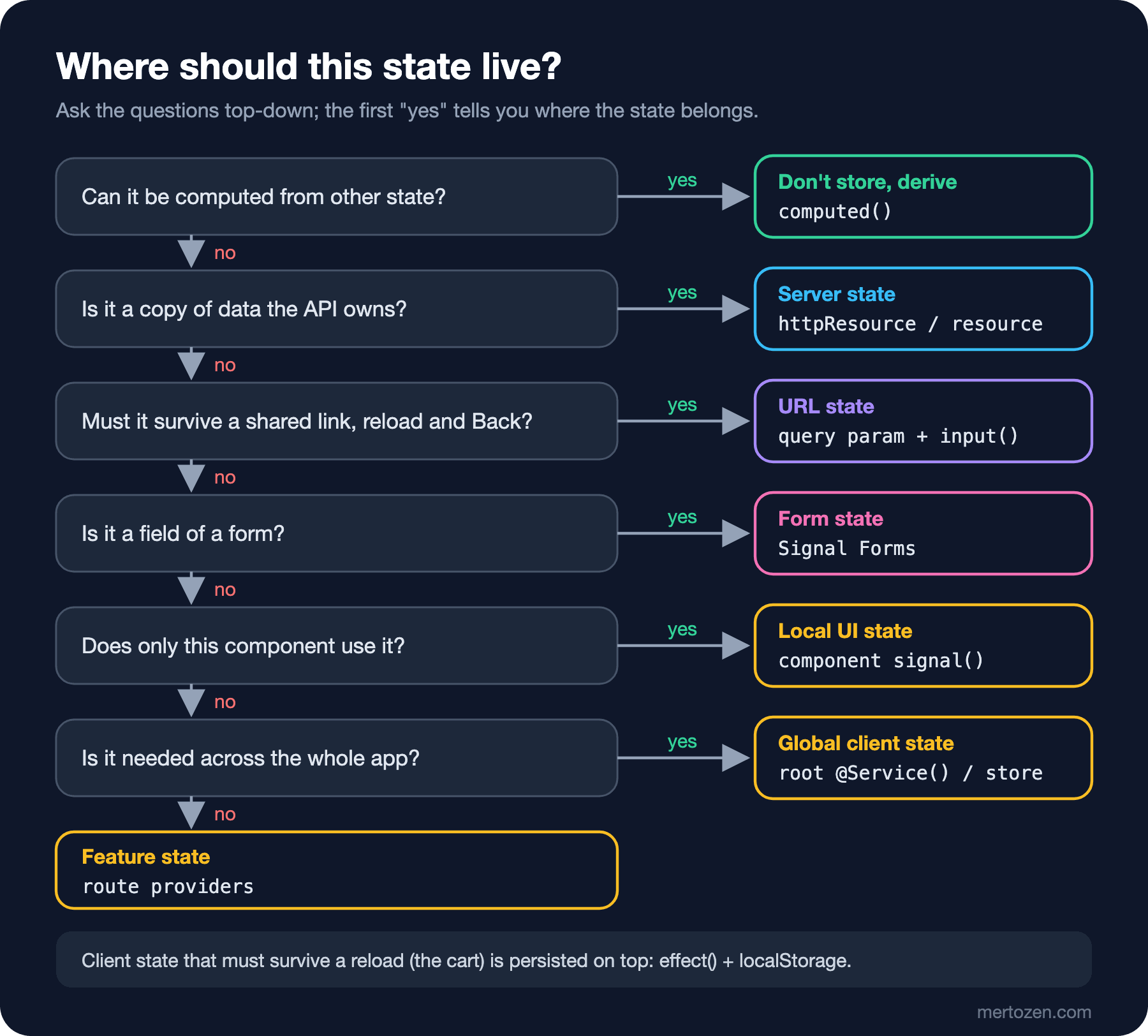
The order is deliberate. "Can it be computed" comes first, because a derived value should be stored nowhere. Ownership comes next: if the data belongs to the API, it is server state no matter which component uses it. Only once those two questions are out of the way does the scope question make sense. Feature level is at the bottom of the tree, because "more than one component but not everywhere" is the least common and most debated case; the UI Architecture Patterns series post "Boundaries in Large Angular Apps: Feature Folders, Facades and Layers" looks at those boundaries in terms of folders and layers.
In Production
Client state at the root is not cleared automatically when the user changes. If someone signs out and signs in with another account in the same browser, the cart and any other user-specific root state carry the previous user's data until the page is reloaded. The sign-out flow must reset that state deliberately; session state itself (guards, interceptors, token refresh) is in the Authentication and Authorization series post "Authentication State in Angular: Functional Guards, Interceptors, Single-Flight Token Refresh and UI Authorization".
If you use server state with SSR, data fetched on the server can be embedded in the page's HTML and carried over to the browser. That is fine for the book list and dangerous for the user's orders: that HTML can end up in a cache and be served to another user. The details are in the third post, together with the resource's id option.
The cheapest way to measure a state architecture is to count how many requests go to the API during a navigation. In the table above, Back produced one request and the reload one more; reasonable for this scenario. But if two components on the same page request the same list separately, or the list is fetched from scratch on every tab change, the browser's Network tab shows it immediately. With persistent state, size and consistency across tabs matter too: a cart open in two tabs changing without either knowing is a topic for the upcoming Browser APIs and PWA series.
Common Pitfalls
Copying the API response into a global store
The most common mistake is to treat server state like client state: fetch the list once, put it in a store at the root and have everyone read from there. On paper it reduces the number of requests. This is a version of the catalog page written that way:
import { HttpClient } from '@angular/common/http';
import { inject, Service, signal } from '@angular/core';
import { apiUrl } from '../api';
import type { Book, BookPage } from '../models';

// Anti-pattern: a global copy of server data that nobody refreshes
@Service()
export class BookCache {
  readonly #http = inject(HttpClient);
  readonly #books = signal<Book[]>([]);
  readonly books = this.#books.asReadonly();

  loadOnce(): void {
    if (this.#books().length > 0) return; // "already in the store"
    this.#http.get<BookPage>(`${apiUrl}/books`).subscribe((page) => this.#books.set(page.items));
  }
}
The catalog page calls loadOnce() in its constructor and shows cache.books(). Playwright opened the page, then sent another customer's Dune order straight to the API, and the user went to the cart and came back to the catalog:
catalog, first visit : Dune - 450 TRY - 12 in stock Add to cart
another customer     : POST /api/orders -> 201
catalog, second visit: Dune - 450 TRY - 12 in stock Add to cart
API says             : Dune - 11 in stock
The API says 11, the page shows 12 and will keep showing it: nobody refreshes the copy in the store. Fixing that means adding "when did it go stale", "when should it be fetched again" and "what to show while loading" logic to the store; in other words, rewriting a server state tool by hand. The same scenario with the real page that uses httpResource:
catalog, first visit : Dune Frank Herbert - 450 TRY - 12 in stock Add to cart
another customer     : POST /api/orders -> 201
catalog, second visit: Dune Frank Herbert - 450 TRY - 11 in stock Add to cart
API says             : Dune - 11 in stock
Coming back to the catalog produced a new request, and the stock is 11. A copy of server state should live as long as the component that shows it; if it needs to live longer (because many screens use the same data), you need a tool that does that together with a staleness rule. The third post separates the two.
Storing a derived value separately
Keeping the cart count, the total, a "is there a next page" flag or a filtered list in a separate signal means you have to update it at every point where something changes. At some point it is forgotten and the two values contradict each other. If only one method writes a value and that value can be worked out from other values, it is a computed.
Putting every piece of state at the root
Moving local state to the root because "someone else might use it later" means also taking on the job of resetting it for its whole lifetime. Move the dialog to the root and it stays open after Back; on the next visit it opens with the old selection. Move state when the need to share it really appears, and move it to the nearest common owner.
Putting state in the URL that does not belong there
The URL is a powerful place for state, but not everything belongs there. An open dialog, a hover state or a half-written review writes history entries and makes the Back button meaningless for the user. Sensitive data such as tokens or email addresses leaks into logs, the browser history and the Referer header. Put what is shareable and reproducible in the URL: filters, sorting, page, the selected tab.
A Small Experiment
★☆☆ Open the catalog page at ?category=fantasy and check the summary line; is the text right for a single result? If not, fix it. Then change the category in the address bar to poetry by hand: what does the API return and what does the page show? This is the first sign of the fourth post's topic, validating input that comes from the URL.
★★☆ Move the coverOf signal to CartStore (the root) and run the Playwright scenario again. What does the dialog column show in the row after Back? What code would you have to write to fix that behaviour?
★★★ Make a state inventory for the checkout flow: the delivery address form, the shipping options (with prices from the API), the selected shipping method, the coupon code, the order summary and the "placing order" status. For each, write down its kind, owner, lifetime and place in the decision tree. Which ones should be forgotten when the user leaves checkout, and which ones should survive a reload?
In the next post we turn the cart into a real store: a private writable signal and asReadonly(), the total with computed, immutable updates, Angular 22's @Service() decorator, state lifetime through provider scope, linkedSignal for state that resets when the page changes, and a single effect that saves the cart from a reload.