

When Server-Side Rendering? Choosing Between MVC, Razor Pages, Blazor SSR and an Angular SPA

Server-side rendering wins for SEO, fast first loads, form-heavy internal apps and small teams; an SPA fits heavy interactivity and APIs with many clients. We build the same list with an MVC controller and a Razor Page, trace the request lifecycle in the framework logs, compare a 474-byte Angular shell with 2.5 KB of ready HTML and discuss where Blazor SSR fits.
Version note: The code in this post was built and run with .NET 10 (SDK 10.0.402); the Angular build in the comparison was produced with Angular 22.
Guess First
You have two applications that show the same list of books. The first is written with ASP.NET Core MVC (Model-View-Controller) and produces the page on the server. The second is an Angular SPA (Single Page Application) that pulls its data from a Web API (Application Programming Interface). You send a request to both from the terminal with curl, that is, with a client that does not run JavaScript. In which response does the title "Rivers of Ink" appear? And when the browser receives the response to the first request, how many more files does it have to download before it can draw the book list? Write your answer down; we will compare it with real output halfway through the post.
What SSR Means and What This Series Covers
SSR (Server-Side Rendering) means the HTML (HyperText Markup Language) is produced on the server and sent to the browser ready to display. The browser reads the document, applies the CSS (Cascading Style Sheets) and the user sees the content; the page does not wait for JavaScript to run before it becomes meaningful. ASP.NET Core has two classic ways of doing this: MVC and Razor Pages. Both use the same Razor view engine, the same routing, the same model binding and filter infrastructure. Razor Pages is in fact built on top of MVC.
In this series we write the server-rendered face of the site's Bookstore application: a public catalog and an admin panel. Controller/action basics, attribute routing, model binding sources and filters were covered in the ASP.NET Core Web API series; we do not repeat them here and always look at things from the view and form side. The MVC pattern itself, meaning the difference between the original Smalltalk version and the web version, is in the UI (User Interface) Architecture Patterns series post "The MVC Pattern: Original Smalltalk MVC and Web MVC Are Not the Same". This post asks a more practical question: when is rendering on the server the right choice, and once you have made that choice, how do you decide between MVC and Razor Pages?
Same Page, Two Models
Let us put the two models side by side first. In a single project (Ssr01) we list the same three books with both an MVC controller and a Razor Page. The data is shared:
namespace Ssr01.Models;

public record BookRow(int Id, string Title, decimal Price);

public static class BookData
{
    public static readonly BookRow[] All =
    [
        new(1, "The Pragmatic Path", 420m),
        new(2, "Rivers of Ink", 265.5m),
        new(3, "Clean Lines", 380m),
    ];
}
On the MVC side, a controller action handles the request and decides which view to render:
using Microsoft.AspNetCore.Mvc;
using Ssr01.Models;

namespace Ssr01.Controllers;

public class BooksController : Controller
{
    public IActionResult Index() => View(BookData.All);
}
@model BookRow[]
<h1>Books (MVC)</h1>
<ul>
@foreach (BookRow book in Model)
{
<li>@book.Title: @book.Price TL</li>
}
</ul>The View(BookData.All) call does not name a view; MVC finds Views/Books/Index.cshtml from the action name (Index) and the controller name (Books). In Razor Pages there is no intermediate layer between the URL (Uniform Resource Locator) and the file. The file Pages/Catalog.cshtml is the /Catalog address itself:
@page
@model Ssr01.Pages.CatalogModel
<h1>Books (Razor Pages)</h1>
<ul>
    @foreach (BookRow book in Model.Books)
    {
        <li>@book.Title: @book.Price TL</li>
    }
</ul>
using Microsoft.AspNetCore.Mvc.RazorPages;
using Ssr01.Models;
namespace Ssr01.Pages;
public class CatalogModel : PageModel
{
public BookRow[] Books { get; private set; } = [];
public void OnGet() => Books = BookData.All;
}To run both in the same application, two service registrations and two endpoint mappings in Program.cs are enough:
var builder = WebApplication.CreateBuilder(args);

builder.Services.AddControllersWithViews();
builder.Services.AddRazorPages();

var app = builder.Build();

app.UseRouting();
app.MapStaticAssets();

app.MapControllerRoute(
    name: "default",
    pattern: "{controller=Home}/{action=Index}/{id?}")
    .WithStaticAssets();
app.MapRazorPages()
    .WithStaticAssets();

app.Run();
The <main> part of the responses to curl http://localhost:17711/Books and /Catalog, with the layout removed, is identical:
<h1>Books (MVC)</h1>
<ul>
        <li>The Pragmatic Path: 420 TL</li>
        <li>Rivers of Ink: 265.5 TL</li>
        <li>Clean Lines: 380 TL</li>
</ul>
That answers the first half of the opening question: the book titles are inside the first response. A search engine crawler, a chat app generating a link preview or a browser with JavaScript disabled sees the page content with a single request.
The Lifecycle of a Request
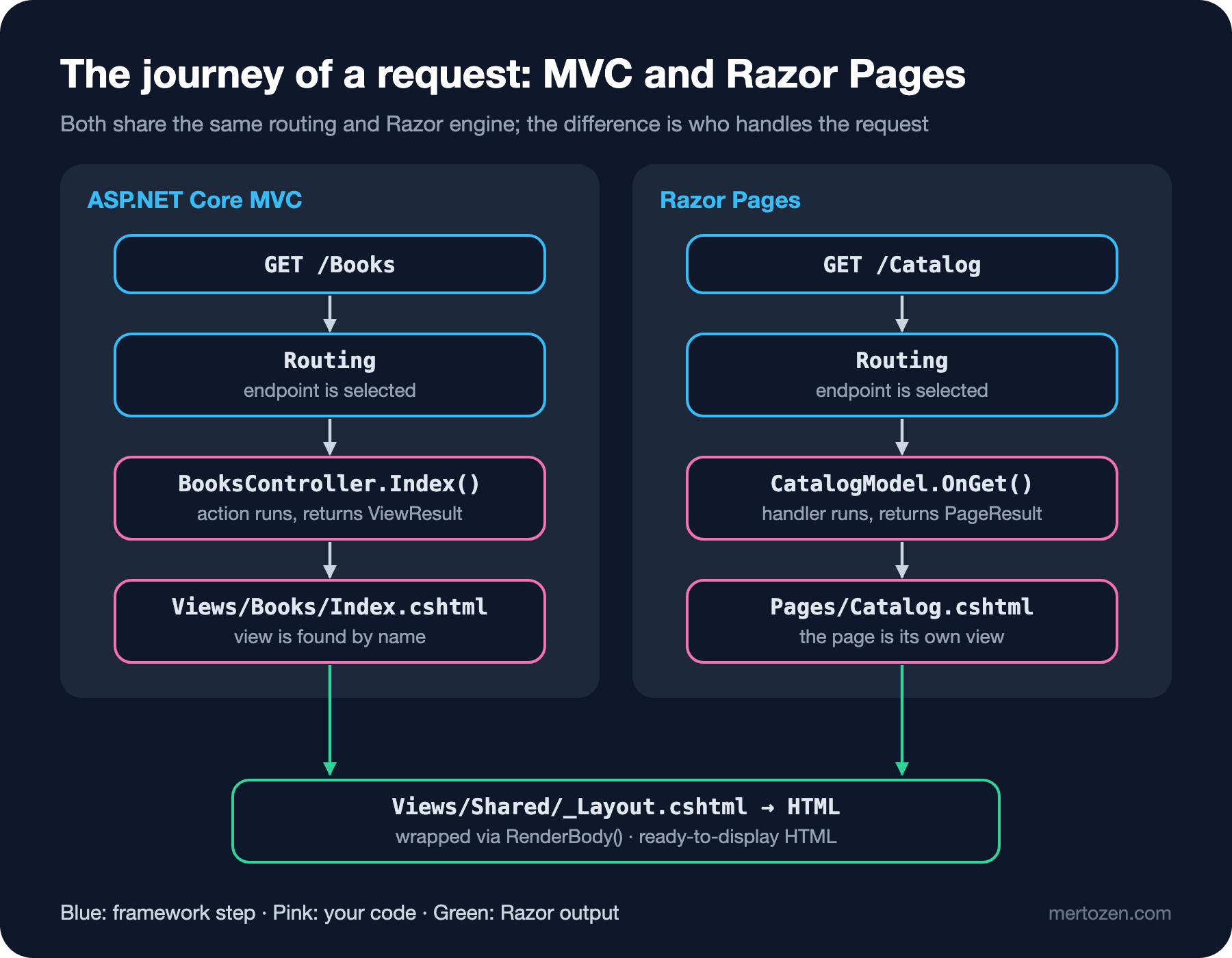
Both models go through the same skeleton: routing selects the endpoint, your code (an action or a handler) prepares the model, Razor renders the view, the layout wraps it and a single HTML document comes out. Instead of guessing, let us see it in the framework's own logs. In appsettings.Development.json I raised three categories to Information:
{
  "Logging": {
    "LogLevel": {
      "Default": "Information",
      "Microsoft.AspNetCore": "Warning",
      "Microsoft.AspNetCore.Routing.EndpointMiddleware": "Information",
      "Microsoft.AspNetCore.Mvc.Infrastructure.ControllerActionInvoker": "Information",
      "Microsoft.AspNetCore.Mvc.ViewFeatures": "Information",
      "Microsoft.AspNetCore.Mvc.RazorPages": "Information"
    }
  }
}
The real log of a GET /Books request:
info: Microsoft.AspNetCore.Routing.EndpointMiddleware[0]
      Executing endpoint 'Ssr01.Controllers.BooksController.Index (Ssr01)'
info: Microsoft.AspNetCore.Mvc.Infrastructure.ControllerActionInvoker[102]
      Route matched with {action = "Index", controller = "Books", page = ""}. Executing controller action with signature Microsoft.AspNetCore.Mvc.IActionResult Index() on controller Ssr01.Controllers.BooksController (Ssr01).
info: Microsoft.AspNetCore.Mvc.ViewFeatures.ViewResultExecutor[1]
      Executing ViewResult, running view Index.
info: Microsoft.AspNetCore.Mvc.ViewFeatures.ViewResultExecutor[4]
      Executed ViewResult - view Index executed in 2.2863ms.
info: Microsoft.AspNetCore.Mvc.Infrastructure.ControllerActionInvoker[105]
      Executed action Ssr01.Controllers.BooksController.Index (Ssr01) in 2.5405ms
info: Microsoft.AspNetCore.Routing.EndpointMiddleware[1]
      Executed endpoint 'Ssr01.Controllers.BooksController.Index (Ssr01)'
And GET /Catalog:
info: Microsoft.AspNetCore.Routing.EndpointMiddleware[0]
      Executing endpoint '/Catalog'
info: Microsoft.AspNetCore.Mvc.RazorPages.Infrastructure.PageActionInvoker[103]
      Route matched with {page = "/Catalog", action = "", controller = ""}. Executing page /Catalog
info: Microsoft.AspNetCore.Mvc.RazorPages.Infrastructure.PageActionInvoker[105]
      Executing handler method Ssr01.Pages.CatalogModel.OnGet - ModelState is Valid
info: Microsoft.AspNetCore.Mvc.RazorPages.Infrastructure.PageActionInvoker[108]
      Executed handler method OnGet, returned result .
info: Microsoft.AspNetCore.Mvc.RazorPages.Infrastructure.PageActionInvoker[107]
      Executing an implicit handler method - ModelState is Valid
info: Microsoft.AspNetCore.Mvc.RazorPages.Infrastructure.PageActionInvoker[109]
      Executed an implicit handler method, returned result Microsoft.AspNetCore.Mvc.RazorPages.PageResult.
info: Microsoft.AspNetCore.Mvc.RazorPages.Infrastructure.PageActionInvoker[104]
      Executed page /Catalog in 7.0057ms
Two details stand out. The first is the route values: the MVC endpoint carries page = "", the Razor Pages endpoint carries action = "" and controller = "". Both share the same routing table and each endpoint carries the other model's values as empty; that is why they can live in the same project without clashing. The second is that OnGet returns void: the returned result . line shows an empty result, after which the framework produces a PageResult through an "implicit handler". In Razor Pages, if a handler returns nothing, the page itself is rendered. MVC has no such shortcut; an action returns explicitly whatever it is going to return.
The timings are telling too: on the very first request the application received (HomeController), the view rendered in 59 ms; the warm-up cost, that is loading the view assembly and the first JIT (Just-In-Time) compilation of the code, landed on that request. Subsequent requests take 2-7 ms. Because Razor views are compiled into C# classes at build time, there is no template parsing cost at runtime.
Where Rendering on the Server Shines
Now the second half of the opening question. Here is the entire index.html from the production build of the Angular Bookstore app we wrote in the site's UI Architecture Patterns series:
<!doctype html>
<html lang="en" data-beasties-container>
<head>
  <meta charset="utf-8">
  <title>Bookstore</title>
  <base href="/en/">
  <meta name="viewport" content="width=device-width, initial-scale=1">
  <link rel="icon" type="image/x-icon" href="favicon.ico">
<link rel="stylesheet" href="styles-5INURTSO.css"></head>
<body>
  <app-root></app-root>
<link rel="modulepreload" href="chunk-CKQSIDE8.js"><script src="main-6MLYBZFF.js" type="module"></script></body>
</html>
474 bytes, and not a single book title; <app-root> is empty. For the book list to appear, the browser first has to download and run the 135 KB main-6MLYBZFF.js and the 128 KB chunk-CKQSIDE8.js, then the application has to send a separate request to the Web API, and when the JSON (JavaScript Object Notation) response arrives it has to draw the DOM (Document Object Model). On the MVC side the /Books response is 2,502 bytes with the list inside it. The only extra work needed to show the page is downloading the CSS.
That difference defines where SSR is strong:
- SEO (Search Engine Optimization) and share previews: because the content is in the first response, crawlers that run no or limited JavaScript see the full page. For content sites such as catalogs, blogs, product pages and documentation, this alone is reason enough.
- First load: on a weak phone and a slow connection, showing ready HTML instead of downloading and parsing hundreds of KB of JavaScript brings the first screen forward noticeably.
- Form-heavy internal applications: admin panels, approval screens, report filters. Most screens are a "list, open, edit, save" loop. Here the client-side state management, separate build pipeline and API contract that an SPA brings are often more weight than they carry.
- Small team, one language: the same person writes data access, business rules and the screen in C#. No separate frontend project, no separate deployment and no validation rules duplicated on both sides.
- Security model: authentication is usually cookie based, and CSRF (Cross-Site Request Forgery) protection comes ready with the form tag helper. The question of where to store a token in the browser never comes up.
Where an SPA and a Web API Shine
The other side of the scale is real too. If the user stays on a screen for a long time and interacts constantly (a drag-and-drop planning board, a live dashboard, a Figma-like editor), asking the server for new HTML on every click feels both slow and clunky. In an SPA the application downloads once, resolves every subsequent interaction locally and talks to the server only in data.
The second strength is one API serving several clients. If your mobile app, your partner integrations and your web interface all use the same Web API, making the web just another client of that API gives a consistent architecture. The third is team structure: with separate frontend and backend teams, drawing the boundary between them as an HTTP (HyperText Transfer Protocol) contract makes independent deployments easier.
These advantages have a cost, though: two languages, two build pipelines, validation duplicated on both sides, client-side routing, token management and extra work for SEO (setting up SSR or prerendering in Angular, for example). Microsoft's "Choose an ASP.NET Core UI" document lists the downsides of an SPA from the same place: more languages, frameworks and tools, and difficulty sharing code between the two sides.
MVC or Razor Pages?
You have decided to render on the server. The second question is MVC or Razor Pages? Since both use the same engine, the difference is not in technical capability but in how the code is organized:
| Topic | MVC | Razor Pages |
|---|---|---|
| Axis of organization | Controller-centric: one controller gathers many actions and views | Page-centric: each page is its own .cshtml and PageModel pair |
| URL | From the route template ({controller}/{action}/{id?}) | From the folder and file path (Pages/Admin/Books/Edit.cshtml) |
| GET and POST | Separate actions in the same or different controllers | OnGet and OnPost in the same PageModel |
| Using one view from several actions | Natural (View("Edit", model)) | Possible but unusual |
| Template | dotnet new mvc | dotnet new webapp |
| Good fit | Many representations of the same resource, a shared controller culture with the API, migrating from legacy MVC 5 code | Independent workflows per screen, CRUD (Create, Read, Update, Delete) heavy panels, form pages |
In practice I think about it like this: if most of your screens are independent forms, Razor Pages spreads the code over fewer files and less indirection. Over time BooksController turns into a 15-action file with 6 different services injected; in Razor Pages the same work is split into 5 small PageModels, each taking only the dependency it needs. On the other hand, in an application that presents the same data in different shapes, shares filters and route rules at controller level and whose team is already used to Web API controllers, MVC feels more natural.
Most importantly, the choice is not final. The Ssr01 project above runs both at the same time. An application whose public catalog is written in MVC and whose admin panel is written in Razor Pages is entirely legitimate; that is exactly how this series will proceed.
Where Blazor SSR Fits
The third piece of the picture is Blazor. The Blazor Web App template introduced in .NET 8 can render Razor components statically on the server (static SSR) and make selected components interactive. Microsoft's "Choose an ASP.NET Core UI" page says it plainly: "For new project development, we recommend ASP.NET Core Blazor." So if you are starting a new project from scratch, Microsoft's recommended default is Blazor.
Why MVC and Razor Pages then? There are a few concrete reasons. First, the installed base: a large number of applications running in the enterprise world are written in ASP.NET MVC 5 or ASP.NET Core MVC; you are the one who will read, maintain and migrate that code. Second, the simplicity of the model: in MVC and Razor Pages one request produces one response, no connection stays open, and there are no concepts such as component lifecycle, render modes or state loss during prerendering. Third, maturity: adding interactivity without an SPA on top of MVC and Razor Pages with lightweight libraries like htmx is a very common, well documented path. Fourth, they do not compete with Blazor: the last section of the same document describes adding Razor components to an MVC or Razor Pages app as a separate option. In the 4th post of this series we render a Razor component inside an MVC view. Blazor itself is covered in the upcoming Blazor series.
In Production
SSR puts work on the server: every page view means an action, probably a database query and a view render. In the logs above the view rendered in 2-7 ms; remember that this is usually the cheapest part, the real cost is in data access. So the first thing to measure in an SSR application is the number and duration of queries per action. The query logging and N+1 topics in the Entity Framework Core (EF Core) series apply directly here.
The second topic is caching. Content that looks the same for everyone, like a catalog page, can be returned through output caching or a CDN (Content Delivery Network) without touching the server at all. For user-specific pages that is not possible; the details of caching are in the upcoming Caching series. Third, on a server-rendered page every interaction means a full page reload. If redrawing the whole page to filter a table in the panel feels slow to the user, the answer is not necessarily an SPA; in the 11th post of this series we update only a part of the page with htmx.
Finally, scale: MVC and Razor Pages are stateless, every request is independent. Adding a new instance behind the load balancer is enough. The one thing to watch is that the Data Protection keys used to encrypt antiforgery and authentication cookies are shared across all instances; otherwise one instance cannot validate a form token produced by another.
Common Pitfalls
Making everything SSR because "we need SEO", or everything an SPA because "it should be modern". The choice can be made screen by screen. Content pages can live on the server while a single highly interactive editor screen lives as a separate SPA or an interactive Blazor component.
Thinking MVC and Razor Pages are different frameworks. In the same project they share the same layout, the same tag helpers and the same DI (Dependency Injection) container. Moving from one to the other does not require rewriting the application; you can migrate screen by screen.
Thinking SSR means "no JavaScript". A server-rendered page still uses JavaScript for client-side validation, dropdowns or modals; that is why jQuery and Bootstrap come with the template. The difference is that the page does not depend on JavaScript to be meaningful.
Reading the Blazor recommendation as "MVC is dead". The document makes a recommendation for new projects; MVC and Razor Pages continue to be supported and updated in every .NET release. The 13th post of this series collects the changes from .NET 8 to .NET 11.
A Small Experiment
★☆☆ Create two projects with dotnet new webapp and dotnet new mvc. Compare their folder structures: which files are shared and which exist in only one of them?
★★☆ Set up the Ssr01 project above and raise the log levels the same way. Change CatalogModel.OnGet to public IActionResult OnGet() and return return Page();. Do the "implicit handler" lines disappear from the log?
★★★ Add a Razor Page named Pages/Books/Index.cshtml to the same project. Now both BooksController.Index and this page want the /Books address. Do you get an error, or does one of them win silently? Look at the Executing endpoint line in the log, then write a small endpoint that injects EndpointDataSource and lists the Order value of every RouteEndpoint. Does the order value that MapControllerRoute assigns to its endpoints explain the result?
The decision is made: Bookstore's catalog and admin panel will be rendered on the server. In the next post we set up the project with dotnet new mvc and look at conventional routing, Areas, view discovery rules and why we should use a ViewModel instead of ViewData, on a real controller.