

Forms in MVC and Razor Pages: Model Binding, Post-Redirect-Get, Antiforgery and Overposting

In MVC controllers the form tag helper produces an antiforgery token but nothing validates it: a tokenless curl request saved a book until AutoValidateAntiforgeryTokenAttribute turned it into a 400. With real requests we cover Post-Redirect-Get and TempData, sending the token in a fetch header, binding collections, nested objects, checkboxes and enums plus the index gap, overposting that set stock to 999 through an entity, and how [Bind] wipes data on updates.
Version note: The code in this post was built and run with .NET 10 (SDK 10.0.402) and Microsoft.EntityFrameworkCore.Sqlite 10.0.14.
Guess First
In the previous post we saw that the form tag helper adds a __RequestVerificationToken to every POST form on its own. Now we added [HttpPost] to the Create action in the admin area and wrote no other attribute. From the terminal, without ever opening the page, you send a request without a token:
curl -i -X POST http://localhost:17711/Admin/Books/Create -d "Title=Night Trains&Isbn=9780000000073&Price=199.90&Stock=5&PublishedOn=2026-10-01&Genre=0&AuthorId=1"Which status code do you get: 400, 403, or 302? Is the book written to the database?
The Form's POST Action and Post-Redirect-Get
The POST action that takes the BookFormViewModel from the previous post:
[HttpPost]
public async Task<IActionResult> Create(BookFormViewModel model, CancellationToken cancellationToken)
{
    if (!ModelState.IsValid)
    {
        model.Authors = await GetAuthorItemsAsync(cancellationToken);
        return View(model);
    }

    int id = await books.CreateAsync(model, cancellationToken);
    TempData["StatusMessage"] = $"Book #{id} \"{model.Title}\" was created as a draft.";
    return RedirectToAction(nameof(Index));
}
The action has two exits and both are deliberate. If validation fails we return the same view with the same model: the user does not lose what they typed and sees the error messages next to the fields. Since the dropdown's list does not come back with the form (Authors is empty on POST), it has to be filled again; forgetting this line means the failing form comes back with an empty dropdown. If it succeeds we save and redirect to the list with a 302. This is Post-Redirect-Get (PRG):
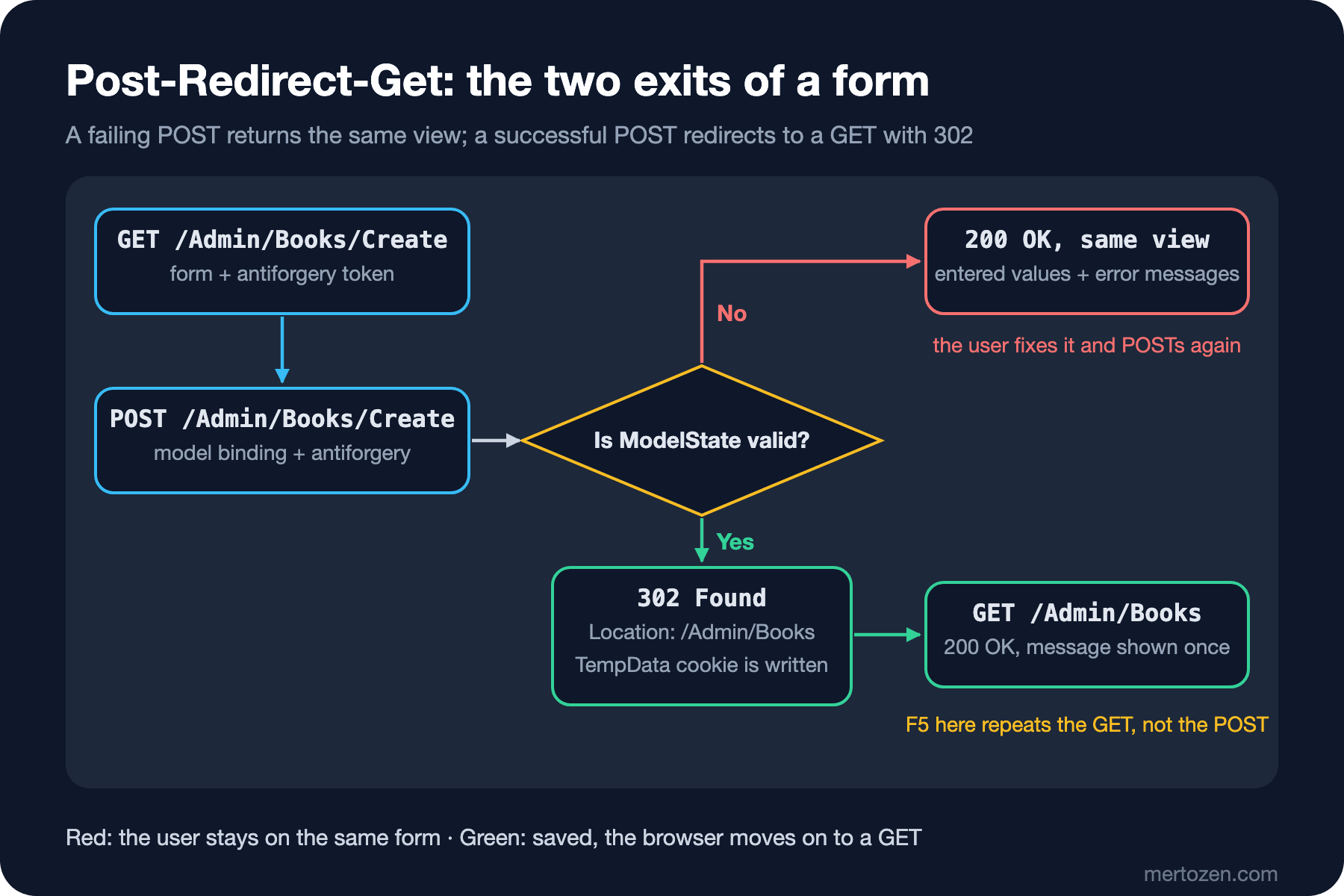
Why not return View("Index", list) directly? Because then the browser's last request stays a POST. When the user refreshes the page (F5), the browser asks "do you want to resubmit the form?" and if they say yes, the same book is created a second time. After a redirect the last request is a GET; refreshing is harmless. The response to a failing form I sent with an empty title, an incomplete ISBN (International Standard Book Number) and a zero price is HTTP/1.1 200 OK, with these lines next to the fields:
<span class="text-danger field-validation-error" data-valmsg-for="Title" data-valmsg-replace="true">The Title field is required.</span>
<span class="text-danger field-validation-error" data-valmsg-for="Isbn" data-valmsg-replace="true">ISBN must be 13 digits.</span>
<span class="text-danger field-validation-error" data-valmsg-for="Price" data-valmsg-replace="true">The field Price must be between 1 and 10000.</span>
Validation itself, its client-side counterpart and business rule errors are the subject of the next post. Here we focus on the flow.
TempData: Saying "Saved" After a Redirect
A redirect has a cost: information from the POST (the record's id, its title) does not carry over to the GET by itself. To carry a "book created" message there is TempData: a small dictionary that lives until it is read on a following request. The default provider keeps it in an encrypted cookie. The real headers of the successful POST:
HTTP/1.1 302 Found
Location: /Admin/Books
Set-Cookie: .AspNetCore.Mvc.CookieTempDataProvider=CfDJ8EINq_wm4TFCv7guzy6SHCcuiQaPofijpUf8kYhdsLcyXucrQb801rrQkbizgDO2C...
The list view reads the message:
@if (TempData["StatusMessage"] is string message)
{
    <div class="alert alert-success">@message</div>
}
The response to the GET the browser sends when following the redirect contains the message, and the same response deletes the cookie:
Set-Cookie: .AspNetCore.Mvc.CookieTempDataProvider=; expires=Thu, 01 Jan 1970 00:00:00 GMT; path=/; samesite=lax; httponly
<div class="alert alert-success">Book #7 "Night Trains" was created as a draft.</div>When I requested the same page once more, alert-success appeared 0 times. A TempData value that has been read is removed at the end of the request; if you want it to live one more request there is TempData.Keep("StatusMessage"), and to look without reading there is TempData.Peek("StatusMessage"). Since it travels in a cookie, do not put large objects into TempData; the cookie size runs into browser limits and travels back and forth on every request.
Antiforgery: the Token Is Not Validated on Its Own
The answer to the guess: 302. The tokenless request was accepted and book 7, "Night Trains", was written to the database. The form tag helper producing a token does not mean anyone validates it. In MVC (Model-View-Controller) controllers, validation runs when you put [ValidateAntiForgeryToken] on the action or controller, or add a global filter. In Razor Pages, POST handlers are validated by default; the two models behave differently on this point.
Why does it matter? In a CSRF (Cross-Site Request Forgery) attack, while a user signed in to the admin panel browses another site, that site posts a form to /Admin/Books/Create in the background; the browser attaches the authentication cookie on its own. The token is the proof that the request really came from our form. The general discussion of the attack is in the Web Security (OWASP Top 10) series post "OWASP A07: Authentication Failures (2)", which covers cookie flags and CSRF; OWASP stands for Open Worldwide Application Security Project.
It is very easy to forget the attribute on some POST action, so I switch validation on globally:
builder.Services.AddControllersWithViews(options =>
    options.Filters.Add(new AutoValidateAntiforgeryTokenAttribute()));
AutoValidateAntiforgeryTokenAttribute looks for a token on every request except GET, HEAD, OPTIONS and TRACE. The same tokenless request now returned HTTP/1.1 400 Bad Request. Raising the Microsoft.AspNetCore.Mvc.ViewFeatures.Filters log category to Information shows why:
info: Microsoft.AspNetCore.Mvc.ViewFeatures.Filters.AutoValidateAntiforgeryTokenAuthorizationFilter[1]
      Antiforgery token validation failed. The required antiforgery cookie ".AspNetCore.Antiforgery.OQdF6r0KLeY" is not present.
Validation has two parts: when the form page is fetched with GET, the server writes a cookie and puts a matching token inside the form. The relevant headers of the form's GET response:
Cache-Control: no-cache, no-store
Pragma: no-cache
Set-Cookie: .AspNetCore.Antiforgery.OQdF6r0KLeY=CfDJ8EINq_wm4TFCv7guzy6SHCce175_lDMtAM3ZzHD8db_wqXxfxhxyLAXKW1GfsAS2n-O2mIIFir0Jn0hiCJooZ-Hi...
X-Frame-Options: SAMEORIGIN
Cache-Control and X-Frame-Options were also added on their own, so that a page with an antiforgery token is not cached and cannot be opened inside an iframe on another site. A request that sent the cookie but not the form field also got a 400, with a different message in the log:
Microsoft.AspNetCore.Antiforgery.AntiforgeryValidationException: The required antiforgery request token was not provided in either form field "__RequestVerificationToken" or header value "RequestVerificationToken".This message also gives the hint for the next section: the token can come in the form field or in the RequestVerificationToken header. For an action you deliberately want to exempt from validation there is [IgnoreAntiforgeryToken]; for example, a webhook endpoint that receives externally signed requests.
Sending the Token with fetch Requests
Back to the question from the experiment in the 4th post: we call a POST that adds to the cart from JavaScript. Since the global filter is on, this request needs a token too. The controller:
[HttpPost]
public IActionResult Add(int bookId)
{
    string? current = Request.Cookies["cart"];
    string updated = string.IsNullOrEmpty(current) ? $"{bookId}" : $"{current}-{bookId}";
    Response.Cookies.Append("cart", updated, new CookieOptions { HttpOnly = true, SameSite = SameSiteMode.Lax });

    // The summary must be computed with the new cookie, so redirect (PRG for fetch as well)
    return RedirectToAction(nameof(Summary), new { compact = false });
}
Since there is no form on the page, we take the token from the IAntiforgery service and put it in a data- attribute on the button:
@inject Microsoft.AspNetCore.Antiforgery.IAntiforgery Antiforgery
...
<button id="add-to-cart" class="btn btn-primary" data-book-id="@Model.Id"
        data-token="@Antiforgery.GetAndStoreTokens(Context).RequestToken">Add to cart</button>
...
<script>
    document.getElementById("add-to-cart").addEventListener("click", async (event) => {
        const button = event.currentTarget;
        const response = await fetch("/Cart/Add", {
            method: "POST",
            headers: { "RequestVerificationToken": button.dataset.token },
            body: new URLSearchParams({ bookId: button.dataset.bookId })
        });
        document.getElementById("cart-summary").innerHTML = await response.text();
    });
</script>
GetAndStoreTokens both produces the token and writes the matching cookie into the response. I tried the same flow with curl. After fetching the details page with GET and taking the cookie and the data-token, the POST without the header returned 400, and the POST with the header:
HTTP/1.1 302 Found
Location: /Cart/Summary?compact=False
Set-Cookie: cart=2; path=/; samesite=lax; httponly
fetch follows the redirect on its own, GETs /Cart/Summary with the new cookie and returns the view component's HTML (HyperText Markup Language). In the browser, after clicking the button twice on the "Stars Over Ankara" page, the content of #cart-summary was:
<span class="navbar-text">Cart: 2 items · 590.00 TL</span>Binding Collections, Nested Objects, Checkboxes and Enums
We saw the sources of model binding (route, query, form) in the Web API (Application Programming Interface) series post on Model Binding. On the form side, the real question is how a flat key-value list turns into a nested object. An admin form that opens an order with the supplier for books running low on stock:
public enum RestockPriority { Low, Normal, High }

public class RestockViewModel
{
    public List<RestockLine> Lines { get; set; } = [];
    public SupplierContact Supplier { get; set; } = new();
    public RestockPriority Priority { get; set; } = RestockPriority.Normal;
}

public class RestockLine
{
    public int BookId { get; set; }
    public string Title { get; set; } = "";

    [Range(0, 500)]
    public int Quantity { get; set; }

    public bool Urgent { get; set; }
}

public class SupplierContact
{
    [Required]
    public string Name { get; set; } = "";

    [EmailAddress]
    public string? Email { get; set; }
}
@for (int i = 0; i < Model.Lines.Count; i++)
{
<tr>
<td>
<input asp-for="Lines[i].BookId" type="hidden" />
@Model.Lines[i].Title
</td>
<td><input asp-for="Lines[i].Quantity" class="form-control" /></td>
<td><input asp-for="Lines[i].Urgent" class="form-check-input" /> Urgent</td>
</tr>
}
...
<input asp-for="Supplier.Name" class="form-control mb-2" placeholder="Supplier" />
<input asp-for="Supplier.Email" class="form-control mb-2" placeholder="Email" />
@foreach (RestockPriority priority in Enum.GetValues<RestockPriority>())
{
<label><input type="radio" asp-for="Priority" value="@priority" /> @priority</label>
}The reason we use for rather than foreach is so that asp-for can read the index from the expression. Selected lines from the generated HTML:
<input type="hidden" ... id="Lines_0__BookId" name="Lines[0].BookId" value="2" />
<input class="form-control" type="number" ... id="Lines_0__Quantity" name="Lines[0].Quantity" value="0" /><input name="__Invariant" type="hidden" value="Lines[0].Quantity" />
<input class="form-check-input" type="checkbox" ... id="Lines_0__Urgent" name="Lines[0].Urgent" value="true" />
<input class="form-control mb-2" placeholder="Supplier" type="text" ... id="Supplier_Name" name="Supplier.Name" value="" />
<label><input type="radio" value="Normal" checked="checked" id="Priority" name="Priority" /> Normal</label>
...
<input name="Lines[0].Urgent" type="hidden" value="false" /><input name="Lines[1].Urgent" type="hidden" value="false" /><input name="Lines[2].Urgent" type="hidden" value="false" /></form>
The rules are in the names: Lines[0].Quantity is a property of the collection's first element, Supplier.Name a property of the nested object. In the ids, dots and brackets turn into underscores because they cause trouble in CSS (Cascading Style Sheets) selectors. Checkboxes have a problem: an unchecked checkbox sends nothing. That is why the tag helper adds a hidden input with the same name and value="false" at the end of the form. If it is checked, the form sends true and false together and the binder takes the first; if not, only false arrives. Also note that every radio button gets id="Priority"; an id repeated on the same page breaks accessibility through <label for>, so you need to give the radios their own ids by hand.
I sent with curl the body the browser would produce when submitting this form (with the first row's checkbox checked); the bound model as logged by the action:
Line: book 2, quantity 10, urgent True
Line: book 3, quantity 5, urgent False
Line: book 6, quantity 0, urgent False
Supplier Ink & Paper Ltd <orders@inkpaper.example>, priority High
An enum binds by name, as in Priority=High, or by number, as in Priority=2. When I sent Priority=Urgent, the page came back with 200 and the validation summary said The value 'Urgent' is not valid for Priority.
The most common mistake with collections is an index gap. A form whose middle row was removed with JavaScript sends Lines[0] and Lines[2]. When I tried this, the log had a single line:
Line: book 2, quantity 10, urgent False
Supplier Ink & Paper Ltd <(null)>, priority Low
Lines[2] silently disappeared: the binder reads sequential indexes starting from 0 and stops at the first gap. In forms where rows can be removed or reordered, adding an <input type="hidden" name="Lines.Index" value="..."> for each row and giving the indexes arbitrary keys such as Lines[a7].Quantity solves this.
Overposting: the Cost of Binding an Entity
A "quick edit" screen that changes only a book's title and price. I wrote the first version the short way: the view is bound to the Book entity, and the POST action finds the entity and binds onto it:
[HttpPost]
public async Task<IActionResult> QuickEdit(int id)
{
    Book? book = await db.Books.FindAsync(id);
    if (book is null)
    {
        return NotFound();
    }

    await TryUpdateModelAsync(book);
    await db.SaveChangesAsync();
    return RedirectToAction(nameof(Index));
}
The form has only Title and Price inputs. But the binder reads whatever is in the form; it does not care what is in the view. I fetched the form with GET to get the cookie and the token, then added two fields to the request:
curl -b cookies.txt -X POST http://localhost:17711/Admin/Books/QuickEdit/2 \
    --data-urlencode "__RequestVerificationToken=$TOKEN" \
    -d "Title=Rivers of Ink&Price=249.90&IsFeatured=true&Stock=999"
The row read with sqlite3 before and after the request (Id|Title|Price|Stock|IsFeatured|Status):
2|Rivers of Ink|265.5|4|0|1
2|Rivers of Ink|249.9|999|1|1
An editor allowed to change the price featured the book on the home page and set the stock to 999. This is called overposting (or mass assignment). The fix is to define the fields the form accepts as a type:
public class BookQuickEditInput
{
    [Required]
    [StringLength(120)]
    public string Title { get; set; } = "";

    [Range(1, 10000)]
    public decimal Price { get; set; }
}
[HttpPost]
public async Task<IActionResult> QuickEdit(int id, BookQuickEditInput input, CancellationToken cancellationToken)
{
if (!ModelState.IsValid)
{
return View(input);
}
Book? book = await db.Books.FindAsync([id], cancellationToken);
if (book is null)
{
return NotFound();
}
book.Title = input.Title;
book.Price = input.Price;
await db.SaveChangesAsync(cancellationToken);
TempData["StatusMessage"] = $"Book #{id} was updated.";
return RedirectToAction(nameof(Index));
}The same attack, this time with Status=Draft added as well: the response is 302 and the row is 2|Rivers of Ink|249.9|4|0|1. Only the price changed. Since BookQuickEditInput has no Stock property, that field found nowhere to bind. The admin's full edit form works on the same logic: BookFormViewModel is bound, and BookAdminService copies only the form's fields into the entity and never touches Status or IsFeatured.
What about [Bind]? [Bind("Id,Title,Price")] Book book does not bind fields missing from the list, which stops overposting. But it backfires when updating with an entity. When I tried it with db.Update(book), the request returned 500:
Microsoft.EntityFrameworkCore.DbUpdateException: An error occurred while saving the entity changes. See the inner exception for details.
 ---> Microsoft.Data.Sqlite.SqliteException (0x80004005): SQLite Error 19: 'NOT NULL constraint failed: Books.Isbn'.
Every unbound property stayed at its default value (Isbn null, Stock 0, AuthorId 0) and Update tried to write them all to the database. A NOT NULL constraint saved us here; with nullable columns the data would have been wiped silently. [Bind] is useful when creating a new record, but since its list is a string, the compiler does not warn when a property name changes. An input model is both safer and more readable. Forms that upload files follow the same rule: enctype="multipart/form-data" and an IFormFile on the input model; for size limits and safe file names, the Web API series post on File Upload and Download applies as is.
In Production
If you run several servers, antiforgery tokens and TempData cookies are encrypted with Data Protection; if the keys are not shared between servers, one server cannot decrypt a token produced by another and users get random 400s. Keep the keys in a shared place (a database, Redis, blob storage).
Antiforgery errors also happen on the user's side: a user who opens a form and submits it a day later, or signs out and back in from another tab, ends up with an invalid token. Instead of an empty 400 page, show an error page that says "refresh the page and try again", and count these 400s separately; a sudden spike points either to a deployment problem or to a real attack attempt.
A side effect of PRG is that every successful save is two requests. That is almost never a problem; but if you decide to render the page directly after a successful POST, you also accept the risk of duplicate records on refresh.
Common Pitfalls
Thinking the token is validated because it is produced. In MVC controllers, without a global AutoValidateAntiforgeryTokenAttribute or a per-action [ValidateAntiForgeryToken], the token is just decoration.
Not refilling dropdown lists on a failing POST. SelectListItem lists do not come back with the form; load them again before return View(model).
Using the entity as the form model. Overposting, data loss when updating with [Bind] and validation attributes leaking into the entity all come from the same root.
Writing asp-for inside a foreach over a collection. When I wrote asp-for="@line.Quantity" inside foreach (RestockLine line in Model.Lines), every row got the same name="line.Quantity" and the same id="line_Quantity"; since RestockViewModel has no property called line, the binder cannot bind any of them to Lines.
Carrying large or sensitive data in TempData. Even though the cookie is encrypted, it travels with every request and runs into the browser's cookie size limit.
A Small Experiment
★☆☆ Remove the global antiforgery filter and put [ValidateAntiForgeryToken] only on the Create POST. Send a tokenless request to QuickEdit; which action is protected and which is not?
★★☆ Add a "remove row" button to the restock form (deleting the <tr> with JavaScript). First reproduce the index gap problem in the browser, then fix it with Lines.Index hidden fields and see in the log that all rows arrive.
★★★ Add a Delete POST action to the admin and put a small delete form on every row of the list. Also write a version that deletes through fetch: read the token from the hidden field inside the form, send it in the header, and remove the row from the DOM (Document Object Model) on success. What do you see in the browser's network tab when you deliberately corrupt the token?
The form is submitted, bound to the right place, and only the allowed fields are saved. But the rule "the ISBN must be 13 digits" could run before the request ever reaches the server, while the rule "this ISBN is already registered" only works on the server. In the next post we write DataAnnotations, ModelState, unobtrusive client-side validation, [Remote] and the client counterpart of our own validation attribute; we will also see how the "1,5" versus "1.5" difference under a Turkish culture breaks validation.