

What Is MongoDB? The Document Model, BSON, Collections and How It Differs from the Relational World
MongoDB is a document database that stores data as BSON documents with typed fields instead of table rows; data read together lives in one document, so most screens need a single read, but the model must come from the queries, not from the tables. With real output: the string date trap, BSON bytes, Decimal128, how an ObjectId is built, a concept map, WiredTiger, licensing and when not to choose it.
Version note: The examples in this post were run with MongoDB 9.0.8 Community Server (the official mongodb/mongodb-community-server Docker image), mongosh 2.6, .NET 10 and MongoDB.Driver 3.14. The same scripts gave the same output on MongoDB 8.0.38.
Guess First
A payment service of Bookstore, the online bookstore used as the shared example across this site's series, writes order records to MongoDB. Because the service receives JSON, it stored the date as a string, exactly as it arrived. Newer code writes to the same collection with a real date. On screen, the orderedAt values of the two orders point to the same moment:
// 01 - guess first: the same field with two different BSON types
db = db.getSiblingDB("bookstore_try");
db.orders.drop();

db.orders.insertMany([
    { _id: 1, status: "Delivered", orderedAt: "2026-06-29T10:15:00Z" },
    { _id: 2, status: "Delivered", orderedAt: ISODate("2026-06-29T10:15:00Z") }
]);

const since = ISODate("2026-06-01T00:00:00Z");
printjson(db.orders.find({ orderedAt: { $gte: since } }).toArray());

// Answer: the BSON type of the field in each document
printjson(db.orders.aggregate([
    { $project: { orderedAtType: { $type: "$orderedAt" } } }
]).toArray());
If you want to run the script yourself, a short-lived container is enough. We build the persistent, password-protected lab in the next post; this container listens on 127.0.0.1 only and is removed when you are done:
docker run -d --name bookstore-mongo-try -p 127.0.0.1:27017:27017 `
  -v "${PWD}\scripts:/lab/scripts:ro" `
  mongodb/mongodb-community-server:9.0-ubuntu2204

# when you are done
docker rm -f bookstore-mongo-try
We ask for orders placed since June 1. How many come back: two, one, or does the query fail because of a type mismatch?
docker exec bookstore-mongo-try mongosh --quiet /lab/scripts/01-guess.js[
{
_id: 2,
status: 'Delivered',
orderedAt: ISODate('2026-06-29T10:15:00.000Z')
}
]
[
{
_id: 1,
orderedAtType: 'string'
},
{
_id: 2,
orderedAtType: 'date'
}
]Only one order came back, and there was no error. MongoDB knows a field's type from the value in each document, not from a table definition. Comparisons such as $gte only compare values of the same type by default; a date is not compared with a string, so that document quietly drops out. The $type result in the second output shows the difference plainly: one is a string, the other a date. In a relational database a column has one type, and a value in the wrong format is rejected on insert. In MongoDB both shapes live side by side unless you add a rule (schema validation is the topic of post 5). This post explains where that difference comes from: the document model, BSON types, _id and ObjectId, how the server is built, and which jobs MongoDB is the right choice for.
Documents, Collections and Databases
The smallest unit of storage in MongoDB is the document. A document is an ordered set of field/value pairs; a value can be a number or a string, but also another document or an array. Documents live in collections, and collections live in databases. Let's look at all three by adding a review:
// 01 - document, collection, BSON types and ObjectId
db = db.getSiblingDB("bookstore_try");
db.reviews.drop();

print("collections before:", db.getCollectionNames().filter(n => n === "reviews").length);
const result = db.reviews.insertOne({
    bookId: 26,
    customer: { customerId: 3, name: "Grace Hopper" },
    rating: 5,
    body: "Still the best science fiction novel I have read.",
    reviewedAt: new Date("2026-06-29T10:15:00Z")
});
print("collections after:", db.getCollectionNames().filter(n => n === "reviews").length);
printjson(result);

const doc = db.reviews.findOne({ _id: result.insertedId });
print("bsonsize:", bsonsize(doc));
print("id time :", doc._id.getTimestamp().toISOString());
collections before: 0
collections after: 1
{
acknowledged: true,
insertedId: ObjectId('6af857ff9de5cff09f284d0c')
}
bsonsize: 180
id time : 2026-11-14T12:45:51.000ZThree things stand out. First, we never created the reviews collection; the first insert did. There is no mandatory CREATE TABLE step, and the same goes for databases. Second, we gave the document no _id, yet the result has an insertedId. Every document must have an _id field that is unique within its collection and cannot be changed later; if you do not provide one, the client (mongosh here, the driver in an application) generates an ObjectId and adds it. _id can be of any type except an array or a regex; when we load the Bookstore data in the next post we keep the integer keys from SQL for books and orders. Third, the customer field is another document: the customer's id and name live inside the review. Showing the review on screen does not need a trip to a customers table.
A document has limits too. According to the documentation, a BSON document can be at most 16 MiB, and at most 100 levels of nesting are supported; each subdocument and each array counts as a level. The namespace, made of the database and collection names, is limited to 255 bytes for unsharded collections. What these limits mean in practice, especially for arrays that grow without bound, is the topic of post 4.
BSON: A Format That Looks Like JSON but Is Not JSON
The output you see in mongosh looks like JSON, but MongoDB keeps data on disk, on the wire and in memory as BSON. The easiest way to see the difference is to look at the bytes. The small console application in the lab project produces the same book as JSON and as BSON and splits the BSON bytes element by element. No server is needed for this; it only uses the BSON library that ships with the MongoDB.Driver package:
// The same book: JSON text and BSON bytes
BsonDocument book = new()
{
    { "_id", 26 },
    { "title", "Dune" },
    { "listPrice", new Decimal128(390.50m) },
    { "listedOn", new DateTime(2024, 6, 1, 0, 0, 0, DateTimeKind.Utc) },
};

byte[] bson = book.ToBson();
dotnet run --project src/Bookstore.MongoLab -- bsonJSON : 78 bytes {"_id":26,"title":"Dune","listPrice":390.50,"listedOn":"2024-06-01T00:00:00Z"}
BSON : 75 bytes
length = 75 4b 00 00 00
_id (int32) 10 5f 69 64 00 1a 00 00 00
title (string) 02 74 69 74 6c 65 00 05 00 00 00 44 75 6e 65 00
listPrice (decimal128) 13 6c 69 73 74 50 72 69 63 65 00 8a 98 00 00 00 00 00 00 00 00 00 00 00 00 3c 30
listedOn (date) 09 6c 69 73 74 65 64 4f 6e 00 00 94 18 d1 8f 01 00 00
end of document 00The document starts with 4 bytes holding its total length (4b 00 00 00, 75 in little-endian). Then each element comes as a type byte, the field name ending in 00, and the value. For _id the type is 0x10, a 32-bit integer, and the value 1a 00 00 00 is 26. The string carries its own length first (5, including the trailing 00) and then its UTF-8 bytes. The price is a 16-byte Decimal128 with type 0x13; the first two bytes 8a 98 encode 39050 and the exponent in the last bytes encodes ten to the minus two: 390.50. The date has type 0x09 and 8 bytes: milliseconds since 1970, which is 1717200000000 for 2024-06-01.
Three conclusions follow. BSON is not always smaller than JSON; here 75 and 78 bytes are nearly the same. The real gain is types and traversal, not size: each value's type is written in the bytes, and thanks to the length prefixes the server can skip a field it does not care about without parsing it. Field names are repeated in every document as well; with a million books, the name listPrice is stored a million times. That is why WiredTiger's default compression matters, but turning field names into unreadable abbreviations is rarely worth it. Finally, JSON has no date and no decimal type: in JSON a date is a string and a price is a double. That is the root of the problem in "Guess First". MongoDB tools carry these types in JSON with Extended JSON, as in {"$date": "..."} or {"$numberDecimal": "390.50"}. In the next post we load the Bookstore data in this format with mongoimport.
The BSON types you will meet most often are double, string, object (a subdocument), array, binData (a byte array; UUID values also live here with subtype 4), objectId, bool, date, null, int (32-bit), long (64-bit) and decimal (Decimal128). There is also a type called timestamp, but it is for replication's internal use; application data always uses date for dates. A few types, such as undefined and symbol, are deprecated. You can see which type a value is stored as with $type; let's look at the review's fields:
// BSON types of the fields (with the $type aggregation operator)
printjson(db.reviews.aggregate([
    { $match: { _id: result.insertedId } },
    { $project: {
        _id: { $type: "$_id" },
        bookId: { $type: "$bookId" },
        rating: { $type: "$rating" },
        customer: { $type: "$customer" },
        reviewedAt: { $type: "$reviewedAt" }
    } }
]).toArray());
[
{
_id: 'objectId',
bookId: 'int',
rating: 'int',
customer: 'object',
reviewedAt: 'date'
}
]A whole number such as 26 typed in mongosh was stored as int; a number with a decimal point such as 0.1 would become a double. In an application, your code and the driver's serialization settings decide which type is written. The details of mapping decimal, Guid and DateTime on the .NET side are in post 9.
Money, Dates and Identity: Decimal128, Date and ObjectId
The cost of storing a price as a double shows up immediately in an aggregation:
// 01 - double versus Decimal128
db = db.getSiblingDB("bookstore_try");
db.prices.drop();
db.prices.insertMany([
    { book: "Dune", asDouble: 0.1, asDecimal: Decimal128("0.1") },
    { book: "Emma", asDouble: 0.2, asDecimal: Decimal128("0.2") }
]);
printjson(db.prices.aggregate([
    { $group: { _id: null, doubleSum: { $sum: "$asDouble" }, decimalSum: { $sum: "$asDecimal" } } }
]).toArray());
[
{
_id: null,
doubleSum: 0.30000000000000004,
decimalSum: Decimal128('0.3')
}
]A double is a binary floating-point number, so it cannot represent 0.1 exactly. Decimal128 is the 128-bit decimal format from IEEE 754-2008; it carries 34 significant digits and adds 0.1 and 0.2 up to 0.3. Use Decimal128 for money, rates and amounts. It is not the same thing as C#'s decimal, but converting between the two is lossless for Bookstore's price range; more on that in post 9.
A BSON date is a signed 64-bit number of milliseconds since 1970. No time zone is stored; the value is always read as UTC. In Bookstore we write every time as UTC and convert to local time only when showing it to a user. Fields that only need a day, such as the day a book was listed, also use date with the time at 00:00 UTC.
An ObjectId is 12 bytes: a 4-byte creation time in seconds, a 5-byte random value generated once per process and a 3-byte incrementing counter. Thanks to this layout, the client can generate an ObjectId without asking the server. Let's generate two in a row and split them into parts:
dotnet run --project src/Bookstore.MongoLab -- objectid6af858014801f064df566334 time=6af85801 random=4801f064df counter=566334
6af858014801f064df566335 time=6af85801 random=4801f064df counter=566335
CreationTime (UTC): 2026-11-14T12:45:53Z
first < second : TrueThe time and random parts are the same, and the counter went up by one. Because time comes first, sorting by ObjectId means sorting roughly by creation order, and getTimestamp() gives you the creation time without a separate field. Roughly, because the documentation explicitly gives no monotonic guarantee: the resolution is one second, values generated in the same second by different processes have no defined order, and each client's clock may differ. If you need a strict order, rely on a separate date field and its index. A general comparison of id strategies (auto-increment, UUIDv7, Snowflake) is in the System Design series post "Unique ID Üretimi: Auto-Increment, UUIDv4, UUIDv7 ve Snowflake".
A Table Is Not a Collection: The Concept Map and Its Limits
For someone coming from relational databases, the first mapping that comes to mind is the table below. It helps you place the concepts, but do not use it without reading the last column:
| Relational | MongoDB | Difference |
|---|---|---|
| database | database | Same concept; created on first write. |
| table | collection | A collection does not enforce a schema; rules are added with schema validation. |
| row | document | A document holds nested subdocuments and arrays. |
| column | field | The type comes with the value and can differ from document to document. |
| primary key | _id | Required in every collection, immutable, ObjectId by default. |
| foreign key | reference by id | The database does not check the relationship; consistency is the application's job. |
| JOIN | embed or $lookup | Data read together is usually embedded in the same document. |
| transaction | single-document write, a multi-document transaction when needed | A write to a single document is always atomic. |
What is misleading about the table is that it suggests converting the relational schema row by row into documents is enough. Let's put the same order side by side in both models:
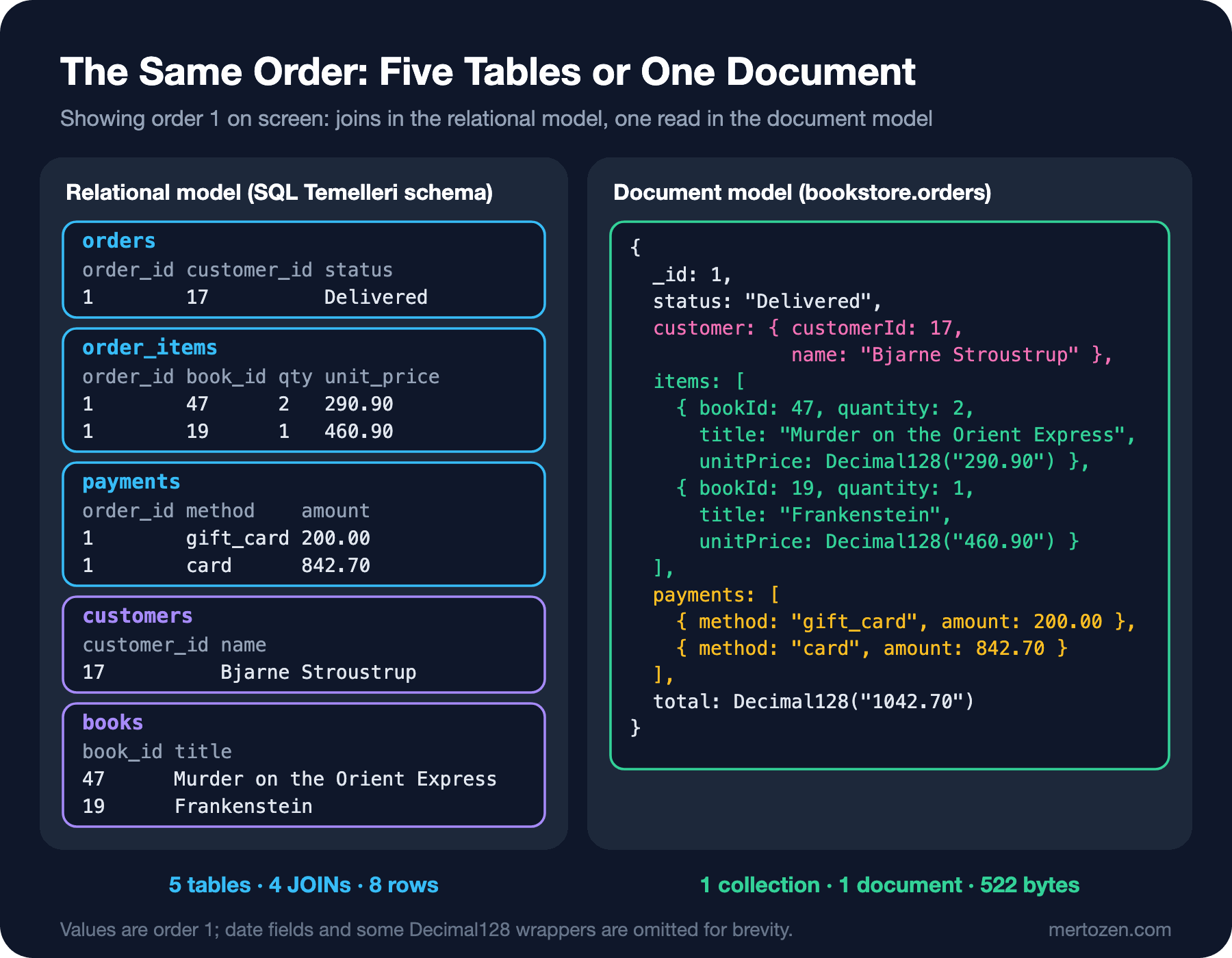
In the relational model, showing order 1 on screen reads eight rows from five tables and needs four joins. In the document model the order, with its items and payments, is one document. But the shape of that document did not come from the tables; it came from what the order screen reads. The book title and unit price in each item are not the book's current state but a copy taken at the moment of sale. The customer's name is a copy too. Reviews, on the other hand, belong to the book rather than the order, and because their number can grow without bound they live in a separate collection. In relational modeling the question is "what is the data?"; in document modeling it is "how will I access the data?". The post that builds the same Bookstore in both models and compares them is "İlişkisel mi Document mı? Aynı Bookstore'u İki Şekilde Modellemek" in the Data Modeling and Normalization series. In this series we go through MongoDB's own modeling rules in posts 4 and 5.
mongod, WiredTiger and Replica Sets: What Is Inside the Server?
// 01 - a quick look at the server: version, storage engine, cache, topology
const status = db.serverStatus();
print("version       :", db.version());
print("storageEngine :", status.storageEngine.name);
print("cache (bytes) :", status.wiredTiger.cache["maximum bytes configured"]);
print("replica set   :", db.hello().setName ?? "(none, standalone)");
version : 9.0.8
storageEngine : wiredTiger
cache (bytes) : Long('3571449856')
replica set : (none, standalone)The server process is mongod. The layer that writes data to disk and reads it back is the storage engine; the default, and in practice the only choice today, is WiredTiger. WiredTiger uses document-level concurrency control for writes: two clients can change different documents in the same collection at the same time, and if both hit the same document one of them gets a write conflict and MongoDB retries the operation itself. By default collection data is compressed with snappy and indexes with prefix compression. Changes are written first to the journal (a write-ahead log) and every 60 seconds to the data files through a checkpoint; after an unexpected shutdown, everything after the last checkpoint is replayed from the journal. What we covered about WAL and checkpoints in the PostgreSQL series has a counterpart here.
WiredTiger's own cache takes, by default, the larger of half of (RAM minus 1 GB) or 256 MB. The Docker VM in this lab sees about 7.6 GB of memory; (7.6 - 1) / 2 gives the 3.3 GB in the output. When you put a memory limit on the container, the documentation's warning matters: in some cases WiredTiger may see the machine's memory instead of the container limit, and then you must set the cache yourself with --wiredTigerCacheSizeGB. The remaining memory is not wasted; the operating system's file cache and the connections use it.
The last line of the output says this server runs standalone. In production, MongoDB's default topology is a replica set: a group of mongod processes holding the same data, one primary and the rest secondaries. Writes go to the primary, the secondaries keep their copy up to date by following a change log called the oplog, and if the primary goes down the remaining members elect a new one. A replica set is not only about high availability: multi-document transactions and change streams work only on a replica set (and on a sharded cluster), and the default write concern, majority, waits for a majority of the replica set members. That is why in post 2 we build the lab as a single-node replica set. When the data no longer fits on one server, sharding comes in: the data is split across shards, clients connect through the mongos router, and the metadata lives on config servers. The MongoDB side of replication and sharding is in post 13; the theory is in the System Design and Distributed Systems Temelleri series.
Licensing, Versions and Atlas
MongoDB Community Server has been distributed under the SSPL for every release since October 16, 2018; older releases stayed under the AGPL v3. The SSPL is not approved by the OSI. Its practical effect is narrow: using MongoDB as your own application's database brings no extra obligation, even if the application is offered as SaaS. The condition applies when you offer MongoDB itself to third parties as a service; then you must also publish the source code of the software that runs the service. The drivers are licensed under Apache 2.0. The paid options are Enterprise Advanced (on your own servers, with extra security and management features) and Atlas, MongoDB's managed cloud service. This series does not use an Atlas account; Atlas-only features are described from the official documentation and marked as not run.
On the version side, MongoDB ships one major release a year and supports each major for five years. 8.0 came out in October 2024 and is supported until October 31, 2029; 9.0 became GA on September 28, 2026 and is supported until October 31, 2031. This series' lab runs on 9.0, but unless noted otherwise everything in the posts works the same on 8.0; we will point out the places where it differs. Starting with 9.0, minor releases go to Atlas only, while self-managed deployments get one "Feature Update" (x.5) a year. The release model and the changes from 6.0 to 9.0 are covered in post 15.
When MongoDB, and When Not?
MongoDB fits best where data is naturally read around one root and its structure varies from record to record. In Bookstore the catalog is a good example: a printed book has a page count and a weight, an ebook has file formats, an audiobook has a narrator and a duration. In a relational model these mean either many empty columns or separate tables; in the document model each book carries its own fields. Read-heavy screens built around a single aggregate, such as order history, are good candidates too: the order with its items and payments is one read and one atomic write. Data that accumulates over time, such as events, logs and measurements, also fits well.
Its weak spots are clear too. Reporting that spans many tables with questions nobody knew in advance is easier in a relational database, where the JOIN optimizer and the expressive power of SQL live. In domains where entities are linked in many directions and rules such as foreign keys, unique constraints and checks must be enforced by the database, the relational model is safer. If almost every operation changes several independent records together, in MongoDB you end up leaning on multi-document transactions all the time; that works, but it is expensive and a sign that the model is wrong. There is a middle option as well: keeping only the variable part in a JSON column of a relational database. In PostgreSQL the tools for that are JSONB and GIN indexes, covered in the PostgreSQL series post "PostgreSQL'de JSONB: Operator'ler, SQL/JSON Function'ları, GIN Index ve Ne Zaman Kullanmamalı?". The general "SQL or NoSQL" decision is in the System Design series post "Veri Katmanını Ölçeklemek: Replication, Sharding ve SQL mi NoSQL mi?".
In Production
Fix your types from the start. Dates are always date, money is always Decimal128, and ids within a collection have one type. MongoDB does not reject the wrong type; you find out a year later while chasing orders missing from a report. A single mapping layer in the application and schema validation in the database are the two safeguards.
Choose the image tag deliberately. latest moves to a new major one day; 9.0-ubuntu2204 follows the latest 9.0 patch, and 9.0.8-ubuntu2204 pins the version. A major upgrade also means upgrading the data files and the feature compatibility version; do not leave that to an image update.
Measure memory. As long as the WiredTiger cache and the working set (frequently used documents and indexes) fit in memory, reads do not go to disk. If you run in a container, set the cache size explicitly and watch the cache statistics in serverStatus(); monitoring is covered in post 14.
Common Pitfalls
Storing dates as strings. The situation in "Guess First" usually comes from a service that saves JSON as it arrives. Strings such as 2026-06-29T10:15:00Z may sort correctly as text, but date arithmetic, time zone conversion and comparison with other records of type date break.
Applying the concept map one to one. If you turn every table into a collection and every foreign key into a reference, you carry all of the relational model's join needs without the relational database's foreign keys and JOIN optimizer. The model must come from screens and queries.
Missing a typo in a field name. listprice and listPrice are two different fields to MongoDB. A query with the wrong name does not fail; it returns nothing, and an update with the wrong name adds a new field to the document. That is why defining field names in one place in the application and using validation matter.
Treating ObjectId as a strict order or as an opaque id. An ObjectId sorts roughly by time but gives no guarantee, and the timestamp inside it can be read by anyone. In an id exposed to the outside world, a visible creation time may be a problem.
A Small Experiment
★☆☆ Add { book: "Middlemarch", asDouble: 0.7, asDecimal: Decimal128("0.7") } to the two prices in 01-money.js and compute the sums again. Check whether the double sum comes out at exactly 1, and use the result in an $eq comparison with 1.
★★☆ Try to fix the string date in 01-guess.js: write a pipeline update that converts string values to date with $dateFromString, and show that the query now returns both orders. We see pipeline updates again in posts 3 and 5.
★★★ Add a bool (isActive) and an array (tags) field to the book in BsonLab, and extend the Dump method to decode these two types. Show in the bytes that an array is stored in BSON as a document whose keys are "0", "1".
In the next post we drop the throwaway container and build the persistent lab: a password-protected, single-node replica set in Docker, connecting with mongosh and Compass, and moving the Bookstore data from the SQL Temelleri series into MongoDB with mongoimport.