

MongoDB Indexes: Compound Indexes and the ESR Rule, Multikey, Partial, TTL, Collation and explain

In MongoDB the field order of a compound index comes from the query: equality first, then sort, then range (ESR); when the range is very selective, putting it before the sort (ERS) reads fewer keys. With real explain output: COLLSCAN and IXSCAN, covered queries, $in and SORT_MERGE, multikey, unique, partial, sparse and TTL indexes, the Turkish collation trap, finding unused indexes with $indexStats and hidden indexes.
Version note: The examples in this post were run with MongoDB 9.0.8 Community Server and mongosh 2.6. All scripts gave the same output on MongoDB 8.0.38.
Guess First
The "my orders" screen of Bookstore, the online bookstore used as the shared example across this site's series, has a filter: the customer's latest three orders of at least 1000 TRY. The query has three parts: equality on the customer number, sorting by orderedAt and a range on total. Let's build two compound indexes on the same three fields, differing only in field order:
db.orders.createIndex({ "customer.customerId": 1, orderedAt: -1, total: 1 }, { name: "esr" });
db.orders.createIndex({ "customer.customerId": 1, total: 1, orderedAt: -1 }, { name: "ers" });
db.orders.createIndex({ total: 1, "customer.customerId": 1, orderedAt: -1 }, { name: "range_first" });

// Ada's (customer 1) latest 3 orders of at least 1000 TRY
for (const min of ["1000", "3000"]) {
    print(`total >= ${min}`);
    for (const name of ["esr", "ers", "range_first"]) {
        summary(name, db.orders.find({ "customer.customerId": 1, total: { $gte: Decimal128(min) } })
            .sort({ orderedAt: -1 }).limit(3).hint(name).explain("executionStats"));
    }
}
We added a third index for comparison: the range field first. hint forces the query to use the given index. Ada has 39 orders. Which index reads fewer index keys, and which one has to sort the result in memory?
total >= 1000
esr          LIMIT <- FETCH <- IXSCAN       keys  11  docs   3  returned 3
ers          FETCH <- SORT <- IXSCAN        keys  11  docs   3  returned 3
range_first  FETCH <- SORT <- IXSCAN        keys 148  docs   3  returned 3
esr and ers read the same number of keys, but only the ers plan has a SORT: the result was sorted in memory. The index with the range field first read 148 keys, because the total >= 1000 condition covers 158 orders of all customers and the customer filter is applied inside that range. The second half of the story is in the total >= 3000 lines. This post covers indexes through the numbers in explain output: compound indexes and the ESR rule, multikey, unique, partial, sparse and TTL indexes, collation for Turkish, and finding unnecessary indexes.
The scripts run as the application user, for example docker compose exec mongo mongosh "mongodb://bookstore_app@localhost:27017/bookstore?authSource=bookstore" --quiet /lab/scripts/06-esr.js -p. Each script drops the indexes of the collection it works on and builds its own. 06-bookstore-indexes.js builds Bookstore's permanent index set; the next posts start with this script after 02-load.sh.
Reading explain("executionStats")
The only reliable way to judge an index is the explain output. explain("executionStats") really runs the query and returns the chosen plan with its statistics. Every script in this post uses the same small helper: it prints the plan's chain of stages and three numbers.
// 06 - explain("executionStats"): COLLSCAN, IXSCAN and a covered query
function summary(label, explain) {
    const s = explain.executionStats;
    const stages = [];
    for (let st = s.executionStages; st; st = st.inputStage) stages.push(st.stage);
    print(`${label.padEnd(10)} ${stages.join(" <- ").padEnd(36)} keys ${String(s.totalKeysExamined).padStart(3)}  docs ${String(s.totalDocsExamined).padStart(3)}  returned ${s.nReturned}`);
}

const filter = { "customer.customerId": 17 };
summary("no index", db.orders.find(filter).explain("executionStats"));

db.orders.createIndex({ "customer.customerId": 1, orderedAt: -1 });
summary("index", db.orders.find(filter).explain("executionStats"));

// Only indexed fields in the filter and projection, _id excluded: the documents are not read
summary("covered", db.orders.find(filter, { _id: 0, orderedAt: 1 }).explain("executionStats"));

// Prefix rule: the index starts with customer.customerId; orderedAt alone cannot use it
summary("no prefix", db.orders.find({ orderedAt: { $gte: ISODate("2026-06-01") } }).explain("executionStats"));
no index COLLSCAN keys 0 docs 379 returned 5
index FETCH <- IXSCAN keys 5 docs 5 returned 5
covered PROJECTION_COVERED <- IXSCAN keys 5 docs 0 returned 5
no prefix COLLSCAN keys 0 docs 379 returned 15Read from right to left: IXSCAN reads keys from the index, FETCH fetches the documents those keys point to, COLLSCAN scans the whole collection. The thing to look at is the ratio of three numbers: totalKeysExamined, totalDocsExamined and nReturned. Ideally the three are close to each other; reading 379 documents for 5 results signals a missing or wrong index. When the projection contains only fields in the index and _id is excluded, MongoDB never goes to the document (PROJECTION_COVERED, docs 0): this is called a covered query. The last line is the prefix rule: a compound index can be used only through the fields starting from the left (its prefixes). The { customerId, orderedAt } index helps a customerId query but not a query on orderedAt alone.
How is the plan chosen? When several indexes qualify, the query planner runs the candidate plans for a short trial period; the plan that produces the most results with the least work wins, and the decision is stored in the plan cache for the query's shape. Since 8.3, and therefore in 9.0, a fallback based on cost estimates (the cost-based ranker) steps in for some queries when the trial is inconclusive; 8.0 has only the classic method. For the query in "Guess First" the planner chose esr and rejected two plans (rejectedPlans).
Compound Indexes and the ESR Rule
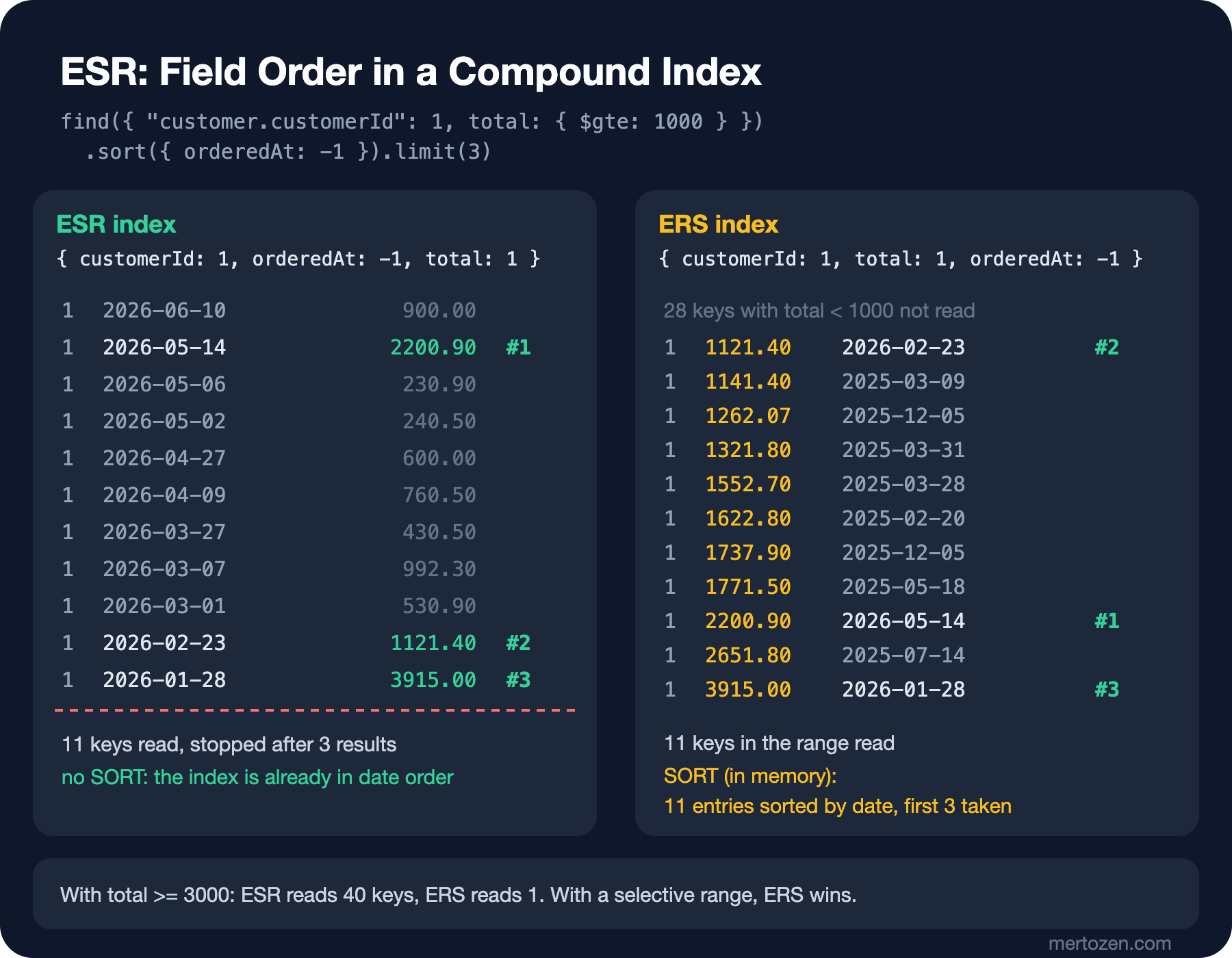
The core of MongoDB's ESR guideline is this: equality fields always come first, because they narrow the index down to a single block and keep the remaining fields sorted inside that block. The sort field comes next; since the index is already in that order, no SORT stage is needed, and limit(3) stops reading once three results are found. The range comes last. As the figure shows, esr reads Ada's orders in date order and stops at the 11th key after finding the third result. ers, on the other hand, has to read all 11 keys in the range and then sort them by date in memory.
total >= 3000
esr          LIMIT <- FETCH <- IXSCAN       keys  40  docs   1  returned 1
ers          FETCH <- SORT <- IXSCAN        keys   1  docs   1  returned 1
range_first  FETCH <- SORT <- IXSCAN        keys  11  docs   1  returned 1
chosen: esr  rejected plans: 2
With a threshold of 3000 TRY the picture turns around. Ada has only one order above this amount; esr looked for three results, did not find them and read all of the customer's keys (40 keys), while ers jumped to the start of the range and read a single key. This is the guideline's exception: if the range condition is very selective, putting the range before the sort (ERS) reads fewer keys, at the cost of a small in-memory sort. Which one is right depends on how the data is distributed, so the decision is made with explain numbers on real data. There is a rule for sort direction too: the { customerId: 1, orderedAt: -1 } index supports sort({ orderedAt: -1 }) and its reverse, but for sorts on two fields you need either exactly the directions in the index or their complete reverse.
The guideline gives an interesting detail about $in: in a sorted query, if the $in list has fewer than 201 elements, MongoDB runs a separate index scan for each value and combines the results with SORT_MERGE, so $in behaves like equality. If the list is long, it behaves like a range and the in-memory sort comes back:
// $in with a sort: a short list behaves like equality (SORT_MERGE), a long one like a range (SORT)
db.orders.createIndex({ status: 1, orderedAt: -1 });
const open = ["Pending", "Paid", "Shipped"];
const padded = open.concat(Array.from({ length: 198 }, (_, i) => `Unused${i}`));
for (const list of [open, padded]) {
    summary(`$in ${list.length}`, db.orders.find({ status: { $in: list } }).sort({ orderedAt: -1 }).limit(5).explain("executionStats"));
}
$in 3 LIMIT <- FETCH <- SORT_MERGE keys 5 docs 5 returned 5
$in 201 FETCH <- SORT <- IXSCAN keys 10 docs 5 returned 5The documentation does not guarantee this limit of 201. The practical consequence: a field queried with short $in lists goes next to the equality fields, a field queried with long lists goes where a range would. $ne, $nin and $regex always count as ranges.
Multikey Indexes: on Array Fields
When you index a field that contains an array, MongoDB generates a separate key for every element of the array and marks the index as multikey on its own; you do not choose a separate index type. For the "orders containing Dune" query, items.bookId:
// 06 - multikey index: one index key per array element
db.orders.createIndex({ "items.bookId": 1 });

const e = db.orders.find({ "items.bookId": 26 }).explain("executionStats");
const ix = e.queryPlanner.winningPlan.inputStage;
print("stage", ix.stage, " isMultiKey", ix.isMultiKey, " multiKeyPaths", JSON.stringify(ix.multiKeyPaths),
      " keys", e.executionStats.totalKeysExamined, " returned", e.executionStats.nReturned);

// A full scan of the index visits every key once: more keys than documents
const full = db.orders.find().hint({ "items.bookId": 1 }).explain("executionStats").executionStats;
print("orders", full.nReturned, " index keys", full.totalKeysExamined);

// $elemMatch uses the same index; both conditions are checked on the same element
const em = db.orders.find({ items: { $elemMatch: { bookId: 26, quantity: { $gte: 2 } } } }).explain("executionStats");
print("$elemMatch keys", em.executionStats.totalKeysExamined, " docs", em.executionStats.totalDocsExamined, " returned", em.executionStats.nReturned);

// Two array fields in one compound index are not allowed ("parallel arrays")
try {
    db.orders.createIndex({ "items.bookId": 1, "payments.method": 1 });
} catch (err) {
    print(err.codeName + ":", err.message.split(" :: caused by :: ").pop());
}
stage IXSCAN isMultiKey true multiKeyPaths {"items.bookId":["items"]} keys 27 returned 27
orders 379 index keys 680
$elemMatch keys 27 docs 27 returned 5
CannotIndexParallelArrays: cannot index parallel arrays [payments] [items]379 orders produced 680 index keys: 1.8 items per order on average. The index grows with the number of array elements, not the number of documents; indexing an unbounded array is the index side of the 16 MB problem from post 4. The $elemMatch query from post 3 used the same index too: the index found 27 orders, the "at least 2 copies" condition was checked on the same element while reading the documents, and 5 results remained.
The last line is the most important restriction of multikey indexes: at most one field in a compound index can be an array. Generating a key for every pair of elements from two arrays means a cartesian product, and MongoDB does not allow it. If the index already exists, inserting a document that would break this rule is rejected. The other restrictions are in the documentation: a multikey index cannot be a shard key, a hashed index cannot be multikey, and a multikey index can cover a query only if the array field is not in the projection and the query has no $elemMatch.
Unique, Partial, Sparse and TTL
In post 3 we used upsert for the cart and said that two concurrent upserts for the same customer could create two carts, and that a unique index prevents this. Here is that index, with two selective index types next to it:
// 06 - unique, partial and sparse indexes
db.carts.createIndex({ customerId: 1 }, { unique: true });
db.carts.insertOne({ customerId: 3, items: [{ bookId: 26, quantity: 1 }] });
try {
    db.carts.insertOne({ customerId: 3, items: [{ bookId: 42, quantity: 1 }] });
} catch (err) {
    print(err.message);
}
// With the unique index an upsert on customerId cannot create a second cart
const r = db.carts.updateOne({ customerId: 3 }, { $push: { items: { bookId: 42, quantity: 1 } } }, { upsert: true });

// Partial index: only open orders are indexed (the warehouse screen)
db.orders.createIndex({ status: 1, orderedAt: 1 },
    { partialFilterExpression: { status: { $in: ["Pending", "Paid", "Shipped"] } } });

// Sparse index: documents without the field are not in the index
db.books.createIndex({ subtitle: 1 }, { sparse: true });
E11000 duplicate key error collection: bookstore.carts index: customerId_1 dup key: { customerId: 3 }
upsert: matched 1, upserted 0, carts 1
index size FETCH <- IXSCAN keys 10 docs 10 returned 10
status Shipped FETCH <- IXSCAN keys 8 docs 8 returned 8
status Delivered SORT <- COLLSCAN keys 0 docs 379 returned 345
subtitle exists FETCH <- IXSCAN keys 6 docs 6 returned 6
subtitle null COLLSCAN keys 0 docs 77 returned 71The second cart was rejected with an E11000 (duplicate key) error, and the upsert updated the existing cart. A unique index has one behavior worth knowing: documents without the field enter the index as null, and a unique index can hold only one null. If you want to allow documents without the field, combine unique with a partial index; the rule then applies only to documents that match the filter.
A partial index indexes only documents that match its partialFilterExpression. The warehouse screen only cares about open orders, and only 10 of the 379 orders are open; the index has just 10 keys. The cost: if the query does not contain a condition covered by the index's filter, the planner cannot use the index, because the result would be incomplete. The Shipped query used the index, the Delivered query scanned the whole collection. A sparse index is the older, cruder form of the same idea: it only holds documents that have the field. 6 of the 77 books have a subtitle; the subtitle: null query also asks for documents without the field, so it could not use the sparse index. The documentation recommends partial indexes over sparse ones in new designs.
TTL Indexes: Documents That Expire
A TTL index is a single-field index on a date field, and a background thread deletes the documents that have expired. There are two ways to use it: a period counted from the last change, and an expiry time carried by each document.
// Sliding expiry: a cart is deleted 30 days after its last change
db.carts.createIndex({ updatedAt: 1 }, { expireAfterSeconds: 30 * 24 * 3600 });

// Fixed expiry: each reservation carries its own expiry time (expireAfterSeconds: 0)
db.stock_reservations.createIndex({ expiresAt: 1 }, { expireAfterSeconds: 0 });
db.stock_reservations.insertMany([
    { bookId: 26, orderId: 380, quantity: 1, expiresAt: new Date(Date.now() - 60 * 1000) },
    { bookId: 26, orderId: 381, quantity: 2, expiresAt: new Date(Date.now() + 15 * 60 * 1000) },
    { bookId: 26, orderId: 382, quantity: 1, expiresAt: "2026-06-30T10:00:00Z" }     // a string, not a date
]);
before: carts 2 reservations 3
after the TTL pass: carts 1 reservations 2
[
{
orderId: 381,
expiresAtType: 'date'
},
{
orderId: 382,
expiresAtType: 'string'
}
]The cart updated 45 days ago and the stock reservation that expired a minute ago were deleted. The expired reservation whose expiresAt is a string is still there: TTL only looks at date values, and the mix-up between strings and dates from post 1 silently produces documents that live forever here. Deletion is not instant; the documentation says the TTL thread runs every 60 seconds, which is why the script waits until the deletion happens, for up to 150 seconds. In a replica set only the primary deletes, and the secondaries receive the deletes through replication. TTL does not work on compound indexes and does not guarantee deletion on the dot; the application should also check the rule "a reservation older than 15 minutes is invalid" when it queries.
Turkish Search and Sorting with Collation
In post 3 we saw that $regex with the i option scanned every book. The right way to do case-insensitive search and language-aware sorting is collation: a setting that defines comparison rules through a language (locale) and a sensitivity (strength). strength: 2 ignores case and still tells accents apart.
// 06 - collation: case-insensitive Turkish search and sort with an index
const tr = { locale: "tr", strength: 2 };
db.books.createIndex({ title: 1 }, { collation: tr });

// The query must use the same collation as the index
summary("with collation", db.books.find({ title: "ince memed" }).collation(tr).explain("executionStats"));
summary("without collation", db.books.find({ title: "ince memed" }).explain("executionStats"));

// Sort: binary order versus the Turkish alphabet
const titles = c => db.books.find({ title: { $gte: "H" } }, { _id: 0, title: 1 }).sort({ title: 1 }).collation(c).limit(5).toArray().map(b => b.title);
print("simple:", db.books.find({}, { _id: 0, title: 1 }).sort({ title: -1 }).limit(3).toArray().map(b => b.title).reverse().join(" | "));
print("tr    :", titles(tr).join(" | "));

// Locale matters: in Turkish, I and i are different letters (I/ı, İ/i)
for (const c of [tr, { locale: "en", strength: 2 }]) {
    print(`${c.locale}: city "istanbul" ->`, db.customers.countDocuments({ city: "istanbul" }, { collation: c }),
          ` title "ince memed" ->`, db.books.countDocuments({ title: "ince memed" }, { collation: c }));
}
with collation FETCH <- IXSCAN keys 1 docs 1 returned 1
without collation COLLSCAN keys 0 docs 77 returned 0
simple: War and Peace | Wuthering Heights | İnce Memed
tr : Hyperion | I, Robot | İnce Memed | Jane Eyre | Kürk Mantolu Madonna
tr: city "istanbul" -> 0 title "ince memed" -> 1
en: city "istanbul" -> 16 title "ince memed" -> 0The index with a collation serves only queries that specify the same collation; the query without a collation did a binary comparison, scanned the whole collection and did not find "İnce Memed". The difference is even more visible in sorting: the default binary order puts the letter "İ" after Z, at the very end of the list; the tr collation puts it where it belongs in the Turkish alphabet, after I.
The last two lines are the real trap. In Turkish, I and i are not the upper and lower case of the same letter: the lower case of I is ı, the upper case of i is İ. In the customer data the city is written in ASCII as "Istanbul". With the tr collation this means "ıstanbul", and a search for "istanbul" finds no customers; the en collation finds 16 customers, but this time a search for "ince memed" does not find "İnce Memed". The collation's language has to match how the data is written: tr for fields written with Turkish characters, en for fields converted to ASCII. If every query on a collection will use the same collation, define a default collation in createCollection; the collection's queries and indexes inherit it, and the risk of forgetting collation on some query goes away.
Wildcard, Text Indexes and Search
A wildcard index ({ "$**": 1 } or { "attributes.$**": 1 }) indexes all fields whose names are not known in advance. The documentation recommends it only when the fields really are unknown and notes that it is slower than targeted indexes; the attribute pattern from post 5 met the same need with a single compound index.
The classic tool for word search is the text index with the $text operator. It supports Turkish stemming, but a collection can have only one text index, and there are no features such as typo tolerance or autocomplete. The MongoDB documentation now recommends MongoDB Search's $search stage over $text. On self-managed deployments it runs as a separate mongot process; according to its release notes it became GA for Community and Enterprise with version 1.70.1 (June 2026), and the compatibility table lists MongoDB Server 8.3 and later, not 8.0. I did not install mongot in this lab, so I am only relaying the documentation here.
Finding Unused and Redundant Indexes
Every index is updated on every write and takes memory, so dropping indexes is as much part of the job as adding them. $indexStats tells you how many times each index has been used since the last restart. This stage and hiding indexes are not covered by readWrite, so the script runs as admin:
// 06 - finding unused and redundant indexes; hiding before dropping (needs dbAdmin)
bookstore.orders.createIndex({ "customer.customerId": 1, orderedAt: -1 });
bookstore.orders.createIndex({ "customer.customerId": 1 });          // prefix of the index above
bookstore.orders.createIndex({ status: 1 });

// $indexStats: how many times each index was used since the last restart
bookstore.orders.aggregate([{ $indexStats: {} }, { $project: { name: 1, ops: "$accesses.ops" } }, { $sort: { name: 1 } }])
    .forEach(s => print(s.name.padEnd(36), "ops", Number(s.ops)));

// Redundant: an index whose keys are a prefix of another index's keys
const indexes = bookstore.orders.getIndexes();
for (const a of indexes) for (const b of indexes) {
    const ka = Object.entries(a.key), kb = Object.entries(b.key);
    if (a.name !== b.name && ka.length < kb.length && ka.every(([k, v], i) => kb[i][0] === k && kb[i][1] === v)
        && !a.unique && !a.partialFilterExpression && !a.collation) {
        print("redundant:", a.name, "is a prefix of", b.name);
    }
}

// Hide first, watch the application, drop later (unhideIndex brings it back at once)
bookstore.orders.hideIndex("customer.customerId_1");
_id_ ops 0
customer.customerId_1 ops 0
customer.customerId_1_orderedAt_-1 ops 20
status_1 ops 1
redundant: customer.customerId_1 is a prefix of customer.customerId_1_orderedAt_-1
hidden: true plan uses: customer.customerId_1_orderedAt_-1The single-field customerId index was never used; since it is a prefix of the compound index, the compound index can do everything it does. The prefix check leaves out unique, partial and collation indexes, because they do a different job even when they are a prefix of another index. The counters reset on restart and each member keeps its own; check a long enough period and all members before deciding. Hiding with hideIndex before dropping is the safe path: a hidden index is invisible to the planner but keeps being updated; if a query slows down, unhideIndex brings it back at once without rebuilding the index.
At the end of all these experiments, Bookstore's index set comes out of the screens' queries and lives in 06-bookstore-indexes.js:
db.orders.createIndex({ "customer.customerId": 1, orderedAt: -1 });              // my orders, newest first
db.orders.createIndex({ "items.bookId": 1 });                                     // orders containing a book (multikey)
db.orders.createIndex({ status: 1, orderedAt: 1 },
    { partialFilterExpression: { status: { $in: ["Pending", "Paid", "Shipped"] } } });   // open orders only
db.reviews.createIndex({ bookId: 1, reviewedAt: -1 });                            // a book's latest reviews
db.books.createIndex({ title: 1 }, { collation: { locale: "tr", strength: 2 } }); // case-insensitive title search
db.books.createIndex({ "authors.authorId": 1 });                                  // books of an author (multikey)
db.carts.createIndex({ customerId: 1 }, { unique: true });                        // one cart per customer
db.carts.createIndex({ updatedAt: 1 }, { expireAfterSeconds: 30 * 24 * 3600 });  // abandoned carts expire
In Production
Plan for the cost of an index build. According to the documentation, a build takes a short exclusive lock on the collection only at the start and the end and lets reads and writes through in between; even so, on a large collection it is heavy I/O that can run for hours. In a replica set the build runs on all members at the same time, and by default the primary does not mark the index ready until all data-bearing voting members have finished; if one of those members is unreachable, the build can wait.
Watch that indexes fit in memory. Frequently used indexes should stay in the WiredTiger cache (post 1); track index sizes with totalIndexSize and indexSizes in db.collection.stats(). A collection can have at most 64 indexes and a compound index at most 32 fields, but the practical limit arrives much earlier, in write cost.
Tie every new index to a query shape. The profiler and the slow query log (post 14) show the shapes of slow queries; an index decision should rest on that query's explain numbers, not on "it might be needed".
Common Pitfalls
Putting a separate index on every field. I ran the query from "Guess First" with three separate indexes on customerId, total and orderedAt (the last part of 06-esr.js): the planner chose only the customerId index, read 39 keys and 39 documents and sorted the result in memory (SORT <- FETCH <- IXSCAN). A query on three fields needs one compound index in the right order, not three single-field indexes; unused single-field indexes are nothing more than write cost.
Ordering a compound index by habit rather than by the query. Alphabetical order, the order in the schema or the "most selective field first" rule do not replace ESR: in "Guess First" the index with the range first read 148 keys instead of 11. The order comes from the equality, sort and range parts of the query and is verified with explain.
Defining collation on the index and forgetting it in the query. A query without a collation does not use an index with a collation; it silently falls back to COLLSCAN, and its result differs too. On the .NET side you have to add it to every query with FindOptions.Collation (post 9); the most robust option is a default collation on the collection.
A Small Experiment
★☆☆ Write the query "a book's 4 and 5 star reviews, newest first" for reviews. Compare the { bookId, rating, reviewedAt } and { bookId, reviewedAt, rating } indexes with hint; explain the difference between $in: [4, 5] and $gte: 4 in terms of SORT_MERGE.
★★☆ Build a unique, case-insensitive index on customers.email (en, strength: 2). Try to insert a new customer with the address ADA.LOVELACE@example.com; build the same index without a collation and compare the results.
★★★ The catalog page filters books by category and sorts them by price, with a price range and an isActive: true condition. Design an index for this query, measure the key/document/result ratio with explain, and show how you would change the projection to make the query covered.
Indexes solved fast reads from a single collection. In the next post we move on to the aggregation pipeline, which processes many documents and produces new results: revenue per category, orders per customer and facets for the search page with $match, $group, $project, $unwind, $lookup and $facet, side by side with the GROUP BY queries from SQL Temelleri.