

Replica Sets and Sharding: Elections, the Oplog, Choosing a Shard Key and Hot Shards

When the primary of a replica set crashes, a new primary is elected in about 10 seconds and writes stop during that time; in sharding, the shard key decides whether writes pile up on one shard. With real output: two failed writes and a 10-second gap after kill -9, restoring a deleted order from a delayed member, the last 2,000 orders all going to one shard with an orderedAt key, targeted and scatter-gather queries, and a five-minute resharding.
Version note: The examples in this post were run with MongoDB 9.0.8 Community Server, mongosh 2.6, .NET 10 and MongoDB.Driver 3.14. The scripts were also run on MongoDB 8.0.38; the differences are in the relevant sections.
Guess First
Bookstore's order service, Bookstore being the online bookstore used as the shared example across this site's series, writes every 100 ms to the three-member replica set from post 12. The failover command does this for 45 seconds and prints every slow or failed write, and the new primary whenever the primary changes. At second 6 we make the primary step down in a planned way with rs.stepDown(); at second 20 we kill the new primary's process with kill -9:
docker compose -f compose.rs3.yaml exec rs3 mongosh "mongodb://admin@localhost:27021,localhost:27022,localhost:27023/?authSource=admin&replicaSet=rs3" --eval "rs.stepDown(30)" -p
docker compose -f compose.rs3.yaml exec rs3 bash /lab/scripts/13-member.sh kill 27022
Everybody knows the sentence "a replica set fails over automatically". For how many seconds can the application not write, and how many errors does it see?
   0.1s  primary localhost:27021  write    74 ms  ok
   5.8s  primary localhost:27022  write    11 ms  ok
  25.2s  primary none             write  5008 ms  TimeoutException: A timeout occurred after 5001ms selecting a server
  30.3s  primary none             write  5001 ms  TimeoutException: A timeout occurred after 5000ms selecting a server
  30.9s  primary localhost:27023  write   440 ms  ok
writes ok 326, failed 2, slowest 5008 ms
After the experiment you restart the killed member with 13-member.sh start 27022. The application noticed nothing in the planned switch: the primary moved to 27022 and the write took 11 ms. In the crash, no write completed for about 10 seconds, from second 20 to second 30.9, and two requests failed with TimeoutException. In post 9 we lowered ServerSelectionTimeout to 5 seconds; with no suitable primary to be found, each request waited 5 seconds and gave up. This post looks inside replica sets and sharding through measurements of this kind: election and failover time, the oplog window, arbiters, hidden and delayed members, then sharded clusters, choosing a shard key, hot shards and resharding. The theory itself is in the System Design series post "Scaling the Data Layer: Replication, Sharding and SQL vs NoSQL".
Elections and Failover Time
Members send each other heartbeats every two seconds. If the secondaries hear nothing from the primary for electionTimeoutMillis (10,000 ms by default), they start an election; the candidate that gets a majority of the votes becomes primary. The 10 seconds we measured are this setting itself; on 8.0.38 the same experiment gave one failed and one 4.8-second write, and the gap was again around 10 seconds. 13-replset.js reads the reason for the last election from the primary itself:
last election: electionTimeout | electionTimeoutMillis 10000 | votes needed 2The documentation says that with default settings the median time to elect a new primary should not typically exceed 12 seconds. rs.stepDown(), on the other hand, is the primary stepping aside on its own: one of the secondaries becomes a candidate at once and no timeout is waited for. That is why, when restarting members one by one for maintenance (a rolling restart), you leave the primary for last and do a stepDown first. There are two lessons on the application side. First, the driver's default ServerSelectionTimeout is 30 seconds, a value that covers the election time. A short value like 5 seconds gives "fast failure" but produces errors on every failover; choose accordingly. Second, retryable writes made the planned switch invisible, but a single retry cannot close a 10-second gap; the order flow needs a short retry at a higher level or a "try again" for the user.
The Oplog: Size and Window
oplog size 39737 MB | used 0.41 MB | first to last entry 0.02 hoursThe oplog is a fixed-size collection that deletes its oldest entries when it is full. With WiredTiger the default size is 5% of free disk space, at least 990 MB and at most 50 GB. The 39 GB in the lab is 5% of Docker's virtual disk. The number that really matters is not the size but the window: the time between the first and the last entry in the oplog. If a secondary stays down longer than that, it cannot continue where it left off when it comes back and copies all the data from scratch (initial sync). The limit for the resume token of post 10's change stream is the same window. In the lab the window shows 0.02 hours because the lab was just created; in production, watch this number against the write rate of a busy day. If the window is short, you can grow the oplog with replSetResizeOplog or set how many hours of entries must be kept at minimum with oplogMinRetentionHours.
Arbiters, Hidden and Delayed Members
An arbiter is a member that holds no data and only votes; it looks like a cheap way to build a majority with two machines instead of three. The documentation describes the problems of the primary-secondary-arbiter (PSA) setup separately: when the data-bearing secondary is down, w: "majority" writes cannot complete and performance problems appear; the default majority from post 12 falls back to w: 1 if the number of data-bearing voting members is not greater than the voting majority. So three members with an arbiter break the durability arithmetic of post 12. For the third member, prefer a data-bearing machine, even a small one.
A hidden member is a secondary that drivers cannot see and that cannot become primary (priority 0); it is the right place for the analytics reports we promised in post 12, because heavy queries do not tire the members the application reads from. A delayed member is a hidden member that applies the oplog with a fixed delay. The script makes a secondary hidden, priority 0 and delayed by 60 seconds, then "accidentally" deletes an order on the primary:
// A secondary becomes hidden, priority 0 and delayed by 60 seconds
const cfg = rs.conf();
const primary = db.hello().primary;
const member = cfg.members.filter(m => m.host !== primary).at(-1);
Object.assign(member, { priority: 0, hidden: true, secondaryDelaySecs: 60 });
rs.reconfig(cfg);

// An accidental delete on the primary: the delayed member still has the document
orders.deleteOne({ _id: 378 }, { writeConcern: { w: "majority" } });
const delayed = direct(member.host).getDB("bookstore").orders.findOne({ _id: 378 });
orders.insertOne(delayed);
localhost:27022 is hidden; members the drivers see: localhost:27021, localhost:27023
order 378 on the primary: deleted | on the delayed member: found (Paid)
restored from the delayed member: Paid27022 is missing from the member list in the hello output; drivers will not send reads to it. The delete was acknowledged with w: "majority", but the delayed member will apply it 60 seconds later; within that time the order was read from there and written back. This does not replace a backup, but it buys minutes against mistakes of the "I just ran the wrong deleteMany" kind. The delay has a price: because the delayed member applies the oplog late, it can hold writes for minutes if it counts toward w: "majority". That is why the documentation describes making delayed members non-voting (votes: 0); then they do not count toward majority acknowledgment.
Sharded Clusters: mongos, Config Servers and Shards
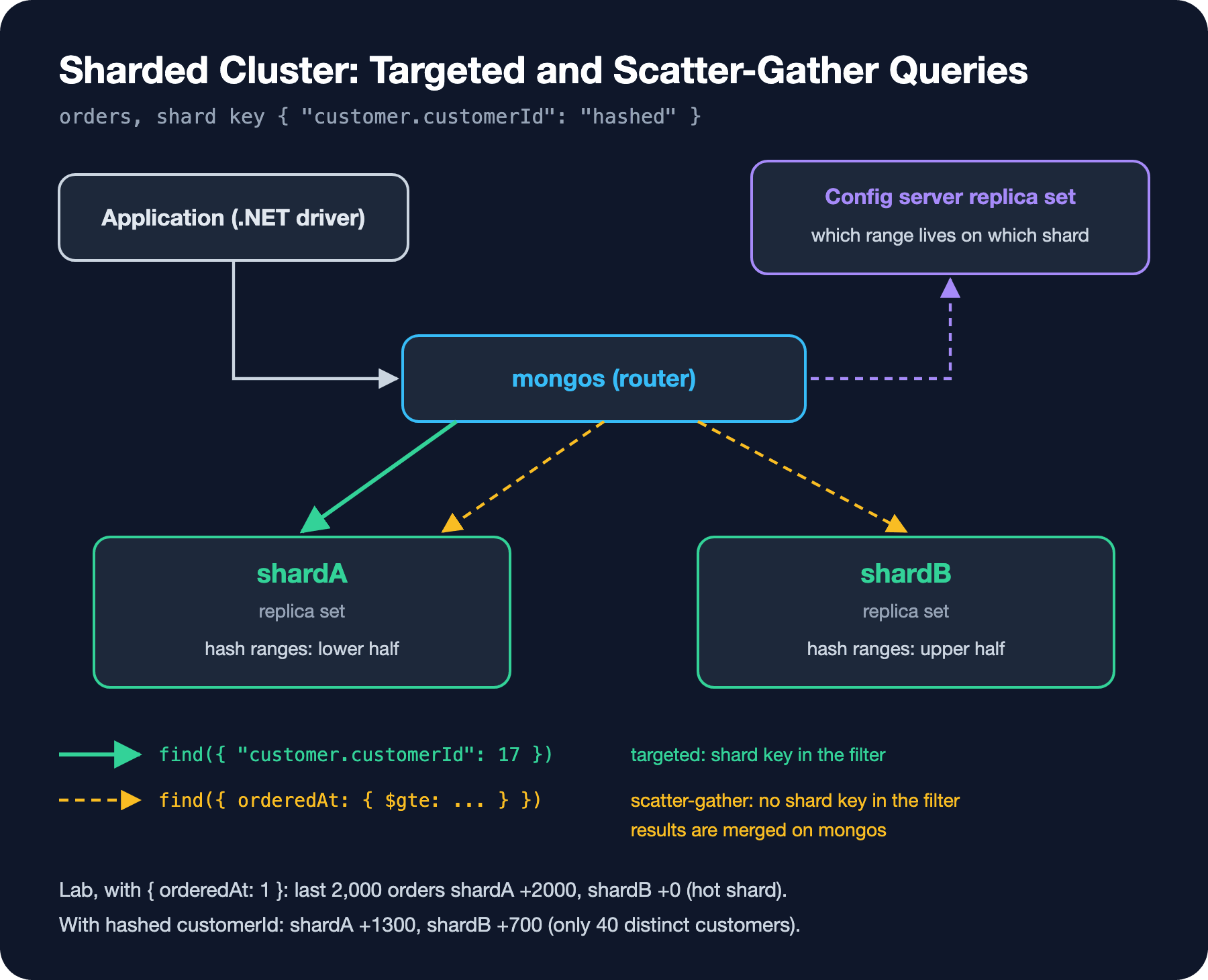
Sharding splits data into ranges by the shard key and puts each range on a shard, that is, a separate replica set. The application connects not to the shards but to mongos; mongos learns from the config server replica set which range lives on which shard and routes the query. In the lab this is one container as well: a config server, two shards (each a single-member replica set) and a mongos, all with a 0.25 GB cache; it runs as the second container on the machine. compose.shard.yaml and 13-shard-init.sh follow the same layout as in post 12; to save memory, stop the three-member lab first:
docker compose -f compose.rs3.yaml down
docker compose -f compose.shard.yaml up -d
docker compose -f compose.shard.yaml exec shard bash /lab/scripts/13-shard-init.sh
docker compose -f compose.shard.yaml exec shard mongosh "mongodb://admin@localhost:27030/?authSource=admin" --quiet /lab/scripts/13-shard-keys.js -p
Choosing a Shard Key and Hot Shards
The documentation judges a shard key by three measures: cardinality (how many distinct values), frequency (how evenly the values are spread) and monotonicity (whether the value keeps increasing). 13-shard-keys.js writes orders into two collections: one with range sharding on { orderedAt: 1 }, the other with hashed sharding on { "customer.customerId": "hashed" }. First 18,000 orders, then it measures which shard the last 2,000 orders went to:
sh.shardCollection("bookstore.orders_by_date", { orderedAt: 1 });
sh.shardCollection("bookstore.orders_by_customer", { "customer.customerId": "hashed" });

// Documents per shard; a migration leaves orphan copies behind for a while, they are not counted
const countsPerShard = name => Object.fromEntries(bookstore[name]
    .aggregate([{ $collStats: { storageStats: {} } }]).toArray()
    .map(s => [s.shard, s.storageStats.count - (s.storageStats.numOrphanDocs ?? 0)]));
orders_by_date: last 2,000 inserts went to shardA +2000, shardB +0 | documents per shard: shardA 13871, shardB 6129
orders_by_customer: last 2,000 inserts went to shardA +1300, shardB +700 | documents per shard: shardA 13000, shardB 7000
orders_by_date last day: SINGLE_SHARD [shardA] customer 17: SHARD_MERGE [shardA, shardB]
orders_by_customer last day: SHARD_MERGE [shardA, shardB] customer 17: SINGLE_SHARD [shardA]With the date key, all of the last 2,000 orders went to shardA. The balancer moves older ranges to shardB in the background (6,129 documents), but because a new order always carries the largest orderedAt value, it always lands in the "last" range, that is, on a single shard: a hot shard. Adding a second shard did not add write capacity. The hashed customerId split the writes across the two shards, but not evenly: 1,300 to 700. The lab has only 40 customers; 40 distinct values do not land evenly across ranges when hashed. In the real Bookstore the number of customers is in the hundreds of thousands and this imbalance disappears; but a low-cardinality key such as "category" or "country" would have the same problem permanently.
The last two lines are the query side. If the filter contains the shard key, mongos sends the query to a single shard (SINGLE_SHARD, targeted); otherwise it sends it to all shards and merges the results (SHARD_MERGE, scatter-gather). The date key targets the "last day" report but spreads the "customer's orders" page across all shards; the hashed customerId does the opposite. The hashed key has one more cost: it cannot target range queries. Because Bookstore's most frequent query is "a customer's orders, newest first" from post 4, my choice is { "customer.customerId": 1, orderedAt: 1 }: the customer query goes to a single shard, the date order within a customer is kept, and new orders are spread across customers. The same logic as the compound index in post 6. With zone sharding you can also pin certain ranges to certain shards (keeping EU customers' data on shards in the EU, for example); I did not run that in the lab.
Resharding: Changing the Key Later
const result = db.adminCommand({ reshardCollection: "bookstore.orders_by_date", key: { "customer.customerId": 1, orderedAt: 1 } });reshardCollection ok: 1 after 333 s
new shard key: {"customer.customerId":1,"orderedAt":1}
shardB 10342 documents
shardA 9658 documentsMoving a 20,000-order collection to the new key took 333 seconds. On 8.0.38 the same operation took 331 seconds; the numbers of the shard key experiment were also exactly the same on both versions. Most of this time is not the data but a rule: the documentation says that a resharding operation always takes at least 5 minutes. The operation is online; reads and writes continue, and only at the end are writes blocked for at most two seconds. The price is disk and load: the new version of the collection is built separately on each shard. If you can, choose the key right from the start; resharding is the way to fix a mistake, not a routine tool.
When Is Sharding Not Needed?
Sharding means a mongos layer, a three-member config server and a separate replica set per shard; three to four times the operational cost. Cheaper steps come first: the right indexes (post 6), shrinking bloated documents and archiving old orders (post 5), growing the primary (vertical scaling) and spreading reads with the rules from post 12. Sharding comes up when the disk, memory or write capacity of a single replica set is really exhausted. The general journey is in the Database Performance and Scaling series being written in this round.
In Production
Test failover, do not assume it. Under load, like the failover command in this post, really kill the primary and look at the application's log: how many requests failed, what did the user see, did the retries repeat the work? Timeout settings and the retry policy are decided by this test.
In a sharded cluster, put the shard key in the filter. A frequent query without the shard key goes to every shard; its cost grows with the number of shards. Watch the balancer too: during a migration, orphan documents stay on the shards for a while; that is why we had to subtract them in the count above.
Common Pitfalls
A monotonic shard key. Range sharding on an ever-increasing field such as an ObjectId _id (post 1: the first four bytes are a time) or orderedAt sends all new writes to a single shard. Either use a hashed key or put the monotonic field behind a high-cardinality field.
Two members in two data centers. If the side holding half of the members goes down, the other side cannot form a majority and cannot elect a primary. The number of members should be odd, and the members should be spread so that losing a single location does not take the majority with it.
A Small Experiment
★☆☆ Set settings.electionTimeoutMillis to 5000 with rs.reconfig and repeat the failover experiment. How much shorter is the gap? What is the risk of lowering this value?
★★☆ Set ServerSelectionTimeout back to the default 30 seconds in the failover command. How do the number of failed writes and the slowest write change in the same kill -9 experiment?
★★★ Add a third collection with the key { "customer.customerId": 1, orderedAt: 1 } to 13-shard-keys.js. Compare the distribution of the last 2,000 writes and whether the two queries are targeted with the other two.
In the next post we move on to protecting these clusters: users and custom roles, TLS, Queryable Encryption, backup with a restore test, and monitoring.